
It's 4:47 on a Tuesday afternoon. The 3:30 pre-ballet class just let out, and twelve parents are streaming through the lobby — three want to ask about recital costume sizing, one needs to update a payment method, and two new families are hovering near the front desk hoping to ask about trial classes. Your front desk person is on the phone with a parent whose auto-pay just failed. Your hip-hop instructor just texted that she can't make Thursday's class. And somewhere in your inbox, there are forty-three unread emails, at least half of which are parents asking questions already answered in the email you sent last week.
This is the reality of running a dance studio — not because you're disorganized, but because the business runs on a calendar that creates three distinct pressure spikes every single year. Fall enrollment (August-September) is a sprint to convert every inquiry before families commit elsewhere. Recital season (roughly January through June depending on your market) compounds everything: costume orders, ticket sales, venue logistics, dress rehearsal scheduling, and a 3-5x surge in parent questions. Summer is the recovery window — and the planning window for doing fall better.
Most "AI for small business" advice ignores that rhythm. The tools recommended here are sequenced around it.
TL;DR — Top 3 Recommendations
- ChatGPT or Claude (free) — Draft every parent email, social caption, and announcement in seconds instead of 20 minutes. Save 4-6 hours/week starting today.
- tawk.to ($0) or My AI Front Desk ($79-$99/mo) — Capture trial-class leads after hours and stop losing families to unanswered calls. Worth $2,000-$5,000/month in recovered enrollment.
- Mailchimp Standard ($20-$50/mo) — Automate trial-class follow-up, re-enrollment campaigns, and missed-class check-ins. Boost retention by 15-25%.
The Dance Studio Calendar Problem
Here's something worth understanding before you look at any software: dance studios aren't a steady-state business. They're a seasonal business masquerading as a monthly subscription.
The table below shows where a typical 200-student studio's revenue actually lands across the year — and, more importantly, where the inquiry and communication volume spikes that drain your admin bandwidth.
| Period | Revenue Share | Inquiry Volume | Primary Admin Pressure |
|---|---|---|---|
| Aug–Sep (Fall Enrollment) | 18–22% of annual | 3–5x baseline | Trial calls, new family onboarding, schedule questions |
| Oct–Dec (Fall Semester) | 28–32% | Baseline | Attendance, billing, costume measurement kickoff |
| Jan–Mar (Recital Build) | 20–24% | 2–3x baseline | Costume deadlines, ticket sales, placement questions |
| Apr–Jun (Recital Season) | 22–26% | 4–6x baseline (peak) | Dress rehearsal logistics, performance schedules, re-enrollment |
| Jun–Jul (Summer) | 8–12% | Below baseline | Summer camp, early fall marketing |
That recital-season spike — 4-6x your normal parent communication volume — is the biggest operational stress the business faces. Studios that have AI handling the routine tier of that communication deal with recital season. Studios that don't handle it manually, usually at the cost of the owner's evenings.
The tools in this guide do the most work during those two peaks. That's the lens through which to evaluate them.
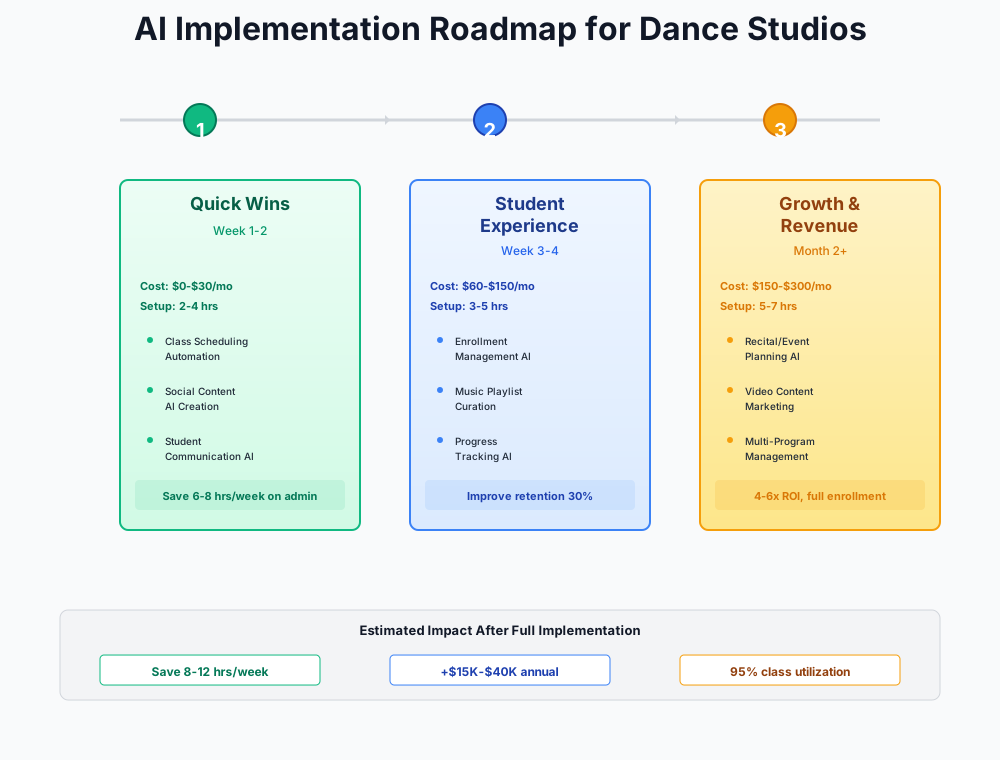
Here's a visual overview of the implementation approach:
Start Here: Free AI Tools You Can Set Up This Week ($0/month)
These three tools cost nothing and deliver immediate time savings. If you can send an email and post on Instagram, you can do this.
Use ChatGPT or Claude to Draft Every Parent Communication
Think about your outgoing parent communications in a typical week: 50-100 emails, texts, and social posts. Each one takes 10-30 minutes of writing and rewriting. That's 8-15 hours of writing every single week between you and your front desk — before anyone opens a class portal or counts attendance. During recital build, that number doubles.
ChatGPT (free tier, GPT-4o) and Claude (free tier) can draft any of these in under 60 seconds. You provide the details, the AI writes a polished message in your studio's tone, you review it, and you send it.
ChatGPT
Best for: Parent emails, social captions, review responses
Free AI writing assistant that drafts parent communications, social media captions, review responses, job postings, and class descriptions. Use it to replace the 15-30 minutes you spend agonizing over every email — especially during costume deadline season when every message you don't write manually is time back in your day.
Set it up in 30 minutes:
- Create a free account at chat.openai.com or claude.ai
- Start with the communication you dread most — for most studios, that's the costume measurement reminder or payment failure notification
- Save your best prompts in a Google Doc so your front desk staff can reuse them
- Build a library of 10-15 prompt templates covering your most common messages
Here are the prompts your studio needs right now:
Write a friendly but firm email to dance studio parents reminding them that recital costume measurements are due by [DATE]. Include: how to submit measurements (come to the studio during office hours or submit via the parent portal), what happens if they miss the deadline (their child's costume may be delayed or require rush fees), and reassure them that staff can help with measuring. Keep it warm, clear, and under 200 words. Sign off as [STUDIO NAME].
Write a series of 3 text messages for a dance studio parent whose monthly tuition payment failed. Message 1 (day 1): friendly notification that payment didn't go through, with a link to update payment info. Message 2 (day 3): gentle reminder with slight urgency. Message 3 (day 7): final notice mentioning that the account will be placed on hold if not resolved. Keep each message under 160 characters, professional but warm, include a [PAYMENT LINK] placeholder.
Write a warm follow-up email to a family who attended a trial [CLASS TYPE] class at our dance studio yesterday. Their child's name is [CHILD NAME] and they're [AGE] years old. Mention something specific about what beginners learn in the first month, reassure the parent that every student starts where their child is, and include a clear call-to-action to register for the [SEMESTER] session. Include our registration link: [LINK]. Keep it under 150 words and make it feel personal, not salesy.
Run this for a month and you've returned 200+ hours annually to yourself — the equivalent of five full work weeks. Most studios feel the difference within the first few days.
Always Review Before Sending
Never send AI-generated text without reading it first. AI occasionally gets dates wrong, makes up policies, or uses phrasing that doesn't match your studio's voice. Use AI to draft; use your brain to approve. This is especially critical for anything involving fees, deadlines, or policies.
Add Free Live Chat to Your Website with tawk.to
Parents browse your website after hours — evenings and weekends — looking for class schedules, pricing, and how to sign up for a trial class. Without a way to get instant answers, many leave and never return. Meanwhile, during the day, your front desk answers the same ten questions over and over by phone and email.
tawk.to
Best for: Budget-conscious studios wanting live chat with no software cost
Completely free live chat platform with unlimited agents and conversations. Add AI Assist for drafted responses to parent FAQs. The $0 price tag makes this a no-brainer for any studio with a website.
Set it up in 45 minutes:
- Create a free account at tawk.to
- Copy the widget code and paste it into your website (Wix, Squarespace, and WordPress all have "add custom code" options — it takes 5 minutes)
- Write canned responses for your top 10 parent FAQs: class schedule, tuition pricing, trial class availability, recital dates, costume info, payment methods, studio address/parking, dress code, age requirements, and registration process
- Set realistic online hours so parents see "We typically reply within 1 hour" instead of a misleading "We're online!" when nobody is available
- Download the tawk.to mobile app so you can respond from your phone during the day
- After 2 weeks, review chat transcripts to find any FAQs you missed and add those as canned responses
Two to three fewer hours fielding repetitive phone calls is a real gain. But the bigger number is the enrollment you stop losing — families who hit your website at 9pm in August and get an instant answer instead of a dead end. Yoga studios and hair salons use the same setup; for dance studios, the timing aligns with when fall enrollment research actually happens.
Batch-Create a Month of Social Media Content
Studios that post consistently on Instagram and Facebook grow 2-3x faster than those that don't. But most owners create content reactively — snapping a random class photo and spending 30 minutes agonizing over a caption. There's no calendar, no strategy, and posting stops the moment you get busy.
The fix: one 2-hour session per month to create and schedule 12-16 posts. Canva's free AI tools generate graphics and captions; Buffer's free plan schedules them across platforms.
Canva
Best for: Social graphics, recital programs, and class flyers with AI design
The design tool you probably already use, now with Magic Write (AI captions), Magic Design (AI layout generation), and direct social scheduling on Pro. Search "dance studio" templates for hundreds of ready-to-customize designs.
Buffer
Best for: Scheduling posts across Instagram, Facebook, and TikTok in one dashboard
Social media scheduler with a built-in AI Assistant that generates captions and content ideas. Free plan covers 3 channels with 10 scheduled posts per channel — enough for most single-studio operations.
Set it up in 2 hours (including your first batch):
- Create free accounts on Canva and Buffer
- In Canva, search "dance studio" templates — customize 12-16 designs with your studio's name, photos, and class details
- Use Canva's Magic Write for captions: "Write 4 Instagram captions for a dance studio announcing fall registration for ballet, hip-hop, and jazz classes for ages 3-18"
- Connect Buffer to your Instagram and Facebook accounts
- Schedule 3-4 posts per week with a content mix: 40% class/student highlights, 30% educational/fun, 20% promotional, 10% behind-the-scenes
- Set a monthly calendar reminder for your next batch session
Create a 4-week social media content calendar for a dance studio. We teach ballet, hip-hop, jazz, and contemporary to ages 3-adult. Plan 4 posts per week (Monday, Wednesday, Friday, Saturday). For each post, provide: platform (Instagram/Facebook/both), content type (photo, Reel, carousel, story), topic, and a caption under 150 characters plus 5-8 relevant hashtags. Mix promotional posts (enrollment, events) with engagement posts (dance tips, student spotlights, fun facts, behind-the-scenes). Include at least 2 video/Reel ideas per week.
Compared to daily reactive posting, you'll save 2-4 hours weekly. The compound payoff: studios posting consistently 3-4x per week tend to run higher trial inquiry volume through enrollment season — when the algorithm is working for you, you're not starting cold in August.
ROI Snapshot
Monthly Cost
$0/mo
Time Saved
9hrs/week
Monthly Value
$3,400
ROI
Infinity%
Front Desk Automation: Capture Enrollment Season Leads ($65-$250/month)
The free tools above save you time on tasks you're already doing. The next layer plugs the two biggest revenue leaks: unanswered calls from prospective families and the enrollment follow-up that nobody has bandwidth to do when class is in session.
An AI Receptionist That Works Enrollment Season
August is when this pays for itself. Call volume to dance studios spikes 3-5x during fall enrollment, and a front desk managing actual families in the lobby physically cannot answer every phone call. The families who get voicemail and don't leave a message — the majority — move on to the next studio on their list.
How many do you actually lose? Studios that track this carefully put the number at 30-50% of calls during peak weeks. At an average annual tuition of $900-$1,500 per enrolled student, each family that slips away during a two-week enrollment window is real money.
My AI Front Desk is an AI receptionist trained on your studio's specific class schedule, pricing, and policies. It answers phone calls, texts, and web chats 24/7 in a natural conversational voice — booking trial classes, capturing contact info, and transferring to a human only when needed.
My AI Front Desk
Best for: Studios losing leads to unanswered calls, especially during enrollment season
AI receptionist that answers calls in a natural voice, trained on your studio's specific schedule, pricing, and FAQs. Books trial classes and captures lead info 24/7. Free trial includes 20 voice minutes to test. Also used by barbershops and martial arts schools — the call-volume spike during busy periods is a common thread.
Set it up in 2 hours:
- Sign up for My AI Front Desk's free trial (20 voice minutes)
- Prepare a comprehensive document: complete class schedule with days/times/ages, tuition pricing, trial class policy, studio address and parking, recital dates, costume timeline, and your top 20 parent FAQs
- Upload the information during setup — the AI trains on your specific studio data
- Set it as your after-hours phone forwarding number (contact your phone provider for conditional forwarding)
- Test it yourself: call the number, ask common parent questions, verify accuracy
- During enrollment season, consider forwarding ALL calls during class hours, with the AI transferring complex issues to your staff
- Review weekly call summaries and update the knowledge base for any questions the AI struggled with
If the $79-$99/month feels like a stretch before you've seen the call volume, start with Tidio with Lyro AI — no phone answering, but the AI chatbot resolves up to 70% of parent questions on your website automatically.
Tidio
Best for: AI chat widget that auto-answers parent questions on your website
AI chatbot (Lyro) that handles FAQs about schedules, pricing, class availability, and recital dates. Collects trial class bookings and parent contact info automatically. A strong middle-ground between free tawk.to and the full AI phone receptionist. Check Tidio's website for current plan pricing — the Lyro AI feature is billed separately from the base plan.
For most studios, the AI receptionist pays for itself with a single recovered enrollment during August alone. The steady-state value — covering evenings and weekends year-round — is what makes it a permanent part of the budget rather than a seasonal tool.
ROI Snapshot
Monthly Cost
$99/mo
Time Saved
4hrs/week
Monthly Value
$3,900
ROI
3839%
Automated Email Sequences That Run the Entire Enrollment Cycle
A family attends a trial class. They had a great time. But nobody follows up within 48 hours — because your front desk was dealing with costume orders and a billing dispute. By day five, the family has moved on.
This scenario plays out dozens of times per enrollment season. The families who don't get a timely follow-up aren't choosing a competitor over you — they're just not choosing at all because you didn't make it easy. Mailchimp's AI-powered automation fixes this by running the follow-up sequence automatically the moment a trial is logged.
Three sequences worth building:
- Trial-class-to-enrollment nurture (4 emails over 7 days)
- Spring re-enrollment campaign (3 emails in March/April, timed to the pre-recital parent mindset)
- Missed-class engagement check-in (triggered when a student misses 2+ consecutive classes)
The same behavioral-trigger logic — flag inactivity, send a personal win-back message before the cancellation — is what drives churn prevention at a gym or fitness studio, just with membership dues instead of tuition on the line.
Mailchimp
Best for: Automated email sequences for trial follow-up, re-enrollment, and retention
The most widely-used email marketing platform, now with AI email writing and send time optimization. Integrates directly with Jackrabbit Dance and The Studio Director. Studios using automated re-enrollment sequences report 15-25% higher re-registration rates. Important: multi-step automation workflows require the Standard plan ($20/month for up to 500 contacts) — the Essentials plan does not include them.
Set it up in 2-3 hours:
- Upgrade to Mailchimp Standard ($20/month for up to 500 contacts) — multi-step automations require Standard, not Essentials
- Import or sync your parent email list from Jackrabbit Dance, The Studio Director, or your registration forms
- Build Automation 1 — Trial Class Follow-Up: Day 0 (welcome), Day 1 (thank you + enrollment link), Day 3 (address common hesitations + testimonials), Day 7 (limited-time reminder)
- Build Automation 2 — Spring Re-Enrollment: Schedule for March/April with early-bird priority for current families
- Build Automation 3 — Retention Check-In: Tag families when a student misses 2+ consecutive classes, trigger "We miss [student name]!" email with makeup class options
- Use Mailchimp's AI email writer to draft all copy — provide the key message, let AI generate the warm version
- Enable Send Time Optimization so each email arrives when that specific parent is most likely to open it
Write a 4-email nurture sequence for a dance studio. The audience is parents whose child just attended a trial class. Email 1 (send day 0, same day): Welcome and what to expect in their first month. Email 2 (day 1): Thank you for visiting, include a direct registration link, mention this semester's schedule. Email 3 (day 3): Address common parent hesitations (commitment level, cost, whether their child is "good enough"), include 2 short parent testimonials. Email 4 (day 7): Friendly final reminder with a limited-time waived registration fee. Each email should be under 150 words, warm and encouraging, never pushy. Sign off as [STUDIO NAME].
Build these once and they run every enrollment cycle without any additional effort. The recovered revenue from families who had a great trial but never got a timely follow-up runs $1,500-$4,000/month for most studios once the sequences are live.
Social Content at Recital Scale
Your free Canva and Buffer setup is working — the upgrade question is whether the content volume during recital season overwhelms a free plan. Canva Pro ($15/month) removes the credit cap on AI features. Buffer Essentials ($15/month for 3 channels billed annually) adds analytics that reveal which posts actually drive trial class bookings versus which ones just collect likes.
Consider adding HeyGen for AI announcement videos — instructor introductions and summer camp promos that don't require a production crew. HeyGen's free tier produces only 3 videos/month and adds a watermark, which looks unprofessional for parent-facing content; the Creator plan ($29/month) removes watermarks and allows unlimited video creation. Use AI for talking-head announcements only — real footage for actual dance highlights, always.
Most studios pick up another 1-2 hours weekly beyond the free tier. The analytics are the real reason to upgrade: knowing which content actually moves people to book a trial is different from knowing which content gets the most hearts.
ROI Snapshot
Monthly Cost
$130/mo
Time Saved
6hrs/week
Monthly Value
$4,600
ROI
3438%
Advanced: Studio Intelligence and Seasonal Planning ($200-$600/month)
With the previous tools running, you've already reclaimed 10-15 hours per week and improved lead capture significantly. This layer tackles the structural challenges: predicting which students are about to leave, automating payroll compliance for your mixed workforce, and forecasting the summer cash-flow gap before it becomes a crisis.
Retention Tracking That Catches Problems Before Recital Season
Here's the attrition pattern that catches most studio owners off guard: families don't quit after the recital. They quit during it — or more accurately, they make the mental decision during recital season when communication is stressful and logistics feel chaotic, then formally cancel in July. By the time summer re-enrollment opens, they've already moved on.
The warning signs — declining attendance, missed payments, class downgrades — are in your studio management data. Nobody has time to monitor 200 student records for subtle patterns. That's what the AI does.
WellnessLiving
Best for: Mid-sized studios (100-300 students) wanting AI retention tools built into management software
Full studio management platform with predictive churn detection, AI chatbot, automated re-engagement campaigns, and smart scheduling. Positions itself as a lower-cost Mindbody alternative with AI-driven retention tools baked in.
A few things worth knowing before you migrate:
- Migrate platforms during summer (June-August) when enrollment is lower. Never during recital season — that's inviting catastrophe.
- Set retention alert thresholds at 2+ consecutive missed classes, 1+ payment failure in 30 days, and any class downgrade
- When the AI flags at-risk families, front desk follows up with a personal phone call within 48 hours — not an automated email
- 90-day goal: reduce annual attrition by 5 percentage points. For a 200-student studio at $1,200 average annual tuition, that's $12,000 in retained revenue
Not ready to switch platforms? Build a manual at-risk checklist in a spreadsheet and review it weekly. Use ChatGPT to draft the outreach scripts. This gets you 60% of the value at zero cost — and it's worth starting with the manual version so you know what the AI is surfacing when you eventually automate it.
Payroll Compliance for a Mixed Instructor Workforce
Dance studios face a payroll situation that most businesses don't: a mix of W-2 employees (front desk, full-time instructors) and 1099 contractors (part-time instructors, guest choreographers, substitutes). The IRS and state labor boards are increasingly scrutinizing dance instructor classification, and a misclassification penalty runs $5,000-$25,000+. At least 17 states also have specific dance studio acts regulating contracts and refund policies.
Gusto
Best for: Studios with 3+ instructors (any employee/contractor mix) needing payroll compliance
Payroll, HR, and benefits platform with Gus AI assistant that helps with employee vs. contractor classification decisions, automates tax filings, and flags compliance issues. Studios with only 1099 instructors can use the contractor-only plan ($35/month + $6/contractor/month) — no employees required to sign up.
Critical steps:
- Inventory your workforce: list every instructor, their classification, hours, and pay rate
- Use Gus AI to review each classification — the AI asks questions about control, schedule, and equipment to flag potential misclassification risks
- If Gus flags risks, consult a local employment attorney ($300-$500 for a review) before making changes — this is the one area where professional advice is worth every penny
- Set up direct deposit for all employees and contractors
- Connect Gusto to QuickBooks Online so payroll syncs automatically
- Enable automatic W-2 and 1099 filing — Gusto handles this every January
Payroll processing drops by 2-3 hours weekly. The compliance catch is harder to put on a ledger, but $5,000-$25,000 per misclassification issue is real money — and Gusto's questions surface the risk before it becomes a problem.
Cash Flow Forecasting for the Summer Gap
Dance studio revenue swings 30-50% between peak enrollment (September) and summer. Rent and core payroll don't swing at all. Most owners discover cash flow problems when the bank account runs low — by then, the options are stressful and limited.
QuickBooks Online
Best for: AI-powered bookkeeping, cash flow forecasting, and seasonal revenue planning
The standard small business accounting platform, now with Intuit AI that auto-categorizes transactions, forecasts cash flow 30-60-90 days out based on seasonal patterns, and flags tax deductions. Integrates directly with Jackrabbit Dance and The Studio Director.
Set it up in 3-4 hours:
- Connect your business bank account and credit card — QuickBooks imports and AI-categorizes transactions automatically
- Set up integration with your studio management software (Jackrabbit, The Studio Director, or WellnessLiving all have QuickBooks connectors)
- Let AI categorize 2-3 months of history, reviewing and correcting miscategorizations to train it
- Enable cash flow forecasting in Reports — the AI models inflows and outflows based on your seasonal patterns
- Set a weekly 15-minute financial check-in to review the forecast
Two to three hours back weekly on bookkeeping. More importantly, you stop flying blind heading into summer — when the gap between September's revenue high and June's low hits, you'll have 90 days of warning instead of a Friday afternoon surprise.
ROI Snapshot
Monthly Cost
$400/mo
Time Saved
7hrs/week
Monthly Value
$5,700
ROI
1325%
What Actually Goes Wrong (and How to Avoid It)
Don't switch your studio management platform during recital or enrollment season. Migrating from Jackrabbit or The Studio Director affects billing, enrollment, attendance, and parent communication simultaneously. Summer (June-August) is the only window where a migration is survivable. Make this a hard rule.
Don't invest in AI choreography or movement analysis tools yet. They're interesting technology in early beta — not production-ready for real studios. Your choreographic expertise isn't something a movement tracker replaces. Check back in 12-18 months.
Never auto-send any communication you haven't reviewed. AI makes mistakes — wrong dates, fabricated policies, awkward phrasing. In a relationship-driven business where one poorly worded email about costume fees generates thirty angry parent replies, a human needs to review before hitting send. The one exception: pre-written canned FAQ responses you've already approved.
If you're running under 100 active students, reputation management platforms like Birdeye aren't the right fit yet. You can replicate 80% of the value for free: use ChatGPT to draft review request messages after recitals, respond to every review personally (ChatGPT drafts the response), and monitor your Google Business Profile weekly.
Don't use AI-generated video avatars for dance content. HeyGen works well for announcement videos and talking-head content. Parents want to see real students doing real dancing in real classes. An AI avatar attempting a pirouette will damage your brand.
Your First-Week Checklist
- Create a free ChatGPT or Claude account and draft your first parent email using the prompts above
- Save your 3 most common email types as prompt templates in a shared Google Doc
- Install the tawk.to chat widget on your website and write canned responses for your top 10 FAQs
- Download the tawk.to mobile app so you can respond to chats during the day
- Create free Canva and Buffer accounts and batch-schedule your first 2 weeks of social media posts
- Track your admin hours this week (use a notepad or Toggl free) to establish a baseline
- After 2 weeks with free tools running: evaluate whether My AI Front Desk ($99/mo) makes sense based on missed call volume
- After 1 month: set up Mailchimp Standard and build your trial-class follow-up automation
- After 2 months: review retention data and decide whether a WellnessLiving migration is worth exploring for summer
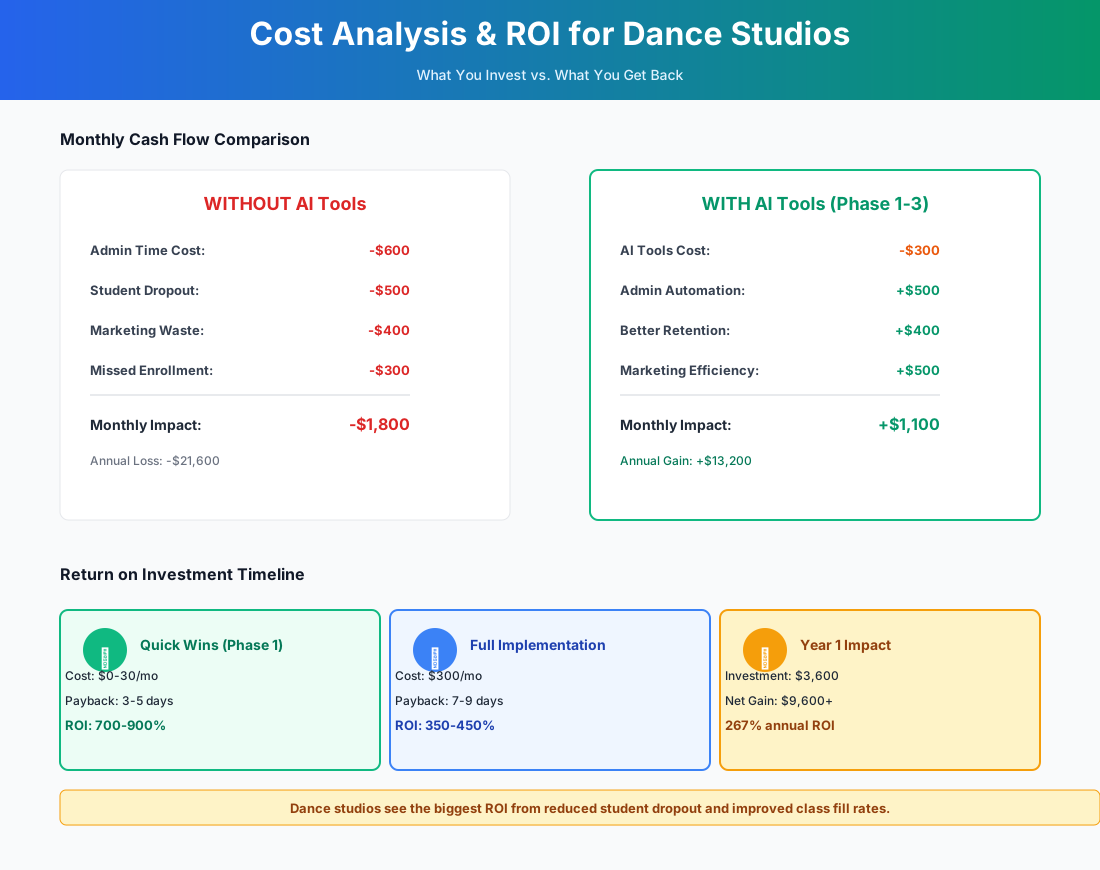
Here's a breakdown of the costs and expected returns:
Frequently Asked Questions
Can an AI chatbot actually handle the nuance of class placement questions?
For straightforward inquiries — age ranges, class schedule, pricing, dress code — yes, easily, after you've loaded your studio's information. Placement is different. A parent asking whether their 9-year-old with "two years of experience at another studio" belongs in Ballet 2 or Ballet 3 requires an instructor's eye. Configure your chatbot to capture these leads and schedule a placement assessment rather than attempting to answer directly. The win is still significant: the AI handles the 80% of questions that are routine, freeing your staff for the 20% that require judgment.
How do I stop AI-drafted emails from sounding generic when my studio has a very specific community voice?
Start every session with a voice brief: paste in 3-5 emails you've written that felt right, and tell the AI "This is how we communicate — match this voice in everything you write for us." Save that brief as the first line of every prompt template. It works far better than just saying "be friendly," and takes about two minutes to set up. The AI will pick up your warmth, your phrasing, even whether you tend to use exclamation points.
Does music licensing cover recital performances at rented venues, or just in-studio use?
SoundMachine's $26.95/month plan covers music played inside your studio space — classes, lobby, and waiting areas. Recital performances at a rented theater are a separate licensing situation. Most theater venues carry their own blanket ASCAP/BMI licenses that cover performances, but confirm this in writing with the venue before the event. For competition routines and recital music specifically, many studios purchase individual track licenses through royalty-free music libraries or work with a music editor who handles licensing.
What happens to enrollment data if I try WellnessLiving and want to go back?
Both WellnessLiving and your current platform (Jackrabbit or The Studio Director) support CSV export — student info, billing history, attendance records. Export your current data as a backup before any migration. Then run both systems in parallel for 2-4 weeks during summer before cutting over. The real risk isn't data loss — it's disruption to families' auto-pay and portal access during the transition, which is why the June-August migration window is non-negotiable.
My instructors are independent contractors — will Gusto flag them and create problems?
Gusto's Gus AI flags potential misclassification risks; it doesn't reclassify anyone on its own. It asks questions about how much control you exercise over schedule, teaching methods, and equipment, then tells you whether the arrangement looks defensible. If something gets flagged, that's useful early warning — better to learn from Gusto than from an IRS audit. The key factors for defensible contractor status: do they set their own schedule? Use their own choreography? Work for other studios? If yes to all three, the classification is usually solid. If you set their hours, dictate curriculum, and they teach exclusively at your studio — that's likely an employee relationship. Either way, an employment attorney review ($300-$500) is worth it before making any changes.
Can AI help manage the complexity of recital-season communication — costume deadlines, ticket sales, dress rehearsal logistics?
This is actually where AI writing tools earn their keep most clearly. ChatGPT and Claude can turn a bullet list of logistics into a polished parent communication in under a minute. Build a "recital season prompt library" in a shared doc in October: one prompt each for the initial recital announcement, costume measurement deadline, ticket sales opening, dress rehearsal schedule, performance day logistics, and post-recital thank you. Run through that sequence every year in under an hour. The content is yours; the drafting labor disappears.
The tools in this guide can realistically eliminate 15-25 hours of weekly admin work from your studio's operations, improve trial-class conversion by 15-25%, and reduce annual student attrition by 5-10 percentage points. For a 200-student studio, that translates to $25,000-$100,000 in annual impact against $200-$800/month in tool costs.
Open ChatGPT right now, paste in the costume measurement prompt above, and see for yourself how fast it works. That first 30-second draft will tell you more than any article can.
If you also run workshops or intensives beyond the regular semester, our music school guide covers event-based enrollment workflows in more detail.
More AI Implementation Guides
AI Tools for Music Schools: The 2026 Studio Guide
Discover the best AI tools for music schools in 2026 — a step-by-step plan to cut admin hours, capture more enrollment leads, and stop summer attrition.
AI Tools for Breweries: The 2026 Owner's Playbook
The best AI tools for breweries in 2026: cut TTB compliance time, tighten COGS, streamline taproom scheduling, and target release marketing — starting free.
AI Tools for Bookkeeping Services: 2026 Guide
Best AI tools for bookkeeping services in 2026: Automate categorization, reconciliation, and document chasing without hiring extra staff.
AI Tools for Marketing Agencies: 2026 Playbook
The best AI tools for marketing agencies in 2026. A phased plan to kill Hell Week reporting, scale content, and fix billable utilization without new hires.
AI Tools for Home Health Care Agencies: 2026 Guide
A practical 2026 guide to AI tools for home health care agencies — HIPAA-safe automation for shift-filling, OASIS-E documentation, EVV, and claim denials.
AI Tools for Dermatology Practices: 2026 Guide
The best AI tools for dermatology practices in 2026 — cut prior-auth hours, reduce no-shows, and grow your cosmetic line, with a HIPAA-first rollout plan.
Keep exploring
Browse the full library by industry or category, see every product we cover in the AI tools directory, or read the head-to-head comparisons.