
HVAC is a demand-capture game more than anything else. When the heat breaks in July or the furnace dies in January, homeowners call three companies and hire whoever picks up first. Not whoever has the best trucks, the nicest logo, or the most Yelp badges. Whoever answers.
That sounds simple. It's actually the thing most shops fail at — not because they don't care, but because the calls spike exactly when the whole crew is already maxed out. A single heat wave can push inbound call volume up 300-400% in 72 hours. You can't hire CSRs fast enough to cover it. You can set up an AI that never goes on break.
That's the spine of this guide: how to capture and dispatch the surge, then build the systems that turn one-time emergency calls into long-term customers. A 2026 ServiceTitan survey found 57% of AI-using contractors say it has directly helped them grow their business. The gap between that 57% and the rest isn't budget — it's knowing where to start.
Specific tools, real pricing, copy-paste prompts. No filler.
TL;DR — Top 3 Recommendations
- Start with ChatGPT/Claude (free) — Draft proposals, review responses, and social posts in minutes instead of hours
- Add AI phone answering with Dialzara ($29/mo) — Capture the calls you're currently missing during surge periods and after hours
- Automate review requests with NiceJob ($75/mo) — Go from 2-5 new Google reviews/month to 10-20+ without your techs asking awkwardly
Where HVAC Money Actually Disappears
The businesses that benefit most from AI aren't the ones drowning in problems — they're the ones that can name the specific leak. Here's what the data shows for a typical 5-10 tech residential shop.
| Season | Inbound Call Volume vs. Baseline | After-Hours Call Share | Average Job Value |
|---|---|---|---|
| Summer peak (June–Aug) | +280–400% | 38–45% | $420–$650 (cooling repair) |
| Winter peak (Dec–Feb) | +200–300% | 41–49% | $380–$600 (heating repair) |
| Shoulder (Mar–May, Sep–Nov) | Baseline | 22–28% | $290–$450 |
That after-hours call share is the number most owners haven't looked at closely. Nearly half of surge-period calls come in when the office is closed or the phone is already tied up. An answering machine captures maybe 40% of those. An AI that books appointments and transfers emergencies captures north of 85%.
The other gaps are more familiar but worth naming precisely:
- Unsold estimates: the average shop closes 40-60% of repair estimates and 25-40% of replacements. Most never follow up past the initial visit.
- Manual load calculations still take 30-60 minutes with traditional software — long enough for a competitor to send a same-day proposal while you're still in Wrightsoft.
- Diagnostic callbacks run 8-15% of service calls. Each one costs $150-$300 in labor before you collect a dollar.
- Admin overhead: 20-30 hours a week in scheduling, writing, invoicing, and phone tag for the average owner-operator.
None of these require reinventing the business. They require plugging specific holes with tools built for the trades.
Here's a visual overview of the implementation phases:
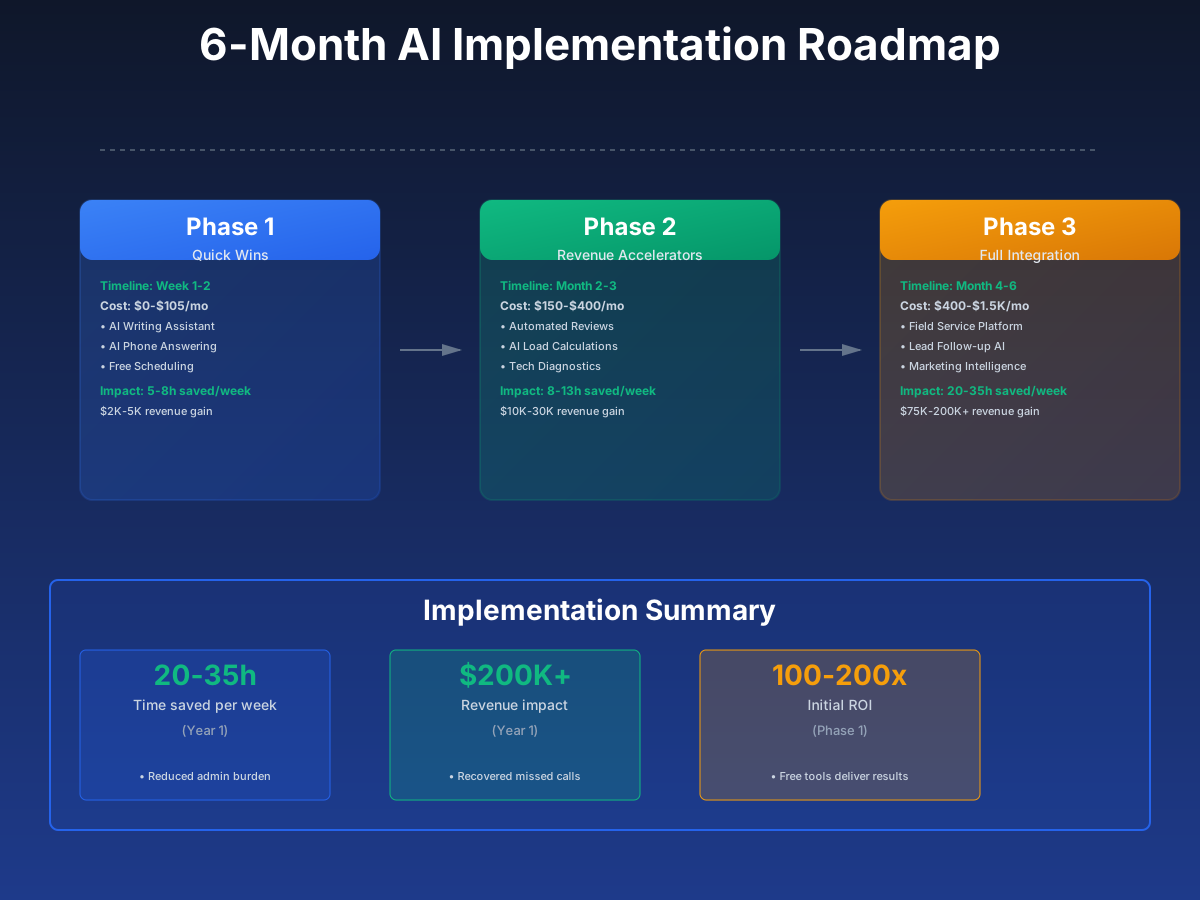
Stage 1: Capture the Surge — Free to $105/Month (Week 1-2)
These are the tools you can set up this week without technical skills or IT help. The priority here is answering every call and getting your written communication out of the chaos.
Stop Losing 5-8 Hours a Week to Writing
Go to chat.openai.com. Create a free account. In the next 10 minutes, you can draft a professional equipment replacement proposal, respond to three Google reviews, and outline a month of social posts.
Most HVAC owners either skip the writing entirely or rush it at 9 PM after a twelve-hour day. Proposals go out vague. Review responses get copy-pasted. Social media goes dark from November until they remember in March. It's not a work-ethic problem — writing is a different skill from running an HVAC company, and squeezing it in after field work shows.
ChatGPT
Best for: All HVAC business writing — proposals, reviews, social media, job postings
Free tier handles everything a small HVAC company needs. Create an account in 2 minutes and start using the HVAC-specific prompts below. Upgrade to Plus ($20/mo) only if you hit usage limits.
The three prompts below cover the highest-value writing tasks in an HVAC shop. Use them as-is, then customize with your company details:
Write a professional proposal letter to a homeowner explaining why we recommend replacing their [AGE]-year-old [EQUIPMENT TYPE] rather than repairing it again. The current repair would cost $[REPAIR COST] and the new system costs $[REPLACEMENT COST]. Include: efficiency gains (compare old SEER rating to new), reliability benefits, our financing options through [FINANCING PARTNER], and a clear recommendation. Keep it under 400 words, avoid technical jargon, and make the homeowner feel confident they're making a smart investment — not being upsold.
Write a professional response to this Google review for [COMPANY NAME], an HVAC company: "[PASTE REVIEW HERE]". If it's positive, thank them by name, mention a specific detail from their review, reference the technician if named, and invite them to recommend us to neighbors. If it's negative, acknowledge the issue without being defensive, apologize sincerely, and invite them to call us directly at [PHONE] so we can make it right. Keep the response under 100 words — short responses feel more genuine.
Write 8 social media posts for [COMPANY NAME], an HVAC company in [CITY, STATE], to use during [SEASON — e.g., "the lead-up to summer cooling season"]. Mix of: 3 educational tips for homeowners (filter changes, thermostat settings, signs your AC needs service), 2 promotional posts (tune-up specials, maintenance agreement benefits), 2 behind-the-scenes posts (day in the life of a tech, truck restock, training), and 1 community post (local event, charity work, team spotlight). Include a call to action on each. Tone: knowledgeable but approachable, like a neighbor who happens to be an HVAC expert.
Used consistently, this saves most office managers 5-8 hours a week. Proposals that go out same-day — instead of "I'll send that Thursday" — close at measurably higher rates. Even one additional replacement close a month pays for a lot of ChatGPT Plus subscriptions.
Don't Skip the Review Step
Always read AI-generated text before sending. Add your company-specific details — your financing terms, your warranty info, the customer's name. Generic AI output is a starting point, not a finished product.
AI Phone Answering — The Surge-Season Priority
Here's what actually happens during a heat wave. Day one: manageable. Day two: every line is ringing, your CSR is on hold with a supplier, and three calls roll to voicemail. Day three: same thing, but now it's 7 PM and the homeowner who called after hours either left a message or — more likely — called the next shop on Google and got booked.
That's not a staffing failure. It's a physics problem: you cannot hire a part-time CSR for a 72-hour surge and then let them go. But you can have an AI receptionist that scales instantly, answers simultaneous calls, and books the appointment before the homeowner decides to try someone else.
For $29 a month, you get 24/7 coverage that handles HVAC-specific questions, books real appointments, and routes anything urgent — no heat, gas smell, flooding — directly to your on-call cell.
Dialzara
Best for: Solo operators and small HVAC teams missing after-hours and overflow calls
Answers unlimited simultaneous calls 24/7. Handles HVAC-specific FAQs (service areas, pricing, availability), books appointments, and transfers emergency calls (no heat, gas smell) to your on-call number. No setup fees, no contracts.
My AI Front Desk
Best for: HVAC companies wanting FSM scheduling integration and multilingual support
Integrates directly with ServiceTitan, Housecall Pro, and Jobber for real-time appointment booking. Multilingual support is a standout feature if you serve diverse communities. Higher tiers include workflow automation. Also used by barbershops and hair salons — the HVAC-specific scripts for emergency dispatching are what differentiate it here.
Getting Dialzara live (takes about 45 minutes):
- Sign up at $29/month — live within 24 hours
- Enter your company info: service area, hours, emergency number, services offered
- Configure emergency transfer rules: calls mentioning "no heat," "gas smell," or "flooding" go straight to your on-call cell
- Set up call forwarding from your business line for after-hours (or all calls if you're a solo operator)
- Call your own number after hours — go through the full customer experience yourself
- Check call summaries daily for the first two weeks, then weekly
ROI Snapshot
Monthly Cost
$29/mo
Time Saved
4hrs/week
Monthly Value
$5,800
ROI
19900%
Ten recovered calls a month at a $300 average job value is $3,000 in revenue from a $29 tool. During a surge week, ten calls is a conservative two-day total.
Free Staff Scheduling with Homebase
The group-text scheduling system works fine at two techs. Add a third, layer in seasonal overtime rules, and throw in a sick call during a heat wave — it stops working. Not catastrophically; just slowly, in $200 overtime chunks and "wait, who's on call tonight?" at 6 PM.
Homebase is genuinely free for the base plan. Not a trial, not a freemium tease. Scheduling, time tracking, and job posting for one location at no cost. The AI-assisted scheduling accounts for availability and overtime rules automatically.
Homebase
Best for: HVAC companies with 2+ staff wanting to ditch paper and text-based scheduling
Free plan includes scheduling, time tracking, and hiring for one location. AI-assisted schedule building accounts for staff availability and overtime rules. Automated shift reminders reduce no-shows. The free job posting feature publishes to Indeed, ZipRecruiter, and Google Jobs simultaneously. Also popular with landscaping companies and cleaning services in the trades.
Most owners get 3-5 hours a week back just from cutting the scheduling back-and-forth. The bigger win during surge season is coverage clarity — no more eating $500 in overtime from a shift confusion that a shared schedule would have caught.
Stage 1 Total Investment
Monthly cost: $0-$105 (ChatGPT free + Dialzara $29-$60 + Homebase free) Setup time: 3-5 hours total Expected return: $5,500-$14,000/month in recovered revenue and time savings
Stage 2: Convert What You Capture — $150-$400/Month (Month 2-3)
Stage 1 is about not losing business you should have won. Stage 2 is about converting it — getting reviews, sending proposals same-day, and reducing the callbacks that erode profit margin.
Automated Review Generation with NiceJob
Your tech isn't going to ask for a review at the end of a service call. Not because he doesn't care — he's got his hands full packing up, the customer is still processing a $6,000 conversation, and asking for a favor in that moment feels off. So it doesn't happen.
NiceJob handles it automatically: a text two hours after the job closes, a follow-up at two days, a final at five. Timed right, when the relief of a working system is still fresh. You get 3-4x more reviews per month without changing a single thing about how your techs operate.
If you're at 40-50 Google reviews while your top competitor has 400, you're invisible in the Maps 3-pack — which is where 46% of local searches land. Review velocity matters as much as total count. Google notices acceleration.
NiceJob
Best for: HVAC companies wanting to dominate local Google Maps rankings through review volume
Connects to ServiceTitan, Housecall Pro, Jobber, and others. Sends review request sequences: first ask 2 hours post-job, nudge at 2 days, final at 5 days. Smart escalation handles non-responders. Customers report 3-4x more reviews per month. Also drives results for pest control companies, painting companies, and car detailing businesses.
Four steps to get it running:
- Sign up at $75/month and connect to your FSM
- Configure the sequence: first ask 2 hours post-job, nudge at 2 days, final at 5 days
- Use the ChatGPT review response prompt from Stage 1 to reply to every new review within 24 hours
- Track review count weekly — expect 3-4x improvement within 30 days
ROI Snapshot
Monthly Cost
$75/mo
Time Saved
2hrs/week
Monthly Value
$5,400
ROI
7100%
Most shops see $3,000-$10,000 a month in new inbound revenue from improved Maps ranking. At $75, it's the most straightforward ROI calculation in this guide.
AI-Powered Manual J Load Calculations with AutoHVAC
Open AutoHVAC on your phone at the job site. Photograph the blueprint. In about 60 seconds, you have an ACCA-compliant Manual J, S, and D report you can hand to the homeowner on the spot — or email before you've driven off their street.
Compare that to the standard workflow: dimensions scribbled on a notepad, back at the office, Wrightsoft open, 40 minutes of entry, proposal emailed Thursday. By then the homeowner has already gotten two same-day proposals from competitors who didn't need Thursday.
The speed difference closes deals. An ACCA-compliant load calculation in the proposal also justifies your price to homeowners who are comparing you against someone who eyeballed the equipment size. It shows your work.
AutoHVAC
Best for: HVAC replacement and new install contractors who want 60-second load calculations instead of 30+ minutes
Upload a blueprint PDF from any device — phone, tablet, or laptop on the job site. AI extracts room dimensions automatically. Outputs ACCA-compliant Manual J calculations with 99%+ accuracy. No training required. Eliminates the $1,500+ training investment of traditional software.
Getting it into your workflow:
- Sign up at $79/month — no setup fees, no contracts
- Run it on a recent job where you already know the answer — verify the output
- Train your lead installer: photograph the blueprint on-site, upload, done in 60 seconds
- Include the load calc report in every replacement proposal
- For new construction, quote builders same-day instead of 2-3 day turnarounds
ROI Snapshot
Monthly Cost
$79/mo
Time Saved
4hrs/week
Monthly Value
$8,800
ROI
11039%
Shops running 5-10 replacement estimates a week save 3-5 hours on the calculation side alone. The bigger return is the $5,000-$15,000/month in closed deals from same-day proposals and correctly-sized equipment that doesn't generate callbacks.
AI Diagnostic Support with Bluon MasterMechanic
Your senior tech gets a call at 2 PM. Junior is on a job, the system is running but not cooling, and he can't figure out whether it's the TXV or a refrigerant charge issue. Your senior walks him through it over the phone — 20 minutes gone, attention pulled off the job he's on. This happens three, four times a week during summer.
Bluon MasterMechanic is trained on 135,000 real HVAC troubleshooting calls, quality-controlled by veterans with 35+ years of field experience. Your junior tech scans a nameplate or types a model number, describes the symptoms, and gets step-by-step guidance with OEM part numbers and specs across 20M+ models from 200+ brands. Bilingual English/Spanish. It covers the failure modes your techs actually encounter — capacitor failures on Carrier units, TXV issues on Trane systems, control board diagnostics on Lennox equipment.
Bluon AI MasterMechanic
Best for: HVAC companies with junior techs who need field support, or any shop wanting to reduce diagnostic callbacks
Natively built into Housecall Pro at no extra charge. Available as a plugin for ServiceTitan and BuildOps. Techs scan a nameplate or type a model number to pull specs, OEM parts, and AI-driven troubleshooting guidance. Bilingual English/Spanish. Trained on 135,000+ real tech support calls quality-controlled by 35+ year veterans.
Getting the team using it:
- If you're on Housecall Pro, enable Bluon in your settings — it's already included at no extra charge
- For ServiceTitan or other FSMs, contact Bluon for plugin integration
- Run a 15-minute team demo: scan a nameplate, ask a troubleshooting question, walk through the step-by-step guidance
- Set the expectation: every tech uses it for the first two weeks, including the experienced ones
- Track callback rates monthly — most shops see measurable improvement within 60 days
The senior-tech phone time alone is worth it. Most shops get 3-5 hours a week back for their top tech and avoid $2,000-$5,000 a month in callback costs.
Create a troubleshooting decision tree for residential split system AC units that are running but not cooling. Start with the most common causes and work toward less common ones. For each step, include: what to check, what the reading should be, what an abnormal reading means, and what to do next. Cover: thermostat settings, air filter, condensate drain, refrigerant charge (superheat/subcooling), capacitor testing, contactor inspection, compressor amp draw, and TXV operation. Format as a numbered checklist a junior technician can follow on a tablet.
Stage 2 Total Investment
Monthly cost: $154-$400 (NiceJob $75 + AutoHVAC $79 + Bluon varies) Setup time: 4-6 hours total Expected return: $10,000-$30,000/month from reviews, faster estimates, and fewer callbacks
Stage 3: Build the Full System — $400-$1,500/Month (Month 4-6)
Stages 1 and 2 fixed the worst leaks and built some momentum. Stage 3 is the infrastructure layer — the FSM platform, the lead follow-up automation, and the marketing intelligence that ties everything together and compounds over time.
AI-Powered Field Service Management Platform
The FSM platform question is mostly a size-and-budget decision, but the right timing matters. If you're still dispatching by whiteboard or group text at five techs, you're probably eating 8-15 hours a week of office overhead that software eliminates — plus the invisible costs of double-bookings, missed maintenance agreements, and a customer history that lives in one person's memory.
The per-tech productivity gains cover the subscription cost fairly quickly once the setup week is done. The harder part is the week of setup — but you do it once.
Housecall Pro
Best for: HVAC companies with 1-15 techs wanting the best balance of AI features, price, and ease of use
CSR AI answers calls and books jobs 24/7. Analyst AI generates plain-language revenue and profitability reports. Coach AI gives personalized business growth advice. Native Bluon MasterMechanic integration for field diagnostics. Global chat hub manages all messages in one place. 14-day free trial. If you also serve plumbing, check our plumbing business guide — Housecall Pro handles both trades. Electrical shops running the same dispatch-and-quoting workflow will find comparable tool picks in our electrical contractor guide.
Jobber
Best for: HVAC companies with 2-10 techs who want simple, affordable software with AI scheduling
Jobber Copilot provides AI scheduling and routing recommendations. Jobber Receptionist handles calls and texts 24/7. AI-assisted quoting from historical pricing data. Strong QuickBooks integration. 14-day free trial, no credit card. Core plan starts at just $39/month.
ServiceTitan
Best for: Established HVAC companies with 5+ techs seeking enterprise-level AI automation
Atlas AI co-pilot lets you speak or type plain English commands to dispatch, run reports, and automate decisions. Titan Intelligence provides predictive scheduling and demand-based capacity planning. Marketing automation throttles ad spend based on schedule fullness. The most powerful option — but the most expensive and complex. Also used by flooring companies for field service operations.
How to choose:
- 2-5 techs, want simplicity: Jobber ($39-$199/mo)
- 3-15 techs, want strong AI features: Housecall Pro ($79-$199/mo)
- 5+ techs, serious growth ambitions: ServiceTitan ($250-$500/tech/mo)
Still torn between the two heavyweights? Our ServiceTitan vs Housecall Pro comparison digs into the pricing, AI features, and team-size fit for each.
Size the Tool to the Team
ServiceTitan is built for operations with 5+ techs and dedicated office staff to manage it. At 3 techs, you'll spend the first six months fighting the complexity and paying $750-$1,500/month for features you can't yet use. Housecall Pro gives you 80% of the AI capability at roughly 20% of the cost. Start there and upgrade when ServiceTitan's scale features actually apply to your business.
Implementation:
- Start with a 14-day free trial — do NOT sign annual until you've tested with real jobs
- Enter 10-20 recent jobs to test the workflow end-to-end
- Connect QuickBooks immediately — eliminating double entry alone is worth the subscription
- Enable automated reminders (reduce no-shows 25-40%) and "tech is on the way" texts (cut "where's my tech?" calls by 80%)
- Import customer database and equipment records — unlocks maintenance agreement tracking and replacement marketing
- Train over one week: Days 1-2 office, Days 3-4 techs on mobile, Day 5 test with real jobs
Most shops recover 8-15 hours a week in office and field operations once the FSM is running well. That's before counting the revenue gains from reduced no-shows and optimized dispatch.
Automated Lead Follow-Up to Close More Estimates
Customers who close on replacement work take 5-12 touches on average. Most HVAC companies send one text the day after the estimate, maybe an email a week later, then give up. That's why close rates hover around 40% industry-wide when 50-55% is achievable with consistent follow-up.
The difference between those two numbers on $70,000 a month in estimates is $7,000 in revenue. Hatch and CHIIRP automate the entire sequence — personalized texts, emails, and voicemails built from the actual job details in your FSM. Your office staff can take over any conversation at any time. We line up these two follow-up tools feature by feature in our Hatch vs CHIIRP comparison.
Hatch
Best for: HVAC companies with high estimate volume and low close rates who want AI-personalized follow-up
AI agent sends personalized multi-touch follow-ups (text, email, voice) to every unsold estimate. Personalizes based on in-home visit details from your FSM. Each AI bot has a name, personality, and business directive. Your office staff can take over any conversation at any time. Direct ServiceTitan and Housecall Pro integration.
CHIIRP
Best for: HVAC companies spending on paid lead gen (Google LSA, Angi) who need instant automated follow-up
Instant AI outreach to leads from Facebook, Google, Angi, Thumbtack within seconds of submission. Multi-channel sequences: SMS, email, ringless voicemail. Direct ServiceTitan and Housecall Pro integration. Critical stat: 78% of customers choose the first company to respond — CHIIRP gets you there in seconds, not hours.
If the budget isn't ready for a paid tool, here's the manual version that still works:
I run an HVAC company. Create a 5-message follow-up sequence for homeowners who received a replacement estimate but haven't scheduled the work.
Message 1 (Day 1, text): Thank them for their time, recap the key recommendation briefly Message 2 (Day 3, email): Address the #1 objection (price) by mentioning our financing options through [FINANCING PARTNER] — monthly payments as low as $[AMOUNT] Message 3 (Day 7, text): Share a relevant customer testimonial about a similar replacement Message 4 (Day 14, email): Mention that equipment pricing is subject to change and the quote is valid for 30 days Message 5 (Day 30, text): Final friendly check-in offering to answer any remaining questions
Keep each message under 100 words. Tone: helpful and patient, never pushy. Include a clear call to action in every message.
A 10-point improvement in close rate on $70,000 a month in estimates is $7,000 in additional revenue — whether you're using Hatch, CHIIRP, or a manual sequence built from the prompt above.
AI-Driven Marketing and Customer Intelligence
Most of an HVAC company's best revenue opportunities are already in its customer database. Equipment that's 12-15 years old and hasn't been serviced in two years. Customers who got a replacement estimate two summers ago and never booked. Households near active permit pulls for additions or new construction. The data is there — the problem is that nobody has time to mine it manually.
Arch connects to ServiceTitan and layers on external signals — permits, real estate transactions, financial indicators — to surface exactly those customers and automatically enroll them in the right campaign.
Arch
Best for: ServiceTitan users wanting AI-driven marketing that targets the right customers for the right service at the right time
Connects to ServiceTitan data plus external signals (permits, real estate transactions, financial data) to build Ideal Customer Profiles. Identifies churning customers before they leave. Surfaces upsell opportunities from technician notes. Automatically enrolls customers in personalized email and direct mail campaigns. Revenue attribution tracks every marketing dollar back to booked jobs.
If you're not on ServiceTitan yet, you can do this manually with decent results:
- Export your customer list — sort by last service date
- Use ChatGPT to draft a reactivation email for customers who haven't called in 12+ months
- Offer a $49 tune-up as a re-engagement incentive (normally $89)
- Send via Mailchimp's free tier (free under 500 contacts) or your FSM's built-in email
Write a friendly, personal email from [COMPANY NAME] to a homeowner who hasn't used our HVAC services in over 12 months. Mention that their system likely hasn't been professionally inspected in a while and that small issues caught early prevent expensive emergency repairs in peak season. Offer a $49 seasonal tune-up as a welcome-back incentive (normally $89). Include a clear call to action to call or text us at [PHONE] to schedule. Tone: warm, concerned about their comfort, not salesy. Under 150 words.
For shops with the volume to justify Arch, the revenue attribution — knowing exactly which marketing dollar produced which booked job — tends to change how the next $5,000 gets spent. Most see $3,000-$10,000 a month in improved returns on marketing they were already running.
Stage 3 Total Investment
Monthly cost: $400-$1,500 (FSM $79-$500 + lead follow-up $300+ + marketing tools vary) Setup time: 8-15 hours spread over 4-6 weeks Expected return: $15,000-$40,000/month from optimized operations, higher close rates, and smarter marketing
Common Setup Mistakes
Monitor AI phone answering for the first 30 days. An AI that misquotes a price or mishandles a "my furnace smells like gas" call costs more than the time it saves. Set emergency transfer rules before you go live, then review call summaries daily for the first month.
Don't deploy five tools the same week. One tool every 1-2 weeks is the pace most teams can absorb. Deploy everything at once and you'll get partial adoption on all of it.
Don't use ChatGPT for autonomous customer conversations. It's excellent for drafting content you review before sending. For actual customer-facing AI — appointment booking, follow-up sequences — use purpose-built tools like Dialzara, Housecall Pro CSR AI, or Hatch that have HVAC-specific guardrails.
Migrate your customer data when you switch FSMs. Customer records, equipment age, and job history are the inputs that make AI scheduling, marketing, and predictive upsell actually work. Leaving that data behind is like buying a GPS and giving it no maps.
Fix the workflow before you automate it. If your techs all quote differently, AI-assisted pricing will codify the inconsistency at scale. Document the right process first, then automate it.
The Sequence That Works
Start here. Do these in order — don't jump to Stage 3 before Stage 1 is running.
- Create a free ChatGPT or Claude account and bookmark the HVAC prompts from this guide
- Draft your first equipment replacement proposal using the AI prompt — send it same-day after your next diagnostic visit
- Reply to every Google review from the last 30 days using the review response prompt
- Sign up for Dialzara ($29/mo) and configure AI phone answering with emergency transfer rules
- Test your AI phone answering by calling your own number after hours — walk through the full customer experience
- Sign up for Homebase (free) and move your team scheduling off text messages
- After 2 weeks: Sign up for NiceJob ($75/mo) and connect it to your FSM for automated review requests
- After 2 weeks: Sign up for AutoHVAC ($79/mo) and run your first AI load calculation
- After 2 weeks: Enable Bluon MasterMechanic for your tech team (free with Housecall Pro)
- After 60 days: Evaluate FSM platforms (Housecall Pro or Jobber free trials) if you're still on spreadsheets
- After 60 days: Deploy automated lead follow-up (Hatch or CHIIRP) or use the 5-touch template with manual sending
- Track monthly: missed call rate, estimate close rate, Google review count, weekly admin hours
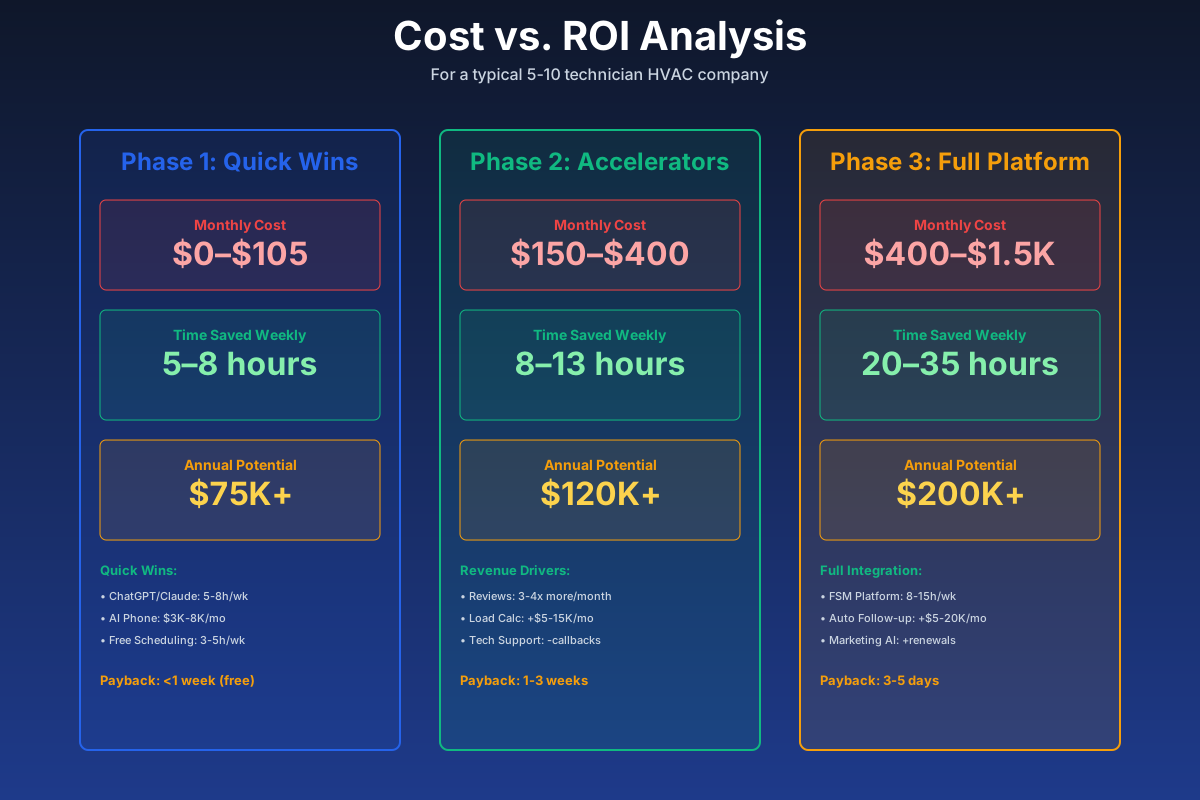
Here's a breakdown of the costs and expected returns:
FAQ
Does AI load calculation software produce ACCA-compliant Manual J reports I can show to building inspectors?
Yes. AutoHVAC generates ACCA-compliant Manual J, Manual S, and Manual D output — the same reports you'd produce with Wrightsoft, built faster using computer vision to extract dimensions from blueprints. You can include these in permit applications directly. One caveat: verify results on unusual building types (log homes, historic properties with non-standard insulation) before submitting. The 99%+ accuracy figure holds on conventional residential construction; unconventional builds are worth a manual check.
Can AI dispatching account for EPA 608 certification levels when assigning techs to refrigerant-handling jobs?
Yes, but only if you set it up that way. ServiceTitan and Housecall Pro both let you tag technicians with their certification levels — 608 Universal, Type I, Type II, Type III — and their AI dispatching factors those tags into job assignments. A Type II-only tech won't get routed to a job requiring high-pressure recovery. The problem is that most HVAC companies skip this step during onboarding and then wonder why dispatching recommendations look wrong. Spend the 30 minutes during setup to tag every tech's certs, vehicle inventory, and specialties. You only do it once.
What happens to AI phone answering during an internet or power outage at my office?
Nothing bad, actually — this is one of the underrated advantages of cloud-based tools. Dialzara and My AI Front Desk run on the vendor's servers, not your office network. If your internet goes down, calls still route through the cloud and get answered normally. Your techs' FSM apps run on cell data, not office WiFi. The real failure mode to protect against is a widespread cellular outage during a major weather event — which is also exactly when your HVAC call volume is peaking. Keep your on-call emergency transfer number as a cell phone (not a landline), and have a paper copy of the day's schedule for true disaster scenarios.
How do I prevent Hatch or CHIIRP from contacting customers who already scheduled or declined?
This is the most common setup mistake with both tools. Map your FSM job statuses — "estimate declined" and "job booked" — to the suppression triggers in the follow-up tool during initial setup. Then test it: mark a dummy estimate as "booked" in your FSM and confirm the follow-up sequence stops within 15 minutes. Do this before going live. Status sync can also break silently during FSM software updates, so add a monthly check to your routine. Messaging a customer who already hired you — or one who explicitly said no — is a fast way to lose the relationship.
Should I let my techs use ChatGPT for on-site troubleshooting instead of paying for Bluon?
For generic questions, ChatGPT works. For actual field diagnostics, it's the wrong tool. When your tech types "Carrier 24ACC636A003 high-pressure lockout" into ChatGPT, he gets generic high-pressure troubleshooting advice. Bluon pulls the specific service manual, wiring diagram, OEM part numbers, and documented failure modes for that exact model — from a database of 20M+ units trained on 135,000 real support calls. On a $29 diagnostic that becomes a $250 callback because of a misdiagnosis, "free" gets expensive. Use ChatGPT for writing. Use Bluon in the field.
My competitor has 400+ Google reviews. Is it too late to catch up?
No — and the math actually favors you if you move now. Google weights review velocity (how fast new reviews arrive) heavily, not just total count. A competitor sitting at 400 reviews adding 2 per month looks stagnant. Install NiceJob, run 15-20 new reviews per month, and you'll see Maps ranking improvement within 90 days. Their total count doesn't matter much if their velocity is dead. You'll pass their total within 18-24 months and rank better than them well before that.
How much does AI dispatch actually help during a surge, beyond just answering calls?
This is where FSM AI earns its cost. During a heat wave, ServiceTitan's Titan Intelligence and Housecall Pro's AI scheduling look at current schedule density, tech locations, job type, and travel time to recommend dispatch sequences that get more jobs completed per day. A dispatcher making manual routing calls might move 10 jobs per tech per day. AI-optimized routing can push that to 12-13 by cutting dead time between calls. On a five-tech team during a three-day surge, that difference compounds fast — and it's the difference between needing to turn away work and keeping up with demand.
The next heat wave is coming. A hundred homeowners will search "emergency AC repair" within a 48-hour window, call the first three results, and hire whoever answers. This guide is about being that company — not by accident, but by design.
Set up Dialzara before the next surge. Get your proposals going out same-day with AutoHVAC. Build your review velocity now so your Maps ranking is strong when demand peaks. The shops that win surge season aren't the ones that hustle harder — they're the ones that don't let anything fall through the cracks.
More AI Implementation Guides
Best AI Receptionists for Small Businesses (2026)
The best AI receptionist for a small business depends on your call volume and budget. We compare 7 real tools with verified 2026 pricing and who each fits.
How Much Does an AI Receptionist Cost? (2026)
How much does an AI receptionist cost in 2026? Real pricing for AI answering tools — from $29/mo flat plans to per-minute models. Compare tools & costs.
AI Tools for Plumbing Businesses: 2026 Guide
The best AI tools for plumbing businesses in 2026. Capture calls, automate dispatch, dominate Google reviews, add $75K–$250K annual revenue.
AI Tools for Breweries: The 2026 Owner's Playbook
The best AI tools for breweries in 2026: cut TTB compliance time, tighten COGS, streamline taproom scheduling, and target release marketing — starting free.
AI Tools for Bookkeeping Services: 2026 Guide
Best AI tools for bookkeeping services in 2026: Automate categorization, reconciliation, and document chasing without hiring extra staff.
AI Tools for Marketing Agencies: 2026 Playbook
The best AI tools for marketing agencies in 2026. A phased plan to kill Hell Week reporting, scale content, and fix billable utilization without new hires.
Keep exploring
See every AI implementation guide we've published for Trades & Contractors, or browse the full library by industry or category. Looking for a specific platform? The AI tools directory indexes every product mentioned across our guides, and the comparisons hub puts the most-asked head-to-heads side by side.