
A prospect saw your Pinterest reel at 9:47 p.m. on a Tuesday. By 9:51 she had DMed three planners — yours, plus two competitors she'd never heard of before scrolling. Whoever responds first with a real answer almost certainly wins the consult. Industry benchmarks are blunt about this: replies inside one hour triple booking rates, and most boutique planners average two to eight hours.
That's the gap clients are operating in now — concierge-level responsiveness expected from a one-person shop while you're on-site at a 200-person reception or asleep.
The same client also expects rendered concept visuals (not Pinterest boards), real-time budget transparency, an event app for the corporate gala, and a video reel within 48 hours of the event. Boutique planners can't out-staff Marriott's event division. They have to out-tool it.
This is the practical, boutique-firm playbook for AI in 2026 — the specific tools and prompts that compress a 3-hour proposal to 30 minutes, capture Instagram DMs while you're at a venue walk-through, and turn the 4-minute highlight reel from your videographer into three weeks of social content. Organized so you implement what you can afford in the order that makes the most money back first.
TL;DR — The three highest-ROI moves
1. Activate the AI features already built into HoneyBook and Canva Pro. Most planners are paying for them and never turned them on. Zero new cost. ~5 hours/week reclaimed.
2. Set up ManyChat to auto-qualify Instagram DM leads while you're on-site. $29/month (Pro). Captures the 30–80% of inquiries that currently go cold overnight.
3. Use ChatGPT or Claude as your daily writing assistant for proposals, RFPs, timelines, and FAQ replies. $20/month. Saves 8–12 hours/week immediately.
The Job Nobody Talks About: Coordinating 12 Vendors Against One Fixed Date
Event planning is really an orchestration business. The creative vision gets the client to sign. Everything after that is logistics — coordinating a dozen independent contractors who all need to arrive, set up, and execute in a specific sequence on a date that cannot move.
Consider what a typical full-service wedding or corporate gala actually involves:
| Planning stage | Typical duration | Coordination load |
|---|---|---|
| Inquiry to signed contract | 1–3 weeks | 3–6 vendor availability checks, 2–4 proposal revisions |
| Active planning (post-deposit) | 3–12 months | 8–14 vendors onboarded, 20–40 vendor touchpoints |
| Final 30 days | 4 weeks | Vendor confirmations, COI collection, RSVP chase, timeline lock |
| Event day | 12–16 hours | Real-time coordination across all vendors simultaneously |
A mid-size wedding (150 guests, full planning) involves roughly 10–14 separate vendor contracts: venue, catering, photography, videography, florals, music, hair and makeup, transportation, lighting, rentals, officiant, and often a photo booth or specialty entertainment vendor. Each one requires an RFP, a discovery call, a contract review, multiple status check-ins, and a final-week confirmation. That's 60–90 vendor emails just for one event.
Multiply that by 15–20 active client files and you see where the week goes. Not proposals. Not client calls. Vendor coordination and document management. Most planners running $150K–$400K shops are spending 30–40% of their billable hours on work that AI can handle — or at least compress by 70%.
Three realities to anchor before we get into tools:
- Lead response is the biggest revenue lever. Average wedding bookings run $3,200–$4,900 and corporate events $15K+. Top performers convert 35–50% of leads vs. an industry average of 10–20%. Speed of first response is the single biggest variable separating those groups.
- Seasonality compounds the squeeze. Weddings peak April–October; corporate kickoffs hit Q1; holiday parties stack November–December. The months you're executing events are the months you're supposed to be marketing for next year. AI is what makes both happen simultaneously.
- The work shifts at every revenue tier. Under $150K, you're solving "I don't have time." From $150–500K, "I have time but my systems are leaking leads." Over $500K, "my team is doing inconsistent work and clients can tell." Each tier needs a different layer of the stack.
Layer 1: Activate What You Already Have (Weeks 1–2)
Don't buy anything new until you've turned on the AI features inside tools you're already paying for. HoneyBook ($29–$109/month on annual billing), Canva Pro (~$10/month on annual billing, $15/month monthly), and a $20 ChatGPT or Claude subscription cover 70% of the time savings available. Total new spend in this layer: $0 to $50 per month.
ChatGPT or Claude: Your Universal Event Planning Assistant
Manual proposal writing eats 2–4 hours per lead. Run-of-show timelines get rebuilt from scratch every event. The same 15 client questions get answered by email, over and over. None of that is creative work — it's repetition, and repetition is exactly what ChatGPT (GPT-4o) and Claude are built for.
Use either as a daily assistant for the four highest-volume writing tasks: proposal drafts, run-of-show timelines, vendor RFP emails, and a client FAQ library. With the right prompt, output lands 80% of the way to final — you add the personal details and send.
Claude (claude.ai)
Best for: Long structured documents — proposals and timelines
Claude Pro excels at long, structured documents like minute-by-minute run-of-show schedules and multi-section proposals. The 200K-context window means you can paste an entire past proposal and a client inquiry form, then ask for a customized draft — it stays consistent across the whole document.
ChatGPT Plus
Best for: Conversational tone and quick iterations
Slightly better for warm, conversational caption and email tone. The GPT-4o model handles back-and-forth refinement well, which matters when you're tweaking proposal language for a specific client's vibe.
Three prompts to set up on day one. Each one replaces hours of writing per week:
I'm a boutique event planner. A new client just submitted an inquiry with these details:
- Event type: [wedding / corporate gala / holiday party / fundraiser]
- Guest count: [X]
- Event date: [date]
- City/venue: [location]
- Stated budget: $[X]
- Style/theme keywords they mentioned: [e.g., "romantic, garden, candlelight, soft pastels"]
- Specific requests: [e.g., "live band, photo booth, plated dinner, sustainability priority"]
Write a professional proposal introduction (3 paragraphs) that:
- Reflects back their vision in language that shows we were listening
- Establishes our creative point of view on how to execute it
- Builds excitement without overpromising
Then provide a bulleted scope of services with 5–8 line items appropriate to this event type.
My company name is [NAME]. My brand voice is [warm/polished/luxury/playful — pick one]. Reading time should be under 3 minutes.
Generate a minute-by-minute run-of-show for the following event. Format as a table with columns: Time | Event | Responsible Party | Notes.
EVENT DETAILS:
- Type: [outdoor wedding ceremony + reception, corporate gala, etc.]
- Date: [date]
- Venue areas: [ceremony lawn, cocktail terrace, reception ballroom]
- Guest count: [X]
- Ceremony: [start time], [duration], [officiant, readers, music details]
- Cocktail hour: [start time], [duration], [location, food, entertainment]
- Reception: [start–end times], [seating style, courses, speeches, dances, special moments]
Start vendor load-in at [time]. Include buffer time before each milestone (15-min cushions). Flag vendor arrival times explicitly. Mark which moments require client/family staging vs. behind-the-scenes execution.
Write a vendor RFP email for a [florist / photographer / DJ / caterer / lighting designer / rental company].
EVENT DETAILS:
- Type: [event type, e.g., "200-person outdoor garden wedding"]
- Date: [date]
- Location: [city + venue if known]
- Style: [3–5 descriptive words, e.g., "romantic, soft, garden-inspired, candlelit, pampas grass"]
- Estimated budget for this vendor category: $[X]
In the email, request:
- Confirmation of date availability
- Portfolio samples relevant to this style
- Itemized pricing breakdown
- A 20–30 min discovery call
Tone: professional but warm. Sign-off from [my name] at [my company]. Length: under 200 words.
One more one-time task worth front-loading: spend an hour building a client FAQ library. Ask ChatGPT or Claude to write polished 2–3 paragraph responses to the 10–15 questions you answer by email every week — pricing range, availability, planning vs. day-of differences, package customization, vendor preferences. Save them as Gmail canned responses or HoneyBook templates. You'll never type them again.
Most planners reclaim 8–12 hours a week from this layer alone. At a $75/hour effective rate, the first month pays for the entire stack several times over.
The personalization rule
Never send AI output without adding 2–3 specific details about the actual client and event. The reason AI proposals get bad reputations is that planners paste raw output. The reason AI proposals close 25% faster than manual ones is that planners use them as drafts and add the parts no AI knows — your discovery-call notes, your read on what the client actually cares about, your vendor relationships.
Activate HoneyBook's AI Features (If You're Already a User)
About 75% of professional planners are on HoneyBook. If that's you, log into Settings → AI Features and turn on every available toggle right now — most planners on the $29–$109/month annual plans have been paying for these since the 2025–2026 updates without ever switching them on:
- AI Proposal Builder. Reads your past proposals and the client's inquiry form to generate a first draft. HoneyBook's own data says it saves 20+ minutes per proposal.
- AI Notetaker. Joins your Zoom or Google Meet discovery calls, transcribes, and delivers a structured summary with action items to the client's HoneyBook file within minutes.
- Predictive lead alerts. Surfaces leads you haven't responded to in 2+ hours and drafts the reply for you.
- One-prompt workflows. Type "send a follow-up 48 hours after a client views a proposal but doesn't sign" and HoneyBook AI builds the automation.
If you're on Dubsado instead, the AI suite is less mature but the workflow automation is more customizable. Pair it with ChatGPT and you arrive at roughly the same place. See our photography studio AI guide for a deeper HoneyBook-vs-Dubsado comparison in a creative-services context.
Canva Magic Studio: AI Design for Social, Proposals, and Day-Of Materials
Roughly 95% of planners already pay for Canva Pro. If you haven't enabled Magic Studio (Canva's 2026 AI layer), you're paying for it and leaving it on the table.
- Magic Design. Type "romantic garden wedding Instagram post for a 200-person outdoor reception" and get 5+ ready-to-edit options.
- Magic Write. Inside any text box, generate captions, email copy, and event descriptions.
- Magic Eraser / Background Remover. Clean up event photos in 30 seconds instead of 15 minutes in Photoshop.
- Dream Lab. Generate concept art for venue styling, floral inspiration, or mood-board references.
- Content Planner. Schedule directly to Instagram, Pinterest, LinkedIn, and Facebook from inside Canva.
The highest-value habit here: batch a month of social content in one 2-hour session during a slow week. January, February, August — pick a quiet stretch. Generate 12–16 posts. Schedule them. Don't think about social content again for 30 days.
Otter.ai Free: Capture Every Verbal Vendor Commitment
Your florist agreed to arrive at 11 a.m. on the call. The email follow-up said "morning." On event day she rolls in at 1:15 with setup half-done. Vendor disasters almost always trace back to verbal commitments that never made it into writing — and Otter.ai's free tier (300 transcription minutes/month) closes that gap entirely.
OtterPilot auto-joins your scheduled Zoom and Google Meet calls, transcribes in real time, and drops a structured summary with action items into your inbox minutes after the call ends. When you need to confirm what Sarah's Florals said about arrival time, you search the transcript instead of relying on memory.
For 20+ calls/month, upgrade to Otter Pro ($8.33/user/month annual) or switch to Fireflies.ai ($10/user/month) for stronger HoneyBook integration via Zapier. See how an architecture firm's AI stack handles meeting documentation for clients with similarly detailed verbal commitments.
Two-party consent states matter
California, Illinois, Florida, Washington, Massachusetts, and Pennsylvania require all-party consent before recording. Always open client and vendor calls with: "I use an AI notetaker for our records — is that okay with everyone?" Most people appreciate the thoroughness; the ones who say no are rare and you simply turn it off for that call.
Layer 2: Plug the Lead Leaks and Automate the Grind (Weeks 3–8)
Layer 1 reclaimed time. This layer attacks the two biggest revenue leaks: leads going cold because no one responded fast enough, and social media going dark during event-heavy weeks. It adds roughly $70–$150/month in subscription costs and delivers a 15–30x return on that spend when even one additional booking per month is captured.
ManyChat: 24/7 Instagram DM Lead Capture
Wedding and social-event planners get 30–80% of their leads through Instagram. A prospect DMs at 10 p.m., replies to a story, or comments "this is exactly what I want!" on a reel — and wakes up the next morning with a response from the competitor who had automation running.
ManyChat (Pro plan at $29/month) builds a qualification flow that runs inside Instagram DMs while you're on-site, asleep, or in a discovery call. The Pro tier is required for AI-powered DM features — the free plan caps out too quickly to be useful in production. The setup that matters:
- Keyword triggers. When someone DMs "pricing," "available," "wedding," "corporate," "interested," "book," or "quote," ManyChat replies immediately.
- Four-question qualification flow. Event type → date → guest count → budget range. Use buttons, not free text, to keep dropout rates low.
- Slack or email notification on completion. A fully qualified lead with date, scope, and budget lands in your inbox by morning.
- Auto-reply with Calendly link. "Perfect! I'll personally follow up within 24 hours — meanwhile, here's our portfolio and a way to grab a discovery call slot directly."
- Story-reply automation. Anyone who replies to your Instagram stories gets a warm welcome DM with your inquiry form.
ManyChat reports 80%+ open rates on Instagram DM automations vs. 20% for email. The boutique retail store AI playbook walks through a slightly different ManyChat configuration optimized for product inquiries — useful if you also sell add-on rental or styling SKUs.
Corporate planners: skip ManyChat
If your leads come via LinkedIn, RFPs from procurement teams, or referrals from association directors — not Instagram DMs — ManyChat isn't your tool. Use Tidio on your website (Growth plan at $59/month) for live chat with Lyro AI handling initial qualification. Note: Tidio's $29/month Starter plan includes only 50 lifetime Lyro AI conversations — the $59/month Growth plan is needed for ongoing AI chat.
Flick: Consistent Instagram and TikTok Presence During Peak Season
Here's the pattern that kills reach for most planners: post consistently through February, then go completely dark May through October — exactly when you should be showing off your best work and pulling in next year's clients. Instagram's algorithm punishes that inconsistency with months of reduced reach, and recovery is slow.
Flick ($14–$30/month) has an AI assistant called Iris that generates a month's worth of content ideas, writes captions in your brand voice, and schedules posts. The workflow is batch-based by design:
- One slow day per month, open Flick → Iris and brief it on your business and ideal client. Ask for 30 content ideas.
- Select 12–16. Upload event photos. Have Iris write each caption with hook, body, CTA, and 8 hashtags. Edit for accuracy (Iris doesn't know the venue name, flower variety, or client's first name — always add those).
- Drag into the scheduler. Flick suggests optimal posting times based on your audience activity.
Flick doesn't schedule to Pinterest, which is a real gap for wedding planners. Pair it with Tailwind ($15/month) or use Canva's built-in Content Planner for Pinterest and Flick for Instagram/TikTok.
Zapier: Connect Your Tech Stack So Nothing Falls Through the Cracks
How many places does your vendor contact info currently live? HoneyBook, Google Sheets, your phone contacts, a Slack message from three weeks ago, maybe a sticky note. Every time a client books or a vendor is confirmed, you're manually copying details across five systems — that's 5–8 hours a week of pure data-entry work.
Zapier ($20/month Starter) closes those gaps. Build three automations and the rest will reveal themselves:
Automation 1 — New Client Folder. Trigger: new HoneyBook project. Action: create a Google Drive folder [Client Name] — [Event Date] with subfolders for Contracts, Vendor Docs, Photos, and Design.
Automation 2 — Signed Contract Alert. Trigger: contract signed in HoneyBook. Actions: (1) post to Slack #new-bookings; (2) add a row to your master Google Sheets event tracker; (3) send the client a "Welcome to the family!" email with their first planning homework.
Automation 3 — Vendor Payment Tracker. Trigger: invoice paid in HoneyBook. Action: append a row to your Google Sheets vendor payment tracker with client, vendor, amount, and date.
Zapier's AI Copilot lets you describe the automation in plain English. Type "When a new HoneyBook project is created, create a Google Drive folder" and Copilot generates the Zap for you.
Reclaim.ai: Calendar Protection for Peak Season
May through October, your calendar fills with client calls, vendor meetings, site visits, and event days. What doesn't show up as calendar blocks — but absolutely has deadlines — is proposal writing, content batches, and vendor confirmations. Those get squeezed into whatever gaps remain, which is how a normal event-season week becomes a 55-hour week.
Reclaim.ai ($8/user/month annual) schedules protected time blocks around your existing meetings before those slots can be claimed. Four habits to set up first:
- Proposal Writing — 2 hours, 3x/week, weekday mornings
- Content Batch Session — 3 hours, monthly, first slow week
- Event Day Recovery — auto-block the day after every event as low-priority
- Vendor Confirmation Calls — 1 hour, weekly, scheduled 30/14/7 days before each event
Reclaim reports that users recover an average of 7.6 hours/week through smarter scheduling. The single most valuable habit for planners: event-day recovery. Block the morning after every event as low-priority. You will otherwise fill it. Running a Monday discovery call on three hours of sleep after a 16-hour Saturday is exactly the kind of momentum-killer Reclaim simply prevents.
ROI Snapshot
Monthly Cost
$71/mo
Time Saved
12hrs/week
Monthly Value
$8,100
ROI
11308%
Layer 3: Differentiate on Vision and Win Bigger Contracts (Months 3–6)
The tools here aren't admin time-savers — they're the ones clients can see and feel. Use them to move pricing power upward: from a $2,000 day-of fee to a $6,000 full-planning fee, from a $15K corporate event to a $40K conference contract.
Midjourney: AI-Generated Concept Renders for High-End Bookings
A $50K luxury wedding client doesn't book because your Pinterest board is beautiful. They book because they can see their event — their venue, their aesthetic, their color story — rendered in a way that makes the design feel real. Sourcing images from other people's events takes 4–6 hours per proposal and never quite gets there.
Midjourney ($10–$30/month) generates custom concept renders tailored to the client's specific brief in under 60 minutes. The structure that works:
[Event type], [aesthetic descriptors], [specific design elements], [color palette], [lighting style], [photography style]
Example: Outdoor wedding reception, romantic and editorial, long banquet tables with pampas grass centerpieces, white roses and eucalyptus, warm candlelight, soft blush and ivory tones, luxury editorial photography style, golden hour --ar 16:9 --v 6
For each new proposal, generate 3–4 concept renders showing different directions. Include them as a "Design Vision" section. Better still: use the image-to-image feature with a photo of the actual venue, reimagined with your proposed decor. Clients approve proposals faster when they can see their own space transformed.
Always label AI renders as concept inspiration
Add a footer to every AI render: "Creative Concept Inspiration — Not Representative of Actual Event." Clients appreciate transparency, and this is the difference between an inspiring proposal and a misleading one. Never pass AI renders off as photos of past events. The first time a client compares your AI proposal to your actual portfolio, the relationship is done.
The same conceptual rendering workflow lets architecture firms and high-end real estate teams close higher-value contracts — see how a real estate agency uses AI rendering for virtual staging to drive higher offer prices.
OpusClip: Turn Each Highlight Video Into Three Weeks of Reels
Most planners post the 4-minute highlight video once to Instagram, get a few hundred views, and let a $1,500–$3,000 piece of content sit unwatched. Meanwhile, the most viral social content is 15–90 second vertical clips — which is exactly what the highlight video already contains. The footage is already shot. The story is already told. It just needs to be cut.
OpusClip ($15–$29/month) automatically extracts 10–25 short, vertical, captioned clips from each highlight video. A single 4-minute reel produces 2–3 weeks of daily Reels and TikTok content — generated in under 10 minutes of your time. The Virality Score ranks clips by predicted engagement so you know which to post when.
Best clip categories to look for:
- Transformation reveals (venue before/after setup) — highest engagement
- Detail shots with movement (centerpiece pans, florals, lighting setups)
- Guest reactions during big moments (first look, speeches, dance floor opens)
- Behind-the-scenes from the planner's POV (rare and high-engagement)
- Brief ceremony moments (keep these tasteful and short)
Schedule one clip per day for the 2 weeks following the event. You stay visible during your recovery window — when you'd otherwise have gone dark.
RSVPify: Eliminate the Final-30-Days RSVP Chase
For weddings and galas with 100–300 guests, the final 30 days become an RSVP chase: following up with every non-respondent individually, managing dietary restrictions across email and voicemail, rebuilding seating charts after every late change. This phase alone costs 8–15 hours per large event — most of it completely automatable.
RSVPify ($39–$199/month, or per-event pricing) handles almost all of it:
- AI RSVP concierge (ai.rsvp) handles guest questions conversationally — without you involved.
- Conditional form logic shows meal choices only if attending, dietary fields only if they have one, plus-one name fields only if they selected "attending with guest."
- Automated reminder sequences at 8 weeks, 3 weeks, and 1 week before deadline. Planners report 40–60% reduction in individual follow-up emails.
- Real-time dietary dashboard auto-compiled and shareable as a PDF to the caterer.
- CSV export to AllSeated or Prismm for seating charts.
Reserve RSVPify for 100+ guest events where the automation has clear ROI. For 50-guest events, manual tracking is faster than setup.
Whova: Enterprise Event Management AI for Corporate Planners
Corporate planners managing conferences (100–2,000 attendees) need tools their clients expect: professional event apps, attendee networking, session-based agenda management, post-event analytics. Cvent provides this — at $19,500+/year, which is inaccessible for boutique corporate firms.
Whova delivers comparable AI conference management at per-event pricing that scales with attendee count. What matters most:
- Automated speaker intake forms collect bio, headshot, session description, AV requirements, and travel preferences in one structured form (saves 15–20 hours of speaker coordination per conference).
- AI agenda builder optimizes multi-track scheduling around speaker availability and sponsor priority.
- AI attendee matchmaking surfaces networking connections based on job title and stated interests — a measurable value-add clients can see.
- Real-time AI Q&A and polling during sessions, with audience questions prioritized by upvote.
- Post-event ROI report showing attendance, connections made, engagement scores, and satisfaction signals — exactly the data you need to justify your fee on recurring contracts.
Reserve Cvent for clients who specifically require it by contract. For everyone else, Whova does the same job at a fraction of the cost.
Segment your stack by what you plan
- Weddings and social only: HoneyBook AI + ManyChat + Midjourney + OpusClip + RSVPify (large events only). Skip Whova entirely.
- Corporate only: ChatGPT/Claude + Zapier + Nowadays AI (venue sourcing) + Whova. Skip ManyChat (LinkedIn/RFPs, not Instagram).
- Both: Start with Layer 1 across the board. Layer Layer 2 by lead channel. Reserve Layer 3 spend for the event category making you the most money.
Six Mistakes Worth Calling Out
- Don't use AI to generate client reviews or testimonials. Google, The Knot, and WeddingWire prohibit AI-generated reviews and can delist your profile. Ask for the review using AI-drafted request emails — but the review itself must come from the actual client.
- Don't present Midjourney renders as your portfolio work. Misrepresenting AI images as photos of past events will destroy client trust the first time someone compares your proposal to your real gallery. Always label them as "Design Concept Inspiration."
- Don't record discovery calls without informing participants. Two-party consent states require all-party agreement. "I use an AI notetaker for our records — is that okay?" handles it cleanly.
- Don't implement all layers simultaneously. Planners who try to adopt 8 new tools in a month end up using none of them effectively. Spend two weeks living in Layer 1 before considering Layer 2.
- Don't skip the human review on AI-generated proposals. AI doesn't know your specific vendor relationships, regional pricing norms, or the particular details from your discovery call. An AI proposal with wrong venue details signals to the client that you weren't listening — worse than no proposal at all.
- Don't subscribe to Cvent unless a client contractually mandates it. $19,500+/year is justified only for firms running 15+ large corporate events annually. Whova handles 90% of the same job.
Getting Started Checklist
Two weeks. One step per day. Don't skip the order — Layer 1 funds Layer 2 funds Layer 3.
- Day 1: Start a Claude Pro or ChatGPT Plus free trial. Save the three prompt templates above into a Notion or Google Doc.
- Day 2: Run the proposal draft prompt on your next inquiry. Time how long the AI-assisted version takes vs. your usual.
- Day 3: Log into HoneyBook → Settings → AI Features. Turn on AI Proposal Builder, AI Notetaker, and predictive lead alerts.
- Day 4: Open Canva Pro → Apps → enable Magic Studio. Generate one Instagram post using Magic Design as a test.
- Day 5: Sign up for Otter.ai free. Connect your Google Calendar. Confirm OtterPilot will join your next client call.
- Day 6–7: Build your client FAQ library — 10–15 questions answered with AI drafts, saved as Gmail canned responses.
- Day 8: Sign up for ManyChat (free plan to start). Connect your Instagram Business account.
- Day 9: Build a 4-question Instagram DM qualification flow. Test it by DMing your own business account.
- Day 10: Sign up for Zapier Free. Build the new-client-folder automation (HoneyBook → Google Drive).
- Day 11: Sign up for Reclaim.ai. Create your four habit blocks (proposal writing, content batch, event-day recovery, vendor confirmations).
- Day 12–13: Run a 2-hour content batch session in Canva and Flick. Schedule 12–16 posts for the next month.
- Day 14: Audit your hours. Compare your last fully-manual week to this AI-assisted one. Time saved should be 8–15 hours.
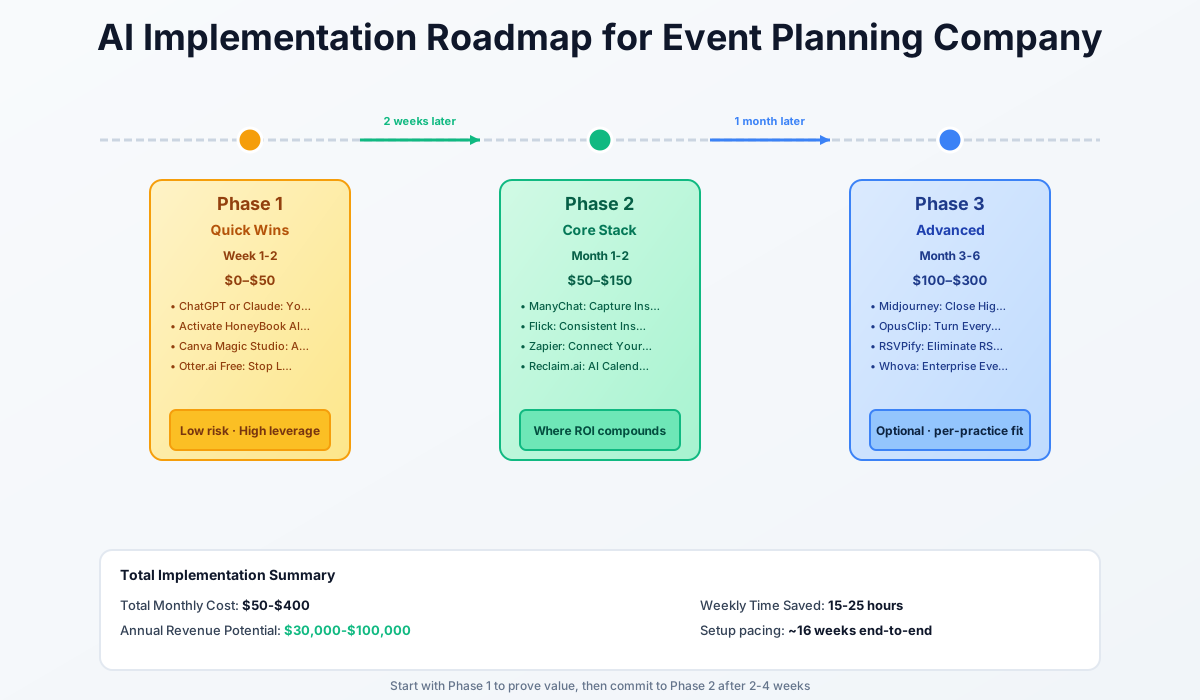
Here's how this rolls out — three phases, each with its own cost ceiling and impact target:
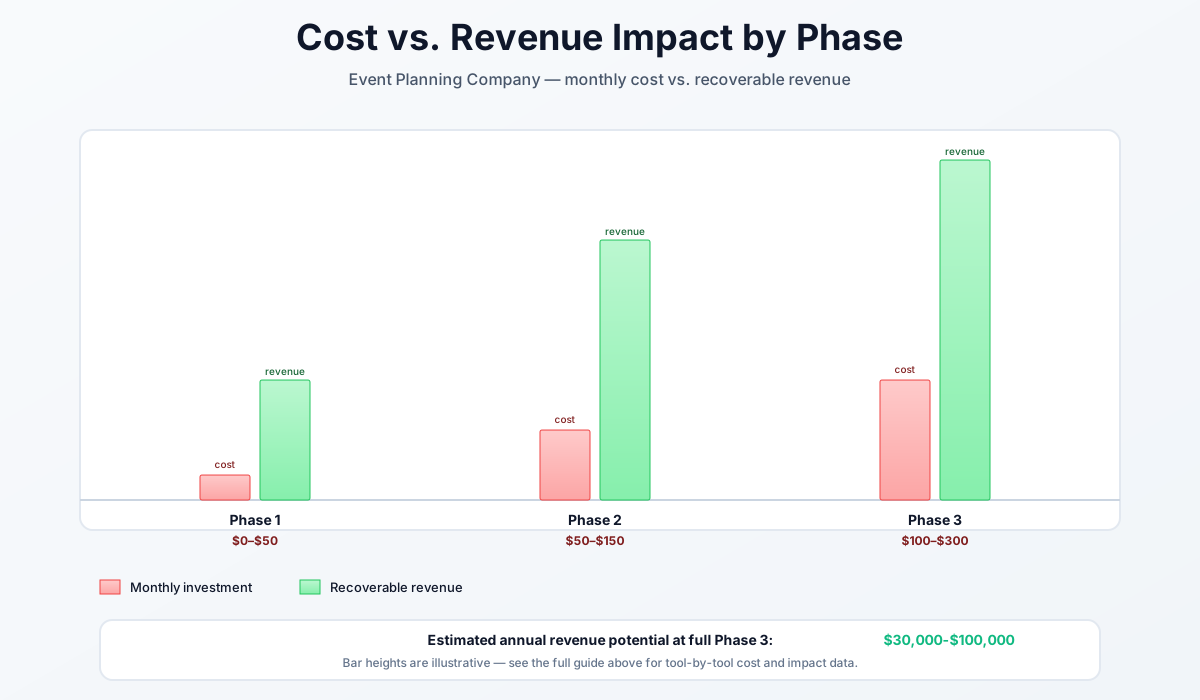
Here's a breakdown of the costs and expected returns:
FAQ
What's the actual time saving on a proposal — is 30 minutes realistic?
Yes, for a standard inquiry response. The AI handles the structure and the language; you add the specific client details and the creative-vision paragraph you took notes on during the discovery call. Where planners lose time is tweaking AI output into perfection instead of treating it as a first draft. Set a rule: 20 minutes of editing maximum. If you're going past that, you're over-engineering it.
Can I use AI-generated venue renders in proposals without misleading clients?
Yes, with two conditions. First, label every AI render clearly: "Creative Concept Inspiration — Not Representative of Actual Event." Second, never mix AI renders with real portfolio photos in the same gallery. A clean structure is: "Past Work" (actual photos) and "Design Vision for Your Event" (AI renders, labeled). Most clients appreciate the transparency more than they care about the source.
How do I keep an AI notetaker compliant in two-party consent states like California?
Two-party consent states (California, Illinois, Florida, Washington, Massachusetts, Pennsylvania, plus several others) require every participant to agree to recording — not just be notified. Open every call with: "I use an AI notetaker to keep our records accurate — is that okay with everyone?" Wait for an affirmative response. If anyone declines, turn it off for that call. This counts as documented consent.
Does ManyChat work with Instagram Creator accounts, or do I need a Business account?
You need a Business account. The conversion is free and reversible: Instagram Settings → Account → Switch to Professional Account → Business. Creator accounts won't work for DM automation, and the switch costs you nothing — Business accounts get Meta Business Suite, ad-running ability, and ManyChat compatibility.
Can AI handle the final-30-days RSVP chase for a 250-guest wedding?
RSVPify's automated reminder sequences will replace 40–60% of the individual follow-up emails you'd otherwise send. The remaining stragglers still need a personal text or call. The AI concierge handles "wait, what time is the ceremony?" questions, dietary restrictions, and plus-one logistics without you involved. Expect to reclaim 8–10 hours over the final 30 days vs. doing it manually.
What's the difference between ChatGPT and HoneyBook's AI Proposal Builder?
HoneyBook reads your past proposals and the client's inquiry form automatically — it has context from your account. ChatGPT and Claude require you to paste context in, but give you more control over tone, structure, and length. Most planners use HoneyBook AI as the default for routine proposals and ChatGPT/Claude for high-stakes proposals that need a custom narrative. Many run both in sequence: HoneyBook for a first draft, then Claude for the creative-vision paragraph.
How do I handle vendor coordination across 12 vendors without a dedicated coordinator?
Honestly, this is where the Zapier + Otter.ai + HoneyBook stack does the most work. Otter captures every verbal commitment in a searchable transcript. Zapier keeps your folder structure and tracker current automatically. HoneyBook's client file keeps all vendor contracts and COIs in one place. You still need to actually confirm the vendors — no AI sends that final-week "see you Saturday at 9am" text — but the information management and follow-up logging becomes nearly automatic.
Running a catering-adjacent operation? Our catering company guide covers the food-production and staffing logistics side of large event service in more depth.
More AI Implementation Guides
AI Tools for Photography Studios: 2026 Workflow Playbook
Best AI tools for photography studios in 2026. Cut editing time by 70%, automate bookings and inquiries, grow print sales, and reclaim 15-25 hours weekly.
AI Tools for Breweries: The 2026 Owner's Playbook
The best AI tools for breweries in 2026: cut TTB compliance time, tighten COGS, streamline taproom scheduling, and target release marketing — starting free.
AI Tools for Bookkeeping Services: 2026 Guide
Best AI tools for bookkeeping services in 2026: Automate categorization, reconciliation, and document chasing without hiring extra staff.
AI Tools for Marketing Agencies: 2026 Playbook
The best AI tools for marketing agencies in 2026. A phased plan to kill Hell Week reporting, scale content, and fix billable utilization without new hires.
AI Tools for Home Health Care Agencies: 2026 Guide
A practical 2026 guide to AI tools for home health care agencies — HIPAA-safe automation for shift-filling, OASIS-E documentation, EVV, and claim denials.
AI Tools for Dermatology Practices: 2026 Guide
The best AI tools for dermatology practices in 2026 — cut prior-auth hours, reduce no-shows, and grow your cosmetic line, with a HIPAA-first rollout plan.
Keep exploring
Browse the full library by industry or category, see every product we cover in the AI tools directory, or read the head-to-head comparisons.