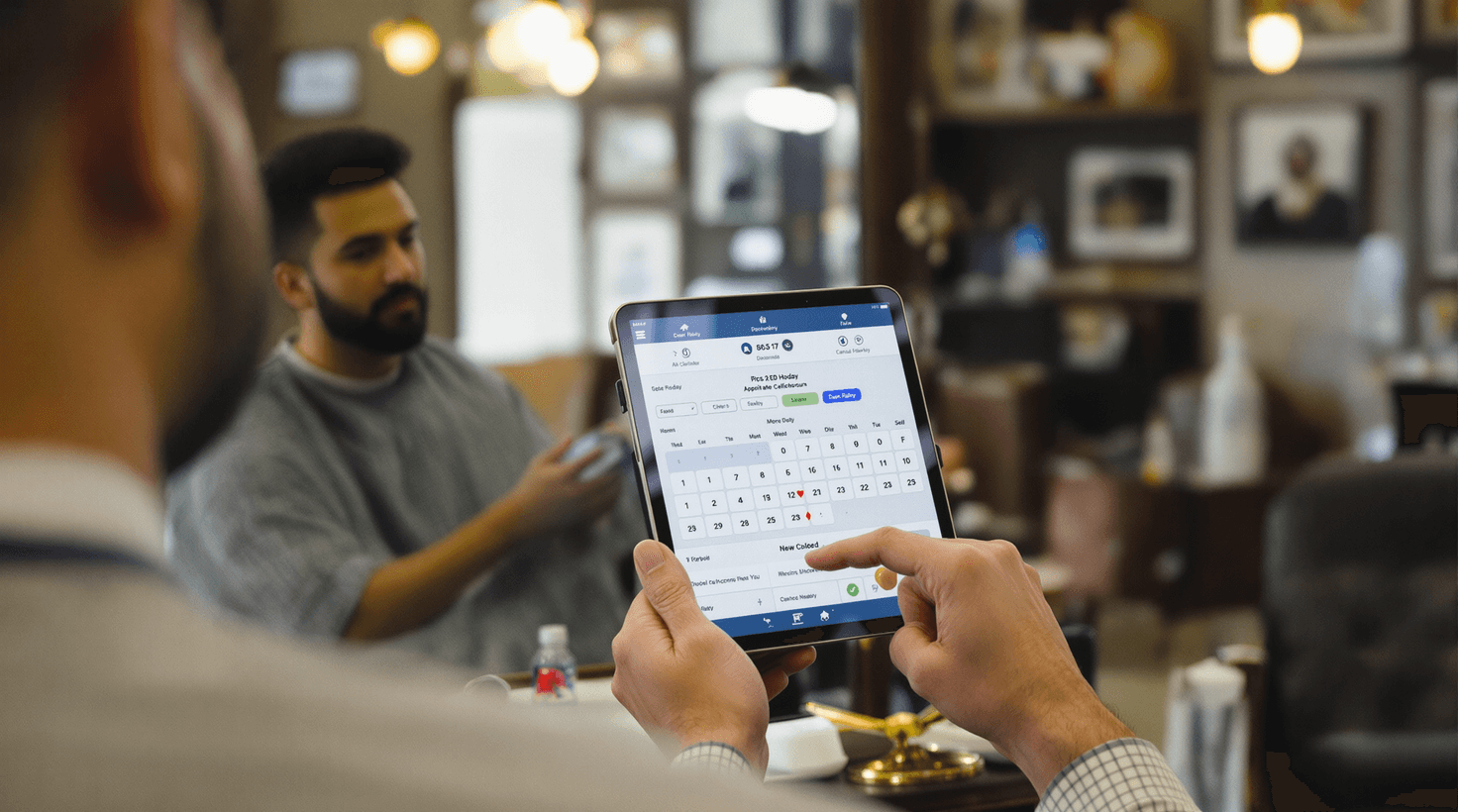
It's 9:47 on a Saturday morning. Your shop's been open for seventeen minutes and there are already six guys in the waiting area — two booked, four walk-ins. Your phone is buzzing on the counter with a caller you can't answer because you're halfway through a skin fade. One of the walk-ins just peeked at the crowd, shook his head, and left. That's $40 gone. Meanwhile, your 10:00 appointment hasn't confirmed, and you're silently betting he's a no-show. Again.
That's not a bad day. That's a Tuesday in most busy shops — and the Saturday version is worse.
The barbershop business runs on a rhythm most other service businesses don't have: regulars come back every 2-4 weeks like clockwork, or they drift to whoever can get them in faster. Your job isn't just cutting hair. It's keeping that rhythm intact for 200-400 clients at once, managing walk-in surges in between, and doing all of it while your hands are occupied.
AI tools won't change what makes a great barber. But they handle the parts of the business that have nothing to do with cutting hair — the unanswered calls, the no-show chaos, the Instagram posts you meant to write at 9 PM — so you can stay focused on the chair.
TL;DR — Top 3 Recommendations
- Use ChatGPT on your phone for instant Instagram captions, review responses, and promo texts — free, saves 3-5 hours/week
- Turn on automated SMS reminders in your existing booking app to cut no-shows by 40-60% — recovering ~$3,000-$5,000/year
- Add an AI receptionist (My AI Front Desk, $49/month) to capture the calls you miss while cutting — worth $800-$2,000/month in recovered bookings
The Recurring-Cut Problem Nobody Talks About
A barbershop client who visits every three weeks is worth about $720/year. At four weeks, that drops to $560. The math sounds small until you multiply it across 300 clients — and realize that even a modest slip in visit frequency, maybe six clients drifting from a 3-week to a 4-week cycle, costs you $960/year without a single client leaving.
Here's what that looks like across a typical shop:
| Visit Frequency | Annual Visits | Revenue per Client ($40 cut) | 300-Client Value |
|---|---|---|---|
| Every 2 weeks | 26 | $1,040 | $312,000 |
| Every 3 weeks | 17 | $680 | $204,000 |
| Every 4 weeks | 13 | $520 | $156,000 |
| Every 6 weeks | 8 | $320 | $96,000 |
A one-week slip in average visit cadence across your client base costs more than most AI tools combined. That's the real reason automated reminders, rebooking nudges, and lapsed-client campaigns exist — not to be annoying, but to protect the rhythm.
The other half of the equation is walk-ins. Unlike a hair salon that runs almost entirely on appointments, barbershops operate a hybrid model where a meaningful share of revenue walks through the door unannounced. Managing that queue — communicating wait times, keeping walk-ins from leaving when the lobby looks full, balancing them against booked clients — is its own daily logistics problem.
These two dynamics — the recurring-cut cadence and the walk-in flow — are what the tools below are built around.
Your labor model also shapes what you need. Commission shops (barbers earn 40-60% of services) need accurate split tracking. Booth rental shops (barbers pay fixed weekly rent, keep all earnings) face IRS misclassification risk — and states like New Jersey and Pennsylvania prohibit booth rentals entirely. Either way, the admin overhead of running even a 2-3 chair shop can eat 20-30% of your week if it's not systematized.
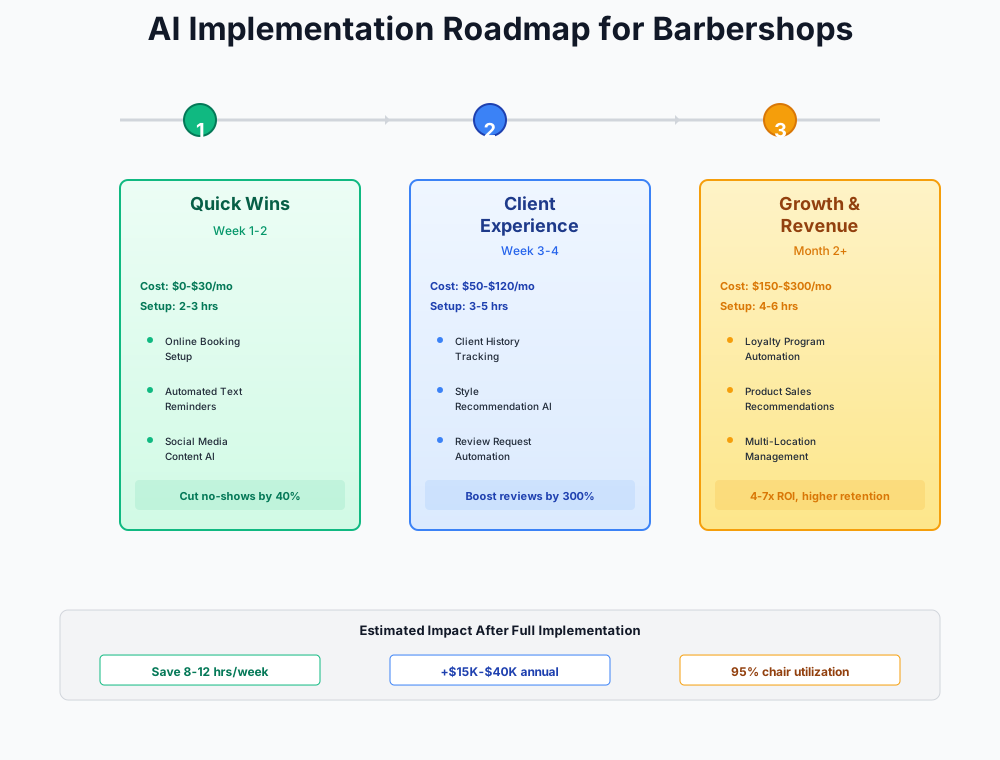
Here's a visual overview of the implementation approach:
Start Here: Free Tools Worth Setting Up This Week
Every recommendation in this section costs $0. You can set them up between clients or on a Sunday morning. Combined, they'll save you 8-12 hours per week.
ChatGPT as Your On-Demand Marketing Writer
You know you need to post on Instagram. You know you need to respond to Google reviews. You know you should text your regulars before Father's Day. But you're behind the chair from open to close, and writing marketing copy at 9 PM sounds terrible.
ChatGPT (free on your phone) does it in 30 seconds. Here's how to start:
Step 1: Download ChatGPT on your phone. No credit card needed.
Step 2: After your next clean fade, snap a photo and use this prompt:
Write 5 Instagram captions for this skin fade photo. My shop is [SHOP NAME] in [CITY].
Keep them short (under 150 characters), include 1-2 relevant hashtags each, and make
them sound like a real barber wrote them — not a marketing agency. Include a booking
CTA in at least 2 of them.
Step 3: When a Google review comes in (positive or negative), paste it in:
Write a response to this Google review for my barbershop [SHOP NAME]. Keep it under 80 words, professional but warm. If negative, acknowledge the issue without being defensive and offer to make it right. If positive, thank them specifically for what they mentioned.
Review: "[PASTE REVIEW HERE]"
Step 4: Create a "Saved Prompts" note on your phone with your 5-7 most-used prompts. You'll reuse them dozens of times.
Most shops that actually use this — not just save the prompts but reach for them every day — get 3-5 hours a week back. The real payoff is consistency: two posts a week for six weeks beats one burst per month every time for local search visibility.
Don't Sound Like a Robot
Always edit AI-generated text before posting. Add your own slang, your shop's personality, your city's flavor. ChatGPT gives you a strong draft in seconds — you spend 30 seconds making it sound like you.
Batch-Create Social Content with CapCut + Canva
Instagram and TikTok are the top client acquisition channels for barbershops. Haircut transformation videos — the before/during/after clips — are the bread and butter. But editing video while running a shop is a time sink.
CapCut (free, no watermark) solves this. Record 15-30 second clips of your best cuts throughout the week, then batch-edit them in one sitting:
- Open CapCut and select a trending template (search "barber" or "transformation")
- Drop in your clips — CapCut auto-edits transitions and syncs to music
- Turn on Auto Captions — critical because most people watch Reels with sound off
- Export and save. Total time: 3-5 minutes per video
For static posts — service menu graphics, promo flyers, before/after side-by-sides — Canva (free tier, 50 AI uses/month) has hundreds of barbershop templates. Use the Background Remover on haircut photos for clean portfolio shots.
Pair this with ChatGPT captions from the previous step, and you've got a complete content engine that runs on Sunday mornings. Dog grooming businesses use the same CapCut + Buffer workflow for transformation videos — it works across any visual service business.
Realistically: 8-12 posts per month instead of 2-4, with maybe 2 hours of actual work. Transformation videos consistently outperform static posts for barbershops — don't overthink the editing. Trending templates exist for a reason.
Activate Your Booking App's Hidden Reminder Features
If you're using Booksy, Square Appointments, Fresha, GlossGenius, or Vagaro, you're probably using 20% of the features you're already paying for. The most impactful one you're likely ignoring: automated SMS reminder sequences.
No-shows cost the average barbershop $5,824 per year. Automated reminders cut that by 40-60%.
Here's how to set them up in any major platform:
- Open your booking app's Settings → Notifications/Reminders
- Enable reminders at three intervals: 48 hours, 24 hours, and 2 hours before
- Turn on two-way confirmation so clients can reply "C" to confirm or "R" to reschedule
- If available, enable automated waitlist filling — when someone cancels, the system texts the next person on the waitlist
- Track your no-show rate for 30 days before and after
If you don't have a booking platform at all (you're in the 30% still using paper or phone-only), start with Fresha — the core booking and reminder features are genuinely free.
ROI Snapshot
Monthly Cost
$0/mo
Time Saved
3hrs/week
Monthly Value
$880
ROI
Infinity%
Shops that run all three reminder touchpoints typically see no-show rates fall from the 15-20% range down to 5-8%. On a packed Saturday schedule, that's the difference between a barber standing idle for 40 minutes or staying booked through close. At $40/cut, two recovered appointments covers what most paid tools cost for a month.
Schedule a Month of Posts with Buffer
Even with great content ready, you need consistency. Buffer's free tier lets you schedule 10 posts across 3 channels — enough for 2-3 posts per week on Instagram, Facebook, and TikTok.
- Sign up for Buffer (free) and connect your accounts
- Set aside 2 hours on a Sunday: batch-load your CapCut videos and Canva graphics with ChatGPT captions
- Let Buffer's optimal timing feature choose when to post (it analyzes your audience's active hours)
- Check analytics once per week (5 minutes) to see what's driving bookings
Two hours on a Sunday, then you don't think about it again all week.
Plugging the Revenue Leaks: $75-$250/Month Tools
With your marketing and scheduling running smoothly, the next layer tackles the three biggest revenue leaks: missed calls, walk-in chaos, and clients who visit once and vanish.
Stop Losing Calls with an AI Receptionist
When you're mid-fade, you can't answer the phone. Every missed call is a potential $35-$50 booking walking to the shop down the street. Solo barbers and small shops without a dedicated receptionist lose a significant share of inbound calls during business hours — particularly in the 11 AM to 2 PM window when walk-ins peak and the phone tends to ring most.
My AI Front Desk
Best for: Solo barbers and small shops without a receptionist
Answers your phone 24/7 with a natural-sounding AI voice. Books appointments directly into your existing scheduling software (Booksy, Square, Google Calendar). Handles rescheduling, cancellations, FAQs, and sends you a summary of every call. Costs less than two haircuts per month.
Setup in 5 steps:
- Sign up for the free trial at myaifrontdesk.com
- Connect it to your booking platform (supports Booksy, Square Appointments, Google Calendar)
- Input your service menu with prices, hours, walk-in policy, and common questions
- Set up call forwarding: route unanswered calls to the AI after 3 rings
- Test it — call your own shop number and try booking a fade with your preferred barber
The AI handles standard calls (booking, pricing questions, hours) cleanly. For complex situations — "I need a lineup and beard trim but I also want to talk about a custom hair design" — it takes a message and texts you the details.
Nail salons use the same tool to handle high call volume during peak hours. The ROI math is the same: capture five extra bookings a week and the tool pays for itself roughly 16 times over.
Here's our barbershop info for the AI receptionist:
Shop name: [NAME] Address: [ADDRESS] Hours: [HOURS] Services: Haircut ($35), Skin Fade ($40), Beard Trim ($15), Haircut + Beard ($50), Hot Towel Shave ($30), Lineup ($20), Kid's Cut ($25) Walk-in policy: Walk-ins welcome, but appointments get priority. Current wait times vary — we recommend booking online at [BOOKING LINK]. Parking: [DETAILS] Barbers: [LIST NAMES AND SPECIALTIES]
Do the math on your own shop: if you average $40 per booking and capture five appointments a week that would otherwise have gone unanswered, that's $800/month. Most shops see more than five. The tool costs $49.
Tame Walk-In Chaos with a Virtual Waitlist
Walk-ins are essential revenue, but unpredictable waves create two problems: overbooked rushes where clients leave after seeing a packed shop, and dead zones where chairs sit empty. The guy who peeks in, sees six people waiting, and leaves? That's $40 you'll never get back — and he probably booked somewhere else on his phone before he got to his car.
Waitwhile
Best for: Shops with significant walk-in traffic
Virtual queue that clients join from their phone via QR code. AI predicts wait times based on service type, barber speed, and current queue depth. Clients get SMS updates when their turn approaches — they can grab coffee next door instead of crowding your lobby.
The setup that changes walk-in dynamics:
- Sign up for Waitwhile's free plan
- Create your service menu with realistic time estimates (fade: 40min, lineup: 20min, beard trim: 15min)
- Print a QR code for your door and front window: "Skip the wait — join our virtual queue"
- Add the Waitwhile link to your Google Business Profile and Instagram bio
- Train your barbers in a 5-minute huddle: when a walk-in arrives, add them to the digital queue
- After 2 weeks, Waitwhile's AI learns your barbers' actual speeds and wait predictions get accurate
Clients don't mind waiting 30 minutes if they know it's 30 minutes. They leave when there's no information. Two extra clients staying in queue per day instead of walking out is $80. Over a busy month, that's $1,600 you didn't have before — and the peak-hour analytics eventually tell you exactly which Saturdays to bring in an extra barber.
Build Shop-Level Loyalty (Not Barber-Level)
Here's the hardest truth in barbershop ownership: when a barber leaves, they take their clients. If your clients are loyal to Marcus, not to your shop, you're one resignation away from losing 20-40% of revenue.
The fix is a booking platform that stores client history, preferences, and communication at the shop level — so even if Marcus leaves, you still have every client's contact info, cut preferences, and visit history.
GlossGenius
Best for: Shops ready to build shop-level client retention
All-in-one booking platform with AI-powered lapsed-client re-engagement, automated "we miss you" campaigns, rebooking prompts at checkout, and an AI Growth Analyst that identifies your highest-value clients and most profitable services.
How to build shop-owned client relationships:
- Start a 14-day free trial (no credit card required)
- Import your client list — CSV from Square, Booksy, or even a phone contacts export
- Enable lapsed-client campaigns: trigger at 6 weeks of inactivity with a warm "we miss you" text
- Turn on automated rebooking prompts at checkout — when a client pays, the system suggests booking their next appointment
- Set up a loyalty program: every 10th visit gets a free add-on (beard trim, hot towel treatment)
- On Gold tier, ask the AI Growth Analyst: "Which clients have the highest lifetime value?" and "Which services have the best margins?"
Write a warm, casual text message for my barbershop [SHOP NAME] to send to clients who
haven't visited in 6+ weeks. Keep it under 160 characters. Don't sound corporate —
sound like their barber checking in. Include a booking link placeholder [LINK].
Write 3 versions so I can A/B test.
Barbershops typically re-engage 15-25% of lapsed clients with a single well-timed text. If you have 400 clients in your database and 150 haven't been in six weeks, that's $500-$1,500/month in bookings that would otherwise never come back. The 6-week trigger isn't arbitrary — it's roughly when a client who normally comes every 3-4 weeks starts to feel like they've slipped away, and a nudge lands at exactly the right moment.
Growth and Optimization: $150-$400/Month
With the foundation solid — content engine running, no-shows cut in half, calls answered, walk-ins managed, clients retained — these tools take you from surviving to scaling.
Automate Payroll and Commission Tracking
Gusto
Best for: Shops with 3+ barbers (employee or mixed model)
Automates payroll, commission splits, tip reporting, W-2/1099 generation, and tax filing. Its AI assistant Gus answers compliance questions — like whether your booth rental setup in California passes the ABC test for independent contractors.
Commission tracking in a barbershop isn't simple math. Barber A works a 60/40 split. Barber B is on booth rental at $300/week. Barber C is a new hire on a 50/50 split for the first 90 days, then moving to 60/40. Tips need to be allocated per-barber and reported to the IRS. If you misclassify a booth renter as an employee (or vice versa), penalties start at $50 per misclassified W-2.
Gusto handles all of this automatically once configured:
- Determine your labor model for each barber: W-2 employee, 1099 contractor, or booth renter
- Connect Gusto to your POS (Square, Clover) so commission calculations pull from actual sales
- Set up commission formulas per barber — Gusto calculates each pay period automatically
- For booth renters, use Gusto's 1099 contractor payment feature for rent invoicing with a paper trail
- Ask Gus: "What are my obligations if a booth renter in [state] is reclassified as an employee?"
If Sunday payroll is eating 3-4 hours a week, that's 150+ hours a year doing something that should take 30 minutes once the system is configured.
Build Your Google Review Engine
Google reviews are the #1 factor in local search ranking for barbershops. Shops with 100+ reviews and 4.5+ stars dominate "barbershops near me" results. But asking every client to leave a review is awkward and inconsistent.
Your booking platform (Booksy, GlossGenius, Fresha) already has automated review request features — you just need to activate them:
- Generate your Google Review shortlink (search "Google review link generator" + your business name)
- In your booking platform, enable post-appointment review requests with your Google link
- Set the timing to 1-2 hours after the appointment — not immediately. Give clients time to see their cut in natural light and feel good about it
- Use ChatGPT to write the request message:
Write a text message asking a barbershop client for a Google review. Under 160 characters.
Casual and genuine — not corporate. Include a placeholder for the review link [LINK]
and the shop name [SHOP]. Write 3 versions.
- Respond to every review within 24 hours — positive and negative. Google rewards engaged businesses with higher rankings.
Shops that automate review requests consistently hit 5-10 new reviews a month without ever asking face-to-face. At 100+ reviews with a 4.5+ average, you show up differently in Maps results — often the difference between being the first call versus the backup option when someone's usual shop is fully booked.
Explore Dynamic Pricing for Peak Hours
This one's advanced, and you should test it manually before committing to any tool. The concept: a fade costs $40 on Friday evening and $32 on Tuesday morning. You capture premium pricing when demand is high and draw clients into dead slots with a modest discount.
Anolla
Best for: Shops ready to optimize revenue per chair-hour
AI dynamic pricing engine that adjusts service prices based on real-time demand. Includes queue management and booking features. Free basic tier lets you test the concept before committing.
Start with a manual test before automating:
- In your booking platform, create a "Saturday Premium Fade" at $5 more than your regular price
- Run it for 4 weeks. If booking volume doesn't drop, your clients accept peak pricing
- Then consider Anolla's free tier for automated price adjustments
- Set guardrails: maximum +15% during peak, maximum -10% off-peak
- Frame off-peak prices as discounts, not peak prices as surcharges — the psychology matters more than the math
Test Before You Automate
If you raise Saturday prices 20% and lose 30% of walk-ins, you've lost net revenue. Always test with a manual premium tier for at least 30 days before implementing dynamic pricing technology.
The upside is real — $500-$1,500/month once dialed in. But do the 30-day manual test first. Shops that skip straight to automated dynamic pricing often end up walking it back when loyal regulars notice the Saturday price bump and mention it loudly.
Upgrade Financial Visibility with QuickBooks AI
Most barbershop owners have no unified view of which services are actually profitable after factoring in time, products, and labor cost. A 30-minute hot towel shave at $30 might be less profitable than a 20-minute fade at $35 once you account for supplies and chair time.
QuickBooks Online Essentials
Best for: Shops wanting per-service profitability insights
Auto-categorizes expenses, reconciles bank and POS transactions, and generates revenue-by-service reports. The AI accounting agent handles 80% of what a part-time bookkeeper would do.
Connect your POS (Square, Clover) and booking platform so revenue flows automatically. Set up categories specific to your shop: services by type, retail sales, booth rental income, supplies, rent, payroll. Let the AI categorize transactions for 2 weeks, then review and correct — it learns from your feedback.
The more useful thing isn't the time savings. It's what you discover. Most owners find a service or two they've been pricing wrong — either too low for how long it takes or too high for what the market tolerates. That visibility alone is worth more than shaving two hours off Sunday night.
A Few Tools Not Worth the Spend
Spend wisely. Here's where barbershop owners most often waste budget:
Podium or Birdeye ($200-$400/month) — Your booking platform already sends automated review requests for free. These premium tools are for shops running aggressive, multi-channel reputation campaigns. Wait until you've maxed out what Booksy or GlossGenius offers built-in.
Jasper AI ($39-$59/month) — ChatGPT does 95% of your copywriting for free. Jasper makes sense for marketing teams running complex multi-channel campaigns. You're writing Instagram captions and review responses.
SQUIRE's top-tier plans ($150-$250/month) — Genuinely good software, but designed for multi-location chains. A single-location shop gets better value from GlossGenius ($24-$48/month) or Booksy ($30/month) paired with targeted tools. The tipping point is usually 4+ barbers or 2+ locations. Below that threshold, you're paying for features you'll never use.
One operational note: don't switch booking platforms during your busy season. Migration means re-entering client data, retraining barbers, and risking lost appointments. If you're moving from Booksy to GlossGenius, do it in January. Run both in parallel for 2 weeks.
Getting Started: Your First-Week Checklist
- Download ChatGPT on your phone and write 5 Instagram captions for your best recent cuts (15 minutes)
- Open your booking platform settings and enable 3-touch SMS reminders: 48hr, 24hr, and 2hr before appointments (20 minutes)
- Enable two-way confirmation so clients can reply C to confirm or R to reschedule (5 minutes)
- Download CapCut and edit one haircut transformation video using a trending template (20 minutes)
- Sign up for Buffer (free) and schedule your first week of posts (30 minutes)
- Record your current no-show rate — you'll compare this against your rate in 30 days
- Generate your Google Review shortlink and save it in your phone notes for easy sharing
- Sign up for My AI Front Desk free trial and set up call forwarding for unanswered calls (1-2 hours)
- Print a Waitwhile QR code and put it on your front door and window (30 minutes)
- Import your client list into GlossGenius and enable the lapsed-client campaign at 6 weeks (1 hour)
The first five items are free and take under 2 hours total. Start there. By the end of your first month, you'll have recovered enough revenue from reduced no-shows and captured calls to fund everything else on this list.
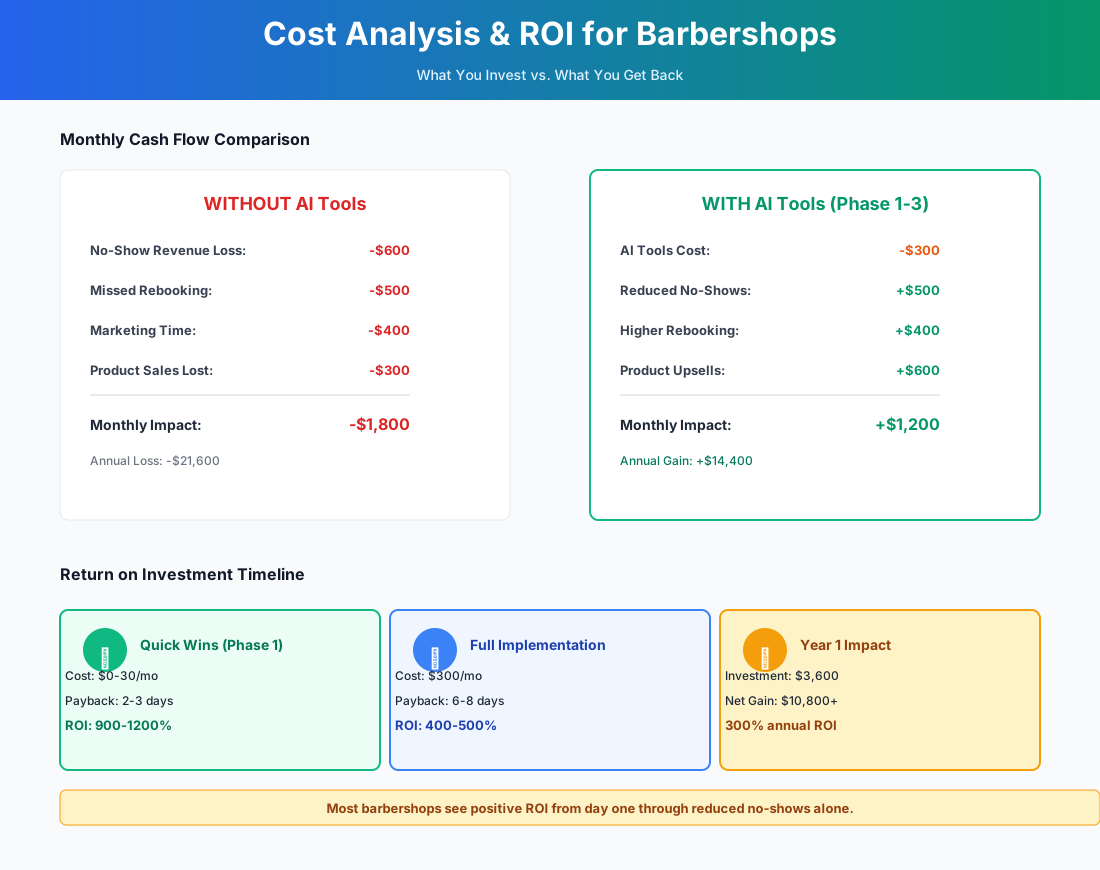
Here's a breakdown of the costs and expected returns:
Frequently Asked Questions
Can an AI receptionist book with a specific barber, or does it just grab the next open slot?
It handles barber-specific requests — as long as your scheduling platform supports them, which Booksy, Square Appointments, and Google Calendar all do. During setup, you list each barber's name, specialties, and schedule. When a caller says "I want a fade with Marcus on Saturday," the AI checks Marcus's availability and books it. If Marcus is full, it offers alternatives naturally: "Marcus is booked Saturday, but he has a 2:00 PM on Thursday. Would you like that, or would you prefer to see another barber Saturday?" It doesn't dump people into the first open slot.
My walk-ins always arrive in waves. Does Waitwhile actually help, or just add a step?
It genuinely helps — but only if you put the QR code somewhere visible before people walk in the door. The goal is to let someone check the queue from the parking lot and decide whether to wait. That's what stops the walkaway. Inside the shop, it also means you're not managing a verbal "you're third in line" conversation every five minutes. The AI learns your barbers' actual pace over the first two weeks, so wait estimates get accurate enough that clients trust them.
I run a booth rental shop. Can I use these tools without creating an employer/employee liability?
Yes, with one clear line. You can offer your booking platform to renters for free, list them on it, and run shop-level promotions through it. What you can't do is mandate that renters use it, track their individual performance metrics, or set utilization targets — that starts to look like employer behavior in an IRS audit. Offer the tools. Don't require them. Most renters opt in voluntarily when it simplifies their day.
How do I keep client data at the shop level when a barber leaves?
This is exactly what GlossGenius's shop-owned client model is built for. Every appointment booked through your platform stores the client's contact info, cut preferences, and visit history under the shop — not under the individual barber's profile. If Marcus leaves and takes his Instagram following, you still have a database of every client he ever saw, plus their rebooking history. That's the whole point.
Is AI going to replace my front desk?
No. And if anyone tells you it will, they're selling something. An AI receptionist handles the calls you physically can't get to — that's the use case. It doesn't replace a receptionist who knows your regulars' names, notices when something is off, or handles the kind of nuanced situation that requires judgment. For a shop that can't afford full-time front desk help, it fills the gap. For a shop that already has dedicated staff, it handles overflow.
Should I use SQUIRE since it's built specifically for barbershops?
SQUIRE is genuinely good — the only all-in-one platform built exclusively for barbershops, and over 3,000 shops use it. But its value scales with complexity. For a solo barber or 2-chair shop, GlossGenius ($24/month) plus My AI Front Desk ($49/month) plus free tools gets you further for about $73/month total. The tipping point is usually 4+ barbers or 2+ locations. That's when a bundled POS, payroll, and AI marketing in one platform outweighs the cost premium.
The barbershop isn't going anywhere — people will always need haircuts, and they'll always prefer the shop that knows their name, remembers their fade preference, and gets them in without a long wait. None of that changes with AI. What changes is how much of your day you spend on the business around the chair instead of the chair itself.
If you're also building out your client communications stack, our guide for hair salons covers the appointment-heavy side in more detail, including platform comparisons for shops that run 90%+ by appointment.
More AI Implementation Guides
AI Tools for Bookkeeping Services: 2026 Guide
Best AI tools for bookkeeping services in 2026: Automate categorization, reconciliation, and document chasing without hiring extra staff.
AI Tools for Marketing Agencies: 2026 Playbook
The best AI tools for marketing agencies in 2026. A phased plan to kill Hell Week reporting, scale content, and fix billable utilization without new hires.
AI Tools for Home Health Care Agencies: 2026 Guide
A practical 2026 guide to AI tools for home health care agencies — HIPAA-safe automation for shift-filling, OASIS-E documentation, EVV, and claim denials.
AI Tools for Dermatology Practices: 2026 Guide
The best AI tools for dermatology practices in 2026 — cut prior-auth hours, reduce no-shows, and grow your cosmetic line, with a HIPAA-first rollout plan.
AI Meeting Assistant Cost for Accountants in 2026
What does an AI meeting assistant cost for an accounting firm? Free tiers, per-seat pricing from ~$17/user/mo, and the real total for a 3-, 5-, and 10-person team, compared.
Best AI Meeting Assistant for Accountants & Bookkeepers
The best AI meeting assistant for accountants records, transcribes, and summarizes client calls into action items. Compare 6 real tools and 2026 pricing.
Keep exploring
See every AI implementation guide we've published for Beauty & Personal Care, or browse the full library by industry or category. Looking for a specific platform? The AI tools directory indexes every product mentioned across our guides, and the comparisons hub puts the most-asked head-to-heads side by side.