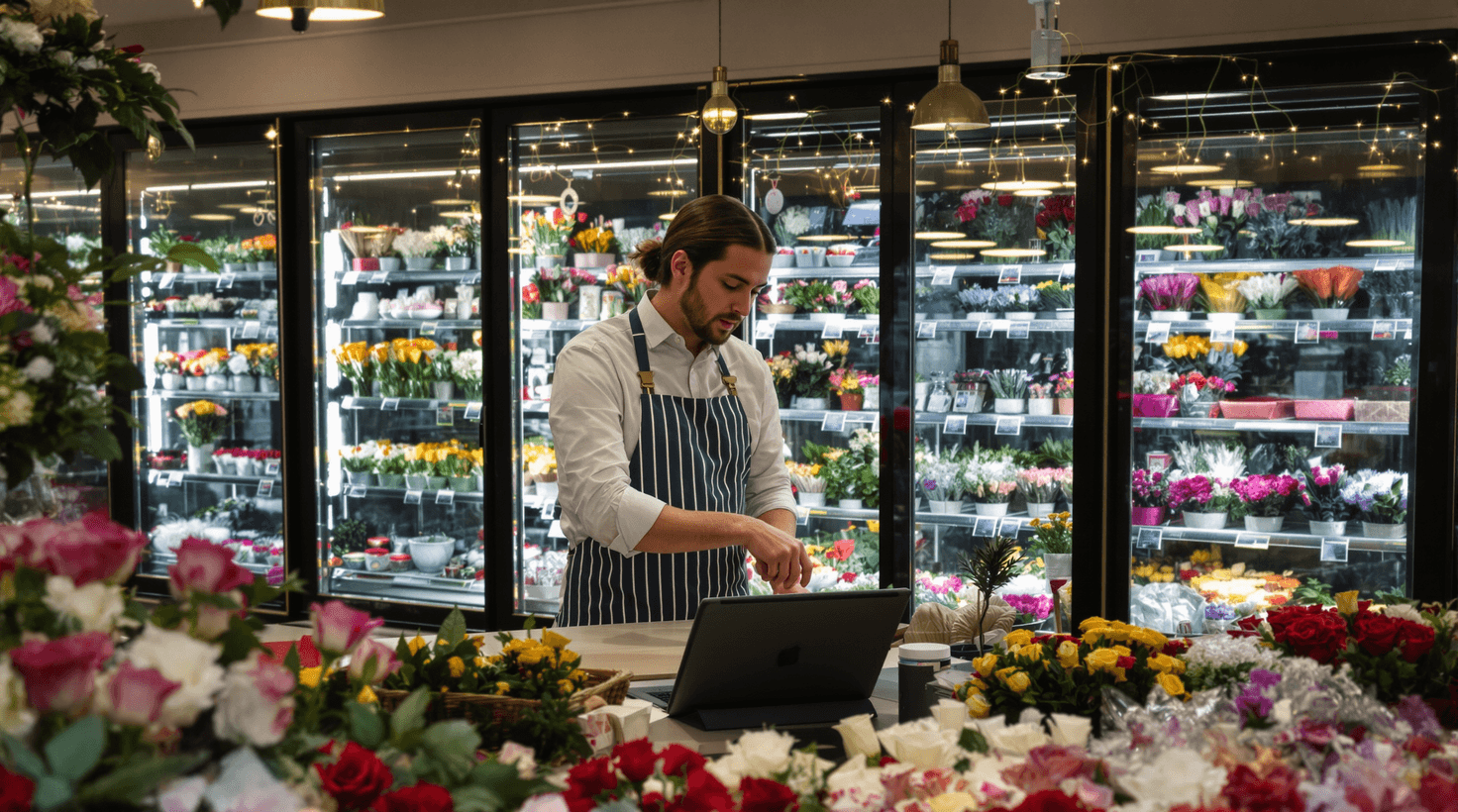
February 13th. You've been at the shop since 4:30 AM. The cooler is stuffed with roses — three varieties, 400 stems — and your delivery driver just called to say his van won't start. Your phone shows eleven missed calls from the last eight hours, mostly gift-buyers panicking about same-day delivery. Your Shopify cart has seven abandoned checkouts totaling $847. And somewhere in your inbox is a wedding inquiry from a bride who emailed at 11 PM last night and will almost certainly book someone else by noon today.
This is floristry in peak season: everything critical happens at once, and the things that can be automated almost never are.
Valentine's Day and Mother's Day together generate somewhere between 30% and 40% of the typical flower shop's entire annual revenue in roughly six combined selling days. That concentration of income is extraordinary — and it means every failed order capture, every abandoned cart, every unanswered after-hours call has an outsized cost. Below is a breakdown of how that revenue actually stacks up across the year, because it shapes every tool decision in this guide.
| Holiday / Period | Share of Annual Revenue | Key Bottleneck |
|---|---|---|
| Valentine's Day (Feb 10–14) | 18–22% | Order volume × 5–8x; delivery routing fails |
| Mother's Day (May 8–12) | 12–16% | Pre-order capture; perishable over-ordering |
| Christmas / Thanksgiving | 8–12% | Online orders; subscription gifting |
| Wedding season (May–Oct) | 20–30% | Proposal time; stem pricing accuracy |
| Rest of year | 20–35% | Consistency; customer retention |
The upshot: if your systems break on Valentine's Day, you don't just lose a few orders — you lose a week's worth of revenue in an afternoon. That's the lens through which every AI tool recommendation here is made.
TL;DR — Top 3 Recommendations
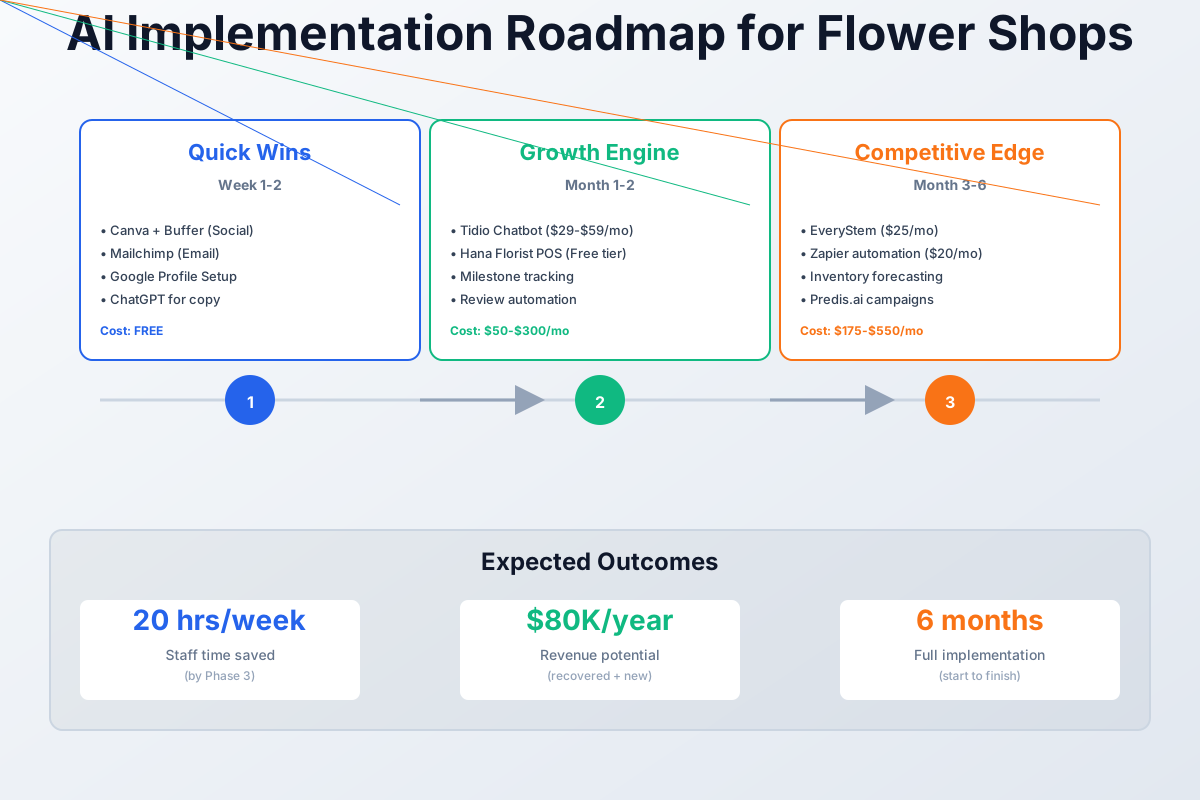
- Canva + Buffer + ChatGPT (free) — Batch-create a full week of social media content in under an hour
- Tidio with Lyro AI ($29-$59/mo) — Capture after-hours website orders and recover abandoned carts automatically
- EveryStem ($24.99/mo) — Price wedding proposals accurately in minutes, not hours, and stop undercharging for event work
Here's a visual overview of the implementation roadmap:
The Best AI Receptionist for Florists
During Valentine's and Mother's Day — and every wedding inquiry that lands at 11 PM — the calls you miss are the orders you lose. An AI receptionist for florists answers the phone 24/7, takes same-day delivery details, quotes basic arrangements, and books or routes wedding consultations while you're elbow-deep in the cooler. The best fit for most flower shops is Rosie ($49–99/mo) — it handles natural conversations, captures the order details, and texts you the lead — with Goodcall ($79/mo) a strong alternative if you want it booking straight into a calendar. See how they stack up in our Goodcall vs Rosie comparison, or browse the best AI receptionists for small businesses.
This is a different job from the website chatbot in the TL;DR above (Tidio/Lyro captures online carts). The AI receptionist captures the phone — and in floristry, the highest-value calls (funeral orders, last-minute Valentine's deliveries, six-figure wedding pipelines) still come by phone. On the two days that make 30–40% of your year, an AI receptionist is the difference between catching the overflow and sending it to the florist down the street. Run it during peak weeks even if you turn it off the rest of the year.
The Florist's Operating Reality
Before diving into tools: wire services like FTD and Teleflora take 20–27% commissions on incoming orders. Margins after rent, labor, and spoilage hover around 15–25% for well-run shops. The average florist wastes 15–25% of purchased stems to spoilage — on $100,000 in annual wholesale purchases, that's $15,000–$25,000 composted every year. And the wedding segment, often the highest-margin work ($2,000–$15,000+ per event), requires hours of stem counting and proposal writing that most florists don't have time to do properly during peak weeks.
Every one of these problems has an AI-powered fix in 2026, most for free or under $60/month.
Start Here: Quick Wins That Cost Nothing
These tools deliver immediate results. Set them up during a slow afternoon and you'll see the impact within a week.
Stop Posting When You Feel Like It
Instagram is genuinely one of the best platforms for florists — visual, local, emotional. The problem isn't the channel. It's that posting consistently takes 5–8 hours per week between photographing arrangements, writing captions, choosing hashtags, and actually posting. During Valentine's week, social media is the first thing to get dropped — exactly when your visibility matters most to last-minute buyers.
Here's the workflow that collapses this to under an hour a week:
Canva
Best for: Creating professional social posts from your arrangement photos
Upload a photo of your arrangement, click "Magic Design," and Canva generates 5-8 complete post designs instantly. The free plan includes one Brand Kit for your shop colors and logo. Pair with Buffer's free plan to schedule everything in advance.
Buffer
Best for: Scheduling a full week of posts in one sitting
Connect Instagram and Facebook, schedule posts at optimal times, and track what's actually driving engagement. The free plan handles 3 channels with 10 scheduled posts each — plenty to start.
Snap 10 photos of your best current arrangements near a window — natural light is everything. Upload them to Canva, run Magic Design, and you'll have a week of professional posts ready in about 30 minutes. Then open ChatGPT or Claude for captions:
Write 7 Instagram captions for a flower shop called [YOUR SHOP NAME] in [CITY]. Include:
- Fresh weekly arrivals — mention specific flowers by name
- A seasonal special with a price point
- Behind-the-scenes (designing, prepping, sourcing)
- Something romantic for couples
- Sympathy/comfort — tasteful, warm tone
- Supporting local — why buying from a local florist matters
- A spotlight on a specific flower variety with a fun fact
Each caption should be 2-3 sentences, feel warm and personal (not corporate), and end with 5-8 relevant hashtags including #[yourcity]florist.
Most shops that stick with this see $500–$2,000/month in additional orders once their Instagram stops going dark for two-week stretches. And during holiday run-ups — the three weeks before Valentine's Day, the four weeks before Mother's Day — consistent posting is the difference between capturing impulse buyers and losing them to the wire services.
ROI Snapshot
Monthly Cost
$0/mo
Time Saved
5hrs/week
Monthly Value
$1,500
ROI
Infinity%
One firm rule: never use AI-generated images of flowers. Your competitive advantage as a local florist is showing your actual arrangements. Use AI for text, scheduling, and design layouts — the flowers in the photos must always be real and yours.
Build Your Holiday Email Machine in One Afternoon
Right now, 1-800-Flowers has its Valentine's Day email sequence drafted, early-bird pricing locked in, and a list of every customer in your zip code who's ordered flowers in the past two years. You have zero campaigns scheduled.
That gap is closable in about three hours.
Mailchimp
Best for: Building your email list and automating holiday campaigns
The free plan covers up to 500 contacts — more than enough to start. Set up a signup form, print a QR code for your checkout counter, and start collecting emails from every customer. Email marketing averages $36 ROI per $1 spent.
The single highest-leverage move: collect emails at checkout. Print a small sign — "Join our VIP list for early access to holiday specials & 10% off your next order" — with a QR code linking to your Mailchimp signup form. Aim for 10–20 new signups per week. Then batch-write your campaigns:
Write a 4-email Valentine's Day campaign for my flower shop [SHOP NAME] in [CITY]:
- TEASER (send 2 weeks before): Build excitement, mention we're taking pre-orders
- EARLY-BIRD (send 1 week before): 15% off orders placed by Feb 10, showcase 3 arrangement options with prices
- LAST-CHANCE (send 2 days before): Urgency — "Don't be the one who forgot," show same-day delivery cutoff time
- SAME-DAY (send morning of Feb 14): For procrastinators — "Still time! We have same-day arrangements available until [cutoff time]"
Each email should be under 150 words, warm and personal (not salesy), mention specific flower varieties, and include a clear "Order Now" call to action. Include subject lines with emoji.
Done right, this is worth $2,000–$8,000/year in captured pre-holiday revenue. Start with even 20 subscribers — then send a short "what's blooming this week" email monthly between holidays. You want to be the florist they think of, not whoever runs the next Google ad.
Make Your Product Pages Work for You
Look at your website's product listings. If the description under a $65 bouquet reads "Beautiful mixed bouquet," Google has no idea what's on that page — and neither does the customer wondering whether it'll arrive in time for a Thursday birthday. Google's AI-powered search now pulls answers directly from your Business Profile and product pages. Thin descriptions mean you're invisible.
The fix takes about 90 minutes and pays off permanently:
Write a compelling 50-80 word product description for an online flower shop product:
Arrangement: [describe the flowers, colors, size, and vessel] Price: [price] Shop name: [YOUR SHOP NAME] City: [YOUR CITY]
Mention the specific flower varieties by name, suggest 2-3 perfect occasions (birthday, anniversary, sympathy, congratulations, etc.), and end with a warm sentiment. Naturally include the phrase "fresh flower delivery in [your city]." Keep the tone warm and personal, not corporate.
Most shops have 15–40 products. At 2 minutes per description using AI, you can redo your entire catalog before lunch. Round it out by updating your Google Business Profile: add all services (wedding flowers, sympathy, delivery, subscriptions, event florals), upload 10+ high-quality arrangement photos, and set a weekly reminder to add 2–3 new photos. Google rewards businesses that show regular activity.
Better product page conversion and improved local search visibility is worth $1,000–$3,000/month — one-time setup, then 15 minutes a week to maintain.
Tools Worth Paying For — $50–$300/Month
With consistent social media, a growing email list, and an optimized online presence, you're ready for tools that directly capture more revenue.
The After-Hours Order You're Currently Losing
How many visitors add something to a florist's online cart and leave without buying? Between 60% and 70%. That's not a traffic problem — it's a conversion problem, and most of it happens at night when you're not there to answer a simple question: Does this deliver to my zip code? Can I get it by tomorrow? What's the right thing to send for a sympathy arrangement?
Without instant answers, they order from 1-800-Flowers instead.
Tidio with Lyro AI
Best for: Capturing after-hours orders and recovering abandoned carts
Tidio's AI chatbot handles roughly 50% of customer inquiries autonomously. It recommends arrangements based on occasion and budget, answers delivery questions, and sends gentle nudges when someone adds to cart but doesn't check out. Integrates with Shopify, WordPress/WooCommerce, and Floranext.
If you've also read our guide on AI tools for bakeries, Tidio shows up there too — it works for any product business where customers browse online and need guidance before buying. For florists specifically, train the bot on three conversations:
- "What's your delivery area?" — Load your delivery zip codes
- "Do you offer same-day delivery?" — Set your cutoff time (e.g., "Order by 1 PM for same-day delivery")
- "What should I get for [occasion]?" — Map occasions to arrangement suggestions by price point
The cart abandonment feature alone often covers the subscription cost. When a customer adds a bouquet and starts to leave, Tidio sends: "Still deciding? I can help you choose the perfect arrangement."
ROI Snapshot
Monthly Cost
$59/mo
Time Saved
4hrs/week
Monthly Value
$2,900
ROI
4815%
On a high-volume Valentine's Day evening — say, 80 visitors between 8 PM and midnight — even recovering three of those abandoned carts at $75 average pays for a month of Tidio.
Turn Repeat Buyers Into Regulars
A customer sends anniversary flowers in June. You do beautiful work. He's happy, his wife is thrilled. And next May, he completely forgets — until June 4th, when he panics and orders from whoever shows up first on Google.
He was yours to lose. A florist POS with milestone tracking sends him an email in late April: "Your wife Sarah's anniversary is coming up on June 8! Last year you sent the Garden Rose bouquet — want to order again?"
Hana Florist POS
Best for: Shops wanting milestone tracking and a website without monthly fees
Free POS + website with no monthly fee (just a commission on web orders). Tracks birthdays, anniversaries, and sympathy dates for each customer. Sends automated reminder emails: "Your wife Sarah's birthday is coming up on March 15! Last year you sent the Garden Rose bouquet — would you like to order again?"
FloristWare
Best for: Established shops needing delivery management and wire service integration
Purpose-built for retail florists with deep delivery management, route optimization, customer purchase history analysis, and wire service support (FTD, Teleflora). The $149/month feels steep, but shops doing 100+ orders/week will recoup it through delivery efficiency alone.
Build one habit: for every in-store order, ask "Is this for a special occasion? I'd love to send you a reminder next year so you never have to stress about it." Most customers love it — it reads as thoughtful, not pushy. Each reminded customer is $50–$150 in revenue that would otherwise go to a competitor. Over a few years, this pushes repeat-order rates from the typical 15–25% toward 35–50%.
Reviews Are Your Local SEO — Automate Getting Them
Pull up Google Maps and search "florist near [your city]." Count the reviews on the top three results. That's your benchmark.
Here's something specific to florists that most businesses don't have: the recipient of your product (the person getting the flowers) is usually different from the buyer (the person who ordered). That's two potential reviewers per order. Smart shops request a review from the buyer about the ordering experience, then send a separate thank-you to the recipient that gently mentions reviews.
Set up your Google Review short link (search "Google review link generator" and paste your business name), then save this text template:
"Hi [Name]! Thank you for your order from [Shop Name]. We'd be so grateful if you could leave us a quick Google review — it means the world to a small local business! [link]"
Send it 1–2 hours after confirmed delivery — that's when satisfaction peaks. Hana Florist POS can automate this entirely, triggering the message the moment you mark an order as delivered. For shops in hyper-competitive markets with 5+ florists within a mile, Birdeye ($299/month) offers AI-generated review responses and competitive benchmarking — but it's expensive for most shops doing under 200 orders/month.
Five to ten new Google reviews per month is realistic. Each additional star on Google increases revenue 5–9%. Respond to every review within 24 hours — the algorithm favors businesses that engage.
The Advanced Layer — Building a Real Competitive Edge
Solve the Wedding Proposal Problem
Wedding flowers are often the highest-margin segment — $2,000–$15,000+ per event. Winning those events requires hours of stem counting, cost calculation, and visual presentations. Most florists undercharge because they can't accurately calculate costs during a consultation, then lose clients because their proposals look unprofessional compared to competitors using modern software.
The core math problem: if you're not consistently hitting 3.5x markup on wholesale cost for event work, you're subsidizing your wedding clients with retail revenue. Most florists who run their actual numbers for the first time discover they've been doing exactly this.
EveryStem
Best for: Accurate stem counting and pricing for wedding/event work
Enter your wholesale costs once, build recipe templates for common pieces (bridal bouquet, centerpiece, ceremony arch), and EveryStem automatically calculates stem counts, rounds up to wholesale bunch minimums, and shows your profit margin in real time. At $24.99/month with no contract, it pays for itself with a single wedding.
Details Flowers Software
Best for: High-volume event florists needing full CRM with e-signatures
The premium standard for wedding floral software. AI color palette tools, supplier marketplace, automated ordering, and client-facing proposals with e-signature capture. Worth it if you handle 10+ events per month. Users report 42% faster proposal creation.
For client presentations, Flower Architect offers a 3D visualization platform with 1,700+ flower models across 190+ categories. Upload a photo of the venue and place your virtual arrangements to show clients exactly how their wedding will look. Brides choose with their eyes, not spreadsheets.
Write a follow-up email for a wedding floral consultation I just had with [BRIDE'S NAME]. Their wedding is [DATE] at [VENUE]. We discussed [ARRANGEMENTS — e.g., bridal bouquet with garden roses and peonies, 10 centerpieces, ceremony arch].
The email should:
- Thank them warmly for the consultation
- Mention I'm attaching the detailed proposal with pricing
- Reference one specific detail they were excited about during our chat
- Include a gentle deadline ("I'll hold your date until [1 week from now]")
- End with a warm, personal sign-off
Keep it under 150 words. Tone: warm, professional, excited (not salesy).
Wedding close rates move from 30–40% to 55–70% with accurate, professional proposals — a shift worth $2,000–$8,000/month for shops doing consistent event business.
Cut the Busywork That Eats Your Mornings
Every flower shop runs the same 2-minute tasks on loop: entering web orders into the POS, texting the driver, sending confirmation emails, updating inventory spreadsheets. None of this requires human judgment.
Zapier
Best for: Connecting your existing tools so they talk to each other automatically
Create automated workflows called "Zaps" that eliminate manual data transfer. Use Zapier's AI builder — type in plain English what you want ("When I get a new Shopify order, text me the customer name, delivery address, and total") and it builds the automation. Free tier gives you 5 Zaps with 100 tasks/month.
Start with these three automations:
- New web order → text notification — When a Shopify/WooCommerce order comes in, instantly text you and your delivery driver with order details
- New order → Google Sheet log — Automatically log every order for easy reporting and tax prep
- Delivery confirmed → review request — When you mark an order as delivered, automatically send the Google Review text to the buyer
If you're running similar automations for a boutique retail store, the pattern is identical — the difference is florist-specific triggers like delivery confirmation and wire service order routing.
Three to five hours per week reclaimed from data entry goes back into design and customer service. That's worth $500–$1,500/month.
Attack Perishable Waste With Data, Not Instinct
The gut-feel ordering method wastes $15,000–$25,000 per year in spoiled stems for the average shop. More importantly, the waste pattern is different at holiday peaks: many florists over-order by 15–30% for Valentine's Day and Mother's Day out of fear of running out, then spend the week after each holiday composting surplus.
Start by tracking every wholesale purchase and daily waste. After 4–6 weeks of data, run AI analysis. If you're using Hana Florist POS from the previous section, the inventory tracking module does this automatically. Otherwise, a Google Sheet works:
Daily Waste Log columns: Date | Stem Type | Quantity Wasted | Reason (didn't sell / arrived damaged / wilted early)
After a month of data:
Analyze this flower shop inventory and waste data. The data shows my weekly wholesale purchases and daily waste for the past [X] weeks.
[PASTE YOUR DATA]
Tell me:
- Which stem types have the highest and lowest sell-through rates?
- What are my weekly demand patterns by day of the week?
- Which stems am I consistently over-ordering by 20% or more?
- What seasonal trends do you see?
- Specific recommendations: which stems should I order less of, and by how much?
- Suggest a "happy hour" pricing strategy for stems approaching end-of-life (day 4-5)
EveryStem also addresses the wholesale minimum problem: it rounds up stem counts to bunch minimums across an entire event order so you can see exactly how many leftovers you'll have and plan retail arrangements around them. If a Saturday wedding needs 3 bunches of garden roses, Monday's retail display uses the remainder. Waste rate on event ordering drops from 20%+ to under 5%.
Most shops find 2–3 stem types they're over-ordering by 20–30%. A 10% waste reduction on $8,000/month in wholesale spend saves $800/month — nearly $10,000/year straight to the bottom line.
Build a "happy hour" protocol: when stems hit day 4–5, make grab-and-go bouquets at 30% off. You recover cost instead of composting, and some shops develop a regular following of customers who come specifically for the flash sales they post to Instagram Stories.
Level Up Seasonal Campaigns Before the Big Holidays
The free Canva + Buffer setup handles everyday posting well. For Valentine's Day, Mother's Day, Easter, and Christmas — the moments when your revenue is actually made — you need promotional videos, carousel posts, and coordinated multi-platform rollouts that look intentional rather than improvised.
Predis.ai
Best for: AI-generated holiday campaign content with videos and carousels
Describe your promotion in plain English ("Valentine's Day campaign, romantic rose bouquets $49-$149, same-day delivery, 15% early-bird discount") and Predis.ai generates complete posts with visuals, captions, and hashtags for every platform. Free plan gives you 15 AI posts/month — enough for seasonal campaigns. Includes competitor hashtag analysis to see what's working for other florists.
Start your Valentine's Day content by January 20, not February 10. Mother's Day content begins 3–4 weeks out. For shops that also do wedding photography partnerships, coordinated seasonal content across both businesses amplifies reach for both.
Two to three hours saved per holiday campaign, plus $500–$2,000 in additional revenue per major holiday through professional pre-order campaigns.
Things Not Worth Your Money Right Now
Skip These (For Now)
Dynamic pricing software isn't ready. QuickFlora's ICON AI dynamic pricing launched in beta in January 2025 and pricing still isn't disclosed. The concept — automatically raising prices as popular stems deplete on busy days — is genuinely useful for a florist running at capacity during Valentine's week. But it's too early to commit. For now, manually raising prices 15–20% on Valentine's Day and Mother's Day is sufficient and proven.
Birdeye at $299/month is only worth it in hyper-competitive markets with 5+ florists within a mile where you're specifically losing customers to review count. Under 200 orders/month, the free manual approach — texting a Google Review link after delivery — works nearly as well.
Never use AI-generated images of flowers on your website or social media. AI image generators create beautiful but obviously artificial arrangements. A customer who orders based on an AI image will be disappointed when the real arrangement looks different.
Keep wedding consultations human. AI chatbots should book the consultation call — never run it. Wedding clients are spending thousands and expect a personal experience. The software handles stem counting and proposals; you handle the relationship.
Don't drop wire services cold turkey. FTD and Teleflora commissions (20–27%) hurt, but they provide baseline incoming orders. Grow your direct online orders with the tools in this guide first, track the ratio monthly, and reduce wire service dependence gradually as you build volume to replace it.
Your First-Week Checklist
- Sign up for Canva (free) and upload your shop logo + brand colors
- Take 10 photos of your best arrangements near a window with natural light
- Use Canva Magic Design to create 7 social media posts from your photos
- Sign up for Buffer (free) and connect Instagram + Facebook
- Schedule your first week of posts in Buffer — you're done with social media for the week
- Sign up for Mailchimp (free) and create your email signup form
- Print a QR code signup card for your checkout counter with a 10% off incentive
- Use ChatGPT/Claude to write your next holiday email campaign (all 4 emails in one sitting)
- Rewrite your top 10 product descriptions using the AI prompt above
- Update your Google Business Profile: add all services, upload 10+ photos, write your business description
- Create your Google Review short link and save the review-request text template in your phone
- Start collecting emails from EVERY customer this week — aim for 10 signups
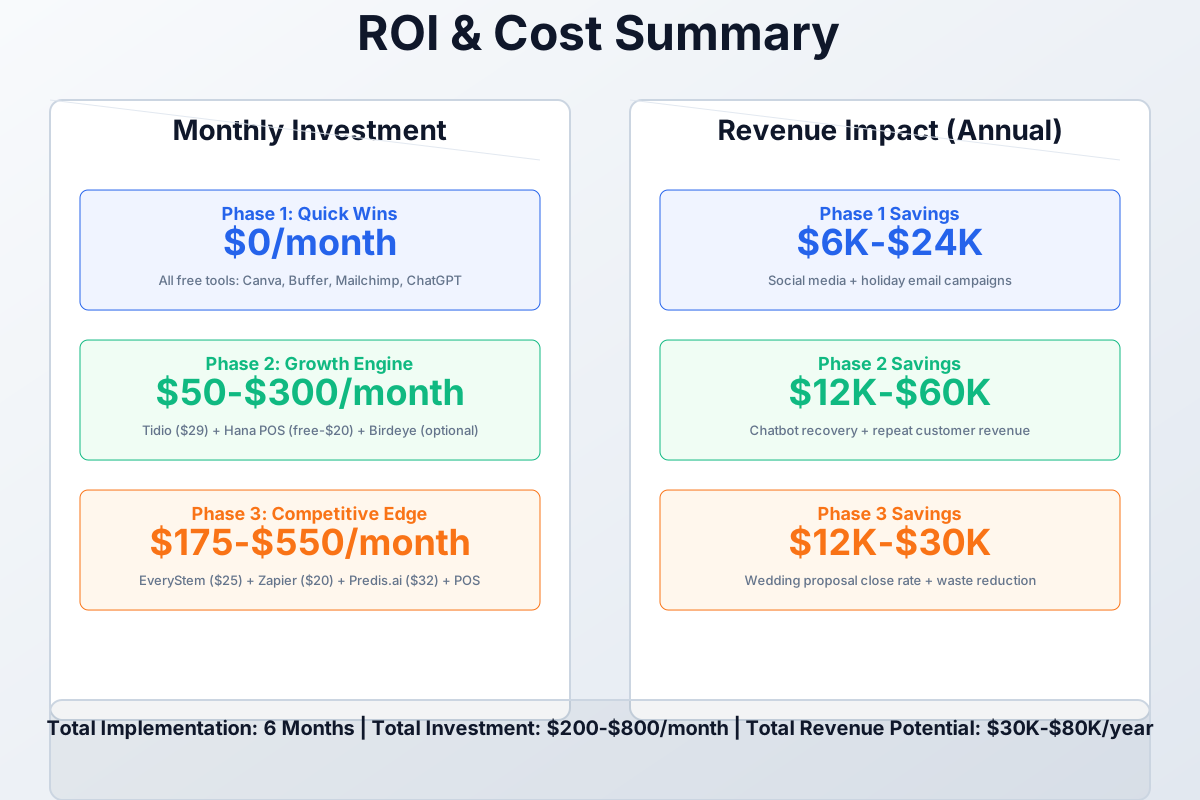
Everything on this checklist is free and can be completed in a single afternoon. Once you're seeing results from these free tools, evaluate the paid-tier investments.
Here's a breakdown of the costs and expected returns:
Frequently Asked Questions
Can AI actually predict how much to order for Valentine's Day and Mother's Day?
Yes, but it needs two or more years of your own data to be useful. Export POS sales history from past holidays and paste it into ChatGPT: "Here are my flower sales from the last 3 Valentine's Day periods. Predict my stem needs for this year by variety, accounting for a [X]% growth trend." It won't be perfect, but it beats gut instinct. The real win is cutting the post-holiday waste spike — most shops over-order by 15–30% for major holidays out of fear of running out, then compost the surplus. Even trimming that by half saves hundreds of dollars per peak.
How do I handle wire service orders alongside my own direct marketing?
Gradual substitution. Wire service orders pay you 20–27% less than direct orders for the same arrangement. Use the email, social, and Google review tools here to grow your direct order volume, and track the ratio monthly. When direct orders consistently fill your capacity, negotiate lower commission rates or phase out wire services entirely. FloristWare integrates with both channels so you can run them from one system during the transition — that avoids the operational chaos of maintaining two separate workflows.
What if a major weather event disrupts deliveries during a holiday?
Prepare the template before you need it, not during. In Buffer, you can pause all scheduled posts from your phone in about 10 seconds. Mailchimp emails can be paused or rescheduled from the mobile app. Write a "weather delay" email and social post as drafts in October — something like: "Due to [weather], we're extending our Valentine's specials through [new date]. All orders will be delivered safely — we'll reach out individually with updated delivery windows." You'll be very glad you have it when a February ice storm hits.
Do I actually need technical skills to set any of this up?
No. Every tool in this guide has a point-and-click setup. Canva, Buffer, and Mailchimp are designed for small business owners who've never touched automation software. Tidio installs via a single code snippet (your web developer or a freelancer can do this in 15 minutes if you don't want to). EveryStem is a spreadsheet-style interface. The only tool with any meaningful setup time is Zapier, and their AI builder now writes the automation when you describe it in plain English.
Should I invest in 3D visualization tools for wedding consultations?
Fewer than 2 weddings per month? Canva mood boards are free and plenty effective. Doing 3+ weddings monthly and competing against florists who show up with professional presentation software? Flower Architect becomes a real differentiator. Upload a photo of the actual venue, place your virtual arrangements, and the bride sees exactly how the ceremony arch looks in her specific space — not a stock photo approximation. If 3D proposals help you close one additional $5,000 wedding per quarter, the tool pays for itself several times over. That's the only math that matters.
The florists who are winning against the wire services and the online giants aren't doing anything mysterious. They're capturing the orders they would have lost at 11 PM on a Wednesday. They're sending the email reminder to the husband who forgot his anniversary. They're getting the Valentine's Day pre-order in February instead of watching it go to 1-800-Flowers. None of that requires a technology budget. It requires setting up the right tools once and letting them run.
Start with the checklist. The free tools first. Then, once you've seen what consistent Instagram posts and automated holiday emails actually do for order volume, the decision about what to pay for next becomes obvious.
More AI Implementation Guides
AI Tools for Breweries: The 2026 Owner's Playbook
The best AI tools for breweries in 2026: cut TTB compliance time, tighten COGS, streamline taproom scheduling, and target release marketing — starting free.
AI Tools for Bookkeeping Services: 2026 Guide
Best AI tools for bookkeeping services in 2026: Automate categorization, reconciliation, and document chasing without hiring extra staff.
AI Tools for Marketing Agencies: 2026 Playbook
The best AI tools for marketing agencies in 2026. A phased plan to kill Hell Week reporting, scale content, and fix billable utilization without new hires.
AI Tools for Home Health Care Agencies: 2026 Guide
A practical 2026 guide to AI tools for home health care agencies — HIPAA-safe automation for shift-filling, OASIS-E documentation, EVV, and claim denials.
AI Tools for Dermatology Practices: 2026 Guide
The best AI tools for dermatology practices in 2026 — cut prior-auth hours, reduce no-shows, and grow your cosmetic line, with a HIPAA-first rollout plan.
AI Meeting Assistant Cost for Accountants in 2026
What does an AI meeting assistant cost for an accounting firm? Free tiers, per-seat pricing from ~$17/user/mo, and the real total for a 3-, 5-, and 10-person team, compared.
Keep exploring
See every AI implementation guide we've published for Retail, or browse the full library by industry or category. Looking for a specific platform? The AI tools directory indexes every product mentioned across our guides, and the comparisons hub puts the most-asked head-to-heads side by side.