
It's 6:45 AM and your truck is already loaded. Two crews are pulling out of the yard, one heading north to a full day of mowing routes, the other east to finish a patio install that's running a day behind. Your phone buzzes — a homeowner on Google wants a quote for a spring cleanup. Then again — a property manager asking about a commercial maintenance contract. By the time you get to the first job site and can actually look at your phone, three calls have gone to voicemail. Two of those callers have already booked with the company that picked up.
That's the part most landscaping business guides skip over: the real money isn't in the one-off cleanups. It's in recurring maintenance accounts — the 40-week mowing client, the HOA that renews every November, the commercial property manager with six sites. One recurring account at $400/month is worth $16,000 over three years before you ever win another job. But recurring contracts only compound if you capture the lead in the first place, close fast, and keep routes tight enough that you're not burning margin on windshield time.
The AI tools in this guide are organized around that specific problem: locking in recurring revenue and running tighter routes. Not generic "efficiency." The specific levers that separate a $400K landscaping company from an $800K one.
TL;DR — Top 3 Recommendations
- GoodCall ($59/mo) — AI phone answering captures every lead while you're in the field. Pays for itself with one saved recurring account per season.
- Deep Lawn — Satellite property measurement lets you quote 10x more properties without site visits. The single biggest time-saver for estimators chasing commercial maintenance bids.
- Jobber ($169/mo Connect plan) — All-in-one scheduling, invoicing, and AI-powered quoting that replaces 3–4 separate tools and keeps your recurring accounts from slipping through the cracks.
The Best AI Marketing Tools for Landscapers
The most useful AI marketing tools for a landscaping business do four things: generate seasonal social posts so your feed stays active during the months you're too busy to touch a keyboard, write service-page and Google Business Profile copy that pulls in search traffic, automate review requests after each completed job, and draft email campaigns for spring cleanup and fall leaf removal before competitors have even thought about theirs.
For social content and seasonal email copy, ChatGPT and Claude (both free) handle the writing side without a subscription. Paste in your service list and target city, and you'll have a spring cleanup blast or a snow removal contract pitch in under a minute — the CopyablePrompts later in this guide give you exact starting points. For hands-off social scheduling built specifically for landscaping contractors, Apaya ($39/mo) learns your brand, auto-generates seasonal posts from the photos your crews take on the job, and publishes them on a consistent schedule so your pages don't go dark in June. On the review side, NiceJob ($75/mo) fires automated text and email requests a few hours after a job closes — when the freshly edged beds are still top of mind — and AI-drafts replies so you're never staring at a response box at 9 PM.
Most landscaping companies already have the content. They just don't have the bandwidth to use it. These tools handle that gap.
The Landscaping Revenue Problem Nobody Talks About
Ask most landscaping owners how they'd grow revenue 30% and they'll say "more leads." That's rarely the right answer. Here's what the numbers actually look like for a typical 4-crew operation:
| Revenue Type | % of Total | Avg Job Value | Annual Value per Account |
|---|---|---|---|
| Recurring maintenance (mowing, fert, cleanup) | 55–65% | $350–$600/mo | $5,000–$9,000 |
| One-time design/install | 25–35% | $8,000–$40,000 | Single transaction |
| Reactive/ad-hoc (aeration, overseeding) | 10–15% | $300–$800 | Variable |
That top row — recurring maintenance — is the engine. It fills your schedule before spring even starts, it's what makes crew utilization predictable, and it's what buyers pay multiples on if you ever sell the business. One-off installs are great margin when you can get them, but you can't forecast payroll around them.
The second number to track is route density: revenue per mile driven. A crew doing $1,800/day in a tight 8-property cluster has a completely different cost structure than a crew doing $1,800/day across 14 properties spread over 35 miles. Fuel, drive time, wear — it adds up fast. Operators who track this figure typically find they're losing $800–$1,500/month in margin per crew to route sprawl. The AI tools in Phase 3 address this directly.
Then there's seasonality. Spring and summer account for 60–70% of annual revenue for most operations in northern markets. The window to lock in recurring accounts for the season is roughly six weeks — mid-February through late March, before competing companies have filled their schedules. Miss that window and you're fighting for scraps in April.
These three levers — recurring contract rate, route density, and seasonal capture — are the spine of how the tools below are organized.
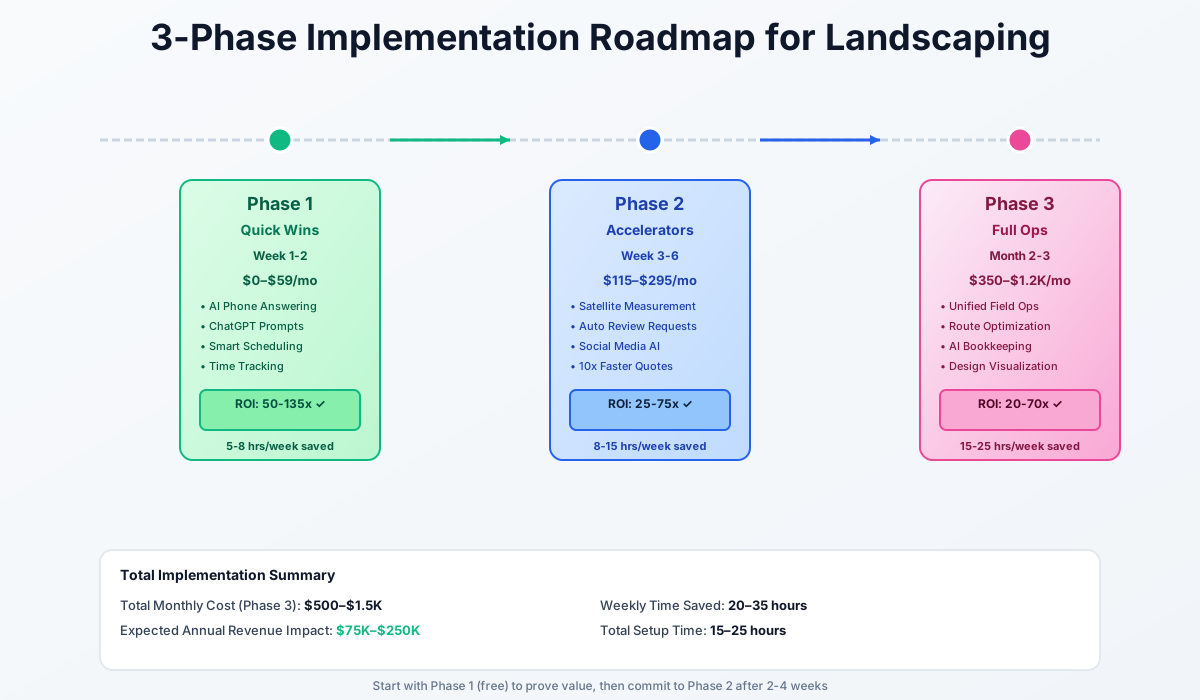
Here's a visual overview of the implementation approach:
Quick Wins: Free to $59/Month
These three tools require no technical ability and solve the problems that cost you money every single day. You can set up all three in a single afternoon.
The Call That Books the Recurring Account
Your estimator drives 25 minutes to measure a property, spends an hour on a detailed proposal, and lands a $450/month maintenance contract. A year later that account is worth $5,400. Now imagine that same account never called back because you were on a job when they rang and the competitor picked up. That's not a hypothetical — it's happening multiple times per week during peak season.
GoodCall
Best for: Solo operators and small crews without office staff
AI phone answering built for landscaping companies. Answers every call 24/7 in natural language, captures the customer's name, address, project details, and preferred callback time. Handles English and Spanish. Integrates directly with Jobber, LMN, and Google Calendar.
Setup takes 30–45 minutes:
- Sign up for GoodCall's 14-day free trial — no credit card required
- Set your business hours, services offered (mowing, landscaping, hardscaping, snow removal), and service area
- Set up conditional call forwarding so GoodCall only answers when you can't — your phone carrier does this in 5 minutes
- Connect to your calendar (Google Calendar, Jobber, or LMN) for direct estimate booking
- Test it yourself: call your own number and pretend to be a homeowner asking about a maintenance contract
GoodCall typically saves operators 5–8 hours per week on returning missed calls and phone tag. More importantly, it recovers recurring accounts that would have walked. At $59/month, one retained $400/month mowing contract covers two and a half years of the subscription.
Don't Skip the Test Call
Always call your own number and role-play as a customer before going live. You need to hear how the AI sounds, make sure it captures the right service details, and verify the lead summaries actually reach you. Five minutes of testing prevents embarrassing customer experiences.
AI Writing: The Emails and Follow-Ups You Never Send
You're spending 3–5 hours per week writing the same types of things: estimate follow-up emails, seasonal promotion blasts, Indeed job ads for crew members, Google review responses, and safety documentation. The problem isn't that these things are hard — it's that you never have time to sit down and do them during the season when they'd actually matter.
Both ChatGPT and Claude are free to use — no setup, no subscription, no technical skills. Open a browser, paste your situation, and get a draft back in 30 seconds.
Write a friendly email to my residential landscaping customers reminding them about [spring cleanup / fall leaf removal / snow removal contracts]. My company is [COMPANY NAME] in [CITY, STATE]. We offer [LIST SERVICES]. Include a clear call-to-action to book their spot early since our schedule fills up by [MONTH]. Keep it under 200 words and make it sound personal, not corporate. Mention that returning customers get priority scheduling.
Write a short, friendly follow-up text message (under 100 words) from a landscaping company owner to a homeowner named [NAME] who received a quote for [PROJECT TYPE] [X] days ago but hasn't responded. Don't be pushy — mention that you're happy to answer questions or adjust the scope. Include that your spring schedule is filling up. Sign it from [YOUR NAME] at [COMPANY NAME].
Write a compelling Indeed job posting for a landscaping crew member position. Company: [NAME], located in [CITY, STATE]. Pay: $[XX]-$[XX]/hour. Requirements: valid driver's license, ability to lift 50 lbs, reliable transportation. We provide: [equipment, training, year-round work with snow removal, etc.]. Emphasize outdoor work, team environment, and advancement to crew leader. Keep it under 300 words. Include 3 specific reasons someone would choose us over working for a big chain landscaping company.
Studies consistently show 60–70% higher close rates when you follow up within the hour instead of the next day. That $0/month tool is doing more revenue work than most paid subscriptions.
Free GPS Tracking That Stops Phantom Overtime
Paper timesheets cost you money two ways: crews round up (even 15 minutes per person per day across 8 employees is 10 hours per week of phantom labor), and you have zero visibility into whether crews arrived at job sites on time. You also can't do accurate job costing without per-site time data, which means you can't tell which recurring accounts are actually profitable.
Homebase
Best for: Landscaping companies with 1 location wanting free scheduling and time tracking
Free scheduling, GPS time clock, and team messaging for unlimited employees. Crews clock in on their phones with GPS verification at each job site. Built-in labor law compliance alerts flag overtime and break violations before they become expensive.
Setup runs about an hour:
- Sign up at joinhomebase.com — completely free, no credit card
- Add employees with their phone numbers — they get an automatic app download link
- Set up your job sites as "locations" so GPS tracking shows crew arrival and departure at each property
- Build next week's schedule using drag-and-drop
- Turn on auto-scheduling to let AI suggest crew assignments based on availability and overtime limits
- Show crews how to clock in/out — takes 2 minutes of training per person
Plan for 2–3 hours saved per week on scheduling and timesheet management, plus $500–$1,500/month back from eliminating phantom overtime charges. The per-site time data you get here also feeds directly into the job costing work you'll do in Phase 3.
ROI Snapshot
Monthly Cost
$0/mo
Time Saved
10hrs/week
Monthly Value
$6,800
ROI
Infinity%
Total quick-win investment: $0–$59/month. Time saved: 10–16 hours/week. If you do nothing else in this guide, these three moves alone will cut your daily administrative burden by more than half.
Revenue Accelerators: $115–$295/Month
With lead capture running and daily admin cut in half, the next tier focuses on tools that directly grow revenue: faster estimating during the critical pre-season window, more Google reviews, and consistent marketing through peak season.
Quote More, Win More Recurring Accounts
Every maintenance contract starts with an estimate. The bottleneck isn't your pricing — it's measurement. Walking a property, pacing bed dimensions, calculating turf area with a measuring wheel: 45–90 minutes per property including drive time. At that rate your estimator can quote maybe 4–5 properties a day, which caps your pre-season push right when you need to be locking up accounts the fastest.
Deep Lawn
Best for: Lawn care and maintenance companies wanting instant satellite-based quoting
AI-powered property measurement using satellite imagery. Instantly calculates lawn area, lot size, beds, driveway, and sidewalk areas. Connects your pricing tables to auto-generate quotes. Includes an embeddable e-commerce widget so customers can get instant quotes on your website 24/7.
If your estimator currently measures 4 properties per day, Deep Lawn lets them quote 20–40 properties per day without leaving the office. At a 35% close rate on maintenance contracts, that's the difference between locking up 7 recurring accounts per week and 35. During the 6-week pre-season window, that gap compounds hard.
Implementation steps:
- Request a demo at deeplawn.com — their team walks you through setup for your specific services
- Input your pricing tables: $45/1,000 sq ft for mowing, $85/yard for mulch, $3.50/linear foot for edging — whatever your rates are
- Test on 5 properties you've already measured manually — compare AI measurements to your actuals
- Set up the customer-facing e-commerce widget on your website for 24/7 instant quotes
- If you use Service Autopilot, connect Deep Lawn through their built-in integration
Always Verify for Design/Build Projects
Satellite measurement is highly accurate for lawn maintenance (mowing, fertilization, mulch). For hardscaping, grading, drainage, or complex landscape construction — always verify on-site. Satellite can't see slope, drainage patterns, or underground utilities. Use it for the initial measurement, then confirm details during a site walkthrough.
For companies bidding commercial maintenance contracts and HOA portfolios, Beam AI by Attentive.ai handles more complex takeoffs — measuring trees, shrubs, irrigation zones, and snow management areas from aerial imagery. Their QA-verified takeoffs run $30–$37 per sheet and deliver in 6–48 hours. It's the right option for companies doing $500K+ in commercial work.
Reviews Are Route Density for Your Google Ranking
A landscaper with 200 Google reviews ranks above one with 30 in local search results. It doesn't matter who does better work — that's just how the algorithm works. And in a competitive market, sitting at 35 reviews while a competitor has 180 is costing you inbound leads every week without you seeing it.
The problem isn't customer satisfaction. The problem is that asking for reviews is awkward mid-season, crews forget, and satisfied customers simply don't think about it. You need an automated trigger.
NiceJob
Best for: Landscaping companies wanting hands-off review generation and social proof
Automatically sends personalized review requests via text and email after every completed job. Makes leaving a review dead simple — one tap. AI drafts responses to incoming reviews so you never leave feedback unanswered. Integrates with Jobber, Service Autopilot, and LMN.
NiceJob sends the request 2–4 hours after job completion — while the freshly mulched beds and crisp edging are still top of mind. That timing alone gets 3–5x more reviews than asking manually a week later.
Setup takes about 1 hour:
- Sign up for NiceJob's 14-day free trial — no credit card required
- Connect your Google Business Profile and Facebook page
- Integrate with your field service software so review requests trigger automatically when a job is marked complete
- Customize the message to reference the specific service performed
- Turn on AI Replies to auto-draft responses — review and approve each before posting
One important safeguard: if a job had issues (rain delays, customer complaints, scope changes), route that customer to a service recovery call instead of a review request. Sending a review request to an unhappy customer is worse than not asking.
Eight to 15 new Google reviews per month instead of 1–2. That compounds over time — more reviews means higher local search placement means more inbound calls without touching your ad budget.
Consistent Marketing Through the Season You're Too Busy to Post
During peak season you're running crews from 6 AM to 7 PM. Social media posts nothing. Then you post a burst in January when nobody's thinking about landscaping. That feast-or-famine pattern destroys visibility precisely when spring demand spikes and you need it most.
Apaya
Best for: Landscaping contractors who want AI-generated social content without touching it
AI social media manager built specifically for landscaping contractors. Learns your brand, automatically generates seasonal content — spring cleanup tips, summer lawn care advice, fall planting ideas, project before-and-afters — and posts to all your platforms on an optimal schedule.
Setup takes 30 minutes:
- Sign up for Apaya's 3-day free trial
- Connect your Instagram and Facebook business pages (LinkedIn too if you target commercial clients)
- Let Apaya scan your website to learn your brand voice, services, and service area
- Review the first week's generated content — approve, edit, or reject posts to train the AI
- Upload before/after photos from completed jobs — Apaya turns them into polished social posts automatically
Real project photos perform 3–5x better than AI-generated generic content. Make it a crew habit: snap a quick before and after on every job. It takes 30 seconds and feeds your marketing for months.
Three to five hours per week back on content creation, consistent posting during peak season when it matters, and according to Apaya's own data, users see 35% more design consultations within one season.
ROI Snapshot
Monthly Cost
$189/mo
Time Saved
12hrs/week
Monthly Value
$12,160
ROI
6334%
Operations Upgrade: $350–$1,200/Month (Month 2–3)
This tier tackles the operational backbone: consolidating onto a single field service platform, tightening crew routes, cleaning up bookkeeping, and closing higher-ticket design/build projects with visual proposals. These tools work best after the first two tiers are running smoothly.
One Platform to Run All Your Recurring Accounts
Right now you might be running scheduling in one app, invoicing in another, customer communications in a third, and QuickBooks separately. Nothing talks to each other. Data gets entered twice. Invoices go out days or weeks after work is done because the workflow is fragmented — and for recurring accounts, late invoicing erodes your relationship with the client before you've even noticed.
Jobber
Best for: Landscaping companies with 1–15 employees wanting one platform for everything
The leading field service platform for landscaping. AI Receptionist handles after-hours calls (can replace GoodCall from the first tier). AI Quote Drafting pre-fills estimates based on similar past jobs. Campaign Generator creates seasonal email promotions automatically. Hands-free Jobber Voice lets crews log updates without touching their phones.
Jobber integrates natively with Deep Lawn (your satellite measurement tool), QuickBooks Online (your accounting), and NiceJob (your review tool). This means a lead comes in → gets measured by satellite → receives an AI-drafted quote → gets scheduled → crew completes the job → invoice sends automatically → review request fires → payment collects. That entire workflow runs with minimal manual intervention.
Implementation steps:
- Sign up for Jobber's 14-day free trial — no credit card required
- Import your customer list (CSV from spreadsheets or other software)
- Set up your service catalog with default pricing — mowing, mulching, spring/fall cleanup, hardscaping, snow removal
- Connect QuickBooks Online immediately — this eliminates double data entry from day one
- Enable automated appointment reminders (reduces no-shows by 30–50%)
- Activate AI Quote Drafting — pre-fills based on similar past jobs, saving 5–15 minutes per quote
- If on Connect plan, set up AI Receptionist as your after-hours answering solution
- Train crews on the Jobber mobile app — takes 15 minutes per person
If you're doing $250K+ in revenue and want deeper automation, Service Autopilot ($199/month Pro plan) offers more sophisticated Smart Maps routing, built-in Deep Lawn integration, and heavier automation workflows. The learning curve is steeper, but the capabilities are stronger for multi-crew operations at scale.
Route density and recurring-account math work almost identically for other route-based home service trades. If you're weighing similar tools for a pool route, see our guide to AI tools for pool service companies — chemistry dosing and IoT monitoring are the pool-specific layer on top of the same routing and scheduling foundation.
Expect 5–10 hours per week back on scheduling and admin, plus $3,000–$8,000/month from faster invoicing, fewer no-shows, and AI drafts handling the quoting legwork.
Route Density: The Margin That's Already in Your Schedule
Here's a number worth running on your own operation: how much revenue does each crew generate per mile driven? If you're doing 40 stops a day across 3 crews and the routes aren't optimized, a typical operation loses 45–90 minutes of productive time per crew per day to unnecessary drive time. At $75–$100/hour billable crew cost, that's $112–$270 per crew per day — or $2,000–$5,000/month across the operation — that evaporates before any tools break or customers complain.
Route4Me
Best for: Lawn care companies running 3+ crews with high daily stop counts
AI-powered route optimization that calculates the most efficient multi-stop sequence for each crew daily. Factors in traffic, weather, time windows, and customer preferences. Re-routes in real time when jobs are added, cancelled, or crews fall behind. Includes territory management and fuel savings reporting.
Implementation steps:
- Sign up at route4me.com and choose the Route Management plan
- Import your recurring customer list with service addresses and preferred service windows
- Input crew details — number of crews, starting location (your shop/yard), typical daily capacity
- Run a test optimization on next week's schedule — compare the AI route to how you would have planned it
- Connect to Jobber or Service Autopilot so routes auto-generate from scheduled jobs
One landscaping-specific caveat: not all crews are interchangeable. A crew with a skid steer and mini excavator can't take the same route as a mowing-only crew. Set up crew-specific capabilities in Route4Me so the optimizer accounts for equipment differences.
For smaller operations (1–2 crews), FieldCamp at $25/month offers basic AI routing and scheduling without the Route4Me complexity.
Route4Me reports 10–30% savings on fuel and time costs for their customers. On a 3-crew operation doing 40 stops a day, that's 2–4 more jobs per crew per day without hiring anyone.
Bookkeeping That Tells You Which Accounts to Keep
You're spending 4–8 hours per week on bookkeeping yourself or paying a bookkeeper $300–$600/month. Most of the work — categorizing transactions, matching receipts, chasing unpaid invoices — is pattern recognition that AI handles faster and more accurately. But the bigger payoff for a recurring-contract business is what you can see once the data is clean: which accounts are actually profitable once you factor in drive time, materials, and crew hours.
QuickBooks Online Plus
Best for: Landscaping companies already on QuickBooks wanting AI-powered automation
Intuit Assist AI is now built into QuickBooks Online at no extra cost. Auto-categorizes transactions by learning your patterns, suggests reconciliation matches, sends intelligent invoice reminders, and forecasts cash flow. Job costing features on Plus plan let you track profitability per project.
Landscaping-specific setup tips:
- Create categories specific to your business: fuel, equipment rental, mulch/stone/materials, subcontractor labor, equipment maintenance, dump fees, herbicide/pesticide
- Connect all business bank accounts and credit cards to Smart Bank Feed
- Review the AI's first batch of categorizations — teach it that Home Depot charges are "Materials" not "Office Supplies"
- Set up automated invoice reminders at 3, 7, and 14 days past due
- Use the Cash Flow Forecast weekly — it predicts gaps based on outstanding invoices and known expenses
- Photograph receipts immediately with the mobile app — AI reads and categorizes them automatically
Three to six hours per week saved on bookkeeping. More importantly, the job costing visibility prevents the panic decisions that cost money during seasonal transitions — cutting crews too early in the fall, underpricing spring contracts because you don't know where you actually stand.
Closing Bigger Design/Build Jobs With Visuals
When you're selling a $15,000–$50,000 landscape design/build project, the customer can't visualize the result from a verbal description or a hand sketch. They hesitate, delay, and go with the competitor who showed them a rendering. The margin on design/build work is real — but you have to close it.
iScape
Best for: Landscapers selling design/build projects who need quick visual proposals
Take a photo of the customer's property and overlay real plants, pavers, lighting, and outdoor features using augmented reality. Show them exactly what their new patio, fire pit, or garden will look like — standing in their yard, on their phone. Create branded PDF proposals in minutes.
If you currently close 30% of design/build proposals and iScape moves that to 40%, on a $20,000 average project that's an extra $2,000/month in gross profit from one more signed contract per month. Every visualization also doubles as a portfolio piece — upload completed before-and-afters alongside the original rendering to show future prospects exactly what to expect.
If you run a cleaning service or pest control business, you'll recognize many of the same missed-call and scheduling challenges. The estimating and route-density problems are specific to field service trades with high stop counts — the tools above address both.
ROI Snapshot
Monthly Cost
$575/mo
Time Saved
20hrs/week
Monthly Value
$18,600
ROI
3135%
A Few Things Worth Skipping
Autonomous mowing robots are real — Husqvarna and Scythe both make them. They're also $50,000–$300,000+ per unit, designed for university campuses and corporate parks, and the economics don't work for most small-to-mid operations. Watch the space for 2027–2028 when mid-market pricing is expected, but don't let anyone sell you a pilot program before then.
On the software side: don't add a $300/month CRM before fixing lead capture, invoicing speed, and review volume. Sophisticated customer segmentation doesn't help much when you're still missing calls and sending invoices two weeks late. And don't roll out five new tools in one week — none of them will get set up properly. Two weeks per tier, in order, is what actually sticks.
One more thing: if you're already on Jobber, Service Autopilot, or QuickBooks, check what AI features have shipped recently. Multiple platforms added significant capabilities in 2025–2026 that existing customers get at no extra cost. You may already be paying for AI you're not using.
Getting Started Checklist
- Sign up for GoodCall free trial and set up conditional call forwarding on your business line
- Create a free ChatGPT or Claude account and save the 3 landscaping prompts from this guide to your phone
- Set up Homebase free plan — add all employees and configure GPS job-site tracking
- Request a Deep Lawn demo and test satellite measurements against 5 properties you've already measured manually
- Sign up for NiceJob free trial and connect to your Google Business Profile
- Set up Apaya and upload 10 before/after project photos for AI-generated social content
- Start Jobber free trial — import your customer list and connect QuickBooks on day one
- If running 3+ crews, evaluate Route4Me with a one-week test optimization against your current manual routing
- Review QuickBooks AI categorization of your last 30 days of transactions — correct any misclassifications to train the AI
- Create your first iScape visualization for an upcoming design/build proposal
GoodCall is the one to start with today. It takes 30 minutes to set up, and by tomorrow morning every call that would have gone to voicemail gets captured. For a business built on recurring accounts, that single change protects more revenue than anything else on this list.
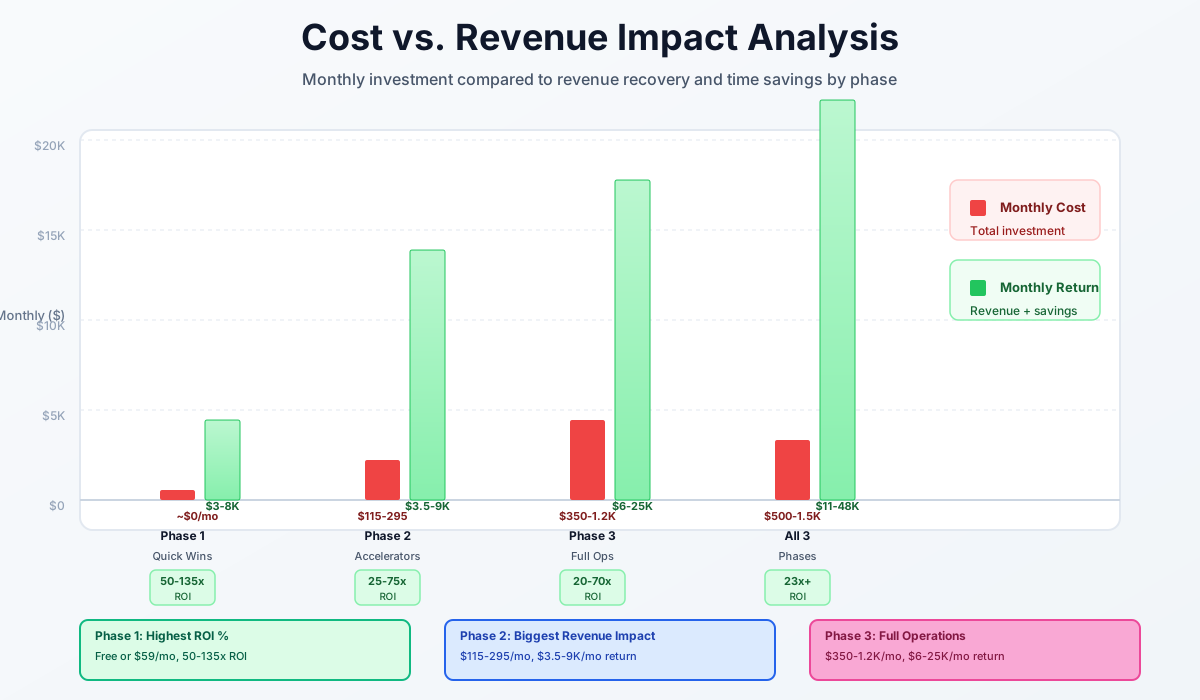
Here's a breakdown of the costs and expected returns:
Frequently Asked Questions
Can AI satellite measurement replace on-site visits for hardscape and irrigation estimates?
Not entirely — and you shouldn't try. Satellite tools like Deep Lawn and SiteRecon are 95–98% accurate for flat surfaces: turf area, lot boundaries, bed edges, driveways. They can't see slope, drainage grade, soil conditions, underground utilities, or root systems that affect installation costs. Use satellite for initial measurement and pricing, then verify on-site for any project involving grading, retaining walls, drainage, irrigation, or tree removal. The satellite measurement still saves you 30–45 minutes per estimate by giving you accurate dimensions before you arrive.
How much do optimized routes actually move the needle for a 3-crew operation?
More than most owners expect. Run this on your own numbers: take your average revenue per crew-hour, multiply by the drive time each crew burns on transitions between stops, and you'll usually find $1,500–$3,000/month in margin sitting in your current routing decisions. Route4Me's own customer data shows 10–30% savings on fuel and time costs. The compounding effect matters too — tighter routes mean you can fit one or two additional stops per crew per day without extending hours, which is how you add revenue without adding headcount.
What happens to AI-drafted quotes when material prices change mid-season?
This is a real risk. Mulch, stone, and topsoil prices can swing 15–25% between spring ordering and summer delivery. AI quote drafting in Jobber and Service Autopilot pulls from your saved pricing tables — so if you don't update those tables when suppliers raise prices, you'll send out quotes with stale margins. Set a monthly calendar reminder to verify your material costs against current supplier invoices, and update your pricing tables immediately. Some operators add a 5–10% material escalation clause to quotes valid beyond 30 days as additional protection.
Is it worth keeping AI tools running through the off-season?
Keep the essentials: GoodCall (snow removal leads start in October, spring cleanup inquiries come in January), Jobber (your customer data lives there), and QuickBooks. You can pause NiceJob and Apaya from November through February if you're not completing jobs that generate reviews or content. Honestly, the slow months are the best time to get the Phase 2 and 3 tools properly configured — the worst possible time to implement new software is March when every phone is ringing and your estimator is already overwhelmed.
Does the Jobber AI Receptionist handle commercial inquiries as well as residential ones?
For residential homeowners asking about mowing, cleanup, and basic maintenance — yes, it handles them well. For commercial inquiries from property managers and HOAs, it captures the basics but a human needs to follow up within the hour. Commercial callers often have specific scope requirements — snow response times, irrigation schedules, pesticide application certifications — that need a real conversation. Configure the AI Receptionist to flag commercial inquiries as high priority, let residential requests go straight to online booking, and give your estimator a 30-minute callback target on any commercial lead.
How do I track GPS time when crews start from different locations or share equipment trailers?
In Homebase, set up each major job site as a separate "location" with GPS geofencing. For crews that meet at the shop to load trailers, create a "Yard" location where they clock in, then switch locations when they arrive at the first job site. For crews with take-home trucks who drive directly to sites, enable remote clock-in with GPS verification. The goal is accurate per-site time data for job costing — without it, you genuinely cannot tell which recurring accounts are profitable and which ones you're servicing at a loss.
My close rate on maintenance contracts is already decent. Is there a ceiling where more AI tools stop helping?
Good question. The tools in this guide have the most impact in the 30–55% close rate range. If you're already closing 55%+ of maintenance bids, the bigger lever shifts from lead capture and quoting speed to account retention — reducing churn on existing recurring accounts through better communication, proactive renewal outreach, and service quality tracking. At that stage, Jobber's Campaign Generator for renewal campaigns and NiceJob's ongoing review cadence matter more than the front-end lead tools. The measurement and route tools stay valuable at any close rate because they affect margin, not just volume.
The recurring account is the unit of value in a landscaping business. Start with GoodCall to stop losing them at the first ring, and work down the checklist from there.
More AI Implementation Guides
AI Tools for Pressure Washing Businesses (2026 Guide)
The best AI tools for pressure washing businesses in 2026. Capture missed calls, quote via satellite, automate follow-up, and win more jobs without ad spend.
AI Tools for Junk Removal Companies: 2026 Owner's Guide
The 2026 guide to AI tools for junk removal companies — answer every call, quote a pile from a photo, optimize routes, and cut tipping fees. Start free.
AI Tools for Pool Service Companies (2026 Guide)
The complete 2026 guide to AI tools for pool service companies — route density, chemistry dosing, AI phone answering, and a premium IoT monitoring tier.
Best AI Tools for Pest Control Companies (CSR & Routes)
AI CSRs, smarter routing, automated reviews & EPA-compliant chemical logs for pest control companies. Tool picks + step-by-step setup, starting free today.
AI Tools for Cleaning Services: 2026 Guide
Best AI tools for cleaning services in 2026. Cut admin hours in half, fill schedule gaps, convert more leads, and scale your team step by step.
Best CRM & AI Marketing Tools for Fence Companies
Compare CRM & AI marketing tools for fence companies. Cut quote turnaround from days to minutes, never miss a lead call, automate follow-up. Pricing inside.
Keep exploring
See every AI implementation guide we've published for Trades & Contractors, or browse the full library by industry or category. Looking for a specific platform? The AI tools directory indexes every product mentioned across our guides, and the comparisons hub puts the most-asked head-to-heads side by side.