
Here's the problem nobody talks about in electrical contracting: you're losing jobs you should be winning, and you know exactly where — at the bid table.
The average small electrical shop spends 20–40 hours assembling a commercial bid. Win rate on competitive GC invitations: 15–25%. That means for every job you land, you burned 60–160 hours of estimating time on losses. At $100/hour of owner or senior estimator time, you're spending $6,000–$16,000 in unbillable effort per job won. And because the takeoff takes so long, you can't bid more — so the problem compounds.
On the residential side, the bottleneck looks different: it's speed. When a homeowner's panel trips and won't reset at 6 p.m. on a Friday, the first contractor to respond gets the call. Industry data puts that window at under 5 minutes before conversion drops sharply. If you're pulling wire in a crawl space, you're losing those leads to whoever picks up first.
Two completely different constraints — bid throughput and lead response time — but AI tools can fix both. This guide is built around that reality: what to implement in your first week (free, no setup), what to automate in your first month (kills no-shows and lead leakage), and where to invest for the long-term margin shifts that actually move the P&L (estimating, job costing, and fleet). Every tool listed is real, priced as of 2026, and chosen for electrical shops specifically — not repurposed from a general home-services template.
The Short Version
Bidding bottleneck: If you can't bid more jobs because takeoffs take too long, PataBid Quantify ($1,200/yr) is your move. First, validate it — Beam AI gives you one free AI takeoff right now. Upload real plans you're bidding next week and compare the output against your manual count.
Lead leakage: LeadTruffle ($229/mo + $299 one-time onboarding) engages every inbound lead within seconds via SMS, 24/7. At $35–$70/lead on Google LSA, one recovered weekend lead pays for a week of the tool.
Job costing blindspot: Knowify ($99/mo) closes the feedback loop between what you bid and what you spend. Without it, you find out a job bled money three months after closeout. With it, you know by Tuesday of the week it happens.
Where Electrical Contracting Is Different From Other Trades
Before diving into tools, it's worth being honest about what makes the electrical business harder to optimize than, say, a plumbing or HVAC shop. Three structural realities shape which AI tools actually matter:
The bid economy is brutal. Commercial electrical is essentially a low-win-rate game that only pencils out if your per-bid cost is low. Most shops have one person — usually the owner — doing takeoffs. Here's what that looks like in practice:
| Work Type | Avg. Takeoff Time | Typical Win Rate | Effective Cost Per Win |
|---|---|---|---|
| Small commercial (under $100K) | 4–8 hours | 25–35% | 12–24 hours of owner time |
| Mid commercial ($100K–$500K) | 8–20 hours | 15–25% | 32–133 hours of owner time |
| Large commercial ($500K+) | 20–40+ hours | 10–20% | 100–400 hours of owner time |
| Residential service (quoted on-site) | 30–60 minutes | 55–75% | 40–110 minutes of tech time |
That table explains why residential service is the profit engine for most shops under $3M and commercial is the growth vehicle — and why AI takeoff tools matter so much more here than in almost any other trade.
You're a licensed operation in a code-governed world. A master electrician on staff, state license, NEC compliance, OSHA 10/30, and certified payroll for any prevailing-wage work. AI doesn't replace any of that — but it absolutely can speed up the paperwork around it.
Material costs are structurally volatile. Copper has climbed from roughly $5.10/lb in mid-2025 to the $6.50/lb range by late 2026; switchgear and transformers were running 20–52 week lead times; tariff uncertainty makes fixed-price bids riskier than they used to be. The right estimating tools build that volatility into bid templates rather than pretending it doesn't exist.
The labor math is also grimmer here than in other trades. BLS projects 81,000 annual electrician openings through 2034 against a workforce projected to shrink 14% by 2030. Every unfilled journeyman seat represents roughly $150,000–$250,000 of capped annual revenue. That's why AI recruiting tools are treated as a real priority in this guide, not a footnote.
If you run a similar small trades operation, our guides for plumbing businesses, HVAC companies, and general contractors cover the same FSM platforms and dispatch challenges — though the estimating side here is specific to electrical.
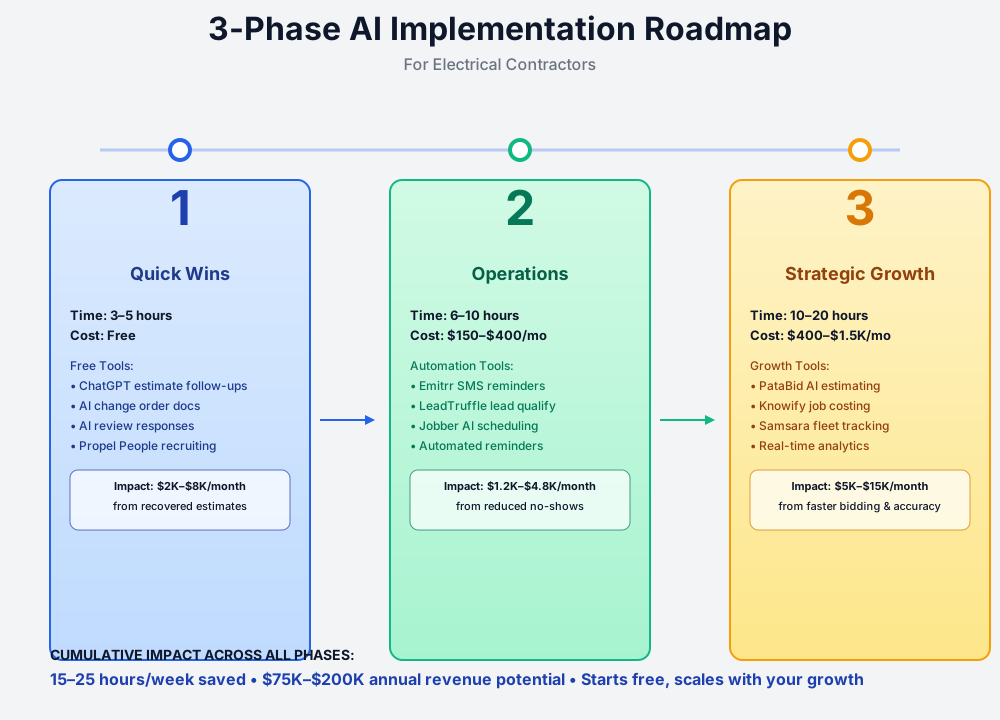
Here's a visual overview of the implementation roadmap:
First Circuit: Free Tools That Pay Off Before Your Next Estimate Is Due
Think of this as your service panel — the foundational work before anything else connects. These tools cost nothing except 30 minutes of setup. If none of them move your numbers within two weeks, the more expensive tools won't either. So run these first.
1. AI-Written Estimate Follow-Ups
Forty to sixty percent of residential estimates go unanswered. Not because the homeowner chose a competitor — because they got busy and forgot. Your $3,200 panel upgrade estimate is sitting in their inbox next to 47 other things they meant to deal with.
Most owners send zero follow-ups because writing them feels awkward. ChatGPT (free at chatgpt.com) writes a non-pushy, professional follow-up in under a minute. Block 10 minutes every Monday morning, run through your open estimates over 3 days old, and send them. Contractors who do this consistently report 15–25% improvement in close rate. On an average estimate queue, that's $2,000–$8,000/month that was otherwise going to quietly disappear.
Write a short, friendly follow-up email to a homeowner who received our estimate for [JOB TYPE — e.g., 200A panel upgrade] [X] days ago but hasn't responded. The estimate was $[AMOUNT]. Our company name is [YOUR COMPANY] and we're a licensed electrical contractor in [CITY/STATE]. Don't be pushy — acknowledge they may be comparing options, offer to answer any questions, and mention we have a [DAY/WEEK] opening we could hold for them. Keep it under 150 words. Sign it [YOUR FIRST NAME].
Free tier on ChatGPT is all you need. Save the prompt in your phone's notes app so it's available when you're in the truck.
2. AI-Generated Change Order Documentation
Your journeyman opens a wall during a panel upgrade and finds aluminum branch wiring. Or the homeowner walks you to the garage and mentions three additional outlets "while you're already here." This is how 5–10% of earned revenue disappears in small electrical shops — the work gets done, the verbal okay happened, and nobody put it in writing.
The usual reason is friction: writing a clean change order with a proper cost breakdown, explanation of the condition, and signature line takes 20–30 minutes. AI cuts that to two minutes. Your journeyman calls you, you build the CO on your phone while they're still on site, email it to the customer, and work doesn't restart until it's signed.
Write a formal change order for an electrical project.
Original scope: [DESCRIBE — e.g., 200A service upgrade with new panel and 12 branch circuits] Unforeseen condition discovered: [DESCRIBE — e.g., aluminum wiring throughout existing branch circuits requires remediation before the new panel can be energized] Additional materials required:
- [QTY] [ITEM] @ $[PRICE/UNIT] = $[SUBTOTAL]
- [continue list] Additional labor: [HOURS] hours @ $[RATE]/hour = $[SUBTOTAL] Total additional cost: $[GRAND TOTAL]
Write a clear document with the cost breakdown and a signature line for customer approval. Note that work cannot proceed until the change order is signed. Include a section that briefly explains in plain English why this work is necessary and what happens if it's not done.
The discipline that separates shops netting 15% from shops netting 5% isn't smarter estimating or better crews — it's that one rule: signed before the work starts. AI just makes it fast enough that you have no excuse not to follow it.
3. Google Review Responses That Actually Help LSA Ranking
LSA contractors above 4.7 stars with 50+ reviews pay measurably less per lead than those below those thresholds — Google's ranking algorithm weights both metrics. Most small shop owners either never respond to reviews or post a generic "Thanks for the kind words!" which Google's signals barely register. A specific, service-keyword-rich response is meaningfully better for ranking than no response.
Two minutes with ChatGPT, twice a week. That's the entire time investment.
Write a professional, warm response to this 5-star Google review for my electrical contracting business: [PASTE REVIEW]
Keep it under 75 words. Thank them specifically for what they mentioned (e.g., the technician's name, the type of work). Include a subtle mention that we also do [LIST 2-3 OTHER SERVICES — e.g., EV charger installs, whole-home generators, panel upgrades]. Sign it [YOUR FIRST NAME]. Vary the language so it doesn't read like a template if a future reviewer reads multiple responses.
For negative reviews, use a different prompt: acknowledge the frustration, take ownership without sounding defensive, and invite a direct call. The key is to never argue publicly — the audience is every future homeowner reading your profile, not the person who left the review.
4. AI Recruiting Posts + Free Trade-Specific Hiring Platform
The journeyman shortage isn't going away. BLS projects 81,000 annual openings through 2034. Workforce projected to shrink 14% by 2030 while demand grows 25%+. 76% of 18–20 year olds say there's a stigma attached to trade careers versus a four-year degree (Jobber 2024 Blue Collar Report; the 2025 edition shows the gap narrowing slightly as AI and economic uncertainty shake the college-first mindset). And losing one journeyman costs $5,000–$15,000 to replace and disrupts 2–4 active projects.
Two free moves:
First, use ChatGPT to write a job posting that doesn't read like every other "Now Hiring Journeyman" listing on Indeed.
Write a job posting for a Journeyman Electrician at a small non-union electrical contractor in [CITY, STATE]. Pay range: $[XX]-$[XX]/hour based on experience. Benefits we offer: [LIST — e.g., company van and fuel card, simple IRA with 3% match, $250/month health stipend, paid OSHA 30, 5 days PTO year one]. Work mix: [e.g., 60% commercial light construction, 30% residential service, 10% industrial maintenance — no overnight travel].
Sell the position to a licensed journeyman tired of union politics or big-company bureaucracy who wants to work for a small shop where they have a relationship with the owner and aren't a number. Be specific and authentic. Avoid corporate language. Mention that we hand new hires real responsibility on day one if they earn it.
Second, post it through Propel People (propelpeople.ai), which launched in 2025 as a free hiring platform purpose-built for the trades. Their AI ProScore ranks applicants based on actual electrical certifications (journeyman license, OSHA 30, switchgear experience), and applications happen via SMS so candidates don't need a polished resume — which matches the reality of how most trade hires actually communicate.
Don't Use AI for NEC Code Decisions Without Verification
ChatGPT will happily explain NEC Article 230.79 service-entrance sizing in plain English. It's a great research starting point. But it can confidently produce wrong code citations, especially for state amendments and locally adopted edition differences. NEC 2026 has now been published, but adoption is uneven — most states are still enforcing NEC 2023 or NEC 2020, with only a handful of early adopters on NEC 2026 so far. Always verify against the current NEC edition adopted in your specific jurisdiction before relying on AI output for an inspection or a permit submittal. AI is a study aid, not a code book.
First Circuit cost: $0. If consistent estimate follow-ups, change order documentation, review responses, and a better job listing don't visibly move your numbers in 30 days, stop reading and figure out what's broken in your operation first — software won't fix it.
Rough-In: Core Operations — Kill No-Shows and Lead Leakage
This is where you wire the daily operational infrastructure. You've seen AI works. Now you're paying for tools that automate the grind so your crew can focus on the actual work. Each of these typically pays for itself in the first month.
1. Automated SMS Appointment Reminders (Emitrr)
A no-access service call wastes $150–$400 in labor and truck costs — 1–3 hours of journeyman time plus $75–$150 in vehicle overhead before any wrench turns. Even 2–3 no-shows per week is $1,200–$4,800/month in pure waste. And most small shops still rely on a manual phone call the day before, if they remember.
Emitrr
Best for: Automated reminders + reviews without enterprise pricing
All-in-one business texting platform with two-way SMS, automated appointment reminders, review request automation, and shared inbox. Significantly cheaper than Podium and built for small home service shops. Integrates with Jobber, Housecall Pro, QuickBooks, and Google Business Profile.
The setup that actually works is a 3-touch sequence:
- 48 hours before: "Hi [Name], this is [Company]. Confirming your electrical appointment on [date] at [time]. Reply CONFIRM or call us to reschedule."
- 24 hours before: "Reminder: [Company] will be at your home tomorrow at [time] for [service]. Please ensure clear access to your electrical panel and breaker box."
- 2 hours before: "We're heading your way. [Tech name] will arrive around [time]. Questions? Reply to this text."
That second message — the access reminder — is the unsung hero. It prevents the other kind of wasted trip: the "I'm here but the panel is in the basement behind the storage shelves" call.
Add a post-job review request that fires 2 hours after job completion ("Thanks for choosing [Company]! If you were happy with [tech name]'s work, a quick Google review helps us a lot: [link]") and you've solved no-shows and review velocity in the same workflow.
ROI Snapshot
Monthly Cost
$25/mo
Time Saved
4hrs/week
Monthly Value
$3,300
ROI
13100%
2. AI Lead Qualification (LeadTruffle)
Saturday evening. You're at a kid's soccer game. A homeowner submits an Angi request — burning smell from the panel, breaker won't reset. You don't see it for two hours. By then, they've already booked the other shop that responded in three minutes.
At $35–$70 per LSA lead, that's not just a lost lead — it's a lost $3,000+ job you already paid to generate. The economics get worse when you look at a month's worth of after-hours and weekend leads your inbox swallowed.
LeadTruffle
Best for: Residential electricians on Google LSA, Angi, and Thumbtack
AI-powered SMS and voice lead qualification for home service trades. Automatically engages inbound leads from Angi, Thumbtack, Yelp, Google LSA, and your website 24/7. Qualifies leads, books appointments, and pushes them into Jobber, Housecall Pro, or Workiz. Average cost under $1 per lead qualified.
LeadTruffle's AI engages every inbound lead within seconds via SMS or voice, collects job details ("Is the panel making any sounds? Are any outlets sparking? When did this start?"), filters out spam and out-of-area requests, and routes qualified leads to your FSM or directly to your on-call tech for emergencies.
The configuration that matters most is emergency routing logic. Train it on your specific trigger phrases — "burning smell," "sparking," "no power to the whole house," "panel making noise" — and those contacts skip the normal queue and go directly to your on-call tech's phone. A hot-tub circuit addition can wait until Monday. A potential panel fire cannot. The AI gets this right when you invest 30 minutes in the initial setup; skip it and you're booking safety calls as next-month appointments.
For shops already on Housecall Pro, their native CSR AI is a comparable option — fewer integrations to manage, though the pricing is higher at entry.
3. AI-Powered FSM with Smart Scheduling (Jobber)
If you're still scheduling on a whiteboard or in a shared Google Calendar, this is the upgrade that compounds. Jobber consistently reports their electrical contractor customers save an average of 7 hours per week — and at $39–$199/month for the relevant tiers, it's a small fraction of what ServiceTitan costs while delivering most of the functionality for shops under 8–10 techs.
Jobber (with Copilot AI)
Best for: Small to mid-size residential and light commercial electrical shops
Field service management with AI-powered Copilot business coach, automated scheduling recommendations, customer reminder automation, AI-generated invoice summaries, and review request automation. Direct QuickBooks integration. 14-day free trial.
The Connect plan at $119/month is usually the right starting point — it includes the automated reminders, QuickBooks sync, and online booking that small shops actually use. Resist the urge to turn on every feature on day one. Start with scheduling and same-day field invoicing. Layer in the rest over the following weeks.
On the ServiceTitan question: if you have under 8–10 field techs, do not buy ServiceTitan. The platform is excellent, but at $250–$500/tech/month plus $5,000–$15,000 in implementation fees, it's overbuilt for your operation. The cost-to-benefit math doesn't work until you have enough techs to amortize it. Jobber or Housecall Pro (which our HVAC guide covers in more depth) will deliver 80% of the functionality at 20% of the cost.
Same-Day Field Invoicing Is the Cash Flow Move
The single biggest cash-flow lever in residential service work is generating the invoice from the field at job completion — not waiting until the office manager catches up the next day or week. Jobber's mobile app lets your tech build the invoice on-site, take payment by ACH or card, and get a signed receipt before they leave the driveway. Average days-to-payment drops from 14–30 days to 0–3 days. That difference is real working capital you previously had financed by your line of credit.
Rough-In monthly cost: $370–$550+/mo (LeadTruffle alone is $229/mo at the entry tier; Emitrr adds $20–$149/mo depending on your plan; Jobber Connect adds $119/mo). Budget for LeadTruffle's $299 one-time onboarding on top of that. Each tool independently pays for itself within the first month if your shop has reasonable call volume. Don't roll out all three in one week — get appointment reminders working first, then add LeadTruffle, then migrate to Jobber.
Final Inspection: AI Estimating, Job Costing, and Fleet — The Real Profit Levers
This is where the economics of the trade actually shift. Two of the biggest profit levers in electrical contracting — estimating accuracy and job-cost visibility — have historically been gated by software that costs $1,800–$3,000+/year per seat. AI-native alternatives are now available at a fraction of that.
1. AI Electrical Estimating and Takeoff
Owners spend 20–30% of their week estimating jobs they don't win. A single commercial electrical bid runs 8–40+ hours of estimating time, with industry win rates of 15–25% on competitive bids. Do that math — 20 hours on a bid you don't win, at $100+/hour of owner time, is $2,000+ in opportunity cost per loss. And you can't bid more jobs because hiring an estimator at $60,000–$80,000/year is the chicken-and-egg problem nobody can solve.
AI takeoff tools collapse 8–40 hours of work into 1–4 hours. Three serious options for electrical:
PataBid Quantify
Best for: Small/mid commercial electricians priced out of Trimble Accubid
AI-assisted electrical takeoffs combined with built-in labor/material cost databases, real-time supplier pricing integration (Gescan, CES), and automated proposal generation. Flat $1,200/year — no per-user fees. Free 2-week trial. Significantly cheaper than Trimble Accubid ($3,000+ initial + maintenance) or ConEst IntelliBid ($1,800/year/user).
Beam AI (iBeam.ai)
Best for: Outsourced AI takeoff-as-a-service on complex commercial bids
Upload commercial electrical drawings and receive a completed, QA-reviewed quantity takeoff within 24-72 hours — counts of outlets, switches, panels, conduit runs, fixtures, and fire alarm devices. AI recognizes electrical symbols regardless of scale, orientation, or drafting style. Users report saving 15-20 hours/week and bidding 3-5x more projects.
Drawer AI
Best for: Commercial/industrial estimators doing high-volume PDF takeoffs
Purpose-built AI electrical estimating that automates device counting, branch circuit routing, wire sizing with voltage-drop calcs, and plan stitching across multi-sheet drawing sets. Generates Excel quantity reports and annotated PDF markups. Claims up to 70% takeoff time reduction.
The smart adoption sequence is to test before you commit. Beam AI's first takeoff is free — upload a real set of plans you're bidding next week, get the result back in 24–72 hours, and compare it line-by-line against your manual takeoff. If device counts and conduit quantities match within an acceptable margin, you've validated the approach. Then sign up for PataBid Quantify ($1,200/year) for routine self-serve takeoffs and keep Beam AI in your back pocket for high-stakes bids where you want the human QA layer.
Calibrating to your actual crews matters. Generic production-rate databases assume a generic journeyman bending generic conduit at generic speeds. Your 22-year journeyman who's been bending 1" EMT for two decades works 20–30% faster than the database. Track actual hours-by-phase on your next 5–10 projects, then adjust the production rates in your estimating tool to match. Without this calibration, you'll either over-bid and lose work, or under-bid and lose money.
Always Spot-Check the AI Takeoff
AI symbol recognition has gotten startlingly good — but it can still miss devices on poorly scanned drawings, miscount when symbols overlap with notes, or double-count when sheets are revised. Before you submit a bid based on an AI takeoff, manually verify device counts on at least one or two representative areas of the drawing. The rule of thumb: spot-check the densest device area on the plan. If the AI got that area right, the rest is usually right too.
2. Real-Time Job Costing and AIA Billing (Knowify)
Without real-time job costing, you don't know if a project is profitable until it's already over — and by then, all you can do is mourn the loss. Industry forums show owners regularly losing 5–15% of contract value on misestimated labor hours. The feedback loop is broken: you bid $45K, you spend $48K, and you find out three months later when QuickBooks finally reconciles.
Knowify
Best for: Electrical shops doing both service and commercial construction
Construction management software purpose-built for trade contractors. Combines estimating, project management, change order workflows, real-time job costing, AIA-style progress billing, and best-in-class QuickBooks integration. Mobile time-tracking flows automatically into job costs. 14-day free trial, no credit card.
The two features that change the math for an electrical shop:
1. Real-time labor and material variance against the estimate. Every time a tech logs hours or you receive a supply-house invoice, Knowify compares it against the estimated budget for that job phase (rough-in, trim, service entrance, controls). The dashboard shows you, every Friday, which jobs are tracking over budget while there's still time to fix it — instead of three months after closeout.
2. Native change order workflow. When your tech encounters out-of-scope work, they create the change order in the field. It pulls from the original estimate scope, gets routed to the customer for signature, and automatically adjusts the project budget when approved. The "we did the work but never billed it" problem effectively goes away.
For commercial-focused shops doing $1M+ with AIA G702/G703 progress billings, retainage tracking, and certified payroll compliance, Adaptive (adaptive.build) and BuildOps (buildops.com) are the next tier up — both are construction-accounting platforms with AI-powered receipt scanning, vendor compliance management, and live WIP reporting. Both require a sales call for pricing and are priced for firms with $1M+ revenue.
3. AI Fleet Management (Samsara) — If You Have 4+ Vehicles
Vehicle costs run 5–10% of revenue for most electrical contractors. For a $1.2M shop, that's $60K–$120K/year in fuel, insurance, lease payments, maintenance, and depreciation. Without GPS tracking, your dispatcher can't see where techs actually are, can't optimize routes, and can't prove arrival/departure times when a customer disputes a bill.
Samsara
Best for: Electrical fleets of 4+ service vehicles
AI-powered fleet management with GPS tracking, predictive maintenance alerts, and route optimization. AI dash cams (real-time incident detection, safety scoring) are available as an add-on — that's where insurance premium reductions of 10-20% come from, but they push the cost to $40-$60/vehicle/mo. Hardware is bundled; requires a 3-year contract with full remaining-balance early-termination fee.
The two ROI components most owners underestimate:
- Insurance premium reductions. After 3 months of clean safety-score data, most fleets can negotiate 10–20% off commercial auto premiums. On a 6-vehicle fleet at $1,800/vehicle/year, that's $1,080–$2,160/year in pure savings.
- Route optimization fuel savings. Real-world Samsara data shows up to 30% fuel reduction on optimized multi-stop service days — and gas is one of the few major operating costs you can reduce without firing anyone.
The 3-year contract is the catch. Samsara won't let you do a one-year pilot. Negotiate hard before signing — ask for the dash cam features bundled in at the base rate, or for a 30-day out clause for the first 90 days. If you have 1–2 vehicles, skip Samsara entirely and just enable Google Maps Timeline on the company phones.
Final Inspection monthly cost: $400–$1,500. This is the tier where you need to be deliberate about what you turn on. Pick the one tool that addresses your single biggest profit leak. If you're losing commercial bids because takeoffs take too long, lead with PataBid or Beam AI. If you're underbilling change orders, lead with Knowify. Don't try to do all three in one quarter.
The Wiring Mistakes Worth Naming
The ServiceTitan situation. If you have under 8–10 field techs, do not buy ServiceTitan. This comes up in almost every conversation with small shop owners because the platform markets itself well. It's genuinely excellent — for operations large enough to justify $250–$500/tech/month plus $5,000–$15,000 in implementation. Under that threshold, you're paying enterprise money to use 20% of the features. Jobber or Housecall Pro run the same service-and-dispatch workflow at $39–$199/month. Wait until you outgrow them, which is a good problem to have.
AI and NEC code. ChatGPT will explain Article 230.79 service-entrance sizing in plain English in about 10 seconds. It will also, with equal confidence, cite a code provision that doesn't exist in the edition your jurisdiction has adopted. Or miss a state amendment. Or confuse the 2020, 2023, and now 2026 NEC on a specific article — with NEC 2026 published but only adopted so far in a handful of early states, most jurisdictions are still working off 2023 or 2020. Use it to study, to get oriented, to draft permit submittal language — but always verify against the actual adopted code before an inspection or submittal. This is not a warning about AI being unreliable in general; it's a warning about using it as a code book when you're accountable for the inspection outcome.
Buying four tools at once. The pattern that gets shops in trouble is this: owner reads a guide, gets excited, signs up for Emitrr, LeadTruffle, Jobber, and PataBid in the same week. The office manager is overwhelmed by four training sessions, one tool doesn't get set up correctly, and three months later everything gets cancelled. Run one tool for two weeks until it's working. Then add the next one. The checklist at the end of this guide is sequenced intentionally.
Samsara's contract terms. The GPS and dash cam ROI is real. The 3-year contract with full remaining-balance early termination is also real. If you're evaluating Samsara, negotiate before signing — ask them to bundle the AI dash cam at the base GPS rate, or push for a 90-day out clause. For shops with 1–3 vehicles, skip it entirely and enable Google Maps Timeline on company phones instead. You'll capture 80% of the dispatch visibility at zero cost.
90-Day Rollout Checklist
Sequenced so you're not overwhelmed and each tool has time to prove itself before you add the next:
- Week 1: Sign up for ChatGPT (free). Send AI-drafted follow-ups on every open estimate over 3 days old.
- Week 2: Set up Google Business Profile review notifications. Block 10 minutes Tuesday and Friday for AI-drafted review responses.
- Week 3: Save the change order prompt template in your phone. Train field techs to call before doing any out-of-scope work.
- Week 4: Sign up for Propel People (free). Post your AI-written journeyman job listing.
- Week 5-6: Start an Emitrr trial. Configure 3-touch SMS reminders for next week's service calls. Plans start ~$20/user/mo (annual) or $149/mo for the all-in-one suite — confirm current pricing on their site.
- Week 7-8: Sign up for LeadTruffle ($229/mo + $299 one-time onboarding, month-to-month). Connect Google LSA, Thumbtack, Angi, and your website contact form.
- Week 9-10: Start a Jobber 14-day free trial on the Connect plan. Import your customer list from QuickBooks.
- Week 11: Submit one commercial bid using Beam AI's free first takeoff. Compare against your manual takeoff.
- Week 12: Decide on Phase 3 commitment — PataBid Quantify ($1,200/yr) for ongoing AI takeoffs, Knowify ($99/mo) for job costing, or both. Skip Samsara unless you have 4+ vehicles.
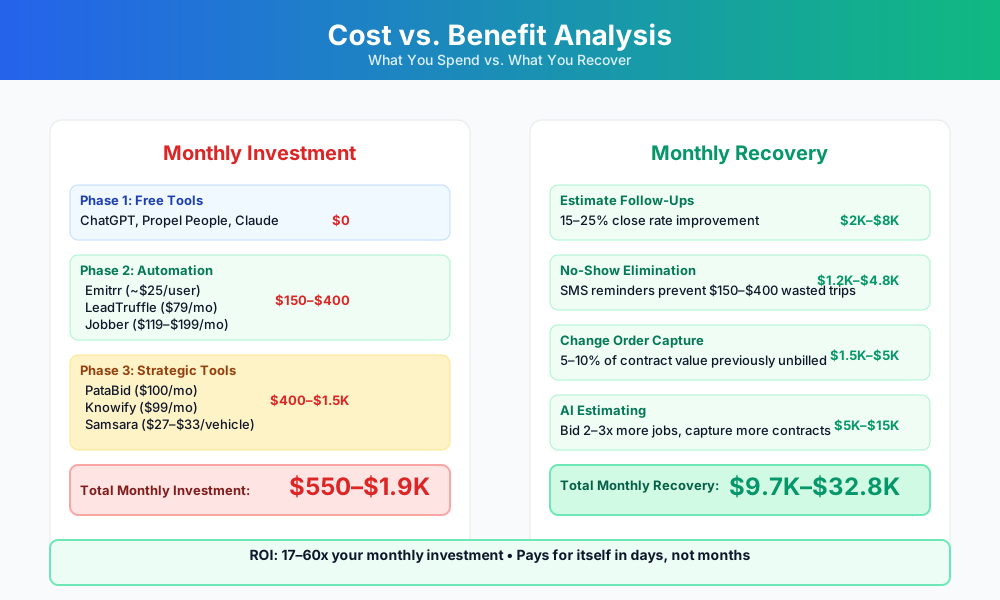
Here's a breakdown of the costs and expected returns:
FAQ
Our win rate on competitive commercial bids is around 20%. Will AI takeoff tools actually change that, or just speed up the losses?
Speed up the losses — if that's all you do. AI takeoff tools collapse 8–40 hours of work into 1–4 hours, which means your cost per bid drops dramatically and you can submit more bids. But throughput only turns into revenue if your pricing is accurate. The real lever is calibrating your AI estimating tool's production rates to your actual crews, not the generic database defaults. Your 22-year journeyman who's been bending 1" EMT for two decades works 20–30% faster than the industry average. When your labor rates reflect that, you can price more aggressively without losing money — and that's what moves win rate. Start with Beam AI's free takeoff trial on a live bid, verify device counts against your manual takeoff, then build your own labor overlay before committing to the annual plan.
Can AI-generated change order documents hold up on a Davis-Bacon prevailing wage project?
Yes for the document; the payroll piece is separate. AI-generated change order text — scope description, cost breakdown, signature line — is fine. It's just formatted language. But if the CO adds labor hours on a federally funded or prevailing wage project, those hours have to run through your certified payroll system (ADP, Paychex, or your accounting module's WH-347 workflow) at the applicable prevailing wage rate. AI doesn't generate certified payroll forms. Keep the two workflows separate and you'll be fine.
What happens when copper prices swing 15–20% while a commercial bid is in review?
Three layers of protection. PataBid Quantify integrates live supplier pricing feeds (Gescan, CES) so material costs refresh in near-real-time. On commercial bids with a 30+ day review window, add an explicit material escalation clause tied to a published copper or aluminum index — most GCs will accept it, and it's standard contract language now. For residential fixed-price work, build a 5–10% material contingency into your overhead markup. AI estimating doesn't eliminate volatility; it just makes re-bidding fast when prices shift.
Does Jobber's AI scheduling understand that a crew is on standby for a 4-hour inspection window and can't be booked elsewhere?
Yes. Jobber's Copilot and FieldCamp (AI dispatcher for trades at $39.99/user/mo) can block a standby window as a "soft" appointment and prevent double-booking. What no AI tool currently does is negotiate with a municipal building department to compress that window to 90 minutes. You'll still lose some standby time until building departments modernize. What AI prevents is the compounding mistake of also losing a service call you accidentally booked in the same slot.
Is an AI lead qualification tool going to misroute a "I smell burning at my panel" call as a non-emergency?
Not if you spend 30 minutes configuring it. LeadTruffle and Housecall Pro CSR AI both support emergency keyword routing — "burning smell," "sparking," "no power," "panel noise" all flag as priority and push directly to your on-call tech's phone. Skip the initial training and yes, it might book that call as a Tuesday afternoon appointment three weeks out. The 30-minute setup is the difference between a tool that saves you and one that creates liability.
We're on Housecall Pro already. Is it worth switching to Jobber for the AI features?
Probably not. Both platforms have AI-powered scheduling, automated reminders, and QuickBooks integration. Switching costs — data migration, retraining your office staff, workflow disruption during cutover — usually run 60–90 days of friction. Housecall Pro's CSR AI (their native lead qualification feature) is a direct alternative to LeadTruffle and reduces the integrations you need to manage. Our HVAC guide covers Housecall Pro in more depth since it's the dominant tool in that trade. Stay on your current platform; use the tools you already have before paying for a new one.
What's the AI play for an electrician trying to grow EV charger installs?
EV charger work is the highest-margin residential add-on in the trade right now — $500 to $2,000 per install depending on the panel situation. The technical work isn't AI-assisted. The customer acquisition side is: configure LeadTruffle to qualify EV inquiries by panel capacity, vehicle type, and garage vs. outdoor location; use ChatGPT to write city-specific landing pages ("Tesla Wall Connector installation in [city]"); update your Google Business Profile services list to include EV charging. The LSA EV-charging category reliably generates cheaper leads than the generic "Electrician" category in most major metros. Worth doing this week — takes about two hours.
The Bid on Your Desk Right Now
Here's a concrete way to start. If you have a commercial bid coming up in the next two weeks — anything with a set of PDFs — upload those plans to Beam AI today. The first takeoff is free, delivered in 24–72 hours, and comes with a human QA review. When it lands, open it next to your manual count and compare device-by-device on one dense section of the drawings.
If the counts are within 3–5%, you've just proven that AI takeoffs work for your type of work. That's not a hypothetical — that's a validated datapoint about your actual drawings, your actual building types, your actual plan quality.
From there, the 90-day checklist runs itself. But this one test is worth doing today, before you read another guide or buy another subscription.
Shops running similar field service operations in adjacent trades will find a lot of crossover in our plumbing business guide and HVAC company guide. The general contractor guide covers the Procore ecosystem and GC-side tools in depth — relevant if you're doing significant subcontract work on larger commercial jobs.
More AI Implementation Guides
AI Tools for Breweries: The 2026 Owner's Playbook
The best AI tools for breweries in 2026: cut TTB compliance time, tighten COGS, streamline taproom scheduling, and target release marketing — starting free.
AI Tools for Bookkeeping Services: 2026 Guide
Best AI tools for bookkeeping services in 2026: Automate categorization, reconciliation, and document chasing without hiring extra staff.
AI Tools for Marketing Agencies: 2026 Playbook
The best AI tools for marketing agencies in 2026. A phased plan to kill Hell Week reporting, scale content, and fix billable utilization without new hires.
AI Tools for Home Health Care Agencies: 2026 Guide
A practical 2026 guide to AI tools for home health care agencies — HIPAA-safe automation for shift-filling, OASIS-E documentation, EVV, and claim denials.
AI Tools for Dermatology Practices: 2026 Guide
The best AI tools for dermatology practices in 2026 — cut prior-auth hours, reduce no-shows, and grow your cosmetic line, with a HIPAA-first rollout plan.
AI Meeting Assistant Cost for Accountants in 2026
What does an AI meeting assistant cost for an accounting firm? Free tiers, per-seat pricing from ~$17/user/mo, and the real total for a 3-, 5-, and 10-person team, compared.
Keep exploring
See every AI implementation guide we've published for Trades & Contractors, or browse the full library by industry or category. Looking for a specific platform? The AI tools directory indexes every product mentioned across our guides, and the comparisons hub puts the most-asked head-to-heads side by side.