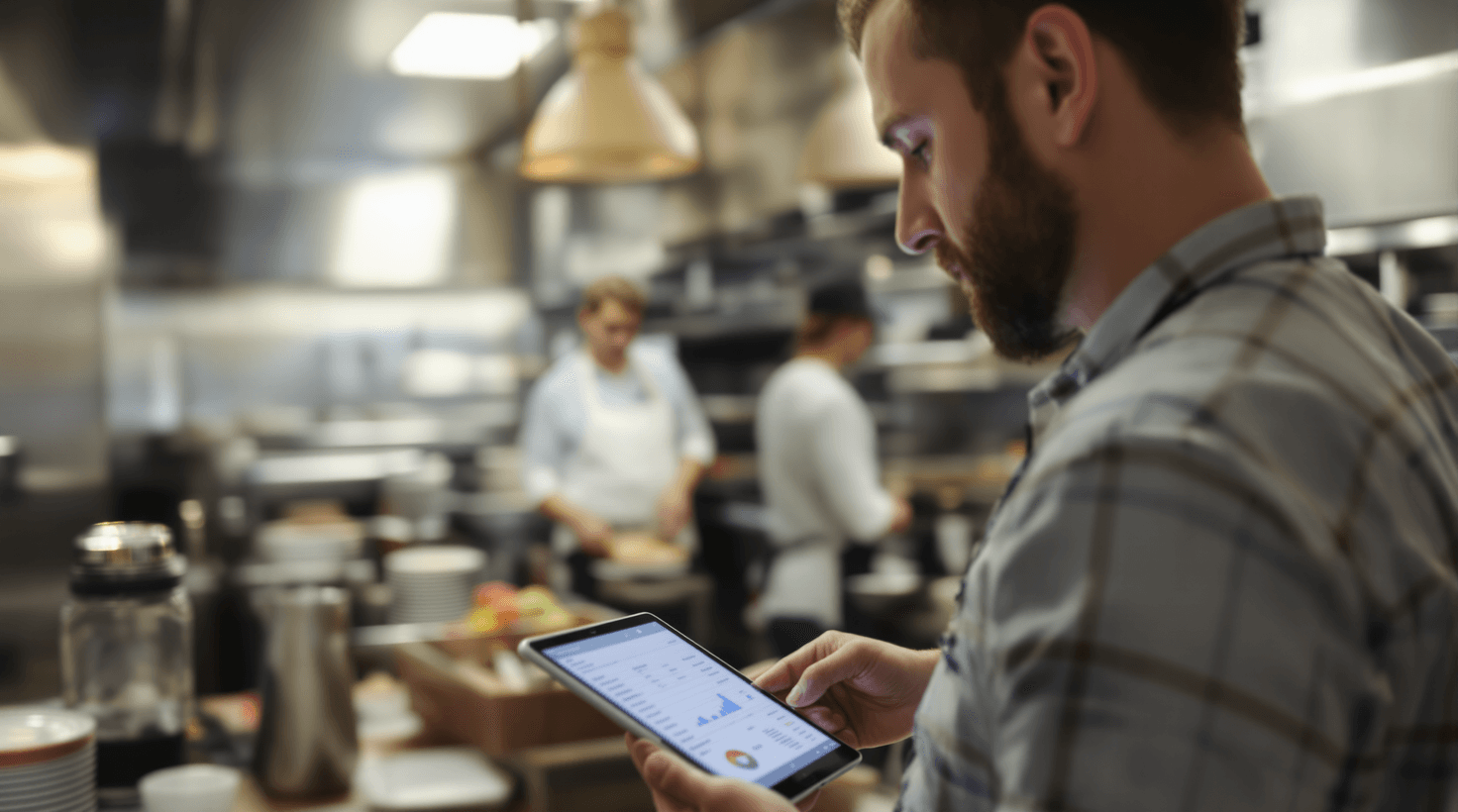
It's 5:47 PM on a Friday. The host stand phone is ringing for the third time in two minutes—no one can grab it because one server called out sick and the other is trying to explain to table 12 that the kitchen just 86'd the salmon. Behind the line, your sous chef is staring at a half-empty walk-in, wondering how they over-ordered lettuce by 40 pounds but somehow ran out of chicken thighs. Three tablets behind the expo window are beeping with DoorDash, Uber Eats, and Grubhub orders, each one slightly out of sync with the POS. And somewhere in the back office, next week's schedule sits half-finished in a spreadsheet your GM hasn't touched since Tuesday.
This isn't a bad night. This is just a Friday.
Here's the problem underneath all of it: you're running a business that nets 3–5% — and most of the decisions that determine whether you hit that margin or fall below it are being made manually, on instinct, under time pressure. Every point of food cost matters. Every hour of unnecessary labor matters. Every missed call and every lost repeat guest matters. At 4% net margin, a $1,500/month improvement in food cost variance is the difference between a good year and a great one.
AI won't cook your food or charm your regulars. But it can answer that phone, predict how much chicken you actually need, build next week's schedule in 30 seconds, and consolidate those three screaming tablets into one calm screen. The restaurants adopting these tools aren't futuristic chains — they're independent operators who got tired of running on gut feel when the numbers demand precision.
This guide walks you through exactly which AI tools to implement, in what order, and what they'll actually cost. No theory — just specific tools, setup steps, and dollar-figure results that matter for an independent restaurant doing $500K–$2.5M in annual revenue.
TL;DR — Your Top 3 Moves
- Start using ChatGPT or Claude today for review responses, social media, and job postings — free, saves 5–8 hours/week
- Deploy Craftable ($99/mo) for AI invoice processing and food cost tracking — targets a 2–5% food cost reduction worth $2,000–$5,000/month
- Install Loman AI ($199/mo) to answer every phone call 24/7 — captures $3,000–$10,000/month in orders from calls you're currently missing
The Margin Math Every Restaurant Operator Needs to See
A 3–5% net margin sounds thin because it is. Here's where the money actually goes:
| Cost Line | Typical % of Revenue | AI Lever |
|---|---|---|
| Labor | 28–35% | Scheduling automation, demand-based staffing |
| Food & beverage COGS | 28–35% | Invoice AI, portion variance tracking |
| Rent/occupancy | 5–10% | (fixed — AI can't help here) |
| Third-party delivery commissions | 15–30% per order | Direct ordering migration |
| Utilities, marketing, supplies | 15–20% | Content automation, review management |
| Net margin | 3–5% | Precision across all lines above |
Top performers — the 10–15% margin restaurants — aren't doing a different business. They have surgical precision on food cost, labor scheduling, and repeat guest marketing. Those are the three places AI delivers measurable results, and they're also the three places most independent operators are flying blind.
The technology stack in most restaurants is already surprisingly deep: 95% use a POS system, 80% offer online ordering, 70% of full-service spots use reservation software. The gap isn't tech adoption — it's that these systems don't talk to each other, and the data they generate goes largely unanalyzed. AI bridges that gap.
If you're running a food truck or catering company, many of these tools apply to your operation too, though the implementation order differs by service model.
Here's a visual overview of the implementation phases:

Starting Point: Free Tools That Pay Off Immediately
These cost nothing and require no technical skills. If you can use Instagram, you can do this.
ChatGPT or Claude for Reviews, Social, and Hiring
A 1-star drop on Yelp correlates with a 5–9% revenue decline, according to Harvard Business School research. And there's a more granular pattern worth knowing: restaurants that respond to 80%+ of their reviews within 48 hours average 4.2+ stars on Google, while those that respond to fewer than 20% average 3.6 stars. Over 90 days, that 0.6-star gap translates to roughly 8–12% fewer covers for a mid-sized independent.
Most owners respond to reviews sporadically — maybe once a week, maybe never — because each response takes 10–15 minutes to craft. ChatGPT drafts a thoughtful, personalized response in 30 seconds. It can generate a full week of social media posts in 10 minutes. It can write job postings that actually attract candidates instead of the same "Now Hiring" template recycled since 2019.
ChatGPT
Best for: Review responses, social media, job postings, training materials
The free tier handles everything a restaurant owner needs for daily content creation. No credit card required. Use it for review responses, weekly social media calendars, job postings, and employee training checklists.
I own a [casual Italian / upscale steakhouse / etc.] restaurant called [NAME] in [CITY]. Write a professional, empathetic response to this negative review. Acknowledge their specific complaint, apologize without being defensive, explain what we're doing to fix it, and invite them to return. Keep it under 100 words.
Review: "[PASTE THE REVIEW HERE]"
Create 5 Instagram posts for my [type] restaurant in [city] for this week. This week's specials are: [list specials]. We also have [event/promotion]. For each post, write: a caption (2-3 sentences, casual and inviting), 8-10 relevant hashtags mixing local and food-related tags, and a suggested photo idea. Make the voice feel like a real person, not a brand.
Across review responses, social media, job postings, and training documents, expect to reclaim 5–8 hours per week. The revenue protection from faster, more consistent review responses alone is worth $2,000–$8,000/month for a restaurant getting 5+ reviews per week.
Always Read Before You Post
AI drafts are starting points, not finished products. Never post a review response without reading it first — especially for serious complaints about food safety, discrimination, or injury. Those require a personal, human response that acknowledges the gravity of the situation.
Schedule Smarter with 7shifts
Your GM spends 3–5 hours every week building next week's schedule. Cross-referencing availability texts, checking who's approaching overtime, trying to remember who requested off three weeks ago. Then someone calls out Monday morning and the whole thing unravels into a group text chain.
7shifts replaces all of this with a mobile app your team actually uses. The free Comp plan covers a single location with up to 10 employees — enough to prove the concept before you invest anything.
7shifts
Best for: Staff scheduling, shift swaps, labor cost tracking
The restaurant industry's most widely adopted scheduling platform (50,000+ restaurants). Free plan includes drag-and-drop scheduling, shift swapping, and a team communication app. Paid tiers add AI auto-scheduling and POS integration for demand-based staffing.
Setup in 1 hour:
- Sign up at 7shifts.com — free Comp plan, no credit card
- Add employees with roles, availability, and contact info (30 minutes for a 10-person team)
- Build next week's schedule using drag-and-drop instead of your spreadsheet
- Have every team member download the 7shifts app at your next pre-shift meeting
- Enable shift swap requests so staff handle their own coverage with manager approval
Three to five hours back per week is the obvious win. The less obvious one: 7shifts gives you real-time visibility into labor cost as a percentage of revenue — the single most important number you're probably not tracking daily. Your labor cost target should be 28–32% of revenue. If you don't know where you're running right now, that's the first problem to fix. If you're running a bakery with similar scheduling headaches, 7shifts works equally well for production-focused food businesses.
ROI Snapshot
Monthly Cost
$0/mo
Time Saved
4hrs/week
Monthly Value
$2,400
ROI
Infinity%
AI Menu Descriptions and Food Photography
Online ordering now represents 30%+ of revenue for many restaurants, and delivery platforms rank items with better photos and descriptions higher in search results. Professional food photography costs $1,000–$5,000 per session. Your DoorDash listing probably has blurry iPhone photos and descriptions that say "Chicken Parmesan — $16.99" with zero appeal.
Write compelling menu descriptions for these dishes at my [casual Italian] restaurant. For each dish, write 2-3 sentences that use sensory language (taste, texture, aroma), mention key ingredients, and make the reader hungry. Don't use clichéd food words like "mouthwatering" or "delectable."
- Chicken Parmesan — breaded chicken, marinara, mozzarella, spaghetti
- Caesar Salad — romaine, house-made dressing, croutons, parmesan
- [ADD YOUR ITEMS]
Use Microsoft Copilot Image Creator (free) to generate professional-looking food photos for delivery platform listings. Items with photos get 30%+ more orders on DoorDash. This won't replace a real photographer for your website hero images, but for the 47 items on your Uber Eats menu that currently have no photo at all, AI-generated images are infinitely better than blank squares.
You're looking at $1,000–$5,000 saved versus professional photography, plus $500–$2,000/month in increased online order conversion from better listings.
Fixing the Profit Leaks: Food Cost and Delivery Margins
This is where the margin math gets real. These tools cost $150–$540/month combined but target $5,000–$14,000/month in savings — the two biggest profit drains for independent restaurants.
Craftable: From "I Think Our Food Cost Is Around 32%" to Knowing Exactly
The average independent restaurant wastes 4–10% of purchased food inventory before it ever reaches a plate. On $30,000/month in food purchases, that's $1,200–$3,000 per month going straight into the garbage. And that's before counting supplier invoice errors — which happen on 5–8% of invoices and almost always go undetected.
Craftable uses AI to process invoices (snap a photo, it does the rest), track actual vs. theoretical food cost by menu item, and flag ingredient price changes in real time. The goal isn't more reports — it's a specific kind of clarity: knowing that your chicken thigh variance this week is coming from Station 3's portioning, not supplier pricing.
Craftable
Best for: Invoice processing, food cost tracking, recipe costing
AI-powered invoice scanning with automatic 3-way matching (PO → delivery → invoice). Real-time food cost variance reporting, recipe costing, and integration with 1,000+ POS and vendor systems. The most accessible entry point for restaurants moving from spreadsheets to data-driven food cost management.
The connection most operators overlook: your POS sales mix tied directly to your theoretical food usage. When Tuesday night sells 40% more pasta dishes than projected, Craftable flags that Wednesday's prep list needs to adjust. This is the difference between a chef who orders on gut feel and one who orders on data — and that difference is worth 2–5% of your food cost.
Implementation steps:
- Connect your POS system (Toast, Square, Clover — Craftable integrates with all major systems)
- Import your vendor list and start scanning invoices with your phone
- Enter your top 20 recipes with ingredient costs to establish baselines
- Run your first week's actual-vs.-theoretical food cost report
- Set automated alerts for ingredient price changes over 5%
- Schedule a 30-minute weekly food cost review replacing your old spreadsheet process
ROI Snapshot
Monthly Cost
$99/mo
Time Saved
4hrs/week
Monthly Value
$3,900
ROI
3839%
Free Alternative to Get Started
Not ready for $99/month? Use ChatGPT to analyze your food cost data manually. Export your POS sales mix report, paste it alongside your inventory costs, and ask: "Identify the 5 menu items with the highest food cost percentage variance from my 30% target. For each, suggest whether to adjust the recipe, raise the price, or reduce portion size." It's not automated, but it's free insight you're not getting today.
The Third-Party Delivery Problem (And What to Do About It)
Let's be direct about the delivery math. If you're doing $10,000/month through DoorDash at a 25% commission, you're writing DoorDash a $2,500 check every month. At 4% net margin, you need $62,500 in total revenue just to net-net that commission. That's not a knock on DoorDash — it's platform economics that work fine for well-capitalized chains and terribly for thin-margin independents.
Otter doesn't solve the commission problem, but it solves the operational chaos that makes delivery even more expensive than it should be.
Otter
Best for: Multi-platform delivery order management and menu syncing
Aggregates DoorDash, Uber Eats, Grubhub, and other delivery platforms onto a single screen. One menu editor publishes everywhere simultaneously. Unified analytics show which platform drives the most profitable orders. Auto-acceptance rules handle orders during rush without manual intervention.
If you're on DoorDash, Uber Eats, and Grubhub, you have three tablets behind your counter — each beeping independently with different order formats, different acceptance windows, and different reconciliation processes. Menu updates require logging into each platform separately, a 2–3 hour process every time you change a price. Otter consolidates all three into a single screen with one menu editor.
There's also a reconciliation problem every delivery restaurant has but few operators address: platform payouts rarely match what you expect. Tracking down the difference burns hours. Otter's end-of-day reporting automatically matches orders to payments across platforms, flagging discrepancies before they become month-end surprises. On a restaurant doing $15,000/month in delivery, this typically catches $300–$800/month in billing errors or missed adjustments.
Plan on reclaiming 3–5 hours/week in menu syncing, order management, and payment reconciliation, plus $1,000–$3,000/month from fewer order errors and data-driven platform optimization.
FoodDocs: Compliance That Doesn't Depend on Paper
Paper food safety logs are the health inspector's favorite target — and for good reason. They're unreliable, easily missed, and the number one reason restaurants fail inspections. With 75%+ annual turnover, every new hire needs training on your HACCP procedures, and paper-based systems make consistent compliance across shifts nearly impossible.
FoodDocs
Best for: HACCP compliance, digital food safety logs, staff certification tracking
AI generates a customized HACCP plan based on your restaurant type, menu, and kitchen layout. Digital temperature logging replaces paper, with smart alerts for missed checks. Tracks food handler certifications with automatic expiration reminders. Designed for high-turnover kitchens where training new staff on compliance is a constant challenge.
A failed health inspection doesn't just cost you a fine — it creates a public record that shows up on Google. In many jurisdictions, inspection scores are indexed by search engines. One bad score can undercut thousands of dollars in marketing spend. FoodDocs keeps you inspection-ready every shift, not just the week before the inspector shows up.
Certification tracking is the feature that surprises most operators. In states that require food handler certifications — California, Texas, Illinois, Arizona, and others — tracking expiration dates across a workforce that turns over 75% annually is a genuine operational headache. FoodDocs automates this with reminders 30, 14, and 7 days before expiration.
ROI Snapshot
Monthly Cost
$84/mo
Time Saved
3hrs/week
Monthly Value
$1,300
ROI
1448%
Bloom Intelligence: Knowing Which Guests Are About to Disappear
68% of restaurant guests who don't return within 90 days never come back. Most independent restaurants have no systematic way to identify who those lapsing guests are, let alone reach out before they're gone.
Bloom Intelligence creates a guest database from your WiFi, POS, and online ordering data, then automatically segments customers by visit frequency and spend. Its AI identifies guests drifting toward lapse and triggers personalized win-back campaigns before day 90. The WiFi captive portal does the collection automatically — when guests connect to your WiFi, they enter an email or phone number. No clipboard at the register, no awkward ask from your server. A restaurant with 200 daily covers can capture 30–50 new contacts per day, building a marketing list of 1,000+ in the first month.
Bloom Intelligence
Best for: Guest data capture, automated win-back campaigns, review monitoring
WiFi-based guest data capture builds your marketing list passively. AI segments guests by behavior and triggers automated campaigns. Monitors and suggests responses for reviews across Google, Yelp, and TripAdvisor. The $60/month price point makes it accessible for single-location independents.
That list is the asset. Bloom puts it to work through automated win-back campaigns that would otherwise require 2–3 hours of manual marketing work each week, driving $1,500–$4,000/month in recovered lapsed guests and higher repeat visit rates.
Strategic Tools for Restaurants Ready to Play Offense
These tools have higher monthly costs but target the largest revenue opportunities. They make sense for restaurants doing $1M+ annually where the ROI math clearly works.
Reclaiming Delivery Margins with Owner.com
Every order that shifts from a third-party platform to your own direct ordering channel recovers that commission instantly. Owner.com provides a branded website, direct online ordering, a branded mobile app, and automated marketing — designed to shift customers from DoorDash to ordering directly from you at a flat 5% customer fee instead of your 15–30% platform commission.
Owner.com
Best for: First-party online ordering, reclaiming delivery margins
AI-optimized branded website and mobile app for direct online ordering. Automated email/SMS campaigns target repeat customers. Integrates with DoorDash Drive and Uber Direct for delivery fulfillment without marketplace commissions. Best for restaurants doing $10,000+/month in delivery where commission savings exceed the monthly cost.
The technology is solid, but the real ROI comes from actively migrating customers. Print a simple card for every DoorDash/Uber Eats bag: "Love our food? Order direct at [YourRestaurant].com — same great food, 10% off your first order." Restaurants that execute this consistently shift 20–30% of delivery volume to direct ordering within 3 months.
One honest check before you commit: at $499/month plus $1,000 setup, Owner.com needs to shift roughly $2,500/month in orders from 25% commission platforms just to break even. If you're doing less than $5,000/month in total delivery, Popmenu ($50/month) or your POS's built-in online ordering is the smarter starting point. Owner.com is the right tool at the right scale — $10,000+/month in delivery revenue.
ROI Snapshot
Monthly Cost
$499/mo
Time Saved
2hrs/week
Monthly Value
$5,200
ROI
942%
Loman AI: Capturing the Calls That Walk Away
How many calls does your restaurant miss between 10 PM and 10 AM? Catering inquiries from event planners working late. Weekend brunch reservations from people planning Friday night. Takeout orders from someone pre-ordering for tomorrow's lunch. Without someone answering, those calls go to voicemail — and 80% of callers who reach voicemail hang up and call the next restaurant on the list.
Loman AI answers every call 24/7 with a natural-sounding AI voice. It takes reservations, processes takeout orders directly into your POS, answers FAQ questions (hours, directions, menu items, allergen info), and sends confirmation texts — without pulling a single staff member off the floor.
Loman AI
Best for: AI phone answering, takeout order capture, reservation booking
Natural-sounding AI voice handles inbound calls 24/7. Takes takeout orders and sends them directly to your POS (Premium tier). Books reservations, answers FAQs, and sends confirmation texts. Captures orders from the 30–60% of calls restaurants miss during peak hours.
Help me calculate how much revenue my restaurant loses from missed phone calls. Here are my numbers:
- Average missed calls per day during service hours: [NUMBER]
- Estimated percentage that are takeout orders: [%]
- Average takeout order value: $[AMOUNT]
- Estimated percentage that are reservation inquiries: [%]
- Average party size for phone reservations: [NUMBER]
- Average per-person spend: $[AMOUNT]
Calculate my monthly missed revenue opportunity and whether Loman AI at $199-$399/month would be a good investment.
Upgrading 7shifts to Predictive Labor Scheduling
If you started with 7shifts' free plan earlier, you've eliminated paper schedules and group texts. The Pro tier ($76.99/month) connects directly to your POS and uses historical sales data to forecast demand by day, daypart, and weather conditions — then auto-generates schedules that keep labor cost within your target.
The difference between gut-feel scheduling and data-driven scheduling is typically 1–3% of revenue. On a restaurant doing $100,000/month, that's $1,000–$3,000/month in labor savings from a $77/month tool. If your labor cost consistently exceeds 30% of revenue, or if you find yourself regularly overstaffed on slow nights and understaffed on busy ones, the Pro tier pays for itself in the first week.
ROI Snapshot
Monthly Cost
$77/mo
Time Saved
4hrs/week
Monthly Value
$2,400
ROI
3017%
Full Inventory Automation with MarketMan
If Craftable has given you food cost visibility but you want automated purchase orders, AI-driven ordering recommendations based on historical usage, and mobile inventory counting with barcode scanning, MarketMan is the logical upgrade.
MarketMan
Best for: Full inventory automation, AI ordering, waste tracking
Adds AI-driven ordering recommendations on top of cost tracking. Automated purchase orders sent directly to suppliers based on par levels and demand forecasts. Mobile inventory counting cuts count time from 2–5 hours to 30–60 minutes. Growth tier includes waste tracking with reason codes to identify patterns. If you also run a coffee shop, MarketMan scales well across food and beverage concepts.
Don't switch before you're ready. If Craftable is keeping your food cost variance under 2% and you don't need automated ordering, stay with it. MarketMan makes sense when you're managing 100+ SKUs, working with 10+ vendors, or when the time spent manually creating purchase orders exceeds the $100/month price difference. For a feature-by-feature breakdown of both platforms, see our Craftable vs MarketMan comparison.
A Few Honest Spending Guardrails
AI drive-thru and kiosk systems like SoundHound start at $599/month and are designed for QSR chains with 100+ locations. The hardware integration complexity doesn't make sense for a single-location independent restaurant. Wait 2–3 years for plug-and-play options.
Restaurant365, at $469/month, replaces your entire accounting, inventory, and scheduling stack simultaneously. That disruption makes sense for multi-unit operators, not a single-location restaurant exploring AI for the first time. Start with targeted tools that solve specific problems.
On contracts: many restaurant AI tools offer 20–30% discounts for annual billing. Resist until you've used the tool for 6–8 weeks and confirmed measurable ROI. The flexibility to cancel is worth more than the discount, especially in your first year.
Your Getting Started Checklist
- Create a free ChatGPT or Claude account and respond to your 3 most recent reviews (15 minutes)
- Generate this week's social media content using the prompts above (10 minutes)
- Sign up for 7shifts free plan and add your team (1 hour)
- Build next week's schedule in 7shifts instead of your spreadsheet
- Write AI-powered menu descriptions for your top 10 delivery items
- Update your DoorDash and Uber Eats listings with new descriptions and photos
- Start a Craftable free trial and scan your first week of invoices
- Enter your top 20 recipes in Craftable and run your first food cost variance report
- Sign up for FoodDocs and generate your customized HACCP plan
- Mount a shared tablet in the kitchen for digital food safety logs
- Evaluate Otter if you're on 2+ delivery platforms
- Calculate your missed-call revenue opportunity before considering Loman AI
- Track your labor cost % weekly using 7shifts data — upgrade to Pro when ready
- Review Owner.com ROI math only after you're doing $10K+/month in delivery
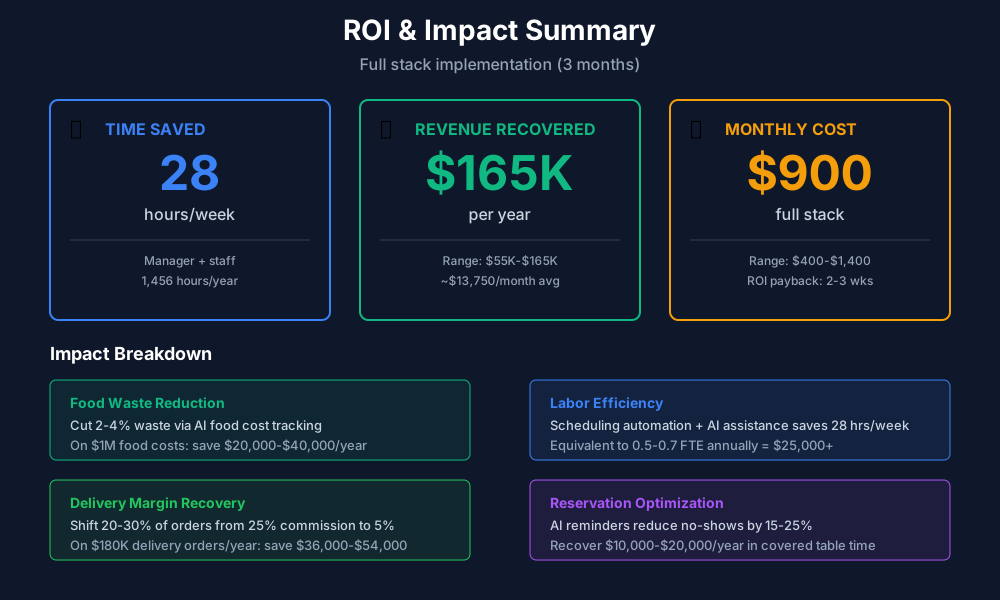
Here's a breakdown of the costs and expected returns:
Frequently Asked Questions
Can AI phone answering handle custom menu questions and complex allergy requests accurately?
Loman AI handles standard menu questions well — ingredients, pricing, hours, specials — because you configure this information during setup. For complex allergy inquiries, the AI can either provide answers you've pre-loaded or transfer the call to a staff member. Spend 30 minutes during setup mapping your most common allergy questions and their accurate answers. Never rely on AI to improvise food allergy information. That's a liability risk no software can insure against.
How does AI food cost tracking handle items with fluctuating market prices like seafood and seasonal produce?
Every time you scan a new invoice, Craftable and MarketMan update that ingredient's cost automatically. If your salmon supplier raises prices 12% on Tuesday, every salmon dish recalculates by Wednesday morning and an alert fires so you can decide whether to absorb it, adjust the portion, or reprice. For highly volatile items, set your alert threshold at 5%.
Will delivery platform aggregators like Otter cause problems with our existing DoorDash contracts?
No. Otter connects via each platform's official API, so your existing contracts, commission rates, and marketing promotions are completely untouched. Orders just appear on one screen instead of three. The one thing that won't consolidate: platform-specific promotional tools like DoorDash's Sponsored Listings. You'll still manage those in each platform's own dashboard.
What happens to our digital food safety logs during a power outage or internet failure mid-service?
FoodDocs stores completed entries locally on the device and syncs when connectivity returns. But here's the thing most operators miss: train your staff on what to do when the app is unavailable. If no one has a backup plan, you'll get blank logs — which defeats the whole point. Paper backup for temperature checks is still worth keeping on hand for exactly this scenario.
How do we shift customers from DoorDash to our Owner.com direct ordering without losing DoorDash visibility?
Keep your DoorDash listing active for discovery — new customers finding you on the platform is free marketing. The shift strategy targets repeat customers only. Include a branded card in every DoorDash bag ("Order direct at [YourName].com — 10% off your first direct order"). Add the direct ordering link to your Google Business Profile, Instagram bio, and every email. The goal is a 20–30% shift over 3 months, not eliminating DoorDash entirely. Restaurants that remove themselves from platforms lose the discovery funnel and usually end up worse off.
Is AI going to replace my front-of-house staff?
No. And if anyone is selling you on that premise, they're selling something else. What AI replaces is the specific administrative overhead that keeps your best people from doing their actual jobs — answering phones during service, hunting for schedule conflicts, manually updating three delivery tablets. Your floor staff's value is in hospitality, not admin. The goal is getting them off their phones and onto the floor.
Do AI scheduling tools account for sub-shift labor like split prep and service shifts?
7shifts Pro handles split shifts, multiple roles per employee (a cook who also does prep), and different pay rates per role. When the auto-scheduler builds your week, it can schedule the same employee for a morning prep shift and an evening line shift with the required break between them. It also enforces state split-shift premium rules — California, New York, and others require extra pay for splits. Configure your state's labor rules during setup (about 10 minutes). After that, the AI won't schedule anything that would put you out of compliance.
The path forward is straightforward: start with the free tools in the first section this week. Respond to your reviews with AI, generate your social media content, and get your team on 7shifts. Those three moves alone will recover 8–13 hours per week and protect revenue you're currently losing.
Once you've built the daily habit — and it takes about two weeks — move to Craftable and Otter. That's where the margin math starts to shift: food cost reductions and delivery operation savings that are real, measurable, and visible in your weekly numbers.
The strategic tools come last, when you're ready to go from defending margins to building them. At 3–5% net, every point recovered is meaningful. The operators hitting 10–15% aren't operating a different restaurant. They're just operating with better information.
More AI Implementation Guides
AI Tools for Wineries: DTC, Cellar & Compliance
The best AI tools for wineries in 2026 — cut wine club churn, automate DTC marketing, digitize cellar records, and stay TTB-compliant. A phased plan.
Best AI Tools for Bakeries: Production & Orders
Best AI tools for bakeries: cut waste 50%, automate custom cake orders, forecast demand spikes, and reclaim 15-25 hrs/week. See picks, pricing & setup.
Catering AI: Best Tools for Caterers (Cut Hours, Win Bids)
The best catering AI tools for proposals, booking, and food cost control. Cut proposal time 80%, capture leads 24/7, and win more events. See picks & pricing.
AI Tips for Baristas: Coffee Shop Tools & ChatGPT
AI tips for baristas and coffee shop owners: use ChatGPT for marketing, automate social posts, cut inventory waste 50%, and save 15+ hrs/week. Top picks.
Best AI Tools for Food Trucks: POS, Social & Catering
Cut food waste 30%, automate Instagram, book more catering gigs & reclaim 15+ hours weekly. Best AI tools for food trucks — free picks, real pricing & setup.
AI Tools for Bookkeeping Services: 2026 Guide
Best AI tools for bookkeeping services in 2026: Automate categorization, reconciliation, and document chasing without hiring extra staff.
Keep exploring
See every AI implementation guide we've published for Food & Hospitality, or browse the full library by industry or category. Looking for a specific platform? The AI tools directory indexes every product mentioned across our guides, and the comparisons hub puts the most-asked head-to-heads side by side.