The average hair salon chair sits empty for 3.2 hours per day. Not because clients don't exist — because the systems for filling those gaps, keeping clients on a rebooking cadence, and capturing retail revenue on every visit are either absent or manual. That's the quiet math underneath most salon P&Ls: not bad work, just leaking time.
This guide is built around three levers that move the needle most in salon economics: rebooking rate, chair utilization, and retail attachment. Every tool recommendation connects back to at least one of them. The phase structure isn't about complexity — it's about sequencing so each layer pays for the next.
TL;DR — Top 3 Recommendations
- Recover color margin now: Set up SalonScale ($49/mo) to track every gram of color — most salons recover $300–$800/month in waste within the first 30 days
- Stop losing the rebooking window: Configure your existing salon software's automated rebooking nudges — most platforms include this but nobody turns it on
- Fill last-minute gaps: Add My AI Front Desk ($99/mo) to capture the 35%+ of booking requests that come in after hours and currently go to voicemail
The Three Numbers That Actually Drive Salon Revenue
Most salon owners think about revenue as a booking problem — fill more appointments, make more money. That's part of it. But the higher-leverage version is this: what percentage of your clients rebook before they leave, how full are your chairs during your paid operating hours, and how often does a client walk out with a retail product?
Here's what those numbers look like across salons, from struggling to high-performing:
| Metric | Struggling | Average | High-Performing |
|---|---|---|---|
| Rebooking rate | 20–30% | 35–45% | 60–75% |
| Chair utilization | 45–55% | 60–70% | 80–90% |
| Retail attachment per visit | $4–$8 | $12–$18 | $28–$45 |
| No-show rate | 18–25% | 10–15% | 4–7% |
| Color waste (% of backbar cost) | 30–40% | 20–30% | 8–15% |
A salon moving from "average" to "high-performing" on rebooking alone — going from 40% to 65% — effectively replaces the client acquisition cost on 25% of its existing book. You're not buying new clients; you're keeping the ones you already have.
AI tools don't manufacture these improvements. But they do systematically remove the friction that causes them to stay at "average."
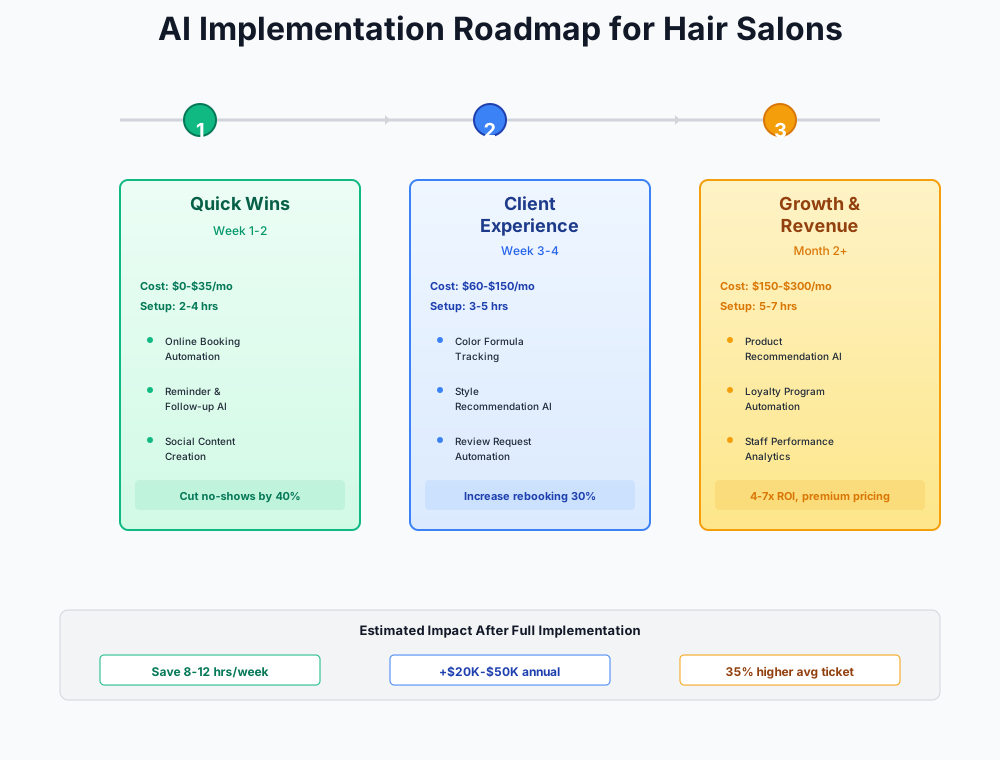
Here's a visual overview of the implementation phases:
Getting the Foundation Right: Free Tools That Pay Immediately
Cost: $0–$30/month | Setup: 3–5 hours | Impact: $2,000–$6,000/month
Before spending a dollar on software, there are two free levers that most salons are leaving untouched. The first is in your phone. The second is probably already in your salon software's settings.
Your Phone Is a Marketing Studio You're Not Using
It's 7:45 PM. Your last client just left and you have a killer before/after sitting in your camera roll — dimensional balayage that took four hours and turned out exactly right. You know you should post it. But writing the caption, choosing the hashtags, adding the booking link... you'll do it tomorrow. Tomorrow it's three days old and feels stale.
That friction is real, and AI eliminates it. Open ChatGPT on your phone before you pack up.
Write 3 Instagram captions for a hair salon before/after post showing a [describe the service — e.g., "dimensional balayage on dark brown hair going to warm caramel"]. Include a call-to-action to book online at [your booking link]. Add 5 relevant hashtags. Tone: warm, confident, professional — not salesy. Keep each caption under 150 words.
Ninety seconds. Pick the one that sounds most like you, tweak two words, and post. Over a week of 4–5 posts, that's 1–2 hours saved — and more importantly, it actually gets done.
Two more prompts that save salon owners serious time:
Write a professional, empathetic response to this Google review for my hair salon. Acknowledge their frustration, don't get defensive, and invite them to contact us directly to resolve the issue. Keep it under 100 words.
The review says: "[paste the review text]"
Write a friendly email to a hair salon client who hasn't visited in [X weeks/months]. Their last service was a [describe service]. Remind them why regular maintenance matters for that specific service type. Include an incentive: $15 off their next visit if they book within the next 2 weeks. Tone: warm and personal, not corporate. Keep it under 120 words.
Don't Skip This Step
Always edit AI-generated captions to sound like you. Your clients follow your salon for your personality and expertise — not generic marketing copy. The AI gives you a starting point; your voice makes it real.
Use Buffer (free plan: 3 channels, 10 scheduled posts each) to batch-schedule a week of content in one Sunday session. Generate the captions with ChatGPT, drop them into Buffer with your photos, set the recommended posting times, and let it run. Salons posting 3–5 times a week get 2–3x more new client inquiries than those posting once or twice. Buffer's AI Assistant also generates caption drafts if you haven't already written them in ChatGPT.
The Rebooking Window Is Closing Before Your Client Reaches the Parking Lot
How many clients walk out without a next appointment? In the average salon, it's more than half. Most of them intend to rebook. They just don't.
The rebooking window is the 24 hours after a service — when the client still remembers how great their hair looks and the idea of returning is most concrete. Miss that window and you're relying on them to feel that pull again on their own, weeks later, without a prompt.
Two things close that gap without any new software:
First: configure a rebooking nudge in your current platform. Every major salon software (Vagaro, GlossGenius, Fresha, Boulevard, Phorest) includes automated post-visit messages — most salons just haven't turned them on. Set a message to send 2–4 hours after checkout: "Loved having you in today. Your [service] typically looks best refreshed every [8 weeks / 6 weeks / 4 weeks]. Want to grab your next slot before the calendar fills up? [booking link]" That interval personalization is key — a haircut client and a balayage client have very different return timelines.
Second: activate the waitlist. When a client cancels, your software can automatically text the next person on the waitlist. This one feature can recover 60–80% of last-minute cancellations without anyone lifting a finger — but it only works if you've been collecting waitlist signups. Start today.
Set up this 3-touch reminder sequence to protect the appointments you already have:
- 7 days before: Email confirmation with service details and your cancellation policy
- 48 hours before: SMS with option to confirm, reschedule, or cancel
- 2 hours before: Final SMS with parking/directions info
The 48-hour text is critical — it gives clients enough time to cancel and lets you fill the slot from your waitlist. Automated SMS reminders cut no-show rates from 15–20% down to 5–8%. Enable two-way texting so clients can reply "C" to confirm or "R" to reschedule.
ROI Snapshot
Monthly Cost
$0/mo
Time Saved
4hrs/week
Monthly Value
$3,300
ROI
Infinity%
The Mid-Tier Stack: Where Chair Utilization Gets Fixed
Cost: $75–$175/month | Setup: 4–8 hours | Impact: $3,000–$10,000/month
The free tools handle consistency. These tools handle the structural problems: color margin leakage, lapsed clients who should be regulars, and the review volume that determines whether a new client calls you or calls someone else.
Color Waste Is a Hidden Payroll Problem
Ask your stylists how much they mix for a full-head highlight. They'll give you a number. Ask them what they actually used last Tuesday on the client with fine, shoulder-length hair, and they won't know — because nobody tracked it.
The average salon loses $300–$800/month to unused color going in the trash. Annualized, that's $3,600–$9,600. For a color-heavy salon doing $20K+ in monthly services, it can be worse. The problem isn't that stylists are careless — it's that there's no feedback loop.
SalonScale
Best for: Any salon spending $500+/month on color products
AI-powered backbar management with Bluetooth scales that track every gram of color mixed. Provides waste insights per stylist, smart reorder alerts, and per-service cost analysis. Most salons recover the subscription cost within the first month.
The Solo plan ($49/month, or $499/year with a free Bluetooth scale included) is the right starting point. Setup runs 1–2 hours: enter your product catalog, set the scale at the color station, train the team. After 30 days, pull the waste report. Show it at your next team meeting — not as a gotcha, but as "here's $X we're leaving on the table every month."
Salons that frame waste reduction as a shared goal — funding education trips, investing in better equipment — get dramatically better buy-in than those who present it as monitoring. The 30–50% waste reduction that most salons see in the first month just from awareness is real, and it compounds.
For salons doing heavy balayage and color correction work, also look at Vish ($30–$300+/month). Vish adds pre-formulation: stylists cost out the service before the appointment, which also enables accurate charging for complex services that frequently get underpriced.
ROI Snapshot
Monthly Cost
$49/mo
Time Saved
1.5hrs/week
Monthly Value
$800
ROI
1533%
Lapsed Clients Are Your Easiest Revenue Recovery
How many clients visited you exactly once in the last 18 months? Check that number in your software. Salons I've talked to are consistently surprised — it's often 20–35% of their total client count. Not people who had bad experiences. Just people who meant to come back and got pulled away by life.
Recovering 10% of those clients in a quarter is real money. And the outreach cost is a text message.
Here's how to activate it in each major platform:
In GlossGenius: The AI Growth Analyst identifies lapsed clients automatically and suggests win-back campaigns. Enable smart client segmentation and set automated rebooking nudges for clients overdue by their typical visit cycle.
In Vagaro: Go to Marketing > Automated Campaigns > Lapsed Client Campaign. Set the trigger for clients who haven't visited in 60+ days. Enable automated SMS with a personalized message and a small incentive.
In Phorest: The Treat Card loyalty program averages a 20–30% increase in visit frequency. Set up AI-driven lapsed client campaigns under Marketing > Automated.
In Fresha: Enable churn risk detection under Client Insights — Fresha's AI flags clients with declining visit frequency before they fully lapse, which is the better intervention point.
Write a short, warm SMS (under 160 characters) for a hair salon reminding a client that their [balayage/highlights/color] is due for a refresh. It's been [X weeks] since their last visit. Include a subtle urgency: mention that their color will look best with touch-ups every [recommended interval]. End with a booking link. Don't use the word "overdue" — say "ready for a refresh" instead.
Moving your rebooking rate from 40% to 60% doesn't just improve retention — it changes the math on client acquisition entirely. Every percentage point increase means fewer new clients you need to find to maintain the same revenue.
Reviews Are Compounding Infrastructure
Salons with 100+ Google reviews get 2–3x more new client calls than those with fewer. The gap between a 4.2-star salon with 40 reviews and a 4.6-star salon with 180 reviews isn't just optics — it's the difference between being picked and being scrolled past.
Only 20% of salons systematically ask for reviews. You already have the tool to fix this.
Enable automated review requests in your salon software. Set the trigger to send a text 2–4 hours after each appointment with a direct link to your Google Business Profile. Then respond to every review within 24 hours — use ChatGPT to draft the response, paste it in, add one personal sentence. Positive reviews get a genuine thank-you mentioning something specific. Negative reviews get empathy, accountability, and an invitation to connect offline.
Aim for 10–20 new reviews per month. At that pace, you're at 120–240 reviews within a year. That's a competitive moat most salons never build.
If you also run a nail salon or barbershop, the same review infrastructure applies — our dedicated guides cover the platform-specific setup for each.
Advanced Tools for Salons Ready to Stop Flying Blind
Cost: $150–$350/month | Setup: 5–10 hours | Impact: $3,000–$9,000/month
At this point, the basics are running. Reminders are automated, color is tracked, lapsed clients are being reached. These tools handle the remaining structural gaps: missed calls that never became clients, scheduling gaps you can't see until they're already empty, and financial data you're currently reviewing only at tax time.
After-Hours Calls Are Leaving to Your Competitor
Your 9:30 cancellation texted at 9:15 PM. Your 6 AM opener called at 6:30 AM before you were awake. Your competitor down the street answered.
My AI Front Desk
Best for: Small salons (1–5 chairs) wanting affordable after-hours call handling
AI phone receptionist that answers calls 24/7 in a natural-sounding voice. Books appointments, handles FAQs, captures caller info, and sends conversation summaries. Handles 80%+ of after-hours inquiries automatically.
Before committing, start free: enable Google Business Messages on your Google Business Profile (Settings > Messaging > Turn on). Two weeks of after-hours messages will tell you whether the volume justifies $99/month. Most salons doing $200K+ annually find it does — 10–20 recovered appointments per month at $75–$200 average service value is $750–$4,000 in revenue that would otherwise have gone to voicemail.
One configuration note: color corrections should never be bookable through an AI receptionist. Add a custom rule that routes any call mentioning "color correction," "fix my color," or "previous salon" to voicemail for human callback. Color corrections require a consultation to assess the current state, build a plan, and quote accurately — a booking made without that context usually leads to an unhappy client or an underpriced service.
For higher-volume salons ($400K+ revenue) or multi-location operations, Zenoti's Zeenie AI Receptionist handles 70–80% of inbound calls but starts at $225+/month with a more involved setup. Qlient AI is built exclusively for beauty businesses with hyper-realistic voice and direct integrations with Meevo, Mindbody, and Zenoti — contact them for pricing.
Your Booking Software Should Be Thinking, Not Just Scheduling
Most salon software is a calendar with reminders. The platforms below actually analyze your data and surface recommendations.
GlossGenius
Best for: Solo stylists to mid-size salons wanting elegant AI marketing
All-in-one salon platform with AI Growth Analyst that identifies revenue gaps, AI-powered marketing campaigns, and automated client rebooking nudges. Designed exclusively for beauty professionals. 14-day free trial, no credit card required.
Boulevard
Best for: Growth-focused salons with 3+ stylists wanting ML-powered scheduling
Enterprise-grade salon management with Precision Scheduling that uses machine learning to optimize booking windows and reduce gaps. AI-driven revenue forecasting and smart waitlist management. Clients report 25–30% reduction in scheduling gaps.
GlossGenius ($24/month) is the right call for 1–4 stylists. The AI Growth Analyst surfaces untapped revenue — the typical salon finds $5,000–$20,000 in identifiable gaps on the first run. Boulevard ($175/month) makes sense at 3+ stylists and $400K+ revenue; its Precision Scheduling needs 30 days of data to generate meaningful optimization, but the result is 25–30% fewer scheduling gaps.
Fresha (from $9.95/month per team member) is the budget option with AI-powered client insights and churn risk detection. Note the pricing structure: Fresha charges 2.19% + $0.20 per card transaction plus a 20% commission (minimum $6) on new clients booked through the Fresha marketplace. Repeat and direct bookings carry no commission fee.
One universal rule: migrate platforms in January. Never switch during prom season (May–June) or the holiday rush (November–December).
Retail Attachment Is an Ops Problem, Not a Sales Problem
The highest-margin revenue in your salon isn't a color service — it's the $32 bottle of shampoo sitting on your shelf. The average salon achieves $12–$18 in retail per visit. High-performing salons hit $28–$45. The difference isn't that their stylists are better salespeople. It's that they have systems.
What actually moves retail numbers: point-of-service recommendations in your software (the checkout screen prompts the stylist with "you used X Olaplex today — mention the home care bundle"), consistent product knowledge so every stylist can explain the why behind what they used, and checkout flows that make adding a product as easy as adding a tip.
GlossGenius and Boulevard both include POS product prompting. Pair it with a quick team meeting once a month where you pull the retail attachment numbers per stylist — not to rank or shame, but to find who's got the pitch working and let them share it.
Payroll for Mixed W-2 and Booth Renter Staff
Managing W-2 commissioned employees alongside 1099 booth renters is a compliance minefield. IRS misclassification penalties can reach $50,000+.
Homebase + Gusto
Best for: Salons with mixed W-2 and 1099 staff
Homebase handles scheduling and time tracking (free for up to 20 employees at one location). Gusto automates payroll with commission calculations, tip reporting, and state tax compliance. The two integrate directly — no double data entry.
Homebase's free plan covers scheduling for up to 20 employees at one location. Gusto ($49/month + $6/person) automates commission calculations, tipped minimum wage compliance, and state-specific labor law updates. Together they save 3–5 hours per payroll cycle.
Get your CPA's input on employee vs. booth renter classification before setting up Gusto. This distinction is the number one IRS audit trigger for salons.
Connect AI-Powered Bookkeeping
QuickBooks Online
Best for: Any salon wanting automated bookkeeping with AI categorization
Industry-standard accounting with AI that auto-categorizes transactions with 95%+ accuracy, flags anomalies, and answers natural-language questions like "How profitable was December?" Connects to Vagaro, GlossGenius, Boulevard, and all major salon software.
Connect your salon software to QuickBooks so daily revenue syncs automatically. After 2 weeks of manual categorization, the AI learns your patterns and handles 95%+ of transactions correctly. Set a monthly ritual: on the 1st of each month, review your auto-generated P&L.
Create a dedicated "Processing Fees" category. Most salon owners are surprised to find they're paying $500–$1,500/month in credit card fees — and that number is often negotiable.
If you have SalonScale connected, export monthly product cost data to QuickBooks to see true service profitability: revenue per service minus commission, product cost, and overhead.
A Few Things Worth Skipping
The tools above are worth the money. These are not — at least not yet.
Enterprise AI receptionists like Zenoti ($225+/month) make sense at $400K+ annually. Before that, Google Business Messages is free and My AI Front Desk is $99/month. You'll get 80% of the capability for a fraction of the cost.
Reputation management platforms like Birdeye ($299+/month) or Podium ($300+/month) solve a problem your salon software already solves. Enable the built-in review request automation, use ChatGPT for responses, and spend that money on education instead.
AI hair diagnostic tools that claim to assess hair type, damage, or treatment needs from photos are still unreliable. Your trained eyes and hands — and the relationship you've built with your clients over multiple visits — outperform any app in this category. Use AI for operations and marketing, not clinical assessment.
Don't implement five tools in a month. One tool per phase, mastered before adding the next. The salon owners who get the most out of this stack are the ones who actually change their workflows — not the ones who subscribed to the most things.
If you run a beauty business that includes med spa services, HIPAA and patient consent requirements add compliance layers that salon-only businesses don't face — the med spa guide covers those specifics.
Your First Week: What to Actually Do
- Download ChatGPT on your phone and write your first 3 Instagram captions (15 minutes)
- Log into your salon software and configure the 3-touch automated reminder sequence (30 minutes)
- Enable two-way texting for appointment confirmations (10 minutes)
- Turn on the cancellation waitlist feature in your salon software (10 minutes)
- Sign up for Buffer's free plan and schedule your first week of social content (90 minutes)
- Enable automated review requests — set trigger for 2–4 hours post-appointment (15 minutes)
- Claim and optimize your Google Business Profile if you haven't already (30 minutes)
- Enable Google Business Messages for free client texting through Google Search (10 minutes)
- After 2 weeks: evaluate SalonScale for color cost tracking ($49/mo, 2-hour setup)
- After 30 days: assess after-hours call volume and consider My AI Front Desk ($99/mo)
Items 1–8 can be done in a single afternoon — and most are free features you're already paying for but haven't turned on. The rebooking nudge and waitlist activation alone, if your salon is doing $15K+ monthly, typically recover $500–$1,500 in the first 30 days.
Start with the Instagram caption. Not because it's the most important thing on this list, but because it takes 5 minutes, it works immediately, and it proves to you that the rest of this is real.
Running a lash studio instead of a full-service salon? The rebooking math is even more compressed on a 2-3 week fill cycle — see our dedicated guide to AI tools for lash studios for fill reminders, Instagram booking capture, and no-show prevention built around that cadence.
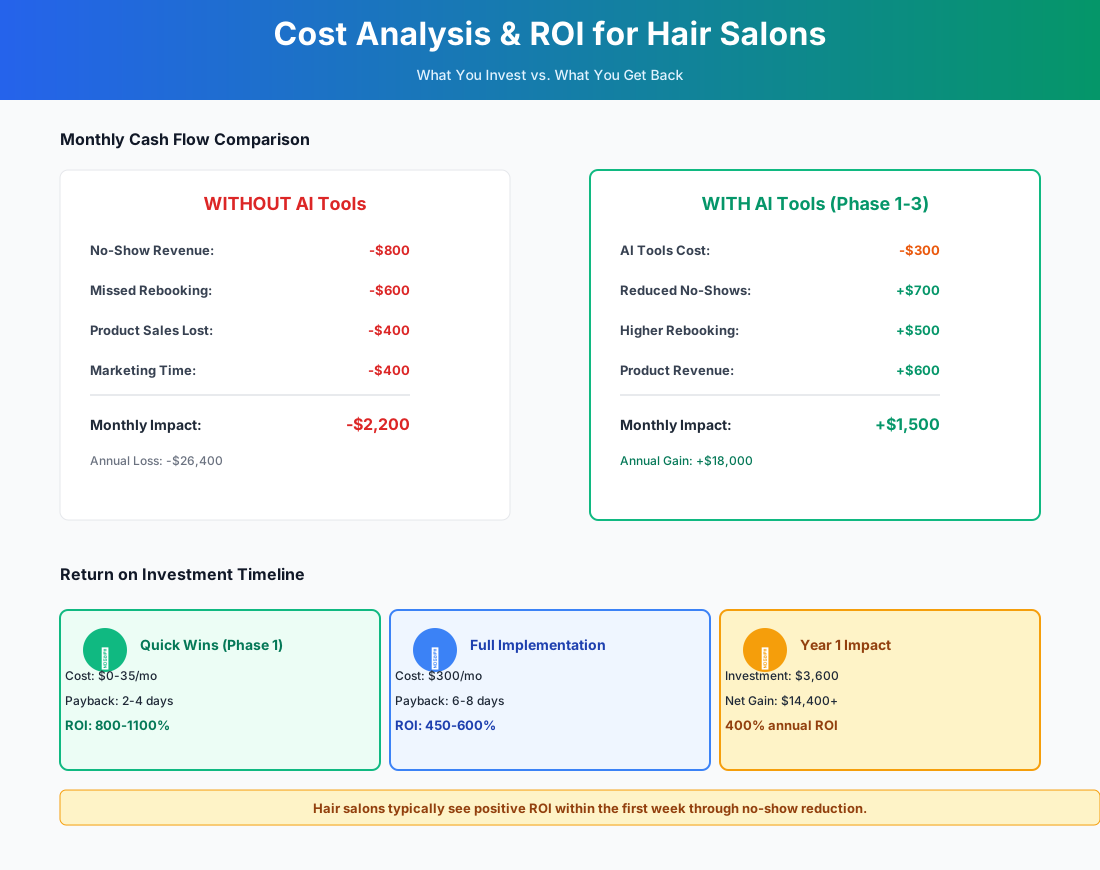
Here's a breakdown of the costs and expected returns:
Frequently Asked Questions
My rebooking rate is around 35%. What's actually causing that and what moves it fastest?
Thirty-five percent means roughly two out of three clients are leaving without a next appointment. The most common culprit isn't that clients don't want to rebook — it's that nobody asked at the right moment. The checkout desk is often rushed, the stylist is already prepping the next client, and the rebooking conversation gets skipped. Fix number one is simple: make the rebooking offer part of the service checkout, not an afterthought. Train every stylist to say "when do you want to come back?" before they walk away from the chair — not at the front desk where the momentum is gone. Fix number two is the automated post-visit message with a personalized return interval. Together, these two changes alone typically move rebooking rates 10–15 percentage points within 60 days.
Can I use SalonScale if my stylists mix color at multiple stations?
Yes. SalonScale supports multiple Bluetooth scales per salon, each connecting to the app independently. The Essentials plan ($99/month) covers up to 3 stylists; Signature ($149/month) handles up to 7. One central mixing area? A single scale on the Solo plan ($49/month) is all you need.
My booth renters use their own booking systems. How do I unify the client experience?
You can't require 1099 booth renters to use your salon software — that level of control risks IRS misclassification. Focus on what you can control instead: your Google Business Profile lists the salon, not individual renters; your Instagram and social presence represents the salon brand; and the common-area experience is yours to design. For the booking side, Fresha lets individual providers maintain separate booking flows under one salon umbrella — clients see a unified front while each renter manages their own calendar.
Does virtual hair color try-on actually influence whether clients commit to a service?
More than you'd expect. L'Oréal's Style My Hair Pro app (free for professionals) is built for in-consultation use — a client who's already seen herself in warm copper highlights is halfway to a yes before you pick up the brush. L'Oréal reports meaningfully higher conversion when virtual try-on is part of the consultation process. Pull it up as a standard step in every color consultation, show 3–4 options, screenshot the winner, and save it to their profile. Fewer "that's not what I expected" redo appointments is a real side benefit.
How do I handle appointment reminders for add-on services that get decided at the chair?
Configure your salon software to send the checkout summary in the follow-up message, not the original booking details. Most platforms support this in their automated campaign settings. The checkout summary shows what was actually performed, which also helps when the client rebooks — they see their full service history, not just the base service they originally booked.
Is there a way to track which stylists are driving retail sales vs. not?
Every major salon platform tracks retail sales by stylist — it's usually buried under reporting. Run that report monthly and use it as a coaching tool, not a ranking system. The stylists who aren't attaching retail usually don't lack the desire; they lack a reliable way to bring it up that doesn't feel like a sales pitch. "I used the Olaplex No. 3 on your ends today — it's what made the color pop like that" is a recommendation, not a sales line. Pair the reporting with a monthly 10-minute product knowledge conversation and you'll see the numbers move.
Here's a breakdown of the costs and expected returns across the full stack:
| Tool | Monthly Cost | Primary Lever | Typical Monthly ROI |
|---|---|---|---|
| ChatGPT + Buffer | $0 | Marketing consistency | $500–$2,000 |
| Automated reminders (existing software) | $0 | No-show reduction | $1,000–$3,000 |
| SalonScale | $49 | Color margin | $300–$800 |
| Lapsed client campaigns (existing software) | $0 | Rebooking rate | $500–$2,000 |
| My AI Front Desk | $99 | Chair utilization | $750–$4,000 |
| GlossGenius or Boulevard | $24–$175 | All three levers | $500–$3,000 |
The first three rows cost nothing beyond your existing subscription and recover real money. That's where to start.
More AI Implementation Guides
AI Tools for Lash Studios: Booking, Fills & Growth
The best AI tools for lash studios in 2026: automate fill reminders, capture Instagram bookings, cut no-shows, and win back lapsed clients on autopilot.
AI Tools for Breweries: The 2026 Owner's Playbook
The best AI tools for breweries in 2026: cut TTB compliance time, tighten COGS, streamline taproom scheduling, and target release marketing — starting free.
AI Tools for Bookkeeping Services: 2026 Guide
Best AI tools for bookkeeping services in 2026: Automate categorization, reconciliation, and document chasing without hiring extra staff.
AI Tools for Marketing Agencies: 2026 Playbook
The best AI tools for marketing agencies in 2026. A phased plan to kill Hell Week reporting, scale content, and fix billable utilization without new hires.
AI Tools for Home Health Care Agencies: 2026 Guide
A practical 2026 guide to AI tools for home health care agencies — HIPAA-safe automation for shift-filling, OASIS-E documentation, EVV, and claim denials.
AI Tools for Dermatology Practices: 2026 Guide
The best AI tools for dermatology practices in 2026 — cut prior-auth hours, reduce no-shows, and grow your cosmetic line, with a HIPAA-first rollout plan.
Keep exploring
See every AI implementation guide we've published for Beauty & Personal Care, or browse the full library by industry or category. Looking for a specific platform? The AI tools directory indexes every product mentioned across our guides, and the comparisons hub puts the most-asked head-to-heads side by side.