
Think about the last 10 estimates you handed out. How many closed? If you're averaging 25–35%, you're actually doing well for the industry. Most residential painting contractors close somewhere between 20% and 40% of the quotes they deliver — which means the majority of the time you spend driving to properties, measuring walls, and writing proposals generates zero revenue.
That math changes when you follow up.
A painting contractor in Phoenix tracked her estimate pipeline for one quarter: first follow-up sent within 48 hours, second at day 6, third at day 12. Her close rate jumped from 28% to 41%. That's not a marginal improvement — on 15 estimates per month at $3,800 average job value, the difference is roughly $7,500 in additional monthly revenue from sending three texts. The follow-up system cost her nothing but 20 minutes and a free AI account.
This guide is built around that reality. Homeowners getting their house painted almost always solicit 3–5 bids. The painter who wins is rarely the cheapest — industry data consistently shows that follow-up speed and quality are stronger predictors of close rate than price for mid-range residential work. We'll walk through how to use AI to own that follow-up funnel, then layer in the tools that handle everything else — calls, reviews, estimating, crew management — as your volume grows.
TL;DR — Top 3 Recommendations
- Build a 3-touch quote follow-up sequence with Claude or ChatGPT (free) — recovering 3 lost quotes per month at $3,500 average adds $126,000/year
- Set up GoodCall AI phone answering ($79/mo) — never miss a lead call while you're on a ladder again
- Install NiceJob ($75/mo) for automated Google reviews — move from 30 reviews to 100+ and dominate local search
The Best AI Voice Assistant for Painters
When you're up a ladder or running a sprayer, you can't answer the phone — and a homeowner who gets voicemail calls the next painter on the list. An AI voice assistant for painters picks up every call 24/7, answers basic questions ("Do you do cabinet refinishing? What's your lead time?"), captures the address and job details, and texts you the lead while you keep working. For a painting contractor the best AI voice assistant is GoodCall ($79/mo) — it's built for trades, sounds natural, and books straight to your calendar — with Rosie ($49–99/mo) as a lighter-weight alternative if you mostly need message-taking and call summaries. We break the two down side by side in our Goodcall vs Rosie comparison.
Why this matters more for painters than most trades: your leads are time-sensitive bids in a 3–5 quote race, and the first contractor to respond wins disproportionately. A missed call isn't a delayed lead — it's usually a lost one. An AI voice assistant (sometimes searched as a "virtual assistant for painting contractors") converts the call you physically can't take into a booked estimate. Pair it with the follow-up sequence below and you've closed both ends of the funnel: every lead answered, every estimate followed up.
The Estimate Funnel Every Painting Contractor Runs (But Few Optimize)
Here's the funnel that determines whether your painting company grows or stays flat:
Lead arrives → You answer (or don't) → Site visit → Estimate delivered → Follow-up (or silence) → Close (or lose)
Every one of those arrows is a leak. But the leaks aren't equal. Answering the phone matters, yes — but the single biggest opportunity for most painting contractors sits between "estimate delivered" and "close." That's where 60–70% of revenue is being left on the table through simple inaction.
Understanding the repaint cycle helps explain why follow-up works so well in this trade. The average homeowner repaints interior spaces every 7–10 years and exteriors every 5–8 years. These are not impulse purchases. A homeowner who got three bids in March, chose your competitor, and had a mediocre experience — or whose painter retired — is back in your market in 2030. The contractor who stayed in contact wins that job without even competing.
Here's where most painting company owners actually spend their week:
- 30% on the job site — rolling, brushing, cutting in, supervising crews
- 30% on sales and estimating — driving to properties, measuring, writing quotes
- 25% on admin — scheduling, invoicing, chasing payments, ordering materials
- 15% on marketing — a before/after on Facebook, occasionally asking for a review
The bind: every hour you spend on a ladder is an hour you're not following up on last week's quotes. AI handles that invisible second job — the calls, follow-ups, and marketing work that grows the business while you're running it.
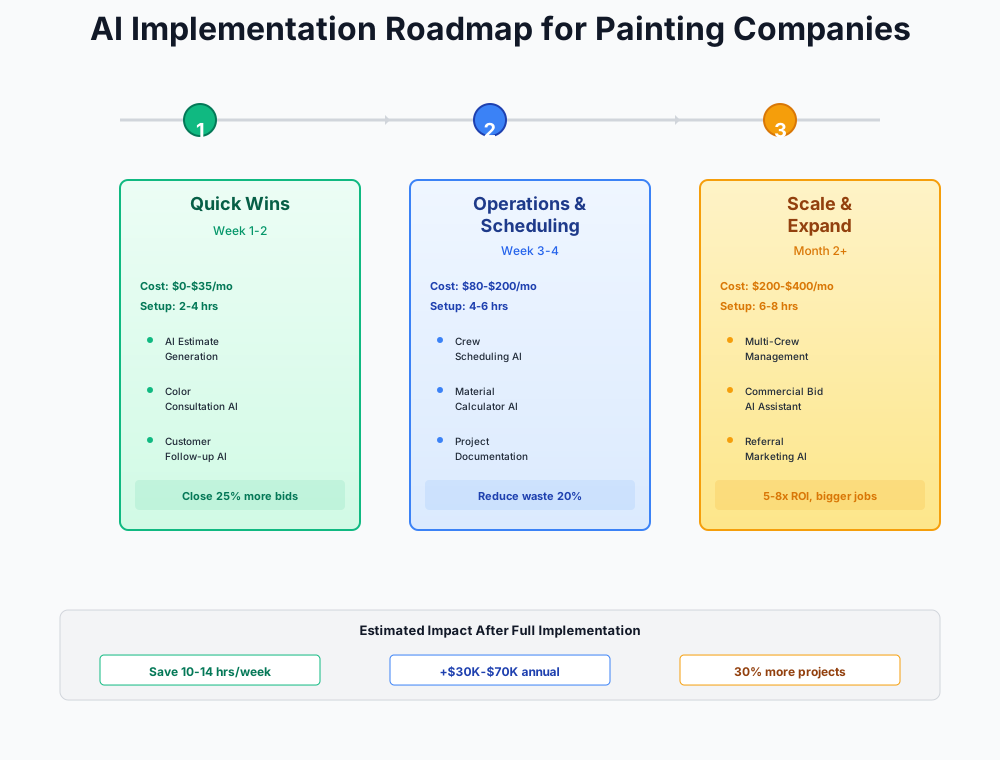
Here's a visual overview of the implementation phases:
Stage 1: The Follow-Up Engine — Free Tools That Pay Immediately
Total setup time: 3–5 hours | Monthly cost: $0–$55
Call this what it is: fixing the most expensive leak in your business using nothing but a free AI account and 30 minutes of your time. No credit card. No software trial. Just a follow-up system that runs on your existing phone.
Build Your Quote Follow-Up System with AI
The most expensive habit in most painting businesses looks like this: you drive 30 minutes to a property, spend an hour measuring and talking with the homeowner, drive back, spend 30 minutes writing up a $4,200 quote, email it over — and then wait. Neither side follows up. The quote sits in their inbox until a competitor calls them.
Industry data suggests 50–70% of painting estimates receive zero follow-up after delivery. The reasons are understandable: you're busy, you feel pushy, you assume if they were interested they'd call back. But the data says otherwise. In one study of home service estimates, leads contacted within 48 hours were 4x more likely to close than those contacted after five days. For painting specifically, where homeowners are juggling multiple bids and often need a nudge to make a decision, structured follow-up is the single highest-leverage change most contractors can make.
The three-touch sequence below is built around the natural decision timeline for residential painting. Most homeowners make their choice within 10–14 days of getting all their bids. Your job is to stay visible and useful — not pushy — during that window.
I run a residential and commercial painting company. Create a 3-message follow-up sequence for estimates I've sent but haven't heard back on:
Message 1: Send 2 days after the estimate. Friendly check-in, ask if they have questions about prep work or paint options. Text message format, under 160 characters.
Message 2: Send 5 days after the estimate. Mention that we have a crew opening in [timeframe] and offer to lock in their spot. Text message, under 200 characters.
Message 3: Send 10 days after the estimate. Final touch — no pressure, mention we're happy to re-quote if their scope changed or if they want to adjust colors. Email format, 3-4 sentences.
Make these sound like they're coming from a real painting contractor, not a marketing department. Use casual, professional language. Don't use exclamation points or emoji.
Copy this into Claude or ChatGPT, generate your three messages, and save them as text shortcuts on your phone (iPhone: Settings > General > Keyboard > Text Replacement; Android: Settings > System > Language > Personal Dictionary). Set a recurring 15-minute block every Monday and Thursday morning to send follow-ups on open quotes. Track everything in a simple spreadsheet — quote date, follow-up dates, outcome — for four weeks.
Painting contractors who implement structured follow-up consistently report a 15–25% improvement in estimate-to-close rate. On a pipeline of 20 quotes per month at $3,500 average, that's 3–5 additional closed jobs — $10,500–$17,500 in monthly revenue from a free tool and 30 minutes of weekly effort.
Use AI Color Visualization to Close Estimates Faster
Color indecision kills more painting bids than price. A homeowner likes your quote, trusts your work — but they can't commit to "Agreeable Gray" vs. "Repose Gray" vs. "Accessible Beige" without seeing it on their walls. So they say they'll think about it, and the bid goes cold.
The color visualization play takes two minutes and changes the close rate dynamic entirely: pull out your phone during the estimate, photograph their room or exterior, and show them three color options on their actual walls before you leave the property. When they can see the outcome, the "let me think about it" window collapses.
Sherwin-Williams ColorSnap Visualizer
Best for: All painting contractors — use during every estimate appointment
AI-powered color visualization that lets you photograph a customer's room or exterior and virtually apply any Sherwin-Williams color in real time. The "Instant Paint" feature uses AI to detect wall surfaces and edges automatically. Works on iOS and Android. Customers can also explore palettes and save favorites you can reference later.
Benjamin Moore Color Portfolio App
Best for: Contractors who sell and apply Benjamin Moore products
Benjamin Moore's Color Portfolio app (iOS and Android) lets you photograph a room or exterior surface and apply any Benjamin Moore color virtually using the Photo Visualizer and live AR Video Visualizer. Useful for contractors with Benjamin Moore dealer accounts who want to keep the color selection within the BM ecosystem.
Pro tip: screenshot the customer's chosen colors in the app and attach them to the estimate. When they review the quote later, they see the visualization alongside the price — a much more compelling package than a plain spreadsheet quote.
Batch-Create a Month of Marketing Content
Most painting company owners know they should post before/after photos and send seasonal emails. After a 10-hour day on a ladder, it doesn't happen. Here's how to do a month of content in one sitting.
I run a residential painting company in [YOUR CITY]. Create 12 social media posts for the next month:
- 4 before/after project showcase posts (I'll add the photos — just write captions)
- 2 seasonal tips posts (current season is [SEASON] — focus on why this is good timing for [interior/exterior] painting)
- 2 color trend posts referencing 2026 trending colors
- 2 educational posts about paint quality differences (e.g., why we use [Sherwin-Williams Duration / Benjamin Moore Regal] over builder-grade paint)
- 1 team/crew spotlight post
- 1 customer testimonial template I can customize
Keep each caption under 150 words. Include 3-5 relevant hashtags per post. Tone should be knowledgeable but approachable — a trusted contractor, not a paint salesman.
Write 3 variations of a text message I can send to customers right after completing a painting job, asking them to leave a Google review. Requirements:
- Under 160 characters each (SMS length)
- Include a placeholder for [REVIEW LINK]
- Sound personal, not automated
- Mention the specific work we just finished (use placeholder [PROJECT TYPE] like "kitchen repaint" or "exterior trim work")
- Don't use the word "review" in every version — vary the language ("share your experience," "let others know," etc.)
Also write one longer email version (3-4 sentences) for bigger commercial jobs where a more formal ask is appropriate.
Create Standardized Job Checklists and Subcontractor Agreements
Inconsistent surface prep is the number-one cause of callbacks in the painting industry. One crew sands and primes every surface; another cuts corners because they're paid per job and want to finish fast. The callbacks hit your reputation, not theirs.
Create detailed job checklists for a painting company for these 4 project types:
- Interior room repaint (walls and ceiling)
- Exterior house painting (wood siding)
- Kitchen cabinet painting/refinishing
- Commercial office repaint
Each checklist should include:
- Pre-job site protection steps (drop cloths, masking, furniture moving)
- Surface prep steps specific to that surface type (sanding grit recommendations, caulking, priming requirements)
- Application steps (number of coats, dry time between coats, technique notes)
- Detail/finish work (trim, edges, touch-ups)
- Cleanup and final walkthrough items
- Photo documentation requirements (before prep, after prep, after first coat, final result)
Format each as a numbered checklist that can be printed on one page and laminated for crew use on every job. Include spaces for crew initials next to each completed step.
This is a painting-industry-specific win. Unlike general contractors, painting callbacks are almost always caused by prep failures — and they show up 6–18 months later when paint peels, bubbles, or cracks. A laminated checklist with crew initials creates accountability and gives you documentation if a warranty dispute arises.
Important: Subcontractor Agreements Need Attorney Review
AI can draft a solid subcontractor agreement in minutes, but worker misclassification penalties from the IRS can reach $50,000+. The line between W-2 employee and 1099 subcontractor is one of the most heavily scrutinized areas in the painting industry. Always have a local attorney review your sub agreements. The $200–$400 review fee is insurance against a five-figure mistake.
Stage 2: Revenue Acceleration — Automate What's Working
Total setup time: 4–8 hours | Monthly cost: $150–$400
Once you've proven that follow-ups and reviews generate revenue manually, it's time to automate those processes so they run without your attention. The goal here isn't adding complexity — it's making the things that already work happen every single time without you having to remember.
AI Phone Answering — Never Miss a Lead Call Again
Every missed call during work hours isn't just a missed call. It's a prospect who called two other painters and scheduled a site visit while you were cutting in a second-story soffit. The window between first contact and booked estimate is typically 2–4 hours for residential painting leads — after that, the odds drop sharply.
GoodCall
Best for: Owner-operators who miss calls while painting and want an affordable AI receptionist
AI phone agent that answers every call 24/7, qualifies the lead (what needs painting, timeline, budget, property type), and sends you a text summary. The AI handles basic questions about your services, service area, and scheduling. When the lead is ready to book, GoodCall sends you an alert for personal follow-up. Starter plan covers 100 unique customers/month — more than enough for most painting companies.
If you're already on Jobber, their $99/month AI Receptionist add-on feeds directly into your CRM. But if you're not on Jobber yet, GoodCall at $79/month is a lower-commitment entry point that works with any setup. We cover similar tools in our landscaping guide — the use case is nearly identical for field service owners who can't answer phones during working hours.
Setup takes under 20 minutes:
- Sign up for GoodCall Starter ($79/month)
- Record your greeting script (GoodCall helps with this during onboarding)
- Configure call forwarding: set your business line to forward to GoodCall after 3 rings (or immediately during work hours)
- Customize the qualification questions: "What type of painting do you need? Interior, exterior, or cabinets?" / "How many rooms or what's the approximate square footage?" / "When are you looking to get this done?"
- Set up text notifications so you receive a lead summary immediately after each call
ROI Snapshot
Monthly Cost
$79/mo
Time Saved
4hrs/week
Monthly Value
$4,800
ROI
5976%
One additional $4,000 job per month from calls you would have missed. That's a 50:1 return on your $79 investment.
Automated Review Generation After Every Job
You finish a beautiful job, the customer is thrilled, you shake hands and drive away — and never ask for a Google review. The problem isn't that customers won't leave reviews. They will, enthusiastically, if you ask at the right moment. Review platforms trigger a personalized request 1–2 hours after job completion — peak satisfaction, before the furniture is back in place and the chaos of daily life takes over.
NiceJob
Best for: Painting companies with fewer than 75 Google reviews who want to systematically build their online reputation
Automated review generation platform that integrates with Jobber, Housecall Pro, and other FSM tools. When a job is marked complete, NiceJob sends a personalized review request via text and email. It also repurposes positive reviews as social media content and website testimonials. The "Review Stream" widget displays live reviews on your website. Companies using NiceJob typically add 2–5 new Google reviews per week.
Podium ($399–$599/month) is overkill for painting companies under $750K revenue. NiceJob delivers the same core review automation for $75/month with Jobber integration.
Setup takes about 10 minutes: connect NiceJob to your FSM platform, customize the review request to mention the specific project type (e.g., "Hope you love the new kitchen cabinets!"), and enable the website review widget.
Most painting companies go from 2–3 new reviews per month to 8–15. Within 6 months, you'll have the volume to compete with any local competitor in the Google Map Pack.
QuickBooks AI for Faster Invoicing and Job Costing
You finish a $4,500 exterior job on Thursday but don't invoice until Monday. The customer pays the following Thursday. That's a full week of delayed cash flow on every job.
QuickBooks Online Plus
Best for: All painting companies — the industry standard for contractor bookkeeping with AI-powered job costing
QuickBooks Online Plus with Intuit Assist AI automatically categorizes transactions, suggests invoice line items based on past jobs, and enables job-level profitability tracking. The AI learns your expense patterns — Sherwin-Williams purchases get auto-tagged to the right job, paint store receipts get categorized correctly. Plus plan is required for the Projects feature that lets you track revenue and costs per painting job.
Painting-specific job costing tip: set up each project as a "Project" in QuickBooks Plus with sub-categories for labor, paint/materials, and subcontractor costs. Tag every Sherwin-Williams or Benjamin Moore receipt to the correct job. After 3 months, you'll know your actual cost per square foot by project type. Most painting company owners are shocked to discover that cabinet refinishing carries 60–70% gross margins while competitive exterior house painting might only net 35%. That information changes how you quote and what work you pursue.
Canva Pro for Professional Marketing Materials
Canva Magic Studio
Best for: Painting company owners who create their own marketing materials — social posts, door hangers, proposal covers, seasonal mailers
AI-powered design tools including Magic Write (text generation), Magic Edit (photo editing), Background Remover, and brand kit consistency. Transform before/after job photos into polished social media posts, professional estimate cover pages, and seasonal marketing pieces in minutes. The "Brand Kit" feature ensures your logo, colors, and fonts stay consistent across everything you create.
The specific play for painters: create a "Before/After" template in Canva with your logo, a side-by-side photo layout, and your phone number. After every job, take the final photos, drop them into the template, and post to Facebook and Instagram. This takes 3 minutes per job and builds a visual portfolio that sells for you 24/7.
Stage 3: Scale and Optimize — Build the Machine
Total setup time: 8–15 hours | Monthly cost: $200–$750
These tools are most valuable for companies running 2+ crews with $500K+ revenue. If you're a solo operator, stay on Stages 1–2 until your volume justifies these investments.
Painting-Specific AI Estimating Software
You're spending 8–15 hours per week on estimates: driving to properties, measuring with a tape measure, writing proposals in Word or a spreadsheet, and emailing them 2–3 days later. Meanwhile, the contractor using PaintScout is handing the customer a professional proposal on an iPad before they leave the driveway.
The production rate problem is real, and generic estimating tools don't solve it. Rolling smooth drywall at 250 sq ft/hour is completely different from brushing crown molding at 40 linear ft/hour or scraping peeling clapboard at 60 sq ft/hour. A spreadsheet estimate that doesn't account for those differences will either consistently underestimate prep-heavy jobs (killing your margins) or overestimate simple ones (losing bids to lower-priced competitors). Neither is acceptable.
PaintScout
Best for: Painting companies with a dedicated estimator or owners doing 10+ estimates per month
The only estimating platform built exclusively for painting contractors. Uses painting-specific production rate databases (sq ft/hour for different surface types, prep levels, and coating systems) to generate accurate quotes in under 10 minutes. Includes automated quote follow-up, digital signatures, and integrates with Jobber, QuickBooks, and most FSM platforms. The production rate library is the key differentiator — it accounts for the difference between rolling a flat wall and brushing detailed trim work.
QuoteIQ
Best for: Solo operators and smaller crews wanting AI estimating at a lower price point
Purpose-built estimating for painting contractors with AI photo-based measurement, production rate calculations, and professional proposal generation. The Essentials plan at $29.99/month is the most affordable painting-specific estimating tool on the market. Includes CRM, scheduling, and invoicing features.
After 20–30 estimates, PaintScout learns your crews' actual production rates and adjusts bids accordingly. Your estimates get tighter over time. That feedback loop doesn't exist in any spreadsheet.
ROI Snapshot
Monthly Cost
$99/mo
Time Saved
8hrs/week
Monthly Value
$6,600
ROI
6567%
Field Service Management with AI Features
If you're managing scheduling on Google Calendar, invoicing in QuickBooks, and customer info in your phone contacts, your information is scattered across five apps. Every crew swap and reschedule requires checking multiple places.
Jobber
Best for: Established painting companies with 2+ crews looking for the most widely adopted FSM platform with AI features
All-in-one field service management: CRM, scheduling, dispatch, quoting, invoicing, and payment processing. The Grow plan includes AI-powered features like voice commands for hands-free job management, automated customer notifications for crew arrival, and integration with 20+ other tools. Jobber is the most common FSM platform among painting contractors — if you hire a new office manager, they've probably used it before.
Jobber add-ons worth considering (but not all at once):
- AI Receptionist: $99/month (alternative to GoodCall if you want everything in one platform)
- Marketing Suite: $79/month
- Reviews integration: works with NiceJob
A practical note on add-on stacking: Jobber's extras ($99 AI Receptionist + $79 Marketing Suite + other line items) can push your monthly bill past $600 before you realize it. Add one at a time, run it for 30 days, measure the results. Most painting companies get the best ROI from the base Connect plan ($119/mo individual, $169/mo for 5 users) plus NiceJob ($75) for reviews before layering in add-ons.
If you're evaluating Jobber vs. Housecall Pro, both are solid choices for painting contractors. Roofing companies and plumbing businesses face the same decision — the right choice depends on which integrations matter most for your existing stack.
Job Site Photo Documentation with AI Reports
A customer calls 6 months after their exterior paint job claiming you never caulked the window frames. You know you did, but your only "proof" is a blurry photo buried in a camera roll on your old phone. Without organized documentation, warranty disputes become he-said-she-said situations that cost you either a free redo or a negative review.
CompanyCam
Best for: Painting companies with multiple crews needing centralized photo documentation for warranty protection and quality control
Every photo is automatically time-stamped, GPS-tagged, and organized by project. Crews take photos at each checklist stage (before prep, after prep, after first coat, final result), and CompanyCam organizes them into project timelines. AI-powered features include automatic report generation from project photos, annotation tools for marking up problem areas, and gallery sharing with customers. The "Before & After" feature auto-pairs photos taken from the same angle.
The warranty protection angle: paint manufacturers' warranties cover 15–25 years of product failure, but filing a claim requires proof of proper prep and application. If Sherwin-Williams Duration fails at year 3, you need documentation showing you followed their specs. CompanyCam provides that trail automatically.
AI Workforce Scheduling and Time Tracking
Crew no-shows, time theft (clocking in from home), and manual schedule juggling across multiple simultaneous job sites eat into your margins and your sanity.
Homebase
Best for: Painting companies with 3–15 W-2 painters who need GPS-verified time tracking across multiple job sites
Free scheduling and time tracking with GPS clock-in/out verification that confirms crew members are actually on the job site before their shift starts. Includes automated shift reminders, availability management, and compliance alerts for overtime and break requirements. The free plan covers up to 20 employees at one location — more than enough for most painting companies. Paid plans (from $24/month) add advanced scheduling, unlimited employees, department-level permissions, and labor cost forecasting.
Because crews work at customer properties rather than a central shop, GPS clock-in is especially valuable for painters. Set a geofence around each job address so crew members can only clock in when physically on site — eliminating the "clocked in at 7am but arrived at 7:45" problem that costs 2–5% of labor spend.
Where Painting Contractors Go Wrong With New Software
There's a pattern that repeats itself constantly in this industry: a contractor hits $600K in revenue, buys ServiceTitan or a similar enterprise platform at $400+/month, spends two weeks on implementation, and then abandons it because the workflow change is too disruptive to a two-crew operation that was running fine on spreadsheets.
The problem isn't the tool — it's the sequencing.
Skip the site visit for AI estimating and you'll regret it. Remote measurement tools like Hover and EagleView work well for roofing companies where the main variables are roof area and pitch. Painting estimates live and die on surface condition assessment — peeling, chalking, wood rot, caulking gaps, mildew. Photos and satellite imagery can't reliably evaluate any of those. Use AI to speed up proposal writing after the site visit, not to eliminate the visit.
Manual first, then automate. Run the Stage 1 follow-up process by hand for 2–4 weeks. Learn what language converts, what timing works, what objections come up. Then automate the proven messages — not hypothetical ones.
The legal exposure on sub agreements is real. The IRS scrutinizes worker classification in painting more heavily than almost any other trade. AI can draft a solid subcontractor agreement in minutes, but the $200–$400 attorney review fee is cheap insurance against a $50,000+ misclassification penalty. Don't skip it.
EPA Lead-Safe Certification is non-negotiable. No AI tool replaces your EPA RRP certification for pre-1978 homes. Make sure AI-generated checklists include lead-safe work practice requirements where applicable. Non-compliance fines reach $37,500 per day.
Getting Started Checklist
- Create a free Claude or ChatGPT account and generate your 3-touch quote follow-up templates
- Download Sherwin-Williams ColorSnap Visualizer and practice on your own home before your next estimate
- Set up text shortcuts on your phone for your follow-up templates
- Generate a month of social media posts and schedule them using Facebook's built-in scheduler
- Create a standardized surface prep checklist for your two most common job types
- Track every estimate and follow-up in a simple spreadsheet for 2-4 weeks to establish your baseline
- Sign up for GoodCall ($79/mo) and configure call forwarding from your business line
- Install NiceJob ($75/mo) and connect it to your FSM platform or set up manual triggers
- Upgrade QuickBooks to Plus ($115/mo) and set up Projects for job-level cost tracking
- After 60 days of proven results, evaluate PaintScout ($99/mo) for AI-powered estimating
- Consider Jobber Connect ($119/mo individual, $169/mo for 5 users) when you're running 2+ simultaneous crews
- Set up CompanyCam ($79/mo) for photo documentation and warranty protection
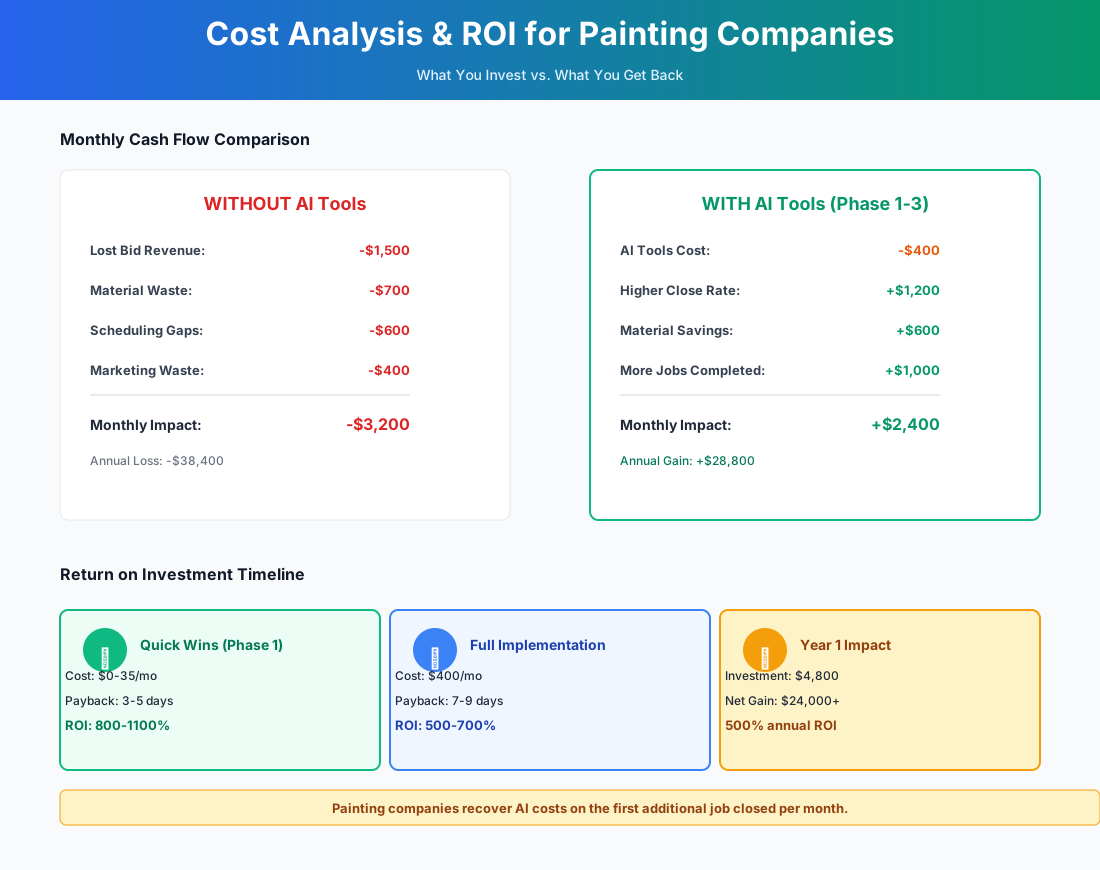
Here's a breakdown of the costs and expected returns:
Frequently Asked Questions
Why does follow-up matter more in painting than in most other trades?
Because the sales cycle is longer and the decision is more personal. A homeowner getting a leaking pipe fixed calls one plumber and books the first available appointment. A homeowner repainting their entire first floor is making a decision about their home's appearance for the next decade — they'll get 3–5 bids, think about it for a week, and pick the contractor who felt most trustworthy and responsive. That window between estimate delivery and decision is where painting jobs are won or lost, and most contractors disappear during it. A structured follow-up cadence keeps you present while competitors go silent.
I've heard 3 follow-ups is the right number. Is there data on that for painting specifically?
The 3-touch sequence tracks well with residential painting decision timelines. Day 2 catches homeowners who are still comparing bids. Day 6 creates light urgency around scheduling availability. Day 12 is a soft close that also signals you won't pester them indefinitely — which matters to homeowners who worry about being hard-sold. Beyond three touches, response rates drop sharply and the negative impression risk goes up. The exception is commercial painting, where decision cycles can run 4–8 weeks and a monthly check-in through week 8 is appropriate.
Can AI estimate painting jobs accurately without a site visit to assess surface conditions?
Not reliably. AI tools can calculate square footage from photos, but painting estimates live and die on prep assessment: peeling, wood rot, chalking, caulking gaps. These conditions require hands-on evaluation. Use AI to speed up the proposal writing after your site visit, not to replace it.
How do AI color visualization apps handle exterior paint that looks different in direct sunlight vs. shade?
This is a real limitation. Sherwin-Williams ColorSnap and Benjamin Moore's Color Portfolio render colors based on the RGB values under the lighting in your photo — the same "Agreeable Gray" will look warmer in a sunny photo and cooler in a shaded one. Best practice: photograph the surface in both direct sunlight and shade and show both renderings. For full exterior repaints, always recommend a physical brush-out sample on a 2x2-foot section viewed across a full day of changing light. No app replaces that.
Do AI phone answering services like GoodCall understand painting terminology when qualifying leads?
GoodCall can be trained on your specific service offerings during onboarding. It handles standard qualification questions well — interior vs. exterior, room count, timeline, property type. Where it struggles is technical follow-ups: if a caller asks "Do you do Venetian plaster?" or "Can you spray a popcorn ceiling with texture?" the AI may not answer accurately. Configure your receptionist to route technical questions to you rather than guessing, and review call transcripts weekly for the first month.
What's the risk of using AI-generated content for EPA Lead-Safe Certification documentation?
High — don't do it without expert review. AI can create internal checklists reminding crews of lead-safe practices on pre-1978 homes, but official RRP documentation (firm certification records, certified renovator records, pre-renovation disclosure forms) must follow EPA formats exactly. Penalties reach $37,500 per day per violation. Use AI for internal operations, not regulatory documentation.
How do I prevent NiceJob from soliciting reviews on jobs that had issues?
NiceJob lets you set a "review gate" that asks customers for a private satisfaction rating before directing them to Google. If a customer rates below your threshold (say, 4 out of 5 stars), the platform routes them to a private feedback form instead — giving you a chance to address the issue before it becomes a 2-star public review. For painting-specific situations like a color match dispute or a touch-up needed after furniture was moved back, you can also manually pause review requests on specific jobs through the NiceJob dashboard before the automated text goes out.
Does PaintScout's production rate database account for different prep levels on the same surface?
Yes — this is one of PaintScout's strongest features. The platform lets you set multiple prep tiers per surface type. An interior wall repaint might have three prep levels: "light prep" (clean and spot-prime, 400 sq ft/hour), "moderate prep" (fill holes, sand, full prime, 250 sq ft/hour), and "heavy prep" (strip wallpaper or skim coat, 80 sq ft/hour). Select the appropriate tier during the estimate, and the system calculates labor hours accordingly. After 20–30 completed jobs, PaintScout adjusts these rates based on your crews' actual production data — your estimates get more accurate over time.
The painters winning the most bids in 2026 aren't necessarily better at their craft than the competition. They answer the phone. They follow up on estimates. They have 140 Google reviews instead of 28. The technical skill is table stakes — the business infrastructure is the differentiator.
Your quote follow-up sequence is the highest-leverage place to start. It costs nothing, takes 30 minutes to set up, and the first recovered estimate will return that time investment many times over. Pull up your list of open quotes from the last two weeks and send the first message today.
If you're also managing a retail paint supply side or running crews for commercial properties, our guides for HVAC companies and landscaping operations cover overlapping territory on field service management and lead response.
More AI Implementation Guides
AI Tools for Breweries: The 2026 Owner's Playbook
The best AI tools for breweries in 2026: cut TTB compliance time, tighten COGS, streamline taproom scheduling, and target release marketing — starting free.
AI Tools for Bookkeeping Services: 2026 Guide
Best AI tools for bookkeeping services in 2026: Automate categorization, reconciliation, and document chasing without hiring extra staff.
AI Tools for Marketing Agencies: 2026 Playbook
The best AI tools for marketing agencies in 2026. A phased plan to kill Hell Week reporting, scale content, and fix billable utilization without new hires.
AI Tools for Home Health Care Agencies: 2026 Guide
A practical 2026 guide to AI tools for home health care agencies — HIPAA-safe automation for shift-filling, OASIS-E documentation, EVV, and claim denials.
AI Tools for Dermatology Practices: 2026 Guide
The best AI tools for dermatology practices in 2026 — cut prior-auth hours, reduce no-shows, and grow your cosmetic line, with a HIPAA-first rollout plan.
AI Meeting Assistant Cost for Accountants in 2026
What does an AI meeting assistant cost for an accounting firm? Free tiers, per-seat pricing from ~$17/user/mo, and the real total for a 3-, 5-, and 10-person team, compared.
Keep exploring
See every AI implementation guide we've published for Trades & Contractors, or browse the full library by industry or category. Looking for a specific platform? The AI tools directory indexes every product mentioned across our guides, and the comparisons hub puts the most-asked head-to-heads side by side.