
Here is the situation most roofing contractors are actually in: a homeowner discovers hail damage on a Tuesday evening, searches "roofer near me," and contacts three companies. Your competitor's AI chatbot responds in 12 seconds with a qualification form. By Wednesday morning, that competitor has already pulled an aerial measurement from Roofr, auto-generated a proposal, and texted the homeowner a branded estimate — all before your office opened and heard the missed call.
This is not a marketing problem. It is a measure-to-quote problem. The roofing companies pulling away from their local markets have figured out how to compress the time between "homeowner raises their hand" and "estimate lands in their inbox" from 2–3 days down to 2–3 hours. The tools that make that possible cost less than most crews spend on fuel in a week.
TL;DR — Top 3 Recommendations
- Roofr (free Starter plan, $19/report) — Get satellite roof measurements and send proposals same-day instead of scheduling site visits
- JobNimbus (14-day free trial) — The roofing-specific CRM that tracks every lead from call to final payment with automated follow-up
- GoHighLevel ($97/month base + usage) — AI voice agent + chatbot that captures leads 24/7, even at 9 PM on a Saturday during storm season
The Best AI Chatbot Tools for Roofing Companies
The best roofing AI chatbots answer storm-damage and inspection inquiries around the clock, qualify leads with the right questions (address, damage type, urgency), and book inspection slots — all before your office opens Monday morning. For a roofing company, that 12-second response window is the difference between getting the job and losing it to whoever picked up first.
GoHighLevel is the platform this guide recommends for that job. Its AI Voice Agent handles inbound calls after hours, and its website chatbot qualifies roof damage inquiries 24/7. When a homeowner texts or submits a form at 9 PM saying they noticed missing shingles, GoHighLevel's bot collects the address, damage description, and a preferred inspection time — and logs the lead directly into your pipeline. No missed call, no voicemail that gets returned three days later.
What makes the chatbot worth configuring carefully is the triage logic: not every inquiry is equal. A homeowner with interior water damage needs a same-day callback. Someone curious about a cosmetic hail ding can wait until next week. A well-built chatbot workflow separates those categories on intake so your crew focuses first on the jobs worth fighting for. GoHighLevel's base plan starts at $97/month, with AI call and SMS usage billed separately — pricing already covered in the Phase 3 section below.
The Measure-to-Quote Gap
Every estimate you write today probably starts with a truck roll and a ladder. That is 1–2 hours per lead, which caps you at 3–5 estimates per day. For most residential crews, that ceiling is also the growth ceiling — not hiring, not marketing spend, not crew size.
There is also a less-obvious cost: the delay itself loses jobs. Industry data consistently shows that quote response time is the single strongest predictor of close rate in residential contracting — stronger than price, stronger than reviews.
| Hours from inquiry to estimate sent | Estimated close rate |
|---|---|
| Under 4 hours | 50–65% |
| 4–24 hours | 25–35% |
| 24–48 hours | 10–20% |
| 48+ hours | Under 10% |
That table should make you a little uncomfortable. Most roofing crews land somewhere in the 24–48 hour column. The fastest crews — the ones using aerial measurement tools — are sending proposals in the same afternoon the lead came in, operating from the top row.
During storm season the stakes multiply. A moderately severe hail event hitting a metro area generates 500–2,000 roofing inquiries in the affected zip codes within 48 hours. The first two or three contractors to flood that neighborhood with same-day estimates capture the lion's share of jobs. Everyone else fights over the remainder at lower margins, or loses to a traveling storm chaser who showed up with a truck full of flyers.
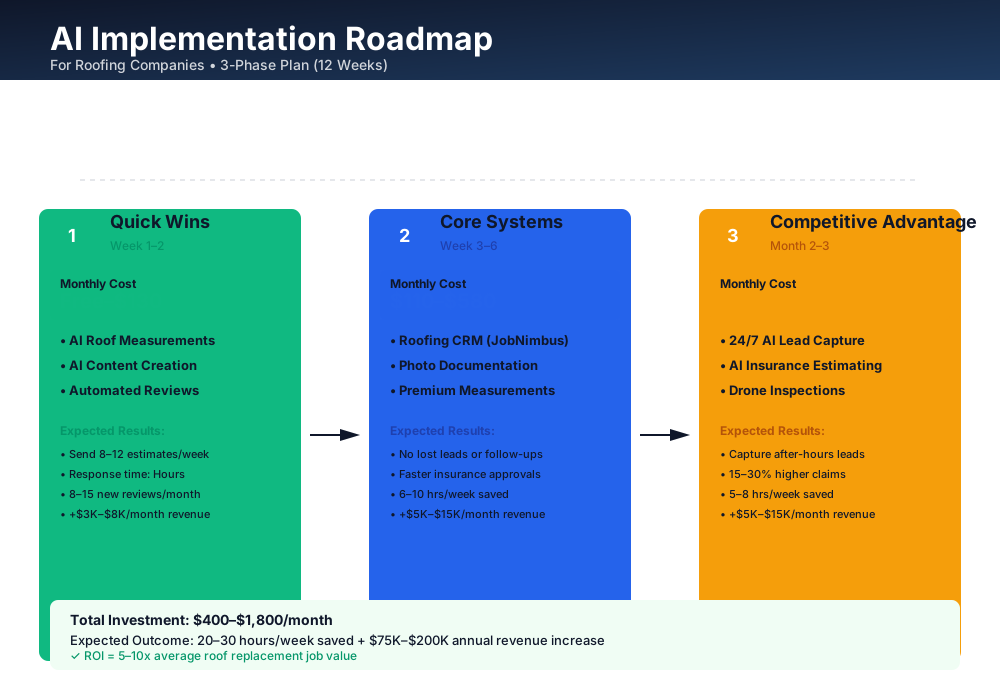
Here is a visual overview of the implementation roadmap covered in this guide:
Storm Readiness Foundations
These tools cost nothing or close to it and require no technical setup beyond a smartphone. Start here this week — before the next storm hits your market.
Aerial Measurements: Stop Climbing Ladders to Generate a Number
AI-powered aerial measurement tools generate accurate roof dimensions from satellite and aerial imagery. You type in an address and within minutes you have roof area, pitch, ridges, valleys, hips, and waste factor — everything you need to build a preliminary estimate without leaving your desk.
Roofr
Best for: Retail roofing estimates and branded proposals
The easiest entry point for AI measurements. The Starter plan is genuinely free — no monthly fee, no credit card required. You pay $19 per measurement report only when you need one. Reports include roof area, pitch, ridges, valleys, and waste factor. Roofr also gives you 5 free branded proposal templates to send professional estimates directly from the measurement data.
Setup takes about 30 minutes:
- Sign up at roofr.com — no credit card needed
- Order your first report by entering a customer's address ($19)
- Review the report: roof area, pitch, waste factor, all broken out
- Use Roofr's free proposal template to create a branded estimate
- Send it to the homeowner within 1–2 hours of their inquiry — not 2–5 days
Most crews go from 3–5 estimates per day to 6–10 once they stop scheduling unnecessary site visits. A single extra won job — typically $8,000–$18,000 — covers 400–900 measurement reports. The math works.
Don't Skip the Site Visit Entirely
Aerial measurements are for initial estimates and proposals. You still need a physical inspection before starting work to catch hidden damage — rotted decking, improper flashing, ventilation issues. The aerial report gets you in the door fast; the on-site inspection is where you build trust and identify the full scope.
Lead Nurturing Sequences and Insurance Explainers
How many follow-up emails did your team send last week to leads who went quiet after the inspection? If the answer is "we texted them once," you're losing jobs to whoever sends the second and third touchpoint.
ChatGPT and Claude both have free tiers that cover everything a roofing company needs: follow-up email sequences, Google Business Profile posts, review responses, and insurance explanation documents. The homeowner who doesn't understand ACV versus RCV is the homeowner who tells you "the adjuster only gave me $8,000 for a $16,000 roof" — and then doesn't hire you. Clear educational content you can text or email after an inspection closes that gap.
Write a 3-email follow-up sequence for a homeowner in [CITY] who requested a free storm damage roof inspection but hasn't scheduled yet.
Email 1 (same day): Create urgency around insurance claim filing deadlines — most policies have a 1-year window. Keep it empathetic, not pushy. Email 2 (3 days later): Include social proof — mention how many roofs you've replaced in their neighborhood after the [MONTH] storm. Include a specific before/after example. Email 3 (7 days later): Final outreach with a limited-time offer for a free gutter inspection with their roof assessment. Acknowledge they're busy and make scheduling effortless (text-to-book).
Company name: [YOUR COMPANY]. Tone: professional, local, trustworthy. Each email under 150 words.
Write a simple explanation (8th-grade reading level) for a homeowner about what Actual Cash Value (ACV) vs. Replacement Cost Value (RCV) means for their roof insurance claim.
Explain: why RCV is better for the homeowner, what "recoverable depreciation" means in plain English, what documents they should request from their adjuster, and what red flags to watch for if an adjuster offers only ACV.
Format as a one-page text document my sales reps can share via text or email after a storm damage inspection. Include a "Questions? Call us" CTA at the bottom with placeholder for phone number.
Realistically, this saves 4–6 hours per week on content and email writing. Better lead nurturing converts 2–3 extra jobs per month — worth $1,000–$3,000 in additional revenue at zero cost.
Automated Google Review Requests
Your top competitor probably has 200+ Google reviews. You have 15–40. Every homeowner searching "roofer near me" sees their listing first before they've spoken a word. Reviews compound — a company with 300 reviews is not twice as trusted as a company with 150, it's perceived as a category leader.
The fix is mechanical, not magical: automated text messages sent within 2 hours of job completion, when the homeowner is standing in their driveway looking at their new roof. That emotional high is the moment. Let it pass and your response rate drops by half.
Jobber
Best for: Small roofing crews wanting easy scheduling, invoicing, and client management
Jobber's Core plan covers scheduling, invoicing, and client management for one user. Automated review requests — triggered after job completion — now require the Marketing Suite bundle (Reviews + Referrals + Campaigns) at $99/month; Jobber has discontinued the standalone lower-priced Reviews-only add-on. It integrates with EagleView for aerial measurements and QuickBooks for accounting. Not as roofing-specific as JobNimbus, but excellent value for smaller crews. If you're also considering tools for other trade services, check out our guides for plumbing businesses and painting companies — Jobber works across all of them.
Free alternative: create a Google review short link (Google Business Profile → Share review form → Copy link), save it as a text shortcut on your phone, and send it to every customer at job completion with a personal message. Free, but requires discipline every single time.
Setup:
- Sign up for Jobber's 14-day free trial (or create the manual review link)
- Configure automated texts to send 2 hours after marking a job complete
- Personalize: "Hi [Name], thanks for choosing [Company] for your roof replacement! We'd love your feedback — takes 30 seconds: [link]. Thanks! — [Your name]"
- Respond to every review within 24 hours using AI-generated response templates
- Track review count weekly — aim for 5–10 new reviews per month
ROI Snapshot
Monthly Cost
$99/mo
Time Saved
3hrs/week
Monthly Value
$4,100
ROI
4041%
Winning the Insurance Claim Cycle
With your foundation running, you're sending faster estimates and collecting more reviews. The next layer replaces spreadsheets and sticky notes with systems built specifically for how roofing workflows actually move — and adds the insurance-specific tools that separate shops doing $800K in storm restoration from shops doing $2M on the same lead volume.
A CRM Built for Roofing, Not Retrofitted for It
One roofing company tracked their leads properly for the first time and recovered $14,000 in their first month — not from new marketing, just from following up on the leads they'd already paid to generate but then lost track of.
That is the real cost of managing leads across personal text threads, a spreadsheet, and three crew members' memories. A roofing-specific CRM tracks every lead from first contact through final payment, automates follow-up sequences, and integrates with your measurement and estimating tools.
JobNimbus
Best for: The most widely adopted roofing-specific CRM — built for your exact workflow
JobNimbus is the CRM that roofing contractors actually use. It tracks leads through your full sales and production lifecycle, integrates directly with EagleView and CompanyCam, and automates follow-up emails and texts based on job stage. The mobile app is built for crews in the field, not office workers at desks. Pipelines default to roofing stages: Lead → Inspection Scheduled → Inspected → Estimate Sent → Approved → In Production → Complete → Paid.
For insurance-heavy shops: AccuLynx (now publishing an Essential tier starting around $250/month, with pricing scaling by user count and features — verify current plan details at acculynx.com) adds AI lead scoring and deeper Xactimate integration. If more than 50% of your revenue comes from storm restoration, AccuLynx is worth evaluating alongside JobNimbus.
For budget-conscious solo operators: QuoteIQ Essentials at $29.99/month is the most affordable roofing CRM with AI features — includes AI Autopilot for automated follow-ups, AI Estimator, and AI text generation.
A note on implementation: don't spend three weeks customizing every field before using the system. Start with JobNimbus's default roofing pipeline for 30 days, then modify based on what you actually find yourself needing. The crews that fail with CRM are the ones that configure endlessly and use never. Run it bare for a month first.
Implementation:
- Start the JobNimbus 14-day free trial — no credit card required
- Import your existing customer list and active leads from your spreadsheet or phone contacts
- Configure your sales pipeline: Lead → Inspection Scheduled → Inspected → Estimate Sent → Approved → In Production → Complete → Paid
- Set up automated follow-up: text 1 hour after inspection if estimate not sent; email 2 days after estimate if not approved; text 5 days after estimate if still pending
- Connect your Roofr account so aerial measurements flow into CRM estimates
- Connect QuickBooks for automatic invoice sync
- Train your team in a 1-hour session: everyone downloads the mobile app and practices logging a lead, updating a status, and triggering a follow-up
Most crews see 6–10 hours saved per week and recover $5,000–$15,000/month in leads that previously slipped through the cracks.
Photo Documentation That Actually Holds Up to Adjusters
Open your last five insurance claims and ask: where are the deck-exposed photos? The ones taken after tearoff but before underlayment, showing the condition of the sheathing? If your crew can't pull those images in under a minute, you've handed the adjuster a reason to deny your supplement.
Right now, job photos probably live on three different crew members' personal phones. Nobody can find the "before" shots when the adjuster asks. Your office staff drags photos into folders for hours each week. And when a warranty claim surfaces two years later? Those photos are gone — along with your leverage.
Contractors in related trades like general contracting, flooring, and cleaning services face the same documentation headaches. But it matters more in roofing, because insurance claim approval hinges directly on photo quality and sequence.
CompanyCam
Best for: Field photo documentation — especially critical for insurance roofing work
Every photo is automatically organized by project, tagged with GPS coordinates and timestamps, and searchable from the office. AI-powered voice-to-report lets crews narrate observations on-site and generate field notes from photos automatically. Generate professional before/after reports in minutes for homeowner presentations and insurance adjusters. Integrates directly with JobNimbus, AccuLynx, and EagleView.
Train your crews on this five-stage photo sequence — in this order:
- Before tearoff: 10–15 photos of existing condition from all angles
- After tearoff: Deck condition (critical for identifying hidden damage and justifying decking replacement on insurance claims)
- After underlayment: Ice and water shield, synthetic underlayment placement
- After shingle install: Completed roof from multiple angles
- Completed + cleanup: Final product plus clean job site
This sequence maps directly to insurance adjuster review points. Miss the "deck exposed" photos and you have lost your evidence for the most profitable supplement line item. Every crew member needs to know this sequence, not just the foreman.
Figure 3–5 hours saved weekly on photo organization, plus faster insurance claim approvals and fewer warranty disputes — worth $2,000–$4,000/month once running consistently.
EagleView for Insurance Work: Roofr's Complement, Not Its Replacement
You've been using Roofr for retail estimates — fast and cheap at $19/report. For insurance restoration, use EagleView. That's not a brand preference, it's a workflow reality.
EagleView
Best for: Insurance-grade measurement reports that adjusters accept without dispute
EagleView is the industry standard for insurance property measurement. Reports have 98%+ accuracy and integrate directly into Xactimate for supplement writing. Insurance adjusters know and trust EagleView reports — sending one proactively often prevents measurement disputes entirely. EagleView does not publish pricing publicly; per-report cost depends on roof size (priced by squares) and your volume agreement. Integrates with JobNimbus, AccuLynx, and ServiceTitan.
Use Roofr ($19/report) for retail estimates where speed matters most. Use EagleView for insurance claims where accuracy and adjuster trust matter most. This dual approach keeps costs down while maximizing value on insurance jobs — and saves 2–3 hours weekly on measurement disputes and re-inspections. Contact EagleView directly to confirm current per-report rates for your volume.
ROI Snapshot
Monthly Cost
$350/mo
Time Saved
12hrs/week
Monthly Value
$12,400
ROI
3443%
Compound Advantage — What the 7-Figure Crews Do Differently
With your core systems running, these tools create genuine competitive separation. An AI lead capture system without a CRM to receive the leads is just expensive noise. Run Phases 1 and 2 first.
24/7 AI Lead Capture and Storm Surge Triage
During storm season, leads don't follow business hours. A homeowner discovers a leak at 9 PM, hears hail at 6 AM Saturday, or notices missing shingles while mowing on Sunday afternoon. The contractor who responds first wins the job most of the time.
The counterintuitive thing about AI lead capture: its value is not the AI. The value is the instant response. Homeowners don't stay on the phone and wait — they move to the next number. An AI that picks up in 12 seconds and asks the right qualifying questions is not a gimmick. It is a closed deal that used to be a missed call.
GoHighLevel
Best for: 24/7 AI lead capture with voice agents, chatbots, and automated storm campaigns
GoHighLevel's AI Voice Agent answers 100% of inbound calls, qualifies leads, and books inspections — even at 2 AM. The AI chatbot on your website qualifies roof damage inquiries 24/7. For storm restoration contractors, the platform can auto-contact homeowners in hail-affected zip codes after major weather events. Includes CRM, automated campaigns, and text/email follow-up sequences. Note: the $97/month base plan does not include voice and SMS usage — those are billed per-minute and per-message. During a busy storm week with hundreds of AI calls, budget $50–$150 in usage fees on top of the base plan. Our plumbing business guide covers GoHighLevel's setup for service contractors in detail.
Setup:
- Start GoHighLevel's 14-day free trial
- Configure the website AI chatbot: qualify leads by asking for address, damage type (storm/age/leak), and preferred inspection time
- Set up the AI Voice Agent: route after-hours calls to AI that answers with your company greeting, qualifies the lead, and books an inspection slot
- Create automated sequences: immediate text on new lead, follow-up email within 1 hour, phone call task for next morning
- Connect to JobNimbus via Zapier so leads flow into your pipeline automatically
- Monitor AI transcripts weekly for the first month and fine-tune responses
Pre-configure Your Storm Surge Triage Before Storm Season
When a major hail event drops 200 leads in 48 hours, you need triage logic already in place. Tag all leads by zip code and damage type. Auto-prioritize active leaks and interior water damage for same-day human callback. Queue cosmetic-only hail damage leads for next-week follow-up. Without this, the AI treats a $25,000 emergency leak repair the same as a "just checking" inquiry, and your team drowns. Build this protocol in a quiet week — not during the storm.
During storm season, capturing after-hours leads that used to go to voicemail is worth $5,000–$15,000/month. Off-season ROI is lower — figure 5–10x — but the system keeps working whether you're watching it or not.
AI-Assisted Insurance Estimating
Insurance carriers and adjusters communicate in Xactimate. If you can't speak their language, you'll consistently leave money on the table — typically $2,000–$5,000 per claim in under-supplemented line items.
Writing a Xactimate estimate manually takes 20–45 minutes per job and requires specialized knowledge. Most roofing salespeople don't have it, so the choice is usually: pay a supplement company $300–$500 per claim, or accept the adjuster's initial number. AI tools now auto-populate Xactimate line items from aerial measurements, photos, and weather data — cutting estimate time to under 10 minutes and flagging line items human estimators routinely miss.
Your options:
- Xactimate Online (~$130–$200/month) paired with EagleView integration — the industry standard, steep learning curve
- QuoteIQ AI Estimator ($29.99–$74.99/month) — generates estimates from photos and satellite measurements in 4–7 minutes, no Xactimate expertise needed
- XBuild (emerging, raised $19M Series A in early 2026) — generates Xactimate-compatible estimates from photos and weather data without requiring you to know Xactimate. Worth watching at x.build.
One practical caution: even with AI tools simplifying the process, you need to understand basic supplement language. Adjusters will probe whether you actually know what you submitted. The AI gets you to 85% — the last 15% requires you to have read a line item before you argue for it.
I'm a roofing contractor writing a Xactimate supplement for a residential roof replacement insurance claim. The adjuster's initial estimate is missing several legitimate line items.
Generate a comprehensive checklist of commonly under-estimated or omitted Xactimate line items for a full residential shingle roof replacement, including:
- Tear-off and haul-away (by layer count)
- Decking replacement (OSB/plywood per damaged area)
- Ice and water shield (valleys, eaves, penetrations per local code)
- Drip edge and starter strip
- Step flashing and counter-flashing
- Pipe boots and penetration flashing
- Ridge vent and ridge cap
- O&P (overhead and profit) — when it applies
- Code upgrades required since original installation
Format as a numbered checklist I can review against the adjuster's estimate line by line. Note which items are most commonly missed.
Average claim value increases 15–30% from proper AI-assisted supplementing. On a $15,000 claim, that's $2,250–$4,500 recovered — per job. Across a month of insurance work, that math compounds quickly.
Drone Inspections with AI Damage Detection
Manual roof inspections take 45–60 minutes, create fall risk, and produce inconsistent documentation. During storm season, inspecting 5–10 roofs per day by climbing ladders is physically impossible for one person.
Drones cut inspection time to 5–10 minutes per roof with zero fall risk. Add AI damage detection software and you get automated identification of missing shingles, hail impacts, flashing failures, and ponding water — with professional reports that impress homeowners and satisfy adjusters.
Before buying a drone: get the FAA Part 107 certification. You or a team member must have this license before flying commercially. The FAA Reauthorization Act of 2024 raised the civil penalty ceiling to $75,000 per violation, and flying without certification voids your liability insurance. Study materials are free from the FAA, the exam costs $175 at any PSI testing center, and most people pass with 2–4 weeks of preparation. License first, drone second — a $1,000 drone sitting in your truck because nobody has the FAA certification is dead capital.
Hardware: DJI Mini 4 Pro (~$599–$759 depending on bundle and retailer discounts) or DJI Air 3 ($1,099) — both produce excellent roofing inspection footage.
AI software options:
- Loveland Innovations IMGING — purpose-built for roofing inspections, AI auto-detects damage types
- DroneDeploy (roughly $330–$500/month per seat depending on plan and billing cycle — pricing structure varies by source, confirm at dronedeploy.com) — better for commercial roofing and larger operations
Write a Google Business Profile post (under 150 words) for [COMPANY NAME], a roofing contractor in [CITY, STATE], promoting our new drone roof inspection service.
Key points to hit:
- Free drone roof inspection (no ladders, no risk to your property)
- We can inspect your roof in under 10 minutes and show you HD footage on the spot
- AI damage detection identifies issues the naked eye can miss
- Perfect for storm damage assessment after the recent [WEATHER EVENT]
- Include a CTA to call or text for a free inspection
Tone: professional but approachable. Don't use words like "cutting-edge" or "revolutionary."
Expected impact: 5–8 hours saved weekly. More inspections per day means more jobs sold — worth $3,000–$8,000/month plus reduced liability insurance costs. "Free drone inspection" is also a lead generation offer that differentiates you from every competitor still climbing ladders.
Your First 14 Days
- Sign up for Roofr free Starter plan — order your first aerial measurement report ($19)
- Create a free ChatGPT or Claude account — generate your storm damage follow-up email sequence and 4 GBP posts
- Set up automated Google review requests (Jobber with Marketing Suite add-on, or free manual text link method — instructions above)
- Start a JobNimbus 14-day free trial — import your active leads and configure your pipeline stages
- Connect Roofr to JobNimbus so measurements flow into estimates automatically
- Download CompanyCam on every crew member's phone — start documenting jobs with the Before/During/After workflow
- Connect QuickBooks to your CRM for automatic invoice sync
- Order 5 Roofr reports and compare against your manual measurements to build confidence
- After Week 2: Evaluate GoHighLevel for 24/7 AI lead capture based on your after-hours lead volume
- Track your metrics: lead response time, estimates per day, close rate, new Google reviews per week
Tackle items 1–3 this week. They're free or nearly free, take under 3 hours total, and you'll see a measurable change in your estimate turnaround before the end of the week. Layer in the CRM and photo documentation in weeks 2–3 once that rhythm is established.
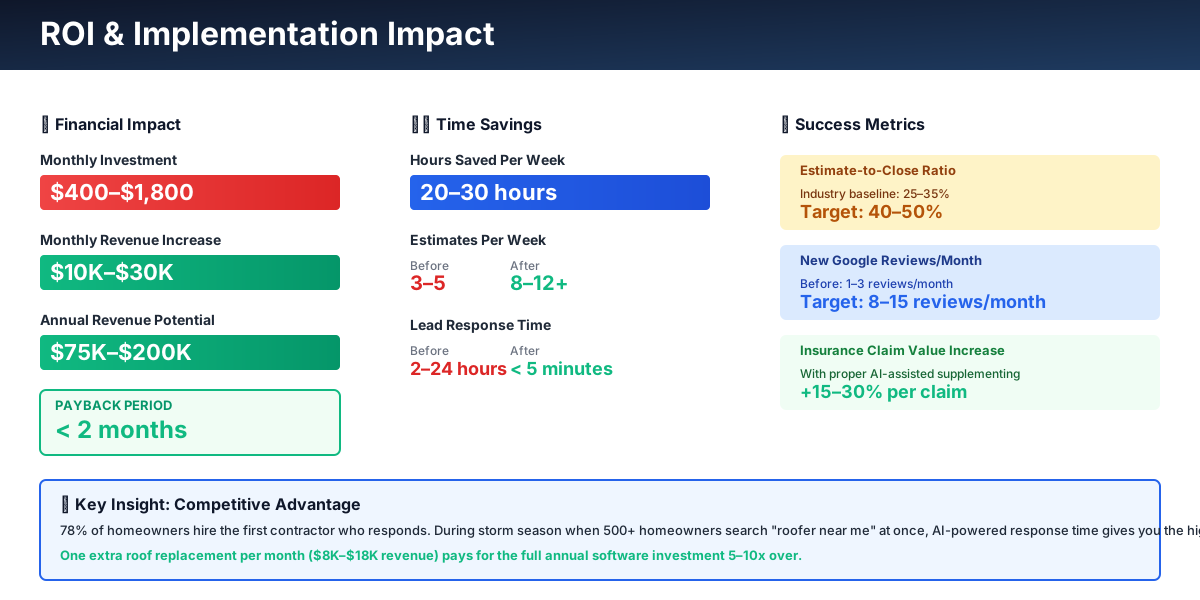
Here's a breakdown of the costs and expected returns:
FAQ
Can aerial measurement tools handle complex roofs — multiple levels, dormers, steep pitches?
Roofr and EagleView both handle standard residential roofs with strong accuracy: 95–98% for simple roofs, 90–95% for complex geometries. Where they struggle: roofs with heavy tree cover that obscures satellite imagery, brand-new construction that hasn't yet appeared in aerial databases, and commercial flat roofs with extensive mechanical penetrations. For complex systems, order the aerial report for preliminary estimating, then verify on-site before ordering materials. Compare your first 5–10 aerial measurements against your tape measurements to calibrate your confidence level with the tool.
Do I need separate tools for insurance restoration work versus retail re-roofs?
Yes, and trying to force both workflows into one platform usually means both suffer. For retail work where the homeowner pays out of pocket, the Roofr + JobNimbus combination handles measurement through payment well. For insurance restoration, you need EagleView (adjuster-trusted measurements), Xactimate or QuoteIQ (insurance-formatted estimates), and a CRM with supplement tracking — AccuLynx handles the insurance side better than JobNimbus. Many successful roofing shops run both: JobNimbus for retail, AccuLynx for insurance. AccuLynx now starts around $250/month for its Essential tier and scales up with plan and team size (verify current rates at acculynx.com) — meaningful overhead for a small crew, but typically trivial compared to the revenue recovered through proper supplementing.
A hail storm just hit my market and I have 150 leads in 48 hours. What breaks first?
Your phone and your triage process. GoHighLevel's AI will respond to every lead instantly, but without a surge protocol already configured, it treats a $25,000 emergency leak the same as a curiosity inquiry. The correct setup: tag leads by zip code and damage type on intake, auto-prioritize active interior leaks for same-day human callback, and queue cosmetic hail-only leads for follow-up next week. If you don't have this configured before storm season, build it during the first quiet week of spring — not during the event. GoHighLevel allows you to set this triage logic in advance and activate it with one toggle.
What's the ROI case for EagleView over just using Roofr for everything?
For retail roofing, it's not worth it — Roofr at $19/report is plenty accurate and the speed advantage is the same. For insurance claims, EagleView's value is specifically that adjusters trust it without pushing back on measurements. A single measurement dispute — where an adjuster challenges your numbers and demands a re-inspection — costs you 2–3 hours and delays payment by weeks. One avoided dispute per month pays for EagleView's premium over Roofr. If you do more than 8–10 insurance claims per month, the math tips strongly toward EagleView for those jobs, with Roofr handling your retail pipeline.
How do I get my crew to actually use CompanyCam instead of their personal phones?
Connect credit to the behavior. Jobs with complete photo documentation (all five stages, in order) get processed faster for payment. Jobs with missing photos trigger a follow-up conversation. Most crews resist the switch for about two weeks, then convert permanently once they see that CompanyCam photos have saved a supplement dispute or a warranty claim. The foreman on each crew should be responsible for photo sequence compliance — not the office. If it's the office chasing photos, you will lose this battle within a month.
Is ServiceTitan worth considering for a roofing company my size?
Only above $2M in annual revenue with dedicated operations staff. Below that threshold, ServiceTitan's implementation cost ($30,000–$80,000+/year plus setup fees) and complexity create more problems than it solves. It's built for large multi-crew operations, not a 5–10 person roofing shop. Start with JobNimbus or QuoteIQ and revisit ServiceTitan when you're consistently above that revenue mark with the administrative bandwidth to run it properly.
The measure-to-quote gap is where most roofing companies bleed jobs silently. No single storm season will fix that — but an aerial measurement tool and a working CRM will. The crew that sends a professional proposal in two hours while their competitor is scheduling a site visit for next Thursday has already won that job, nine times out of ten.
If you do insurance restoration and you're not running EagleView with Xactimate integration, pull one recent claim and count the line items the adjuster's initial offer left out. That number, multiplied by your monthly claim volume, is the cost of staying where you are.
Start with Roofr's free plan today. Order a report on a job you're currently bidding and compare it against your manual measurements. If the numbers are within 3%, which they almost always are, you'll never hand-measure a retail estimate again.
More AI Implementation Guides
AI Tools for Pressure Washing Businesses (2026 Guide)
The best AI tools for pressure washing businesses in 2026. Capture missed calls, quote via satellite, automate follow-up, and win more jobs without ad spend.
AI Tools for Junk Removal Companies: 2026 Owner's Guide
The 2026 guide to AI tools for junk removal companies — answer every call, quote a pile from a photo, optimize routes, and cut tipping fees. Start free.
AI Tools for Pool Service Companies (2026 Guide)
The complete 2026 guide to AI tools for pool service companies — route density, chemistry dosing, AI phone answering, and a premium IoT monitoring tier.
Best AI Tools for Pest Control Companies (CSR & Routes)
AI CSRs, smarter routing, automated reviews & EPA-compliant chemical logs for pest control companies. Tool picks + step-by-step setup, starting free today.
AI Tools for Cleaning Services: 2026 Guide
Best AI tools for cleaning services in 2026. Cut admin hours in half, fill schedule gaps, convert more leads, and scale your team step by step.
Best CRM & AI Marketing Tools for Fence Companies
Compare CRM & AI marketing tools for fence companies. Cut quote turnaround from days to minutes, never miss a lead call, automate follow-up. Pricing inside.
Keep exploring
See every AI implementation guide we've published for Trades & Contractors, or browse the full library by industry or category. Looking for a specific platform? The AI tools directory indexes every product mentioned across our guides, and the comparisons hub puts the most-asked head-to-heads side by side.