
It's 9:47 PM on a Thursday. A homeowner in your service area just watched brown water back up through their basement floor drain. They grab their phone, search "emergency plumber near me," and start calling. Your line rings four times and hits voicemail. They hang up. They call the next number. That plumber picks up. He's booked a $1,400 sewer line job that should've been yours.
That scenario isn't dramatic — it's Tuesday. Plumbing businesses lose more revenue to missed calls than to any other single operational failure, because emergency plumbing doesn't work like scheduled HVAC maintenance or a roofing estimate. When water is actively coming through a ceiling, the homeowner books the first person who answers. Not the best-rated. Not the cheapest. The first one who picks up.
The data makes this concrete. Among plumbing calls arriving outside business hours, booking rates for calls answered immediately run 60–70%. The same call hitting voicemail? Under 20% ever call back. At average emergency ticket values of $500–$1,400, the math on missing ten after-hours calls a week is brutal.
This guide is organized around that reality. We start with the tools that capture calls you're currently losing — AI phone answering, 24/7 scheduling, speed-to-lead. Then we layer in the operational tools (scheduling, dispatch, estimating, bookkeeping) that keep your shop running lean. Then the growth plays: reviews, recruiting, commercial estimating.
TL;DR — Top 3 Recommendations
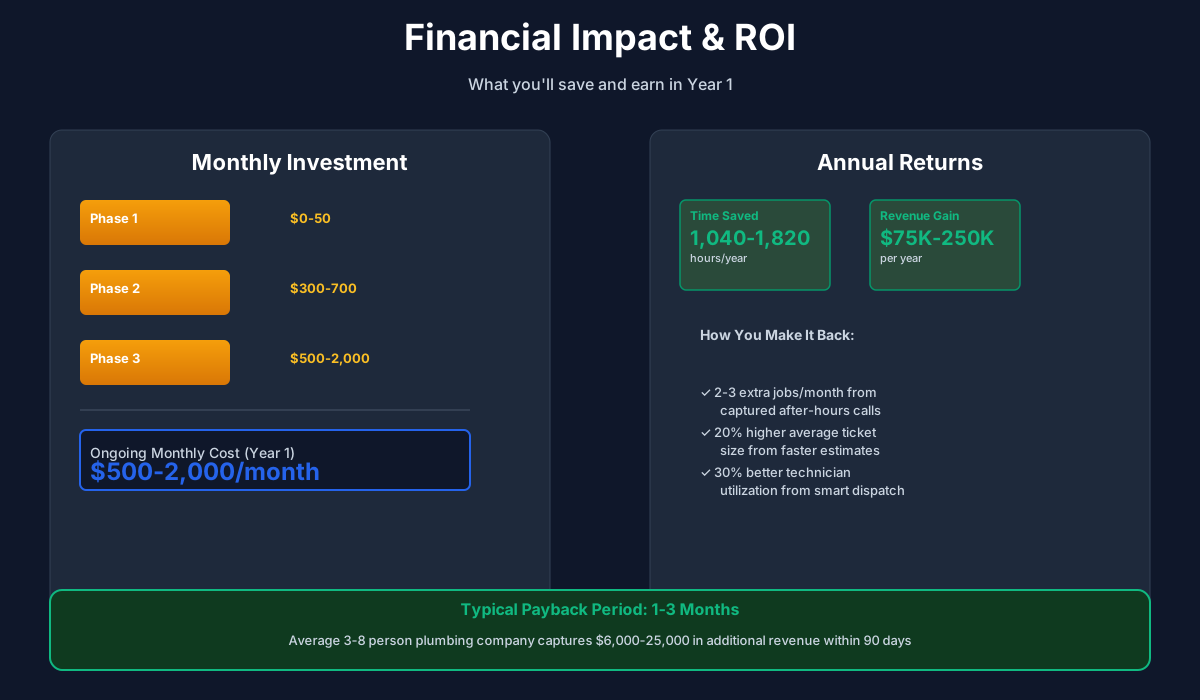
- Start free today: Use ChatGPT or Claude to write estimates, review responses, and social content — saves 5–8 hours/week at $0/month
- Month 1: Deploy Jobber ($39–$199/mo) for scheduling, dispatch, and invoicing — eliminates 10–15 hours/week of admin
- Month 2–3: Add AI phone answering (Housecall Pro CSR AI or Smith.ai at $285/mo) — captures $5,000–$15,000/month in missed-call revenue
Why Speed-to-Answer Is the Whole Game in Plumbing
Before the tool recommendations, a quick look at how plumbing call conversion actually breaks down — because it shapes which tools to prioritize.
Most plumbing calls split roughly 40% emergency / 60% scheduled (drain cleaning, fixture replacement, water heater replacement). But emergency calls punch far above their weight on revenue. They're higher-ticket, they convert faster, and the homeowner has zero price resistance when their basement is flooding. A 5-tech residential shop generating $800K/year will typically see 55–65% of revenue trace back to the emergency and urgent-repair category, even though those calls are the minority by volume.
That concentration creates a specific vulnerability: your after-hours call handling is worth more per call than your business-hours handling, because the caller has nowhere else to turn and no patience to wait.
| Scenario | Avg. Ticket | Conversion if Answered | Conversion if Voicemail |
|---|---|---|---|
| Emergency (burst pipe, sewer backup, gas line) | $800–$1,800 | 65–75% | 15–20% |
| Urgent repair (no hot water, slow drain) | $300–$600 | 55–65% | 20–30% |
| Scheduled maintenance / estimate | $150–$400 | 40–55% | 30–40% |
The emergency row is why AI phone answering pays off faster for plumbing than for almost any other trade. A single captured emergency call covers a month of Smith.ai. The tool recommendations below are sequenced with this in mind.
Here's a visual overview of the implementation phases:
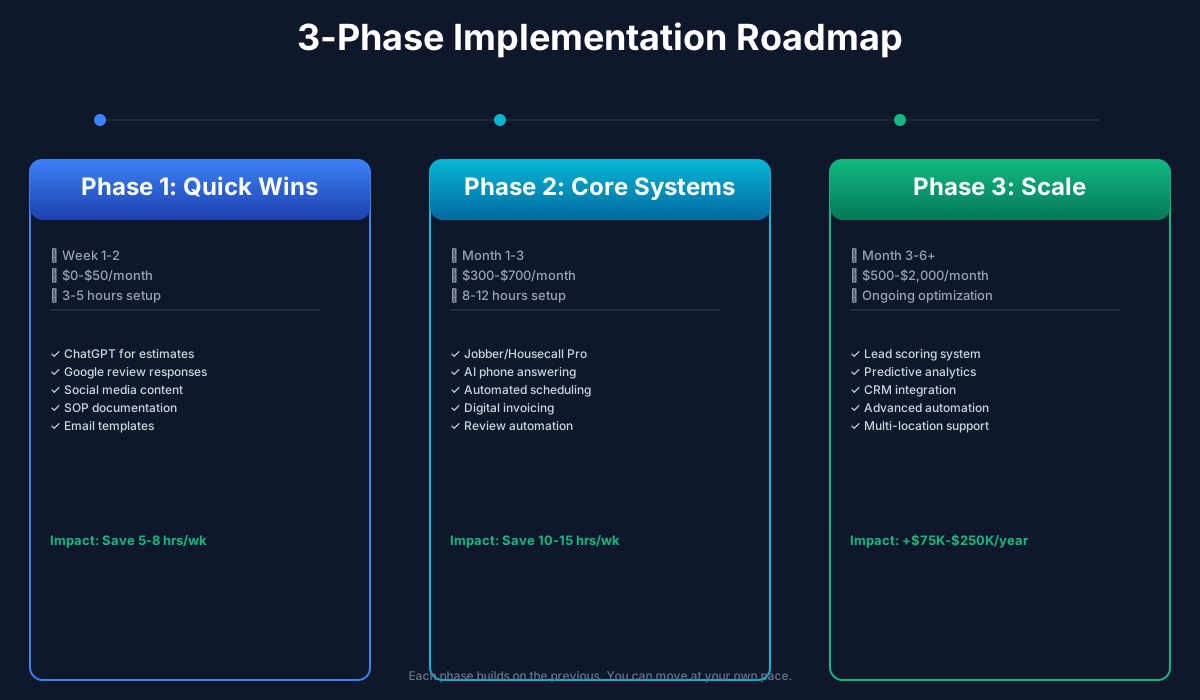
Quick Wins: Free AI Tools You Can Use Tonight
Total cost: $0–$50/month | Setup time: 3–5 hours | Time saved: 8–12 hours/week
These tools require no contracts, no IT setup, no onboarding calls. Open a browser tab and you're running.
Write Professional Estimates in Two Minutes Flat
Every plumber knows the pain: you diagnose a complex issue — maybe a water heater replacement paired with a corroded supply line — and now you need to explain it to the homeowner in plain language, present options, and put a professional number on paper. Writing that estimate properly takes 20–30 minutes. Most plumbers skip the detail and just quote a number, which kills your close rate.
ChatGPT
Best for: Estimates, review responses, SOPs, social content
Free AI assistant that turns rough job notes into polished, professional estimates with good-better-best pricing options. Also handles Google review responses, technician SOPs, and marketing content.
I'm a licensed plumber. I just diagnosed a customer's home with these issues: [describe the problem — e.g., "50-gallon gas water heater from 2011, showing rust at the base, T&P valve weeping, anode rod completely gone"]. Materials needed: [list materials]. Estimated labor: [hours].
Write a professional estimate with three options:
- GOOD: Basic repair to extend life 1–2 years
- BETTER: Standard replacement with a new 50-gallon tank unit, 6-year warranty
- BEST: Tankless upgrade with recirculation pump, 12-year warranty
Explain each option in plain language a homeowner can understand. Include why the BEST option saves money long-term. Keep the tone friendly and trustworthy — not salesy.
The good-better-best format isn't just professional — it's a proven revenue approach. Plumbing companies using tiered pricing in their FSM pricebooks report 15–25% higher average ticket sizes because customers reliably pick the middle option.
A customer left this review for my plumbing company: "[paste the exact review text here]"
Write a professional, empathetic response that:
- Acknowledges their specific concern without being defensive
- Takes ownership where appropriate
- Offers to make it right with a direct phone call
- Shows future customers reading this that we take service seriously
Keep it under 100 words. Sign it with my first name: [your name].
Across estimates, review responses, SOPs, and social content, that's 5–8 hours a week. At $0/month, the math doesn't need explaining.
Generate a Week of Social Media Content from One Job Photo
You just replaced a corroded galvanized main stack with PVC in a 1960s ranch. The before-and-after photos are on your phone. Instead of posting nothing (again), spend two minutes with ChatGPT and get three ready-to-schedule posts.
I just completed this plumbing job: [describe — e.g., "Replaced a 60-year-old galvanized drain stack with PVC in a ranch home. Homeowner had slow drains in every fixture for 3 years and didn't know why. Cut open the wall, found the pipe 80% blocked with corrosion buildup."]
Write 3 social media posts:
- EDUCATIONAL: What causes this problem and warning signs homeowners should look for
- BEFORE/AFTER STORY: Describe the transformation in a way that makes homeowners say "I should check mine"
- PROMOTIONAL: Mention our 24/7 emergency availability and service area [your city/region]
Include 5 relevant hashtags for each. Keep each post under 150 words.
Schedule these posts using the free Meta Business Suite (business.facebook.com) and aim for 3–4 posts per week. Consistency matters more than polish. If you're also looking to keep your broader online presence sharp, our guide to AI tools for HVAC companies covers many of the same social and local-SEO strategies for trades businesses.
Optimize Your Google Business Profile with AI-Written Service Descriptions
When someone searches "emergency plumber near me," Google ranks your Business Profile based on review volume, profile completeness, and keyword relevance. Most plumbing companies leave their service descriptions blank or fill them with one-liners. That's a missed ranking signal.
Use ChatGPT to write a keyword-rich description for every service you offer — drain cleaning, water heater installation, sewer line repair, gas line work, fixture replacement — and add them to your Google Business Profile under Products/Services. Then generate one landing page per city you serve for your website.
Done right, this alone can add $2,000–$8,000/month from improved Google Maps rankings. Profiles with 100+ photos get 520% more calls — while you're at it, start adding job photos every week.
Don't Duplicate Content Across City Pages
Google penalizes identical content. If you generate landing pages for 10 cities, customize each one with neighborhood names, local landmarks, and specific services popular in that area. "Slab leak repair in [Phoenix]" needs different supporting details than the same page for Scottsdale.
Build Your AI-Powered Office (Month 1–2)
Total cost: $150–$800/month | Setup time: 8–15 hours | Time saved: 15–25 hours/week
This is where the operation changes. Paper scheduling and handwritten invoices have a real cost: 10–15 hours of admin weekly, dispatch errors that lose jobs, and a phone system that silently routes emergency calls to voicemail. The tools in this section replace all three.
The FSM Platform Decision
Picking a field service management platform is the single most consequential technology decision a plumbing shop makes. Everything else plugs into it — your schedule, your technicians' phones, your customer history, your invoices, your review requests. Get this right and the rest of the stack is easy.
Jobber
Best for: Small to mid-size plumbing companies (1–10 techs)
All-in-one platform with AI Copilot business coach, AI-powered quote builder, smart scheduling, and automated follow-up sequences. 14-day free trial, no credit card. Used by 250,000+ service businesses.
Housecall Pro
Best for: Plumbing companies wanting built-in AI phone answering
Field service platform with CSR AI that answers every phone call 24/7, qualifies leads, and books jobs automatically. Analyst AI generates reports from plain-language questions. 14-day free trial, no contract.
FieldCamp
Best for: Solo plumbers and 1–3 tech operations wanting AI-native simplicity
Built from the ground up with AI at the core. AI job scheduler, AI dispatcher, automated customer notifications, and online booking — all included at every pricing tier. No feature gates.
How to choose:
- 1–3 techs, budget-conscious: FieldCamp ($39/user/month) or Jobber Core ($39/month)
- 3–8 techs, want AI phone answering bundled: Housecall Pro Essential ($149/month)
- 5–10 techs, need robust reporting: Jobber Grow ($199/month)
- 10+ techs: ServiceTitan (custom pricing, $250–$2,500+/month) — but only once you've grown past 10 techs. It's overbuilt and over-priced below that threshold.
If you've already picked an FSM as a fencing contractor or landscaping company — both Jobber and Housecall Pro work across trades, so your team may already know the interface. Still deciding between the two? Our Jobber vs Housecall Pro comparison walks through pricing tiers, AI features, and which fits your crew size.
Getting it running (seven steps, first week):
- Sign up for Jobber's 14-day free trial at getjobber.com (no credit card)
- Import your customer list (Excel, Google Contacts, or paper — Jobber has import tools)
- Set up your flat-rate pricebook for your top 20 most common services
- Configure automated customer notifications: appointment confirmation, on-the-way text, job completion summary
- Download the mobile app on every technician's phone
- Process your first 5 jobs through the platform this week
- Connect to QuickBooks Online for automatic invoice sync
ROI Snapshot
Monthly Cost
$199/mo
Time Saved
12hrs/week
Monthly Value
$6,680
ROI
3257%
Fix the After-Hours Revenue Leak First
Here's the scenario that kills plumbing shops' top lines: it's Saturday afternoon. Your dispatcher went home at noon. Three families are sitting on burst pipes and failing water heaters. They're all searching Google right now. Two of your competitors have AI answering their phones. Yours goes to voicemail.
This isn't hypothetical. A 5-tech residential shop typically misses 8–15 calls per week outside business hours. At $450 average job value and a 65% booking rate on answered calls versus under 20% on voicemail callbacks, that's roughly $15,000–$30,000 a month in unbooked revenue. AI phone answering that costs $285/month covers itself if it captures a single burst-pipe job.
Housecall Pro CSR AI
Best for: Plumbing companies already on Housecall Pro
24/7 AI customer service rep answers every call, qualifies leads, and books jobs automatically. Launched January 2025 — HCP survey found AI users save 3.2 hours/week and 57% say AI helped grow their business.
Smith.ai
Best for: Companies wanting AI + live human backup for complex calls
Hybrid AI + live receptionist service. AI handles initial screening; humans step in for complex plumbing diagnostics. 24/7 coverage with morning summary reports. Integrates with ServiceTitan, Jobber, and Housecall Pro.
Avoca AI
Best for: Mid-size to large operations ($1M+ revenue) with high call volume
Built specifically for plumbing and HVAC. Books appointments directly into ServiceTitan in real time. My Plumber Plus case study: 0-minute hold times, 1,000+ calls handled, 17% better booking rate than human agents.
One note on setup: before going live, call your own business number after hours and walk through the AI booking flow yourself. Listen to how it introduces your company, what questions it asks, and how it handles a caller who says "I have a gas smell." You need to hear what your customers hear — and you need to configure the emergency escalation paths before the first real call comes in.
Connect QuickBooks for Automated Job Costing
Double-entering invoices from your FSM into QuickBooks wastes 3–5 hours per week and creates errors that compound. Connect them and every invoice, payment, and expense syncs automatically.
QuickBooks Online Plus
Best for: Any plumbing business — the industry standard
AI-powered expense categorization, cash flow forecasting, and Intuit Assist for plain-language financial questions. The Plus plan adds job costing — critical for knowing which services actually make you money. Integrates with Jobber, Housecall Pro, Workiz, ServiceTitan, and Service Fusion.
One specific note on the plan tier: the $30 Simple Start and $60 Essentials plans lack job costing. Without it, you can't track profitability by service type. You won't know that your drain cleaning jobs run at 62% margin while your water heater installs lose money after labor. The $90/month Plus plan (often $45/month with the new-customer discount) is the minimum for plumbing.
Growth Mode: Scale Revenue with AI (Month 3–6)
Total cost: $500–$2,000/month | Setup time: 10–20 hours | Time saved: 5–10 additional hours/week
Operations are humming. Now layer on the tools that actively grow your top line: dominate Google reviews, recruit technicians in a brutal labor market, automate marketing follow-up, and bid on commercial work faster than your competitors.
The Review Race Is Already Running — You're Behind
Look up your top competitor on Google Maps right now. If they have more than twice your review count, they're winning the "plumber near me" algorithm game regardless of how good your work is. Review volume and recency drive local search ranking. Businesses that reach 500+ reviews typically see a step-change in call volume — Google treats them as a dominant local authority.
Podium
Best for: Plumbing companies serious about dominating local search
Sends automated review request texts immediately after job completion. AI generates suggested responses to every review. Podium reports a 320% average increase in review volume — plumbing businesses gain an average 1.5-star Google rating improvement in 90 days. Integrates with ServiceTitan, Jobber, and Housecall Pro.
Birdeye
Best for: Multi-location plumbing companies or those competing in saturated markets
AI review response generation, sentiment analysis that flags urgent negative feedback, and monitoring across 200+ review platforms. G2's #1 reputation management platform with 3,000+ reviews. Clients average 3x more reviews than competitors.
Before spending $300–$400/month on a dedicated platform, enable the built-in review request texts in Jobber or Housecall Pro. Both include them. If you're still generating fewer than 5 new reviews per week after 30 days, then evaluate Podium or Birdeye. Our Birdeye vs Podium comparison lays out the pricing and reputation features side-by-side.
One sentence your techs should say at every job completion: "You'll get a quick text from us — a Google review really helps our small business." That one line doubles response rates. Our HVAC company guide covers Podium's performance for trades businesses in more detail — the review tactics are nearly identical across HVAC and plumbing.
Win the Technician Hiring War
There are 550,000 unfilled plumbing positions nationally. When a licensed plumber applies to your Indeed posting, they're simultaneously applying to 5–10 other shops. If you don't respond within two hours, they've already accepted another offer. You physically cannot call back 15 applicants between dispatch calls and customer emergencies.
Team Engine
Best for: Plumbing companies actively hiring 2+ positions
Built specifically for trades hiring. Auto-texts every applicant within minutes. AI screens resumes for licenses and experience. Posts to 20+ job boards with one click. Includes employee engagement features (birthday texts, surveys) to reduce the turnover that makes hiring so relentless.
Classet
Best for: High-volume hiring where phone screening is the bottleneck
AI voice agents call applicants within minutes of applying and screen for licenses, certifications, experience, and availability. Scores and ranks candidates so you only talk to qualified people.
While you're evaluating these tools, use ChatGPT to rewrite your job postings. Most plumbing job ads are copy-pasted Indeed templates that read like legal documents. Emphasize what makes your shop different — company truck, health insurance, no on-call weekends, clear path to master plumber — and watch applicant quality improve.
Write a job posting for a licensed journeyman plumber in [your city, state]. Our company does [residential service / commercial / new construction].
Emphasize these benefits: [list your actual benefits — company truck, health insurance, PTO, tool allowance, no weekend on-call, etc.]
Make it sound like a real person wrote it, not an HR department. Speak directly to a plumber who's tired of being overworked and underpaid at their current shop. Include specific pay range: [$X–$Y/hour based on experience].
Keep it under 400 words. End with a simple "Text [your number] to apply" call-to-action — plumbers don't fill out long online applications.
Automate Marketing Follow-Up and Customer Reactivation
You have hundreds of past customers in your system who haven't called in 12+ months. You have unsent estimates sitting in Jobber from people who said "let me think about it" and never called back. Both are recoverable — and it costs you one automated text.
GoHighLevel
Best for: Plumbing companies with a tech-savvy owner or marketing agency partner
Automated SMS/email follow-up sequences, AI website chatbot, pipeline management, and review automation. Home service contractors using GoHighLevel report 25–40% improvement in lead-to-booked-job conversion rates. Also used heavily by roofing companies for the same lead-nurture workflows.
Start simple: before spending $97/month, enable the follow-up features already in your FSM platform. Jobber and Housecall Pro both include automated estimate follow-up texts — turn them on. Pull a list of customers who haven't booked in 12+ months and send a seasonal reactivation text (winterization in fall, water heater flush in spring, whole-home inspection anytime).
If you want full automation — sequences that run without you touching them, AI chatbots on your website capturing leads at 2 AM, and multi-step nurture campaigns — that's when GoHighLevel earns its $97/month.
Add AI Estimating for Commercial Blueprint Takeoffs
Skip this section if you're residential service only. But if you bid on commercial, multi-family, or new construction projects from blueprints, this tool changes how fast you can bid.
Manual takeoffs from blueprints take 10–20 hours per commercial bid. That limits you to 2–3 bids per month, and estimating errors lead to underbidding that costs thousands on won jobs.
Beam AI (iBeam)
Best for: Commercial plumbing contractors bidding from blueprints
Upload PDF plans and Beam AI extracts pipe lengths, fitting counts (60+ fitting types including elbows, tees, reducers, valves), fixture quantities, and equipment specs — categorized by system (sanitary, storm, domestic, gas). QA-reviewed outputs delivered in 24–72 hours. Claims 90% time savings; contractors report doubling bid submissions without additional hires.
At $25–$45 per takeoff, you're replacing 10–20 hours of manual counting with a 24-hour turnaround. Bid on twice the work, stop losing money on jobs you undercount, and let your estimator focus on pricing strategy instead of pipe-length arithmetic. Our electrical contractor guide covers Beam AI's cross-trade capabilities if your company handles both plumbing and electrical rough-ins.
ROI Snapshot
Monthly Cost
$150/mo
Time Saved
14hrs/week
Monthly Value
$10,800
ROI
7100%
Getting Started Checklist
- Create a free ChatGPT or Claude account and save the estimate, review response, and social media prompts to your phone's Notes app
- Respond to every unanswered Google review tonight using the AI review-response prompt
- Generate 3 social media posts from your most recent interesting job and schedule them for this week
- Write AI-powered service descriptions for your Google Business Profile (one per service you offer)
- Sign up for a 14-day free trial of Jobber or Housecall Pro — process your first 5 jobs through the platform
- Set up automated customer notifications: appointment confirmation, on-the-way text, and post-job review request
- Connect your FSM platform to QuickBooks Online Plus for automatic invoice sync
- Evaluate AI phone answering: test Smith.ai ($285/mo for 30 calls) or Housecall Pro CSR AI
- After 30 days on your FSM platform, evaluate whether Podium or Birdeye is worth adding for review volume
- If hiring, rewrite your job postings with ChatGPT and explore Team Engine for automated applicant screening
Here's a breakdown of the costs and expected returns:
Frequently Asked Questions
My competitor has 400 Google reviews and I have 38. How do I close that gap without faking reviews?
You close it with speed and volume, not tricks. Turn on automated post-job review request texts in whatever FSM you're using — Jobber and Housecall Pro both have this built in. Then coach every tech to say one sentence at job completion: "You'll get a quick text from us — a Google review really helps our small business." That combination alone gets 20–30% response rates. At 5 jobs per tech per day across 4 techs, that's potentially 20–30 new reviews per week. You'll pass your competitor in 3–4 months. If you're still lagging after 60 days, add Podium or Birdeye — our Birdeye vs Podium comparison lays out which is worth it at your volume.
Can AI phone answering handle a caller who describes a gas leak or active sewage backup — situations where bad triage could create liability?
Yes, but only if you configure the escalation rules during setup. Modern AI phone agents let you define keywords that trigger immediate transfer: "gas smell," "flooding," "no heat in winter," "sewage backup." When the AI hears those words, it stops the booking flow and routes to your emergency line or on-call tech. It should never attempt to diagnose a gas situation — it should say "I'm transferring you to our emergency line now." Smith.ai's hybrid model (AI + live agent) is the safest option here, because a human takes over any call the AI flags as high-risk. This is worth testing yourself before go-live: call your own number after hours and say "I smell gas." Make sure the response isn't "I can schedule someone for Tuesday."
How do AI-generated flat-rate estimates interact with state contractor licensing board rules on written proposals?
AI doesn't know your state's requirements. Most states require written plumbing estimates to include your contractor license number, a scope-of-work description, and in some cases (California's CSLB being the most cited example) a specific right-to-cancel notice. The fix is simple: run AI-generated estimates through a template that appends your license number, company info, and any mandated disclosures. Your FSM platform's estimate template should already have these fields — the AI fills in scope and pricing, the template wraps it in the compliant format.
My technicians are resistant to new software. How do I actually get them to use the FSM app?
Start with the one feature that makes their life easier, not yours. For most techs, that's the on-the-way text — one tap sends the customer an ETA instead of a phone call. Next, show them that digital invoicing means collecting payment on-site by tap or text instead of chasing paper checks. Don't lead with "this helps the office." Lead with "this means you leave the job site 15 minutes earlier." Give your most tech-friendly tech admin access for the first week and let them help train the others. Peer buy-in beats top-down mandates.
Does Beam AI's pipe takeoff account for local plumbing code variations — like copper vs. PEX requirements or specific venting distances my inspector enforces?
No, and it doesn't try to. Beam AI counts what's on the plans — pipe types, lengths, diameters, and fittings from the architect's or engineer's specs. If your jurisdiction requires copper for the last 18 inches before the water heater, you add that manually during your QA review of the takeoff. Think of it as a quantity surveyor, not a code consultant. Your master plumber still signs off on the material list.
Is this guide relevant for commercial-only plumbing operations?
Most of it, yes. The FSM platforms, AI estimating, QuickBooks integration, and hiring tools apply directly. The AI phone answering section is more residential-focused — commercial clients typically call during business hours and expect a human. The Beam AI section is the most commercially relevant piece in the guide. If you're primarily commercial, start with the FSM decision and Beam AI, then evaluate phone answering based on how many emergency service calls you actually take from facility managers after hours.
The plumbing companies pulling away from the pack right now aren't the ones with the newest trucks. They're the ones who answered the call at 9:47 PM Thursday, booked the sewer job before the competitor's voicemail finished playing, and had a professional estimate in the customer's inbox before the tech left the driveway.
That's the stack this guide builds. The tools are real, the costs are real, and the ROI math is conservative. Pick the section that matches where you're losing the most money and start there.
If you're increasingly working alongside kitchen and bath remodelers on full renovations rather than standalone service calls, our kitchen and bath remodeling guide covers the estimating and project-coordination tools built for that side of the job.
More AI Implementation Guides
Best AI Receptionists for Small Businesses (2026)
The best AI receptionist for a small business depends on your call volume and budget. We compare 7 real tools with verified 2026 pricing and who each fits.
How Much Does an AI Receptionist Cost? (2026)
How much does an AI receptionist cost in 2026? Real pricing for AI answering tools — from $29/mo flat plans to per-minute models. Compare tools & costs.
AI for HVAC Companies: Best Tools & Assistants
AI for HVAC companies & contractors: capture missed calls, close more estimates, save 20-35 hrs/week. Compare top AI tools, assistants & pricing inside.
AI Tools for Breweries: The 2026 Owner's Playbook
The best AI tools for breweries in 2026: cut TTB compliance time, tighten COGS, streamline taproom scheduling, and target release marketing — starting free.
AI Tools for Bookkeeping Services: 2026 Guide
Best AI tools for bookkeeping services in 2026: Automate categorization, reconciliation, and document chasing without hiring extra staff.
AI Tools for Marketing Agencies: 2026 Playbook
The best AI tools for marketing agencies in 2026. A phased plan to kill Hell Week reporting, scale content, and fix billable utilization without new hires.
Keep exploring
See every AI implementation guide we've published for Trades & Contractors, or browse the full library by industry or category. Looking for a specific platform? The AI tools directory indexes every product mentioned across our guides, and the comparisons hub puts the most-asked head-to-heads side by side.