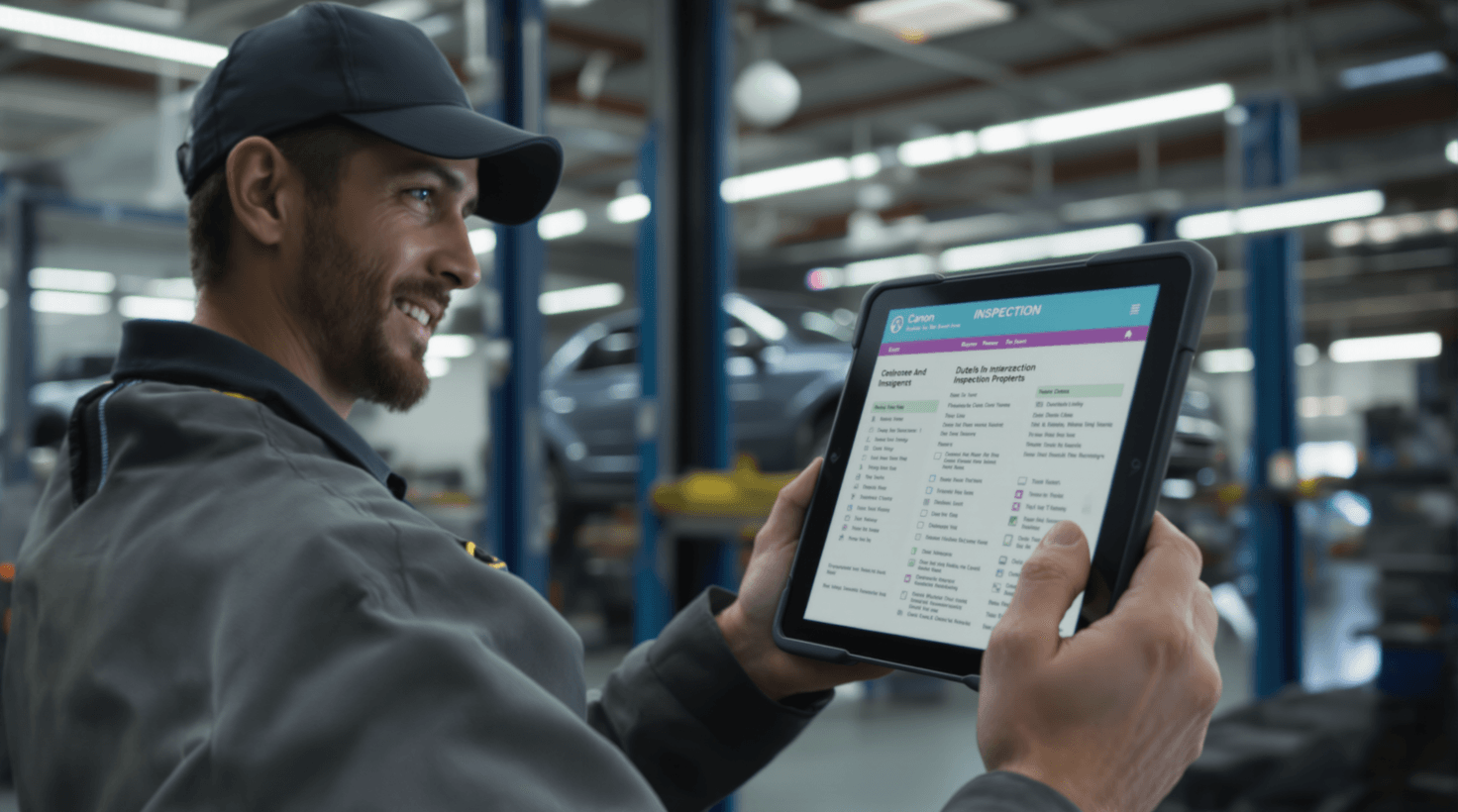
It's 7:47 AM and your service advisor is already underwater. The phone rings while she's writing up a timing belt estimate for the F-150 in bay three. She puts the caller on hold — but the hold turns into a hangup. Your lead tech is thumbing through ALLDATA on his phone, looking up labor times for a 2019 Tucson thermostat housing while the car sits on the lift, unproductive. In the back office, you're toggling between three browser tabs — NAPA, AutoZone Pro, and your local jobber's website — comparing brake rotor prices for the Camry your customer wants picked up by 3 PM. Meanwhile, three Google reviews from last week sit unanswered, and the stack of "declined services" from yesterday's inspections represents about $4,200 in work that walked out the door.
This isn't a crisis. It's Tuesday.
Every one of these bottlenecks — the missed call, the slow parts lookup, the unanswered reviews, the declined repairs — has an AI-powered solution that exists today, works specifically for independent auto repair shops, and in most cases costs less than a set of brake pads. Some cost nothing at all.
This guide walks you through exactly which tools to use, what they cost, how to set them up, and what results to expect — organized into three stages so you can start at zero cost and add paid tools only after you've seen proof.
TL;DR — Your Top 3 Moves
- Start this week (free): Use ChatGPT to translate technical estimates into customer-friendly language, ARI for instant AI labor guides, and PartsTech for one-search parts ordering
- Month 1 ($200-$650/mo): Add AutoLeap AIR to stop losing revenue to missed calls and AutoVitals to boost service approval rates from 55% to 80%+
- Month 3 ($189–$629/mo): Deploy Steer CRM for predictive service reminders that increase customer visit frequency from 1.5x to 3x per year — verify current plan pricing at steer.io/pricing-plans
Why Trust and Visibility Are the Two Levers That Move Everything
Here's something counterintuitive: the shops that are growing fastest right now aren't necessarily the ones with the most bays, the best equipment, or even the lowest prices. They're the ones that win on trust and findability — and those two things are precisely where AI tools give independent shops an asymmetric advantage over dealerships and national chains.
Trust is the DVI story. A customer who can see a photo of their cracked CV boot on their own phone screen — annotated, explained in plain English, with a red/yellow/green indicator — approves work at a rate 25–35 percentage points higher than one who just heard "your CV boot is cracked, it'll be $280." That approval-rate gap compounds into the most significant revenue lever in your shop, and it's entirely within your control.
Findability is evolving fast. It used to mean Google Maps ranking. Now it also means: does your shop get recommended when a customer asks ChatGPT "best transmission shop near Westfield NJ" or gets an AI Overview at the top of a Google search? Shops with 200+ reviews, rich business descriptions, and consistent NAP data are already showing up in AI-generated answers. Shops with 40 reviews and a half-filled Google Business Profile are invisible. This guide covers both.
The underlying economics for a 4–6 bay independent are straightforward: you're running $600K–$1.2M in annual revenue at 50–55% gross on parts and 65–75% on labor, with technician wages consuming 40–55% of revenue. There's not a lot of fat to trim. Every dollar of ROI from these tools comes from one of three places — capturing work you're currently losing (missed calls, declined inspections), increasing the size of approved repair orders, or bringing existing customers back more frequently. The tools in this guide address all three, in that order of priority.
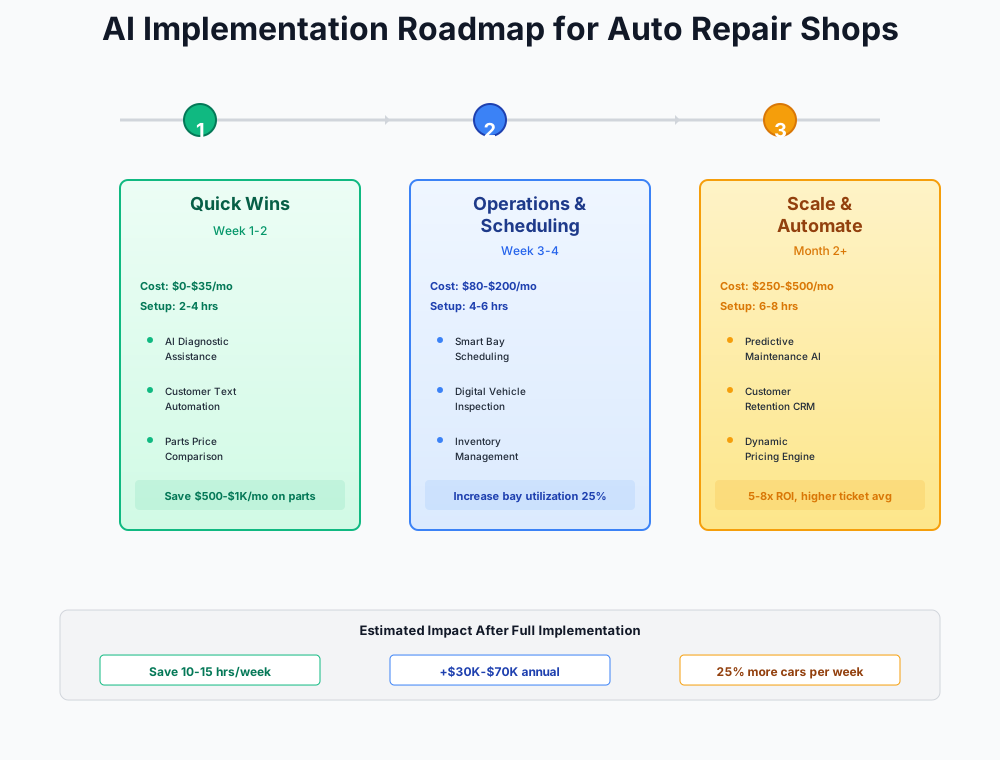
Here's a visual overview of the implementation phases:
Stage 1: Free Tools — Get Your Shop Running Smarter Before You Spend Anything
Total cost: $0–$50/month | Setup time: 2–4 hours | Impact: 12–16 hours saved per week
Everything below runs on a phone or browser. No contracts, no onboarding calls, no IT setup. The goal of this stage is simple: prove the value of AI before committing a dollar to it.
Turn Technical Estimates Into Approvals — and Show Up in AI Search
Your technician writes: "Replace rear main seal, requires transmission R&R, 8.2 hrs labor." Your customer reads that and the first thing they do is Google it. They find a Reddit thread saying dealers charge less. They call you back skeptical, or they don't call back at all. The problem isn't the price — it's that they don't understand what they're paying for.
A clear, plain-English explanation converts that hesitation into an approval. Writing those explanations by hand takes 10–15 minutes per complex estimate. ChatGPT and Claude do it in 30 seconds.
The same tool also helps you get found by AI. When a customer asks ChatGPT or Perplexity "what's a fair price for a rear main seal replacement" or "best transmission shop near [your city]," AI answers are heavily influenced by your Google Business Profile content, your reviews, and the language on your website. ChatGPT can draft optimized descriptions for your GBP, FAQ content for your website that mirrors the questions AI engines are answering, and responses to reviews that signal expertise to both humans and algorithms.
ChatGPT
Best for: Estimate translation, review responses, social media content
Free AI assistant that translates technical repair descriptions into customer-friendly language. Also excellent for drafting Google review responses, writing FAQ content that helps your shop appear in AI-generated search answers, and generating a week's worth of social media posts in under 10 minutes.
I own an auto repair shop called [SHOP NAME]. Explain this repair to a customer who knows nothing about cars. Be reassuring but honest about why it matters. Keep it under 150 words:
[PASTE YOUR TECHNICAL REPAIR DESCRIPTION HERE]
Write a professional, empathetic response to this Google review for my auto repair shop called [SHOP NAME]. Acknowledge their frustration, briefly explain what we do to prevent this issue, and invite them to contact me directly. Keep it under 100 words:
[PASTE THE REVIEW TEXT]
I own an auto repair shop called [SHOP NAME] in [CITY, STATE]. We specialize in [LIST SPECIALTIES — e.g., Asian imports, diesel, transmission repair, fleet vehicles]. Write 5 FAQ questions and detailed answers that a potential customer might ask an AI assistant like ChatGPT or Google AI Overviews when searching for an auto repair shop. Use natural conversational language, include local references where helpful, and write each answer as if an expert service advisor is speaking directly to the customer. The answers should reflect genuinely useful advice, not sales copy.
The practical setup takes about 10 minutes: create a free account at chatgpt.com or claude.ai, save the prompts above as notes on your phone, and your service advisor is ready to go. One non-negotiable standard: respond to every Google review within 24 hours using AI-drafted responses you've lightly personalized. That consistency is what Google's algorithm — and AI answer engines — read as signals of an active, trustworthy business.
Between estimate translations, review responses, and the occasional FAQ or social post, most shops find 5–8 hours a week back. Clearer estimates move approval rates. Consistent review responses improve your Google Business Profile ranking. And FAQ content tailored to what customers actually ask AI assistants is one of the lowest-effort ways to start showing up in AI-generated search answers.
Don't Copy-Paste Blindly
Always read and adjust AI-generated text before sending it to a customer. AI doesn't know your shop's personality, your local slang, or the specific context of a repair. Treat it as a first draft, not a final product. And never paste sensitive customer information (credit card numbers, SSNs) into any AI tool.
Get Free AI Labor Guides and Diagnostic Assistance with ARI
Three to five hours per week — that's what faster labor time lookups are worth to a typical shop. ARI's free AI labor guide gets you there with a phone app that returns instant labor times and AI-assisted diagnostic starting points at the vehicle.
ARI (Auto Repair Software)
Best for: Instant AI labor time lookups, diagnostic starting points
The world's first free AI-powered labor guide plus a Diagnose feature that provides instant labor time lookups and AI-assisted diagnostic guidance directly from your phone or tablet at the vehicle.
The setup is genuinely five minutes: download the ARI app (iOS and Android), create a free account, and you're running. Before committing to it, test it against 3–5 jobs you do every week — brake pads, alternator, timing belt — and compare to your current guides. Then show your technicians the Diagnose feature. Enter year, make, model, symptoms, and any DTC codes. You get AI-suggested diagnostic starting points on the spot.
More accurate initial estimates cut comebacks and improve profit per job. On a shop with a solid average RO, that's $1,500–$3,000 a month recovered in better-priced labor and fewer diagnostic dead ends.
I'm an automotive technician working on a [YEAR MAKE MODEL] with [MILEAGE] miles. The customer reports [DESCRIBE SYMPTOM]. My scan tool pulled [DTC CODES]. What are the 3 most common root causes for this combination of symptoms and codes, and what should I check first? Note any model-specific TSBs or known issues if applicable.
AI Is Not a Diagnostic Tool
ARI and ChatGPT provide diagnostic starting points, not definitive diagnoses. Always verify against ALLDATA, Identifix, or OEM service information for critical repairs. AI doesn't know about your specific vehicle's rust, access issues, or modification history. Treat it as a research assistant, not a master technician.
Search 225+ Parts Suppliers in One Click with PartsTech
Your service advisor calling three suppliers for a brake rotor price comparison is like using a phone book when Google exists. PartsTech searches 225+ suppliers simultaneously and shows live inventory with wholesale pricing on one screen.
PartsTech
Best for: One-search parts ordering across all major suppliers
Search 30,000+ supplier locations simultaneously for live pricing and availability. Integrates directly with Tekmetric, Shop-Ware, Mitchell1, AutoLeap, and most major shop management systems.
If you also run or supply an auto parts store, PartsTech becomes even more powerful — our auto parts guide covers how retailers use it for inventory intelligence and marketplace pricing.
Sign up at partstech.com, connect your supplier accounts — NAPA, AutoZone Pro, O'Reilly, Worldpac, your local jobbers — and you're done. If you're on Tekmetric, Shop-Ware, Mitchell1, or AutoLeap, enable the native integration so searches happen inside the repair order. One rule for your service advisor: PartsTech first, always. The individual supplier calls stop immediately.
Most shops recover 4–6 hours a week. Better pricing from instant comparison. Fewer wrong-part orders. It takes about 20 minutes to set up.
ROI Snapshot
Monthly Cost
$0/mo
Time Saved
12hrs/week
Monthly Value
$4,680
ROI
Infinity%
Write Technician Job Postings That Actually Get Applications
Most shops post the same generic "experienced mechanic wanted" listing that every other shop runs. Technician Find's free Ultimate Technician Ad Checklist and shop-owner community help you write postings that speak to what technicians actually care about: transparent pay, equipment quality, and work-life balance — pair the checklist with ChatGPT (below) to actually rewrite your ad.
Technician Find
Best for: Technician ad checklist and job-posting strategy resources
Free Ultimate Technician Ad Checklist plus a shop-owner community focused on writing job postings that actually get applications. Optimizes for what techs actually search for: pay transparency, shop culture, equipment, and work-life balance.
Write a compelling job listing for an experienced automotive technician at my independent shop in [CITY, STATE]. We have [X] bays with [EQUIPMENT DETAILS — e.g., Hunter alignment rack, Snap-on scan tools]. Pay is $[X]–$[X] based on experience, [flat rate / hourly]. Benefits: [LIST BENEFITS]. Emphasize team culture, equipment quality, and no-weekend schedule if applicable. Write it from the technician's perspective — what they'll get, not what we need. Make it stand out from dealership postings.
Better applicants, faster. A quicker hire avoids $5,000–$15,000 in lost labor revenue sitting idle while a bay goes empty.
Stage 2: Revenue Recovery — Paid Tools Wired to Specific, Measurable Outcomes
Total cost: $200–$650/month | Setup time: 4–8 hours | Impact: $7,000–$25,000/month in recovered and new revenue
Each tool in this stage has a direct line from its cost to a specific revenue outcome. The AI receptionist pays for itself fastest — typically within the first week on the missed-call math alone. DVI is the bigger long-term lever. Run them together and the results compound.
The AI Receptionist: Your Best Service Advisor Never Takes a Lunch Break
Imagine your shop on a busy Tuesday. Bay three is on a timing belt job, bay two just came back with a misfire that needs a second opinion, and your service advisor is elbow-deep in a diagnostic conversation with a customer at the counter. The phone rings. Nobody picks it up. The caller hears voicemail, hangs up, and calls the Firestone two miles away. That appointment — almost certainly a $400–$800 repair order — is gone.
That scenario plays out multiple times a day in most shops. The window isn't just after hours: it's lunch, it's when your advisor is in a conversation, it's the 11–12 phone spike when everyone who noticed a problem on their morning commute finally calls. An AI receptionist closes that window completely.
AutoLeap AIR (AI Receptionist)
Best for: 24/7 call answering, appointment booking, call overflow capture
AI-powered phone receptionist built for auto repair shops. Answers calls, books appointments, handles routine questions (hours, location, service pricing), and texts you a summary. Integrates natively with AutoLeap's shop management system.
A customer calls at 7:15 PM about a check engine light. AutoLeap AIR answers, checks your schedule, books an 8 AM drop-off, and texts confirmations to you both. Your advisor sees the appointment when she opens the calendar the next morning. No voicemail. No missed opportunity. The customer got an answer in 90 seconds.
Setup in five steps:
- Start the 30-day free trial at autoleap.com/air (confirm credit card requirements at signup)
- Configure your shop hours, services, and common pricing in the AIR panel
- Set AIR to handle after-hours calls AND overflow when your advisor can't pick up — the biggest missed-call window is during business hours, not after
- Review call summaries every morning for the first month to calibrate responses
- After the trial, choose your plan: Pay-as-you-go ($1/call), Starter ($99/mo for 200 calls), or Growth ($199/mo for 500 calls). A $100 setup fee may apply on paid plans — confirm at signup.
At a $500 average RO, capturing three extra appointments per week that would otherwise have gone to voicemail recovers $6,000 a month. The Growth plan at $199/mo returns that $6K. Most shops see payback in week one.
ROI Snapshot
Monthly Cost
$199/mo
Time Saved
6hrs/week
Monthly Value
$6,840
ROI
3337%
If you run a car detailing operation alongside your repair shop, the same AI receptionist concept applies — our detailing guide covers My AI Front Desk, which handles similar call-capture for mobile and fixed-location detailing businesses.
Digital Vehicle Inspections: The Trust Engine Behind Higher AROs
Here's the real reason customers decline work: they can't see what your technician sees. When a service advisor says "your rear struts are worn," the customer's internal translation is "they want $800 from me and I have no idea if they're right." Suspicion is the default — not because your customers are dishonest, but because the auto repair industry has spent decades earning that skepticism.
Digital vehicle inspections flip the dynamic. When the customer's phone buzzes with a photo of their actual strut — annotated, measured, shown next to a new one with a red indicator — the dynamic shifts from "trust me" to "here's the evidence." That shift moves approval rates in a consistent, documented pattern:
| Shop Type | Avg Approval Rate Without DVI | Avg Approval Rate With DVI | ARO Impact |
|---|---|---|---|
| Independent, no photos | 50–60% | — | Baseline |
| Independent, photos via SMS | 62–68% | +10–15% | +$40–$70/RO |
| Independent, full DVI platform | 72–85% | +20–30% | +$80–$150/RO |
| Shops with DVI + follow-up call | 80–90% | +25–35% | +$100–$175/RO |
Approval rate ranges based on DVI vendor case studies and independent shop operator benchmarks; individual results vary by market and service mix.
On a 4-bay shop doing 40 ROs/week, moving from 55% to 78% approval on a $420 average ticket adds roughly $3,900/week in approved work. That's without increasing car count by a single vehicle.
AutoVitals
Best for: Digital vehicle inspections with photo/video, service advisor workflow
DVI platform that overlays on top of Mitchell1, Tekmetric, Shop-Ware, and other major shop management systems. Technicians capture photos and videos of every finding; customers receive a visual inspection report via text. AutoVitals claims a 20%+ ARO increase within 90 days — verify current pricing and guarantee terms at autovitals.com.
The DVI workflow that actually works: every vehicle gets inspected, not just cars with complaints. Technicians take 3–5 photos per finding (close-up, wide shot, annotated). The inspection fires to the customer's phone via text link while they're sitting at work or home. Your service advisor calls 30 minutes later — not to push, but to walk through what they're seeing and answer questions. That combination of visual evidence plus a human conversation is what drives 80%+ approval rates.
The key to technician buy-in is framing this right. It's not extra work — it's a pay raise. More approved work means more flagged hours. At flat rate, a tech whose personal approval rate goes from 55% to 78% on 8 vehicles a day is making meaningfully more money on the same shifts. Run that math with your techs out loud in the first week.
Budget Alternative for DVI
If $199/month is too steep right now, start by having technicians take 3 photos per vehicle on their phones and texting them to customers through your shop's existing texting platform. This alone can boost approval rates by 10–15%. Upgrade to a full DVI platform once you've seen the impact of visual inspections on your close rate.
Maximize Parts Gross Profit with AI-Optimized Pricing
Most shops use a flat markup or a manual parts matrix they set once and never revisit. The problem: a 100% markup on a $5 oil filter nets $5, while a 100% markup on a $500 compressor prices you out of the market. Shop-Ware's AI Parts Matrix uses machine learning on your actual sales data to set an optimized curve — high margins on consumables, competitive margins on expensive assemblies.
Shop-Ware
Best for: AI parts pricing matrix, comprehensive shop management, business analytics
Cloud-based shop management system with an AI Parts Matrix that automatically optimizes your parts pricing curve based on real sales data. Includes digital inspections, parts ordering (PartsTech integrated), and a Business Analytics Suite on the Master plan.
The system works in the background. You set your target overall parts gross profit percentage (industry benchmark: 50–55%). The AI analyzes your historical sales by price tier and builds a custom pricing curve — high markup on cheap consumables, moderate on mid-range parts, competitive on expensive assemblies. It adjusts continuously as your parts mix changes month to month.
Shop-Ware's own data reports an average 1.72% GP improvement in the second month of use — treat this as a vendor benchmark, not a guarantee. On a shop doing $80,000/month in parts, a 1.72% GP lift works out to roughly $1,376/month in additional profit, running automatically.
ROI Snapshot
Monthly Cost
$379/mo
Time Saved
2hrs/week
Monthly Value
$2,780
ROI
634%
Stage 3: Retention and Optimization — Building Compounding Advantages
Total cost: $400–$1,100/month | Setup time: 6–10 hours | Impact: $11,000–$30,000/month in additional revenue
These tools work best once Stage 1 and Stage 2 are solid. They're not quick wins — they're infrastructure for the shop that wants to grow 15–20% a year rather than hold steady. Customer retention, predictive maintenance reminders, and data-driven decision-making are where independent shops beat chains on a long timeline.
Deploy Predictive Service Reminders That Bring Customers Back
Your customers visit 1.5 times a year. The industry recommendation is 3–4. That gap is your biggest growth opportunity — not new customers, but more visits from the customers you already have.
A dedicated automotive CRM doesn't send generic "it's been 6 months" texts. It predicts specific services based on mileage, driving patterns, and manufacturer maintenance intervals.
Steer CRM
Best for: Predictive service reminders, customer retention, automated marketing
Automotive CRM that integrates with Tekmetric, Shop-Ware, Mitchell1, and AutoLeap. Imports your entire customer and vehicle service history, then runs AI-driven reminder campaigns. Higher-tier plans add call intelligence that analyzes service advisor phone performance. Pricing has changed frequently — verify current plans at steer.io/pricing-plans before committing.
What Steer does that a generic CRM can't: It predicts when each customer's next oil change, brake service, or timing belt is due based on actual driving patterns — not just calendar time. It sends personalized reminders ("Hi Sarah, your 2021 CR-V is approaching 60,000 miles — time for the factory-recommended transmission service"), runs "lost customer" campaigns for 12+ month inactive customers, and sends automated review requests after every completed RO.
Connect Steer to your shop management system and it imports your full customer and vehicle history automatically. From there: configure reminder sequences (oil change at mileage intervals, brake service at 30K/60K/90K, seasonal campaigns), activate automated review requests set for two hours after pickup, and turn on the lost customer campaign. Start with the lowest plan tier that covers two-way texting and automated campaigns — Steer's pricing structure changes periodically, so confirm current plan options at steer.io/pricing-plans before signing up. Upgrade to a higher tier only after the ROI is clear.
Customer visit frequency climbs from 1.5x to 2.5–3x per year. Lost customers come back. Google reviews compound. Combined impact: $8,000–$20,000/month in additional revenue.
Scale Your Reputation Into a Competitive Moat
Google reviews are consistently ranked among the top factors new customers use when choosing an auto repair shop. Most independent shops have 50–150 reviews. Your top local competitor likely has 300–500. Every month you don't systematically collect reviews, the gap widens.
If you implemented Steer CRM above, review management is built in — skip adding a separate tool. If you need standalone reputation management:
Podium
Best for: Review collection, AI review responses, webchat, payment processing
Multi-channel communication platform that automates review requests via text, generates AI-drafted review responses, and provides webchat for your website. Used by thousands of auto repair shops.
Two hours after pickup, customers get a text asking about their experience. Happy customers are directed to Google. Unhappy ones are routed to you privately first — giving you a chance to resolve before it becomes public. AI drafts responses for every review; you review and post with one tap.
Research on local search behavior consistently shows that higher star ratings drive materially more clicks and calls — the specific lift varies by market and category, but moving from 4.0 to 4.5 stars is a meaningful competitive advantage. Shops with 200+ reviews also signal trustworthiness to new customers in a way that a listing with 30 reviews simply can't.
Car wash operators face a similar review-volume challenge — our car wash guide covers how Birdeye handles review automation for high-transaction-count businesses where volume is even more critical.
Build an AI-Powered Owner's Dashboard
Most shop owners run on gut instinct. That's fine until it isn't. The owners who grow consistently track six numbers and act on them weekly:
- Car count — How many vehicles came through this week?
- Average Repair Order (ARO) — What's the average ticket?
- Parts gross profit % — Are you hitting 50–55%?
- Effective labor rate — What are you actually collecting per billed hour?
- Tech hours produced vs. available — What's your bay utilization?
- Customer return rate — How often do customers come back?
Your shop management system (Tekmetric, Shop-Ware, or AutoLeap) already tracks all six. The AI layer comes from feeding these numbers into ChatGPT monthly for trend analysis and action recommendations.
Here are my auto repair shop's numbers for [MONTH]:
- Revenue: $[X]
- Repair orders: [X]
- Average repair order: $[X]
- Car count: [X]
- Total labor hours billed: [X]
- Parts gross profit: [X]%
- Labor gross profit: [X]%
- Customer return rate: [X]%
Compare to last month's numbers: [PASTE LAST MONTH]. Identify the 2-3 biggest changes and suggest specific actions I can take this week to improve any lagging metrics. Reference industry benchmarks for independent auto repair shops.
Data-driven decisions compound over time. Catching a falling ARO early and addressing it in a team meeting can recover thousands in a single week. Shop-Ware's Master plan ($499/mo) includes the Business Analytics Suite; the Ultimate+ plan ($999/mo) adds a managed website, SEO, and Google Ads — both generate coaching recommendations without the manual ChatGPT step.
Mistakes That Cost Shops Real Money
Switching your SMS just to get one AI feature. Moving from Mitchell1 to Tekmetric — or Tekmetric to Shop-Ware — because a salesperson demoed an impressive AI dashboard takes 2–4 weeks of reduced productivity and disrupts your whole team mid-stream. Nearly every AI add-on in this guide (AutoVitals, PartsTech, Steer, Podium) integrates with whatever you're already running. Only switch systems if your current SMS is fundamentally broken, not because it's missing one feature.
Treating DVI as a paperwork add-on rather than a revenue initiative. This is the single biggest DVI failure mode. Shops that implement DVI and see minimal impact almost always made the same mistake: they handed techs the app, told them to take photos, and moved on. DVI generates revenue only when technicians understand why it matters to their paycheck. The implementation conversation needs to happen before the software is turned on.
Buying enterprise AI before you've maxed out the free tier. Predii, UVeye, and advanced fleet AI analytics are built for 20+ bay operations and dealer groups. A 4-bay independent gets dramatically better ROI from ARI (free AI labor guides), ChatGPT (free estimate translation), and PartsTech (free parts search) than from a $3,000/month platform that assumes volume you don't have. Get to $10K+ in monthly AI-attributed revenue before considering enterprise contracts.
Automating customer messages without a review pass first. AI-drafted estimate translations and review responses are first drafts, not final copy. During the first two weeks with any new automation, have a human read every outgoing message before it sends. One poorly worded automated message — especially a canned review response that misses the actual complaint — can undo years of customer relationship goodwill. After two weeks of clean drafts, you can start trusting the output more.
Confusing AI research assistance with diagnostic expertise. ChatGPT and ARI provide starting points, not answers. They don't know about the 180,000-mile timing chain that's been slapping for 6 months, the PO455 that traces to a loose gas cap rather than an evap leak, or the access problem that adds three hours to an otherwise standard job. ALLDATA, Identifix, and OEM service procedures remain the standard. Use AI to cut research time by half — not to skip the research.
Your Getting Started Checklist
- Create a free ChatGPT or Claude account and save the estimate-translation, review-response, and AI-search FAQ prompts on your phone
- Download the ARI app and test AI labor guides on 5 common jobs your shop performs every week — compare to your current guide
- Sign up for PartsTech free tier and connect your top 3 parts supplier accounts; set the rule: PartsTech first, always
- Use Technician Find or ChatGPT to rewrite your current technician job posting with transparent pay, equipment details, and culture
- Before activating DVI: hold a 15-minute team meeting, show techs the approval-rate math, frame it as a pay raise not extra work
- Start AutoLeap AIR's 30-day free trial — configure for overflow during business hours AND all after-hours calls
- Activate digital vehicle inspections on every vehicle, every time — set photo quality standards (3 photos minimum per finding, well-lit, annotated)
- Review your shop management system's built-in analytics: establish your baseline ARO, parts GP%, car count, and effective labor rate
- After 60 days of Stage 1 and Stage 2 results, evaluate Steer CRM for predictive service reminders and automated review requests
- Set a Monday morning KPI ritual — 15 minutes before the team arrives, pull your 6 metrics and note the one that moved most
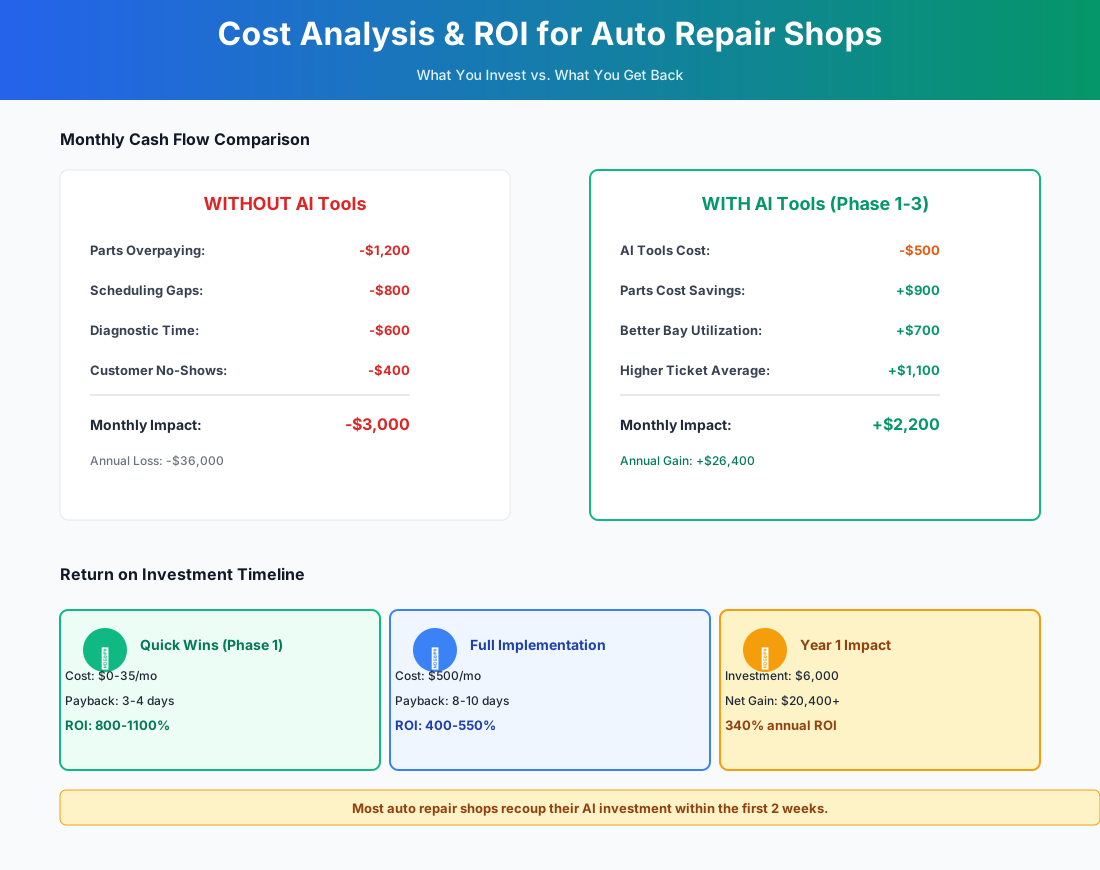
Here's a breakdown of the costs and expected returns:
Frequently Asked Questions
Can AI labor guides from ARI replace ALLDATA or Mitchell1 subscriptions for flat-rate time lookups?
Not yet — and probably not soon. ARI's AI labor times are useful for quick ballpark estimates and are surprisingly accurate for common jobs, but they don't carry the legal weight of published labor guides when it comes to insurance claims or warranty disputes. If your shop processes insurance work or you need defensible labor times for customer disputes, keep your ALLDATA or Mitchell1 subscription. Use ARI to speed up initial estimates and supplement with your published guide for final RO pricing.
How does an AI receptionist handle a customer who calls about a car that's actively breaking down on the roadside?
AutoLeap AIR is configured to recognize urgency keywords — "broken down," "overheating," "won't start," "tow." When it detects an emergency, it immediately routes the call to your service advisor's cell or an on-call number you specify, rather than attempting to book a standard appointment. During your first-week setup, call in with a few emergency scenarios and verify the routing actually works. If you offer towing referrals, you can also program the AI to provide your preferred tow company's number as a backup.
Will my older technicians resist taking photos for digital vehicle inspections?
Some will — especially techs who've been turning wrenches for 20+ years without needing to photograph anything. The most effective approach we've seen: show your flat-rate techs their current approval rate (likely 50–60%), then show them the shop average after DVI implementation at other shops (75–85%). Run the math for them out loud: "If your personal approval rate goes from 55% to 80%, that's 45% more hours flagged on the same number of cars — at your current rate, that's $X more per paycheck." When DVI is framed as a pay increase rather than extra work, resistance drops significantly. Give reluctant techs a two-week trial period and let the numbers speak.
A customer approved $1,800 of work remotely through our DVI — then called back an hour later to cancel half of it. How do we prevent approval reversals?
This happens more than shops want to admit, and it's usually a DVI process issue rather than a customer issue. The most common cause: customers approved work while they were distracted (at work, commuting), then sat down later and got sticker shock without context. The fix is the 30-minute follow-up call your service advisor should make after every DVI send. Don't wait for the customer to call you. Call them, walk through the amber and red findings in plain English, and answer questions while the visual is fresh. Customers who've had a human conversation about the work almost never reverse approvals. The ones who only saw a text link and tapped "approve" are the ones who call back. Also make sure your DVI notes include a one-sentence "why this matters now" for every red finding — not just the description, but the consequence of waiting.
Are my customers' vehicle records and payment data safe when using these AI tools?
For your shop management system and CRM — yes, provided you choose providers with SOC 2 compliance, encrypted storage, and role-based access controls. The one place shops get tripped up is the free AI tools: never paste credit card numbers, Social Security numbers, or payment details into ChatGPT or Claude. Repair descriptions, review text, and anonymized performance data are fine. Customer PII is not. Auto repair shops aren't subject to HIPAA, but you're still responsible for protecting what customers entrust to you. Set a shop rule from day one: AI tools get repair data, not payment data.
Does AI parts pricing optimization work if I source heavily from a single local jobber instead of national chains?
Yes, and this is actually where AI pricing shines. If you source 60–70% of your parts from one trusted local jobber, your manual pricing matrix is probably calibrated to that jobber's cost structure — which means you're leaving money on the table on the 30–40% of parts you get elsewhere. Shop-Ware's AI Parts Matrix analyzes pricing across all your supply sources and builds an optimized curve for each one. It might set a 120% markup on your jobber's $8 oil filters (where the customer doesn't notice) and a 45% markup on a $900 transmission from Worldpac (where the customer absolutely does). The free alternative: export a month of parts invoices into ChatGPT and ask it to identify pricing tiers where your markup is too low or too high relative to the part cost.
Independent shops that are growing in 2026 have one thing in common: they stopped competing on price and started competing on trust and transparency. DVI is the most tangible expression of that shift. The AI receptionist is the most immediately profitable. The CRM is what makes the advantage compound over years.
Pick one thing from the checklist above and do it this week. Not next month, not after the slow season. This week. The shops that are 300 reviews ahead of you on Google started one review at a time, and they started earlier than you'd think.
Running a car detailing operation alongside your repair shop? Our detailing guide covers how mobile and fixed-location detailers use AI communication tools for the same call-capture and booking problems you're solving here.
More AI Implementation Guides
AI Tools for Tire Shops: Complete 2026 Owner's Playbook
The best AI tools for tire shops in 2026 — capture after-hours leads, raise your service attachment rate, and recall customers before they buy at Discount Tire.
AI for Auto Parts Selling: Pricing & Personalization
AI in auto parts selling: personalized suggestions, fitment matching, real-time pricing automation & B2B ordering. Save 15+ hrs/week. See picks & pricing.
Best AI Car Wash Software & CRM Tools for Owners
AI car wash tools and budget CRM picks for owners. Capture missed calls, cut membership churn, predict equipment failures, and automate billing — see pricing.
Best Mobile Detailing CRM & Car Detailing Software
Compare the best mobile detailing CRM & auto detailing software — all-in-one booking, automated reviews, 30-50% fewer no-shows. See pricing & setup steps.
AI Tools for Breweries: The 2026 Owner's Playbook
The best AI tools for breweries in 2026: cut TTB compliance time, tighten COGS, streamline taproom scheduling, and target release marketing — starting free.
AI Tools for Bookkeeping Services: 2026 Guide
Best AI tools for bookkeeping services in 2026: Automate categorization, reconciliation, and document chasing without hiring extra staff.
Keep exploring
See every AI implementation guide we've published for Trades & Contractors, or browse the full library by industry or category. Looking for a specific platform? The AI tools directory indexes every product mentioned across our guides, and the comparisons hub puts the most-asked head-to-heads side by side.