
Fencing is one of the most bid-heavy trades in home services. The average homeowner who wants a privacy fence calls three or four companies, waits a few days for quotes, then signs with whoever got back to them first with a clear number. That's the whole game — speed and follow-through, not necessarily the lowest price.
Most fence contractors lose that game before they even know they're playing it. The site visit goes fine. The homeowner seems interested. Then you drive home, rebuild the estimate in a spreadsheet, email a PDF two days later, and hear nothing. No callback. You assume they went somewhere else. They did — but not because of price. You were the third quote they got back, and they'd already signed.
This guide is about fixing that specific problem: compressing your measure-to-quote time, making sure your follow-ups actually happen, and scheduling your install backlog before the spring window closes. The tools here are organized by when you should add them, not by price tier. Start cheap and earn your way up to the fence-specific platforms.
TL;DR — Top 3 Recommendations
- Start today (free): Use Claude or ChatGPT to create estimate follow-up templates — recovers 10–15% of lost quotes with five minutes a day
- Week 3 ($59–$99/mo): Set up Goodcall or Jobber AI Receptionist so you never miss another lead call during field work
- Week 5 ($99–$129/mo): Switch to ArcSite for on-site estimating — send a professional PDF proposal before you leave the customer's driveway
The Best Marketing Tools for Fence Contractors
For a fence company, "marketing" isn't billboards and yard signs — it's speed-to-lead and follow-up, and the tools that actually move revenue are the ones that answer the call, send the quote, and chase the estimate before a competitor does. The highest-impact stack for fence contractors is an AI receptionist (Goodcall or Jobber's AI Receptionist, $59–$99/mo) so no lead call dies in voicemail, on-site estimating (ArcSite, $99–$129/mo) to put a professional quote in the homeowner's inbox before you leave the driveway, and automated review collection to win the local search that brings the next homeowner in. Paid ads come last — most fence contractors are bleeding more revenue to slow follow-up than to a weak top of funnel.
Where fence marketing dollars actually pay back:
- Speed-to-lead beats ad spend. The homeowner signs with the third quote that arrives first. Answering every call and quoting same-day wins more jobs than any campaign you could buy.
- Reviews are your local-search engine. A thin Google profile makes you invisible in the map pack; automated review requests after every install compound into ranking and trust.
- Follow-up recovers the 10–15% of quotes you already earned but never chased — the cheapest revenue you will ever book.
The tools below are ordered by when to add them, starting with the free follow-up templates that recover lost quotes this week.
Why Fencing is Different From Other Trades
This is worth naming before you start buying software, because fencing has three characteristics that make generic field service advice mostly wrong for you.
Homeowners shop fencing more than any other exterior project. An HVAC emergency gets you one call, one tech, done. A fence is a considered, planned purchase — customers take photos, check HOA rules, and get competing bids. The study below from a multi-market fencing operator shows what happens to close rates as quote turnaround time lengthens:
| Quote Delivered Within | Estimated Close Rate | Notes |
|---|---|---|
| Same day (on-site) | 45–55% | Customer hasn't started shopping yet |
| 24 hours | 30–40% | Competitive but still strong |
| 48–72 hours | 15–25% | Most homeowners have 2+ quotes by now |
| 4+ days | 5–12% | Usually signing with whoever called back |
Get your quote out before the homeowner's mailbox fills up with competing PDFs. That's the north star for everything in this guide.
Seasonality makes every missed job hurt more. March through August typically drives 60–70% of annual fencing revenue in most of the country. Northern operators can see 50–70% drops in winter. During peak season, a missed call or a slow estimate isn't just one job — it's irreplaceable revenue from a window that closes in a few months.
Your material list changes on every single job. A flat 200-foot cedar privacy fence is a completely different takeoff than the same footage on a slope with two gates and a corner lot. Post spacing, rail counts, concrete volume, gate hardware — one missed item on a $10,000 job is a $1,000 margin hit. This is why generic estimate tools fall short and why fence-specific software exists.
Here's the implementation roadmap, broken into three stages:
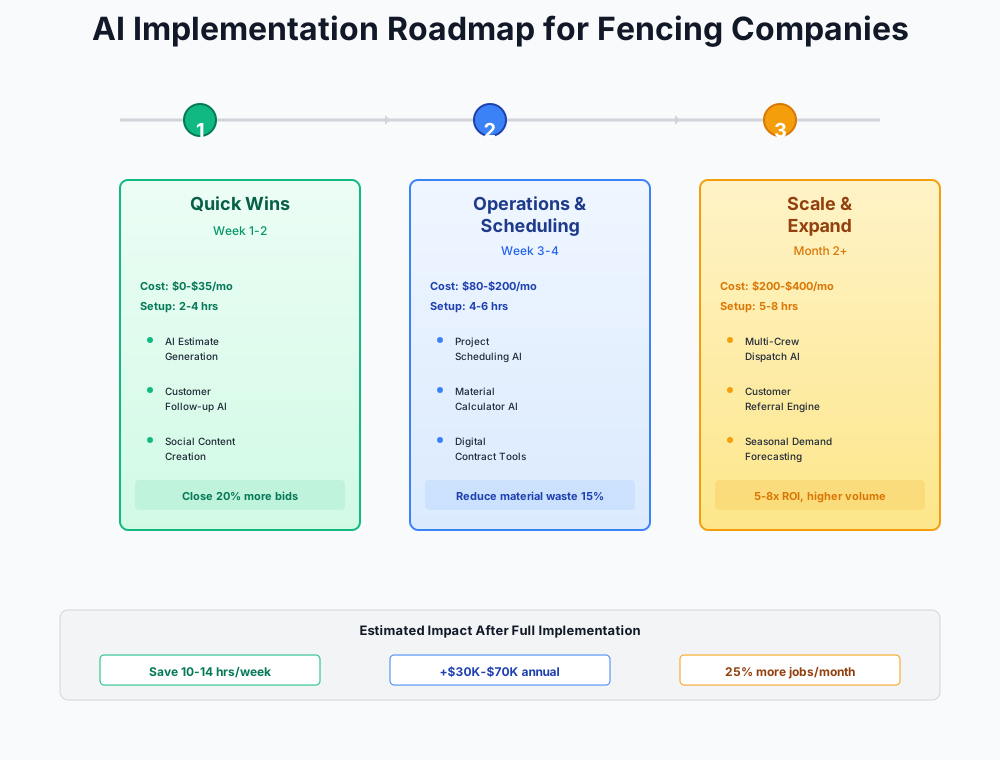
Stage 1: Quick Wins That Cost Nothing ($0–$20/month)
These require nothing more than a free Claude or ChatGPT account and a few hours of one-time setup. They target the two most common revenue leaks: unsold estimates that never got a follow-up, and a thin Google review profile that makes you invisible in local search.
The Estimate Follow-Up Problem is Costing You More Than You Think
Here's a rough picture of what's leaving the table. If you quote 20 jobs per month at a $5,000 average and close 35% of them, you're winning about $35,000/month in new work. The other 65% — $65,000 in quoted work — just goes cold. Industry data consistently shows that one follow-up within 48 hours recovers 10–15% of those stalled estimates.
That's $6,500–$9,750 a month from a text message.
The problem isn't that you don't know this. The problem is that you're installing fences all day, and by the time you get home you've forgotten which quotes are 48 hours old. Let AI write the messages — all you do is hit send.
I'm a fence contractor. A homeowner received my quote for a [FENCE TYPE] fence at $[AMOUNT] three days ago and hasn't responded. Write a friendly, non-pushy follow-up text message that:
- References their specific project (not generic)
- Mentions that material prices are currently stable but may increase
- Offers to answer any questions
- Makes it easy to say yes (reply "YES" to schedule) Keep it under 80 words. Conversational tone, not salesy.
Setup takes about 30 minutes. Open Claude.ai or ChatGPT, generate 3–4 follow-up templates for your most common fence types (privacy, chain-link, vinyl, ornamental), and save them in your phone's Notes app. Every morning, spend five minutes checking which estimates are 48 hours old and unsold. Paste the template, customize the name and project details, hit send. That's it.
Recover two extra jobs per month at $5,000 average and you've added $10,000/month from a free tool.
Your Google Reviews Are Probably Lagging Behind Your Competition
Companies with 50+ Google reviews dominate local search results for "fence company near me." Under 10 reviews and you're essentially invisible to a large chunk of potential customers. The fix is simple — respond to every existing review (Google rewards engagement with ranking) and systematically ask every customer right after job completion.
Write a professional, warm response to this Google review for my fencing company called [COMPANY NAME] in [CITY]: "[PASTE REVIEW TEXT]". Thank them specifically for what they mentioned, reference our commitment to quality fence installation, and naturally include our city name. Keep it under 75 words.
Write a text message I can send to a fencing customer after we've completed their [FENCE TYPE] fence installation. Ask them to leave us a Google review. Include a direct link placeholder [GOOGLE REVIEW LINK]. Make it personal — reference that we just finished their project. Keep it under 60 words and include a thank-you.
To get your Google review link: search your business on Google, click "Write a review," and copy that URL. Save it in your phone. Text it to every customer within 24 hours of completing their fence. The timing matters — wait a week and half of them have moved on mentally.
Batch Your Social Content in One Weekly Session
You don't need a marketing agency for this. Thirty minutes per week and a free AI account.
Write 5 Facebook/Instagram posts for a residential fencing company in [CITY, STATE]. We install cedar privacy fences, vinyl fences, chain-link fences, and aluminum ornamental fences. Mix these post types:
- Before/after project spotlight (I'll add the photos)
- Educational tip about fence maintenance
- Seasonal urgency post (book now for [SEASON] installation)
- Customer testimonial frame (I'll add the quote)
- FAQ answer post ("How long does a cedar fence last?") Each post should be under 100 words with a call to action. Write for homeowners, not contractors.
Canva Magic Studio
Best for: Creating social posts from job-site photos
Use Magic Design to turn your fence installation photos into branded social media posts in one click. Background Remover cleans up cluttered job-site backgrounds. Free tier includes limited AI features; Pro at $15/month unlocks everything.
Write Hiring Listings That Actually Get Applications
With turnover rates that can exceed a hundred employees over a few years at busy shops, you're probably always hiring. Most fence installer job listings on Indeed read like a list of demands. AI can reframe the same job so it leads with what the applicant gets.
Write a job listing for a fence installer position at a residential fencing company in [CITY]. We install wood, vinyl, chain-link, and aluminum fences. Requirements: valid driver's license, ability to lift 50+ lbs, work outdoors year-round. Pay: $[XX]-$[XX]/hour DOE. Write it to make the job sound appealing — lead with what we offer (outdoor work, no cubicle, skills training, growth opportunity), then cover requirements. Include mention of seasonal overtime availability. Keep it under 300 words.
Stage 2: Fix the Structural Problems ($150–$500/month)
Two weeks in. Your follow-up game is tighter, reviews are climbing. Now it's time to fix the two structural problems that cost most fence contractors the most money: missed calls while you're in the field, and slow quote turnaround.
Stop Losing Jobs to Missed Calls
This is the highest-ROI investment for most fencing companies. When a homeowner calls three fence companies on a Tuesday morning, whoever answers that call first gets to schedule the estimate first — and whoever estimates first usually quotes first. You lose that race every time you're 10 feet deep setting a post and can't pick up.
An AI phone answering service picks up every call 24/7, captures the caller's details, answers basic questions ("Do you install vinyl fencing?" "Do you serve [neighborhood]?"), and books estimate appointments directly on your calendar. You get a transcript of every call.
Goodcall
Best for: Solo operators and small crews
AI phone agent that answers every call 24/7, captures lead info, books appointments, and sends follow-up texts. Pricing is per unique caller, not per minute — predictable costs. Integrates with Google Calendar, Jobber, and JobNimbus. Start with the $59/month Starter plan (100 unique callers), which covers most small fencing operations.
Jobber AI Receptionist
Best for: Companies already on Jobber
If you're already using Jobber (or considering it), their AI Receptionist plugs directly into your scheduling, quotes, and customer records. It books estimate appointments, auto-drafts quotes from call details, and handles about 20 calls per week. Included free on the Plus plan ($449/month).
If AI answering captures just 3 extra leads per week that convert at your normal 35% close rate at $5,000 average job value, that's roughly $5,250/week in additional pipeline. At $59–$99/month for the tool, the math doesn't need a spreadsheet.
ROI Snapshot
Monthly Cost
$79/mo
Time Saved
8hrs/week
Monthly Value
$6,600
ROI
8254%
If you want AI handling with human backup for complex commercial calls, Smith.ai offers a hybrid model starting at $97.50/month. See our plumbing business guide for a deeper look at Smith.ai's setup — it maps directly to fencing workflows.
Quote on-Site, Not the Next Day
This is where you start winning jobs before competitors even send their first email. The typical estimating workflow — site visit, paper notes, drive home, build spreadsheet, send PDF — takes 45–90 minutes after you leave the property. By then, the homeowner has already heard back from the faster company.
ArcSite compresses that entire process to about 5 minutes while you're still in the customer's yard.
ArcSite
Best for: On-site quoting from an iPad
Draw the fence layout on your tablet at the job site. ArcSite auto-calculates posts, rails, panels, concrete, and labor using your price book. Generate a professional PDF proposal and send it to the customer before you leave their driveway. Integrates with Jobber, JobNimbus, and QuickBooks. 14-day free trial, no credit card.
The practical shift: you measure and quote in one visit instead of two. Material takeoffs are calculated automatically — no more forgetting corner posts or underestimating concrete. The customer gets a professional proposal while you're standing in their yard. Ask for a decision on the spot. A lot of fence jobs close there because the homeowner was already ready to say yes.
Getting started:
- Download ArcSite on your iPad (works on large Android tablets too)
- Enter your material price book — one-time setup, about 2 hours
- Configure your proposal template with your logo and payment terms
- On your next site visit, draw instead of measure and let the app calculate everything
- Send the proposal on-site, ask the question, and see what happens
Fencing companies using on-site estimating tools consistently report turning 45-minute manual takeoffs into 5-minute digital proposals. That time savings alone justifies the cost. The real payoff is in the close rate shift — look at the table in the first section again.
Get on a Real Field Service Platform if You're Still on Spreadsheets
Jobber and Housecall Pro both now include meaningful AI features that go well beyond basic scheduling. If you're still running jobs off a whiteboard and separate invoice spreadsheets, consolidating onto one platform is worth the friction.
Jobber
Best for: All-in-one: quoting, scheduling, invoicing, CRM
The most popular field service platform for fence contractors with 1–10 employees. AI features include auto-drafted quotes, Voice (hands-free job management), Campaign Generator for email marketing, and the AI Receptionist add-on. Integrates with QuickBooks, ArcSite, Stripe, and Angi. 14-day free trial.
Housecall Pro
Best for: More built-in AI at lower tiers
Direct Jobber competitor with more AI bundled into base plans. CSR AI handles website chat 24/7, Analyst AI provides revenue and performance reporting, Coach AI gives business guidance, and Marketing AI automates campaigns. CSR AI call answering is a paid add-on. 14-day free trial.
Choosing between them: Jobber has the larger integration ecosystem, especially for ArcSite and Angi. Housecall Pro bundles more AI features without add-on fees at lower tiers. Both work well for fencing. Neither is fence-specific — that's what Stage 3 tools address.
If you're already on a platform like JobNimbus or ServiceTitan, don't switch just for AI. Turn on the automation features you're probably not using yet — automated appointment reminders, invoice follow-ups, and review requests. Our landscaping company guide walks through Jobber configuration in detail; the workflow is nearly identical for fencing.
Stage 3: Tools for Multi-Crew Operations ($300–$1,200/month)
These tools are for fencing companies running 10+ estimates per week with multiple crews. Solo operators doing 5–8 jobs per week will get full value from Stage 2 tools for a while. No need to rush here.
Fence-Specific Estimating Software
ArcSite is excellent for getting to the customer fast with a professional proposal. It doesn't know that chain-link terminal posts need different hardware than line posts, or that your local supplier just raised the price of 4x4 cedar by 12%. Fence Cloud and TRUE are built with fencing industry knowledge baked in.
Fence Cloud
Best for: Multi-crew operations needing fence-specific material databases
Purpose-built cloud software for fencing contractors. AI-powered fast takeoffs use regional cost data that auto-updates. Auto-generates contracts, packing lists, labor worksheets, gate cut sheets, and foreman reports — documents ArcSite simply doesn't produce. Includes chain-link, vinyl, ornamental, and wood product databases. Essential plan ($220/mo) supports up to 3 users.
TRUE (ConstructTrue)
Best for: All-in-one fence CRM with on-site drawing tools
Combines CRM, on-site drawing with the TRUE Fence App, scheduling with auto-assignment, dispatch mapping, digital proposals with eSign and ePay, and bi-directional QuickBooks sync. The drawing tool auto-generates material lists from site layouts. $119/month for first user, $49/month per additional.
The upgrade trigger: when you're running 10+ estimates per week and need crew-specific packing lists, auto-generated gate cut sheets, or foreman reports, ArcSite hits a ceiling. Below that volume, it gives you 80% of the value at less than half the cost.
For commercial contractors working from blueprints, BuildVision AI reads uploaded plans and generates complete fence bills of materials in about 5 minutes versus 30–45 minutes manually. It handles terminal vs. line post differentiation, tension bar calculations, and generates bid-format proposals. Contact for pricing; 14-day free trial available.
Automate Review Requests at Scale
Manual review outreach works well until your volume grows past what you can track. At that point, automate it.
If you're on Jobber or Housecall Pro, turn on their built-in automated review requests first — it's the cheapest path. For more aggressive reputation management (competitive benchmarking, AI-generated review responses, fake review detection), move to a dedicated platform.
Birdeye
Best for: Established companies serious about dominating local search
Centralizes reviews from 150+ sites, automates review request campaigns, generates AI review responses, detects fake reviews, and benchmarks you against local competitors. Integrates with Jobber, Housecall Pro, and QuickBooks. Annual commitment required. Overkill for solo operators — start with your FSM platform's built-in reviews first.
Broadly ($299/month) is an alternative that bundles review management with AI web chat and payment collection — useful if your website doesn't have a chat widget yet. See our pest control business guide for a deeper comparison of Birdeye vs. Broadly.
Per-Job Costing: Know Which Fence Type Actually Makes You Money
Which fence type is your most profitable? Most fence contractors genuinely don't know. A $10,000 vinyl privacy fence might net $3,000 or $500 depending on material waste, extra labor hours, and return trips for gate adjustments. Without per-job cost tracking, you're guessing at your own margins.
Booke AI
Best for: Automating QuickBooks categorization
AI bookkeeping layer that works inside your existing QuickBooks account. Auto-categorizes transactions, flags anomalies, reconciles accounts, and explains discrepancies in plain English. Setup takes under 30 minutes — no data migration. Users report 70–80% reduction in time spent on manual categorization.
QuickBooks Live ($200–$400/month) is the more hands-off option — it pairs QuickBooks Online with live certified bookkeepers who handle categorization, reconciliation, and month-end close. Worth considering if you want to fully offload bookkeeping rather than manage the AI tool yourself.
Google Local Services Ads With AI Bidding
If you're paying $36+ per lead on Angi or HomeAdvisor, those leads are shared with 3–4 other companies. Your actual cost per acquired job often lands between $200–$500. Google Local Services Ads use a pay-per-verified-lead model with AI that optimizes placement based on responsiveness and review quality.
Because you've already built your review count and have AI phone answering in place, your LSA ranking will naturally beat competitors who haven't done that work. The "Maximize Leads" AI bidding strategy handles spend optimization automatically.
One prerequisite: you'll need a Google Verified badge, which requires background checks and insurance verification. The process takes 2–4 weeks — start it now so you're ready when everything else is in place.
Payroll for Seasonal Crews Without Compliance Headaches
Managing a mix of W-2 installers and 1099 subcontractors — with seasonal ramps from 3 employees in January to 12 in June — is a workers' comp and tax compliance headache. Missing a state labor law change costs money.
Gusto
Best for: Mixed W-2 and 1099 seasonal workforce
Handles W-2 employees and 1099 contractors in one platform. Auto-files payroll taxes, manages workers' comp premium calculations per pay period, and includes AI-assisted job description writing. The contractor-only plan ($35/month + $6/contractor) is ideal for fencing companies that sub out some work. Auto-sends 1099s at year-end.
A Few Decisions Worth Getting Right
Where Fence Contractors Usually Go Wrong
Buying Fence Cloud or TRUE before outgrowing ArcSite. At $220/month and $119+/month respectively, they're designed for multi-estimator operations. ArcSite at $99–$129/month gives you most of the value until you're consistently hitting 10+ estimates per week.
Signing annual contracts before 30 days of real use. Most tools offer 20–30% discounts on annual billing. Lock in only after you've confirmed the tool works for your operation — not before.
Paying for Angi leads while your Google Business Profile is thin. The average Angi lead costs $36+ and is shared with competitors. A strong Google Business Profile with 50+ reviews generates free organic leads. Fix that first, then consider whether paid lead platforms are worth it on top.
Automating a habit you haven't proven manually. If you've never followed up on unsold estimates, don't jump straight to an automated multi-touch drip system. Prove the habit works by doing it manually with free AI templates for a few weeks. Then automate what's already working.
Your 90-Day Checklist
- Create a free Claude or ChatGPT account (5 minutes)
- Generate estimate follow-up templates for your top 3 fence types (30 minutes)
- Set up a daily 5-minute routine: check unsold estimates, send follow-ups
- Respond to every existing Google review using AI-drafted responses (1 hour)
- Create a post-job review request text with your Google review link (10 minutes)
- Batch-create 2 weeks of social media posts with AI + Canva (30 minutes)
- Sign up for Goodcall or Jobber AI Receptionist — 14-day free trial (20 minutes)
- Program your business hours, services, and FAQs into the AI phone system (30 minutes)
- Download ArcSite and enter your material price book (2 hours one-time)
- Practice drawing 2-3 past jobs in ArcSite before your next site visit (1 hour)
- Evaluate Jobber vs. Housecall Pro if you don't have a field service platform (free trials)
- Turn on automated appointment reminders and invoice follow-ups in your FSM
- Apply for Google Local Services Ads verification (2-4 week process)
- After 60 days: assess whether Fence Cloud or TRUE would improve your estimating further
- After 90 days: review your close rate, review count, and revenue vs. baseline
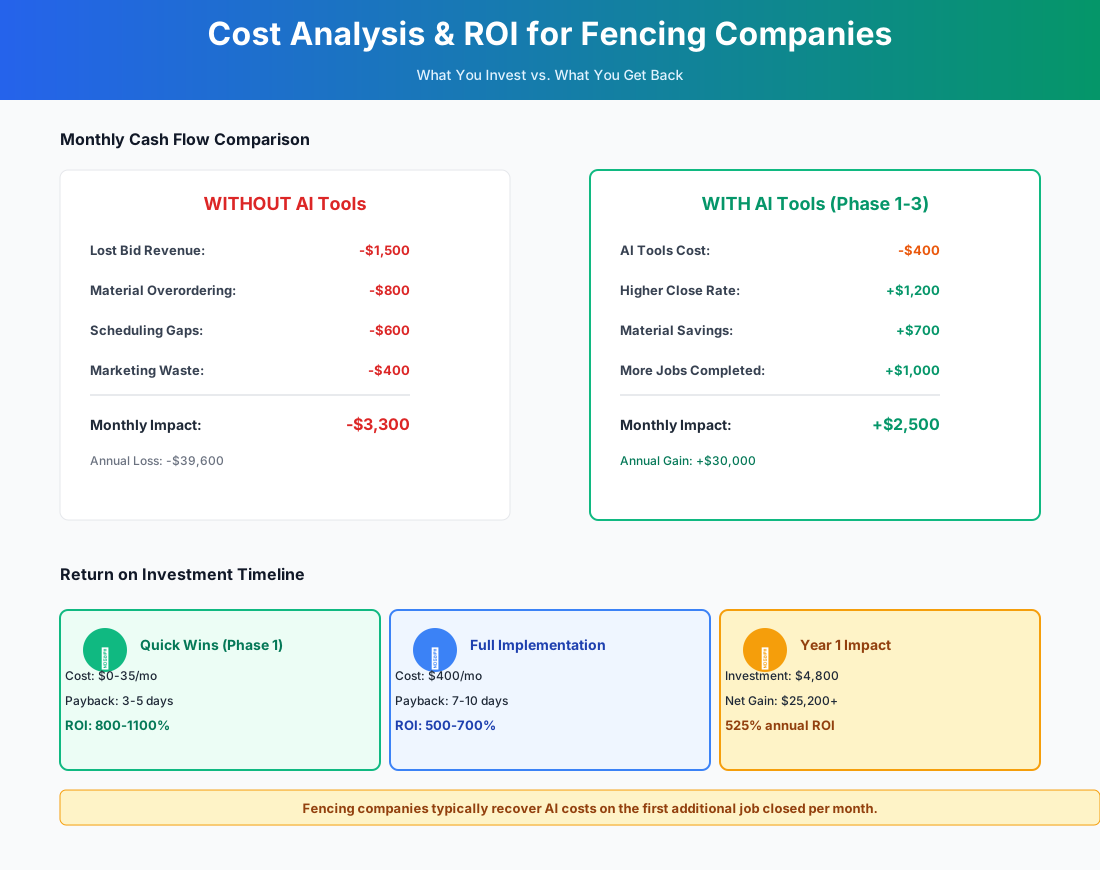
Here's a breakdown of the costs and expected returns:
FAQ
Can AI estimating software handle sloped terrain and setback requirements?
ArcSite lets you draw elevation changes and adjust layouts for setback requirements, but it doesn't auto-detect slope — you still need to note grade on-site. Fence Cloud and TRUE have more sophisticated terrain handling for commercial projects, including adjustment factors for hillside installations that affect post depth and concrete volume. For extreme slopes, you'll still need field judgment, but AI eliminates the math errors on material quantities.
How do I set up an AI phone system to handle the utility-locate question?
Both Goodcall and Jobber AI Receptionist can be programmed with custom scripts. Set up a response that explains you handle 811 utility marking before any digging begins, that it's included in your process, and that the customer doesn't need to arrange it themselves. Also worth programming: have the AI ask callers whether they know the approximate property line location — it saves real time on the site visit.
What if material prices spike between my quote and the installation date?
No AI tool solves this automatically. The best defense is a material price-escalation clause in your contracts — AI can draft a solid one in about 30 seconds. Fence Cloud's regional cost data updates more frequently than a manual spreadsheet, which shrinks the exposure window. Some contractors also build a 5–7% material contingency into their price book for fixed-price quotes. Both ArcSite and TRUE let you update pricing in one place and have it flow to all future estimates instantly.
Is AI phone answering worth it if most of my leads come from referrals?
Probably, unless your referral pipeline is so strong that you're turning jobs down. The issue isn't just capturing new leads — it's that referral customers also call during business hours when you're in the field, and a missed call from a warm referral is more expensive than a missed cold lead. If you're losing even 1–2 referral jobs per month to voicemail, the math favors a $59/month answering service.
I do mostly chain-link commercial work — should I skip ArcSite and go straight to Fence Cloud?
Yes, if you're doing 5+ commercial bids per week. Commercial chain-link requires terminal vs. line post differentiation, tension bar calculations, barbed wire arm specifications, gate operator specs, and bid-format proposals that commercial GCs expect. Fence Cloud's chain-link product library handles all of this out of the box. At $220/month, it pays for itself on the first bid you don't lose to a material calculation error. ArcSite is optimized for residential — it'll feel like a workaround for commercial work.
Does Fence Cloud or TRUE sync with my local lumber yard's pricing?
Not directly. Neither offers API integration with individual suppliers. Fence Cloud's regional cost data benchmarks your prices against market averages and flags significant gaps, and TRUE's QuickBooks sync helps catch discrepancies at the accounting level. Expect direct supplier pricing feeds within the next couple of years — the industry is behind on this, but the demand is there.
The window that matters in fencing is short and predictable. Homeowners who want spring installations are making decisions in March and April. Whoever quotes fastest, follows up consistently, and answers the phone when everyone else is in the field wins the backlog. Start with the estimate follow-up templates — free, 30 minutes, and the closest thing to found money in this trade.
More AI Implementation Guides
AI Tools for Pressure Washing Businesses (2026 Guide)
The best AI tools for pressure washing businesses in 2026. Capture missed calls, quote via satellite, automate follow-up, and win more jobs without ad spend.
AI Tools for Junk Removal Companies: 2026 Owner's Guide
The 2026 guide to AI tools for junk removal companies — answer every call, quote a pile from a photo, optimize routes, and cut tipping fees. Start free.
AI Tools for Pool Service Companies (2026 Guide)
The complete 2026 guide to AI tools for pool service companies — route density, chemistry dosing, AI phone answering, and a premium IoT monitoring tier.
Best AI Tools for Pest Control Companies (CSR & Routes)
AI CSRs, smarter routing, automated reviews & EPA-compliant chemical logs for pest control companies. Tool picks + step-by-step setup, starting free today.
AI Tools for Cleaning Services: 2026 Guide
Best AI tools for cleaning services in 2026. Cut admin hours in half, fill schedule gaps, convert more leads, and scale your team step by step.
Best AI Receptionist for Flooring Installers & Tilers
AI receptionist for flooring installers & tilers — capture every call 24/7, automate lead follow-up & marketing. Save 15+ hrs/week. See pricing & setup steps.
Keep exploring
See every AI implementation guide we've published for Trades & Contractors, or browse the full library by industry or category. Looking for a specific platform? The AI tools directory indexes every product mentioned across our guides, and the comparisons hub puts the most-asked head-to-heads side by side.