It's 6:15 AM on a Tuesday, and you're already at the kitchen table with three browser tabs open — one for the plumbing sub who still hasn't returned your bid request, one for the PDF plans you've been hand-measuring since Sunday, and one for the QuickBooks invoice you forgot to send last week. Your phone buzzes: the homeowner on the Elm Street remodel wants to know why the drywall crew didn't show yesterday. Before you can answer, your superintendent texts a photo of a cracked foundation footer on the new build across town. By the time you pour your second coffee, you've already worked an hour and haven't touched the three bids due Friday.
The difference between a GC who compounds revenue year over year and one who stays permanently stuck at $2M is rarely skill on the job. It's usually two things: how many bids they can get out the door per month, and whether their active projects stay coordinated enough to finish clean. Industry data puts the average bid-to-award rate at roughly 1-in-5. At 20-40 hours per estimate, that means 80-160 hours of unbillable work for every project you land. Fix that ratio — or cut the per-bid time — and your whole business changes.
This guide covers exactly which AI tools move those numbers. Not a demo-dataset review. Not tools pulled from a generic home-services list. These are tools chosen specifically for GC work: multi-week projects, 8-20 active subcontractors, pay apps that fund your payroll, and change orders that need to be documented before the client drives home.
TL;DR — Top 3 Recommendations
- Start today (free): Use ChatGPT or Claude to draft change orders, client reports, and bid leveling comparisons — saves 8-12 hours/week immediately
- Month 1 ($100-$350/mo): Deploy STACK or CountBricks for AI takeoffs + Raken for voice-to-text daily reports — saves 15-25 hours/week during bid season
- Month 3 ($500-$2,500/mo): Add AI-powered COI tracking (Jones), contract analysis (Document Crunch), and billing automation (Siteline) — protects margins and gets you paid 3 weeks faster
The Actual Shape of a GC Business
A GC at $3-5M isn't running a service company. You're running a project portfolio with 8-20 subcontractor relationships active at once, each one a separate compliance, scheduling, and communication thread. The NAHB reports median revenue of $3.4M with an average of 4 employees for single-family builders. Gross margins sit around 14.8% per CFMA benchmarks — which sounds workable until you realize a single underbid or an untracked change order can wipe an entire project's profit.
Here's where the time actually goes, based on what GC operators consistently report:
| Work Category | Hours/Week | Billable? | AI Leverage |
|---|---|---|---|
| Quantity takeoffs / estimating | 20-40 hrs during bid season | No | High — AI cuts 50-80% |
| Sub coordination (bids, scheduling, RFIs) | 8-12 hrs | No | High — templates + leveling |
| Client communication and reporting | 3-5 hrs | No | High — AI drafts in minutes |
| Change order documentation | 2-4 hrs | No | High — 5 min per CO |
| COI tracking and insurance compliance | 2-3 hrs | No | High — fully automatable |
| Pay application assembly | 8-15 hrs/project/month | No | High — major time sink |
| Field supervision and problem-solving | Variable | Yes | Low — this is your value |
The pattern is obvious: most of your time drains into tasks that are pure documentation and coordination overhead. AI doesn't swing a hammer. But it can handle most of those rows in that table.
Two constraints that should shape every tool decision you make: your office is a truck cab, and your field team is skeptical. Any tool that requires 30 minutes at a desk won't survive contact with a real workweek. And your superintendent has been filling out daily logs with a clipboard for 20 years — adoption has to feel easier than the old way, not just theoretically better.
Working with electrical or roofing subs on most of your projects? Our guides for electrical contractors and roofing companies cover several of the same tools from the sub's side — useful to know what you're asking them to adopt. If you're the GC on a design-build job, the architecture firm AI guide covers how the design side handles renders and client documentation — the handoff points are worth understanding from both sides.
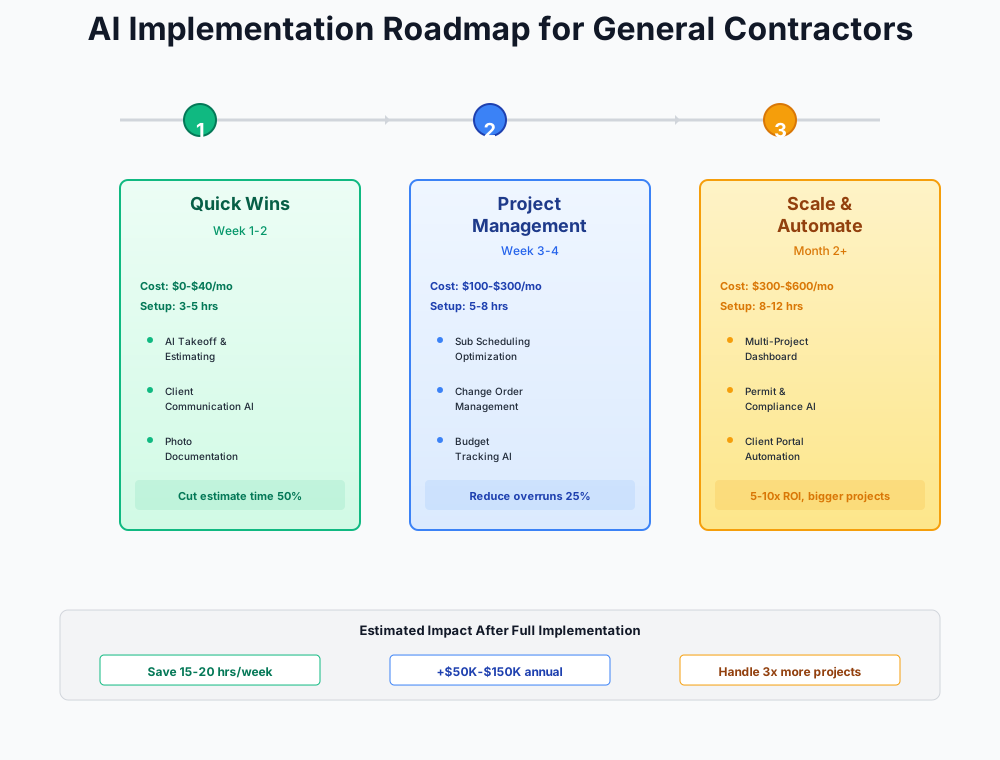
Here's a visual overview of the implementation phases:
The Free Layer: AI That Runs From Your Phone Today
Total cost: $0 | Setup time: 1-2 hours | Expected savings: 8-12 hours/week
Before spending a dollar, spend two hours building the habit. These tools cost nothing and solve the documentation problems that eat your evenings.
Turn Verbal Change Orders into Signed Documents in 5 Minutes
Every GC has war stories about the $30,000 scope change the client "doesn't remember agreeing to." Undocumented change orders are the top cause of unpaid work for general contractors — often $10K-$100K+ per project. The reason they go undocumented isn't that you don't know better. It's that writing a formal change order takes 30-60 minutes, and you're standing on a jobsite with three other problems.
I'm a general contractor working on a residential remodel. My client just verbally requested the following scope change on-site: [DESCRIBE THE CHANGE — e.g., "upgrade all kitchen countertops from laminate to quartz, approximately 45 SF of countertop area"].
Write a formal change order document including:
- Clear description of the additional scope of work
- Cost breakdown: $[X] for materials, $[Y] for labor, $[Z] total
- Schedule impact: [X] additional working days
- Statement that work will not commence until this change order is signed and returned
- Signature and date lines for both parties
Use professional but plain language. Format for easy reading on a phone screen.
Open ChatGPT or Claude on your phone, fill in the specifics from your conversation, and send the document via DocuSign within an hour — while the client still remembers agreeing. Capturing two undocumented change orders a month that would otherwise evaporate recovers $2,000-$10,000 in revenue. The tool costs nothing.
Generate Polished Client Progress Reports from Raw Field Notes
Your clients want weekly updates. Writing them takes 45-60 minutes per project. With 2-3 active jobs, that's 2-3 hours every Friday you don't have. When the reports don't go out, your phone rings all week with "what's happening?" calls that pull you off the jobsite.
Based on my superintendent's daily field notes from this week on our [PROJECT TYPE — e.g., "custom home build in framing phase"]:
[PASTE RAW NOTES — texts, daily log entries, even bullet points work]
Write a professional one-page weekly progress report for my residential client. Include:
- Work completed this week (with specific details)
- Planned work for next week
- Open items requiring client decisions (highlight these clearly)
- Current schedule status (on track / behind / ahead)
- Any upcoming disruptions or weather impacts
Keep it accessible — avoid construction jargon. The client is not in the trades. Tone should be confident and informative, not defensive.
Set a recurring Friday 2:00 PM calendar reminder. GCs who do this consistently report a 50-70% drop in mid-week client interruption calls within two weeks. That's not a small quality-of-life improvement — those calls cost you 20-30 minutes of mental context-switching every time.
AI-Powered Sub Bid Leveling
When three electrical subs return bids for the same scope, comparing them is maddening. One includes the panel upgrade, one excludes it, and the third lumps everything into a single line item. Manual bid leveling takes 1-2 hours per trade — multiply that by 8-15 trades per project and you're talking about a week of work before your own estimate even starts.
I received these bids for [TRADE — e.g., "electrical rough-in and finish"] on my [PROJECT TYPE]:
Bidder A: [PASTE BID SUMMARY OR KEY LINE ITEMS] Bidder B: [PASTE BID SUMMARY] Bidder C: [PASTE BID SUMMARY]
Create a bid leveling comparison:
- Side-by-side scope comparison — what each bidder includes and excludes
- Red flags in the low bid (common exclusions that will become change orders)
- Adjusted apples-to-apples totals accounting for scope differences
- Best overall value recommendation with reasoning
Flag any items where the scope descriptions are ambiguous enough to cause disputes during construction.
OSHA Toolbox Talks — Custom to Your Current Phase
Instead of recycling the same generic safety topics, generate talks specific to what your crew is actually doing this week. Targeted toolbox talks genuinely reduce incidents. And the documented sign-in sheet protects you during OSHA inspections, where fines range from $10,000 to $100,000+.
Create a 5-minute construction jobsite toolbox talk for my crew on [TOPIC — e.g., "fall protection during residential roof framing"].
Include:
- The specific OSHA regulation (cite 29 CFR 1926.XXX)
- 3 common mistakes workers make on this specific task
- Step-by-step safe work procedure
- What to do if a hazard is identified mid-task
- 2 crew discussion questions to check understanding
Write it for a superintendent to read aloud. Plain language — no legal jargon. My crew speaks [English/Spanish/both].
What AI Won't Do For You Here
- Don't trust AI dollar amounts. The AI generates placeholder numbers. Always replace with your actual costs from your historical data.
- Don't send anything without reading it. AI doesn't know about the conversation you had with the client on Tuesday. Review every output.
- Don't stop at change orders. Use the same tools for RFI responses, subcontractor scope clarifications, and punch list narratives.
AI Estimating and Field Documentation
Total cost: $100-$350/month | Setup time: 8-12 hours | Expected savings: 15-25 hours/week during bid season
If the free layer is working, you've already seen the pattern: AI drafts faster than expected and it sounds like you when you fill in the specifics. Now apply it to the two problems that actually govern your bid capacity — estimating and field documentation.
AI-Powered Takeoffs: Cut Estimating Time by 50-80%
Manual quantity takeoffs from PDF plans consume 20-40 hours per bid. AI takeoff tools automatically measure quantities from uploaded drawings — walls, floors, rooms, doors, windows — in minutes instead of hours. This is the single largest time savings in the entire guide.
STACK Takeoff & Estimate
Best for: GCs who want a proven platform with 100,000+ users and a free tier to start
Cloud-based takeoff and estimating platform with AI-assisted measurement tools. Upload PDF plans and get automatic quantity calculations. The free version supports 2 concurrent projects — enough to test the workflow on real bids before committing. Integrates with major PM software.
CountBricks
Best for: Residential GCs who do on-site estimates and want voice-capture capability
AI estimating tool with a standout feature: voice capture for on-site walk-through estimates. Describe the scope aloud while walking a jobsite, and CountBricks structures it into a formal estimate. At $30/month, it's the most affordable AI estimating entry point available.
Start with STACK's free tier on your next actual bid — upload the PDF plans and compare AI quantities against your manual takeoff. Run parallel takeoffs (AI + manual) for your first 3 bids to build confidence. After 3 verified bids, shift to AI as primary with manual spot-checks on high-risk line items only. Bids per month should increase 50-100%. Time per bid should drop 50-80%.
ROI Snapshot
Monthly Cost
$167/mo
Time Saved
15hrs/week
Monthly Value
$9,500
ROI
5589%
One caveat worth taking seriously: AI takeoff tools measure quantities brilliantly, but they don't know your local labor rates, your preferred suppliers' pricing, or the tariff-driven material volatility that pushed steel and aluminum up 50% in 2025. Build your historical cost database first — then let AI handle the measurement while you apply your pricing knowledge.
AI Photo Documentation and Daily Reports
Your superintendent spends 20% of their time — 8-10 hours per week — on documentation instead of managing the job. Daily logs take 45 minutes each. Progress photos are buried in camera rolls. When a dispute surfaces six months later, finding the right photo from the right date is a nightmare.
Raken
Best for: Voice-to-text daily reports that cut reporting from 45 minutes to 5 minutes
Purpose-built for construction field teams. Your superintendent talks into their phone describing the day's work, and Raken converts it to a structured daily report automatically. Includes 500+ pre-built OSHA-compliant toolbox talks, time-card tracking, and production rate tracking. Integrates with Procore and Buildertrend.
CompanyCam
Best for: GPS-tagged, timestamped photo documentation that organizes itself
Every photo is automatically tagged with GPS coordinates, timestamp, and project. AI-powered organization means you can find "the photo of the header beam before drywall went up on the Johnson project" in seconds, not hours. The AI Actions feature can auto-generate photo summaries for client reports. If you work with painting companies or other sub trades, they can use CompanyCam on their end too — creating a shared visual record across the project.
Roll this out in stages: start with Raken for daily reports (the voice-to-text wins your superintendent over immediately). Add CompanyCam 2-3 weeks later once daily reporting is habitual. Deploying both simultaneously creates change fatigue — your field team can only absorb one new workflow at a time.
AI-Assisted Bid Solicitation
Preparing invitation-to-bid packages for each trade takes 1-2 hours per scope. With 8-15 trades per project, that's 10-15 hours before you've even started your own estimate. Poorly written ITBs produce incomplete sub bids that require follow-up calls and re-quotes.
I'm a general contractor preparing bid packages for a [PROJECT TYPE — e.g., "3,200 SF custom home new construction"]. Generate an invitation-to-bid letter and scope summary for [TRADE — e.g., "plumbing rough-in and finish"].
Include:
- Professional cover letter with bid deadline of [DATE]
- Detailed scope of work description for this trade
- List of required submittals (insurance minimums: $1M GL, $500K WC, $1M auto)
- Bonding requirements if applicable
- Bid format requirements (itemized by phase, not lump sum)
- Questions/clarifications deadline
- Site visit availability dates
- Our standard contract terms reference
Tone: professional but direct. We want subs to take this seriously and return complete bids.
Using this approach, most GCs report generating all 8-15 trade ITBs in under 2 hours versus 10-15 hours manually.
Protecting Margins and Accelerating Cash Flow
Total cost: $500-$2,500/month | Setup time: 15-25 hours | Expected savings: $5,000-$20,000/month in protected revenue and faster payments
Most GCs who reach this stage are surprised by how much money was leaking that they didn't know about. Not from bad bids — from untracked insurance lapses, misread contract clauses, and pay apps that sat in someone's inbox for three weeks because of a formatting error. You need the first two layers working before adding these. This is built for GCs doing $1M+ in revenue with at least 2-3 concurrent projects.
AI-Powered COI Tracking: Defusing the Insurance Time Bomb
Construction attorneys have a name for it: the retroactive coverage gap. Your drywall sub's workers' comp insurance lapsed three weeks ago. Nobody noticed because the expiration date is buried in an Excel spreadsheet with 47 other subs. A worker falls off scaffolding. Your sub has no coverage. The claim lands on your GL policy — $200,000.
Tracking certificates of insurance for 20+ subs across multiple concurrent projects using spreadsheets is a liability problem. The expirations don't sync with your project calendar. The follow-up emails get lost. By the time you discover a lapse, work has already been performed without coverage.
Jones
Best for: GCs who want AI COI tracking that doesn't charge their subs to upload
AI reads certificates automatically, monitors expiration dates, sends renewal reminders directly to your subs, and provides a real-time compliance dashboard. The critical differentiator: Jones doesn't charge your subcontractors to upload their certificates — eliminating the friction that kills adoption on other platforms. Integrates with Procore.
myCOI (illumend AI)
Best for: Established GCs with 30+ active subs needing deep insurance compliance
15+ years in construction insurance compliance with AI-powered instant feedback. Reads COIs on upload and immediately flags non-compliant coverage. Integrates with Procore, Sage, Viewpoint, and Foundation — covering the accounting platforms that larger GCs use.
Also monitor auto liability, umbrella/excess, and professional liability for any design-build subcontractors. A lapse in any coverage category creates exposure — not just GL and WC.
AI Contract Risk Analysis: Catching the $50,000 Clause You Missed
Construction contracts contain clauses that cost tens of thousands if you miss them — indemnification provisions, liquidated damages triggers at $500-$5,000 per day on commercial work, pay-if-paid versus pay-when-paid distinctions, and change order notice requirements with specific deadlines that void your right to payment if you miss them by a single day.
Most owner-operators don't have an attorney review every contract. Even when they do, it costs $500-$2,000 per review and takes days.
Document Crunch
Best for: GCs reviewing 10+ contracts per year who need construction-specific AI analysis
Purpose-built for construction contracts. Has processed $350B+ in contract volume. Surfaces the specific clauses that create risk for general contractors — payment terms, notice requirements, indemnification scope, retainage, warranty, and dispute resolution. Provides plain-English summaries so you understand exactly what you're signing.
Budget-conscious approach: start with ChatGPT or Claude for free. Paste key contract sections (indemnification, payment terms, change order procedures, liquidated damages) and ask for a risk analysis from a GC's perspective. This doesn't replace legal counsel, but it tells you which clauses are worth your attorney's $400/hour attention — cutting legal fees by 50-70%.
Your contract review checklist should always cover: (1) payment terms and retainage percentage, (2) change order notice requirements and deadlines, (3) indemnification scope, (4) insurance requirements, (5) dispute resolution, (6) liquidated damages, and (7) warranty obligations.
AI-Powered Billing and Pay Application Automation
The 83-day average payment cycle in construction isn't just a cash flow inconvenience — it's an existential threat. You're fronting sub payments, material costs, and payroll for nearly three months before you see a dime. Add 5-10% retainage held for months or years, and the math gets ugly fast.
Assembling AIA G702/G703 pay applications from multiple data sources takes 8-15 hours per project per month. Collecting conditional and unconditional lien waivers from every sub is entirely manual. And a single error — wrong retainage calculation, missing lien waiver, incorrect format — gets the pay app rejected by the owner, restarting the 83-day clock.
Siteline
Best for: GCs with 3+ concurrent projects who want to get paid 3 weeks faster
Digitizes the entire pay application workflow: auto-populates your Schedule of Values, manages digital lien waiver collection from subs, and submits in the exact format required by the owner's payment portal. Customers report 6x efficiency improvement and getting paid an average of 3 weeks faster. The faster payment alone often covers the annual cost through reduced interest on credit lines.
Calculate your current billing cost before calling them. Multiply hours per month on pay apps (8-15 per project) by your loaded hourly rate by number of active projects. If the result exceeds $2,000/month, Siteline likely pays for itself immediately.
Upgrading to Premium AI Estimating (For High-Volume Bidders)
If you're bidding 20+ projects per year and the entry-level tools are working well, it's time to consider a platform that handles complex multi-trade takeoffs and integrates deeply with your PM software.
Togal.AI
Best for: Commercial GCs processing 20+ bids/year who need the fastest AI takeoff available
Independently tested by Kansas University to be 76% faster than competing takeoff software. Auto-detects floor plan elements (rooms, walls, doors, windows) from uploaded PDFs. Togal.CHAT lets you ask questions about your drawings in plain English — "How many linear feet of exterior wall?" The Growth plan includes unlimited AI takeoffs, removing any volume constraints.
Buildxact
Best for: Residential GCs who want AI estimating + project management + job costing in one platform
All-in-one platform with the Blu AI assistant that combines estimating, project management, job costing, and a client portal. Best for residential GCs who want to replace multiple separate tools with a single platform. If you're currently juggling Buildertrend + Excel + QuickBooks, Buildxact might consolidate two or three of those.
Don't jump here first. Complete at least 10 AI-assisted bids using STACK or CountBricks before upgrading. You need to understand the AI estimating workflow before investing $2,000-$3,000/year. And remember — AI handles measurement, but your 20 years of pricing experience is what makes the bid competitive.
Where Not to Spend
Procore under $3M revenue. Procore's AI (Helix) is excellent, but the platform costs $10,000-$30,000/year with significant onboarding. At under $3M, Buildertrend ($299-$499/month) paired with the tools above gives you 80% of the value at 30% of the cost. Consider Procore when you cross $5M.
DroneDeploy before basic photo documentation is working. DroneDeploy costs $4,188+/year and requires FAA Part 107 certification. CompanyCam at $57/month provides 90% of the documentation protection value. Drones make sense at $5M+ revenue on commercial projects over $500K.
Any AI estimating tool before you have a cost database. AI measures quantities. You provide pricing intelligence. Without historical cost data reflecting your local rates and supplier pricing, faster measurement just means faster wrong numbers.
Two major tool rollouts simultaneously. Construction teams have limited change-management bandwidth. Moving from the free layer to AI estimating should take 2-4 weeks. Adding COI tracking and billing automation should take another 4-8 weeks. Slow adoption sticks. Fast adoption usually doesn't.
Your Getting Started Checklist
- Sign up for ChatGPT (chat.openai.com) or Claude (claude.ai) — free tier is enough to start
- Save the change order prompt template to your phone's notes app
- Generate your first AI change order on your next site visit — send it via DocuSign same day
- Use the client report prompt to send your first AI-assisted weekly update this Friday
- Generate a phase-specific toolbox talk for this week's safety briefing
- Level your next round of sub bids using the bid comparison prompt
- After 2 weeks of the free layer: sign up for STACK free tier and run your first AI takeoff on a real bid
- Try Raken's 14-day free trial — have your superintendent voice-dictate one daily report
- Compare AI takeoff quantities against your manual numbers for 3 bids before trusting it fully
- At $1M+ revenue with 3+ concurrent projects: schedule demos with Jones (COI tracking) and Siteline (billing)
- Calculate your current billing cost per month to determine if Siteline ROI works for your volume
- Never sign an annual contract without completing a free trial on a real project first
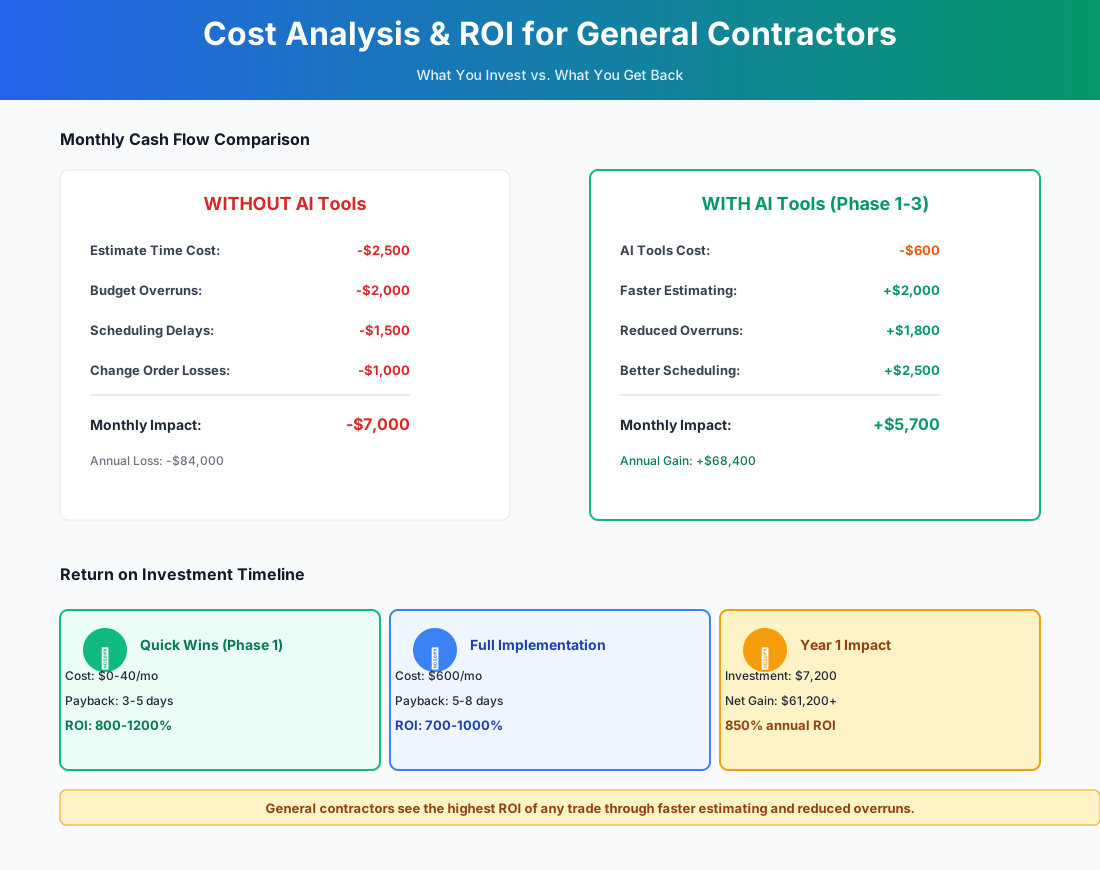
Here's a breakdown of the costs and expected returns:
Frequently Asked Questions
Can AI takeoff tools handle plan revisions and addenda accurately?
This is actually one of the strongest use cases for AI estimating tools. Togal.AI has a plan revision comparison feature that overlays two versions of the same drawing and highlights every change — added walls, moved doors, revised dimensions. Manual comparison of addenda is one of the most error-prone tasks in estimating because changes are often subtle: a moved outlet here, a resized window there. AI catches things that experienced estimators miss when reviewing addenda under deadline pressure. STACK also supports version comparison, though with less automation. Upload every addendum as a separate version — don't overwrite the original — so the comparison runs correctly.
What happens when my superintendent loses cell service on a rural jobsite?
Both Raken and CompanyCam are built for spotty connectivity. Raken allows offline daily log entry — your superintendent records the voice note or types the log, and it syncs when connectivity returns. CompanyCam stores photos locally and uploads when back in range, preserving the GPS tags and timestamps from when the photo was actually taken. If you're consistently working in areas with no service, Raken's offline mode is the more reliable of the two — it was originally built for pipeline and utility projects in remote locations.
How does AI COI tracking handle wrap-up or OCIP projects?
Good question — this trips up most generic insurance tracking systems. Jones and myCOI both allow you to flag specific projects as OCIP or CCIP (Contractor-Controlled Insurance Program), which changes the compliance logic for subs assigned to those jobs. On a wrap-up project, a sub may legitimately not carry their own GL because the project-level policy covers them — but they still need WC, auto, and possibly excess coverage. The AI platforms adjust the compliance checks per project type, so you're not chasing subs for certificates they don't need while still catching the ones they do. If you have a mix of wrap-up and traditional jobs running simultaneously, this feature is essential.
Does Siteline work with owners who require proprietary pay app formats instead of standard AIA G702/G703?
Yes, and you should test it specifically on your most demanding owner's format before signing. Many institutional owners — REITs, government agencies, large developers — reject standard AIA forms and mandate their own templates, sometimes through portals like Textura or GCPay. Siteline handles multiple output formats and integrates with the major GC payment portals. During your demo, bring your most demanding owner's pay app format and ask Siteline to show you exactly how it maps your data to that template. If you work primarily with one or two institutional owners who use proprietary systems, make this a go/no-go factor in your evaluation.
Are AI-generated quantity measurements defensible in a construction dispute or lien proceeding?
They're defensible to the same degree that any takeoff software output is — they're tools that produced the measurement, and you applied professional judgment to the pricing. What matters in a lien or payment dispute is that you can demonstrate: (1) quantities were measured from the contract documents, (2) unit pricing reflects market rates, and (3) the total was accepted via signed change order or contract. The AI takeoff platform actually provides a cleaner audit trail than hand-marked PDF printouts most GCs currently use. For any dispute exceeding $25,000, have your construction attorney review the documentation regardless of how it was generated.
I'm already on Buildertrend. Does adding these tools create redundant systems?
No. Buildertrend is solid for scheduling, client portal, and project management — but its estimating is weak and its daily reporting is manual. The tools here plug those gaps rather than replacing what's working: STACK or Togal.AI handles estimating, Raken handles voice-to-text daily reports, and CompanyCam integrates directly with Buildertrend for photo documentation. Jones and Siteline also connect to Buildertrend for COI and billing workflows. The one overlap is client reporting — you might generate reports via AI and post them through Buildertrend's client portal. Nothing to rip out. Just augment.
My superintendent has used the same clipboard system for 15 years. How do I actually get adoption?
Don't ask him to replace the clipboard. Ask him to talk into his phone for five minutes at end of shift instead of writing it all out. Raken's voice-to-text is fast enough that most supers adopt it within the first week purely on convenience — the report is already done before they're back in the truck. Start with Raken only, let it run for 3-4 weeks, then introduce CompanyCam as a separate thing. Two new tools in the same week is how adoption fails.
The contractors who will hold margins through labor shortages, tariff-driven material volatility, and 83-day payment cycles aren't the ones with the biggest crews. They're the ones who bid faster, document everything, and get paid on time. Start with the change order prompt on your phone. Build from there. Every tool here offers a free trial on a real project — the only thing you're risking is 30 minutes.
If kitchen and bath work makes up a growing share of your book, our kitchen and bath remodeling guide covers the estimating and design-approval workflows specific to that trade in more depth.
More AI Implementation Guides
Best AI Tools for Kitchen & Bath Remodelers (2026)
Cut estimating from 6 hours to 30 minutes, capture after-hours leads, and prevent margin slips. The kitchen & bath remodeler AI playbook.
AI Tools for Breweries: The 2026 Owner's Playbook
The best AI tools for breweries in 2026: cut TTB compliance time, tighten COGS, streamline taproom scheduling, and target release marketing — starting free.
AI Tools for Bookkeeping Services: 2026 Guide
Best AI tools for bookkeeping services in 2026: Automate categorization, reconciliation, and document chasing without hiring extra staff.
AI Tools for Marketing Agencies: 2026 Playbook
The best AI tools for marketing agencies in 2026. A phased plan to kill Hell Week reporting, scale content, and fix billable utilization without new hires.
AI Tools for Home Health Care Agencies: 2026 Guide
A practical 2026 guide to AI tools for home health care agencies — HIPAA-safe automation for shift-filling, OASIS-E documentation, EVV, and claim denials.
AI Tools for Dermatology Practices: 2026 Guide
The best AI tools for dermatology practices in 2026 — cut prior-auth hours, reduce no-shows, and grow your cosmetic line, with a HIPAA-first rollout plan.
Keep exploring
See every AI implementation guide we've published for Trades & Contractors, or browse the full library by industry or category. Looking for a specific platform? The AI tools directory indexes every product mentioned across our guides, and the comparisons hub puts the most-asked head-to-heads side by side.