A bakery runs three overlapping businesses at once. There's the production operation — how many croissants to pull from the proofer at 3 AM and what to do when butter jumps $1.50 a pound overnight. There's the retail and social side — customers who found you on Instagram at 11 PM asking about a four-tier wedding cake, which you won't see until your 11 AM break tomorrow. And there's the custom-order pipeline — the highest-margin work you do, managed through the worst system in your building: a combination of DMs, sticky notes, text threads, and whoever happened to answer the phone.
Each of these has its own AI solution in 2026. None of them requires a tech background to set up, and none of them costs more than your monthly supply order to run. This guide tells you exactly what to use, what it costs, and what breaks first if you skip the setup work.
TL;DR — Top 3 Recommendations
- Start today (free): Use ChatGPT or Claude with bakery-specific prompts to draft custom order replies, Instagram captions, and price recalculations in minutes instead of hours.
- Month 1 ($49-$85/mo): Add Craftybase for true per-item cost tracking and Dubsado to centralize custom cake order management — stop guessing on pricing and stop losing inquiries in DMs.
- Month 3+ ($295+/mo): Implement FlexiBake for AI demand forecasting to cut production waste from 12% to 5%, potentially saving $35,000+/year on a $500K bakery.
The Three Places a Bakery Bleeds Margin
Before getting into tools, it helps to see the problem in concrete numbers. Most bakeries focus on their gross margin (healthy-looking at 50-65%) without tracking where it goes.
| Problem Area | Typical Loss | What Causes It |
|---|---|---|
| Production waste | 5-15% of daily output (~$25K-$75K/year on a $500K bakery) | No forecasting system; gut-feel production |
| Custom order chaos | $200-$1,000/month in remakes + lost inquiries | DMs, texts, sticky notes as your "system" |
| Slow price response | $500-$2,000/month when ingredient costs spike | Manual repricing, 2-3 month lag |
| Social dark periods | 40-60% of custom cake inquiries start on Instagram | Inconsistent posting, no scheduling workflow |
The average custom cake order runs $150-$600 and carries 65-80% gross margin. It is the most profitable thing most bakeries make. It is also the thing managed by the most informal process in the building. That mismatch is where this guide starts.
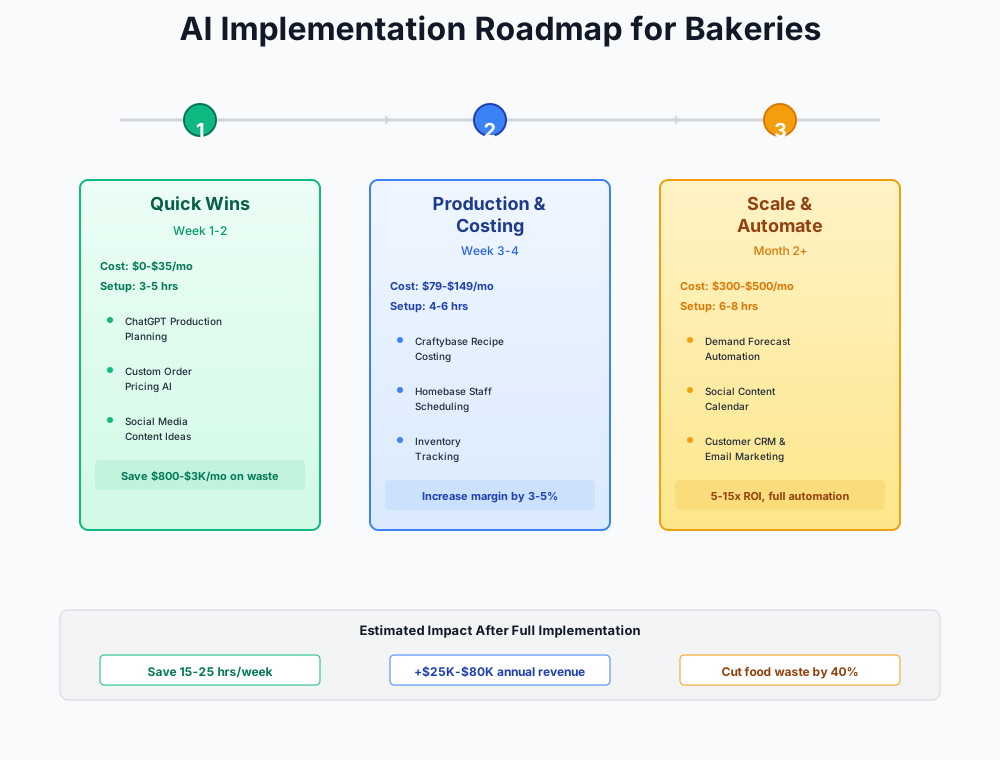
Here's a visual overview of the implementation phases:
Getting the Custom-Order Pipeline Under Control
Custom cakes and specialty orders are the product that separate a thriving bakery from a break-even one. The average bridal cake brings in $350-$700. A tiered birthday cake for a corporate client can run $400-$900. The problem isn't demand — it's that these orders arrive through every channel imaginable (Instagram DM, website contact form, phone call, in-person at the counter) and get tracked however the person who took the inquiry felt like tracking them that day.
The consequences are predictable: miscommunications that require a remake at $50-$500 of labor and ingredients, deposits that never got collected, and inquiries that went unanswered for 48 hours while the customer quietly booked the bakery two towns over.
AI as Your First Responder
Before investing in CRM software, the immediate fix is making sure no inquiry sits unanswered for more than two hours — day or night. A free AI assistant handles the first-response work so you can focus on the actual baking.
ChatGPT (GPT-4o)
Best for: Custom order replies, pricing recalculations, social captions
The Swiss Army knife of bakery AI. Use the free tier for caption writing, review responses, and ingredient cost recalculations. Claude (claude.ai) is an equally strong alternative — try both and use whichever feels more natural.
The prompt below is the one that pays for itself fastest. Paste it into ChatGPT whenever a custom inquiry lands, fill in the brackets, and you get a professional response in 90 seconds instead of the 20-minute context-switch that pulls you off production.
I run a custom cake bakery. A customer named [NAME] emailed asking for a [DESCRIPTION — e.g., 3-tier wedding cake for 150 guests, chocolate and vanilla tiers, floral decorations in blush and gold], delivery to a venue [DISTANCE] away on [DATE]. Write a professional quote email that acknowledges their vision, asks the 3 most important clarifying questions I need before finalizing pricing, and positions our custom work as premium quality. Sign off from [YOUR BAKERY NAME].
My bakery's [INGREDIENT] cost increased from $[OLD PRICE] to $[NEW PRICE] per [UNIT]. I use this ingredient in these products: [LIST PRODUCTS WITH QUANTITIES — e.g., croissants (2 eggs per batch of 12), brioche (4 eggs per loaf), 8-inch custom cakes (6 eggs each)]. Current retail prices: [LIST CURRENT PRICES]. Calculate how much the cost increase adds to each product's ingredient cost per unit, then recommend new retail prices that maintain my [TARGET]% gross margin. Show your math.
Keep these in a Notes app. The pricing prompt is worth having ready at all times — during the egg-price spikes of 2024-2025, when wholesale prices jumped as much as 89% in a single quarter, bakeries that repriced within a week protected their margins; those that waited 2-3 months lost $500-$2,000/month they'll never get back. Ingredient costs are cyclical: eggs have since come back down, but flour, butter, and cocoa all carry the same volatility risk, and the lesson — reprice fast when a cost spikes — applies regardless of which ingredient moves next.
Dubsado: Replacing the DM Chaos With an Actual System
There's a specific kind of money bakeries lose that never shows up in any report: the custom cake customer who sent a DM on a Tuesday night, got a response Thursday morning, then booked somewhere else by Wednesday afternoon. You didn't lose the job to a competitor on price or skill. You lost it to a 16-hour response window.
Dubsado
Best for: Custom cake decorators with complex multi-step order workflows
Deeper customization than HoneyBook ($49/month) at a lower price. Build automated workflows for the entire custom order lifecycle: inquiry, intake form, quote, contract, deposit, production reminder, pickup confirmation. Note: Dubsado raised prices in late 2026 — the Premier tier ($55/month) is now required for unlimited lead capture forms and full workflow automation. 21-day free trial.
The workflow that fixes this has five steps. First: a structured intake form on your website that collects event date, headcount, flavor preferences, design inspiration photos, allergen requirements, and budget. Second: automated quote generation that pulls from the intake form and sends within minutes of submission. Third: digital contract and deposit collection — no "did they actually pay the deposit?" follow-up needed. Fourth: automated production reminders at 7, 3, and 1 day out. Fifth: a client portal for design approval before decorating starts, which is the step that eliminates $200-$500 remakes.
The time savings run 5-8 hours a week on custom order admin alone. Beyond that, you capture orders that would have leaked out of your DMs.
HoneyBook ($49/month) is worth comparing if you want AI-powered auto-replies to wedding inquiries — it's the favorite of custom cake businesses like Kelsie Cakes. Our food truck guide covers HoneyBook's mobile-first workflow.
Tidio AI Chatbot: Midnight Inquiries, Morning Leads
Your website probably already gets custom order traffic between 8 PM and midnight — that's when people sit down with their phones and start planning events. Without a chatbot, those visitors hit a contact form and wait. With one, they get answers about your minimum lead times, flavor options, price ranges, and allergen policies before they go to sleep, and you wake up to a structured lead in your inbox instead of a half-finished inquiry.
Tidio
Best for: Bakeries with websites receiving after-hours custom order inquiries
AI chatbot handles FAQs (hours, allergens, pricing ranges, minimum lead times) 24/7 and captures structured custom order details from after-hours visitors. Realistic combined cost for a small bakery: $70-$150/month.
Build the chatbot to collect real information, not just say "we'll get back to you." Gather event type, date, serving count, flavor preferences, dietary restrictions, budget, and contact info. Bakeries that start capturing after-hours inquiries this way typically see a meaningful jump in custom order volume within a few months — the leads were already landing on the site, just going unanswered overnight.
Tidio Pricing Complexity
The Starter plan ($29/month) covers chatbot flows. Lyro AI is billed separately, starting around $39/month for your first batch of AI-handled conversations, then per-conversation beyond that. Read tier limits carefully — costs escalate beyond the advertised starting price, and realistic all-in cost for an active bakery site runs closer to $100-$150/month.
Local Discovery and Social Media
Forty to sixty percent of custom cake inquiries now start on Instagram, according to bakery operators. That number should focus your social strategy entirely. This isn't about going viral — it's about being findable by the person in your zip code who is planning a wedding, a birthday, or a retirement party and searched "custom cakes [your city]."
The consistent-posting problem for bakeries is structural, not motivational. The best time to post is 7-9 AM. That's when your hands are covered in flour and you're nowhere near your phone. Inconsistency tanks reach, and low reach means that bride-to-be finds the bakery that posts every morning instead of yours.
Buffer Free for Batch Social Media Scheduling
Buffer
Best for: Batch-scheduling a week of social content in one sitting
Free tier covers Instagram, Facebook, and Google Business Profile — the three channels that matter most for a local bakery. Pair with ChatGPT for captions and Canva for visuals to create a complete content pipeline that costs $0-$15/month.
The workflow: 30 minutes every Sunday evening. Use ChatGPT for captions, photos from your camera roll, graphics from Canva, and schedule everything in Buffer. Monday through Friday posts go out at 8 AM while you're pulling loaves from the oven. Even one additional custom cake order per month from consistent posting adds $150-$500 in high-margin revenue.
I'm a bakery owner. Write 5 Instagram captions for this week's posts: Monday — [PRODUCT/THEME]; Tuesday — [PRODUCT/THEME]; Wednesday — [PRODUCT/THEME]; Thursday — [PRODUCT/THEME]; Friday — [PRODUCT/THEME]. Each caption should be 2-3 sentences, warm and personal, include a call to action, and suggest 5 relevant hashtags. Our bakery's personality is [DESCRIBE YOUR VIBE — e.g., warm, artisan, neighborhood-focused].
Canva Pro for Seasonal Marketing Materials
Holiday season — Valentine's Day, Easter, Christmas — accounts for 25-35% of annual bakery revenue. Missing it with rushed graphics costs real money. Hiring a freelancer for each seasonal campaign runs $200-$500 per season.
Canva Pro
Best for: Seasonal promotions, social graphics, menus, packaging labels
Start with the free tier (limited AI image generations/month), upgrade to Pro when you need the brand kit, background remover, and full AI credits. The $18/month replaces $200-$500/season in freelance design costs.
Spend 10 minutes adding your logo, brand colors, and fonts to Canva's brand kit once. Every future design will look like it came from the same place. Magic Resize converts one seasonal graphic across Instagram, Stories, and print in seconds. Background Remover extracts baked goods from cluttered countertop photos without a photographer. Total setup is 30-45 minutes.
Real Photos Beat AI Images
Use Canva's AI-generated images for promotional banners and email headers — not as your primary Instagram content. Real photos of your actual baked goods outperform AI images for engagement and customer trust every time.
Predis.ai: When 30 Minutes a Week Still Feels Like Too Much
By the time you've got Craftybase and Dubsado running, your content workflow (ChatGPT for captions, Canva for graphics, Buffer for scheduling) takes about 25-30 minutes per post. Predis.ai compresses the whole thing to 3-5 minutes. It generates fully designed posts — graphics, captions, hashtag sets — from a two-sentence description.
Predis.ai
Best for: Owner-operators wanting to generate a full week of content in 20 minutes
Food-focused design templates, AI caption generation, competitor content analysis, and scheduling across Instagram, Facebook, TikTok, Pinterest, and Google Business Profile. Free plan available; paid tier pricing has increased since launch, so check current plan limits before committing.
Create an Instagram carousel announcing our spring pastry collection: lavender honey croissants, strawberry rhubarb danish, and lemon poppy seed muffins. Warm, artisan tone. Include pricing ($4.50-$5.50 each). Available March through May. Our bakery is a neighborhood artisan shop with a rustic, inviting aesthetic.
ROI Snapshot
Monthly Cost
$15/mo
Time Saved
10hrs/week
Monthly Value
$1,700
ROI
11233%
Production Forecasting and Waste Control
It's 10 AM Saturday and the croissant display is empty. Three customers ask, your counter staff apologizes, and they leave. Meanwhile, Tuesday's production run left 18 croissants going stale in the back. The gap between what you bake and what you sell is the most expensive inefficiency in any bakery — and the one most operators accept as the cost of the business. It doesn't have to be.
Waste running at 10-12% of production on a $500K bakery is roughly $50,000-$60,000 in ingredients and labor going into the compost. Getting that to 5% recovers $25,000-$35,000 a year. The tools below are how you do it.
Craftybase: Know the True Cost Before You Forecast
You can't control waste if you don't know what waste costs you. Most bakeries price using a 3-4x ingredient multiplier that doesn't account for actual labor time, overhead allocation, or the waste rate baked into each production run. A $65 custom cake that takes 4 hours to decorate can cost $62 in true all-in cost. You don't find out until the end of the month, if ever.
Craftybase
Best for: Artisan bakeries needing true per-item costing
Purpose-built for small-batch food makers. Tracks ingredient costs that auto-update with market prices, calculates labor time per item, allocates overhead, and tells you exactly what each product costs — and what you should charge. 14-day free trial, no credit card required.
Enter a recipe and Craftybase does the rest: 12 croissants using 500g flour at $0.42/lb, 250g butter at $5.99/lb, 2 eggs at $0.71 each, 45 minutes labor at $18/hr. True per-unit cost: $1.87. When butter jumps from $5.99 to $7.49 per pound, your per-croissant cost updates automatically, and you see immediately which products' margins just shrank. Most bakeries find 2-3 products that are significantly underpriced once they load their actual numbers — recovering $500-$2,500/month just from correcting those.
Getting started:
- Start the 14-day free trial at craftybase.com — no credit card needed
- Enter your top 10 best-selling products first (by revenue, not volume) — don't try to load your entire menu at once
- For each product, enter all ingredient quantities, supplier costs, and estimated labor time per batch
- Add overhead allocation (rent, utilities, equipment) as a percentage — Craftybase walks you through this
- Compare Craftybase's calculated cost against your current retail price — you'll likely find 2-3 products that are significantly underpriced
MarketMan + Square: Real-Time Ingredient Cost Intelligence
If you use Square, there's a structural gap between your POS data and your ingredient costs. When egg prices jump, Square keeps ringing sales. MarketMan is the connector that flags the margin damage before the end of the month.
MarketMan (Square Integration)
Best for: Square-using bakeries wanting POS-to-inventory connection
Native Square integration (Square Restaurant Inventory by MarketMan) connects front-of-house sales data directly to back-of-house ingredient costs. AI invoice scanning auto-extracts supplier pricing — no manual data entry. The combined cost is real money for a single-location bakery — run the math against Craftybase before committing. If you don't use Square, pair Craftybase with your POS instead.
MarketMan's AI scans supplier invoices automatically, extracting line-item pricing without manual entry. When flour prices rise 8%, the system recalculates every product using flour and flags the margin impact. Bakery Lorraine achieved approximately 30% COGS reduction after implementing MarketMan.
This only applies to Square POS users. On Toast, Clover, or Lightspeed? Use Craftybase instead.
Building a Production Forecasting System Before You Invest in Software
This is the most important section for bakeries that aren't yet at $400K in annual revenue. You don't need FlexiBake to start reducing waste. You need four weeks of data and a spreadsheet.
Weeks 1-4: Track daily production quantity, daily sales quantity, and daily waste quantity for your top 10 products. Include the day of week and any notes (weather, local events, holiday proximity). A Google Sheet works fine.
Weeks 5-8: Feed it to ChatGPT.
Here is 4 weeks of daily production and sales data for my bakery's top 10 products [PASTE DATA]. For each product, identify: (1) the average daily demand by day-of-week, (2) which days we consistently overproduce vs. underproduce, (3) recommended production quantities for next week by day and product. Flag any products where waste exceeds 10% of production.
Weeks 9+: Refine the model. As your data grows to 6+ months, the patterns become reliable enough to hand off to FlexiBake's AI — with the historical data it needs to be accurate from day one, rather than spending months learning your shop's rhythms.
FlexiBake: AI Demand Forecasting at Scale
Cut waste from 12% to 5% on a $500K bakery and you recover roughly $35,000 a year. Add the revenue from Saturday sell-outs you no longer run — customers who drove 20 minutes and left empty-handed — and you're looking at $45,000-$65,000 in combined impact. A $295/month tool that delivers that return pays for itself within the first few weeks.
FlexiBake
Best for: Growing bakeries with wholesale accounts needing ERP-level production control
Cloud-based ERP built specifically for bakeries — not adapted from restaurant software. AI demand forecasting predicts daily production quantities based on historical sales, day-of-week patterns, season, weather, and confirmed custom orders. Used by 500+ bakeries across 29 countries.
FlexiBake learns patterns that are hard to catch manually: Saturdays need 3x the croissants of Tuesdays; the week before Mother's Day requires 40% more custom cake capacity; rainy Wednesdays drop foot traffic 25%. It generates a daily production schedule for every product. Prerequisites: at least 6 months of daily POS sales data by product, revenue above $400K/year, and 8-12 hours for onboarding.
Nory offers demand forecasting within 3% accuracy in documented bakery case studies — worth evaluating for multi-location operations. Contact them for pricing.
ROI Snapshot
Monthly Cost
$295/mo
Time Saved
7hrs/week
Monthly Value
$4,590
ROI
1456%
Scheduling, Compliance, and the Rest
Homebase Free for Scheduling
Three AM production crews, 6 AM openers, daytime counter staff, afternoon decorators — all with different certifications, and a weekend schedule that looks nothing like Tuesday. Coordinating this via group text costs 3-5 hours a week and still produces overtime and short-staffed Saturday rushes.
Homebase
Best for: Small bakeries managing multiple shift types
Free tier includes scheduling, time clock, and team messaging for one location with unlimited employees. Unlike restaurant-only competitors, Homebase works for both production bakeries and bakery-cafes. Upgrade to Plus ($56/location/month) for AI-powered schedule optimization.
Automated shift reminders matter when someone's alarm needs to go off at 2:30 AM. Last-minute coverage broadcasts when a baker calls out. Time savings: 2-3 hours/week, with reduced overtime recovering $200-$600/month. If you use Toast POS, 7shifts is a strong alternative — free for 1 location, up to 30 employees. Our restaurant guide covers 7shifts in detail.
Mitti (formerly SafetyCulture/iAuditor) Free: Digital Food Safety Compliance
More than 85% of small bakeries still run paper documentation for food safety. One missed temperature log can mean a failed health inspection, temporary closure, and a Google review that sticks around for years. The revenue hit from a temporary closure alone runs $5,000-$50,000.
Mitti (formerly SafetyCulture / iAuditor)
Best for: Digitizing daily compliance checklists on staff phones
SafetyCulture rebranded to Mitti in August 2026 — same product, same login, same pricing, just a new name and web address. Free plan supports unlimited inspections. Search their template library for "bakery food safety" and "HACCP" — adapt existing templates rather than building from scratch. Upgrade to Premium ($24/user/month) for automated corrective actions and trend analysis.
Cover: daily fridge/freezer temperature logs for dairy and cream-filled products, oven calibration records, allergen cross-contamination checks (critical if you handle gluten-free alongside wheat), cleaning schedules with photo evidence, new employee food safety sign-offs. Setup takes 60-90 minutes using pre-built templates.
FoodDocs: AI-Generated HACCP Plan in Under an Hour
Building a proper HACCP plan from scratch takes 40-80 hours. For bakeries opening a second location or recovering from a health inspection issue, FoodDocs uses machine learning to generate a complete, bakery-specific HACCP plan in under an hour.
FoodDocs
Best for: Bakeries opening new locations or needing full HACCP automation
Machine learning trained on thousands of food business configurations generates a complete, bakery-specific HACCP plan in under 1 hour. Then maintains ongoing compliance through digital monitoring dashboards. Compliant with FSMA, BRC, HACCP, ISO 22000, GFSI, SQF, and GMP standards. 14-day free trial.
Bakery 79 implemented FoodDocs across 12 new locations in 3 months — 100% success rate with 5-star health inspection scores. For a single-location bakery, the 14-day trial alone generates your HACCP plan even if you don't continue the subscription.
Your Getting Started Checklist
- Sign up for ChatGPT or Claude (free) and save the 5 bakery prompts from this guide
- Create a Canva account and set up your brand kit (logo, colors, fonts) — 10 minutes
- Sign up for Homebase Free and add all employees with roles and availability — 45 minutes
- Set up Buffer Free and connect Instagram, Facebook, and Google Business Profile — 20 minutes
- Block 30 minutes every Sunday for weekly content batching (captions + scheduling)
- Start the Craftybase 14-day trial and enter your top 10 products with full ingredient costs
- Set up a Dubsado account and build your custom order intake form
- Download Mitti (formerly SafetyCulture) free bakery food safety templates and assign daily checklists to staff
- If you use Square: evaluate the MarketMan integration in your Square dashboard
- Start tracking daily production quantities, sales, and waste for your top 10 products — this data feeds every Phase 3 tool
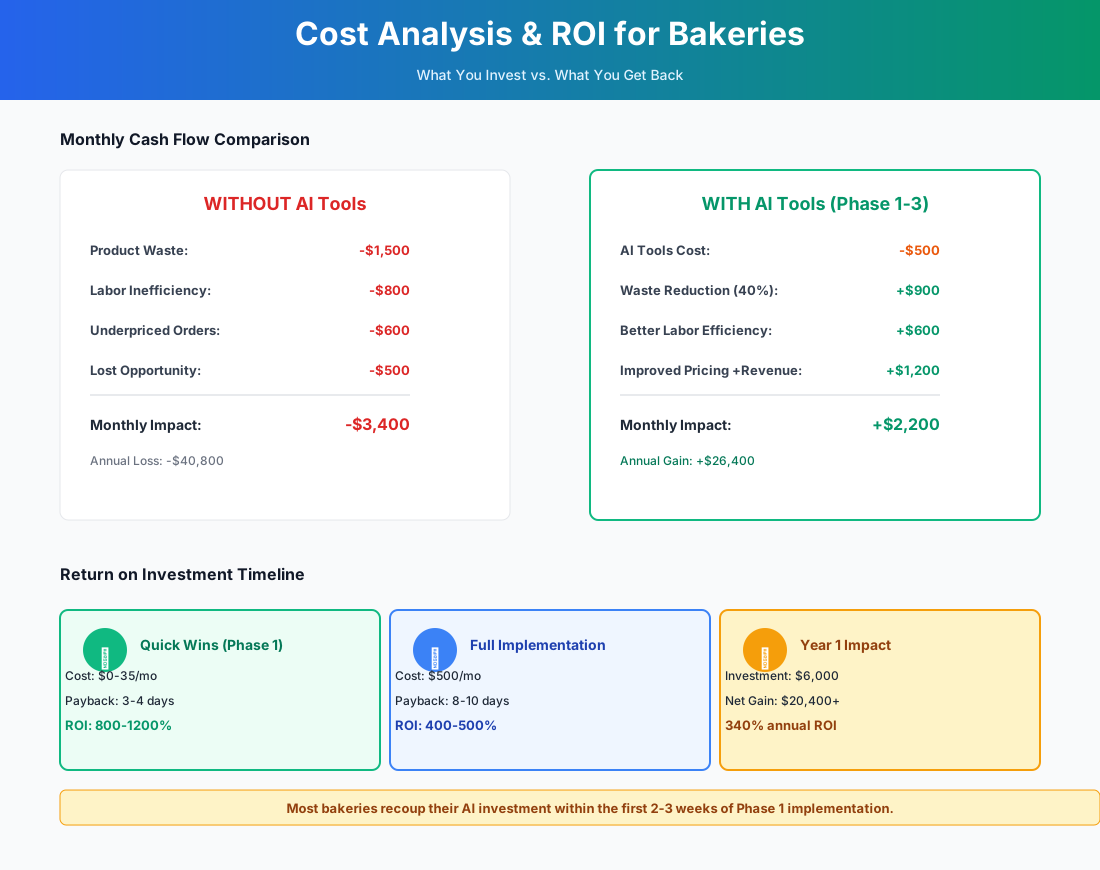
Here's a breakdown of the costs and expected returns:
Frequently Asked Questions
My custom cake inquiries come in through Instagram DMs, not my website. Does Dubsado still work?
Yes, but you need to route them. Add your Dubsado intake form link to your Instagram bio and every post that mentions custom orders. A pinned Story highlight called "Order a Cake" with the link works well. The DMs don't disappear — but your job becomes steering people to the form rather than handling everything in the DM thread itself.
Can AI demand forecasting account for weather impacts on foot traffic?
FlexiBake and Nory both incorporate weather data alongside day-of-week patterns, seasonal factors, and confirmed custom orders. Rainy days can drop foot traffic 20-30% while increasing delivery orders. The catch: you need at least 6 months of historical POS data before the AI has enough signal to learn your specific location's weather sensitivity. Start tracking now if you haven't been.
How do I handle allergen disclosure when an AI chatbot takes custom cake orders?
This is non-negotiable. Your Tidio chatbot must include a mandatory allergen disclaimer in every custom order flow — something like: "Our bakery handles wheat, dairy, eggs, tree nuts, and peanuts. We cannot guarantee a completely allergen-free environment. Please confirm all allergen requirements directly with our staff before finalizing your order." The chatbot collects initial details. A human confirms allergen-sensitive orders before production begins. Never let the chatbot promise allergen safety.
What happens to my FoodDocs HACCP plan if I cancel?
Export your generated plan as PDFs before you cancel — health inspectors may ask for a printed copy. The core document is yours to keep. For ongoing daily monitoring, Mitti's (formerly SafetyCulture) free tier handles the compliance checklists without the FoodDocs subscription.
My bakery does 70% wholesale — does any of this still apply?
Phase 1 tools apply to every bakery. For wholesale-heavy operations, reprioritize: MarketMan becomes the top priority for tracking ingredient costs against wholesale contract pricing. FlexiBake includes route delivery management and multi-account production scheduling built for wholesale. Replace Dubsado with QuickBooks Online for wholesale invoice automation and A/R tracking.
Is Craftybase just for artisan bakers, or does it work for a high-volume retail bakery?
It works best when you have defined recipes and batch sizes — which most retail bakeries do, even at volume. Where it starts to strain is if you're running 80+ SKUs with frequent seasonal rotations. At that point, pairing Craftybase with FlexiBake (which handles the production-scheduling side) gives you full coverage.
We already use Square. Do we really need another inventory tool?
Square's inventory management is built for finished goods, not recipe-based production. It tells you how many croissants you sold; it doesn't tell you that selling those croissants consumed 1.2 kg of butter at the current market price and that your margin on them just dropped 4 points. For bakeries that care about actual food cost, yes — you need either Craftybase or the MarketMan/Square integration.
Running a bakery with retail and wholesale components? Our guides for coffee shops and catering companies cover the ordering, event logistics, and third-party delivery economics that overlap most with bakery operations. Bakeries doing tasting-room or event-based wholesale work will also find the demand-forecasting playbook in our winery guide directly applicable.
The tools in this guide don't change what you bake. They change whether the custom-order inquiry you got at 10 PM on Saturday turns into a confirmed deposit by Sunday morning — and whether the 18 croissants left over on Tuesday become a forecasting data point instead of a compost bin.
More AI Implementation Guides
AI Tools for Wineries: DTC, Cellar & Compliance
The best AI tools for wineries in 2026 — cut wine club churn, automate DTC marketing, digitize cellar records, and stay TTB-compliant. A phased plan.
Catering AI: Best Tools for Caterers (Cut Hours, Win Bids)
The best catering AI tools for proposals, booking, and food cost control. Cut proposal time 80%, capture leads 24/7, and win more events. See picks & pricing.
AI Tips for Baristas: Coffee Shop Tools & ChatGPT
AI tips for baristas and coffee shop owners: use ChatGPT for marketing, automate social posts, cut inventory waste 50%, and save 15+ hrs/week. Top picks.
Best AI Tools for Food Trucks: POS, Social & Catering
Cut food waste 30%, automate Instagram, book more catering gigs & reclaim 15+ hours weekly. Best AI tools for food trucks — free picks, real pricing & setup.
AI Tools for Restaurants: Your 2026 Guide
The best AI tools for restaurants in 2026. Cut food waste, fill no-show tables, automate scheduling, and reclaim delivery margins—step by step.
AI Tools for Bookkeeping Services: 2026 Guide
Best AI tools for bookkeeping services in 2026: Automate categorization, reconciliation, and document chasing without hiring extra staff.
Keep exploring
See every AI implementation guide we've published for Food & Hospitality, or browse the full library by industry or category. Looking for a specific platform? The AI tools directory indexes every product mentioned across our guides, and the comparisons hub puts the most-asked head-to-heads side by side.