
A prospect fills out your website quote form at 7:43 PM on a Tuesday. By Wednesday morning, when your CSR calls back, that person has already received a quote from Progressive, accepted a quote from Lemonade, and forgotten your agency's name. You never had a chance — not because you couldn't compete on coverage or price, but because you were eight hours slow.
Speed-to-quote is the first battleground. But it's not the only one.
Independent agencies live and die by three numbers: quote-to-bind rate, renewal retention rate, and cross-sell ratio. Let one of them slip and your book of business quietly erodes — usually before you notice it in the numbers. A retention rate of 84% sounds solid until you do the math: at that rate, you're replacing one in six clients every year just to stay flat. Agencies that have pushed retention above 91% report that their books grow at 2–3x the rate of lower-retention peers, even with identical new business volume. That math compounds dramatically over a decade.
The tools in this guide attack all three numbers. Some are free. Some cost real money. All of them address a specific gap that generic business software doesn't — because insurance agencies have compliance requirements, E&O exposure, and AMS integration needs that a horizontal CRM tool simply wasn't built for.
TL;DR — Top 3 Recommendations
- Start today (free): Deploy Fathom or Fireflies.ai for AI meeting notes — eliminates post-call documentation and reduces E&O risk
- Month 1 ($149/mo): Add AgencyZoom for automated lead follow-up — agencies report 40% average growth in their first year
- Month 3 (custom pricing): Layer on Sonant AI for 24/7 voice call handling — O'Connor Insurance reported 8x ROI in 30 days
The Three Gaps AI Actually Closes for Independent Agencies
Your existing tech stack — whether that's EZLynx, Applied Epic, HawkSoft, or AMS360 — handles rating, policy management, and basic CRM. It was built to track policies, not to work leads, retain clients, or flag cross-sell opportunities proactively.
The table below shows where independent agencies consistently lose ground, and which AI layer closes each gap:
| Gap | What's Leaking | AI Fix |
|---|---|---|
| Quote-to-bind rate | Leads contacted hours or days late; 21x conversion drop after 5 min | Instant automated follow-up + after-hours AI voice |
| Renewal retention | At-risk clients never get a proactive call; churn is discovered, not prevented | AMS-native AI risk scoring + automated retention sequences |
| Cross-sell ratio | Coverage gaps exist in the book but nobody has time to find them | AI-powered book-of-business mining |
| Producer capacity | 15–20 hrs/week actually selling; rest is admin, data entry, portal work | Commercial rater automation + AI documentation |
| After-hours leads | 80% of after-hours voicemails never call back | 24/7 AI voice receptionist |
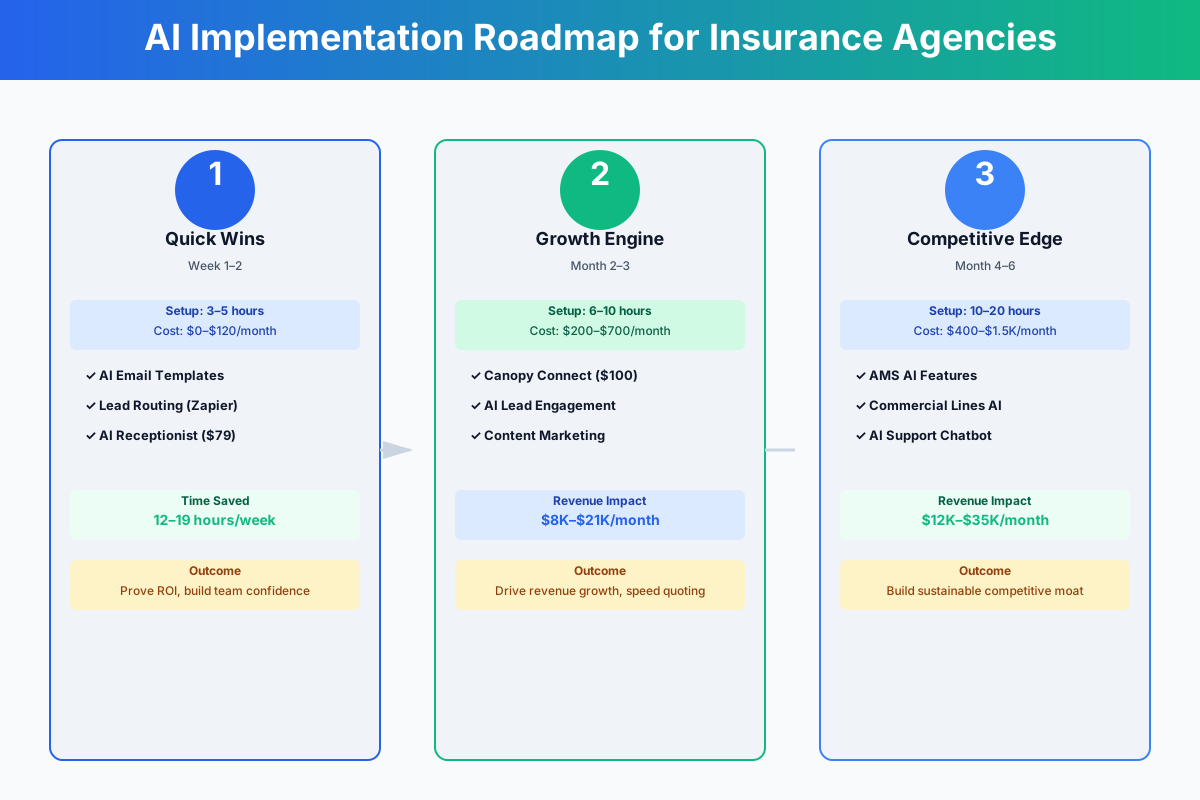
Here's a visual overview of how these tools layer onto your existing workflows:
Foundation Tools: Free This Week
These require no AMS changes, no carrier approvals, no IT involvement. Set them up today.
Stop Losing an Hour a Day to Post-Call Notes
Every coverage discussion your producers have is an E&O exposure waiting to happen — if it's not in writing. Most agents spend 15–30 minutes per meeting writing up notes and logging action items. Across a team of four producers running five meetings each, that's two to three hours daily consumed by documentation.
Fathom
Best for: Agents doing video meetings who want automatic E&O-safe documentation
AI meeting assistant that auto-joins Zoom, Google Meet, and Teams calls. Records, transcribes, and generates structured summaries with action items. Syncs directly to HubSpot or Salesforce. Every coverage recommendation your agent makes is captured verbatim — creating a defensible E&O record without any manual effort.
Fireflies.ai
Best for: Agencies needing higher free-tier volume or phone call transcription
Similar transcription and summarization capabilities with a more generous free tier (800 minutes per month vs. Fathom's 5 summaries). The "Ask Fred" AI copilot lets you query past meetings: "What did the Johnson family say about their umbrella coverage needs last quarter?"
Fathom is sharper if you run primarily video meetings. Fireflies edges it out for phone call transcription or higher volume at zero cost. Either way, your producers reclaim 5–8 hours weekly — and your E&O documentation trail becomes airtight without anyone touching a keyboard.
If you also serve clients in professional services, you'll find a similar setup in our guide for accounting firms, where Fathom saves the same kind of documentation time on client advisory sessions.
Setup (15 minutes):
- Sign up at fathom.ai (or fireflies.ai) — free plan, no credit card
- Connect your Google Calendar or Outlook so it auto-joins meetings
- Run your next three client meetings with recording enabled
- Review the AI-generated summaries — note how it captures coverage discussions, concerns, and next steps
- After one week, compare time spent on documentation vs. your old workflow
Recording Consent Laws Matter
Check your state's recording consent laws before deploying. Eleven states (including California, Florida, and Illinois) require all-party consent. Always disclose recording at the start of every call — a simple "This call is being recorded for quality and documentation purposes" satisfies most requirements. When in doubt, check with your E&O carrier.
Your Producers Shouldn't Spend 45 Minutes Prepping for a Prospect Meeting
They do anyway. Research on the prospect's industry, coverage needs by SIC code, discovery questions — it's a solid hour of prep for a 30-minute meeting. AI language models collapse that to 60 seconds.
I'm an independent P&C insurance agent preparing for a first meeting with a prospect who owns a [TYPE OF BUSINESS] with [NUMBER] employees in [STATE]. What are the typical insurance needs for this type of business, common coverage gaps I should probe for, relevant industry-specific risks (e.g., professional liability, pollution, product recall), and 10 discovery questions I should ask to uncover their full insurance needs? Format as a pre-meeting briefing I can review in 5 minutes.
Write a professional but warm renewal letter for a long-term client named [NAME] whose [TYPE] policy renews on [DATE]. Their premium is increasing by $[AMOUNT] due to [REASON — e.g., "increased replacement cost valuations and a hardening commercial property market"]. Acknowledge the increase honestly, explain the market conditions driving it, emphasize the value of their current coverage, and offer to schedule a review call to explore options. Keep it under 200 words, conversational, and include an E&O disclaimer: "This letter is for informational purposes and does not constitute a coverage guarantee. Please refer to your policy for specific terms and conditions." Sign it from [AGENT NAME] at [AGENCY NAME].
A small business client is asking what Business Interruption Insurance covers. Write a clear, jargon-free email that: (1) explains what BI covers and common exclusions in plain language, (2) uses a real-world example relevant to a [RESTAURANT/RETAIL STORE/CONTRACTOR] owner, (3) mentions the importance of reviewing waiting periods and coverage limits, and (4) ends with a call-to-action to schedule a policy review. Include a disclaimer: "This is general educational information and does not constitute coverage advice. Please review your specific policy language or contact our office to discuss your coverage in detail." Keep it under 250 words.
One firm rule: never paste client PII — SSNs, dates of birth, financial details — into ChatGPT or Claude. Use anonymized examples only. And always review AI-generated coverage content before sending. AI is a drafting tool, not a licensed agent.
The compound value comes from building a shared prompt library your whole team uses — every producer prepping for commercial meetings in five minutes instead of sixty.
Professional Marketing Without a Designer
Your agency's social media looks amateur next to the local State Farm office with corporate marketing support. Hiring a designer costs $500–$2,000 per month. You don't need one.
Canva AI (Magic Studio)
Best for: Agencies wanting professional social media graphics and marketing materials without design skills
Design platform with 25+ AI tools. Magic Write generates captions, Magic Media creates images from text descriptions, and Brand Kit stores your agency logo, colors, and fonts for consistent output. Search "insurance" in the template library for hundreds of ready-made social media posts, flyers, and presentation templates.
Combine Canva with a ChatGPT-generated content calendar and you can batch-create a full week of professional posts in under an hour every Monday morning.
Create a 30-day social media content calendar for an independent insurance agency in [CITY, STATE]. Include a mix of: educational posts about coverage (homeowners tips, auto insurance myths, business insurance basics), local community engagement (sponsorships, charity events, local news), client testimonial/review spotlights, seasonal risk reminders (hurricane prep, winter driving, holiday theft prevention), and subtle promotional content (new carrier announcements, referral programs). Write the caption for each post under 150 words. The agency specializes in [PERSONAL LINES / COMMERCIAL / BOTH] and has [X] Google reviews. Include 4 posts that encourage reviews.
ROI Snapshot
Monthly Cost
$15/mo
Time Saved
3hrs/week
Monthly Value
$1,480
ROI
9767%
Growth Tools: Build the Sales and Retention Engine ($200–$600/month)
With documentation and prep handled, invest in insurance-specific AI that connects directly to your AMS. These typically pay for themselves within 30 days — and the ones tied to renewal retention often pay back for years.
The Follow-Up Speed Problem (And What the Data Shows)
How many hours did your office manager spend calling leads back last week? Now ask: how many of those leads were first contacted within five minutes of submitting? Probably close to zero.
Responding within five minutes makes you 21x more likely to qualify a prospect. Most independent agencies take 4–24 hours. By the time someone calls back, the lead has a quote from a direct writer and has moved on.
AgencyZoom (by Vertafore)
Best for: P&C agencies focused on new business growth and producer accountability
Sales automation CRM built exclusively for insurance agencies. Automatically triggers follow-up sequences when new leads arrive — immediate text acknowledgment, same-day phone call reminder, next-day email with quote status, 3-day and 7-day follow-ups, then monthly drip. Integrates with EZLynx, Applied Epic, HawkSoft, AMS360, and QQ Catalyst. Used by 6,000+ agencies. Agencies report an average 40% growth in new business during their first year.
The sequence that works:
- Minute 0: Automated text — "Thanks for reaching out to [Agency Name]! We received your quote request and a licensed agent will be in touch shortly."
- Hour 1: Producer calls the lead
- Day 1: Email with quote or next steps
- Day 3: Text check-in — "Any questions about the quote we sent?"
- Day 7: Value-add email — coverage tip relevant to their situation
- Day 30+: Monthly drip with seasonal insurance tips
AgencyZoom also automates post-binding workflows: welcome email, coverage review scheduling at 30 days, cross-sell check, and Google review request at 60 days. At $149/month, it needs to help you close roughly one additional personal lines policy per month to break even. Agencies report $3,000–$8,000 per month in additional revenue from improved close rates and faster follow-up.
Renewal Retention: The Math Nobody Pays Enough Attention To
Here's a retention calculation worth running for your own book. If your agency earns $1.2M in annual premium revenue and retains 84% of clients at renewal, you're losing roughly $192K in revenue annually to churn — and spending new-business acquisition dollars to replace it. Push retention to 91% and that leakage drops to $108K. The $84K difference falls straight to the bottom line, and your book's value on a sale or acquisition multiples significantly because a high-retention book commands a better multiple from buyers.
AgencyZoom's renewal retention sequences automate the touchpoints that prevent quiet churn: 90-day renewal outreach, market shopping notification, rate increase explanation calls, and post-renewal check-ins. These are the calls your producers mean to make and rarely get to.
The cross-sell detection in GloveBox works in parallel — flagging clients with coverage gaps before the renewal window opens, so your producers have a targeted call list instead of a general "check in with everyone" reminder.
GloveBox
Best for: Growing agencies wanting to reduce service call volume while improving client retention
Branded client portal and mobile app. Policyholders can access documents, pay bills, file claims, request COIs, and communicate — without calling your office. AI-powered cross-sell detection flags clients with coverage gaps. SOC 2 certified. Connects to Applied Epic, HawkSoft, EZLynx, AMS360, and QQ Catalyst. Agencies report handling 2–3x more policyholders per CSR after implementation.
One check before you buy: does your current AMS already include a client portal you haven't activated? Applied CSR24 and EZLynx Client Center exist on many agencies' plans but have never been turned on. If your AMS portal is genuinely limited, GloveBox is a significant upgrade — but confirm you're not paying for what you already own.
Set a realistic adoption target: 30% of clients using the portal within 90 days. You're not aiming for 100%. You're aiming for enough deflection that CSRs can redirect hours toward retention calls and cross-selling instead of emailing ID cards.
Cut Commercial Quote Time from 3 Hours to 30 Minutes
A single commercial BOP/GL/Workers' Comp quote requires keying the same applicant data into three to seven carrier portals. Each submission runs 20–45 minutes. For a producer writing eight commercial quotes weekly, that's 10–15 hours of repetitive portal work that should be spent prospecting.
Tarmika (by Applied Systems)
Best for: P&C agencies writing small commercial who want to quote 35+ carriers from one application
AI-powered commercial lines comparative rater. Submit one application, receive real-time quotes from 35+ carriers for small commercial risks (BOP, GL, WC, Commercial Auto, Cyber). AI application reading extracts data from uploaded ACORD apps and prior dec pages. Carrier appetite intelligence tells you which carriers will actually write the risk — before you waste time submitting to carriers that will decline. Integrates with Applied Epic, EZLynx, HawkSoft, and QQ Catalyst.
The carrier appetite matching is worth calling out specifically. How many hours has your team wasted submitting to carriers that were never going to quote the risk? Tarmika tells you upfront which carriers are a match. Agencies report commercial quote time dropping from 2–4 hours to under 30 minutes per account. For a producer writing eight commercial quotes per week, that's roughly 12 hours reclaimed.
If you're also working with clients who run auto repair shops or other service businesses, you'll appreciate how much faster you can turn around their commercial GL and garage liability quotes when you're not re-keying the same data five times.
Reviews and After-Hours Lead Response
Your Google Business Profile has 23 reviews. The State Farm agent down the street has 200+. Every happy client who walks out your door without getting a review request is a missed opportunity — and when a prospect fills out your website form at 8 PM, they don't hear back until morning, by which time they've gotten an online quote from a direct writer.
Podium
Best for: Agencies wanting faster lead response and dramatically more Google reviews
AI-native communications platform with an AI Employee that responds to inbound leads within two minutes via text, 24/7. Automates Google review requests after policy binding and renewals. AI-drafted review responses for both positive and negative reviews. Businesses using Podium respond to leads 10x faster, and agencies report 30–40% improvement in Google review volume.
Many home services businesses and HVAC companies use Podium for the exact same reasons. What makes it particularly useful for insurance agencies is the after-hours qualification: when someone requests a quote at 9 PM, Podium's AI can acknowledge the request, ask qualifying questions (type of insurance, current carrier, renewal date), and schedule a callback — all before your competitor's office opens.
Set a goal: 10+ new Google reviews per month. At that pace, you'll pass 100 reviews within six months and start winning the local search battle against captive agents in your market.
ROI Snapshot
Monthly Cost
$300/mo
Time Saved
6hrs/week
Monthly Value
$5,080
ROI
1593%
Advanced Automation for Scaling Agencies ($500–$1,800/month)
These require real budget. The payback is real too — but only if you've built the foundation first and have staff buy-in for the workflow changes.
24/7 Call Handling — Capture the Leads You're Currently Losing to Voicemail
Your agency receives 30–80+ calls per day. CSRs answering routine ID card requests are calls not answered for new quotes. After-hours calls go to voicemail, and 80% of those callers never call back. The revenue leakage is invisible — you never see the leads that went to a competitor at 6:30 PM.
Sonant AI
Best for: Independent P&C agencies fielding 30+ calls/day who want to capture after-hours leads and reduce CSR workload
Voice AI receptionist built exclusively for P&C insurance agencies. Handles inbound calls in 10+ languages with native understanding of insurance terminology. Qualifies leads, collects quote intake data (name, contact info, insurance type, current carrier, renewal date), schedules appointments, and routes urgent calls. Post-call summaries automatically logged to your AMS. Integrates with Applied Epic, EZLynx, HawkSoft, AMS360, and QQ Catalyst.
Deploy Sonant for after-hours calls only during the first two weeks. Review every AI interaction transcript. Once you're confident in the quality, expand to overflow calls during business hours when all CSRs are tied up.
O'Connor Insurance Associates reported 8x ROI in 30 days. BIG Pickering Insurance reported 600% ROI in their first month. The math isn't complicated: capturing two to three after-hours leads per month that would have gone to voicemail — and never called back — more than covers the cost.
What Sonant should handle versus what it shouldn't:
| AI Handles | Transfer to Human |
|---|---|
| After-hours lead intake | Active claims with client distress |
| Quote data collection | Coverage recommendation questions |
| Appointment scheduling | Billing disputes |
| ID card and COI requests | Complex commercial risk discussions |
| Office hours and location info | Cancellation requests (retention opportunity) |
Mining Your Book of Business for Cross-Sell and Retention Signals
Your AMS holds years of client data you're not using. Which clients are 60 days from renewal with no outreach logged? Who has a home policy but no umbrella? Which commercial accounts haven't been reviewed in 18 months?
If you're on EZLynx, activate EVA — the AI assistant that queries your entire book conversationally. Ask it: "Show me all homeowner clients without an umbrella policy" or "Which personal auto policies renew in the next 60 days with premiums over $2,000?" EZLynx estimates EVA can save up to three hours per day per agent by end of 2026.
If you're on Applied Epic, enable Applied Intelligence for renewal risk scoring and automated policy comparison that flags coverage changes and new exclusions at renewal.
If you're on HawkSoft, configure Agency Intelligence dashboards to track retention rate by producer, average revenue per client, and cross-sell ratio.
The monthly book review ritual: schedule a one-hour meeting each month where the team reviews AI-flagged opportunities. Clients with coverage gaps get a cross-sell email sequence. At-risk renewals get a personal call from the producer. Every flagged opportunity gets assigned to a person with a deadline. Without that follow-through, the AI insights are worthless.
Watch for EVA AutoFill
EZLynx is rolling out EVA AutoFill in 2026 — AI that reads uploaded ACORD applications and prior dec pages, then auto-fills quote fields. This could save 45–90 minutes per commercial quote. If you're an EZLynx agency, ask your rep about early access.
A Few Things Worth Saying Plainly
Don't rip and replace your AMS to get AI features. Switching AMS platforms is a 3–6 month disruption. Every tool in this guide integrates with the major platforms.
AI cannot make coverage recommendations or binding decisions. That's the line. AI gathers data, drafts documents, automates admin. Licensed agents make coverage calls. Anything else is E&O exposure.
Before buying any third-party AI tool, ask your top three carriers what they already offer. Many carriers are rolling out automated quoting, risk scoring, and claims tools — free to appointed agents. You may have AI you didn't know about.
Don't put raw ChatGPT on your website. It could give inaccurate coverage information, make implied promises, or mishandle a complaint. For client-facing AI, use insurance-specific tools like Sonant AI or GloveBox that understand compliance requirements.
And don't implement everything at once. Agencies that sign up for five tools simultaneously, get overwhelmed, and abandon all of them within 60 days — we've watched it happen. One tool at a time. Prove the value. Move on.
Your First 30 Days
- Sign up for Fathom (free) and connect your calendar — start capturing meeting notes today
- Create a ChatGPT or Claude account and save the 3 insurance prompts from this guide
- Set up Canva (free) with your agency's Brand Kit and create your first 4 social media posts
- Build a shared prompt library doc and train your CSRs on using AI for email drafting
- Request an AgencyZoom demo and connect it to your AMS
- Configure automated lead follow-up sequences in AgencyZoom (text → call → email → drip)
- Set up automated Google review requests after every policy binding
- Contact Tarmika to evaluate commercial quoting speed improvement
- Check with your AMS provider: 'What AI features am I paying for but not using?'
- Activate EVA (EZLynx), Applied Intelligence (Epic), or Agency Intelligence (HawkSoft)
- Request a Sonant AI demo for after-hours call handling
- Evaluate GloveBox for client self-service (but check your AMS portal first)
- Schedule a monthly 'book review' meeting to act on AI-flagged opportunities
Start with items 1–4 this week. Free, takes under three hours total. Then work down the list, adding one paid tool at a time as you prove the value of each.
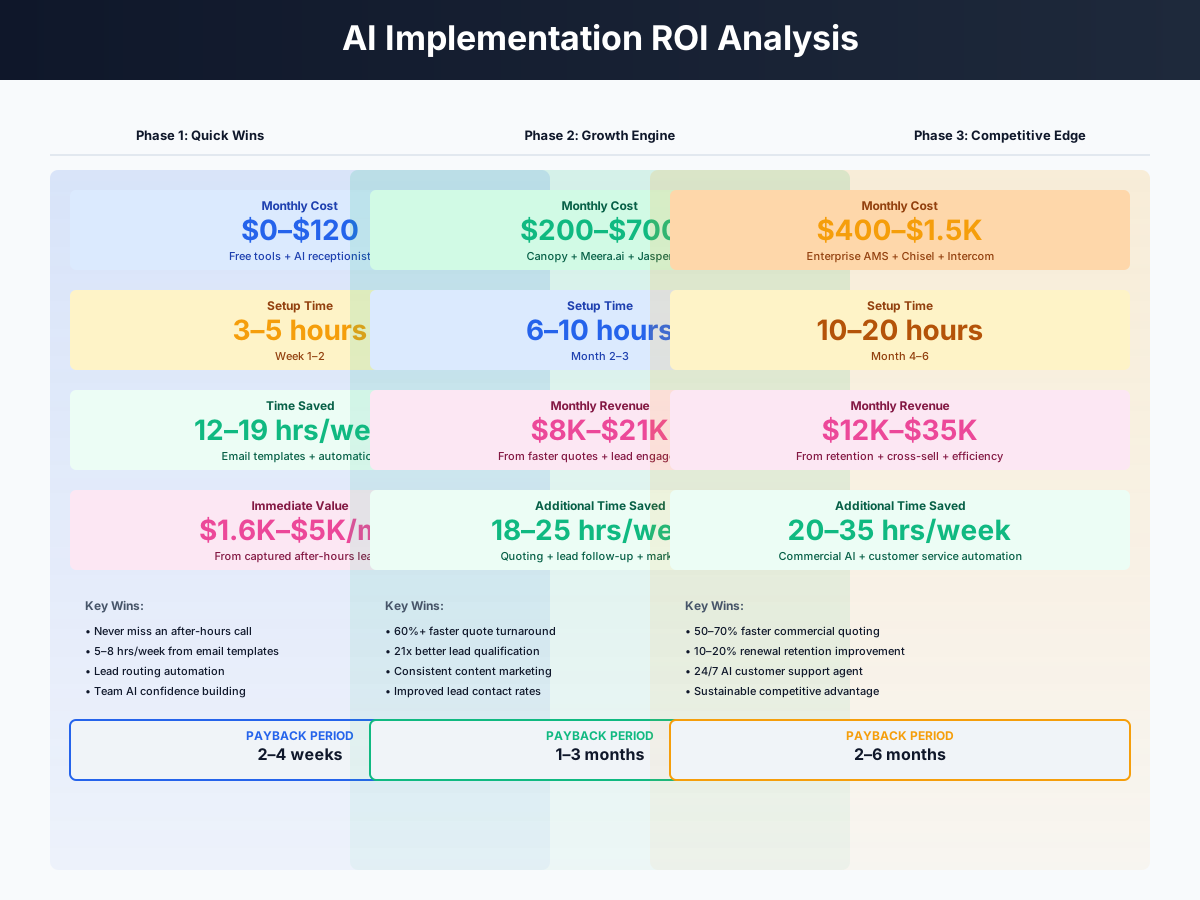
Here's a breakdown of the costs and expected returns:
Frequently Asked Questions
Can Sonant AI really handle the terminology in an insurance call — or will it confuse clients?
Sonant is built specifically for P&C insurance. It understands "dec page," "binder," "loss run," and "certificate holder" without confusion. The key is your escalation configuration: routine tasks (appointment scheduling, quote intake, ID card requests) stay with AI; active claims, coverage questions, and upset clients transfer immediately to a human. Start with after-hours only, review every transcript for the first month, then expand. The agencies reporting 600–800% ROI deployed exactly this way.
How do I keep AI-generated client emails compliant when my state DOI has specific advertising rules?
Three rules for every AI-drafted communication: no specific coverage guarantees or promises, a disclaimer that the content is general information and not a policy-specific guarantee, and principal or compliance officer review before any template enters rotation. For states with strict advertising rules — California, New York, Florida — have your E&O carrier review your AI email templates once. After that, the approved template can be reused safely with client-specific details swapped in. The prompts in this guide include built-in disclaimer language for this reason.
Does Tarmika's carrier appetite matching work for my regional carrier appointments, or just the big nationals?
It connects to 35+ carriers including regional markets. That said, Tarmika is built for small commercial risks — BOP, GL, Workers' Comp, Commercial Auto, Cyber. Complex risks (large property, professional liability for niche industries, E&S lines) still require direct submission. Before signing up, ask Tarmika for their connected carrier list and compare it to your top commercial appointments. If your five most-written commercial markets are supported, the time savings will be dramatic. If you primarily write specialty or E&S, it won't help as much.
My agency writes both P&C and benefits — do these tools cover the group health side?
Mostly no. AgencyZoom, Tarmika, and Sonant AI are P&C-focused. For benefits, Zywave is the standout — compliance content, prospect identification, and renewal quoting tools built specifically for employee benefits brokers. Fathom and Fireflies.ai work for any meeting type. If benefits represent more than 30% of your revenue, run Zywave alongside your P&C tools rather than forcing P&C workflows onto benefits accounts.
How should I handle CSRs who feel threatened by automation?
Honestly, they usually come around faster than managers expect — once they realize AI is absorbing the calls they dread most. Frame it from day one: AI handles the ID card requests and routine follow-ups so the team can do work that actually matters — retention calls, complex service, cross-selling, relationships. The agencies with the best adoption trained CSRs to use the AI tools themselves, rather than having management impose them. Start with Fathom (it just helps CSRs) before introducing GloveBox or Sonant (which changes their workflow). Agencies with AI tools handle 2–3x more policyholders per CSR — that means growth without layoffs, not fewer jobs.
Is it worth switching AMS platforms to get better AI features?
Almost certainly not. It's a 3–6 month disruption to your entire operation, and every tool in this guide integrates with the major platforms already. Before considering a switch, ask your current AMS rep point-blank what AI features are on their 2026 roadmap — most of the major platforms are investing heavily. EZLynx's EVA, Applied Intelligence, and HawkSoft's Agency Intelligence dashboards have all shipped or are shipping this year. Exhaust what you already have before starting over.
The independent agency channel isn't going away. What's changing is the bar for client experience — the speed, the availability, the proactive service that builds the kind of retention rate that compounds over time. The tools above are available to every agency, regardless of size. The ones that deploy them thoughtfully will widen the gap on direct writers and insurtechs, not lose ground to them.
If your agency also provides coverage advice to law firms or accounting practices, check out our dedicated guides for those verticals — understanding their AI adoption helps you speak their language during coverage reviews and renewal meetings. And if preneed and final-expense policies are part of your book, our funeral home AI guide covers how directors handle the insurance-assignment side of that conversation — worth knowing before you're on a call with a grieving family.
More AI Implementation Guides
AI Tools for Bookkeeping Services: 2026 Guide
Best AI tools for bookkeeping services in 2026: Automate categorization, reconciliation, and document chasing without hiring extra staff.
AI Tools for Marketing Agencies: 2026 Playbook
The best AI tools for marketing agencies in 2026. A phased plan to kill Hell Week reporting, scale content, and fix billable utilization without new hires.
AI Meeting Assistant Cost for Accountants in 2026
What does an AI meeting assistant cost for an accounting firm? Free tiers, per-seat pricing from ~$17/user/mo, and the real total for a 3-, 5-, and 10-person team, compared.
Best AI Meeting Assistant for Accountants & Bookkeepers
The best AI meeting assistant for accountants records, transcribes, and summarizes client calls into action items. Compare 6 real tools and 2026 pricing.
AI Tools for Tax Preparation Services (2026 Guide)
AI tools for tax preparation services in 2026. Cut data entry, stop no-shows, automate documents, and build year-round revenue with a phased plan.
AI Tools for Personal Injury Law Firms (2026 Guide)
AI tools for personal injury law firms: capture after-hours leads, cut demand letters to minutes, and clear the medical-records bottleneck — within bar rules.
Keep exploring
Browse the full library by industry or category, see every product we cover in the AI tools directory, or read the head-to-head comparisons.