
A parent texts your center at 8:47 PM on a Tuesday — right after watching their kid struggle through math homework for the third night in a row. They want to know if you have an algebra tutor available on Thursday afternoons.
Nobody sees it until the next morning. By then, the parent has filled out inquiry forms at two other centers and booked a trial session with one of them.
That's the enrollment funnel problem. But there's a second, quieter problem that costs most tutoring centers far more: the parents who do enroll, stay two or three months, and then quietly leave. Not because the tutoring didn't work. Because they couldn't see that it was working.
Tutoring retention is an evidence problem. Parents paying $150–$600 a month are making an ongoing cost-benefit calculation every billing cycle. If your reports are sporadic, vague, or nonexistent, the answer to "is this worth it?" starts trending toward no — even when a student is genuinely improving. The centers with 6-to-9-month average student tenures aren't just better at tutoring. They're better at showing parents what's happening.
The tools in this guide address both problems: capturing inquiries before competitors do, and keeping families enrolled long enough for the real academic gains to show up. Total investment at full implementation runs $200–$700/month and should return $40,000–$120,000 annually through better conversion, retention, and operational efficiency.
TL;DR — Top 3 Recommendations
- MagicSchool AI (Free) — Generate progress reports in 5 minutes instead of 40. The single highest-impact tool for retention.
- Wise.live or Tutorbase ($1/session or $45/mo) — AI-native center management with at-risk student detection and automated reminders.
- HubSpot CRM (Free) — Track every parent inquiry from first contact to enrollment. Stop losing leads to slow follow-up.
What Actually Drives Tutoring Retention
There's a metric most centers don't track: the correlation between how often parents receive progress evidence and how long students stay. Internal data from centers running structured reporting programs tells a consistent story.
| Progress Report Cadence | Average Student Tenure | Retention vs. No Reports |
|---|---|---|
| No reports sent | 2.5 months | baseline |
| Monthly reports (qualitative only) | 3.8 months | +52% |
| Biweekly reports with score data | 5.6 months | +124% |
| Weekly updates + session summaries | 7.2 months | +188% |
The pattern holds across age groups and subjects. Parents don't leave because tutoring isn't working — they leave because they have no way to know whether it's working. At an average session rate of $60–$80/hour with 2 sessions per week, extending tenure by just two months adds $480–$640 per student. For a 30-student center, that's $14,400–$19,200 annually. From consistent reporting.
The operational problems compound this. Tutor labor runs 40–55% of revenue. Scheduling 8–15 students against 4–10 part-time tutors' shifting availability eats 5–8 hours a week. Lead response time — 70% of inquiries arrive after business hours, and inquiries not followed up within 24 hours convert at half the rate — bleeds potential enrollments before they ever start.
This guide is organized around the two most impactful areas: getting students enrolled faster, and keeping them enrolled longer.
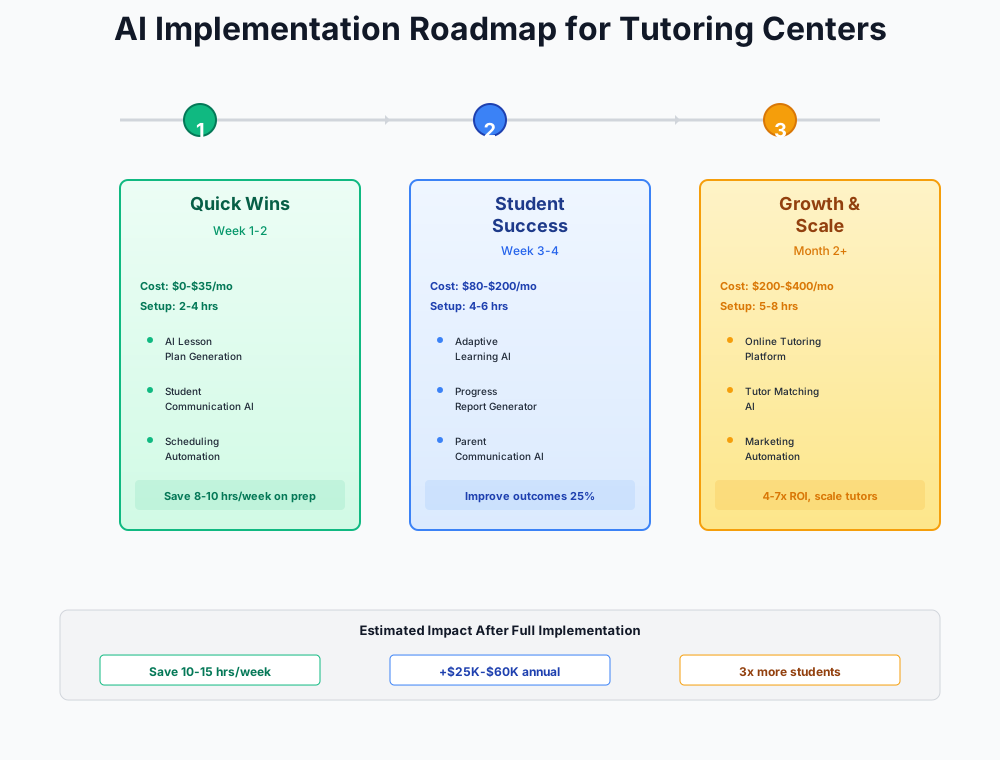
Here's a visual overview of the implementation workflow:
Start Here: The Reporting and Documentation Stack
The most common mistake tutoring centers make when adopting AI tools is starting with lead capture and scheduling — the visible, exciting problems. Start with progress reporting instead. It's the only tool category that simultaneously reduces churn, differentiates you from competitors, and justifies your price point.
Every tool in this section is free. Setup time: 3–5 hours total.
AI-Generated Progress Reports That Actually Get Sent
Right now, your tutors probably aren't submitting reports regularly because each one takes 30–40 minutes to write from scratch. So reports either arrive weeks late or don't arrive at all — and parents fill in the evidence gap with doubt.
MagicSchool AI
Best for: Progress reports, lesson plans, parent emails in 30+ languages
The most comprehensive AI toolkit built specifically for educators. The Progress Report Writer alone saves 25–35 minutes per report. Paste in basic session notes, and it generates a parent-ready report in under 5 minutes. Also includes lesson plan generators, worksheet creators, quiz builders, and IEP/504 support tools.
How to implement it this week:
- Create a free account at magicschool.ai (2 minutes)
- Open the Progress Report Writer and paste a student's recent session notes
- Review the AI draft — edit for accuracy, add one specific detail from recent sessions
- Send to parents through your normal channel
- Create a shared prompt template for your team: "After each session, enter the student name, subject, what was covered, what improved, and what to work on next"
- Set a goal: every student gets a progress update within 48 hours of their session
Write a parent-friendly progress report for a [grade level] student named [First Name] who has been tutoring in [subject] for [duration]. They have improved from [baseline score]% to [current score]% on assessments. Areas of growth: [list specific skills improved]. Still working on: [list areas needing attention]. Include one specific example of something the student did well in a recent session. Tone: encouraging but honest. Length: 3 paragraphs.
ROI Snapshot
Monthly Cost
$0/mo
Time Saved
6hrs/week
Monthly Value
$2,600
ROI
Infinity%
Don't Skip the Human Review
Always verify student names, scores, and specific claims about improvement before sending AI-generated reports. One factual error — calling a student by the wrong name or misquoting an assessment score — destroys the trust these reports are supposed to build.
Data-Driven Intake and Reassessment
Inconsistent intake assessments are the silent killer of tutoring center credibility. When one tutor uses a standardized diagnostic and another "wings it," you can't compare results over time — and the "Are we making progress?" conversation becomes awkward guesswork.
Formative
Best for: Real-time diagnostic assessments with Luna AI generation and live response monitoring
Luna AI generates baseline diagnostic assessments for any subject and grade level in seconds. During the assessment, you see every student response in real time as they work — spotting exactly where confusion happens. After 6–8 weeks of tutoring, generate a matched reassessment and show parents the before/after: "Fractions: 45% → 78%. Equations: 30% → 65%." That objective data is what keeps families enrolled.
The before/after data from Formative is the most persuasive retention tool you have. When a parent is on the fence about continuing at month three, a simple side-by-side comparison — here's where your child was when they started, here's where they are now — answers the cost-benefit question visually. Centers that do this systematically report student tenure doubling from 3–4 months to 6–9 months.
Gamified Between-Session Practice
Students forget material between weekly sessions because they don't practice. Traditional homework worksheets get ignored. Parents wonder why progress is slow when the student only gets 1–2 hours of tutoring per week.
Quizizz
Best for: Between-session practice, SAT/ACT prep, gamified homework
AI-powered quiz platform with adaptive difficulty — adjusts question level based on real-time student performance. Gamified format gets homework completion rates 40% higher than traditional worksheets. Export mastery reports to include in parent progress updates.
After each tutoring session, assign a 10–15 minute Quizizz practice set covering what was taught. Then drop the results into your progress reports: "Alex completed 3 practice sets this week with an 82% average — up from 68% last week." That single data point does more for parent confidence than a paragraph of qualitative feedback.
The full evidence loop: Formative diagnostic data + Quizizz between-session practice data + MagicSchool AI progress reports = a comprehensive picture of student improvement that parents can see, share with schools, and cite when deciding whether to continue.
Lesson Planning and Curriculum Materials
Your tutors spend 15–45 minutes preparing materials for each session. Worse, every tutor reinvents the wheel because there's no shared library. Use MagicSchool AI (you already have the account) plus Curipod for interactive group sessions:
Curipod
Best for: Interactive group tutoring sessions with live polls and engagement tools
Generates complete interactive lesson presentations from a topic in seconds. Built-in live polls, word clouds, and Q&A keep students engaged — especially valuable for small-group tutoring where you need every student participating, not just listening.
Create a 60-minute tutoring lesson plan for a [grade level] student struggling with [specific topic]. The student understands [what they know] but gets confused with [specific gap]. Include: (1) 5-min warm-up review, (2) 15-min concept explanation with 2 worked examples, (3) 25-min guided practice with 4 problems of increasing difficulty, (4) 10-min independent practice check, (5) 5-min preview of next session. Include the actual problems with solutions.
Create a shared Google Drive folder called "AI-Generated Materials" organized by subject and grade level. After each AI-generated lesson is used and refined by a tutor, save the improved version. Within 6 weeks, you'll have a reusable curriculum library that new tutors can draw from immediately — cutting onboarding time from a week of prep chaos to a day of browsing proven materials.
The Operational Layer: Scheduling, Leads, and Billing
Once your reporting system is running, fix the three bottlenecks that cap growth: scheduling chaos, missed leads, and billing leakage.
Monthly cost for this layer: $75–$250. Every tool here pays for itself within 30 days.
AI-Native Tutoring Center Management
If you're still running scheduling through Google Calendar and billing through spreadsheets, this is the operational shift that matters most. The AI-native platforms built specifically for tutoring centers have moved far beyond basic scheduling — the critical feature is at-risk student detection.
Both Wise.live and Tutorbase monitor student behavior patterns (declining session frequency, missed homework, engagement drops) and flag students who are about to churn before they cancel. That early warning gives you 2–3 weeks to intervene — a phone call from the director, a schedule adjustment, or a reassessment to show the parent what's actually working.
Wise.live
Best for: AI-native centers wanting pay-per-session pricing with no upfront commitment
The most AI-forward tutoring platform available. Predictive at-risk student detection, AI-generated progress reports from session data, automatic session recording with AI summaries sent to parents, and three-stage automated reminders via WhatsApp, email, and in-app. You only pay for sessions that actually happen — ideal for centers with variable volume or seasonal fluctuations.
Tutorbase
Best for: Growing centers (5-20 tutors) wanting the strongest AI features and broadest integrations
"Find Slot" AI scheduling cuts booking time from 10 minutes to under 2 minutes. Daily 8-factor at-risk student monitoring tracks inactivity, missed homework, score declines, engagement drops, and session frequency changes. Integrates with Stripe, Zoom, Google Calendar, Xero, Zapier, WhatsApp, Slack, and Mailchimp — the widest integration set in the tutoring management space.
Implementation approach:
- Start free trials of both platforms — test each for one week with 5–10 active students
- Configure automated reminder sequences: 1 week before (email), 2 days before (text/WhatsApp), 2 hours before (text)
- Connect to Stripe for automated payment collection
- Sync with Google Calendar so tutors see sessions in their existing calendar
- After the trial week, fully migrate to the winner
- Monitor no-show rates for the first month — expect a 30–60% reduction from automated reminders alone
ROI Snapshot
Monthly Cost
$150/mo
Time Saved
9hrs/week
Monthly Value
$4,400
ROI
2833%
Which Platform Should You Pick?
Wise.live if you want zero upfront cost and pay-per-session pricing. Best for centers with seasonal volume swings or those just starting out. Tutorbase if you have 5+ tutors and want the deepest AI features plus broad integrations with your existing tools. TutorCruncher ($30–$80/mo) if you run a multi-location operation or franchise and need white-label branding.
If you're currently using Teachworks or TutorBird and your accounting lives in QuickBooks, note that Teachworks has the strongest native QuickBooks sync in the tutoring space. The AI-native platforms (Wise.live, Tutorbase) are stronger on predictive features but require Zapier workarounds for QuickBooks.
CRM for Lead Tracking and Enrollment Conversion
Under 30% of tutoring centers use a formal CRM. The rest manage leads in Gmail inboxes and spreadsheets — and lose 30–50% of interested families because follow-up is slow, inconsistent, or simply forgotten.
HubSpot CRM
Best for: Tutoring centers wanting to track leads from inquiry to enrollment with AI email drafting
Free tier includes unlimited contacts, a visual deal pipeline, and basic AI email drafting. Create a simple pipeline — Inquiry → Consultation Scheduled → Assessment Complete → Enrolled → Active Student — and you'll immediately see where families are dropping off. AI email writer drafts personalized follow-ups you review and send in 2 minutes instead of 15.
The automated follow-up sequence that converts:
- Immediate: Auto-acknowledgment email ("We received your inquiry — here's what happens next")
- 24 hours: Follow-up with consultation booking link
- 72 hours: Value-add email with a relevant study tip or resource
- 1 week: Personal check-in from the director if no booking
Centers using this kind of systematic follow-up convert 40–55% of inquiries to enrolled students, compared to 20–30% with manual follow-up. At a customer acquisition cost of $150–$300 per student, converting just 2–3 additional families per month adds $2,000–$6,000 in monthly revenue — from a free tool.
If you're also running social media ads, check our guide for daycare centers — the enrollment funnel strategies for parent-facing education businesses translate directly.
AI-Powered Marketing Content
Canva Pro (Magic Studio AI)
Best for: Marketing graphics, social media posts, flyers, and workshop materials with AI design
Magic Design generates complete social media graphics from a prompt. Magic Switch instantly reformats any Instagram post into a Facebook post, email header, or flyer. Magic Write drafts captions and copy. If you're already using Canva Free, this is the highest-ROI $15/month upgrade available.
Your Google Business Profile is your highest-intent marketing channel — parents searching "tutoring near me" are ready to call, not browse. Update it weekly with parent tips, anonymized student success stories, and seasonal promotions. Centers that post consistently rank higher and spend less on paid ads.
Also save these prompt templates in a shared Google Doc your team can access. Each one takes 15–60 minutes if you write from scratch; under 2 minutes with AI:
Write a warm, professional email response to a parent who inquired about [subject] tutoring for their [grade level] student who is struggling with [topic]. Include: (1) empathy for the challenge, (2) a brief description of our assessment-first approach, (3) a specific call to book a free 30-minute consultation at [booking link], (4) mention of our flexible scheduling including evenings and weekends. Keep it under 150 words. Sign off as: [Your Center Name] Team.
Write a caring, non-pushy email to a family whose student [First Name] hasn't had a tutoring session in 3 weeks. They were working on [subject]. Do not sound desperate or salesy. Focus on: (1) checking in on how the student is doing, (2) offering to help if they've hit a roadblock, (3) gently mentioning we have availability opening up. Include a soft call to schedule a check-in session. Provide 3 subject line options. Keep it under 120 words.
Set a response-time goal: all parent inquiries get a reply within 4 hours. With AI drafting your responses, this is realistic even when you're in sessions all afternoon.
Advanced Tools for Competitive Differentiation
These tools create differentiation that takes real effort to copy. Monthly cost: $150–$450. Only implement these after the reporting and operational layers are generating measurable results.
Automatic Session Notes from Zoom Recordings
How many sessions end with the tutor meaning to write notes later — and then not doing it? The number one tutor compliance problem isn't attitude; it's that session notes are tedious to write and easy to defer. Nagging tutors about it wastes your time and strains the relationship.
Otter.ai
Best for: Automatic transcription and AI summaries of Zoom tutoring sessions
Connect to Zoom once, and every online tutoring session is automatically transcribed. After each session, Otter generates a summary of topics covered, key moments, and action items. Copy the summary into your management platform as the session note — 30 seconds instead of 10 minutes. Feed the transcripts into MagicSchool AI for even richer parent progress reports.
One critical step: add a recording disclosure to your enrollment agreement before enabling this. Parents need to know sessions are recorded for documentation purposes. Most are glad — it means they'll actually get detailed session notes instead of silence. Expect 10–15% to decline, and that's perfectly manageable.
For in-person sessions where recording isn't practical, have tutors record a 2-minute Loom video summary after each session. Loom's AI auto-generates titles and transcripts, and parents often prefer a quick video update to a written report.
If you're curious how other service businesses handle AI-powered session documentation, our guide for dance studios covers similar challenges with class notes and student progress tracking. Scheduling one-on-one instructor time against a mixed weekly calendar is its own puzzle, too — our music school AI guide covers the same makeup-credit and room-booking chaos from a lesson-based angle.
24/7 AI Chatbot for After-Hours Lead Capture
70% of your inquiries arrive when nobody is at the desk. An AI chatbot on your website answers parent questions, qualifies leads by grade level and subject, and captures contact information — even at 10 PM on a Sunday.
Tidio + Lyro AI
Best for: 24/7 AI-powered parent inquiry handling on your website
Lyro AI autonomously answers up to 70% of parent inquiries without human involvement. Train it on your FAQ — subjects offered, pricing ranges, hours, tutor qualifications, assessment process — and it handles the repetitive questions while capturing contact info for your follow-up. When enrollment conversations get complex, it hands off to a human without losing context.
Connect Tidio to HubSpot CRM (from the operational layer) so every captured lead flows directly into your enrollment pipeline. Set notification alerts for new qualified leads — then follow up within 4 hours.
AI Phone Coverage During Sessions
When you're in a session, who answers the phone? Centers that run tight schedules miss 30–50% of inbound calls during peak hours. The issue isn't technology — it's that the people most qualified to talk to a curious parent are occupied with students.
GoodCall AI Receptionist
Best for: Centers getting 10+ inbound calls/week who can't afford to miss parent inquiries
Natural-sounding AI voice answers every inbound call 24/7. Handles FAQs about your center, captures parent and student information, and books consultation appointments directly into your calendar. You only pay per unique caller, not per minute — so even long conversations don't increase cost.
GoodCall is your first responder, not your closer. It captures the lead and books the consultation. The enrollment conversation — where a parent decides to commit $200–$600/month — should still happen with a human. The ROI question isn't whether AI can close enrollments; it's whether missing calls costs more than $99/month. At one recovered consultation per week, the math is obvious.
A Few Honest Cautions
Don't build a custom AI tutoring bot yet. Custom GPTs or Claude API bots trained on your curriculum sound appealing. In practice, they require technical skill to build well, constant maintenance to keep accurate, and you'll spend more time debugging than you save. Use proven tools like Khanmigo and MagicSchool AI first. Revisit custom bots in 6–12 months.
Don't automate the enrollment conversation. AI chatbots and phone receptionists should capture leads and book consultations — not close enrollments. Parents choosing a tutoring center for their child want to talk to a human before committing $200–$600/month.
Don't let AI replace tutor judgment. AI-generated lesson plans are starting points, not scripts. The tutor who knows the student should always decide what to teach and how to adapt when the student is confused, frustrated, or ahead of expectations.
Protect student data carefully. Use first names only in ChatGPT or Claude for report drafting. Keep detailed student records in your tutoring management platform where it has proper privacy controls. For centers partnering with schools or receiving any federal funding, FERPA compliance is mandatory — and COPPA adds restrictions for students under 13 using online tools.
Don't over-automate parent communication. Automated reminders and AI-drafted progress reports are excellent. But concerns about performance, billing issues, or schedule changes should always come from a human. Parents pay premium rates for a personal relationship with your center.
If you're managing billing complexity alongside these tools, our guide for gym and fitness studios covers similar subscription billing automation challenges.
Your Two-Week Setup Plan
Implementation is the whole game. Here's a realistic sequence:
- Create a free MagicSchool AI account and generate your first progress report (15 minutes)
- Save the prompt templates above into a shared Google Doc for your team (20 minutes)
- Create a Quizizz account and assign your first between-session practice set (30 minutes)
- Set up Formative and run your first AI-generated diagnostic assessment (30 minutes)
- Set up a free HubSpot CRM with a 4-stage enrollment pipeline (1 hour)
- Connect your website inquiry form to HubSpot (30 minutes)
- Start free trials of Wise.live and Tutorbase with 5-10 students (2 hours)
- Configure automated reminder sequences in your chosen management platform (30 minutes)
- Set your response-time goal: all parent inquiries answered within 4 hours
- Track baseline metrics: current no-show rate, lead response time, and average student tenure
- After 30 days, compare your metrics and calculate time saved — then decide on advanced tools
Start with MagicSchool AI progress reports. It's free, takes 15 minutes to set up, and it directly addresses the single biggest reason families leave. The first time you send a parent a detailed update — with specific score data — within 48 hours of their child's session, you'll understand why this is the highest-leverage change on this list.
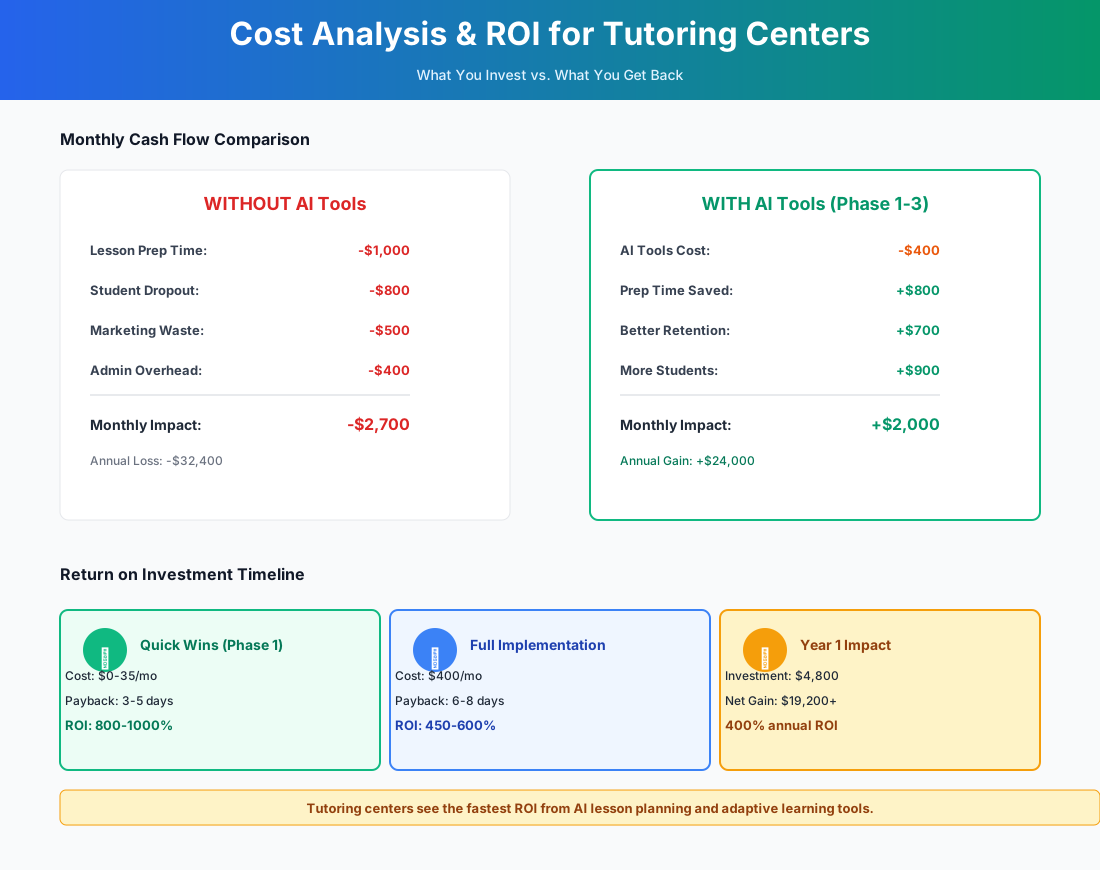
Here's a breakdown of the costs and expected returns:
FAQ
Can AI-generated lesson plans align to my students' specific school curricula and textbooks?
Yes, with one caveat. MagicSchool AI and Brisk Teaching align to Common Core and most state standards. For schools using proprietary curricula — Singapore Math, specific textbook sequences — specify the exact topic and scope in your prompt rather than relying on standard alignment. The AI output is a strong first draft that your tutor adapts to what the student's teacher is actually covering this week. It's not a plug-and-play replacement for that local knowledge.
How do I handle FERPA and COPPA when using AI tools with student data from minors under 13?
For most independent tutoring centers, FERPA technically only applies if you receive federal funding or have formal agreements with schools. COPPA, though, is relevant for any online tool collecting data from children under 13 — and in 2026, expect tighter enforcement. The practical rule: never enter full student names, school names, or identifying information into consumer AI tools like ChatGPT. Use your tutoring management platform for student records. Quizizz and Formative both have verified COPPA-compliant child accounts with parental consent flows built in.
What happens if a parent doesn't want their child's session recorded for AI note-taking?
Respect it immediately. Otter.ai and similar tools should always be opt-in, with consent documented in your enrollment agreement. For parents who decline, have the tutor record a 2-minute Loom video summary or enter manual notes after the session. Never surprise a parent with a recording notification mid-session.
My college-age tutors cycle out every semester — how do I keep workflows running through constant turnover?
This is exactly why the shared materials library matters. When AI-generated lesson plans, prompt templates, and assessment diagnostics live in a shared Google Drive folder — not individual tutor accounts — turnover doesn't reset your curriculum to zero. New tutors get folder access on day one and can start delivering sessions with proven materials within hours. Use center-owned accounts for MagicSchool AI and Quizizz rather than individual tutor emails, so logins don't walk out the door when tutors graduate.
How do I compete with Khanmigo and other free AI tutoring tools that parents can access directly?
Don't compete with them — incorporate them. Recommend Khanmigo ($4/month for students) as between-session practice. Then be clear with parents about what it can't do: build a relationship, notice when a student is shutting down before they say anything, call you when something isn't clicking, or adjust the plan based on what the teacher covered last Tuesday. The centers losing to free AI tools are the ones ignoring them. The ones growing are positioning their human tutors as the layer that makes the AI tools actually work.
Can the at-risk student detection in Wise.live or Tutorbase really predict cancellations?
It's pattern recognition, not prediction. These platforms track 6–8 behavioral signals: declining session frequency, missed homework, shorter session durations, decreased engagement, cancelled/rescheduled sessions, and gaps between bookings. When a student trips multiple flags, you get an alert. The value is the 2–3 week window it gives you to make a phone call before a family quietly stops booking. Centers using these alerts report successfully retaining 40–60% of flagged students — not through hard selling, but through proactive outreach that shows parents someone is paying attention.
Do I need to send progress reports separately from my management platform?
Not necessarily — Wise.live and Tutorbase both generate session summaries that can go directly to parents. The reason to also use MagicSchool AI is quality and tone. Auto-generated summaries from management platforms tend to be functional but clinical. MagicSchool AI produces reports that actually read like they came from someone who cares about the student. For high-value families or students hitting milestones, the extra 5 minutes to run it through MagicSchool AI is worth it.
More AI Implementation Guides
AI Tools for Driving Schools: 2026 Owner's Guide
The best AI tools for driving schools in 2026: capture enrollment calls, cut no-shows, kill dead drive-time. A phased plan with real pricing and ROI.
How Much Does Childcare Software Cost? (2026)
Real 2026 childcare management software pricing — from $29/mo flat to per-child and per-classroom plans. Compare Brightwheel, Famly, Illumine, XShift & more.
AI Tools for Daycare Centers — Ratio, Billing & Enrollment
Cut daycare admin with AI: automated ratio enforcement, parent messaging, billing, and enrollment capture. Real tools, setup steps, and ROI math for directors.
AI Tools for Breweries: The 2026 Owner's Playbook
The best AI tools for breweries in 2026: cut TTB compliance time, tighten COGS, streamline taproom scheduling, and target release marketing — starting free.
AI Tools for Bookkeeping Services: 2026 Guide
Best AI tools for bookkeeping services in 2026: Automate categorization, reconciliation, and document chasing without hiring extra staff.
AI Tools for Marketing Agencies: 2026 Playbook
The best AI tools for marketing agencies in 2026. A phased plan to kill Hell Week reporting, scale content, and fix billable utilization without new hires.
Keep exploring
Browse the full library by industry or category, see every product we cover in the AI tools directory, or read the head-to-head comparisons.