
Architecture firms win or die on two things: proposals and long-project endurance. The first determines whether the work comes in. The second determines whether it turns a profit.
Most small practices have gotten reasonably good at design. What they haven't solved — and what AI is genuinely good at solving — is the volume of writing, visualization production, and coordination overhead that surrounds the design work. An eight-person firm submitting three proposals a month is spending 30–50 hours of principal time on writing that converts at 25%. A five-person firm managing four active projects in CD phase is burning untold hours on RFIs, meeting documentation, and scope creep disputes that should never have become disputes in the first place.
That's what this guide is about: using AI to win more proposals with less effort, generate concept visualizations in minutes instead of days, and build the paper trail that protects your fees across 18-month projects.
TL;DR — Top 3 Recommendations
- Use Claude for proposal drafting — cut RFP response time from 8 hours to 2 hours (free to start)
- Deploy Otter.ai for meeting transcription — document every client decision to protect against scope creep ($0-$20/month)
- Implement Monograph for project financial tracking — see fee burn in real time and catch overruns before they kill your margins ($25/user/month)
The Proposal Problem (And Why It's Worse Than You Think)
Win rates for small architecture firms on competitive RFPs run 20–30%. That's the industry average. For firms submitting to public sector work, it's often lower. The number that rarely gets calculated: how much it costs per proposal attempt.
Here's a table most principals haven't seen for their own firm:
| Firm size | Hours per proposal | Principal rate | Cost per proposal | Win rate | Cost per won project |
|---|---|---|---|---|---|
| 2–4 staff | 8–12 hrs | $175/hr | $1,400–$2,100 | 25% | $5,600–$8,400 |
| 5–10 staff | 12–20 hrs | $200/hr | $2,400–$4,000 | 25% | $9,600–$16,000 |
| 10–20 staff | 20–40 hrs | $225/hr | $4,500–$9,000 | 30% | $15,000–$30,000 |
Those numbers assume every proposal attempt costs you real money — because it does. The $15,000+ cost-per-won-project figure for a mid-size firm is common and almost never tracked. When you start tracking it, the case for AI-assisted proposals is immediate.
AI won't improve your win rate. That's about relationships, past work, and fit with the selection committee. What it does is collapse the time cost per attempt from 8–12 hours to 90 minutes — which means you can respond to more RFPs, focus principal attention on the strategic differentiators rather than the boilerplate, and stop treating proposal writing as an all-hands emergency every time one lands.
The AIA's 2025 research (published with Deltek and Construct Connect) found that only 8% of firm leaders report actively integrating AI into their practices, and just 6% of individual practitioners use it regularly — though 53% are experimenting. A more recent 2026 survey from Chaos and Architizer, covering nearly 800 architects and designers, found 64% had already experimented with AI tools but only 20% were fully integrating it into their workflow day to day — a wide gap between "tried it" and "actually built it into the practice" that echoes the AIA numbers even as the headline adoption rate looks higher. Either way you slice it, the firms actually using these tools daily remain a minority. That gap is an advantage you can take right now.
Winning Proposals Faster: AI Drafting and Visualization
Setup time: 3–5 hours | Monthly cost: $0–$50
Build a Firm Profile Once, Use It Everywhere
The most valuable thing you can do before touching any AI tool is create a structured "Firm Profile" document — one reusable file that contains everything an AI needs to write on your behalf. Firm history, key staff bios, project types, design philosophy, five differentiators, and ten notable projects with square footage and completion year. This takes 90 minutes to build once. After that, every proposal session starts by pasting it as context.
The workflow: paste Firm Profile, paste RFP evaluation criteria, prompt for a qualification narrative. First draft in eight minutes. You spend thirty minutes refining — adding specific numbers, sharpening the language, catching anything the AI invented. Total time: under two hours instead of eight.
Claude Pro
Best for: Proposal drafting, scope of services, award submissions
Claude handles long-form architectural writing exceptionally well. The free tier is sufficient for 3-5 proposals per week. Pro ($20/month) adds longer context windows for pasting full RFP documents and getting comprehensive responses.
I'm responding to an RFP for a [PROJECT TYPE] project in [CITY, STATE]. The selection criteria emphasize: [PASTE CRITERIA].
Using my firm profile above, write a 2-paragraph firm qualification narrative that:
- Highlights our most relevant project experience for this building type
- References specific completed projects by name with square footage and completion year
- Addresses the selection criteria directly, not generically
- Tone: confident and specific. No filler phrases like "we are committed to excellence."
Then write a separate project approach paragraph (150 words max) explaining how we'd approach the schematic design phase for this specific project type.
Create a scope of services for a [PROJECT TYPE] project organized by AIA phases:
- Schematic Design
- Design Development
- Construction Documents
- Bidding/Negotiation
- Construction Administration
For each phase, list 4-6 specific deliverables.
Then add a section titled "Services Not Included in Basic Scope" with 8 items that are commonly requested but outside standard architectural services for this project type. These exclusions protect against scope creep.
Format for direct inclusion in a proposal document.
Always Verify AI Output
AI will invent project details, fabricate statistics, and reference building codes that don't exist — with complete confidence. Never send an AI-generated proposal without a thorough review by the principal or project architect. The AI writes the first draft; you provide the professional judgment.
AI Renders in the Proposal Itself
Here's something most firms haven't tried: including AI-generated concept visualizations in the RFP response. Not photorealistic renders — loose, atmospheric massing studies that demonstrate your design thinking for the specific site and program. Generated from a SketchUp massing sketch and a text prompt, in under ten minutes.
Selection committees frequently comment that one submission "clearly understood what we were trying to build." AI visualization gives you a faster path to showing that understanding before you've been selected — and before you've invested three days in a hand-rendered perspective.
Veras by Chaos
Best for: BIM-integrated AI rendering from Revit, SketchUp, or Rhino models
Originally developed by EvolveLAB and acquired by Chaos in early 2025, Veras generates photorealistic concept renders directly from your modeling tool via text prompts. Type a description of materials and atmosphere, and get four render options in under 2 minutes. The plugin integrates with Revit, SketchUp, and Rhino. Pricing is credits-based — the Veras Pro plan runs $29/month billed annually ($348/year) for 2,000 credits/month, or a Starter tier at $16.90/month billed annually for 500 credits/month.
Midjourney
Best for: Standalone concept visualization and social media content
For concept-phase imagery and marketing visuals, Midjourney produces stunning architectural renders from text descriptions alone — no 3D model required. The Basic plan ($10/month) covers light usage; the Standard plan ($30/month) adds unlimited relaxed-mode generations and is the sweet spot for most small firms.
For presentations during schematic design, the shift from one hand-rendered option to three AI-generated concept directions changes the meeting dynamic entirely. Clients who were going to "sleep on it" are now making a direction decision in the room. That's not a small thing — it compresses SD phases and cuts revision cycles.
Design-iteration time with AI visualization, based on what firms using Veras and Midjourney are reporting: traditional render production runs 2–8 hours per image; AI render production runs 5–15 minutes. For a firm producing 3–4 renders per week across active projects, that's 6–30 hours of production time recovered monthly.
Protecting Fees Across Long Projects
Setup time: 4–8 hours | Monthly cost: $150–$400
An architecture project that starts with a signed contract and goodwill on both sides can still turn ugly at month fourteen when the client doesn't remember approving the window locations. This section is about building the paper trail that prevents that — and the financial visibility that catches budget overruns before they become unrecoverable.
Meeting Documentation as Scope Defense
Otter.ai joins your Zoom and Teams calls automatically from your calendar, transcribes everything, and generates a summary with decisions and action items. For site visits and in-person design reviews, the mobile app records directly. The documentation habit this creates — forwarding an AI-generated summary to the client after every meeting — is worth far more than the transcription itself.
That forwarded email does two things: it creates a timestamped record of every decision, and it quietly shifts the dynamic of future scope disputes before they start. Clients who know every conversation is documented tend not to misremember things.
If you work with attorneys or legal consultants, you'll recognize this practice — law offices use Otter.ai for exactly this purpose, and it's become standard professional-services hygiene.
Otter.ai
Best for: Client meetings, design reviews, CA coordination calls
Otter's free tier gives you 300 minutes/month — enough for 10+ client meetings. It integrates with Zoom, Teams, and Google Meet, joining automatically from your calendar. The searchable transcript archive is gold for scope disputes months later.
Setup takes fifteen minutes: sign up, connect your calendar, install the mobile app. After that it runs passively. The only habit change required is forwarding the summary after each meeting — a fifteen-second task that produces years of protection.
Real-Time Fee Burn Visibility
How many of your active projects right now are over their budgeted hours?
If you're managing in spreadsheets, you probably don't know — and by the time someone runs the numbers, the project is at 120% of budget with no path to recovery. Monograph puts fee burn in front of you every day. The MoneyGantt view shows phase-by-phase fee consumption on a visual timeline. The fee burn alerts fire when a project hits 75% of budgeted hours — which is early enough to have a real conversation with the client about additional services rather than quietly absorbing the cost.
Monograph
Best for: Fee burn tracking, utilization monitoring, project profitability
Purpose-built for architecture and engineering firms. Integrates with QuickBooks Online for invoice sync. The fee burn alerts alone — which notify you when a project hits 75% of budgeted hours — can prevent the scope overruns that kill small firm profitability.
The implementation has one hard requirement: daily time tracking by all staff. Expect resistance the first two weeks. Hold the line. After that it becomes habit, and the data it produces changes how you manage projects permanently.
ROI Snapshot
Monthly Cost
$125/mo
Time Saved
4hrs/week
Monthly Value
$7,900
ROI
6220%
Twice-monthly invoicing instead of monthly is worth mentioning separately: at $100K/month in billings, reducing AR days by fifteen is worth $50,000+ in annual cash flow. Connect Monograph to QuickBooks Online, set the invoicing cadence, and that improvement happens without any additional effort.
AI-Assisted Code Research
Most small firms treat code research as a senior-only task — which creates two problems simultaneously. It keeps licensed staff away from design work. And it creates a bottleneck every time a junior team member hits a compliance question they can't answer independently.
AI-generated code checklists don't replace your team's expertise. They generate a comprehensive first-pass document that licensed staff verifies rather than builds from scratch. Junior staff learns faster by working from a structured checklist. Senior architects stop getting pulled off design work for tasks that can be delegated.
UpCodes Copilot
Best for: Jurisdiction-specific code compliance verification
UpCodes is purpose-built for building code research with an AI copilot that, per UpCodes' own reported benchmarks, scores around 93% accuracy on compliance questions — more than double what generic AI reportedly achieves. The free tier gives access to their code database; the Professional plan unlocks full Copilot Intelligence.
I'm an architect working on a [BUILDING TYPE] project in [CITY, STATE]. The building is approximately [SQUARE FOOTAGE] with [NUMBER OF STORIES] stories. Assumed occupancy classification: [GROUP].
Generate a comprehensive IBC 2021 code research checklist covering:
- Occupancy classification and separation requirements
- Construction type and allowable building area/height
- Means of egress (exit width, travel distances, number of exits)
- Fire-resistance ratings for structural elements and separations
- Accessible route requirements per ADA Standards and IBC Chapter 11
- Plumbing fixture counts per IPC
- Energy code requirements (reference ASHRAE 90.1 and local amendments)
Format as a checklist with checkboxes. Flag any items that commonly vary by local jurisdiction amendment.
IMPORTANT: This is a preliminary research tool. All items must be verified against the specific code edition adopted by [CITY, STATE] before use in construction documents.
Advanced Design AI: Site Analysis and Schematic Exploration
Setup time: 8–16 hours | Monthly cost: $250–$700
Once your proposals are faster and your project tracking is solid, these tools let a five-person firm punch significantly above its weight — in interviews, in schematic design, and in the feasibility studies you've historically done for free.
AI-Powered Site Analysis During Interviews
Show three AI-generated massing studies during the interview — before you've signed anything — and you've separated your firm from everyone else in the room. That's not a hypothetical. Firms using Forma are doing it now.
Site feasibility work that used to take weeks can be produced in hours. Real-time solar, wind, noise, and embodied carbon analysis happens within seconds of adjusting a massing model. For multifamily projects, Finch3D generates floor plan variations and optimizes unit mix automatically, with direct Revit output. Principals who used to spend three days on a solar study get the same analysis while walking a client through design options in a meeting.
Autodesk Forma
Best for: Site analysis, generative massing, solar/wind/noise studies
If your firm already subscribes to the Autodesk AEC Collection (which most Revit users do), you already have access to Forma at no additional cost. It delivers real-time AI-powered environmental analysis — sun, wind, noise, and embodied carbon — within seconds of adjusting a massing model. Won Architectural Record's 2025 Product of the Year.
Finch3D
Best for: Multifamily residential floor plan optimization and unit mix analysis
AI-generated floor plan variations in seconds. Graph-based optimization for circulation, unit mix, and code compliance. Direct Revit output. The free plan includes all manual editing; the Basic plan (€79/month, billed in euros — convert at the current exchange rate for USD budgeting) adds AI-driven unit plan generation that's a significant time-saver for multifamily feasibility studies.
Maket.ai
Best for: Residential floor plan generation, ADU feasibility, small-firm schematic design
The "ChatGPT for architecture" — generates residential floor plans from text parameters. Free plan includes 50 one-time credits to start. The Homeowner plan ($20/month) adds 300 monthly credits and multi-story generation — the right entry point for most small firms. A Pro plan ($100/month, 3,000 monthly credits) exists for higher-volume users. Best suited for residential and small commercial work.
Consider packaging the site analysis capacity as a standalone billable service: "AI-Assisted Site Feasibility Study" at $2,000–$5,000, delivered in 1–2 days instead of 2–3 weeks. Most firms do this work for free during pre-design pursuit. Charging for it converts uncompensated hours into a revenue line while positioning your practice as technically advanced.
AI Specification Writing for Construction Documents
Small firms rarely have dedicated spec writers. The usual workaround: pull specs from a similar past project, update them lightly, issue them with product references that are two years out of date, then manage the RFIs during CA.
AI-assisted spec drafts speed up the boilerplate work substantially. The AI handles CSI MasterFormat structure, standard ASTM references, and generic performance requirements. You focus on project-specific requirements and design intent — the part that actually requires professional expertise.
Write a CSI MasterFormat Section [SECTION NUMBER] ([SECTION TITLE]) specification for a [PROJECT TYPE] project. Structure as:
Part 1 — General: Scope, related sections, references (cite specific ASTM standards), submittals required, quality assurance, delivery/storage/handling requirements.
Part 2 — Products: List 3 acceptable manufacturers with model numbers for [APPLICATION]. Include performance requirements with specific values (fire rating, STC rating, thermal resistance as applicable).
Part 3 — Execution: Installation requirements, preparation, examination of substrates, field quality control, cleaning, protection of finished work.
Flag any items that commonly require project-specific customization. Note where local code amendments may override standard requirements.
IMPORTANT: This is a draft for professional review. All product references, ASTM standards, and performance values must be verified by a licensed architect before inclusion in construction documents.
High-Volume Proposal Platform
If you're submitting three or more proposals per month, generic AI from the proposal section above may not scale efficiently. Purpose-built AEC proposal platforms learn from your past winning proposals and surface relevant project experience automatically.
Jasper AI
Best for: High-volume proposal writing with brand voice consistency
Train Jasper's Brand Voice on 5–10 of your best winning proposals. It learns your firm's tone, vocabulary, and style — then generates drafts that sound like you wrote them, not like a generic AI. Pro plan runs $69/month per seat (monthly) or $59/seat billed annually. Worth the investment when proposal volume justifies it.
Any professional services firm that lives by written proposals sees strong returns from AI writing tools — the pattern is consistent across architecture, law offices, and insurance agencies alike.
AI-Enhanced Bookkeeping and Invoicing
If your firm already uses QuickBooks Online — about 75% of small architecture firms do — you already have everything you need for AI-assisted bookkeeping. The features that handle transaction categorization, invoice drafts, and payment reminders are built in. You just haven't turned them on.
Quick setup:
- Log into QBO and enable automatic bank feed categorization (Banking → Rules)
- Turn on AI payment reminders at 3, 7, and 14 days past due
- Connect Monograph to QBO for automatic time-to-invoice sync
- Set a goal: invoice every project at least twice monthly
Two to four hours per week back, and a meaningful improvement in cash position — without adopting any new software.
Common Mistakes Worth Avoiding
AI image generation creates communication tools, not construction documents. A beautiful AI render of a wall section is worthless to a contractor and potentially dangerous. Keep AI in the presentation lane — renders, proposals, concept studies — and humans in the documentation lane. The line matters professionally and from a liability standpoint.
Don't let fee visibility come after time tracking. The sequence matters: establish daily time logging across all staff first, then evaluate whether Monograph or a simpler tool is right for your firm's volume. If you can't measure current utilization and fee burn, you can't measure the impact of any other change.
Automated client communication requires human review every time. Architecture is a relationship business. One confidently wrong AI statement in a code compliance email could create professional liability exposure. Use AI to draft; use a licensed architect to send.
Code research output from generic AI needs jurisdiction verification. Even at UpCodes' own reported ~93% accuracy figure, that's still 3–4 wrong items on a 50-item checklist. The risk isn't that AI is useless for code research — it's genuinely useful — it's that the output looks authoritative whether it's right or not. Build the review step into your process as non-negotiable.
Getting Started
- Create a Firm Profile document (firm name, bios, differentiators, notable projects) — 30 minutes
- Sign up for Claude or ChatGPT free tier and draft your next proposal using AI — 1 hour
- Sign up for Otter.ai free tier and transcribe your next 3 client meetings — 15 minutes to set up
- Use AI to generate a building code research checklist for your current project — 15 minutes
- After 2 weeks: sign up for Monograph free trial and enter your active projects — 2 hours
- Enforce daily time tracking for all staff for 2 weeks — track utilization improvement
- Try Veras (from $29/mo billed annually) or Midjourney ($10–$30/month) for your next client presentation rendering
- Enable QBO AI payment reminders and switch to twice-monthly invoicing
- After seeing early results: evaluate Forma (check if included in your AEC Collection) for site analysis
- Track your proposal win rate, utilization rate, and AR days monthly — compare to pre-AI baselines
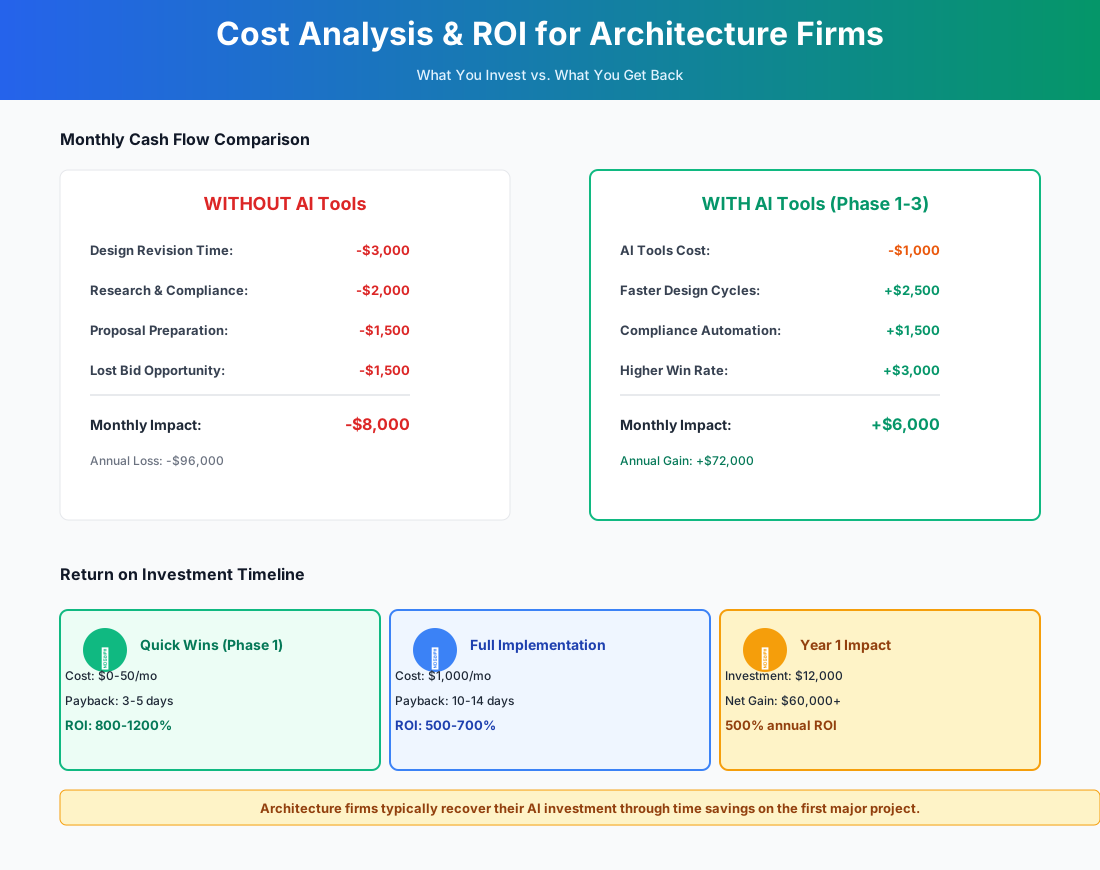
Here's a breakdown of the costs and expected returns:
Frequently Asked Questions
Our firm submits proposals in consortium with other firms. Can AI still help with proposal drafting?
Yes, and this is actually where AI is most useful. Consortium proposals are typically longer, require more formal coordination between team narratives, and demand consistent voice across sections written by different firms. Build a shared "Project Approach" document that all team members can use as AI context, and prompt for sections that explicitly position the consortium's combined experience rather than any single firm's. The coordination overhead of consortium proposals — often 30+ hours — compresses considerably when each firm drafts its section from a shared structural template.
Can AI-generated concept renders be included in permit submission packages?
No. AI renders are communication tools for client presentations, marketing, and design exploration — not regulatory submissions. Building departments require technically accurate drawings produced in BIM/CAD software that carry a licensed architect's seal. Use AI renders during schematic design to accelerate client decisions, then produce permit-ready documents through your standard BIM workflow.
How does AI code research handle local jurisdiction amendments?
This is the critical limitation. Generic AI tools are trained on widely published model codes but typically miss local amendments — California's Title 24, New York City's unique egress provisions, and hundreds of others. UpCodes Copilot addresses this by maintaining jurisdiction-specific code databases, which UpCodes says explains its roughly 93% accuracy versus roughly 40–50% for generic AI on jurisdiction-specific questions (figures per UpCodes' own reported benchmarks, not an independent audit). Always specify the exact jurisdiction and adopted code edition in your prompt, and treat AI output as a starting checklist that licensed staff verifies against the locally adopted code.
What happens to project data when I use these tools — is client confidentiality protected?
Paid plans (Claude Pro, ChatGPT Plus) include data privacy agreements and don't use your inputs for model training. Free tiers typically don't offer the same guarantees — avoid uploading sensitive client financial data on those plans. For AEC-specific tools like Monograph and UpCodes, review their privacy policies and confirm your professional liability carrier doesn't exclude AI-assisted work. Government and institutional projects with contractual data handling provisions deserve a closer look before uploading anything to third-party tools.
Does AI actually help with the CA phase, or just earlier stages?
CA is underrated as an AI use case. The main wins: AI-generated RFI responses from your specification language (draft in seconds, architect reviews before sending), meeting minutes from Otter.ai that create a documented record of every site observation, and AI-drafted change order narratives from your time logs. The long tail of CA administrative work — the emails, the documentation, the tracking — is exactly the category of work AI handles well. The judgment calls about whether that wall assembly actually meets the spec intent are yours.
If AI can generate massing studies and floor plans, do we need fewer designers?
Not based on what's actually happening in firms using these tools. Designers spend less time on repetitive massing iterations and more time on refinement and client work that requires trained judgment. The bottleneck in most small firms isn't raw design production anyway — it's principal time. When AI compresses proposal writing, code research, and rendering, principals get bandwidth back for business development and design direction. Anecdotally, firms actively adopting AI are reporting that it expands capacity rather than reduces headcount — the bottleneck shifts from production to judgment, which requires more trained people, not fewer.
How do I justify AI tool costs when our margins are already under pressure?
Start with the free tier of Claude and spend one week tracking proposal time before and after. When you can show that a proposal now takes 90 minutes instead of eight hours, the math is immediate: at $200/hour effective rate, you've recovered $1,300 per proposal. After that, Monograph at $25/user/month is justified the first time its fee burn alert lets you have an additional-services conversation instead of absorbing an overrun. The advanced tools — Forma, Finch3D — should follow demonstrated ROI from the earlier steps, not precede it.
The proposal is where most practices either win or waste their principals' time. Start there. Build the Firm Profile document, draft one proposal with AI, and measure the hours. Everything else in this guide follows from that first proof point.
More AI Implementation Guides
AI Tools for Bookkeeping Services: 2026 Guide
Best AI tools for bookkeeping services in 2026: Automate categorization, reconciliation, and document chasing without hiring extra staff.
AI Tools for Marketing Agencies: 2026 Playbook
The best AI tools for marketing agencies in 2026. A phased plan to kill Hell Week reporting, scale content, and fix billable utilization without new hires.
AI Meeting Assistant Cost for Accountants in 2026
What does an AI meeting assistant cost for an accounting firm? Free tiers, per-seat pricing from ~$17/user/mo, and the real total for a 3-, 5-, and 10-person team, compared.
Best AI Meeting Assistant for Accountants & Bookkeepers
The best AI meeting assistant for accountants records, transcribes, and summarizes client calls into action items. Compare 6 real tools and 2026 pricing.
AI Tools for Tax Preparation Services (2026 Guide)
AI tools for tax preparation services in 2026. Cut data entry, stop no-shows, automate documents, and build year-round revenue with a phased plan.
AI Tools for Personal Injury Law Firms (2026 Guide)
AI tools for personal injury law firms: capture after-hours leads, cut demand letters to minutes, and clear the medical-records bottleneck — within bar rules.
Keep exploring
Browse the full library by industry or category, see every product we cover in the AI tools directory, or read the head-to-head comparisons.