
Your front desk misses a call at 2 PM on Tuesday. The caller is a new PI lead — estimated case value around $12,000. By the time you're out of court and see the voicemail at 5:30, they've already retained someone else. Not because your rates were too high. Not because you're a worse attorney. Because you replied four hours later and the firm down the street replied in fifteen minutes.
That's the intake problem. But there's a second one happening simultaneously, in the same two-attorney firm, every day: the attorney who just lost that lead spent three hours this morning drafting an engagement letter, a demand letter, and a fee agreement — documents that are 80% identical to ones drafted last month. Three billable hours absorbed by document production that AI can compress to forty minutes.
These two problems — slow intake and manual drafting — aren't just inefficiencies. They're the ceiling on what a small firm can earn. Fix them, and a solo practitioner or two-attorney firm can realistically handle 30-40% more matters without hiring.
The tools and approach below are built around that specific goal. Not AI in the abstract. Not enterprise software priced for Am Law 200 firms. A concrete sequence starting with your intake pipeline and document workflow, then layering in research and matter management once those are running.
Three Starting Points
- This week (free): Set up an AI-drafted intake response workflow — every inquiry gets a substantive reply within 15 minutes during business hours
- Week 2 ($39-99/mo): Deploy Billables AI for passive time tracking — most attorneys recover 1.5-2 unbilled hours per day
- Month 2 ($109/mo): Add Clio Manage with AI features for centralized matter management, deadline alerts, and auto-suggested time entries
Why Intake Speed Is the Whole Game
Here's a number worth sitting with: 78% of potential clients hire the first firm that responds substantively to their inquiry. The average small firm takes over four hours to reply. That gap — between what clients expect and what most small firms deliver — is where cases are won and lost before a single consultation happens.
The research on intake conversion makes the stakes concrete:
| Response Time | Lead-to-Consultation Rate | Est. Monthly Value (10 leads/mo at avg $6K case) |
|---|---|---|
| Under 5 minutes | 55-60% | $33,000-$36,000 |
| 5-30 minutes | 35-40% | $21,000-$24,000 |
| 1-4 hours | 20-25% | $12,000-$15,000 |
| Over 4 hours | 10-15% | $6,000-$9,000 |
The difference between a 5-minute response and a 4-hour response isn't doubled revenue — it's tripled. And the tools that close that gap cost less than $100/month to deploy.
The second lever is document production. A survey of solo and small-firm practitioners consistently shows 30-40% of attorney time going toward drafting documents that are largely templated — engagement letters, demand letters, standard motions, wills, fee agreements. That's 12-16 hours a week in a 40-hour practice. AI document automation realistically cuts this to 4-6 hours, without touching quality — because the attorney still reviews everything. The time savings go back into billable client work or, more likely, home.
The tools in this guide are sequenced to fix intake first, drafting second, then matter management and research once the foundation is solid.
Start Here: Intake Response and Qualified Lead Capture
Most attorneys treat intake as an administrative function. It isn't. Intake is sales, and the first attorney to respond with something substantive — not a "we'll call you back" autoresponder, but an actual acknowledgment of the client's situation and a clear next step — wins the case at a dramatically higher rate.
Claude Pro
Best for: Nuanced legal writing, client communication drafts
Claude is the strongest tool currently available for drafting empathetic, practice-specific intake responses. The free tier handles 5-10 responses per day. Upgrade to Team ($30/user/month) for privacy guarantees — the Team plan contractually prohibits Anthropic from using your inputs for model training, which matters when you're describing client situations.
The free tier is enough to start. The workflow takes 30 minutes to set up:
- Train your receptionist or paralegal to paste incoming inquiry details into Claude
- Use the prompt below as a template — it keeps responses under 200 words, avoids legal advice, and directs the client to schedule a consultation
- The staff member reviews the draft for accuracy and personalizes it before sending
- Set a firm rule: every inquiry sent during business hours gets a response within 15 minutes
I run a [practice area, e.g., family law] firm in [city, state]. A potential client just emailed: "[paste their inquiry here]". Write a professional, empathetic response that:
- Acknowledges their specific situation with genuine concern
- Briefly explains how our firm handles these cases (without making promises)
- Invites them to schedule a free 30-minute consultation
- Includes a clear call-to-action with our phone number: [number] Keep it under 200 words. Do not give legal advice or make outcome predictions.
Attorney Review Is Not Optional
Every AI-drafted response must be reviewed by a licensed attorney before sending. Intake responses should be limited to procedural information, empathy, and scheduling — never legal advice, never outcome predictions. Unreviewed AI-generated content creates real liability exposure and potential bar complaints.
In practice, this setup saves 5-8 hours a week on drafting alone. More importantly, faster response times convert 30-50% more inquiries into consultations. At $6,000 average case value and ten inbound leads per month, the difference between a 4-hour response and a 15-minute response is roughly $15,000/month in retained cases.
AI Meeting Notes: Stop Losing Details After Consultations
After every client meeting, you spend 15-30 minutes reconstructing notes. Critical details slip. And undocumented conversations create professional liability risk — if a client later disputes what was discussed, contemporaneous records are your protection.
Otter.ai
Best for: Internal meetings and client consultations (with consent)
Real-time AI transcription and summarization for Zoom, Teams, Google Meet, and in-person meetings. Generates searchable archives with speaker identification. The free tier covers roughly 10 thirty-minute consultations per month.
Before you record anything, you need a consent framework. Two-party consent states — California, Florida, Illinois, Pennsylvania, and eight others — make recording without all-party consent a potential criminal wiretap violation, not just a civil matter. Otter.ai itself faces an active class-action lawsuit (Brewer v. Otter.ai) alleging covert recording violations. The exposure is real.
Safe use framework:
- Add this language to your engagement letter: "With your permission, we may record and transcribe meetings to ensure accuracy of our notes. Recordings are kept confidential and treated as attorney work product."
- Get explicit verbal consent before recording, documented in the transcript itself
- Never use for calls with opposing counsel, mediations, or settlement negotiations
- Never enable the auto-join feature for external meetings you didn't schedule
- Store transcripts linked to the client matter, marked as attorney work product
- Treat AI transcriptions as notes, not certified transcripts
Done correctly, meeting transcription recovers 3-5 hours a week in post-meeting write-up time and produces more accurate billing for consultation time.
Recover Billable Time You're Already Losing
This section often generates skepticism until attorneys see the numbers. The average solo practitioner or small-firm attorney fails to capture 10-30% of actual working time — not because they're lazy, but because manual timesheet reconstruction from memory at 9 PM is unreliable. At $250/hour, that gap is $25,000-$75,000 per attorney per year in revenue that evaporates.
Billables AI
Best for: Solo attorneys and small firms on hourly billing
Billables AI passively tracks your work across Microsoft 365, Google Workspace, and Zoom — then auto-generates complete time entries with professional narratives and client-matter matching. Privacy-first: tracks app activity, not screenshots. The comparison between AI-captured time and manually-reconstructed time is usually jarring.
Start free to build the habit, then layer in passive tracking:
- Today (free): Download Toggl Track (free for up to 5 users) and commit to using the one-click timer for every task this week. The point is awareness, not billing.
- After one week: Sign up for Billables AI's free trial at billables.ai.
- Connect Billables AI to your Microsoft 365 or Google Workspace account.
- Connect Zoom if you do video consultations.
- At end of each day, review AI-generated time entries (5-10 minutes vs. 30-45 minutes of manual reconstruction).
- Compare your first week's captured time against your previous manual entries.
ROI Snapshot
Monthly Cost
$69/mo
Time Saved
4hrs/week
Monthly Value
$11,500
ROI
16567%
The math is unambiguous: if Billables AI captures one extra hour per day that you would otherwise have forgotten, that's $5,000/month in recovered revenue against a $39-$99 tool cost. Most attorneys discover 1.5-2.5 additional hours on their first full week of passive tracking.
Document Drafting: The Fastest Way to Free Up Attorney Hours
This is where the leverage is. Attorneys spend 30-40% of their time drafting documents that are 80% identical to ones drafted before. Engagement letters, demand letters, basic wills, standard contracts, court filings — high-volume, low-variance work that AI can compress dramatically. The attorney still reviews everything. The drafting time moves from 2 hours to 25 minutes.
Build Your Document Automation Library
Gavel
Best for: Estate planning, real estate, family law, and immigration firms
Turns your existing Word documents into intelligent, interview-driven templates. Blueprint AI converts your existing documents into automation templates in minutes. Client-facing questionnaires auto-generate completed documents. Integrates directly with Clio Manage.
The setup takes a focused day:
- Identify your top 5 most-drafted documents — for most small firms: engagement letter, demand letter, motion template, will/trust, standard contract.
- Sign up for Gavel Lite ($83/month — 10 templates, enough for year one).
- Use Blueprint AI: upload your existing Word template and the AI identifies variable fields and builds the automation template.
- Build a client-facing questionnaire for your most common document type. Clients answer questions; Gavel generates the completed document.
- Connect the Clio integration so client data auto-populates.
If you chose Smokeball as your practice management platform, it includes 20,000+ built-in legal forms by state and practice area — making separate document automation software unnecessary for common filings.
ROI Snapshot
Monthly Cost
$83/mo
Time Saved
6hrs/week
Monthly Value
$7,500
ROI
8936%
Target a 60-80% reduction in drafting time for templated documents. A will that took 2 hours to draft from scratch should take 20-30 minutes through an automated questionnaire. Across 10 templated documents per week, that's 15-20 hours of attorney time recovered monthly.
AI Contract Review for Transactional Work
For transactional practices — corporate, real estate, M&A, employment — contract review likely consumes more attorney hours than any other single activity. Reviewing 20-40 contracts per month at 2-4 hours each means 40-160 hours of semi-routine work.
Spellbook
Best for: Transactional attorneys handling M&A, commercial contracts, and corporate work
Works directly inside Microsoft Word as a native add-in. Reviews contracts, flags risks, benchmarks terms via "Compare to Market," and auto-generates redlines. Spellbook Associate handles multi-document due diligence from a single prompt. Used by 4,000+ legal teams. Independent reviewers cite 50-70% reduction in review time for standard agreements.
Build a custom clause library of your firm's preferred language for frequently negotiated provisions — Spellbook becomes significantly more valuable as you populate it with firm-specific positions. For firms that implemented Gavel above, the Gavel Exec add-on ($160/user/month) provides contract review within the same ecosystem.
If the budget isn't there for dedicated contract AI yet, the prompt below works with Claude as a cost-effective starting point for initial review:
Review this contract for [party you represent, e.g., "the tenant" or "the seller"]. Identify:
- Ambiguous terms that could be interpreted against my client
- Missing protective clauses standard in [contract type] agreements
- Unusual provisions that deviate from market norms
- Potential liability risks and one-sided indemnification clauses
- Termination and dispute resolution provisions that disadvantage my client Format as a redline memo with specific recommended changes for each issue. Flag any provisions requiring negotiation vs. those that are dealbreakers. [Paste contract text below]
This Claude-based approach ($20/month) is useful for initial review but lacks Spellbook's market-benchmarking database and Word integration. Use it as a supplement on lighter-volume months, not a permanent replacement for dedicated contract AI on high-volume transactional work.
Matter Management: Stop Cases from Falling Through the Cracks
Missed deadlines, scattered case files across email threads and paper folders, unbilled work discovered three months later — these aren't just inefficiencies. In a law office, they're malpractice risk. Every matter without centralized deadline tracking is a potential disciplinary complaint.
Clio Manage with Manage AI
Best for: Small firms (1-15 attorneys) wanting an all-in-one platform
The market-leading cloud-based legal practice management platform (150,000+ lawyers). Manage AI automates scheduling, billing suggestions, and client communication drafting. Clio Duo suggests time entries for unlogged calls and emails. Document Analyzer provides AI summaries and issue spotting. 200+ integrations including QuickBooks, Outlook, Gmail, Zoom, and Westlaw.
MyCase
Best for: PI, family law, and criminal defense firms wanting a simpler interface
Strong Clio alternative with integrated AI document automation (formerly Woodpecker), smart billing that flags disputed time entries, and AI-powered intake forms. 4.7/5 on G2 from 500+ reviews. Lower price point than Clio for comparable features.
Migrating without the headache:
- Sign up for free 7-day trials of both Clio and MyCase. Test which interface fits your workflow — both are solid platforms.
- Migrate active matters first. Don't try to import 10 years of history — start fresh with current cases.
- Set up automated deadline reminders: statute of limitations alerts, court filing deadlines, client follow-up reminders.
- Connect your email so all client communication is automatically logged to the correct matter. This single integration recovers 2-3 hours a week on its own.
- Enable Clio Duo's suggested time entries or MyCase's billing intelligence to catch unbilled work.
- Train all firm staff in a 2-hour session. Both platforms offer free onboarding support.
If you connected Billables AI in the previous section, link its export to your practice management platform so passive time capture flows directly into your billing system.
The numbers add up fast: 5-8 hours a week recovered from file hunting, deadline tracking, and duplicate entry. Plus $2,000-$5,000/month in time that was always worked but never billed. And a substantially lower malpractice exposure profile.
Automated Intake Routing and Lead Nurturing
New client inquiries arrive via phone, email, website, and social. Without a system, leads disappear into inboxes, follow-ups get forgotten, and the attorney who's in court all day misses calls that never get returned.
Smith.ai
Best for: Solo practitioners who can't staff a full-time receptionist
24/7 AI and human hybrid receptionist that handles inbound calls and chats, qualifies leads by case type and geography, books consultations, and captures intake data — all syncing directly into Clio, MyCase, or Lawmatics. Bilingual (English/Spanish). 30-day money-back guarantee.
Lawmatics
Best for: Firms actively marketing for new clients
The leading legal CRM with AI-powered lead scoring (QualifyAI), automated follow-up sequences, website chat that qualifies visitors 24/7, and automatic conflict checks. Integrates with Clio, MyCase, Smokeball, and CallRail. Law firms report converting 30-50% more leads due to faster follow-up automation.
Start with the free version before committing to these: create a Google Form with your intake questions, embed it on your website, and set up Gmail templates for three follow-up emails (immediate acknowledgment, 24-hour consultation reminder, 72-hour final follow-up). When call volume justifies the investment, layer in Smith.ai for after-hours coverage and Lawmatics for automated nurturing.
Track three numbers: calls answered vs. missed, lead-to-consultation rate, consultation-to-engagement rate. Most firms implementing this stack see lead-to-client conversion jump from 15-25% to 30-40%.
Research and Competitive Firepower
With efficient intake, drafting, and matter management running, the next unlock is research capacity. This is where a two-attorney firm can genuinely match the output of a much larger operation.
Legal research consumes 20-40% of case work for litigation attorneys. Solo practitioners face an impossible trade-off: spend five hours researching what a big-firm associate with unlimited Westlaw access finds in one hour, or cut research short and risk malpractice.
Casetext / CoCounsel Core
Best for: Solo and small litigation firms wanting AI research without full Westlaw pricing
Now part of Thomson Reuters, CoCounsel Core provides AI-powered document search, deposition prep (auto-generates questions from transcripts), contract analysis, case timeline creation, and inline citations. For firms already on Westlaw, adding CoCounsel Deep Research to an existing subscription is often cheaper than a separate purchase.
If you're on Lexis, evaluate Lexis+ AI with Protégé — the Shepardize AI feature remains the gold standard for citation checking, and the new Protégé General AI adds secure access to major AI models within a privileged legal environment.
One Maryland solo practitioner pays $428/month for Westlaw Precision plus CoCounsel and reports a 30-50% reduction in research time. At $250/hour billing rate, five recovered research hours per week adds $6,500/month in additional capacity.
Non-negotiable firm policy, written down and enforced: AI research output is a starting point, not a final product. All case citations must be Shepardized or KeyCited before inclusion in any filing. Multiple federal courts have sanctioned attorneys for briefs containing AI-hallucinated case citations. This isn't a risk worth taking.
Content Marketing and Organic Lead Generation
89% of potential clients search online before hiring a lawyer. Most small firm websites have thin content, no blog, and generic practice area pages that haven't been updated since the site was built.
Create 15 frequently asked questions and detailed answers for a [practice area, e.g., personal injury] law firm website in [state]. Questions should address what potential clients actually search for online:
- Process questions ("What happens after I file?")
- Timeline questions ("How long does a [case type] take?")
- Cost questions ("How much does a [practice area] lawyer charge?")
- Expectation questions ("What should I bring to my first consultation?") Use plain language — no legal jargon. Each answer should be 75-100 words. Include a call-to-action at the end of each answer inviting the reader to contact us.
Write an 800-word blog post for a [practice area] law firm in [city, state] about [topic, e.g., "what to do immediately after a car accident"]. Include:
- Practical advice a potential client would find genuinely valuable
- [State]-specific information where relevant (statutes of limitations, filing requirements)
- Headers and short paragraphs for easy scanning
- A call-to-action to schedule a free consultation Tone: helpful and authoritative, not salesy. This should read like advice from a trusted attorney, not an advertisement.
The workflow: publish one blog post per week and one FAQ page per practice area. The attorney reviews each piece for legal accuracy — spending 15-20 minutes editing rather than 4-6 hours writing from scratch. After 3-6 months of consistent publishing, organic traffic typically grows from 50-200 monthly visits to 500-2,000.
FirmPilot
Best for: Firms already spending $5K+/mo on marketing
AI marketing platform built exclusively for law firms. Trained on 5M+ legal marketing content pieces. GEO optimization positions your firm to be cited by ChatGPT, Perplexity, and Google AI Overviews. Competitive blueprinting reveals competitor SEO and PPC strategies. Only cost-effective for firms with significant existing marketing budgets.
For firms already investing heavily in marketing, FirmPilot's generative engine optimization (GEO) is worth evaluating. AI search engines increasingly answer legal questions directly — if your firm isn't cited in those answers, you're invisible to a growing segment of potential clients. But at $3,500/month, this only makes sense if you're already generating $50K+/month in revenue and spending $5K+ on marketing.
Ethics and Confidentiality: The Non-Negotiables
Legal AI has real guardrails that distinguish it from AI in other business contexts. Before implementing anything in this guide, these need to be understood and documented as firm policy.
Client data in AI tools. Free-tier versions of major AI tools may use your inputs for model training. When you're describing a client's situation to get a draft response, you're potentially putting privileged information into a system with no confidentiality protections. Use paid Team and Enterprise plans — Claude Team ($30/user/month), ChatGPT Team ($30/user/month), Clio, and Smokeball all contractually guarantee your data isn't used for training and isn't accessible to other users. Check your state bar's AI ethics guidance before choosing a tool.
AI-generated citations. This has resulted in sanctions in multiple federal courts. Every citation, without exception, must be Shepardized or KeyCited before inclusion in any filing.
Recording consent. Two-party consent states impose potential criminal penalties and statutory damages of $5,000-$10,000 per violation. The Brewer v. Otter.ai class action specifically alleges that the platform's auto-join feature records participants who haven't consented. For law office use, limit Otter.ai to internal team meetings and client meetings where you have obtained and documented explicit consent on the record.
Court disclosure. As of early 2026, several federal judges require attorneys to certify whether AI was used in preparing filings. Some state bars require disclosure to the court; others require disclosure only to the client. Check your local court's standing orders and your state bar's most recent AI guidance before using AI in any filing.
Insurance. Notify your malpractice carrier before implementing AI tools — some policies contain exclusions related to technology use. Several carriers, including ALPS and CNA, have published guidance framing proper AI adoption as risk reduction. Document your AI use policies and share them with your carrier at renewal.
State bar AI ethics opinions. Most state bars have issued formal opinions on AI use in legal practice. Some require client disclosure. Some prohibit specific applications. Non-compliance can trigger disciplinary action. This is not optional research.
Getting Started: Your Week-by-Week Checklist
- Week 1: Sign up for Claude or ChatGPT (free tier). Draft 5 client inquiry responses using the prompt templates above. Set a firm rule: every inquiry gets a response within 15 minutes.
- Week 1: Download Toggl Track (free) and start the timer for every task. Track your actual hours vs. what you would have billed manually.
- Week 2: Sign up for Billables AI free trial. Connect to your Microsoft 365 or Google Workspace. Compare AI-captured time to your manual tracking.
- Week 2: Start Otter.ai free trial. Record your next 3 client meetings (with consent). Evaluate time saved on post-meeting notes.
- Week 3: Create one FAQ page and one blog post using the AI prompts above. Publish to your website.
- Month 2: Sign up for Clio Manage or MyCase free trial. Migrate active matters. Connect email integration.
- Month 2: Set up Google Forms intake on your website. Create 3 follow-up email templates with AI assistance.
- Month 3: Evaluate Smith.ai for after-hours call handling. Start Gavel free trial for document automation on your top 5 templates.
- Month 4-6: Based on practice area — add CoCounsel Core (litigation) or Spellbook (transactional) for AI-powered research or contract review.
- Ongoing: Publish 2 blog posts/week. Request Google reviews after every resolved matter. Track all metrics monthly.
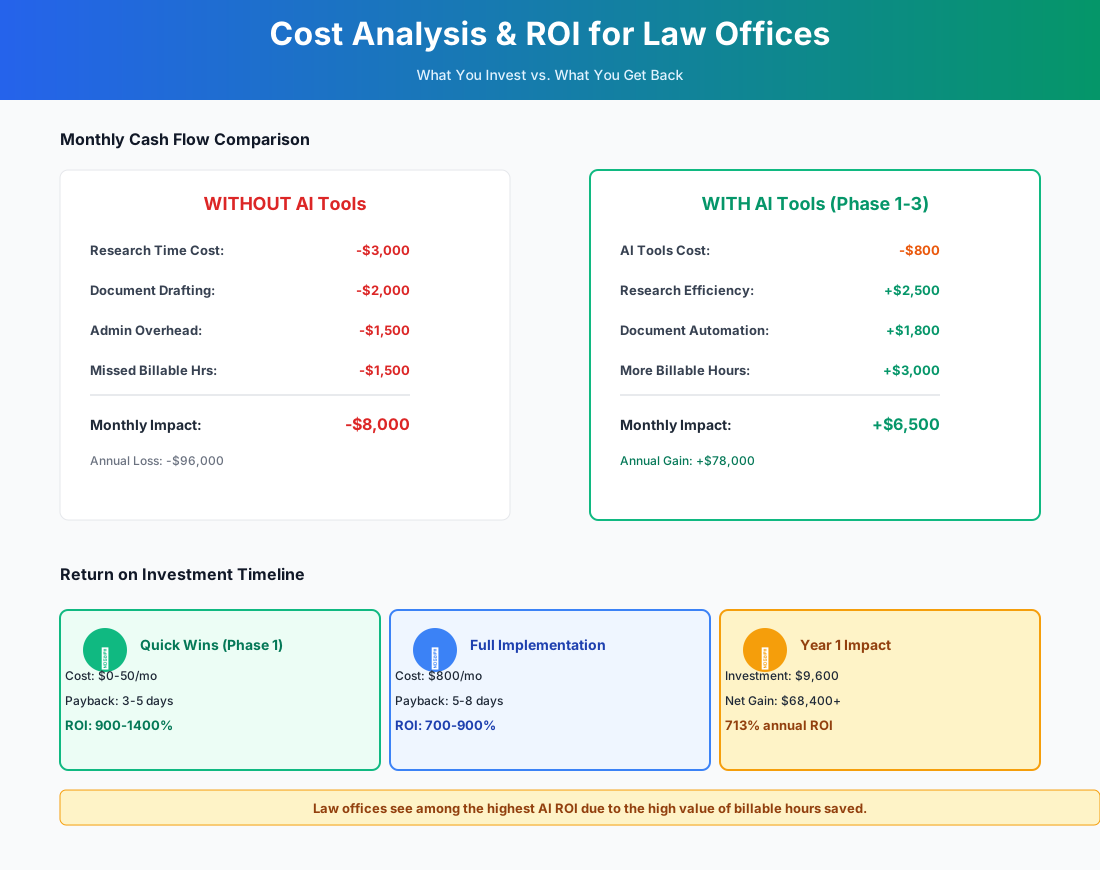
Here's a breakdown of the costs and expected returns:
FAQ: AI Tools for Law Offices
Can I use AI-drafted documents in court filings without disclosure?
This depends entirely on your jurisdiction and is changing fast. As of early 2026, several federal judges require attorneys to certify whether AI was used in preparing filings — notably Judge Brantley Starr in the Northern District of Texas. Some state bars require disclosure to the court; others require disclosure only to the client. Check your local court's standing orders and your state bar's most recent AI guidance. The safest practice: disclose proactively and verify every citation independently in Westlaw or Lexis.
What happens to attorney-client privilege if AI tools process client data?
Privilege is preserved as long as the AI tool's terms of service don't allow disclosure of your inputs to third parties. Paid Team and Enterprise plans from Claude ($30/user/month), ChatGPT ($30/user/month), Clio, and Smokeball all contractually guarantee that your data isn't used for model training and isn't accessible to other users. Free-tier tools typically don't make this guarantee. The ABA's Formal Opinion 512 (2024) provides guidance on maintaining privilege when using cloud-based AI — treat AI tools like any other cloud vendor and conduct due diligence on their data handling practices.
How do conflict checks work when AI is automatically creating contacts from inbound calls?
This is a real operational risk most implementation guides skip over. When Smith.ai or Lawmatics automatically creates new contacts in Clio from inbound calls, those contacts enter your system before a formal conflict check runs. Both Clio and Lawmatics support automated conflict checking on new contact creation — but you must enable and configure it. Set Clio's conflict detection to flag matches against all existing matters, adverse parties, and related contacts. Review every flag before the initial consultation, not after. For firms handling both plaintiff and defense work in the same practice area, this is especially critical.
Is Otter.ai safe to use in two-party consent states?
Proceed with caution. In California (Penal Code 632), Illinois (720 ILCS 5/14-2), and Florida (Fla. Stat. 934.03), recording a confidential conversation without all-party consent can carry criminal penalties and statutory damages of $5,000-$10,000 per violation. For law office use, limit Otter.ai to internal team meetings and client meetings where you have obtained documented explicit consent on the record. Never enable auto-join for external meetings.
My state bar requires CLE credits on legal technology — do any of these tools count?
Yes. Clio's annual conference (ClioCon) and its on-demand webinar library include MCLE-accredited sessions on legal technology. Thomson Reuters and LexisNexis regularly offer CLE-eligible training on their AI features. Many state bars now offer dedicated AI ethics CLE programs that cover the tools in this guide. Implementing AI in your practice can double as your technology CLE requirement — check your state bar's approved provider list.
Is AI going to replace my associates or paralegals?
No. Anyone telling you it will is selling something. What it does is expand what one attorney or one paralegal can handle. The attorney who used to spend 3 hours drafting an engagement letter now spends 20 minutes reviewing one. That's not replacement — that's capacity. The practical question is whether the time freed by AI goes back into more client work, more thorough work, or work-life balance. That's a management decision, not a technology one.
Should I notify my malpractice insurance carrier before implementing AI tools?
Yes. Some legal malpractice policies contain exclusions or endorsements related to technology use, and AI-generated work product is new enough that carriers are still updating their positions. Proactively notifying your carrier that you're using AI as a drafting and research assistant — with attorney review of all outputs — demonstrates responsible adoption. Several carriers, including ALPS and CNA, have published guidance framing proper AI adoption as risk reduction. Document your AI use policies and share them with your carrier at renewal.
The legal profession moves slowly on technology by design. Caution has its place. But the economics of small firm practice — unbilled hours, lost intake leads, and competition from firms with AI-enabled associates — are making AI not just useful but necessary at a pace that's faster than most solo practitioners realize.
The intake gap is the fastest fix. Start with the response workflow above, track your lead-to-consultation rate for 30 days, and see what the numbers say. Everything else builds from there.
If you run a professional services firm outside of law — say an insurance agency or an accounting firm — the intake automation and content marketing principles above translate directly, with different compliance requirements and tool choices. The underlying approach is the same.
More AI Implementation Guides
AI Tools for Bookkeeping Services: 2026 Guide
Best AI tools for bookkeeping services in 2026: Automate categorization, reconciliation, and document chasing without hiring extra staff.
AI Tools for Marketing Agencies: 2026 Playbook
The best AI tools for marketing agencies in 2026. A phased plan to kill Hell Week reporting, scale content, and fix billable utilization without new hires.
AI Meeting Assistant Cost for Accountants in 2026
What does an AI meeting assistant cost for an accounting firm? Free tiers, per-seat pricing from ~$17/user/mo, and the real total for a 3-, 5-, and 10-person team, compared.
Best AI Meeting Assistant for Accountants & Bookkeepers
The best AI meeting assistant for accountants records, transcribes, and summarizes client calls into action items. Compare 6 real tools and 2026 pricing.
AI Tools for Tax Preparation Services (2026 Guide)
AI tools for tax preparation services in 2026. Cut data entry, stop no-shows, automate documents, and build year-round revenue with a phased plan.
AI Tools for Personal Injury Law Firms (2026 Guide)
AI tools for personal injury law firms: capture after-hours leads, cut demand letters to minutes, and clear the medical-records bottleneck — within bar rules.
Keep exploring
Browse the full library by industry or category, see every product we cover in the AI tools directory, or read the head-to-head comparisons.