
February 14th. Your firm has 11 weeks of returns backed up, one staff accountant out sick, and your admin is on her third call of the morning chasing the same W-2 from the same client who never checks email. Meanwhile, the return you finished last night is sitting in the queue because you're still waiting on a K-1 that was due three weeks ago.
This is what tax season actually looks like at a small CPA firm — not a capacity problem in the abstract, but a very specific one: you have the expertise, you have the clients, and you are burning hours you don't have chasing documents that should already be in your hands.
AI tools don't fix that by making you work faster. They fix it by getting documents in the door sooner, cutting the research time on complex questions, and freeing up senior staff from work that doesn't require a CPA license. This guide covers exactly which tools do which jobs, what they cost, and the order that makes sense to implement them.
TL;DR — Top 3 Recommendations
- Start today (free): Use ChatGPT or Claude plus CPA Pilot ($29/mo) for client email drafting and citation-backed tax research — saves 8–14 hours/week immediately.
- Within 60 days: Deploy Liscio ($49/user/mo, AI file intelligence now included) for AI-powered document collection via text — clients respond 8x faster — and TaxDome ($800/user/yr) for all-in-one practice management.
- By month 3–6: Launch advisory services with Fathom (~$45/mo) turning your existing QBO/Xero data into paid CFO packages at $500–$3,000/month per client.
The Best AI Meeting Assistant for Accountants and Bookkeepers
If you bill for advisory calls, run year-end planning meetings, or onboard clients over Zoom, the fastest AI win is a meeting assistant that records, transcribes, and summarizes the call into action items — so a senior accountant stops losing 20 minutes after every meeting writing up notes. For most firms the best AI meeting assistant for accountants and bookkeepers is Otter.ai (free tier covers 300 minutes/month; Pro is ~$17/user/mo), with Fireflies.ai (free tier, Pro ~$18/user/mo) the strongest alternative when you want it writing summaries straight into your CRM.
What this actually does for a bookkeeping or accounting firm:
- Client advisory calls get an automatic, searchable transcript and a one-paragraph summary you can paste straight into the engagement file — defensible documentation with zero typing.
- Action items are extracted automatically ("client to send Q3 bank statements," "review S-corp election by Oct 15"), so nothing falls through the gap between the call and the workpaper.
- Onboarding and discovery meetings become reusable: the transcript captures every account, login, and deadline the client mentions once, instead of you re-asking three emails later.
Start with Otter's free tier this week. If you run more than ~10 client calls a week or want summaries pushed into your practice-management system, the per-seat cost on Otter or Fireflies is recovered in the first hour of reclaimed write-up time. For the full picture, see our roundup of the best AI meeting assistants for accountants, what a meeting assistant actually costs a firm, and the head-to-head Otter.ai vs Fireflies.ai comparison.
The Three Drains Specific to Accounting Firms
Most AI-in-business guides treat professional services as one category. Accounting firms have three very specific problems that don't apply to, say, an HVAC company or a dental office, and the tools worth buying are the ones that directly target them.
The seasonal capacity crunch. Tax season is not a busy period — it's an annual stress test that exposes every inefficiency in your operation. During January through April, the average small CPA firm runs at 120–140% of normal utilization. Staff accountants routinely bill 65+ hours a week. Partners hit 80. Then May arrives and capacity drops to 60%. That mismatch isn't solvable by hiring; the talent shortage saw 300,000+ accountants leave the profession between 2020 and 2025, and CPA-credentialed roles now take an average of 73 days to fill. AI doesn't add headcount — it multiplies the capacity of the people you already have during the months it actually matters.
The document collection grind. Every tax season, the same thing happens: you request documents, clients take days to respond, your workflow stalls, and your admin spends hours on follow-up calls that produce one W-2 at a time. Industry data suggests the average client takes five days to respond to a document request, and fewer than 20% submit everything within 24 hours. Here's what that costs in aggregate:
| Scenario | Manual (Email) | With AI-Powered Text Collection |
|---|---|---|
| Avg. client response time | 5 days | ~1 day |
| % submitting within 24 hrs | ~20% | ~55% |
| Admin hours chasing docs (per 100 clients, per season) | 80–120 hrs | 25–35 hrs |
| Returns delayed past first-contact deadline | ~37% | ~12% |
That admin time is billed at $75/hour loaded cost. The math on fixing the document channel is not subtle.
The compliance-to-advisory gap. The average small firm earns less than 10% of revenue from advisory services — despite advisory carrying 30–50% margins versus 20–30% for compliance work. The barrier isn't expertise. It's that compliance work consumes every available hour, and the few remaining minutes aren't enough to package and pitch advisory services that require their own workflow. AI changes this equation by compressing the compliance work enough to create real advisory capacity.
Getting Immediate Wins: AI for Research and Client Communication
Total setup time: 3–5 hours | Monthly cost: $0–$60
These tools deliver immediate relief on your biggest daily frustrations. No software purchases required. You can set them up between client appointments.
Stop Drafting Emails From Scratch
Your CPAs spend 20–30 minutes drafting each IRS notice response, engagement letter, or client explanation email. With 8+ client communications per day, that's 5–10 hours per week of writing that doesn't require CPA expertise — just CPA review.
ChatGPT or Claude generates a professional first draft in 60 seconds. You review and personalize in 2–3 minutes instead of writing from scratch. Most clients notice the faster response, not the process that produced it.
My client is a self-employed consultant who just received a $45,000 IRS notice for underreported income from a 1099-NEC they forgot to report. Write a calm, professional email explaining what happened, what the next steps are, what penalties may apply, and how we will resolve this. Use plain English and avoid jargon. The client is anxious and this is their first IRS notice.
My client is a married couple filing jointly. They own an S-Corp with $380,000 in net income. The owner's reasonable compensation is set at $120,000. They have no retirement plan in place. Write a 1-page tax planning memo identifying the top 3 strategies to reduce their 2025 tax liability, with estimated savings for each, written for a non-CPA audience.
Set the rule firm-wide: AI drafts, humans review. Never send without CPA verification of facts and figures. Save five prompt templates somewhere your whole team can access — IRS notice response, engagement letter, tax planning memo, client explanation email, monthly newsletter draft — and train staff in a 30-minute meeting with three real examples. Two weeks of time-tracking builds the ROI case for the Phase 2 tools.
ROI Snapshot
Monthly Cost
$20/mo
Time Saved
7hrs/week
Monthly Value
$5,600
ROI
27900%
Firms running this setup consistently recover 5–8 hours/week firm-wide — $1,500–$3,000/month in billable time at CPA rates, from a free tool.
CPA Pilot: Tax Research in Two Minutes Instead of Ninety
General-purpose AI works well for drafting, but tax research requires something purpose-built. CPA Pilot is trained specifically on IRS code, Treasury Regulations, and all 50 state tax codes — and every answer comes with citation links you can verify.
A single complex multi-state research question that would take 45–90 minutes to research manually gets answered with citations in under 2 minutes. At $29/month, it costs less than a quarter-hour of your time.
CPA Pilot
Best for: Solo CPAs and small firms wanting affordable AI tax research
AI tax assistant built for CPAs and EAs. Covers IRS code, Treasury Regs, and all 50 state codes with citation-backed answers. Includes automated 1040 return review, tax projections, and AI-drafted client communications. Integrates with Drake Tax and UltraTax CS.
Run your first test before paying: ask a question you recently researched manually and compare. Then test across three different complexity levels — a straightforward 1040 question, a state-specific nexus question, and a multi-entity planning question. If you use Drake Tax or UltraTax CS, explore the integration. Set up a shared team account so staff access without reinventing prompts.
Never Trust AI Tax Research Without Verification
CPA Pilot provides citations — always click through to the actual IRS code section or regulation. AI tools can occasionally misinterpret edge cases, especially on state-specific nexus rules and multi-entity structures. Treat AI research like work from a sharp but junior associate: verify before relying on it.
At 3–6 hours saved per week on research and return review, that's $1,000–$2,500/month in recovered partner time from a $29/month tool.
Seasonal Staff Onboarding — Free, This Week
Creating training materials for seasonal hires takes 2–3 hours per module. Paste any IRS revenue procedure or tax law update into ChatGPT and ask for a 10-question scenario-based quiz with answer key for Drake Tax preparers. Two minutes instead of two hours. Save everything in a shared "Training Library" folder and reuse it every season.
I'm going to paste in IRS Revenue Procedure 2025-XX about [topic]. After reading it, generate a 10-question quiz with answer key that I can use to train my staff on the key changes. Include scenario-based questions, not just definition questions. The audience is staff accountants preparing individual tax returns at a small CPA firm using Drake Tax.
Fixing the Document Collection Problem
Total setup time: 8–15 hours | Monthly cost: $150–$600
These tools address your two most expensive operational problems: document collection chaos and workflow management. They pay for themselves within 30–60 days.
Liscio: Change the Channel, Not the Script
How many follow-up emails did your admin team send last tax season chasing the same W-2 from the same client who never checks their inbox? The problem isn't the client — it's the channel. People read texts in minutes. They read accounting firm emails in days, if at all.
Liscio sends text-message notifications to clients' phones. Clients respond 8x faster via text than email. Liscio's File Intelligence — automatic renaming and categorization of every document clients upload (W-2s, 1099s, K-1s, receipts) — is now bundled into the plans rather than sold as a separate add-on, starting on the entry-level Intelligent Files tier.
Liscio
Best for: Tax firms eliminating email-based document collection
Secure client communication platform built for accounting firms. File Intelligence auto-categorizes and renames uploaded documents and is included on all tiers (no longer a separate paid add-on). Personalized tax-gathering workflows send each client a customized document checklist. FirmView dashboard gives visibility into every outstanding document request firm-wide. Mobile app drives the 8x faster response rate.
Implement this in September or October — not January. Migrating clients to a new communication platform during the crunch is a mistake. Get everyone comfortable during the slow season so text-based document collection is second nature by the time your intake volume peaks.
Timing Matters
Implement Liscio in September–November, well before tax season. Migrating clients to a new communication platform during January–April is a recipe for chaos. Get everyone comfortable during the slow season so it's second nature by January.
Setup sequence: import your client list from practice management software, build request templates for your top five client types (Individual W-2, Self-employed/Schedule C, S-Corp owner, Rental property owner, Bookkeeping client), enable text notifications, and configure automated follow-ups at Day 1, Day 3, and Day 5. Your admin team gets 5–10 hours back per week during tax season. Document turnaround drops from five days to roughly one.
ROI Snapshot
Monthly Cost
$180/mo
Time Saved
8hrs/week
Monthly Value
$2,400
ROI
1233%
Practice Management: Stop Running Your Firm From a Shared Spreadsheet
37% of small firms miss deadlines during peak season. That's not because their CPAs don't care — it's because the workflow visibility doesn't exist. When engagement status lives in someone's head or a shared inbox, things fall through the cracks predictably and repeatedly.
For firms under 10 people, TaxDome is the clearest value: it combines CRM, workflow automation, client portal, document management, e-signatures, and billing in one platform. Its AI automatically tags and categorizes documents, and its workflow engine surfaces late engagements before a deadline actually slips.
For growing firms of 5–50 people, Karbon has the strongest AI roadmap in practice management — AI email summarization, AI inbox prioritization, and AI Agents (in development) for autonomous data entry and client follow-ups. More expensive, but it scales with you.
TaxDome
Best for: Solo to 10-person firms wanting all-in-one practice management
All-in-one platform combining CRM, workflow, client portal, document management, e-signatures, and billing. AI document tagging and categorization. Unlimited client accounts at no extra charge. Replaces the need for separate portal, e-sig, and CRM tools.
Karbon
Best for: Growing firms (5–50 staff) with strongest AI roadmap
Premium practice management with AI email summarization, AI drafting, inbox prioritization, and practice intelligence dashboards. Claims 18.5 hours saved per user per week. AI Agents for autonomous task execution in development. Integrates with QBO, Xero, DocuSign, and Microsoft 365.
One note on avoiding duplicate spend: TaxDome includes a client portal and document collection features. Before also paying for Liscio, test TaxDome's built-in portal first. Some firms prefer Liscio's text-first approach alongside TaxDome for workflow — but confirm the overlap before carrying both costs.
Build workflow templates for your five most common engagements (Individual 1040, Business return, Monthly bookkeeping, Payroll, New client onboarding), define steps and relative due dates, connect email so all client communication logs to the correct client, then run a two-week parallel period with your old system before cutting over. The 37% peak-season miss rate is a systems problem. Workflow automation directly addresses it.
Booke AI: Automated Categorization Inside QBO and Xero
Your bookkeepers spend roughly 6 hours per week moving data between systems — exporting from QuickBooks, reformatting in Excel, re-importing into tax software. At a $49/hour loaded cost, that's $15,000/year per employee in work that produces zero billable value. Meanwhile, clients miscategorize transactions constantly, generating reconciliation headaches every month.
Booke AI operates directly inside your existing QuickBooks Online or Xero. No migration, no new interface. It learns from your corrections, improving over time, and automatically requests missing documents from clients.
Booke AI
Best for: Firms automating QBO/Xero bookkeeping clients
AI bookkeeper working inside QBO and Xero. Autonomous transaction categorization that learns from corrections. Smart document matching for invoices and receipts. Automated missing document requests sent to clients. OCR for bills in any language or currency. Claims 80% faster categorization vs. manual processing.
Start with one client — choose someone with 300+ monthly transactions and messy categorization. Connect Booke AI, let it run for a full month, then compare your actual time spent against a comparable manual client. The math needs to work: at $129/month per client, the sweet spot is clients where manual categorization consumes 8+ hours/month. At that volume, Booke AI's 80% faster categorization saves roughly $400/month in staff time against the $129 cost. Confirm the ROI on client one, then roll out.
If $129/month per client doesn't pencil out, invest 2 hours setting up comprehensive bank rules in QBO for each client. Well-configured rules auto-categorize 60–70% of transactions at zero cost.
Building Advisory Revenue on the Capacity You Just Recovered
Total setup time: 10–20 hours | Monthly cost: $300–$1,500
With the operational foundation in place, redirect recovered hours into higher-margin work. The compliance-to-advisory shift isn't about capability — you already have it. It's about having the time and the right packaging tools.
Fathom: Turn Data You Already Have Into a New Revenue Line
Most small firms earn less than 10% of revenue from advisory. The advisors who've crossed 30–40% tend to say the same thing: clients were willing to pay all along. The firm just never packaged the insight formally.
Fathom turns your existing client QBO/Xero data into professional advisory reports — KPI dashboards, cash flow analysis, industry benchmarking — without building anything from scratch. If you're already informally answering client questions like "How's my business doing?" you're doing advisory for free. Package it.
Fathom
Best for: Firms launching CAS/advisory from QBO/Xero data
Financial analysis and management reporting platform. Automated KPI dashboards, cash flow forecasting, and consolidated multi-entity reporting. Fathom is priced in AUD; Portfolio plans give firms an insights dashboard across their entire client base from $62 AUD/month (~$43 USD/month) for 100 companies, though full reporting still requires upgrading individual clients to the Pro tier. Unlimited brandable reports for client-facing deliverables.
A practical pricing framework that converts existing bookkeeping clients:
- Tier 1 — Reporting Only ($300–$500/month): Monthly financial dashboard plus a 15-minute review call
- Tier 2 — Reporting + Strategy ($750–$1,500/month): Adds forecasting, KPI targets, and a 45-minute monthly strategy call
- Tier 3 — Fractional CFO ($2,000–$5,000/month): Cash flow management, board-ready reporting, weekly availability
Write a professional but warm email to my bookkeeping client [CLIENT NAME], a [INDUSTRY] business with approximately $[REVENUE] in annual revenue. I'd like to offer them a monthly CFO advisory package that includes a KPI dashboard, monthly financial review meeting, and cash flow forecasting. The investment is $[PRICE]/month. Explain the value in terms they care about — not accounting jargon — and offer a free first month to demonstrate the impact.
ROI Snapshot
Monthly Cost
$45/mo
Time Saved
3hrs/week
Monthly Value
$7,400
ROI
16344%
Five advisory clients at $500–$3,000/month adds $3,000–$15,000/month in new revenue — not recovered time, new margin at 30–50%.
For firms ready to go deeper: Clockwork AI (starting at $149/month for a single-business engagement; firm plans bundle pooled client licenses across higher tiers) adds conversational AI FP&A analysis. Jirav offers driver-based budgeting for mid-market engagements. Validate demand with Fathom first — don't invest in higher-tier tooling until clients are paying for the service.
If you serve insurance clients or want to see how another professional services vertical structures advisory packages, our insurance agency guide covers a similar advisory-upsell model with a parallel client base. And if your advisory push is heading toward ongoing investment or retirement planning rather than just CFO-style reporting, our AI tools for financial planning firms guide covers the compliance-first playbook RIAs use for that adjacent, more regulated tier of advisory work.
Content Marketing at 2–3 Hours a Month
Most small firms rely on referrals for 70–80% of new clients and invest 2–5% of revenue in marketing. That works — until a PE-backed competitor with a real marketing budget moves into your market.
You don't need a dedicated marketing person. You need a system producing one blog post, one email newsletter, and a few LinkedIn posts per month. AI makes this a 2–3 hour/month commitment instead of a 10–15 hour one.
Jasper AI
Best for: Consistent content marketing without a dedicated marketing person
AI content platform with Brand Voice for tone consistency. Long-form blog posts, email newsletters, LinkedIn posts, and social content. SEO mode for ranking on tax-related search terms. One webinar transcript can be repurposed into 6–12 months of content.
Start free before paying: use ChatGPT or Claude to draft your first blog post and newsletter this month. Optimize your Google Business Profile (free, high-impact for local search). Only upgrade to Jasper Pro ($59/month on annual billing, $69/month on monthly billing) once you've confirmed you'll maintain a consistent publishing schedule — Brand Voice and SEO optimization only pay off if you're producing content regularly.
A content calendar aligned to the accounting cycle helps with consistency:
| Month | Topic |
|---|---|
| January | Tax prep tips and document checklist |
| February | W-2/1099 reminders for business owners |
| March | Last-minute deductions and retirement contributions |
| April | Extension guidance and estimated tax payments |
| May–June | Mid-year tax planning strategies |
| July–August | S-Corp reasonable compensation review |
| September | Q3 estimated payments and year-end planning preview |
| October–November | Year-end tax moves for business owners |
| December | Annual financial review and planning for next year |
Activate What You're Already Paying For
Most firms use 30–40% of their existing tax software's capabilities. Before buying anything new, schedule a free 1-hour training session with your vendor. The AI features you're paying for but not using are likely worth more than the next tool on your list.
- Intuit ProConnect users: Enable Intuit Assist for AI data extraction from W-2s, 1099s, and K-1s directly into return fields. The AI Client Briefing analyzes 60 data points to prepare you for advisory conversations.
- Thomson Reuters UltraTax CS users: Explore CoCounsel Tax for AI research integrated with Checkpoint. "Ready to Review" — their agentic AI that generates CPA-ready 1040s from source documents — is worth a close look.
- Any platform: CPA Pilot ($29/month) works as a standalone AI review layer across any tax software stack.
The new workflow model: AI extracts data, staff validates, AI flags issues, CPA reviews. This shifts preparers from data entry to quality validation — which means handling 15–25% more returns without additional staff. During tax season, that's 5–10 hours/week per preparer recovered.
Don't Migrate Tax Software for AI Features
Switching from Drake to ProConnect (or vice versa) costs 50–200+ hours in data migration and retraining. The AI features available today aren't worth that disruption. Activate what's in your current platform and supplement with standalone tools like CPA Pilot.
What to Skip (And Why)
Don't paste client PII into general-purpose AI. Never put Social Security numbers, EINs, or bank account numbers into ChatGPT or Claude. Anonymize client details when drafting — use "Client A" and replace specific figures with ranges. For tools that connect to actual client data (Booke AI, Fathom, TaxDome), verify SOC 2 Type II compliance and review their data processing agreements before connecting client data. If your firm serves healthcare clients and the tool will touch PHI, you need a signed BAA under HIPAA. This is an IRS Publication 4557 data security requirement and a Circular 230 compliance concern — not optional.
Don't implement new software during tax season. January through April is the worst time to introduce anything new. Implement document collection and practice management tools in September–November. The free AI tools (ChatGPT, CPA Pilot) are low-risk enough for any time of year.
Don't invest in Clockwork AI or Jirav before validating advisory demand. Clockwork starts at $149/month for a single engagement and scales with firm plans at higher tiers. Validate that clients will pay for advisory by offering a manual version first with Fathom or ChatGPT plus Google Sheets. If they pay $500–$1,500/month, then invest in better tooling. If they don't, the more expensive tool won't change that.
Don't plan for AI to replace offshore staff. AI handles data entry, categorization, and first-pass review. It doesn't handle client relationships, professional judgment, or the 20% of complex work requiring human expertise. The honest model for 2026 is AI plus a smaller offshore team, not AI instead of one.
Our law office guide covers the parallel challenge of balancing AI efficiency with professional liability — relevant if your firm handles legal consulting or works closely with attorneys.
Getting Started Checklist
- Create a ChatGPT or Claude account and test 3 client communication drafts this week (free, 30 min)
- Sign up for CPA Pilot free trial and run 5 tax research questions against it ($29/mo after trial, 30 min)
- Build a shared prompt library with your top 5 communication templates — save to Google Doc or shared drive (30 min)
- Train your team: 30-minute meeting showing 3 real AI-draft-then-review examples (30 min)
- Track time savings for 2 weeks — log minutes saved per AI-drafted communication (ongoing)
- Evaluate Liscio (document collection) and TaxDome or Karbon (practice management) — schedule demos (1 hour)
- Plan Phase 2 implementation for September–November pre-tax-season window
- Identify your top 5 bookkeeping clients for advisory upsell — who already asks you financial questions?
- Audit your current tax software utilization — schedule a free vendor training session (1 hour)
- Optimize your Google Business Profile: add services, upload photos, respond to all reviews (1 hour)
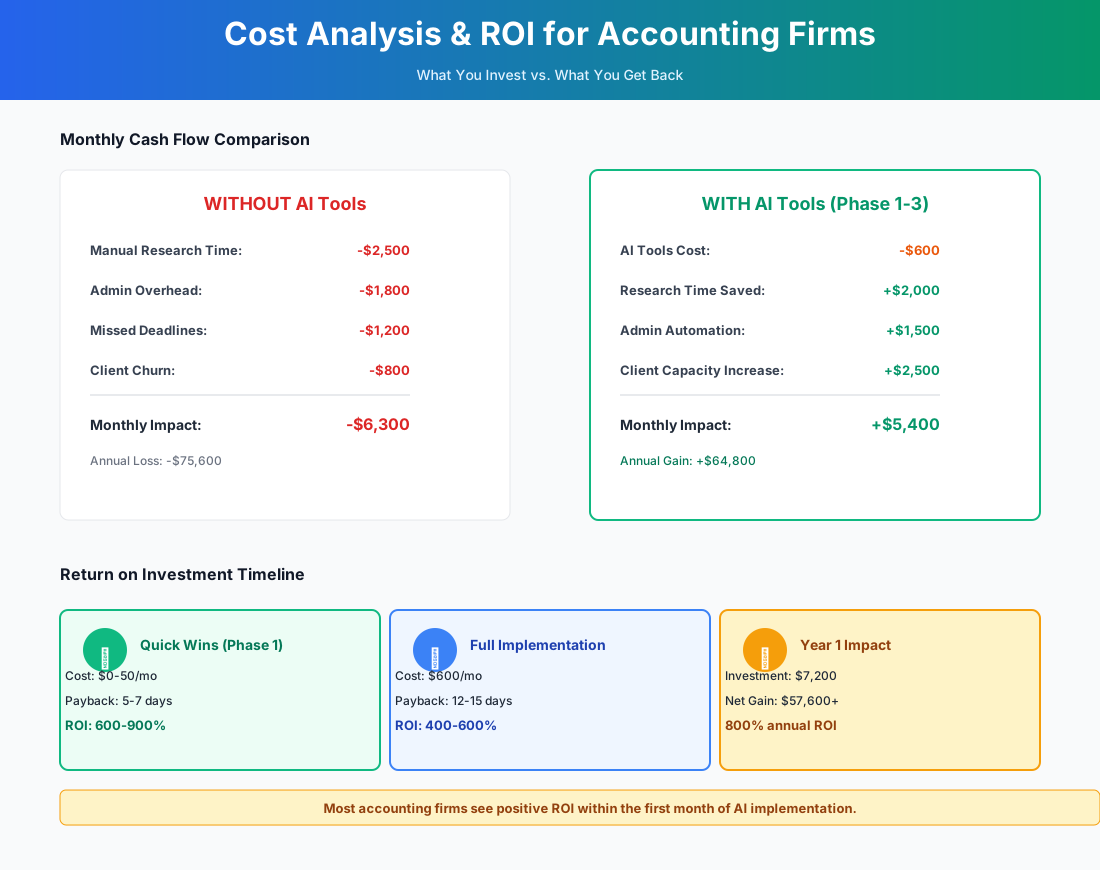
Here's a breakdown of the costs and expected returns:
Frequently Asked Questions
Can CPA Pilot citations actually hold up in an IRS audit response, or do I still need to verify through Checkpoint?
You still verify. CPA Pilot cites the same authoritative sources Checkpoint does — IRC sections, Treasury Regulations, IRS guidance — but clicking through to the actual code section takes two minutes and is non-negotiable for audit defense. Think of AI research as getting you to the right answer in two minutes instead of ninety. The final verification still happens; it's just not the hard part anymore.
How does Circular 230 due diligence apply when AI is generating first drafts of tax positions?
Circular 230 requires that tax positions have a "reasonable basis" and that practitioners exercise due diligence. AI doesn't change the standard — it changes the workflow. Your process: AI generates the research and draft position, CPA verifies citations against primary sources, CPA applies professional judgment on the specific client facts, CPA signs off. Document your review process. The AI draft is a starting point. The CPA's review is what satisfies Circular 230, the same way reviewing a junior associate's work product does today.
Is Liscio worth it if TaxDome already has a client portal?
Depends on your client demographic. TaxDome's portal is solid for clients who are comfortable logging into a web interface — typically business owners and self-employed clients you work with year-round. If a meaningful share of your clients are older individuals who don't check email reliably, Liscio's text-first approach moves the needle in a way TaxDome's portal won't. Test TaxDome's built-in features before carrying both costs.
What's the honest break-even calculation for Booke AI?
At $129/month per client, Booke AI needs to save your team enough hours to justify the cost. The math works clearly when a client has 300+ monthly transactions where manual categorization takes 8+ hours. Booke AI's 80% faster categorization frees roughly $400/month in staff time against the $129 price. Under 200 transactions per month, set up QBO bank rules first — they're free and handle 60–70% of categorization without a subscription.
When should I offer the first advisory package and to whom?
Start with your bookkeeping clients who already ask you financial questions — "Am I profitable?", "Why did my cash drop last month?", "Should I buy that truck now or wait?" Those clients are already primed. Offer them a free first month: a Fathom financial dashboard plus a 30-minute review call at no charge. After they see the insights, present Tier 1 at $300–$500/month. Anchor the conversation in their business outcomes, not your hours. Firms that underprice advisory at $100–$200/month find it doesn't get taken seriously. The market rate for monthly CFO-level reporting for a $1M+ business is $500–$3,000/month.
Will long-term clients notice that emails are AI-drafted?
Almost never — and this comes up every time. The emails clients care about are the ones where you're explaining something complex (IRS notices, planning memos, engagement renewals). AI drafts those well, and a 2-minute review catches anything that needs adjusting. The clients who've worked with you for 15 years care about your judgment on their specific situation. They'll notice the faster response. They won't notice the process behind it.
My firm doesn't have a dedicated IT person. How hard is this to actually set up?
Every tool in this guide was designed for firms without IT staff. CPA Pilot and ChatGPT are browser-based with no installation. Liscio is a web app with CSV import. TaxDome and Karbon both have guided onboarding. The one thing that takes real time is building workflow templates in your practice management tool — budget a full day for that, do it in June or July, and you'll have it done before it matters. If you'd rather hand data security, backups, and vendor management to someone else entirely, our AI tools for IT managed service providers guide covers what a modern MSP retainer looks like and what it costs.
The firms navigating the staffing shortage and competitive pressure from PE-backed roll-ups aren't working more hours. They're recovering the hours already being lost to document chasing, repetitive email drafting, and manual data movement — and redirecting them toward advisory work that actually builds the firm's value. Start with the checklist above. The first two items take under an hour and cost nothing.
More AI Implementation Guides
AI Tools for Bookkeeping Services: 2026 Guide
Best AI tools for bookkeeping services in 2026: Automate categorization, reconciliation, and document chasing without hiring extra staff.
AI Tools for Marketing Agencies: 2026 Playbook
The best AI tools for marketing agencies in 2026. A phased plan to kill Hell Week reporting, scale content, and fix billable utilization without new hires.
AI Meeting Assistant Cost for Accountants in 2026
What does an AI meeting assistant cost for an accounting firm? Free tiers, per-seat pricing from ~$17/user/mo, and the real total for a 3-, 5-, and 10-person team, compared.
Best AI Meeting Assistant for Accountants & Bookkeepers
The best AI meeting assistant for accountants records, transcribes, and summarizes client calls into action items. Compare 6 real tools and 2026 pricing.
AI Tools for Tax Preparation Services (2026 Guide)
AI tools for tax preparation services in 2026. Cut data entry, stop no-shows, automate documents, and build year-round revenue with a phased plan.
AI Tools for Personal Injury Law Firms (2026 Guide)
AI tools for personal injury law firms: capture after-hours leads, cut demand letters to minutes, and clear the medical-records bottleneck — within bar rules.
Keep exploring
Browse the full library by industry or category, see every product we cover in the AI tools directory, or read the head-to-head comparisons.