Cleaning businesses don't really sell cleanings. They sell the recurring weekly appointment — the one where Mrs. Patterson knows your crew shows up every Tuesday at 9, leaves the key under the mat, and never has to think about it again. That predictable, auto-renewing relationship is what separates a $200K cleaning company from a $600K one. One-time jobs fill calendars. Recurring contracts build businesses.
The problem is the entire operational stack between "signed client" and "Monday's deposit" runs on manual work. Confirming appointments. Answering quote requests at 11 PM. Rerouting three crews when someone calls out at 6:45 AM. Chasing Google reviews. That admin work doesn't scale — and when you're doing $20K/month, it eats your mornings. When you're trying to push to $40K, it's the ceiling.
The cleaning businesses pulling ahead in 2026 have wired AI into three specific chokepoints: instant online quoting that converts leads before a competitor picks up, automated recurring-schedule management that keeps clients on the books, and crew dispatching that handles same-day chaos without the owner in the middle of it. This guide covers the tools doing that work, how to sequence them, and the numbers you can realistically expect.
TL;DR — Top 3 Recommendations
- ZenMaid Pro ($39/mo + $14/seat) — Cleaning-specific recurring scheduling with automated reminders that cut no-shows from 15% to under 8%
- Goodcall ($99/mo) — AI phone agent answers every inbound call 24/7, books jobs, and stops leads from going to whoever picks up second
- ChatGPT or Claude (free) — Draft job postings, review responses, and win-back emails in 2 minutes instead of 30
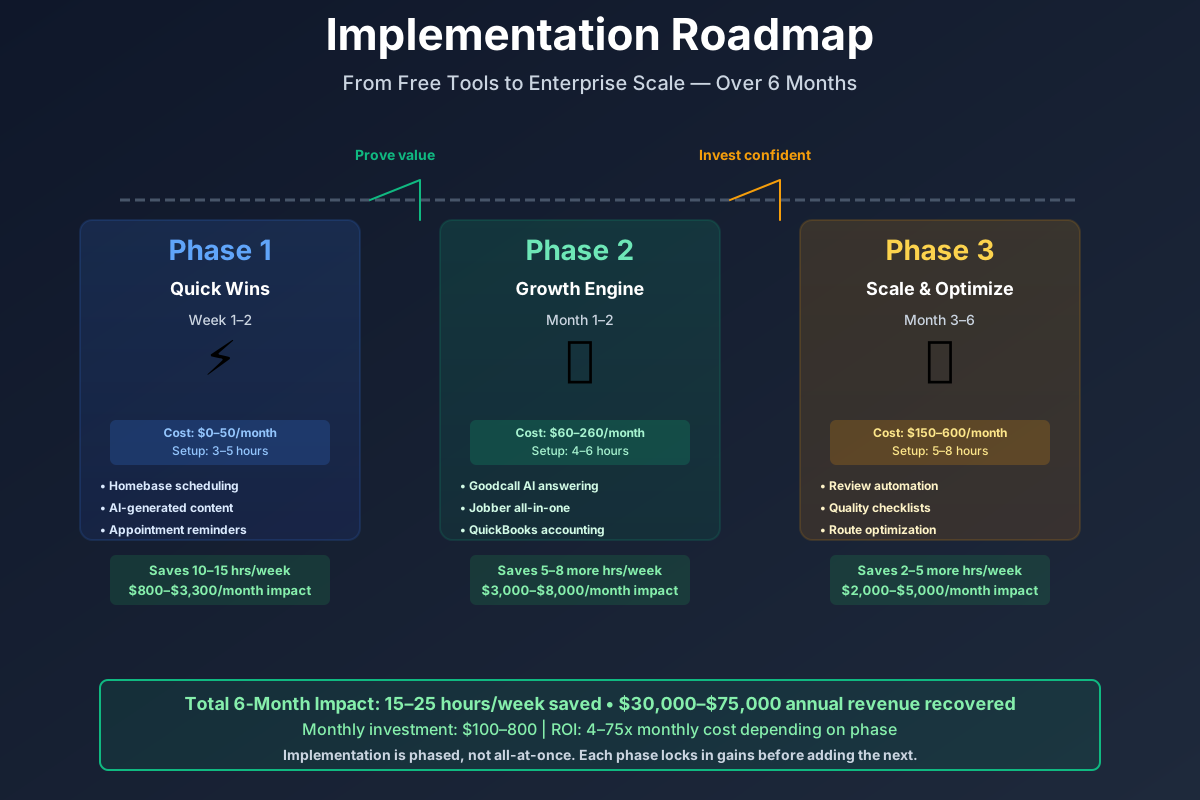
Here's a visual overview of the implementation phases:
Why Recurring Contracts Change Everything
Before getting into tools, it's worth anchoring on the number that makes this industry tick. A recurring client — weekly or biweekly — generates $2,000–$5,000 per year and costs nearly nothing to retain once they're on the books. A one-time deep clean generates $150–$350 and requires starting the acquisition process over.
| Client Type | Avg Annual Revenue | Acquisition Cost | Year-2 Retention Rate |
|---|---|---|---|
| One-time (move-out, deep clean) | $200–$350 | $40–$90 via paid leads | n/a |
| Monthly recurring | $900–$1,800 | $40–$90 (same) | 55–65% |
| Biweekly recurring | $1,800–$3,200 | $40–$90 (same) | 65–75% |
| Weekly recurring | $3,500–$5,200 | $40–$90 (same) | 70–80% |
The acquisition cost is roughly the same regardless of which type of client books. The lifetime value is 10–25x higher for a weekly recurring account. This is why the tools most worth your money are the ones that (a) convert leads faster before they book a one-time deal with your competitor, (b) keep recurring clients on the schedule, and (c) run your crews efficiently enough that you can actually service the recurring volume you're building.
Running a similar field-service operation? The landscaping company guide and pest control guide cover related crew-scheduling and seasonal-retention patterns. Laundromats face a related version of this math with equipment uptime instead of crew capacity — see our laundromat guide for how AI handles machine-downtime alerts and customer texting in an unattended location.
The Free Toolkit: Start This Week
Timeline: Weeks 1–2 | Monthly cost: $0–$35 | Setup time: 3–5 hours total
ChatGPT or Claude — Your Free Admin Writing Assistant
Every job posting you've typed from scratch, every reply to a one-star review, every welcome email to a new recurring client — none of that required your expertise. It just required time. Open ChatGPT (chat.openai.com) or Claude (claude.ai) and use these prompts. You'll get publish-ready drafts in under two minutes.
Write a job posting for a residential house cleaner at my small local cleaning company in [CITY].
We pay $18-22/hour, offer flexible weekday scheduling (no nights or weekends), paid training,
mileage reimbursement, and a supportive team. Target candidates who are reliable, detail-oriented,
and have their own transportation. Make it friendly and specific — not corporate.
Include a bullet list of what we offer and what we're looking for.
Post the result to Indeed, Facebook Jobs, and Craigslist. Refresh with a slightly updated version every 2–3 weeks to stay at the top of search results.
I own a cleaning business. A customer left this 1-star review: "[PASTE REVIEW TEXT]".
Write a professional, empathetic response that acknowledges their concern, takes responsibility
without admitting legal wrongdoing, offers to make it right with a direct phone call, and ends
positively. Keep it under 150 words. Do not be defensive.
Create a detailed room-by-room cleaning checklist for a standard residential deep clean
of a 3-bedroom, 2-bathroom house. Include the kitchen, living room, each bedroom, and
both bathrooms. List tasks in logical order (top-to-bottom, left-to-right). Format as
a printable checklist with checkboxes. Note which cleaning products to use for each room.
Beyond new hires and reviews, the highest-ROI use is win-back emails. Any recurring client who hasn't rebooked in 60+ days is at risk. Paste their name, last service date, and service type into ChatGPT and ask for a short re-engagement email with a soft discount offer. Most owners who start doing this consistently claw back 1–2 accounts per month they'd otherwise assume were gone.
Total time savings once this becomes habit: 5–8 hours/week across job postings, review management, and client communications.
Homebase Free — Team Scheduling and GPS Time Tracking
The daily group text thread asking "what's the schedule today" is not a scheduling system. It's a symptom of not having one. Homebase's free plan gives you drag-and-drop scheduling, GPS-verified clock-in/out, and team messaging in a single app your cleaners access on their phones. Build the schedule once; push notifications handle the rest.
Homebase
Best for: Cleaning teams under 10 that need scheduling + time tracking in one free app
Free tier includes scheduling, GPS time tracking, team messaging, and basic hiring tools. Eliminates time theft (GPS verification), reduces scheduling texts by centralizing everything in the app, and posts job openings to Indeed, Facebook Jobs, and Google Jobs from one dashboard.
Setup runs under an hour: create a free account, add your cleaners (they get a text to download the app), build next week's schedule with drag-and-drop, enable GPS clock-in. Then post your AI-written job listing through Homebase directly to Indeed and Facebook Jobs simultaneously.
One quiet win from GPS clock-in: time theft — early clock-outs, late arrivals logged as on-time — averages 4–6 minutes per shift per employee. On a 5-person team, that's $200–$400/month in wages paid for time not worked. Homebase catches it automatically.
Canva Pro — Marketing Content Without the Time Sink
Before/after cleaning photos are the highest-performing content type for cleaning businesses on social media. Most owners know this. Almost none post consistently, because "create content" turns into a two-hour project that gets pushed to tomorrow.
Canva's AI generates a complete, publish-ready post — image and caption — from a text prompt in under two minutes. The Brand Kit locks in your logo and colors so everything looks consistent.
Canva Pro
Best for: Creating before/after posts, seasonal promotions, and hiring graphics
AI post generator creates publish-ready content in under 2 minutes. Magic Edit enhances before/after cleaning photos. Thousands of cleaning-specific templates for Instagram, Facebook, and flyers. Background remover for professional team photos.
Photograph every deep clean (with client permission), batch four posts in Canva on a Saturday morning, and schedule them for the week. That's 30 minutes instead of three hours — and they actually go out. Organic social leads cost $0, versus $25–$75 per Thumbtack or Yelp lead in ad spend. The gap compounds over months.
ROI Snapshot
Monthly Cost
$15/mo
Time Saved
11hrs/week
Monthly Value
$1,320
ROI
8700%
The Core Stack: Automation That Protects Revenue
Timeline: Weeks 3–8 | Monthly cost: $170–$310 | Setup time: 8–12 hours spread across 4–6 weeks
This is where the recurring-contract angle gets serious. Phase 2 tools automate the systems that keep clients on the books — appointment confirmations, quality documentation, review generation, and bookkeeping. Getting this right is what makes higher lead volume in Phase 3 actually worth something.
ZenMaid Pro — The Recurring Schedule Engine
Twelve to twenty percent of scheduled cleaning jobs fall apart. Cancellations and no-shows where your crew still gets paid, you can't fill the gap on two hours' notice, and a client is left wondering where their cleaner is. At 25 jobs per week and a 15% rate, that's roughly $2,400 in lost revenue every month.
ZenMaid was built exclusively for maid and cleaning services. Its automated three-message sequence — booking confirmation, 48-hour reminder, day-of confirmation — consistently brings that cancellation rate below 8%. For a 3-person team at $81/month all-in, recovering two slots per week at $150/job means the tool pays for itself fourteen times over.
But the scheduling automation is only half the story. The recurring-service engine is where ZenMaid actually earns its keep: you set up a recurring template once (standard biweekly clean, deep clean monthly add-on, whatever), and the system auto-schedules every future appointment without anyone touching the calendar. Clients who book recurring stay on the books. One-time clients get a gentle prompt to convert. That compounding effect is hard to replicate with any general-purpose scheduling tool.
ZenMaid Pro
Best for: Residential cleaning businesses with 1-5 cleaners wanting cleaning-specific automation
Built exclusively for cleaning businesses. Automated SMS/email appointment reminders, digital room-by-room checklists on mobile, GPS check-in tracking, recurring appointment scheduling with conflict detection, customer self-booking widget for your website, and automated post-service review request emails.
ZenMaid vs. Jobber vs. Housecall Pro — the honest version:
ZenMaid is the right call for a solo operator or 1–5 person team doing primarily residential work. At $39/month + $14/seat it's significantly cheaper than Jobber Connect at $169/month or Housecall Pro at $149/month, and the cleaning-specific features come ready out of the box rather than requiring customization. If you're running 5+ crews, mixing residential and commercial, or want AI-powered operational coaching from your own data, Jobber with Copilot ($119–$199/month) is worth the premium — Jobber Copilot analyzes your actual numbers and provides personalized strategy recommendations. Our plumbing business guide covers Jobber's AI features in depth.
Setup: 3–4 hours. Sign up for the free trial (no credit card), import your client list, configure the 3-message reminder sequence, set up the website booking widget, and create your recurring service templates with room-by-room task lists. Onboard your team in a single meeting.
ROI Snapshot
Monthly Cost
$81/mo
Time Saved
4hrs/week
Monthly Value
$1,680
ROI
1974%
Connecteam Free — Quality Documentation That Ends Disputes
NAE Cleaning Solutions reported a 98% reduction in customer complaints after switching to Connecteam's digital checklists with mandatory photo documentation. That's not a rounding error — it's what happens when every cleaner submits timestamped, GPS-tagged photos of each room before leaving a job site.
Without documentation, a quality dispute is your word against the client's. With it, you pull up the photos in thirty seconds and the conversation ends. More importantly: recurring clients who see a consistent process and get occasional photo-proof updates don't churn. They feel watched over. That's the product.
Connecteam
Best for: Cleaning teams needing GPS check-ins, digital checklists, and photo proof — free
Digital cleaning checklists with required photo documentation per room. GPS-verified clock-in/out tied to specific job site locations. AI auto-scheduling builds shifts based on employee availability and qualifications. Team messaging with built-in translation for multilingual crews. Free for up to 10 users with most features included.
One feature worth calling out specifically: built-in translation. If your workforce is primarily Spanish-speaking, an English-only automated shift notification is functionally useless. Connecteam handles multilingual crew communication natively. Test every automated team message with a bilingual staff member before rolling it out, or use ChatGPT from the previous section to translate first.
Quality Control Isn't Optional
Higher lead volume in the next phase only generates sustainable revenue if clients stay. A business that chases new clients but loses recurring ones to quality complaints is running in place. Digital checklists and photo documentation are what make scaling actually work.
NiceJob Pro — Turning Happy Clients Into Reviews
Most cleaning businesses are better at their jobs than their Google profile suggests — not because clients are unhappy, but because satisfied clients rarely leave reviews without a specific prompt, and that prompt almost never comes. Manually following up after every job is one more task that slips.
NiceJob fixes this by triggering a personalized review request automatically the moment a job is marked complete in ZenMaid or Jobber. Smart follow-up sequences re-ask at optimized intervals. The Pro plan adds AI Review Replies that draft on-brand responses for your approval.
NiceJob Pro
Best for: Cleaning businesses that get great feedback but few published reviews
Automated review requests triggered by job completion in your scheduling software. Smart follow-up sequences with optimized timing. AI Review Replies drafts responses in your brand voice. Repeat-business automation re-engages lapsed clients. Referral program automation. Social proof widgets for your website. 14-day free trial.
NiceJob users routinely go from single-digit reviews to 30+ within 90 days. More reviews at a higher average rating directly improve your Google local ranking for "cleaning service [your city]" — where most organic leads originate. Birdeye ($299/month) and Podium ($300–$500+/month) offer similar functionality at enterprise scale, but NiceJob Pro at $125/month delivers 80–90% of the same capability at a fraction of the price. Save the enterprise platforms for when you're running multiple locations.
QuickBooks Online with Intuit Assist AI — Bookkeeping That Surfaces Pricing Gaps
There's a number most cleaning business owners don't know: their actual cost-per-clean by service type. Not the labor cost. The full cost — supplies, drive time, vehicle wear, pro-rata overhead. Without it, you're pricing by feel, and feel usually underprices the services that are the most expensive to deliver.
QuickBooks Online's Intuit Assist AI auto-categorizes bank transactions at 85–95% accuracy, matches supply receipts photographed from the field via OCR, and flags overdue invoices for automated follow-up. The Payments Agent predicts which clients are likely to pay late so you can follow up before the invoice ages.
QuickBooks Online
Best for: Cleaning businesses with employees and commercial clients needing AI-powered bookkeeping
Intuit Assist AI auto-categorizes 85-95% of bank transactions. OCR receipt matching at 90%+ accuracy. Payments Agent automates overdue invoice follow-up. Finance Agent provides 90-day cash flow forecasting. Natural language search across all your financial data. Integrates directly with ZenMaid, Jobber, Homebase, and Gusto.
AI Bookkeeping Needs a Monthly Human Check
85–95% accuracy means 5–15% of transactions are miscategorized. On $25,000/month revenue, that's $1,250–$3,750 in potentially wrong categories — enough to distort profit reports and create tax issues. Schedule a 30-minute "books review" the first Monday of each month. The AI does the heavy lifting; you catch the edge cases.
Upgrade to QuickBooks Plus ($90/month) and you can track expenses at the project level. Most owners who do this discover their deep cleans are significantly more profitable per hour than their weekly maintenance cleans. That changes what you market, what you discount, and how you staff.
Advanced Growth: Removing the Owner Bottleneck
Timeline: Month 3+ | Additional monthly cost: $120–$280 on top of Phase 2 | Setup time: 6–10 hours over several months
Phase 2 protects the recurring revenue you have. Phase 3 addresses the ceiling that stops most cleaning businesses from scaling past where the owner is involved in every new booking, every hire decision, and every route change.
Goodcall — Every Lead Gets Answered
You're on your knees scrubbing a bathroom when your phone rings. You can't answer. By the time you finish and call back — 47 minutes have passed. The caller has already booked with whoever picked up second.
That happens to 30–40% of all inbound calls for cleaning businesses. Goodcall is an AI phone agent that answers every call in two rings, 24/7, including weekends and holidays. It sounds natural, answers your top 20–30 FAQs about pricing and availability, and books directly into your calendar. You get full transcripts.
Goodcall
Best for: Cleaning businesses losing leads because the owner can't answer calls on the job site
AI phone agent answers every call 24/7. Trains on your top 20-30 FAQs (pricing, service area, availability, cancellation policy). Books appointments integrated with Google Calendar. Bilingual English/Spanish capability. Unlimited minutes — flat monthly fee. $0.50/extra unique customer beyond plan limit.
Alternative: ServiceAgent.ai ($0.99/minute, pay-as-you-go from $20) was built specifically for cleaning businesses. It qualifies leads by asking square footage, room count, and service type, then books directly into your calendar — and even upsells add-ons like refrigerator cleaning or inside-oven cleaning. If your call volume is under 100 minutes/month, the per-minute model is likely cheaper than Goodcall's flat rate.
Train Your AI Phone Agent Before Going Live
Invest 2 hours writing out every edge case before launch: your exact service area by zip code, pricing for every home size and service type, your cancellation fee, what to say when a caller asks for a discount, and how to handle complaints. An AI that books a job in a zip code you don't serve — or quotes $80 when your rate is $180 — creates more damage than a missed call.
Converting just 2–3 additional leads per month that would have gone to voicemail covers the entire Phase 3 investment. At $150–$250 per job, that's $300–$750 in recovered revenue from calls you're currently losing.
LeadWinner AI — Win on Response Speed
You spend $500/month on Thumbtack — roughly 15 leads. You convert 20%, which is 3 booked jobs. A competitor who responds in 20 seconds instead of 20 minutes converts 30–45% of the same lead pool, booking 5–7 jobs from that same $500. LeadWinner AI responds to paid leads on Yelp, Thumbtack, and Google Local Services Ads within 20–30 seconds — before your competitors even see the notification — with personalized responses sent simultaneously via platform messaging and direct SMS to the customer's phone.
LeadWinner AI
Best for: Businesses spending $500+/month on Thumbtack/Yelp/Google LSA who lose leads to faster competitors
Responds to Yelp leads in ~20 seconds via both Yelp messaging and direct SMS. Responds to Thumbtack inquiries in ~20 seconds. Responds to Google LSA message leads in ~30 seconds. AI crafts personalized responses based on the specific request. Triggers a 2-way auto-call bridging you and the lead. Automated follow-up sequences. Official Yelp Partner API. 7-day free trial.
The extra 2–4 booked jobs per month at $150+ each cover LeadWinner's cost in the first week.
Homebase Plus — AI Hiring to Fight 75–200% Turnover
The cleaning industry's turnover problem is structural: 75–200% annual churn means a 8-person team might cycle through 6–16 people in a year, at $500–$1,500 per hire in recruiting, background checks, and training. You can't eliminate it, but you can hire faster and smarter so vacancies don't become schedule gaps.
Upgrade from Homebase Free to Homebase Plus ($59.95/month) to unlock the AI Hiring Assistant. It screens applicants against your criteria, schedules interviews automatically, and suggests structured interview questions that predict retention. Time-to-hire drops from 3–4 weeks to 1–2 weeks.
Screen for these must-have criteria in cleaning applicants:
- Own reliable transportation (non-negotiable for mobile cleaning routes)
- Available for at least 3 weekday shifts between 8 AM and 5 PM
- Willing to commit to a 90-day trial period
- No felony convictions involving theft or property damage (background check)
- Comfortable working independently after training period
Preferred: cleaning/hospitality experience, bilingual English/Spanish, flexible scheduling
FieldCamp AI Dispatcher — Route Optimization for 3+ Crew Operations
Route planning for three crews takes most cleaning business owners 90 minutes every morning. A 6:45 AM call-out can turn that into two hours of reshuffling texts. Transportation eats 8–12% of revenue before a single room gets cleaned.
FieldCamp's AI Dispatcher assigns cleaners based on skills, location, and availability simultaneously. When a cancellation hits, it reshuffles the entire day's routes in one click and pushes updated schedules to every cleaner's phone. It runs as a standalone layer on top of your existing scheduling software — no migration required.
FieldCamp AI Dispatcher
Best for: Multi-crew operations (3+ teams) wanting AI route optimization without replacing their scheduling tool
AI assigns cleaners based on skills, location, certification, and availability. Real-time route updates when cancellations or add-ons occur. Emergency one-click reshuffling for call-outs. Predictive analytics on demand peaks and profitability by zip code. GPS tracking with automated ETA notifications. Works on top of existing scheduling software including Jobber, Housecall Pro, and Google Calendar.
For a 3-crew operation, smart routing typically adds 2–3 additional service calls per crew per day without extending hours, and cuts windshield time by 20–30%. That translates to $800–$1,500/month in additional revenue, plus fuel savings that compound quickly. Alternative: OptimoRoute ($35/vehicle/month) handles pure route optimization for businesses covering wide geographic areas with 6–12 daily stops per vehicle.
ROI Snapshot
Monthly Cost
$59/mo
Time Saved
8hrs/week
Monthly Value
$2,160
ROI
3561%
Four Things to Skip
Don't implement more than one new tool at a time. Each tool requires configuration, team communication, and a monitoring period. Adding three in one week guarantees none get set up properly.
Don't buy Birdeye ($299/month) or Podium ($300–$500/month) at the single-location scale. NiceJob Pro at $125/month delivers 80–90% of the same capability. Enterprise platforms make sense at multiple locations, not before.
Don't automate team communications before testing multilingual support. If your workforce is primarily Spanish-speaking, an English-only shift notification creates confusion and erodes trust. Use Connecteam's built-in translation or ChatGPT to translate before sending.
Don't skip quality control in a rush to get the AI phone agent live. More leads converting to clients who then churn because quality is inconsistent isn't growth — it's expensive churn. Phase 2 before Phase 3.
Getting Started: Your Week-by-Week Checklist
- Week 1: Create free ChatGPT account — write your first job posting and a negative review response
- Week 1: Sign up for Homebase free — add your team, build next week's schedule, enable GPS clock-in
- Week 2: Set up Canva free/Pro — create your Brand Kit and batch 4 before/after social posts
- Week 3: Start ZenMaid Pro free trial — import clients, configure 3-message reminder sequence
- Week 4: Set up Connecteam — build room-by-room digital checklists with required photo uploads
- Week 5: Activate NiceJob Pro trial — integrate with ZenMaid, send first automated review requests
- Week 6: Connect QuickBooks Online — link bank accounts, let AI categorize for 2 weeks before reviewing
- Month 3: Set up Goodcall — program your complete FAQ, pricing matrix, and service area before going live
- Month 3: Activate LeadWinner AI — connect Thumbtack and Yelp accounts for 20-second lead response
- Month 4: Upgrade to Homebase Plus if hiring is active — configure AI screening criteria
- Month 4+: Add FieldCamp AI Dispatcher if running 3+ crews — verify routes for 1 week before trusting fully
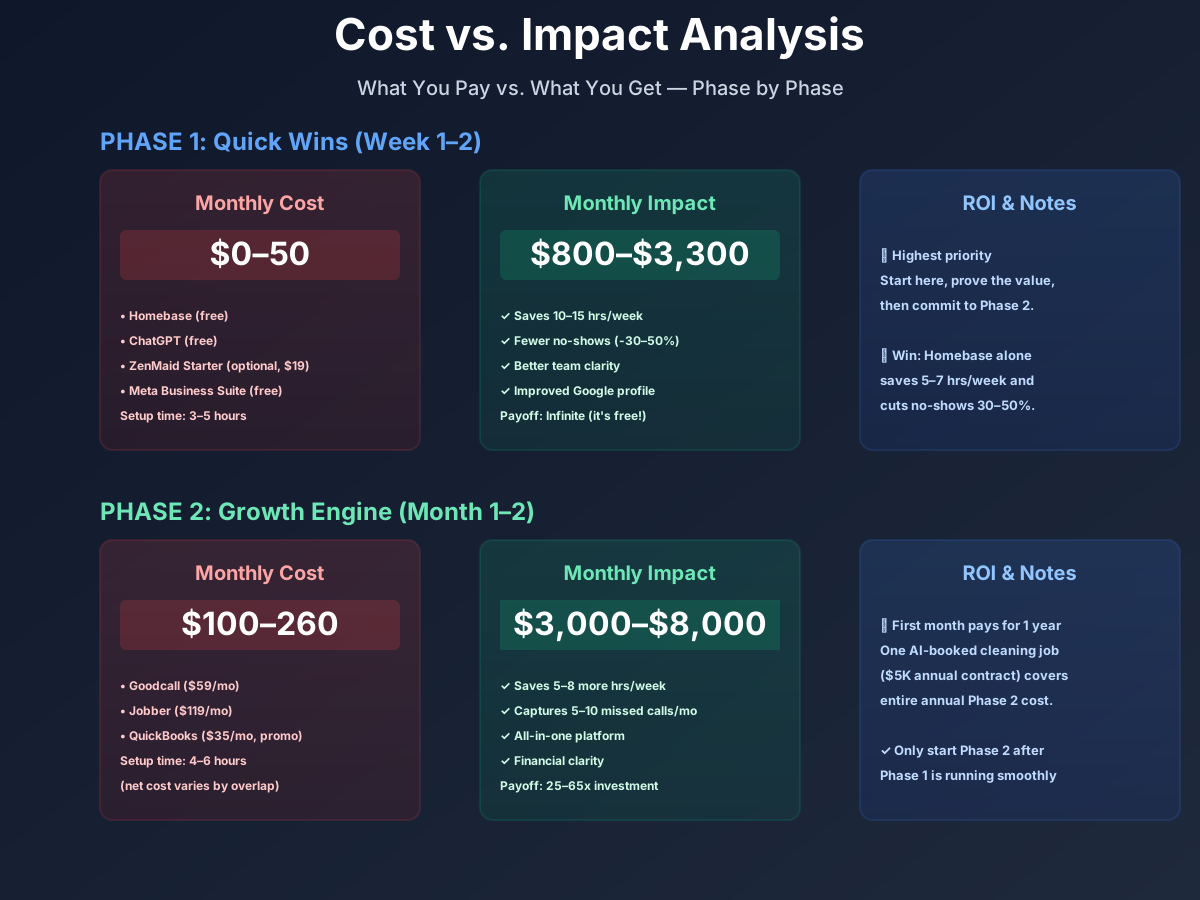
Here's a breakdown of the costs and expected returns:
Frequently Asked Questions
Can AI scheduling tools handle different time blocks for standard versus deep versus move-out cleans?
Yes, and this is exactly why cleaning-specific software matters. ZenMaid lets you create service templates with different time blocks — 2 hours for a standard 3-bedroom, 4 hours for a deep clean, 6 for a move-out. When a client books online, the calendar automatically blocks the correct amount of time. Jobber and Housecall Pro handle this too, but require more manual configuration since they're built for all field service industries.
My crew is mostly Spanish-speaking. Will automated scheduling and messaging actually work for them?
Connecteam is your answer here — it has built-in translation and multilingual team messaging. For anything outside Connecteam, use ChatGPT to translate before sending. The bigger issue is making sure your AI phone agent (Goodcall) and booking widget (ZenMaid) don't create confusion at the client-facing layer; those should remain in English since that's who's booking. Just make sure the internal crew-facing tools speak your team's language.
How do I handle a cleaner who calls out at 6 AM when I have 8 jobs across 3 crews?
Without AI dispatching, you spend 30–60 minutes on the phone reshuffling assignments and notifying clients. FieldCamp AI Dispatcher handles this in one click — it reassigns affected jobs across remaining crews based on location and schedule gaps, then pushes updated routes to every cleaner's phone. If you're not yet at the 3-crew level where FieldCamp makes sense, ZenMaid's conflict detection at least surfaces the problem immediately so you're not discovering the gap when a client calls asking where their cleaner is.
Do I really need separate residential and commercial software, or can one tool handle both?
Depends on the split. ZenMaid is strong for residential but wasn't built for commercial janitorial workflows — multi-site inspections, facility manager portals, compliance documentation. If commercial represents more than 30% of revenue, consider Swept ($30–$225/month) for those accounts: it handles multilingual messaging in 100+ languages, location-based GPS inspections, and client portals where facility managers view your quality reports. You can run ZenMaid for residential and Swept for commercial simultaneously, with QuickBooks unifying the financials.
Is OSHA chemical handling compliance affected by AI-generated cleaning checklists?
No — but you're responsible for accuracy regardless of how the checklist was created. Your crews must follow GHS/SDS requirements, so any AI-generated checklist needs to specify correct chemicals, safety notes (ventilation, PPE, incompatible combinations), and your actual product brands. Have your most experienced team lead review any AI checklist against your product inventory and SDS sheets before rolling it out.
How quickly will I see ROI if I start with just ZenMaid?
Faster than most tools. At a 15% cancellation rate with 25 jobs per week at $150/job, you're losing roughly $2,400/month to no-shows and late cancellations. ZenMaid's 3-message reminder sequence typically cuts that to under 8% within the first 30 days. For a 3-person team at $81/month total, recovering even two slots per week covers the tool's cost fourteen times over. Most practices see the impact clearly within the first billing cycle.
The cleaning business that answers every call, confirms every recurring appointment, documents every job, and follows up with every lapsed client is the one that fills its weekly slots and holds onto them. Most of that work is automatable today.
Start with the free ChatGPT account and your first AI-written job posting. That's five minutes, zero dollars, and the beginning of convincing yourself the rest of this is worth your time.
More AI Implementation Guides
AI Tools for Pressure Washing Businesses (2026 Guide)
The best AI tools for pressure washing businesses in 2026. Capture missed calls, quote via satellite, automate follow-up, and win more jobs without ad spend.
AI Tools for Junk Removal Companies: 2026 Owner's Guide
The 2026 guide to AI tools for junk removal companies — answer every call, quote a pile from a photo, optimize routes, and cut tipping fees. Start free.
AI Tools for Pool Service Companies (2026 Guide)
The complete 2026 guide to AI tools for pool service companies — route density, chemistry dosing, AI phone answering, and a premium IoT monitoring tier.
Best AI Tools for Pest Control Companies (CSR & Routes)
AI CSRs, smarter routing, automated reviews & EPA-compliant chemical logs for pest control companies. Tool picks + step-by-step setup, starting free today.
Best CRM & AI Marketing Tools for Fence Companies
Compare CRM & AI marketing tools for fence companies. Cut quote turnaround from days to minutes, never miss a lead call, automate follow-up. Pricing inside.
Best AI Receptionist for Flooring Installers & Tilers
AI receptionist for flooring installers & tilers — capture every call 24/7, automate lead follow-up & marketing. Save 15+ hrs/week. See pricing & setup steps.
Keep exploring
See every AI implementation guide we've published for Trades & Contractors, or browse the full library by industry or category. Looking for a specific platform? The AI tools directory indexes every product mentioned across our guides, and the comparisons hub puts the most-asked head-to-heads side by side.