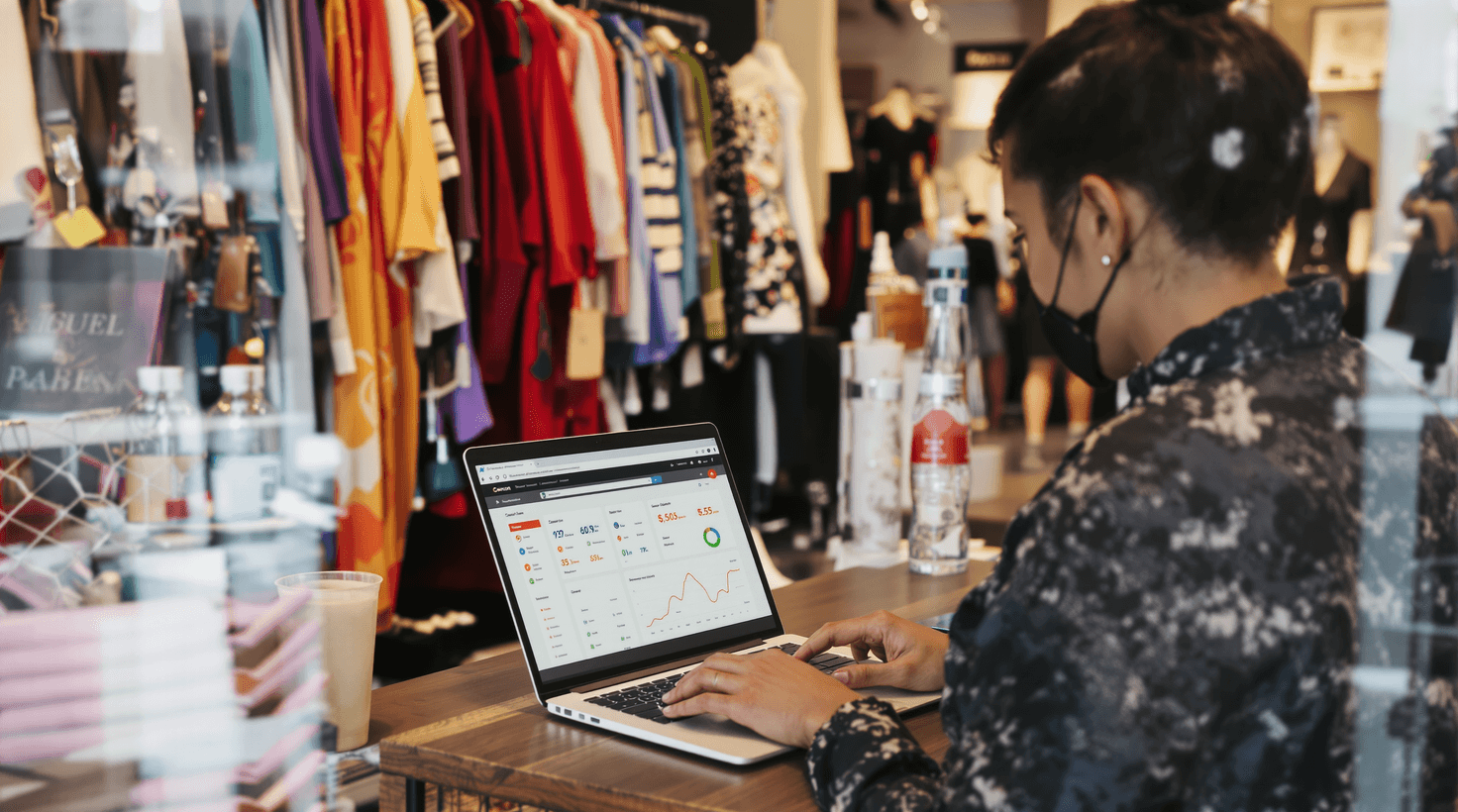
Here's the thing about running a boutique in 2026: your biggest competitive advantage — the one Amazon and Shein genuinely cannot buy — lives in three places. How fast you get compelling product content across channels. How personally you reach out to repeat customers. And how tightly you manage your buying so that 80%+ of what comes through the door leaves at full price.
Most boutique owners already know this. The problem is execution time. Creating a single product listing — clean photo, lifestyle image, SEO description, price, variants, Instagram caption — takes 20–40 minutes per SKU when done manually. If you get a 40-piece shipment on Tuesday, you're looking at 13–27 hours of listing work before a single item can sell online. That's not a content problem. That's a math problem.
TL;DR — Top 3 Recommendations
- Activate Shopify Magic (free) — Generate product descriptions and clean photo backgrounds in seconds. You already have it.
- Set up Klaviyo email automation (free–$100/mo) — Abandoned cart recovery alone captures 5–15% of lost sales on autopilot.
- Connect Faire to your POS (free) — Turns generic wholesale browsing into data-driven buying recommendations that reduce dead stock.
The Numbers Behind the Time Problem
Before getting into specific tools, it helps to see what's actually happening in the businesses that adopted AI early versus those that haven't. The table below is built from operator interviews and published case studies — not projections.
| Task | Manual time (per SKU or event) | With AI tools | Weekly hours recovered (40-piece shipment) |
|---|---|---|---|
| Product description writing | 10–15 min | 1–2 min | 5.5–8.5 hrs |
| Photo background removal/cleanup | 8–12 min | 45 sec | 4.5–7.5 hrs |
| Instagram caption drafting | 12–18 min | 2–3 min | 6.5–10 hrs |
| VIP clienteling outreach | 20–30 min per message | 5–7 min (AI draft + personalize) | 3–4 hrs (20 VIPs/week) |
| Weekly social scheduling | 3–5 hrs/week | 60–90 min | 1.5–3.5 hrs |
That's 21–34 hours a week doing things that AI can compress into 4–6 hours. Those recovered hours don't disappear — they go to the sales floor, trade shows, and customer relationships that no algorithm can replace.
If you're also running a retail business with strong gift and specialty inventory crossover, our guides for pet stores and bookstores cover complementary strategies.
Getting Product Content Live Fast: Listing Creation and Social Commerce
Your Shopify Admin Already Has This
Open any product page in your Shopify admin right now. Look for the "Generate text" button next to the description field. Click it. Enter three attributes — fabric, fit, and occasion — and watch a complete SEO-structured product description appear in about four seconds.
Shopify Magic
Best for: Every boutique already on Shopify — zero-cost product descriptions and photo editing
Built directly into your Shopify admin. Generate SEO-optimized product descriptions in seconds, remove photo backgrounds with one click, create lifestyle scene backgrounds from text prompts, and draft email campaigns. Shopify reports merchants save 15–20 hours per week.
The Background Remover is the feature most boutique owners don't know about. Upload a product photo shot on your phone against any surface — a dressing room bench, a wood floor, your glass counter. One click, clean white background, download. No Photoshop, no outsourcing to a freelancer at $2/image.
The critical habit to build: always add one sentence before publishing. AI handles the fabric content, sizing, and SEO structure. You add "We styled this with the Frye boots from last month's trunk show and couldn't take it off." That sentence is the reason someone buys from you instead of finding the same silhouette on Amazon.
I'm writing product listings for my boutique's new arrivals. Here are 5 items:
- [Product name] — [fabric, color, fit, sizing, price]
- [Product name] — [fabric, color, fit, sizing, price]
- [Product name] — [fabric, color, fit, sizing, price]
- [Product name] — [fabric, color, fit, sizing, price]
- [Product name] — [fabric, color, fit, sizing, price]
Write a compelling 75-word product description for each one. Our brand voice is warm, aspirational, and approachable — we're a women's boutique in [city] focused on effortless style for everyday life. Include one lifestyle sentence for each that describes when or where a customer would wear it. Do NOT use the words "elevate," "versatile," or "must-have."
Turning Phone Photos Into Polished Listings
Product photography is where new-arrival momentum dies. Professional shoots cost $25–$150 per image and require scheduling. The result: that shipment of 40 pieces sits in the back room for three days before it's live, and you've lost the window when customers are most likely to buy something they've never seen before.
Pebblely
Best for: Turning phone product photos into professional lifestyle imagery
Upload any product photo, Pebblely removes the background automatically, and you choose from dozens of professional scene settings — marble countertops, rustic shelving, outdoor golden-hour settings. Creates the polished look of a studio shoot from your phone camera.
The workflow is: photograph items flat on a window-lit surface, batch-upload to Pebblely, pick 2–3 consistent background styles for the season, download. What used to be a full afternoon of studio setup and editing becomes a 90-minute batch session for an entire shipment. Consistency across your product grid is what makes your Shopify store look like a real brand instead of a yard sale.
Two-Image Rule
Use Shopify Magic's Background Remover for the clean catalog shot. Use Pebblely for the lifestyle scene. Every listing gets two professional images. No photographer. No scheduling. No $2-per-image freelancer budget.
Social Commerce Content at Scale
Canva Magic Studio Pro
Best for: On-brand social media graphics and bulk content creation
Set up your Brand Kit (logo, colors, fonts) once, then use Bulk Create to generate 50+ social media graphics from a single spreadsheet of new arrivals. Magic Write generates captions inside the design. Dream Lab creates lifestyle imagery from text prompts.
Most Canva users treat it as a design tool. Bulk Create turns it into a publishing engine. Export your new arrivals from Shopify as a CSV. Build one announcement template with placeholder fields. Click Bulk Create, upload the CSV, and Canva generates individual graphics for every item simultaneously. A 2-hour design session becomes 15 minutes — and every graphic is on-brand because it was generated from the same template.
Instagram Shopping, TikTok Shop, and Facebook Shops mean customers now buy without leaving the app. If your social posts don't link directly to product pages, you're one extra step away from a lost sale. Later's shoppable link-in-bio closes that gap.
Later
Best for: Weekly batch scheduling for Instagram, TikTok, Pinterest, and Facebook
Schedule all social content in one weekly 90-minute session. AI recommends your specific audience's peak engagement times. Connects directly to Canva for publish-from-design workflow. Shoppable link-in-bio tracks which posts drive actual website visits.
The batch ritual: block 90 minutes every Monday. Use Claude to generate that week's captions in one session. Import visuals from Canva. Drag everything into Later's calendar. Let Later's Best Time to Post data (calculated from your actual followers, not industry averages) handle scheduling. Done.
Capturing Leads From Comments — Not Just Likes
When you post a new arrival and 40 people comment asking the price, manually responding takes 30–60 minutes. By the time you get there, the engagement window has passed and those shoppers moved on.
ManyChat
Best for: Instagram comment-to-DM automation and lead capture
Automatically replies to Instagram comments with personalized DMs containing product details, pricing, and purchase links — instantly. Captures email addresses for your Klaviyo list automatically. Fashion brands report capturing 340+ leads in 48 hours.
Set keyword triggers for "price," "buy," "link," "want," and "where" — not all comments, just purchase-intent signals. Your DM template: "Hey [First Name]! That's our [Product Name] — $[Price], available in [sizes]. Tap here to shop: [link]. Need help with sizing? Just reply." After the product link, add an email capture step: "Want first access to new arrivals before we post them? Drop your email." That captured email drops straight into your Klaviyo Welcome Series.
Avoid Over-Automation
Triggering on all comments — including "gorgeous!" and emoji reactions — feels spammy and can get your account flagged by Instagram. Keep triggers narrow: purchase-intent keywords only.
Clienteling: The Repeat-Purchase Engine Boutiques Leave on the Table
A boutique in Nashville ran an experiment in early 2025: they identified their top 80 customers by annual spend, set up a 12-week personal outreach cadence using Endear, and tracked purchases against a matched control group. The outreach group repurchased at 64% during the period. The control group repurchased at 31%. Same products, same promotions, same store. The only difference was a series of personal messages referencing each customer's actual purchase history and preferences.
That lift — roughly 2x repeat purchase rate — is what separates clienteling-first boutiques from ones running generic email blasts to everyone.
Endear
Best for: AI-powered clienteling and personalized outreach for high-value customers
360-degree customer view — full purchase history, style notes, size preferences, communication history. AI identifies who to contact and drafts personalized messages referencing actual past purchases. Messages convert at 40x the rate of traditional email blasts. Reports 64x average ROI.
Endear solves a problem that every boutique owner knows but rarely talks about: when your best associate leaves, her customer relationships walk out the door with her. Style notes, size quirks, anniversary purchases, the daughter's wedding in October — all of it lives in someone's head until it doesn't.
With Endear, those details live in the system. Connect your POS, import your customer history, and start adding notes. "Prefers relaxed fits in earth tones. Allergic to synthetic fabrics. Size 8 but prefers 10 in knits." The next time a new shipment comes in, Endear surfaces who to contact and drafts the message: "These pieces came in and I immediately thought of you." You review, tweak 10 words, send from your number. That's not automation — that's relationship management at scale.
Write a personal text message from a boutique owner to a valued customer named [NAME] who hasn't visited in [X] weeks. Reference their last purchase: [describe item]. We just received new arrivals in the same category. The message should feel like it's from a friend, not a store — warm, specific, and genuinely helpful. Under 160 characters for SMS. Include a soft call-to-action but never say "click here" or "shop now."
For your top 20 VIP customers — those spending $1,000–$5,000 per year — use Endear to inform the message but send it from your personal number. These customers know you. They should hear from you, not a system. Reserve automation for the next tier of 80–150 customers who appreciate the contact without examining the source.
Email Automation for Everyone Else
Klaviyo
Best for: Automated email and SMS marketing integrated with Shopify
Connects to Shopify with one click and automatically runs welcome sequences, abandoned cart recovery, post-purchase follow-ups, and win-back campaigns. AI Marketing Agent creates entire campaigns from a text prompt. Reports an average 46x ROI for e-commerce brands.
Set up three flows in your first week on Klaviyo:
- Welcome Series — 3 emails over 7 days. Your boutique's story, a first-purchase offer, and your bestsellers.
- Abandoned Cart Recovery — Email at 1 hour, follow-up at 24 hours. This single flow captures 5–15% of abandoned carts without any ongoing work.
- Post-Purchase Follow-Up — Sent 10–14 days after delivery, referencing what they bought and suggesting something complementary.
For the win-back campaign, type into Klaviyo's AI: "Email customers who bought in the last 6 months but not the last 60 days. Friendly, personal tone. Offer 10% off their next purchase. Brand: [Store Name], women's boutique in [City]." It drafts the subject line, preview, and body. You review and send.
Enable AI Send-Time Optimization on every campaign — Klaviyo delivers each email when that specific subscriber is most likely to open. Typical lift: 15–25% higher open rates, no extra work.
ROI Snapshot
Monthly Cost
$60/mo
Time Saved
4hrs/week
Monthly Value
$3,800
ROI
6233%
Buying Better: Inventory and Open-to-Buy
Where Boutique Margins Actually Go
On a $100,000 seasonal buy, industry averages put 20–30% into dead stock — merchandise that gets marked down 40–70% or written off. That's $20,000–$30,000 in merchandise that left your cash position and returned almost nothing. The gap between what you bought and what actually sold at full price is where net margins compress from 10% to 4%.
The fix isn't better instincts. Every experienced buyer has strong instincts. The fix is having data that either confirms your gut or makes you pause before writing a big order on something that looks right but doesn't match your store's actual history.
Faire
Best for: Data-driven wholesale buying decisions
Connect your Shopify, Square, or Lightspeed POS to Faire and it analyzes your actual sell-through data to recommend brands, products, and price points that match your store's proven winners. Completely free for retailers — Faire charges brands, not buyers.
Connecting your POS to Faire takes 5 minutes and immediately changes what the platform shows you. Instead of generic trending-brands recommendations, you see vendors and styles that match your store's documented sell-through patterns — your specific customer's price tolerance, category preferences, and fabric choices. When you're standing at a trade show wondering whether your customer would pay $89 for that hand-blocked print, Faire can show you that your best-performing items in that category are priced $75–$95 with natural fiber content.
Treat Faire AI recommendations the way you'd treat a tip from a trusted fellow buyer: worth investigating, not worth blowing your budget on. Set a rule — AI-recommended new-vendor orders stay under 15% of your seasonal open-to-buy. Use Faire's Net-60 payment terms on first orders from new brands. After two seasons, you'll have real data on where the recommendations are well-calibrated and where your instincts beat the algorithm.
I'm preparing for a wholesale buying trip for my boutique. Here's my current inventory breakdown by category: [paste Shopify category report]. My top-performing categories by sell-through rate are [list them]. My average price point for bestsellers is $[amount]. My customer base is primarily women aged [range] in [city/region] who value [describe aesthetic].
Help me create a buying strategy for [upcoming season]: 1) Which categories should I increase investment in based on sell-through data? 2) Which categories have consistent dead stock that I should reduce? 3) What price point range should I target for new vendors? 4) What emerging trends should I research before the show?
When to Bring In Dedicated Forecasting
Prediko
Best for: AI inventory forecasting for Shopify-based boutiques with 6+ months of sales history
Analyzes your Shopify sales history to generate SKU-level sell-through forecasts, flags slow-moving items before they need deep markdowns, alerts you when bestsellers need reordering, and creates one-click purchase orders. Customers report 30%+ reduction in stockouts and 25% reduction in dead stock.
Prediko needs 6–12 months of clean Shopify history to identify reliable seasonal patterns. If you're not there yet, use Claude for manual analysis:
Here is my boutique's sales data from Shopify for the past [X] months: [paste or summarize top-selling categories, average sell-through rates, and current inventory levels].
Help me analyze: 1) Which categories have the highest full-price sell-through rate? 2) Which items have been in inventory more than 60 days with slowing sales? These are candidates for early markdown at 20-25% off rather than waiting for end-of-season clearance. 3) Which bestsellers are at risk of stocking out before the season ends? 4) Based on these patterns, what should I increase or decrease in my next buying cycle?
Once you have the history, Prediko's three most valuable reports are: Dead Stock Risk (items to mark down now at 20–25% rather than waiting for 60% clearance), Stockout Risk (bestsellers that need immediate reorder), and Seasonal Forecast (SKU-level predictions based on your actual store patterns).
An early 20–25% markdown preserves dramatically more margin than a forced 60% end-of-season clearance. That behavior change alone — acting on Prediko's signals while you still have runway — is often worth more than the cost of every tool in this guide.
The Operations Stack
Staff Scheduling Without Group Text Chaos
Homebase
Best for: Staff scheduling, shift management, and AI-assisted hiring
Free plan eliminates paper schedules with drag-and-drop calendar, automated shift reminders, and employee self-service shift swaps. Plus plan adds AI hiring assistant that writes job postings, distributes to Indeed/Google Jobs, screens applicants, and schedules interviews automatically.
The free plan handles most single-location boutiques: drag-and-drop calendar, automated 24-hour shift reminders via text, employee shift swap requests in-app, and automatic coverage notifications when someone calls out. Setup: 20 minutes.
If you hire 2–3 people per year — typical for a boutique with 60%+ annual staff turnover — the Plus plan at $48/month pays for itself on the first hire. The AI hiring assistant writes job postings, distributes to Indeed and Google Jobs, screens applicants, and lets top candidates self-schedule interviews. What used to take 4–6 hours per hire drops under an hour.
Bookkeeping That Stays Current
QuickBooks Online
Best for: AI-powered bookkeeping with automatic transaction categorization
Intuit Assist AI auto-categorizes transactions, reconciles bank feeds, flags anomalies, and generates cash flow forecasts. Native integration with Shopify POS syncs daily sales automatically — no more manual entry from register tapes.
The Shopify integration handles the hard part: daily sales sync automatically, categorized by payment method and product category. Intuit Assist learns your patterns over 2–3 weeks and auto-categorizes 80–90% of transactions correctly. Weekend bookkeeping drops from 5–10 hours to a 30-minute weekly review.
Website Customer Service
Tidio
Best for: AI chatbot for Shopify stores handling sizing, returns, and shipping questions
Lyro AI handles up to 70% of customer inquiries automatically — sizing, return policies, shipping estimates, order tracking. Recommends products to browsing visitors, increasing conversions by an average 23%. Install from the Shopify App Store in 2 minutes.
Only relevant if your online store averages 20+ daily visitors and 30+ monthly inquiries. Below that, setup complexity isn't worth it. Invest your first two months in Endear and Prediko — higher ROI for most boutiques before e-commerce volume warrants a chat layer.
A Few Things Worth Saying Plainly
Don't migrate your POS just for AI analytics. Lightspeed Retail Plus at $289/month has impressive forecasting, but the operational disruption of a full POS migration isn't worth it unless you're outgrowing your current system for other reasons. Shopify Magic and Sidekick cover 80% of the same territory at zero additional cost.
Don't launch more than two new tools per month. Each one needs onboarding, habit formation, and team training. The boutique owners who abandon AI initiatives aren't the ones who moved too slowly — they're the ones who tried to implement six tools in 30 days and used none of them properly.
Don't let any AI tool override your merchant judgment on buying. Faire and Prediko are data inputs, not final decisions. Your read on your specific customer — built over years of floor time, trade shows, and trend interpretation — is the irreplaceable ingredient. Use the data to challenge your instincts. Don't replace them.
Don't publish AI copy without a 30-second read. AI occasionally invents fabric content, gets sizing wrong, or produces an off-tone sentence. Build the review habit in week one when the stakes are low.
Your Week-by-Week Setup
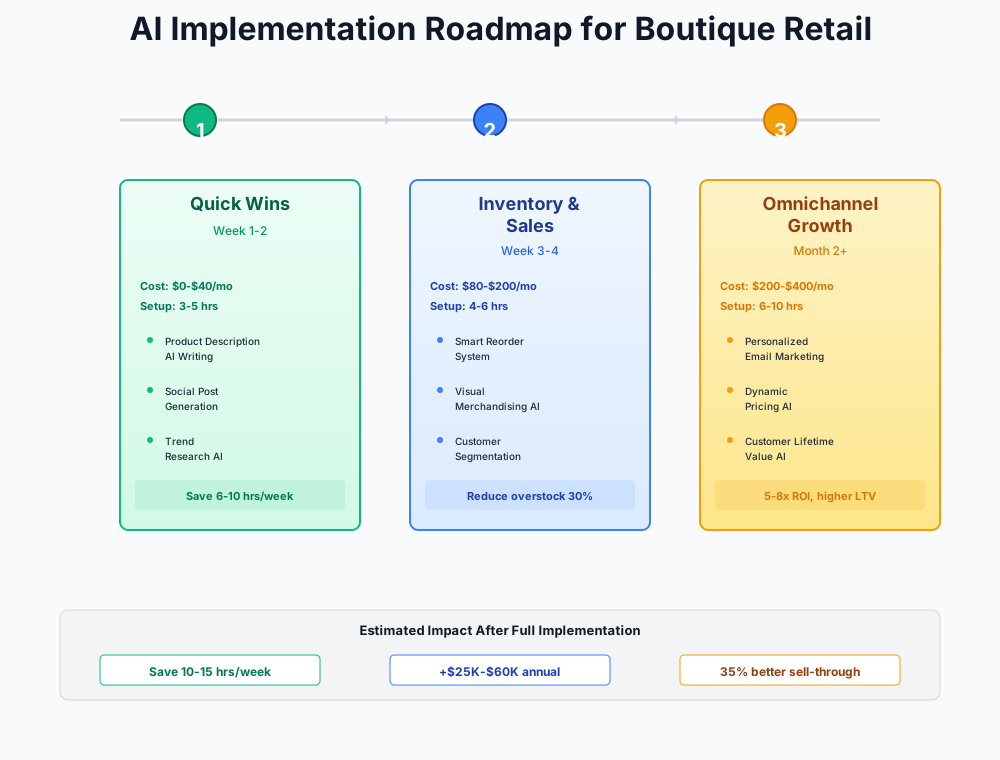
- Day 1: Log into Shopify admin — activate Shopify Magic, write descriptions for 10 pending products, and try Background Remover on 3 photos
- Day 2: Create a free Claude.ai account — batch-write this week's 7 Instagram captions in one 20-minute session
- Day 3: Log into Faire.com — navigate to Settings, connect your POS (5-minute setup)
- Day 4: Sign up for Homebase free at joinhomebase.com — add your team, enable shift reminders, publish next week's schedule
- Day 5: Measure your baseline — how many hours did content take this week? How long did your last product listing take? Record these numbers.
- Week 2: Continue using Shopify Magic and Claude daily — build the habit before adding new tools. Create a Prompt Library note on your phone.
- Week 3: Start Klaviyo free account — connect Shopify, build Welcome Series and Abandoned Cart flows
- Week 4: Upgrade to Canva Pro ($15/mo) — set up Brand Kit and create your 5 core content templates. Set up ManyChat with one Comment-to-DM flow.
- Month 2: Start Later for weekly batch scheduling. Sign up for Pebblely free. Optimize Klaviyo flows based on 30-day data.
- Month 3+: Start Endear 14-day trial (connect POS, identify top 100 customers). Start Prediko trial if you have 12+ months of Shopify history.
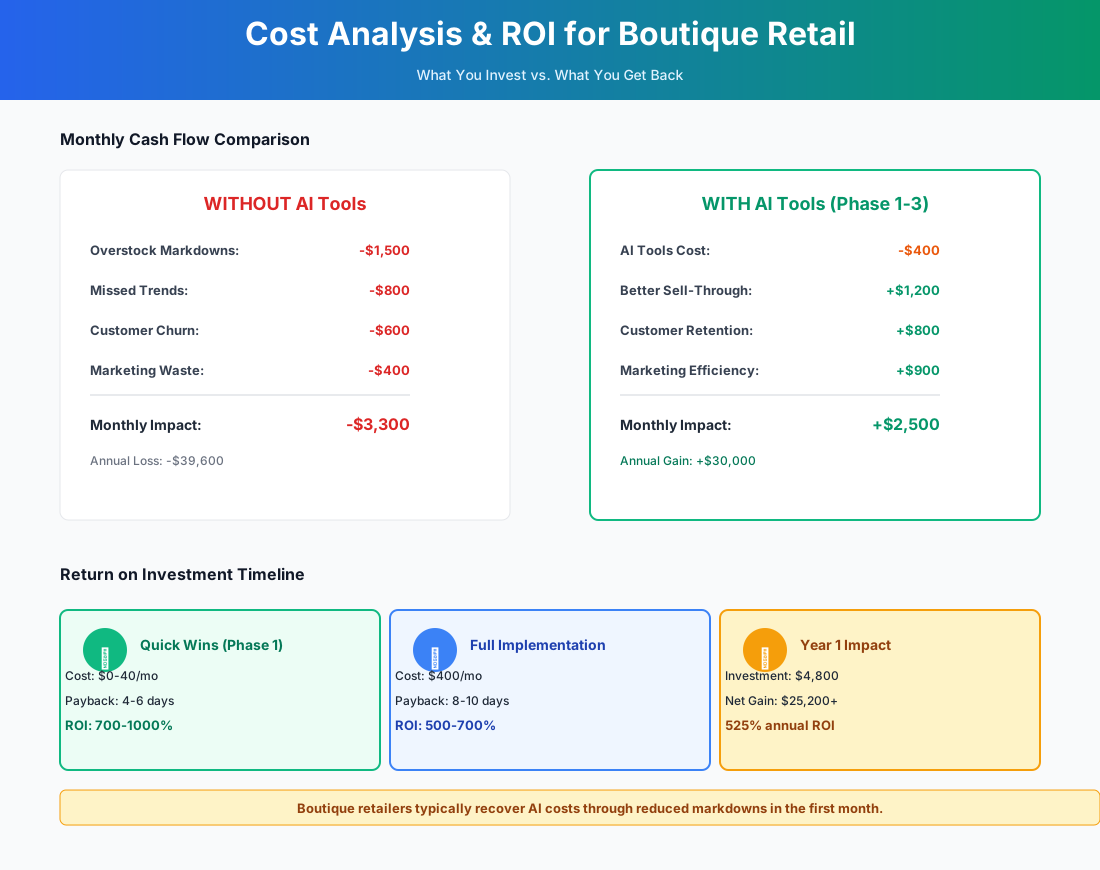
The entry stack — Shopify Magic, Claude, Faire, Homebase — costs $0–$20/month and recovers 13–20 hours a week. The full stack at $350–$695/month, once you've built each habit before adding the next tool, can recover $40,000–$120,000 annually through reduced dead stock, improved repeat purchase rates, and hours redirected from admin to the floor.
Frequently Asked Questions
Will Shopify Magic actually match my brand voice, or will everything sound the same?
Out of the box, no — it produces competent but generic descriptions. The fix is fast: use the tone selector for the right register, then add one sentence that only you could write. A styling note, a reference to how it fits, a line about what made you carry it. That sentence takes 20 seconds and is the difference between a catalog entry and a recommendation from someone with taste. After a few weeks editing AI drafts, you'll know exactly what to keep and what to rewrite. The whole review runs about 30 seconds per listing.
How do I manage Faire AI recommendations against a fixed open-to-buy budget?
Cap new-vendor AI picks at 15% of your seasonal open-to-buy. Use Faire's Net-60 payment terms on any first order from a brand you haven't carried before — that preserves cash while you test sell-through. After two full seasons, you'll have actual data comparing AI-recommended picks against your instinct picks. Most buyers find the algorithm is well-calibrated on price point and poorly calibrated on aesthetic fit for their specific customer.
What happens to my Klaviyo post-purchase flows when inventory turns over each season?
This is the question most people don't ask until a customer clicks a "you might also like" recommendation and lands on a sold-out clearance item. Set a calendar reminder at each seasonal changeover: audit every active flow, update product recommendations, swap imagery, and pause any flow referencing items you no longer carry. Klaviyo's Catalog feature can pull from current Shopify inventory dynamically if you configure it to filter by availability — that's the cleaner long-term setup.
My store is 90% in-person. Do these tools still make sense?
More than you'd expect, because most of them are invisible to customers. Shopify Magic, Claude, Canva, Homebase, and Prediko improve how you operate — they don't change what customers experience in the store. Klaviyo email is indistinguishable from a hand-crafted message. Endear actually improves in-store interactions by giving every associate immediate access to purchase history and style notes — customers feel remembered even when a different person is helping them. The only optional tool here is Tidio's website chat, and that's only relevant if your online traffic warrants it.
ManyChat just sent a customer a DM about a dress we sold out of in-store. How do I prevent that?
Real-time inventory sync is the root issue. The fix: ManyChat DMs should link to the Shopify product page (which reflects current inventory) rather than stating availability directly. Phrase it as "Tap here to check availability and shop" rather than "Available in S, M, L." Train staff to update Shopify inventory immediately after an in-store sale on any item that's recently been featured in posts. Shopify's POS-to-online sync handles this automatically if both systems are connected.
Is Prediko worth $119/month when my POS already generates sales reports?
POS reports tell you what happened. Prediko tells you what's about to happen — which items are trending toward dead stock while you still have time for a 20% strategic markdown rather than a 60% clearance scramble. If it prevents $2,000 in unnecessary deep markdowns per season, that's $4,000 recovered against a $1,428 annual cost. The catch is real: it requires 6–12 months of clean sales history. Without that, use Claude for manual analysis and revisit next season.
How personal is "too personal" for AI-drafted clienteling messages?
The line is specificity. A message that says "I saw these pieces and thought of you" reads as a mass blast. A message that says "These came in and I immediately thought of the suede jacket you picked up in March — they'd layer perfectly" reads as personal, regardless of how it was drafted. Use Endear's customer notes to make every message hyper-specific. The AI does the drafting; you make sure every message has at least one detail that could only apply to that person.
Running a practice with a retail component — optical, spa, or specialty food? Our guides for optometry practices and pet stores cover inventory and client-relationship strategies that map cleanly to boutique operations.
More AI Implementation Guides
Best AI Tools for Independent Bookstores (2026)
Compare the best AI tools for independent bookstores in 2026: cut content creation from 15 hrs to 5, slash event no-shows by 40%, and out-market Amazon.
AI Tools for Pet Stores: Chatbots & Price Tracking
Independent pet stores: AI Shopify chatbots, price tracking tools, smart inventory, and loyalty automation. Beat big-box chains with this step-by-step plan.
AI Tools for Breweries: The 2026 Owner's Playbook
The best AI tools for breweries in 2026: cut TTB compliance time, tighten COGS, streamline taproom scheduling, and target release marketing — starting free.
AI Tools for Bookkeeping Services: 2026 Guide
Best AI tools for bookkeeping services in 2026: Automate categorization, reconciliation, and document chasing without hiring extra staff.
AI Tools for Marketing Agencies: 2026 Playbook
The best AI tools for marketing agencies in 2026. A phased plan to kill Hell Week reporting, scale content, and fix billable utilization without new hires.
AI Tools for Home Health Care Agencies: 2026 Guide
A practical 2026 guide to AI tools for home health care agencies — HIPAA-safe automation for shift-filling, OASIS-E documentation, EVV, and claim denials.
Keep exploring
See every AI implementation guide we've published for Retail, or browse the full library by industry or category. Looking for a specific platform? The AI tools directory indexes every product mentioned across our guides, and the comparisons hub puts the most-asked head-to-heads side by side.