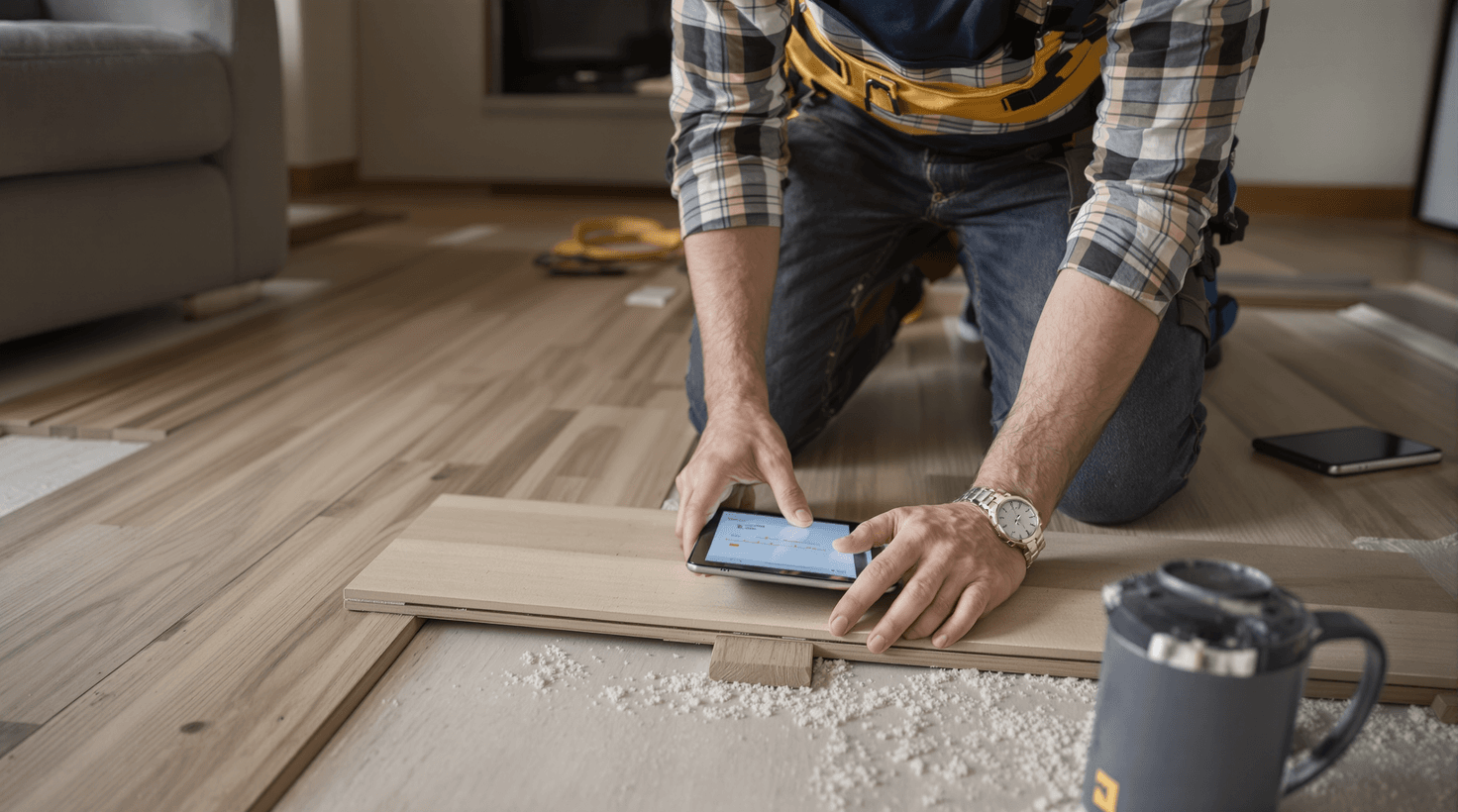
Picture a flooring installer's Tuesday afternoon: both knees on a concrete slab, adhesive on both hands, phone buzzing somewhere in a work bag three feet away. It rings again. And again. By the time the crew breaks for water, there are four missed calls — and one of those callers has already booked with somebody else.
That scenario is not an edge case. A ServiceTitan analysis of over 50,000 contractor phone lines found that home service businesses miss roughly 60% of inbound calls during business hours; other industry trackers put the all-hours average closer to 25–30%. Either way, flooring companies — crews with their hands full and no dedicated office staff — tend toward the higher end. At an average ticket of $3,000–$8,000 for a residential install, those aren't inconveniences. They're $10,000 to $40,000 worth of booked revenue you never saw.
The missed-call problem is the biggest single revenue leak in the flooring business — and it's the first thing this guide addresses. But it's connected to a second problem that's almost as costly: the gap between "I measured the job" and "the customer has a quote in hand." Most flooring companies still operate on a 24–48 hour quote cycle. The fastest ones send quotes before they leave the driveway. Guess who wins the job.
This guide is organized around those two realities: capture every lead, and quote it before the homeowner has time to call anyone else. The tools, the setup steps, and the ROI math are all here.
TL;DR — Top 3 Recommendations
- Set up AI response templates now (free) — respond to every lead in under 60 seconds, even from a job site
- Deploy Housecall Pro with CSR AI ($149-$350/mo) — never miss another phone lead while you're on your knees installing hardwood
- Add MeasureSquare for digital estimating (~$54/mo) — deliver same-day quotes with accurate waste calculations instead of losing jobs to faster competitors
The Flooring Business in 2026
The US flooring installer industry encompasses roughly 104,000 businesses generating around $34 billion annually (IBISWorld), with the residential sector representing the majority of market volume. If you're reading this, you're likely running a company with 3-20 employees doing somewhere between $400K and $3M a year, constantly balancing residential projects against the commercial work that could make your month.
A few realities shape the competitive landscape right now:
- Skilled installers are hard to find. Nearly three-quarters of flooring contractors report turning down work because they couldn't staff it, and only a small fraction of flooring apprentices are under 25 — the labor shortage is structural, not seasonal, which means every crew-hour is precious and overstaffing isn't a real option.
- Resilient flooring (LVP and similar) dominates. Resilient flooring now holds more than a third of US flooring market dollars, and LVP specifically has grown from roughly a fifth to around 30% of residential installations over the past several years — reshaping what skill sets your crew needs and which install speeds are even achievable.
- Lead platforms are non-exclusive by design. Angi and HomeAdvisor charge roughly $15–$100+ per lead depending on trade and market, and the same prospect typically gets sent to anywhere from three to eight competitors. Speed of response is the only differentiator you can control.
- Material prices have been volatile. Hardwood, LVP, and tile prices have swung anywhere from the teens to well over 30% depending on material and year — a quote that sits for two weeks is a margin risk, not just a sales risk.
Most flooring companies run on QuickBooks, Google Calendar (or a whiteboard), a personal cell phone, and sometimes MeasureSquare or Floorzap. A meaningful share still rely on spreadsheets or fully manual methods for estimating rather than purpose-built software. The gap between what's being used and what's available is where the biggest gains are hiding.
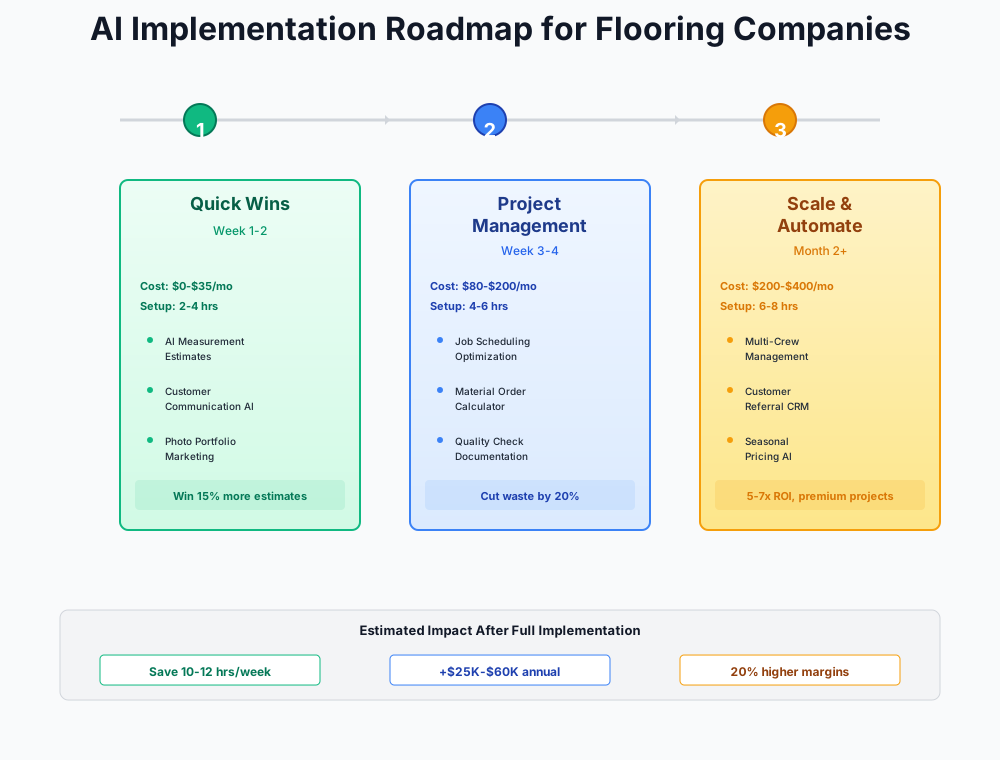
Here's a visual overview of the implementation phases:
Getting Your House in Order: Weeks 1–2
Before spending a dollar on software, there are five things you can fix tonight using tools you already have or that cost nothing. These aren't "nice to haves" — they're the foundation every paid tool builds on.
Lead Response Templates That Live on Your Phone
A widely-cited Harvard Business Review analysis of over 2 million sales leads found that contacting a web lead within one hour makes you roughly 7x more likely to qualify that lead than waiting until the next day. When you're on a job site with a nail gun in your hand, you're not drafting professional emails — but you could be texting a pre-written template in 15 seconds.
Use Claude or ChatGPT to create a library of 8–10 pre-written response messages, then save them as text shortcuts on your phone. The shortcut "flrlead1" can expand to your full LVP inquiry response. Brief your office manager on the same shortcuts.
Write 8 professional text message templates for a flooring company responding to different types of leads:
- Website form submission for LVP install
- Angi lead for hardwood refinishing
- Google inquiry for tile bathroom
- Referral from a past customer
- Commercial property manager inquiry
- Follow-up after no response to initial quote
- Follow-up 48 hours after in-home estimate
- Re-engagement for a lead that went cold 2 weeks ago
Keep each under 160 characters where possible. Include [CUSTOMER NAME] and [YOUR NAME] placeholders. Tone: friendly, professional, not salesy. We're a local flooring company, not a call center.
One evening of setup, and you're recapturing leads that would've gone to whoever answered first. At an average job value of $3,000–$8,000, even one or two extra closed jobs a month makes this the highest-ROI hour you'll spend this year. Cost: nothing.
QuickBooks AI Features You're Already Paying For
QuickBooks is the most widely used accounting platform among flooring contractors, but most haven't turned on the AI features included in their subscription. Three worth enabling today:
- Smart bank feed categorization — AI learns to sort materials, labor, subcontractor payments, fuel, and insurance automatically. Saves up to 12 hours/month on bookkeeping.
- Payments Agent — Auto-sends reminders at 3 days, 7 days, and 14 days overdue. No more awkward "hey, you haven't paid yet" phone calls.
- Cash flow forecasting — Predicts your cash position based on outstanding invoices and recurring expenses. Critical when you're carrying $8–12K in materials for a commercial job.
QuickBooks Online
Best for: Every flooring company — you probably already have it
The AI features are free upgrades to your existing plan. Enable automated transaction categorization, payment reminders, and cash flow forecasting. The Plus plan ($140/month after Intuit's latest price increase) adds job costing and 1099 management for subcontractors — essential for flooring businesses.
Takes 30 minutes to turn on. The Payments Agent alone reduces average collection time by 5 days — meaningful when you're carrying $8–12K in materials on a commercial job.
Batch-Create Social Content from Job Photos
Every flooring company has a phone full of incredible before-and-after photos. Almost none of them make it to social media consistently. Consistent posting drives organic leads that cost $0 compared to $15–$80 per lead from Angi.
Write 12 Instagram/Facebook captions for a flooring company. I'll describe each job below. Make each caption conversational and authentic — like a proud contractor sharing their work, not a marketing agency. Include 3-4 relevant hashtags and end with a soft call to action. Vary the tone: some educational, some proud, some about the customer's reaction.
Job 1: Whole-home LVP installation in a 1960s ranch, medium oak color, customer had two golden retrievers Job 2: Herringbone tile pattern in a master bathroom, white Carrara marble look Job 3: Red oak hardwood refinish, dark walnut stain, 1920s craftsman home Job 4: Commercial LVP in a 3,000 sqft dental office, grey stone look Job 5: Carpet-to-hardwood conversion in a living room, customer cried when she saw it Job 6: Waterproof LVP in a finished basement that previously flooded
Schedule 3 posts per week using Meta Business Suite (free). Twenty minutes once a month replaces $500–$2,000 a month in paid lead spend with organic traffic over time.
Room Visualization on Your Website — Free
Customers want to see what their floor will look like before committing to a $5,000–$15,000 purchase. Roomvo's AI-powered room visualizer is free for dealers when the flooring manufacturer participates in their Partner Program — Shaw, Mohawk, Armstrong, and Mannington are all confirmed partners.
Roomvo
Best for: Flooring retailers and contractor-retailers selling major manufacturer brands
Customers upload a room photo and instantly preview flooring products in their space. The Roomvo PRO app lets you use the visualizer during in-home estimates — a powerful closing tool for hesitant buyers. Shoppers who use the visualizer are 5x more likely to convert.
Install takes 1–2 hours: sign up at get.roomvo.com, embed a single JavaScript snippet on your website, and download the PRO app for in-home appointments. If your brands aren't Roomvo partners, Floori (pricing available on request) offers a similar solution with its own product catalog. Roomvo reports a 15% annual sales increase for dealers who adopt it.
Installation Checklists That Survive Subcontractor Turnover
Callbacks from subcontractor quality inconsistency cost $500–$2,000 per incident. Most companies have no standardized checklist — quality depends entirely on which crew shows up. That's a liability, not a staffing preference.
Create a detailed quality control checklist for LVP (luxury vinyl plank) installation in a residential home. Organize into three sections:
Pre-Installation Checks:
- Subfloor flatness within 3/16" per 10ft
- Moisture meter readings (concrete: under 5 lbs per MVER; wood: under 12% MC)
- Acclimation confirmation (48 hours at room temperature)
- Existing damage documentation with photos
- Transition planning for adjacent rooms
During Installation Checks:
- Expansion gaps (1/4" minimum at all walls and fixed objects)
- Stagger pattern minimum 6-inch offset between end joints
- Click-lock engagement verified every 3 rows
- Transitions and T-moldings at doorways
Post-Installation Checks:
- Debris cleanup
- Customer walkthrough items
- Before/during/after documentation photos
- Signed completion acknowledgment
Format as a one-page numbered checklist with crew lead signature line and date.
Generate separate checklists for LVP, hardwood, tile, and carpet. Print 50 copies, laminate a master, keep stacks in every work van. Expect $1,000–$3,000/month in reduced warranty costs and 2–4 fewer hours a week on dispute calls. Print cost: under $20.
ROI Snapshot
Monthly Cost
$0/mo
Time Saved
14hrs/week
Monthly Value
$7,800
ROI
Infinity%
The Phone Problem and the Quote Problem: Month 1–2
These are the two leaks that bleed the most revenue from flooring companies, and they're related. You miss the call because you're on-site. You lose the job because your quote took three days. Fix both here.
Never Miss Another Lead Call
You're on a job site installing hardwood when your phone rings. You can't answer — your hands are covered in adhesive. The caller gets voicemail, hangs up, and calls the next flooring company on Google.
How often does this happen? Housecall Pro has reported that field service contractors miss a significant share of inbound calls during peak job hours (7 AM–5 PM). At an average ticket of $4,500, losing just one job a month to a competitor who answered first costs roughly $54,000 in annual revenue. That's not a rounding error.
Housecall Pro's CSR AI answers every call and text 24/7, qualifies the lead (project type, timeline, square footage), books an estimate appointment, and creates a follow-up task with a conversation summary. You review the summaries between jobs and call back hot leads first.
Housecall Pro
Best for: Flooring companies with 2-15 employees wanting an all-in-one platform
Field service management with a full AI Team suite: CSR AI for 24/7 call answering, Analyst AI for real-time business reporting, Coach AI for improvement insights, and Marketing AI for automated campaigns. 57% of AI users report it has helped grow their business.
If you're already using Jobber for scheduling, their AI Receptionist add-on (around $29/month on top of your base plan, and bundled free on Jobber's higher tiers) covers the same ground and keeps everything in one platform. Both integrate with QuickBooks. See how other trades use Jobber in our plumbing business guide and HVAC guide.
Setup is seven steps:
- Start Housecall Pro's 14-day free trial — Essential plan at $149/month (annual billing); CSR AI is a separate paid add-on (pricing not publicly listed — ask during trial)
- Enable the CSR AI add-on for 24/7 call answering with a dedicated phone number
- Configure your business profile: service area, flooring types you install, typical lead times, estimate booking calendar
- Set the AI to collect: project type (LVP, hardwood, tile, carpet), approximate square footage, timeline, new construction vs. replacement
- Forward your main business number or update Google Business Profile with the new number
- Test it yourself — call from a personal phone and adjust responses based on the experience
- Connect to QuickBooks Online for automatic invoice syncing
Don't Forget to Update Everywhere
When you switch to a Housecall Pro phone number, update it on your Google Business Profile, website, business cards, vehicle wraps, and Angi/HomeAdvisor profiles. A disconnected old number loses leads permanently.
Same-Day Quotes Win More Jobs
The measure-to-quote gap is where flooring companies quietly lose work they think they're winning. A homeowner calls two companies on Friday afternoon. Company A finishes the in-home measurement Saturday morning and sends a quote Sunday night. Company B sends the quote before leaving the driveway on Saturday. Company B wins most of the time — not because they're cheaper, but because they moved first.
Manual takeoffs with tape measures, paper notes, and Excel take 24–48 hours to become a formal quote. Measurement errors cause material over-ordering ($200–$800 wasted per job) or under-ordering, which delays the job and frustrates the customer.
MeasureSquare's mobile app uses your phone's LiDAR sensor (iPhone 12 Pro and newer) to capture room dimensions, auto-calculates material quantities with industry-standard waste factors, generates seam diagrams, and produces a professional quote — while you're still standing in the customer's kitchen.
MeasureSquare
Best for: Residential and commercial flooring contractors needing purpose-built estimating
Purpose-built AI flooring estimating software. AI Takeoff reads commercial blueprints and auto-draws room boundaries — cuts drawing time by ~50% per project. AR measurement via mobile LiDAR for in-home estimates. Auto-generates seam diagrams, tile layouts, waste calculations, and 3D models.
For commercial blueprint work, pair MeasureSquare with Beam AI (iBeam) — upload PDF floor plans and receive QA-reviewed material quantities within 24–72 hours. Beam AI has moved to an annual license model priced by trade and bid volume (no longer per-sheet; contact ibeam.ai for current pricing). JBG Flooring reports saving up to 2 days per commercial takeoff.
A few configuration details worth getting right from the start:
- Configure waste factors per material: LVP (7–10%), hardwood (10–15%), tile (10–15% straight lay / 15–20% diagonal), carpet (5–10%)
- Build your material library with the 10–15 products you install most, including your actual cost and retail price per square foot
- Practice on 2–3 upcoming estimates before going live with customers — measure rooms both manually and digitally to build confidence
- Create a branded quote template with warranty info, payment terms, and material specs
Waste Factors Matter More Than You Think
The default 10% waste factor is insufficient for diagonal tile patterns, complex room layouts, or hardwood with significant grain matching requirements. Set waste factors per material type during setup — this single configuration prevents the most common source of margin erosion in flooring estimating.
MeasureSquare saves 4–8 hours a week and recovers $1,500–$4,000/month from reduced material waste and jobs you win by quoting faster. At roughly $54/month, it pays for itself in the first estimate.
Job Site Photo Documentation for Warranty Protection
When a customer calls 8 months later claiming their new LVP is buckling, you need to prove the subfloor was flat and dry when you installed it. Without systematic photo documentation, it's your word against theirs — and manufacturers won't honor warranty claims without pre-installation condition photos.
CompanyCam gives every crew a standardized, timestamped, GPS-tagged documentation system. The entry-level Core plan covers core photo documentation; the Crew tier and above add AI voice-to-report (installers narrate on-site, AI generates a field report) and AI Photo Summary. Start with Core and upgrade once the documentation habit is established.
CompanyCam
Best for: Flooring companies dealing with subfloor disputes, warranty claims, or subcontractor QC
Job site photo documentation with GPS-tagged, timestamped photos that auto-organize by project. AI voice-to-report and AI Photo Summary are available on the Crew tier and above — the base Core plan covers core photo documentation. Integrates with Jobber, Housecall Pro, ServiceTitan, and Builder Prime.
Similar to how painting companies use CompanyCam for surface prep documentation and general contractors rely on it for multi-trade coordination, flooring companies get the most value from documenting pre-installation subfloor conditions — the evidence that protects you in every warranty dispute.
Mandatory photo protocol for every job:
- Before photos of existing floor and subfloor condition
- Moisture meter readings displayed on the meter face
- Acclimation documentation (material in room with date/time)
- During-installation progress shots
- Completed installation photos
- Customer walkthrough/approval signature
Most flooring companies recover far more in warranty disputes they'd previously been losing than the cost of the software. At $63–$129/month depending on tier, it typically covers itself on the first dispute it helps you win.
ROI Snapshot
Monthly Cost
$400/mo
Time Saved
12hrs/week
Monthly Value
$8,400
ROI
2000%
Building a Reputation and a Crew: Month 3–6
With calls captured, quotes out same-day, and documentation systematized, the next phase is the compounding work: building a local reputation that reduces what you spend on paid leads, and solving the installer shortage before it caps your growth.
Turn 50 Google Reviews into a Lead Magnet
Each full star of Google rating is worth roughly 40% more conversions industry-wide, and top-rated local businesses see meaningfully more map-pack clicks than lower-rated competitors — so moving from 4.2 to 4.8 stars is a real, measurable lead-volume gain, even if the exact percentage varies by market. Most flooring companies ask for reviews verbally at job completion — when the homeowner is admiring their new floor — and never follow up. Verbal requests convert at about 5–10%. Texted links convert at 20–30%.
Before automating anything, test the manual version for 30 days: create a Google review short link (search "Google review link generator"), save it as a text shortcut ("flrreview"), and text it to every customer at job close. Once you've confirmed that texted requests actually generate reviews, automate it.
Birdeye
Best for: Flooring companies under 50 Google reviews or with a rating below 4.5 stars
AI-powered review management used by 150,000+ local businesses. Automated review requests via SMS/email, AI-generated review responses, sentiment analysis, and competitive benchmarking against local flooring competitors. Birdeye's own case studies report review-volume increases well above 100% for actively-managed profiles, though exact results vary by market and starting review count.
Birdeye sends the review request text within minutes of invoice payment. AI drafts responses to every review so your profile looks actively managed. Aim for 100+ reviews within six months. Most flooring companies sit under 50, which means this single move can flip your local search position entirely. At roughly $299+/month, it's worth roughly $2,000–$8,000/month in organic leads that replace what you've been paying Angi for.
The Installer Hiring Problem
Flooring contractors widely report difficulty finding skilled installers — recent trade surveys put the share of contractors who've turned down work for lack of crew above 70%. The ones who are available get multiple offers within days. The hiring advantage goes to whoever responds first — and that's a solvable problem.
Team Engine
Best for: Flooring companies actively hiring who lose candidates to slower-responding competitors
AI-powered recruiting for blue-collar industries. Automates job posting across Indeed, ZipRecruiter, Facebook Jobs, and Craigslist simultaneously. AI chatbot engages applicants instantly via text 24/7, screens for trade-specific criteria, and schedules interviews automatically. Clients report hiring 40% faster.
Not ready to pay for Team Engine yet? Write a compelling posting first (free with ChatGPT), post it manually, and respond to every application by text within 2 hours. Once you've confirmed the posting generates real applicants, automate the distribution.
Write a job posting for an experienced LVP and hardwood flooring installer. This is for a well-reviewed residential flooring company (4.9 stars on Google) in [YOUR CITY].
Requirements: 3+ years of flooring installation experience, own basic tools, reliable transportation. Pay: $28-$38/hour based on experience, W-2 or 1099 negotiable.
Emphasize: consistent year-round work, positive crew culture, no micromanagement, work-life balance (home by 5 most days). Make it sound like a real person wrote it — not a corporate HR department. Include what makes working here better than the 4 other flooring companies also hiring right now.
Each filled installer position generates $8,000–$15,000/month in installable revenue. Spending $500+/month to fill a seat faster than a competitor isn't a cost — it's leverage.
Pipeline Visibility When You Have a Dedicated Estimator
If you have a dedicated estimator or sales rep — not just the owner doing estimates — Builder Prime gives you visibility into your entire sales pipeline: pending estimates, quotes needing follow-up, close rates, and where leads are falling through.
Builder Prime
Best for: Flooring contractors with dedicated sales staff needing home-improvement-specific CRM
CRM built for home improvement contractors with a dedicated flooring industry configuration. Manages leads from Angi/HomeAdvisor intake through signed contract. Automated SMS/email response in under 60 seconds, smart follow-up sequences, and KPI dashboards across leads, sales, and production.
If you're doing fewer than 5 estimates per week and the owner handles all sales, Housecall Pro's built-in CRM from the previous phase is sufficient. Builder Prime shines when you have 2+ salespeople and 20+ estimates per month — the per-user pricing structure means the platform cost gets spread across a team that's actually using the pipeline visibility.
Configure automated follow-up sequences: instant response to new leads (under 60 seconds), 48-hour follow-up after estimate, 7-day "checking in," and 14-day final follow-up with a limited-time incentive. Expect $2,000–$6,000/month from closed jobs that would have been lost because nobody remembered to call back.
ROI Snapshot
Monthly Cost
$1100/mo
Time Saved
10hrs/week
Monthly Value
$10,000
ROI
809%
Pitfalls Worth Calling Out
ServiceTitan under $1M annual revenue is overkill. ServiceTitan doesn't publish pricing, but contractor-reported costs run roughly $250–$400 per technician per month with a 4–8 week implementation timeline. Housecall Pro or Jobber deliver 80% of the value at a fraction of the cost. Revisit ServiceTitan when you have 5+ crews and dedicated office staff.
Podium at $399–$599/month is the wrong starting point for reputation management. Start with the free manual method (texting Google review links), then move to Birdeye (from $299/month) or NiceJob ($75/month). Only consider Podium if you specifically need its text-to-pay features.
Don't send AI-generated quotes until you've validated the waste factors. An estimate with a wrong waste factor damages your credibility more than a slow-but-accurate manual quote. Practice MeasureSquare on 5–10 jobs before using it for customer-facing output.
AI-generated content always needs a 30-second human scan before sending. A generic-looking AI response to a heartfelt five-star review signals to customers that nobody actually read what they wrote. Read it, tweak it, then post.
Getting Started: Your First Two Weeks
- Create a free ChatGPT or Claude account and generate 8-10 lead response templates (45 minutes)
- Save templates as text shortcuts on your phone — test by sending yourself one (15 minutes)
- Log into QuickBooks Online and enable smart bank categorization, Payments Agent, and cash flow forecasting (1 hour)
- Check if your flooring brands are Roomvo partners at get.roomvo.com — if yes, sign up and embed the visualizer on your site (1-2 hours)
- Generate quality control checklists for each flooring type you install, print 50 copies per type (1 hour)
- Start Housecall Pro or Jobber free trial, enable AI call answering, forward your business number (2-3 hours)
- Sign up for MeasureSquare free trial, complete onboarding tutorial, practice on 2-3 upcoming estimates (3-5 hours)
- Install CompanyCam on every crew lead's phone, establish mandatory photo protocol (1-2 hours)
- Create a Google review short link and text it to your last 10 completed customers this week (30 minutes)
- Set a calendar reminder for 30 days: 'Evaluate Phase 2 tools — keep, adjust, or cancel free trials'
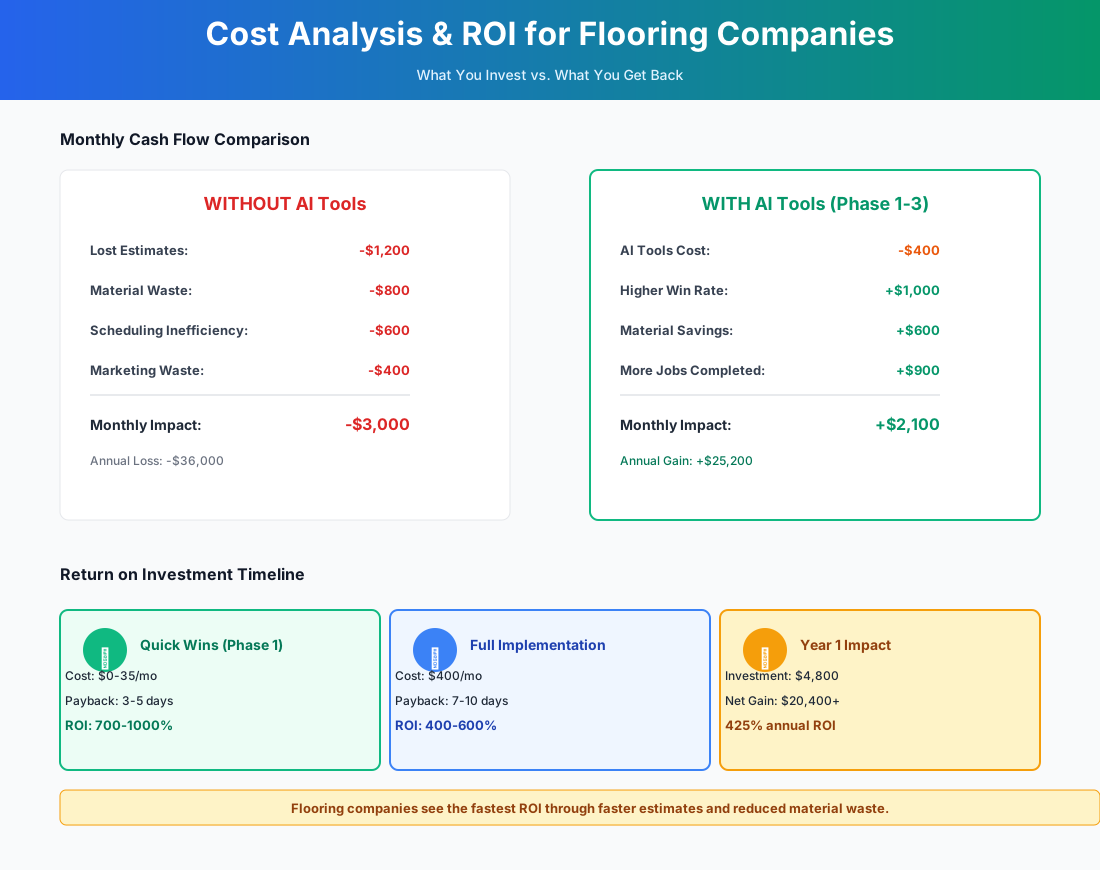
Here's a breakdown of the costs and expected returns:
Frequently Asked Questions
How accurate is LiDAR measurement for rooms with lots of angles — L-shapes, alcoves, bay windows?
For standard rectangular rooms, MeasureSquare's LiDAR measurements are accurate within 1–2%, comparable to a laser distance meter. L-shaped rooms and alcoves measure accurately too — the app handles irregular polygons well. Where you still need to apply judgment is waste factor settings, not room dimensions. A diagonal tile pattern in a non-rectangular room needs a 15–20% waste factor, not the default 10%. The time savings come from automatic quantity calculations and seam diagrams; the skill of reading a complex layout doesn't disappear, it just takes less time to execute.
What's the real story on dye-lot risk when AI tools auto-calculate material quantities?
This is one of the genuine limitations of digital estimating. When MeasureSquare auto-calculates that you need 847 square feet of Shaw Floorté LVP, it doesn't know that your local distributor only has 600 sqft from the same dye lot. Always verify dye-lot availability with your distributor before confirming the order — and order 100% of the material from a single lot. If you can't get a full lot match, have that conversation with the homeowner before installation day, not after half the floor is down and the seam is visible under kitchen lighting. The AI speeds up quantity calculation; dye-lot coordination is still a phone call to ProSource or your distributor.
Will an AI receptionist push away homeowners calling about a $15,000 hardwood install?
Less than you'd expect. Modern AI call answering sounds conversational — think Google Assistant, not a 2015 phone tree. More important: the AI isn't replacing your sales conversation. It captures the lead, collects project basics, and books the estimate appointment. The homeowner talks to you for the actual consultation. The real comparison isn't human vs. AI — it's AI vs. voicemail. About 80% of callers who reach voicemail hang up and call the next company on the list. The AI wins that comparison every time.
How do I protect margins when material prices change between quote date and install date?
No AI tool currently tracks real-time distributor pricing for flooring materials at the SKU level — that functionality is still enterprise-only. The practical defense: quote with a 30-day material price guarantee (standard in the industry), include a clause that material costs beyond 30 days are subject to re-quote, and order materials within a week of signed contract. QuickBooks' cash flow forecasting can model the impact of price swings on outstanding quotes. The emerging AI supply chain tools are expected to reach SMB flooring contractors in late 2026 or 2027 — until then, speed is the best hedge. Quote fast, close fast, order fast.
I'm a solo operator with one helper. Which tools actually make sense for my size?
Weeks 1–2 only, at first. The response templates, QuickBooks AI features, and Roomvo visualizer are all free and built for a one-or-two-person operation. If you add one paid tool, make it Housecall Pro Essential ($149/month) with CSR AI — it replaces the office manager you don't have. MeasureSquare (~$54/month) is the second add. Skip Builder Prime, Team Engine, and Birdeye until your volume justifies them. A two-person crew running the free tools plus Housecall Pro is better positioned than a 10-person company running on a cell phone and a spreadsheet.
My subcontractors won't use apps. How do I get CompanyCam documentation without a fight?
Tie it to payment. Add a clause to your subcontractor agreement: final payment requires completed CompanyCam documentation including pre-installation subfloor condition, moisture readings, and post-installation walkthrough photos. Subs who resist accountability are the ones generating your warranty callbacks. The crews who adopt it fastest are usually the ones who've already been burned by a dispute where they had no evidence — once a sub loses $3,000 on an unwinnable claim, they become CompanyCam advocates without any persuasion from you.
Two things separate the flooring companies winning in local search from the ones fighting over Angi leads: they answer the phone, and they quote faster than anyone else in the market. Every tool in this guide is aimed at one of those two outcomes.
The response templates and QuickBooks features cost nothing and take an evening. Start there, today, before you evaluate anything with a monthly fee. The paid tools earn their keep — but they compound on a foundation you have to build first.
Running a shop that also handles hardscape or outdoor renovations? Our landscaping company guide covers the estimating and lead-capture tools that work for that side of the business too.
More AI Implementation Guides
AI Tools for Pressure Washing Businesses (2026 Guide)
The best AI tools for pressure washing businesses in 2026. Capture missed calls, quote via satellite, automate follow-up, and win more jobs without ad spend.
AI Tools for Junk Removal Companies: 2026 Owner's Guide
The 2026 guide to AI tools for junk removal companies — answer every call, quote a pile from a photo, optimize routes, and cut tipping fees. Start free.
AI Tools for Pool Service Companies (2026 Guide)
The complete 2026 guide to AI tools for pool service companies — route density, chemistry dosing, AI phone answering, and a premium IoT monitoring tier.
Best AI Tools for Pest Control Companies (CSR & Routes)
AI CSRs, smarter routing, automated reviews & EPA-compliant chemical logs for pest control companies. Tool picks + step-by-step setup, starting free today.
AI Tools for Cleaning Services: 2026 Guide
Best AI tools for cleaning services in 2026. Cut admin hours in half, fill schedule gaps, convert more leads, and scale your team step by step.
Best CRM & AI Marketing Tools for Fence Companies
Compare CRM & AI marketing tools for fence companies. Cut quote turnaround from days to minutes, never miss a lead call, automate follow-up. Pricing inside.
Keep exploring
See every AI implementation guide we've published for Trades & Contractors, or browse the full library by industry or category. Looking for a specific platform? The AI tools directory indexes every product mentioned across our guides, and the comparisons hub puts the most-asked head-to-heads side by side.