You lose the booking before you ever pick up the camera. That's the part nobody talks about.
A couple inquires on a Saturday afternoon. You're shooting a wedding. By Sunday morning, when you finally reply, they've already had a 20-minute video call with another photographer who responded at 6 PM Saturday. Your work is better. Your price is fair. Doesn't matter — you never got the conversation.
Then there's the other end of the job. You shot a beautiful 8-hour wedding. Now you're 18 days into post-production, staring at 1,847 raw files in Lightroom, exhausted eyes skipping over frame 623 of Uncle Dave mid-blink, and you still have 1,200 frames left. Two portrait sessions have shot since then and are waiting their turn. Your delivery deadline was two weeks ago.
These two pressure points — slow inquiry response and the post-production grind — are where most photography studios quietly bleed revenue and reputation. This guide is built around fixing both, using AI tools that exist right now, cost under $150/month combined, and don't require you to learn anything technical.
TL;DR — Top 3 Recommendations
- Aftershoot (from $10/mo) — AI culling drops a 6-hour wedding cull to 20 minutes. Start here.
- HoneyBook ($19/mo) — Automated workflows respond to inquiries in minutes, not hours. Stop losing leads.
- Pic-Time ($25/mo) — Automated print sale campaigns add $500–$3,000/client without you lifting a finger.
The Two Workflows That Run Your Business (And Where AI Actually Helps)
Before picking tools, it's worth being honest about where your hours actually go. A typical solo photographer running 2–3 weddings per month plus portrait work spends their week roughly like this:
- Shooting: 40% — sessions, weddings, events
- Editing and culling: 30% — the single biggest time drain
- Admin and marketing: 20% — emails, invoicing, social media, contracts
- Client communication: 10% — consultations, prep guides, follow-ups
That culling and editing block — 30% of your week — is where AI delivers the most dramatic return. The table below shows what actually happens to post-production time when photographers adopt AI culling and editing profiles:
| Workflow Stage | Manual Time (Wedding) | With AI Culling | With AI Culling + Editing Profile |
|---|---|---|---|
| Culling 1,800 raw files | 4–7 hours | 15–25 minutes | 15–25 minutes |
| Editing 500 selects | 18–28 hours | 18–28 hours | 3–6 hours (review only) |
| Total post time | 22–35 hours | 19–29 hours | 4–8 hours |
| Delivery timeline | 5–8 weeks | 4–6 weeks | 2–3 weeks |
And on the inquiry side, booking conversion drops sharply the longer you wait:
| Response Time | Booking Conversion Rate |
|---|---|
| Under 1 hour | 68–74% |
| 1–4 hours | 48–55% |
| 4–24 hours | 28–35% |
| Over 24 hours | under 15% |
The math on both: a photographer who cuts post time from 30 hours to 8 per wedding frees up roughly 22 hours of post-production per wedding — capacity you can reinvest in more shoots, faster delivery, or simply your weekends. (How much of that translates into actual added bookings depends on your shooting calendar and sales pipeline, not edit time alone.) A photographer who responds in under an hour instead of next-day tends to convert a meaningfully higher share of inquiries. You don't need to accomplish both at once — but both levers are worth understanding before you decide where to start.
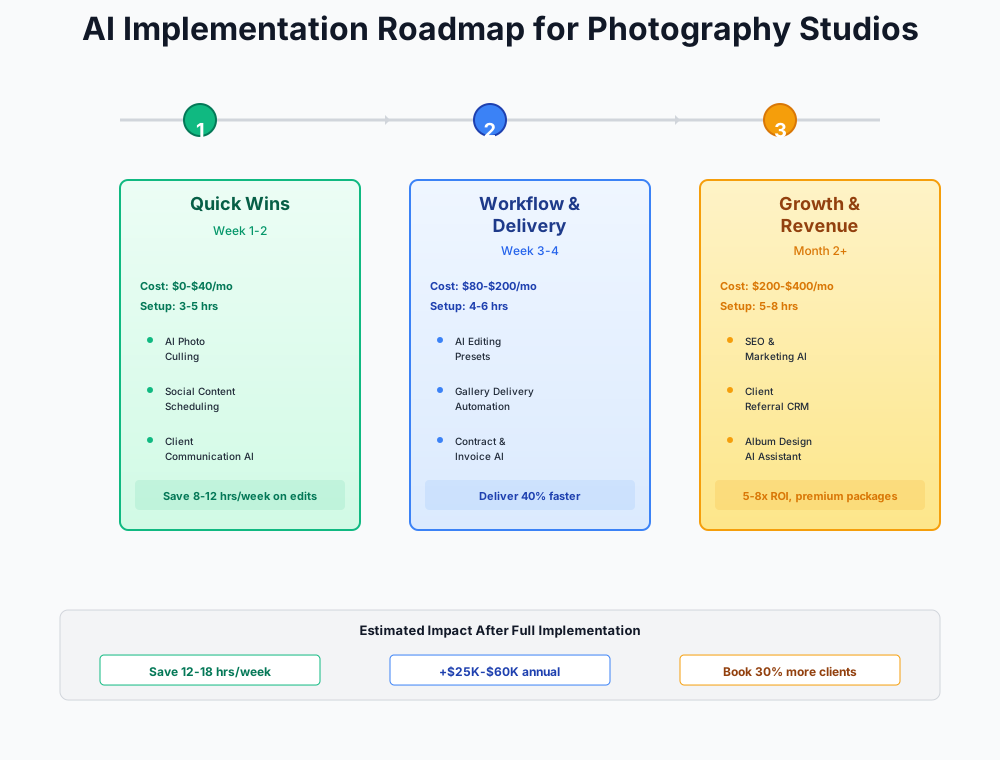
Here's a visual overview of the implementation roadmap:
The First Week: Culling and Instant Inquiry Response
These two moves cost $0–$10/month. Combined setup time is about 3–5 hours. Start with whichever problem is hurting you more right now.
AI Culling — The Fastest ROI in Photography
If you do nothing else from this guide, do this. A typical wedding cull takes 3–8 hours. With Aftershoot, that same task takes 15–25 minutes. You're not removing your judgment from the process — you're removing the clicking.
Aftershoot's AI identifies the best shots, removes near-duplicates, flags closed eyes, and detects blur. What comes out is a curated set to review. You still approve every image that goes into the final gallery. You just skip 90% of the mechanical work to get there.
Aftershoot
Best for: Wedding and portrait photographers shooting 2+ sessions/week
AI culling + editing + retouching in one flat-fee subscription. The Selects plan ($10/mo billed annually) covers AI culling; Essentials ($20/mo billed annually) adds AI editing with marketplace styles. Learns your personal editing style from your existing Lightroom catalogs. Works offline — no cloud upload required. Pro plan ($40/mo billed annually) adds unlimited AI editing with your own custom style profile.
How to run your first cull:
- Download Aftershoot from aftershoot.com — the 30-day free trial requires no credit card
- Import your most recent wedding or portrait session (RAW files) into Aftershoot
- Run AI Cull — the software sorts images into "select," "maybe," and "reject" piles
- Spend 10–15 minutes reviewing the AI's selections, overriding any you disagree with
- Export your selections directly into Lightroom Classic or Capture One for editing
- After 2–3 sessions, compare your culling time before and after — most photographers see a 50–70% reduction immediately
Don't skip the "maybe" pile on your first few runs. Some of your best candid shots land there before the AI learns your style preferences.
Alternative worth knowing: FilterPixel ($19/month flat rate, no per-image charges) is the better value if you're shooting 5+ weddings per month.
ROI Snapshot
Monthly Cost
$10/mo
Time Saved
10hrs/week
Monthly Value
$4,000
ROI
39900%
Faster Inquiry Response Without Being Chained to Your Inbox
Open ChatGPT or Claude right now. Paste this prompt for your last three real inquiries and see what you get. If the output is good enough to send with minor edits, you've just solved your response time problem for free.
The workflow is simple: create a library of 5 saved prompts for your most common communications. Keep them in a Google Doc or as canned responses in your CRM. When an inquiry comes in — even from your phone between setups — you can paste, personalize in 90 seconds, and send before a competitor has finished reading their email.
I'm a wedding photographer in [City] known for [your style — e.g., documentary, fine art, moody editorial]. A couple named [Name] just inquired about wedding photography for [date] at [venue]. My wedding packages start at $[X].
Write a warm, enthusiastic response that:
- Acknowledges their venue choice with something specific (if you've shot there, mention it)
- Briefly describes my approach and what makes my coverage different
- Mentions my starting package price without being salesy
- Invites them to a 15-minute phone or Zoom call to discuss their vision
- Keeps it under 150 words and avoids sounding like a template
Tone: friendly, confident, not desperate for the booking.
I'm a [portrait/family/senior] photographer in [City]. My client [Name] has a [session type] booked for [date] at [location].
Write a detailed but friendly prep guide email covering:
- What to wear (colors that photograph well, patterns to avoid, coordinating without matching)
- How to prepare kids (nap schedule, snacks, favorite toy for bribing)
- What to bring (outfit changes, props, personal items)
- Timeline expectations (how long the session takes, when to arrive)
- Weather backup plan
- What happens after the shoot (editing timeline, gallery delivery)
Keep it warm and reassuring — many clients are nervous about being photographed. Under 300 words.
Build prompts for: inquiry response, booking confirmation with prep guide, gallery delivery, review request, and past-client re-engagement. Five prompts cover 80% of the client communication you do every week.
Cost: Free. Time saved: 3–5 hours/week on email alone.
Use Adobe Firefly Features You're Already Paying For
You're paying $55/month for Adobe Creative Cloud but probably only using 30% of its AI capabilities.
Firefly's tools are already in your Photoshop subscription. Three worth opening today: Generative Remove eliminates distracting background elements; Generative Expand extends canvas edges for album layouts where you need a wider composition than you shot; and the conversational AI assistant edits from plain-language descriptions ("brighten the subject's face and add more background blur").
The most immediately useful of the three for working photographers is Generative Expand. Album designers use it constantly to turn vertical portraits into horizontal spreads without awkward cropping. Try it on five recent client images before anything else.
Quick Win
Generative Expand solves one of album design's most annoying problems. Instead of awkwardly cropping a vertical portrait to fit a horizontal album spread, expand the canvas and AI fills in the rest naturally.
Cost: $0 additional (included in your Creative Cloud subscription). Time saved: 2–3 hours/week on retouching and compositing.
Business Automation: Bookings, Marketing, and Print Sales
With culling time cut, the next question is: what do you do with those recovered hours? Investing 5–8 of them into automation setup pays back permanently. These tools cost $75–$250/month combined and generate direct revenue through faster bookings, higher print sales, and consistent marketing.
Stop Losing Leads With a CRM That Works While You Shoot
Every wedding inquiry that sits unanswered for 24 hours has a 78% chance of booking someone else. Each lost wedding booking costs $3,000–$6,000. If you're losing even 2–3 per year to slow follow-up, that's $6,000–$18,000 left on the table — and that's a conservative estimate for photographers under $5,000/wedding.
HoneyBook
Best for: Full-time photographers wanting an all-in-one client management platform
AI-powered CRM with automated workflows, AI Composer for email drafting, Smart Files (interactive proposals where clients select packages, sign contracts, and pay in one document), and instant lead response automation. The most popular CRM in the photography industry.
Sprout Studio
Best for: Photographers wanting photography-specific AI tools built into their CRM
The only CRM with AI tools designed specifically for photographers — including an AI questionnaire builder and AI email writer. Combines CRM, galleries, invoicing, contracts, album proofing, and email marketing in one platform.
Three automations to build before anything else:
- Instant inquiry response: New inquiry arrives → auto-send acknowledgment email + pricing PDF within 5 minutes
- Booking workflow: Client selects package → auto-send contract + invoice → upon signing + payment → auto-send welcome questionnaire + prep guide
- 48-hour follow-up: If an inquiry doesn't respond to pricing within 48 hours, automatically send a friendly check-in
If you're already using HoneyBook or Dubsado but haven't configured automations, you're paying for a sports car and driving it in first gear. Spend 3–4 hours building your first workflows and you'll recover 5–8 hours per week permanently.
I'm a [wedding/portrait] photographer. A potential client named [Name] received my pricing guide 48 hours ago but hasn't responded.
Write a gentle, non-pushy follow-up email that:
- References their original inquiry naturally (don't say "I noticed you haven't responded")
- Adds a small piece of value they didn't get in the first email (a tip about their venue, a recent testimonial, or a behind-the-scenes detail about your process)
- Creates soft urgency without being salesy (mention that your [season] calendar is filling up, if true)
- Ends with a specific, easy call to action ("Would a 10-minute call on Thursday or Friday work?")
- Under 100 words — shorter is better for follow-ups
Tone: warm, patient, confident.
Like other creative service businesses such as hair salons, event planners, and boutique retailers, photography studios live and die by how quickly they respond to inquiries. The difference is that a single lost wedding booking costs more than a month of lost haircut appointments.
End the Feast-or-Famine Cycle With Consistent Marketing
Most photographers post on Instagram when they remember and never email past clients. The result: fully booked in spring and fall, scrambling in January and July.
The stack that solves this without requiring you to become a content creator: Canva Pro ($15/month) for content creation + Later ($25/month) for scheduling + Flodesk ($19/month) for email campaigns to past clients.
The monthly content batch workflow:
- Block 2 hours on the first Monday of each month
- Use Canva's Magic Write to generate 10–12 Instagram captions at once
- Create matching graphics using Canva's photography templates + your recent session images
- Upload everything to Later and schedule 3 posts per week using the Best Time to Post feature
- Done. Your social media runs on autopilot for the entire month.
Write 10 Instagram captions for a [wedding/portrait/headshot] photographer in [City]. Mix these types:
- 3 portfolio showcases (emotional, story-driven captions about the session)
- 2 behind-the-scenes stories (what it's actually like at a shoot)
- 2 educational tips for clients (what to wear, how to prepare, best time of day)
- 2 personal/relatable posts (photographer life, why you love this work)
- 1 soft promotional post (mini-session announcement or booking CTA)
Each caption should be 50–100 words with a hook in the first line. Include 5 relevant hashtags per caption. Avoid generic phrases like "capturing memories" or "freezing moments in time."
Set up two automated email sequences in Flodesk once and forget them:
- Past-client anniversary re-engagement: Sends 11 months after their session offering a discounted anniversary or update session. Photographers using this report a 15–25% repeat booking rate.
- Gallery delivery + review request: Auto-sends 7 days after gallery delivery with a direct Google review link.
Flodesk
Best for: Photographers wanting beautifully branded email campaigns with HoneyBook integration
Designed for creative entrepreneurs with best-in-class visual templates. Native HoneyBook integration means your client list stays in sync automatically. Automated sequences for past-client re-engagement, gallery follow-ups, and holiday mini-session announcements.
One more thing on marketing: don't sleep on Pinterest. Unlike Instagram posts that die in 24–48 hours, Pinterest pins drive traffic for years. Wedding and portrait photographers get long-term SEO value from pinning venue-specific and seasonal content. If Pinterest is a significant traffic source for you, consider Tailwind ($19.99/month) — an official Pinterest Marketing Partner with analytics specifically designed for that platform.
Automated Print Sales: The Revenue You're Currently Leaving on the Table
Most photographers deliver a digital gallery, send a "let me know if you need anything" email, and walk away. That approach leaves $500–$3,000 per client in uncaptured print sales. Not because clients don't want prints — because nobody followed up at the right moment.
Pic-Time
Best for: Photographers wanting automated print sales without manual follow-up
Client gallery platform with the most powerful built-in print sales automation. AI-curated campaigns trigger automatically based on client behavior: abandoned cart emails, early-bird discounts within 48 hours of gallery delivery, and gallery expiration countdowns. 25+ print lab partners with photographer-set markups.
The four campaigns to configure first:
- Early-bird print sale: Triggers 24–48 hours after gallery delivery with a limited-time discount
- Abandoned cart recovery: If a client adds items to their cart but doesn't purchase, an automated email brings them back
- Gallery expiration countdown: Reminders at 30 days, 14 days, and 3 days before the gallery closes
- Favorites follow-up: Nudges clients who've favorited images but haven't ordered
Set print markups at 3–4x lab cost — not 2x, which barely covers overhead. And don't disable gallery expiration out of fear of upsetting clients. The expiration is what creates urgency. Be upfront about it in your delivery email: "Your gallery is available for 90 days. I'll send a reminder before it closes."
ROI Snapshot
Monthly Cost
$25/mo
Time Saved
2hrs/week
Monthly Value
$2,600
ROI
10300%
Finishing the Post-Production Problem: AI Editing Profiles
Once culling is handled, the remaining post-production bottleneck is editing time. Culling a 1,800-image wedding from 5 hours to 20 minutes is dramatic. But you're still editing 500 selects, and that takes 18–28 hours if done manually.
AI editing profiles solve the second half. You train the AI on your existing Lightroom catalogs — your specific color grading, exposure preferences, how you handle mixed lighting, your skin tone adjustments. After training on 1,000–2,000 of your edited images, the AI replicates your decisions on new shoots. You review rather than edit from scratch.
How to build your profile:
- Export 1,000–2,000 of your best-edited images from recent Lightroom catalogs
- Upload to Aftershoot Pro ($40/month billed annually) or Imagen AI ($0.05/photo) for AI profile training
- Run your next portrait session through the profile — review every image carefully on the first run
- After 3–5 sessions, you should be accepting 85–95% of edits without changes
The cost comparison matters here. A 2,000-image wedding at Imagen AI's $0.05/photo rate costs $100 per wedding. Aftershoot Pro at $40/month is unlimited. If you're shooting 2+ weddings per month, Aftershoot Pro saves $160+/month over Imagen. If you shoot 1 wedding per month with smaller portrait sessions between, Imagen's pay-as-you-go model often costs less. Run the numbers for your actual shoot volume.
For portrait retouching specifically, Evoto AI specializes in skin smoothing, blemish removal, and teeth whitening with batch processing. Credits are only deducted at export, so you can experiment freely.
Train on Your Best Work Only
Don't train your AI profile on inconsistently edited galleries. Use only work where you were happy with the final result. The AI replicates whatever you feed it — your best work or your worst.
With AI culling plus AI editing profiles working together, total post time per wedding drops from 22–35 hours to 4–8 hours. That means delivering galleries in 2–3 weeks instead of 6–8 — which clients notice, mention in reviews, and tell their engaged friends about.
ROI Snapshot
Monthly Cost
$45/mo
Time Saved
15hrs/week
Monthly Value
$7,500
ROI
16567%
Pricing, SEO, and Client Consultations
What You Actually Need to Charge
Most photographers undercharge — not by a little, but by 15–40% — because almost nobody accurately calculates their cost of doing business. When you factor in editing time (now dramatically reduced), equipment depreciation, software subscriptions ($200–$400/month), insurance, and self-employment taxes (15.3% on top of income tax), the real hourly rate on a $4,000 wedding package often falls below $50.
Picsello
Best for: Photographers struggling with pricing — the Smart Profit Calculator alone justifies the cost
All-in-one platform with a unique AI-powered Smart Profit Calculator built on 4+ years of photography business data. Input your actual expenses, desired salary, target sessions, and working hours — it calculates the exact price floor you need to be profitable. Also includes booking, galleries, invoicing, and automated emails.
Here's the thing about raising prices: it's much less scary when you can show the client what they're getting for the money. Responding in under an hour. Delivering galleries in 2 weeks. Print campaigns with beautiful automated reminders. Premium experience justifies premium pricing. Run the Picsello Smart Profit Calculator first — most photographers find they need to raise prices 15–40% just to cover actual costs.
For bookkeeping, QuickBooks ($15–$35/month) with AI transaction categorization handles the expense tracking that most photographers either ignore or pay their accountant to sort out quarterly. It learns your photography expense patterns and flags the sales tax question that trips up many studios: several states require sales tax on digital files, and QuickBooks AI catches these inconsistencies before they become a problem.
Local SEO: Getting Found Before the Inquiry
Your website probably doesn't rank for "[your city] wedding photographer." Without venue-specific and seasonal blog content targeting local keywords, you're invisible to the 30–50% of clients who discover photographers through Google search before they ever reach Instagram.
Focal
Best for: Photographers wanting AI-generated SEO blog posts designed for local search
Photography-specific platform with AI blog generation that creates locally-optimized posts based on your shooting locations and specialties. Also includes website builder, client booking, contracts, and galleries.
Write a 1,500-word blog post about [Venue Name] wedding photography in [City, State]. I'm a wedding photographer who has shot at this venue [X] times.
Include:
- Best photo locations at this venue (specific spots, not generic)
- Ideal timing for golden hour based on the venue's orientation
- Practical logistics: parking, getting-ready rooms, ceremony-to-reception flow
- Weather considerations and backup indoor spots
- 2-3 specific tips only someone who's shot there would know
- A natural call-to-action to book a consultation
Write from my first-person perspective. Include the phrase "[City] wedding photographer" naturally 2-3 times. Make it genuinely useful for couples researching this venue — not just SEO filler.
Blog content takes 2–4 months to rank, but then compounds without ongoing cost. One well-written venue post can generate inquiries for years. Similar to how bakeries use local SEO to own searches like "best bakery near me," photographers can own venue-specific queries that bring in warm leads before those clients even know your name.
Stop Losing Shot List Details in Client Consultations
During discovery calls, you're trying to listen to the client's vision, take notes on shot lists, and build rapport simultaneously. Details slip. That specific comment about the grandmother who can't stand for long — gone by the time you open your notes app.
Otter.ai (free — 300 minutes/month) automatically transcribes and summarizes every client call. After the call, you have a searchable transcript and key action items. Before a shoot, search the client's name to refresh on everything they mentioned: family dynamics, must-have group shots, that uncle who shouldn't sit near the aunt.
Cost: Free. Setup: 15 minutes.
A Few Things Worth Saying Directly
Don't replace your entire editing workflow with AI overnight. Run AI editing alongside your normal process for the first 3–5 sessions. Compare results side by side. Your reputation depends on consistent quality, and you need to trust the tool before relying on it for client deliverables.
Don't use AI to generate fake portfolio images. AI-generated photos in your portfolio is deceptive and will destroy client trust faster than anything else. Use AI for editing efficiency — never for creating shots that didn't happen.
The AI headshot threat is real but specific. AI headshot generators ($25–$50) are capturing the budget LinkedIn headshot market — people who want a decent photo and don't care about the experience. They're not touching the executive branding market ($500–$2,000+), corporate team headshot days ($200–$400/person at volume), or clients who value direction and confidence coaching. If your headshot business relies on $150 basic headshots, you'll feel the squeeze. The move is upmarket: executive branding packages, corporate team headshot days, personal branding shoots with wardrobe and location variety. An algorithm can't tell someone to relax their jaw.
Getting Started Checklist
- Download Aftershoot (free 30-day trial) and cull your next session with AI — time yourself before and after
- Create 5 saved prompts in ChatGPT/Claude for your most common client emails (inquiry response, prep guide, gallery delivery, review request, re-engagement)
- Open Photoshop and try Generative Remove and Generative Expand on 5 recent client images
- Set up your first CRM automation: instant inquiry acknowledgment + pricing guide auto-send (HoneyBook or Sprout Studio)
- Build a 48-hour follow-up automation for inquiries that don't respond to pricing
- Sign up for Pic-Time and configure automated print sale campaigns (early-bird, abandoned cart, gallery expiration)
- Block 2 hours on the first Monday of each month for content batching with Canva + Later
- Set up a Flodesk automated sequence: past-client anniversary re-engagement at 11 months
- After 3-5 sessions with AI culling, upgrade to Aftershoot Pro and train your personal AI editing profile
- Run the Picsello Smart Profit Calculator to find out what you actually need to charge
- Publish your first venue-specific SEO blog post using the ChatGPT/Claude prompt above
- Connect Otter.ai to your calendar for automatic client call transcription
Start with items 1–3 — they're free and take under 2 hours combined. Then tackle 4–6 in your second week. By month two, you'll have reclaimed 15–20 hours per week and added measurable revenue from faster bookings and automated print sales.
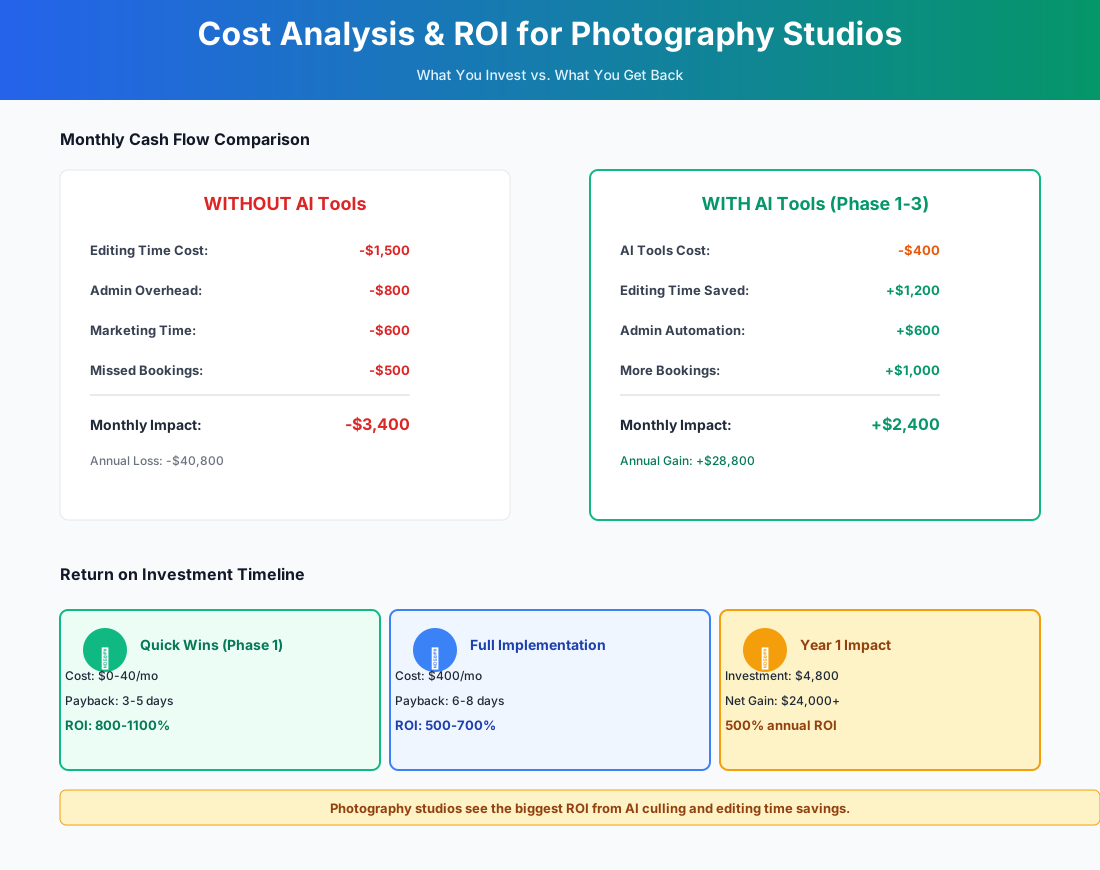
Here's a breakdown of the costs and expected returns:
FAQ
Can AI editing profiles actually match my specific color grading style, or will my work look generic?
This is the most common concern — and the most unfounded. Tools like Aftershoot and Imagen AI don't apply a generic Instagram filter. They train on your actual Lightroom catalog: your specific color temperature preferences, your contrast curves, how you handle mixed lighting, your skin tone adjustments. After training on 1,000–2,000 of your edited images, the AI replicates your decisions with 85–95% accuracy. You always review before delivery. Think of it as cloning your editing brain, not outsourcing your eye.
I shoot tethered in-studio — do AI culling tools work with tethered workflows, or only after import?
Post-import only, for the most part. Aftershoot, FilterPixel, and Narrative Select all work after you've completed the session and imported the full set. The exception for portrait retouching is Evoto AI, which supports tethered shooting and is useful for headshot days where you want to show clients retouched previews in real-time. For tethered studio work, the typical flow is: shoot tethered to Capture One or Lightroom → complete the session → run AI culling on the full set → review in 10–15 minutes.
How do I handle copyright when AI tools modify my images — does the AI own any rights?
No. Under current U.S. copyright law (as of 2026), you retain full copyright on images you photograph and edit, regardless of whether AI tools assisted in post-processing. AI editing tools modify your original photographs; they don't create new works. Adobe Firefly is specifically trained on commercially licensed content, making it safe for client work. Keep your standard model and property releases in place for commercial usage, and note in your contracts that you use industry-standard editing tools. You don't need to disclose "AI" unless your contract specifically requires technology disclosures.
What if Aftershoot or Imagen AI shuts down — do I lose my trained editing profile?
Your Lightroom catalogs stay on your machine. That's your training data, and no platform can take it. If Aftershoot disappeared tomorrow, you'd retrain on Imagen or Narrative Select using the same catalogs within a few hours. As a precaution, keep your Lightroom presets maintained alongside your AI profile. You always want a manual fallback.
My contracts promise 6–8 week delivery. If AI cuts editing time by 70%, should I advertise faster turnaround?
Yes — but set the new commitment conservatively. Move your contractual delivery promise to 3–4 weeks, not "within days." Delivering in 2–3 weeks when you promised 4 creates a genuine surprise. Promising 1 week and delivering in 2 creates disappointment. The larger opportunity: faster turnaround drives referrals and reviews while the wedding is still emotionally fresh. Couples who get their gallery within 3 weeks post on social media immediately, tag you, and tell their engaged friends. That organic visibility compounds in a way no ad spend replicates.
Is the AI headshot threat to portrait photographers actually serious, or is it overblown?
Serious for one specific market segment. AI headshot generators at $25–$50 have effectively taken the budget LinkedIn headshot market — people who want a functional professional photo and don't care about the experience. They haven't touched the executive branding market, corporate team headshot days, or clients who need wardrobe coaching, confidence direction, and multiple looks. If your portrait revenue depends heavily on $150 basic headshots, the pressure is real and will increase. The answer isn't to compete on price — it's to move the offering somewhere an algorithm can't follow.
More AI Implementation Guides
Best AI Tools for Event Planning Companies: 2026 Playbook
Boutique planners lose leads to slow replies and burn out on 3-hour proposals. Here's the 2026 AI playbook for event planning companies that actually scales.
AI Tools for Breweries: The 2026 Owner's Playbook
The best AI tools for breweries in 2026: cut TTB compliance time, tighten COGS, streamline taproom scheduling, and target release marketing — starting free.
AI Tools for Bookkeeping Services: 2026 Guide
Best AI tools for bookkeeping services in 2026: Automate categorization, reconciliation, and document chasing without hiring extra staff.
AI Tools for Marketing Agencies: 2026 Playbook
The best AI tools for marketing agencies in 2026. A phased plan to kill Hell Week reporting, scale content, and fix billable utilization without new hires.
AI Tools for Home Health Care Agencies: 2026 Guide
A practical 2026 guide to AI tools for home health care agencies — HIPAA-safe automation for shift-filling, OASIS-E documentation, EVV, and claim denials.
AI Tools for Dermatology Practices: 2026 Guide
The best AI tools for dermatology practices in 2026 — cut prior-auth hours, reduce no-shows, and grow your cosmetic line, with a HIPAA-first rollout plan.
Keep exploring
Browse the full library by industry or category, see every product we cover in the AI tools directory, or read the head-to-head comparisons.