
A customer once told a bookseller at a small shop in Portland that she'd been to three other stores before finding this one. She wasn't looking for a specific title. She was looking for someone who could tell her what to read next. She spent $110 and came back the following Saturday.
Amazon can't do that. No algorithm can do that. And the roughly 3,200 ABA-member indie bookstores operating in the U.S. right now — up 70% since 2020 — have figured this out. The indie bookstore renaissance isn't a nostalgia play. It's a bet that curation, community, and the handselling conversation are worth more than free shipping.
The question isn't whether you can out-Amazon Amazon on price or logistics. You can't, and you're not trying to. The question is whether you can out-curate them — host more compelling events, send a newsletter that actually feels like it came from a person, and turn a one-time gift buyer into a weekly regular — without burning your evenings doing admin work that AI could handle in a fraction of the time.
That's what this guide is about.
TL;DR — Top 3 Recommendations
- Use ChatGPT or Claude (free) to cut newsletter and social content creation from 15 hours/week to 5. Start today.
- Move events to Eventbrite (free for free events) with automated reminders to reduce no-shows by 40-60%.
- Add Klaviyo or Brevo ($9-45/mo) for genre-segmented email automations that drive 30-50% of email revenue on autopilot.
The Curation Economy: Where Indie Bookstores Actually Win
Here's what the numbers look like that rarely appear in think-pieces about indie bookstores. Gross margin on new titles runs 40-50%. Used books and gifts run 60-80% and 45-55% respectively. That margin hierarchy matters because it tells you where your real business is — and it's not in competing with Amazon on frontlist hardcovers.
Staff picks and handselling are where indie stores punch above their weight. A bookseller recommendation converts at a dramatically higher rate than an algorithmic suggestion, and it tends to move backlist titles where margins are stronger and competition is lower. A 2023 survey by the Midwest Independent Booksellers Association found that stores with consistent, well-promoted staff pick programs reported 12-18% higher backlist sales as a proportion of total revenue compared to stores without them. Backlist sells at full margin with zero publisher co-op pressure. That's the curation advantage in dollars.
Events compound this. Customers who attend at least one author event per year visit an average of 4.1 times per month versus 2.3 times for the general customer base. Every event you host isn't just a single revenue moment — it's a multiplier on future visits. The table below shows what this translates to for a mid-sized store:
| Event type | Avg. book pre-sale per ticket | Post-event avg. basket add-on | Estimated 90-day repeat visit lift |
|---|---|---|---|
| Local author signing | $18 | $12 | +1.4 visits |
| Publisher-supported touring author | $28 | $22 | +1.8 visits |
| Monthly book club (recurring) | $24 | $9 | +2.6 visits |
| Children's storytime (free) | $0 | $31 | +1.1 visits |
Storytime attendees spend almost nothing on the event itself and reliably spend $30+ in the store afterward. That's the community flywheel: events build the relationship, and the relationship drives every other sale.
AI's job in this context is specific and narrow. It won't recommend books. It won't replace the bookseller conversation. What it will do is handle the 12-20 hours per week you're currently spending on newsletters, social formatting, used book pricing, scheduling, and bookkeeping — so you can spend that time on the floor, doing the thing that actually differentiates you.
Content Creation: Marketing That Sounds Like Your Store
Owner-curated content is a legitimate competitive advantage for indie bookstores. Your newsletter arrives in a reader's inbox feeling like a letter from a friend who happens to know a lot about books. That's irreplaceable — and it's also the task that eats more of your week than almost anything else.
Most bookstore owners spend 10-15 hours weekly on content. With AI assisting the drafting, that drops to 5-8 hours. The output gets more consistent, too — you stop skipping weeks because the blank page is daunting.
ChatGPT
Best for: All-purpose content creation — newsletters, social posts, event copy
The Swiss Army knife for bookstore content. Feed it bullet points about your staff picks, events, and new arrivals, and it drafts polished copy in minutes. You edit 20% to add your personal voice. The free tier is enough to start; Plus at $20/month is worth it if you're using it daily.
Write a bookstore newsletter for this week. Include: (1) A warm intro paragraph about [seasonal theme or local event], (2) Three staff pick highlights for these books: [Book 1, Book 2, Book 3] with 2-3 sentence blurbs each, (3) An event announcement for [Event Name] on [Date] with [Author/Topic], (4) A closing 'this week in the store' paragraph. Keep it conversational and community-focused. Total length: 400-500 words. Our store name is [Store Name] and our voice is [warm/witty/literary/nerdy — pick one].
Write a compelling 75-word staff pick recommendation for the novel [Book Title] by [Author]. The reader who loved it said they were drawn to [specific quality — e.g., 'the atmospheric setting' or 'the complex characters']. Write in a warm, enthusiastic bookseller voice that makes a browser want to pick it up immediately. Avoid spoilers.
One bookstore owner described the shift this way: the AI handles the blank-page problem, and she handles the voice. The newsletter started going out every week instead of whenever she could find three hours to write it. Weekly newsletters don't just generate sales — they signal to readers that the store is alive, active, and worth paying attention to.
One critical rule: always verify book titles, author names, and event dates in AI output before sending. AI hallucinates these details occasionally, and a wrong author name destroys credibility faster than missing a week.
BookTok Without Being on Camera
BookTok drove 59 million print book sales in 2024. Forty-five percent of TikTok users report purchasing a book after seeing it on the platform. If you're not creating video content, you're ceding territory — but most bookstore owners have no interest in being on camera, and they shouldn't have to be.
Booktook
Best for: Creating BookTok videos without being on camera
Turns a book description into a cinematic TikTok/Instagram Reel in minutes. Upload your staff pick text, the AI extracts the strongest hook, and you get a ready-to-post 9:16 vertical video. No face on camera, no editing skills required.
Buffer
Best for: Scheduling posts across Instagram, Facebook, TikTok, and Threads
Create one week's worth of social content in a single Monday morning sitting, then Buffer posts at optimal times automatically. Its AI assistant drafts platform-specific versions of the same content in one click. For 3-5 channels, expect $15-25/month on the Essentials plan.
The workflow: draft your staff pick text in ChatGPT, feed it into Booktook for a video, schedule both through Buffer. Monday morning batching replaces the daily "I need to post something" scramble. One sitting, one week covered.
A note on what actually performs on BookTok: niche backlist titles consistently outperform new bestsellers on the platform because they feel like discoveries. A video about a 2019 debut novel that nobody's talking about will outperform a Colleen Hoover video because BookTok rewards the feeling of "I found something special." That's not an accident — that's your curation advantage, expressed in a format a new audience can find.
If you're also running social content strategies for adjacent retail formats, our guide for boutique retail stores covers Buffer and content-batching adapted for fashion and lifestyle products.
Events: Your Sharpest Edge Against Amazon
Let's be honest about what's at stake with events. A Thursday night author reading with wine, good conversation, and books people can actually buy that night is something Amazon will never replicate. The existential case for events is clear. What's harder is making them operationally sustainable.
Free-RSVP events see 40-60% no-show rates. You've ordered books, set up chairs, paid staff overtime, and sent three emails — and half the room is empty. The fix isn't better promotion. It's a structural change: require a ticket, even for a free event.
Eventbrite
Best for: Ticketed events with automated reminder sequences
Even requiring a free "ticket" with an email address reduces no-shows by 40%. Add Eventbrite's automated reminder sequences (7 days, 1 day, morning-of) and you cut no-shows further. The AI description generator creates compelling listings from basic event details.
I'm hosting an author event: [Author Name] will be reading from and signing [Book Title] on [Date] at [Time]. The book is about [one-sentence description]. Write: (1) An Instagram caption (max 150 words) with a strong hook, (2) A Facebook event description (250 words), (3) A 3-sentence press release blurb for local media, (4) A subject line for our email newsletter announcement.
The book-pre-purchase-as-ticket model goes further. Many successful indie bookstores now require attendees to buy the author's book when registering. This guarantees sales, further reduces no-shows (people who've paid $28 show up), and builds real credibility with publishers' publicity departments — who send mid-list authors where they know events generate actual numbers. Connect Eventbrite to your email platform so event attendees automatically join your newsletter list. They're your highest-value prospects, and you have their email address.
ROI Snapshot
Monthly Cost
$0/mo
Time Saved
3hrs/week
Monthly Value
$1,716
ROI
Infinity%
Visual Branding Without a Designer
Canva with Magic Studio AI
Best for: Event flyers, social graphics, and brand consistency
Set up your Brand Kit once (logo, colors, 2 fonts), create 5 reusable templates (staff pick, new arrivals, event flyer, book club, sale graphic), then use Magic Resize to export for Instagram, Facebook, TikTok, and print in one click.
Customer Loyalty: Turning Browsers Into Regulars
Most indie bookstores track loyalty with paper punch cards that customers forget, lose, or never redeem. There's a deeper problem: you have no data on who your best customers are, how often they visit, or when they're starting to drift away.
Genre-Segmented Email That Sells
Your newsletter currently goes to your entire list — the mystery reader gets the same email as the children's book buyer. Retailers report that segmented emails earn 3x more revenue per email than batch-and-blast. The setup is straightforward once you have purchase history data from your POS.
Klaviyo
Best for: Shopify-based bookstores wanting purchase-driven email segmentation
AI-powered segmentation based on purchase history and genre preference. Set up three automated flows — welcome series, post-purchase recommendation ("Since you loved [Book], try..."), and win-back for customers gone 90+ days — and watch them generate revenue while you sleep. AI subject line optimization improves open rates by 15-25%.
Brevo
Best for: Non-Shopify bookstores with large email lists
Charges by emails sent, not subscriber count — ideal for bookstores with 2,000-10,000 subscribers who send weekly newsletters. Brevo's Aura AI agent generates campaign content and suggests audience segments. At $9-18/month, it's dramatically cheaper than Klaviyo for stores not on Shopify.
Start with three segments: Mystery/Thriller readers, Literary Fiction readers, and Children's/YA buyers — based on purchase history from your POS. Send genre-specific newsletters monthly alongside your store-wide weekly newsletter. Cap at 2 emails per person per week to avoid unsubscribes.
For a deeper look at how Klaviyo's segmentation features work for other small retailers, check out our guide for pet stores, which covers similar purchase-history-driven email flows.
Digital Loyalty That Gives You Actual Data
Stamp Me
Best for: Replacing paper punch cards with a data-rich digital alternative
Customers collect digital stamps on their phones. You get analytics showing visit frequency, top spenders, and lapsed customers. Automated push notifications re-engage customers who haven't visited in 30+ days. After 60 days, you'll know who your top 20% of customers are (they're likely driving 60-80% of revenue) — and you can create VIP perks for them like early access to author event tickets.
The stamp card is just the hook. The actual value is what comes after: knowing your average customer visits 2.3 times per month, and that customers who attend an event visit 4.1 times per month. That math tells you exactly how much a Thursday night author reading is worth in downstream revenue — and changes what you're willing to spend on it.
Write a friendly, personal email from [Store Name] to a customer we haven't seen in 3 months. Mention that we've gotten in some great new [their preferred genre] titles they might love. Reference one specific new book: [Book Title] by [Author] — describe it in 2 sentences. Include a soft call-to-action to stop by this week, and mention our [current event or promotion]. Keep it under 120 words. Tone: like a friend who just read something amazing, not like a marketing email.
Operations: Back-of-House Tasks That Don't Need Your Brain
The work of curating shelves and hosting events runs on a foundation of mundane operations: pricing used books, building staff schedules, reconciling accounts, managing publisher returns. None of this requires human judgment in the way that bookselling does. AI can compress these tasks substantially.
Used Book Pricing in 15 Seconds
A customer brings in 30 books. Each one needs to be evaluated, and the pricing conversation can get uncomfortable when they think their dog-eared copy of a mid-2000s thriller is worth $8. BookScouter eliminates the guesswork and, frankly, most of the argument.
BookScouter
Best for: Instant used book pricing from 30+ vendor comparisons
Scan a book's ISBN barcode with the free mobile app and instantly see buyback prices from 30+ online vendors. Set your offer at 25-35% of the lowest vendor price. Show the customer the screen — transparent, market-based pricing eliminates the "I think my books are worth more" friction. Even a brand-new hire can price used books accurately on day one.
Post a small sign at your trade-in area: "We use real-time market data to ensure fair pricing for your books." Transparency builds trust and speeds up the transaction. For books without ISBNs — pre-1970s titles, some small press editions, signed copies — BookScouter won't help. Those still require the experienced eye. But they're the minority; for the 80% of used books that have ISBNs, this tool pays for itself instantly (it's free).
Staff Scheduling Without the Group Text
Homebase
Best for: Scheduling part-time retail staff with shift swap capability
The free plan handles scheduling, time tracking, and team messaging for up to 20 employees at one location — enough for any single-location bookstore. Staff see schedules on their phones, swap shifts without texting you, and get automatic reminders. No more "I didn't know I was working today." The Plus plan ($59.95/mo) adds AI-powered schedule building.
Homebase is one of the most widely used tools across small retail businesses — our guides for boutique retail stores and bakeries also recommend it as a first step for scheduling automation. The free tier is genuinely functional, not a bait-and-switch.
Create an "Event" shift type that's separate from regular floor shifts. This lets you track event labor costs independently — crucial for understanding whether your Thursday night author readings are actually profitable after factoring in staff overtime. A lot of bookstore owners are surprised to run this number for the first time.
Cash Flow and Q4 Buying
The feast-or-famine cash cycle is the existential pressure of indie bookselling. November-December accounts for 30-40% of annual revenue. January through March is a financial desert. You need to invest heavily in inventory by October to capture the holiday season, then survive Q1 on whatever's left. AI-powered financial tools can't eliminate this cycle, but they can make it predictable.
QuickBooks Online with AI Agents
Best for: Automated categorization, cash flow forecasting, and Q4 planning
If you're among the 80% of bookstores already on QuickBooks, upgrading to Essentials or Plus unlocks AI agents. The Accounting Agent auto-categorizes transactions and flags anomalies. The Payments Agent predicts late payments and automates reminders. Most importantly, the cash flow forecasting tool uses your historical data to predict your Q4-to-Q1 position — giving you a data-driven answer to "Can I afford to order another 200 copies of that holiday gift book?"
Track separate categories for: New Books, Used Books, Gifts/Stationery, Café (if applicable), Events, and Online Sales. This granularity reveals which revenue streams are actually profitable — many bookstore owners are surprised to learn that their gift section, at 45-55% margin, is subsidizing their new book section's thinner margins.
I'm uploading our sales data from last year's Q4 (October-December). Please analyze it and tell me: (1) Which genres and titles had the highest sell-through rate, (2) Which categories were over-bought (low sell-through), (3) What quantity range to target for [specific genre] titles priced $15-$25 based on last year's velocity. Format as a buying recommendation table I can reference when placing Ingram iPage orders.
Upload your POS sales export (CSV) into Claude for this analysis — Claude handles structured data better than ChatGPT for this kind of tabular work. This replaces 3-5 hours of manual spreadsheet work with a 10-minute session, and the output directly informs your Ingram ordering decisions.
Publisher Returns: The Hidden Time Sink
No one outside the book trade ever thinks about publisher returns until they talk to a bookseller and realize it's quietly eating 4-8 hours every month. Unsold frontlist books must be identified, pulled, boxed, and returned to publishers within allowable return windows — typically 12 months. Miss a window and you're stuck with dead inventory, capital tied up with no way to recover it.
No AI tool directly automates this yet. Booklog has announced AI return-identification features in beta, but for now the best option is Claude analyzing your inventory aging report:
I'm uploading my inventory report showing title, publisher, received date, quantity on hand, and units sold. Today's date is [date]. For each title: (1) Calculate days since received, (2) Flag any title approaching the 12-month return window (within 60 days), (3) Flag any title with fewer than 2 units sold in the last 90 days as a return candidate, (4) Sort by return urgency (closest to expiring window first). Output as a table with columns: Title, Publisher, Days Since Received, Return Window Status, Units Sold (90d), Recommendation.
No other retail vertical has consignment-style return windows with publishers. It's a book-trade peculiarity, and it's exactly the kind of structured, repetitive data analysis that AI handles well.
A Few Things Worth Skipping
Skip enterprise AI search tools like Empathy.co for your website. They're built for catalogs of 100,000+ products with high traffic. A simple Tidio chatbot or good native search handles your needs until you're doing significant online volume — and most indie bookstore websites aren't there.
Skip AI inventory forecasting tools if you're on Booklog, Anthology, or CirclePOS. Tools like Prediko are Shopify-native and simply don't connect to your POS. Use Claude to analyze your exported sales data quarterly (the Q4 Buying Analysis prompt above) and wait for Booklog's announced AI features before paying separately for something that'll likely be redundant.
Skip AI ad optimization. Most indie bookstores lack the ad budget — $500+/month minimum — to make algorithmic ad optimization worthwhile. Your marketing dollars are better spent making organic content more consistent. Newsletters and events build community; paid ads build transactions. You're in the community business.
And one firm principle: don't automate your book recommendations. AI recommendation tools like Librarian.AI are genuinely useful as staff research aids for discovering titles you might recommend to customers — but the personal "I read this and couldn't put it down" conversation is your competitive moat. Use AI behind the counter, never in place of the bookseller.
Getting Started Checklist
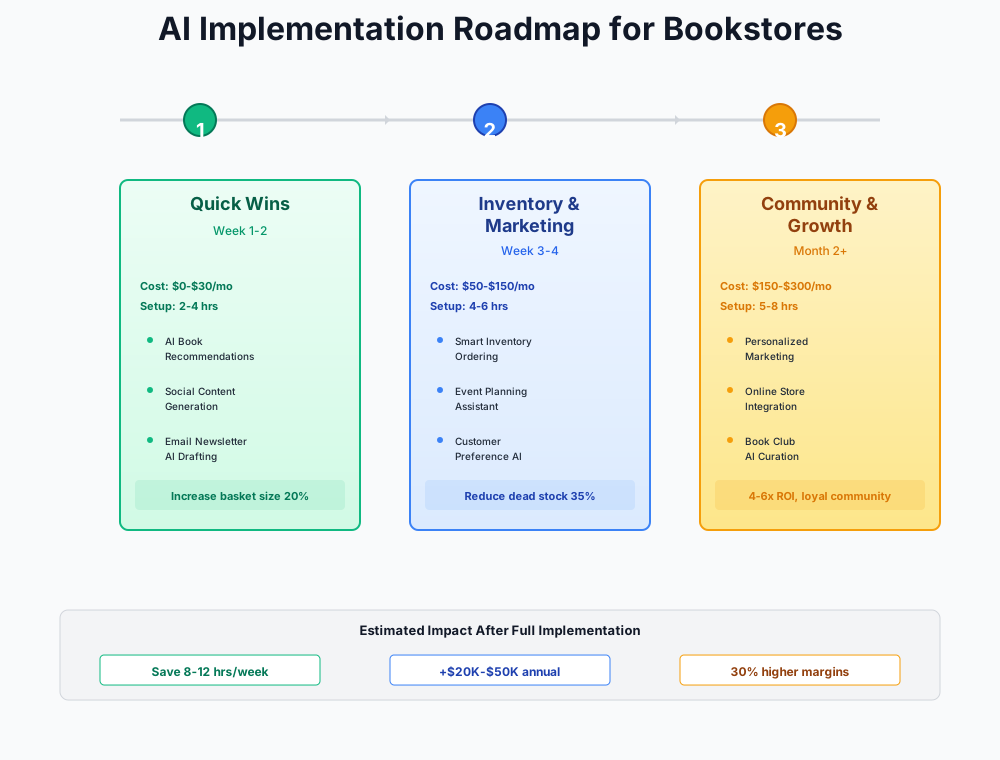
- Create a free ChatGPT or Claude account and draft this week's newsletter using the template prompt above (30 minutes)
- Download BookScouter on your phone and the phone of your most frequent used-book buyer — price 10 trade-ins to test the workflow (15 minutes)
- Sign up for Homebase free plan and build next week's staff schedule in the app (1 hour)
- Evaluate your email platform: if you're paying for Mailchimp or outgrowing its free tier, sign up for beehiiv (free, 2,500 subscribers) and migrate your list (1-2 hours)
- Create your next author event on Eventbrite instead of a Google Form — enable the automated reminder sequence (1 hour)
- Sign up for Buffer free plan, connect 3 social channels, and batch-schedule one week of posts (1 hour)
- Try Booktook: create one BookTok video from a staff pick description and post it (30 minutes)
- Set up Canva Pro Brand Kit with your store's logo, colors, and fonts — create 3 reusable templates (2 hours)
- After 4 weeks: evaluate Klaviyo (Shopify) or Brevo (non-Shopify) for genre-segmented email automation (2-3 hours to set up)
- After 6 weeks: review QuickBooks AI upgrade for automated categorization and cash flow forecasting
Items 1-4 are all free and take under 3 hours combined. Start there this week.
Frequently Asked Questions
Can AI help me decide what to order from Ingram, or is buying still a gut-feel skill?
Both — and the best buyers have always used both. AI is genuinely good at the retrospective analysis: which genres had the highest sell-through last Q4, which titles you over-bought, what quantities to target for a given price point. Upload your POS export into Claude and use the Q4 Buying Analysis prompt above. But AI can't read a galley and sense that a debut novelist is about to break out. It doesn't know that your neighborhood just got a bookish wine bar that will drive literary fiction buyers through your door. Use AI for the data patterns; trust your instincts for the curation call. That division of labor is where good indie buying lives.
What happens to my Ingram iPage workflow — does any AI tool integrate directly with book distribution ordering?
Not yet. As of early 2026, no consumer-grade AI tool plugs directly into Ingram's iPage ordering system. The practical workaround: export your POS sales data as a CSV, analyze it with Claude for buying insights, then apply those insights when placing orders in iPage. Booklog has announced beta AI features that may eventually bridge this gap. Today, it's still a two-step process.
My store uses Booklog — will these AI tools work with my existing POS?
Most of them work alongside Booklog, not inside it. ChatGPT, Buffer, Canva, and Eventbrite need no POS integration at all. For email marketing, you'll export customer purchase history from Booklog as a CSV and import it into Klaviyo or Brevo — about 20 minutes. QuickBooks sync with Booklog is manual data export rather than live, which isn't ideal but works. The real gap is AI inventory forecasting: Shopify-native tools simply don't connect to Booklog yet. Wait for Booklog's announced AI updates before paying separately for forecasting — there's no point buying something that'll be redundant in 12 months.
How do I create BookTok content when my staff doesn't want to be on camera?
Nobody has to be on camera. Booktook creates cinematic videos from text — feed it your staff pick blurb, get a ready-to-post vertical video. And some of the most-followed indie BookTok accounts are nothing but hands pulling books off shelves, aesthetically styled flat lays, and close-ups of beautiful covers. BookTok rewards content that feels like a discovery, not a commercial. A 15-second phone video of a bookseller's hands with a text overlay usually outperforms a produced talking-head video anyway.
Is there anything AI genuinely cannot help with in a bookstore?
Yes. The handselling conversation — the moment where a bookseller says "you're going to love this" based on knowing the customer, having read the book, and understanding the match — is irreplaceable. AI recommendation tools can help staff research titles, but the conversation itself is yours. The same goes for evaluating a box of used books from an estate sale where half the titles have no ISBNs and one of them might be a signed first edition. Experience and instinct still run the floor. AI runs the back office.
Our internet goes down during storms — what happens to cloud-based tools mid-transaction?
Your POS (Booklog, Anthology) should already have offline mode for checkout. For AI tools: ChatGPT, Claude, Buffer, and Canva all require internet, but none are time-critical during a transaction. Newsletter drafts save locally; scheduled social posts are already queued in Buffer's servers. The one operational risk is if you're mid-used-book-pricing with BookScouter when the connection drops — keep a printed reference sheet of your top 50 most-traded titles with approximate values as a backup. Event ticketing through Eventbrite works even when your store's internet is down because customers already have tickets on their phones.
Is it worth switching from Mailchimp to beehiiv if I only have 800 subscribers?
At 800 subscribers, you're already paying Mailchimp $20-45/month. beehiiv's free plan covers 2,500 subscribers with unlimited sends and includes an AI newsletter generator — that's $240-540/year back in your pocket, plus better writing tools. Migration takes 1-2 hours. The one reason to stay on Mailchimp: if you've built complex automation flows you can't replicate on beehiiv's free tier. At that point you'd need beehiiv Scale at $43/month, and the math becomes less clear. Run your own numbers before switching.
The stores that thrive over the next decade won't just love books more than Amazon does. They'll spend more of their time on the floor doing the things Amazon can't — and less time wrestling with scheduling spreadsheets and blank newsletter drafts. That's what this stack is designed to do: protect the hours that matter.
Running a practice with a retail component? Our guides for optometry practices and pet stores cover inventory and loyalty program AI for other specialty retail formats.
More AI Implementation Guides
Best AI Tools & Examples for Boutique Retail Stores
See real AI applications for boutique retail stores: cut dead stock 30%, automate Instagram captions, and build customer loyalty. Free setup checklist inside.
AI Tools for Pet Stores: Chatbots & Price Tracking
Independent pet stores: AI Shopify chatbots, price tracking tools, smart inventory, and loyalty automation. Beat big-box chains with this step-by-step plan.
AI Tools for Breweries: The 2026 Owner's Playbook
The best AI tools for breweries in 2026: cut TTB compliance time, tighten COGS, streamline taproom scheduling, and target release marketing — starting free.
AI Tools for Bookkeeping Services: 2026 Guide
Best AI tools for bookkeeping services in 2026: Automate categorization, reconciliation, and document chasing without hiring extra staff.
AI Tools for Marketing Agencies: 2026 Playbook
The best AI tools for marketing agencies in 2026. A phased plan to kill Hell Week reporting, scale content, and fix billable utilization without new hires.
AI Tools for Home Health Care Agencies: 2026 Guide
A practical 2026 guide to AI tools for home health care agencies — HIPAA-safe automation for shift-filling, OASIS-E documentation, EVV, and claim denials.
Keep exploring
See every AI implementation guide we've published for Retail, or browse the full library by industry or category. Looking for a specific platform? The AI tools directory indexes every product mentioned across our guides, and the comparisons hub puts the most-asked head-to-heads side by side.