It's 6:47 AM on a Saturday. Your head chef is already in the commercial kitchen breaking down cases of produce for tonight's 180-person wedding. Across town, your event manager is loading chafing dishes and linens into the van for a corporate lunch at noon. Your phone buzzes — a bride-to-be found you on The Knot at 11 PM last night and wants a proposal by Monday. You haven't responded yet because you were running a rehearsal dinner until midnight.
Meanwhile, there are two more proposals sitting in your inbox from Tuesday that you haven't followed up on. Your best server just texted that she can't make tonight's wedding. And somewhere in the back of your mind, you know your food costs crept above 38% last month, but you haven't had time to figure out why.
This is catering. And the way you win or lose isn't at the event — it's in the 48 hours before a prospect decides to book, and the 10 days it takes to get a proposal out the door. AI won't plate your entrées or charm a bride during a tasting. But it will write that proposal in 12 minutes instead of 90, fill your server vacancy before the afternoon rush, and tell you exactly which menu items are bleeding your margins.
TL;DR — Top 3 Recommendations
- Start today (free): Use ChatGPT or Claude to draft catering proposals — cuts writing time from 90 minutes to 15 minutes per proposal
- Month 1-3 ($275/mo): Add HoneyBook for automated booking pipelines and Tidio for 24/7 lead capture on your website
- Month 3-6 ($400-900/mo): Deploy MarketMan for AI food cost control — a 5% food cost reduction on $500K revenue saves $25,000/year
Proposals Are Where Catering Companies Win or Lose
Here's a number worth sitting with: catering operations that respond to inquiries within 4 hours close at roughly double the rate of those that respond the next business day. Not somewhat better. Roughly double.
| Response Time to Inquiry | Estimated Booking Rate |
|---|---|
| Under 4 hours | 35–45% |
| Same day (4–12 hours) | 20–28% |
| Next business day | 10–16% |
| 2+ days | Under 8% |
Based on industry benchmarks from catering CRM data; individual results vary by market and event type.
The problem isn't that caterers are slow because they don't care. The problem is that a custom proposal for a 180-person wedding with three dietary restrictions and a passed-appetizer course takes 60–90 minutes to write — and you're doing that during off-peak hours after a weekend of back-to-back events. If you have three proposals outstanding and it's Sunday night, something's getting delayed.
This is the central challenge the tools in this guide are designed to fix: get accurate, personalized proposals out faster, capture leads while you're on-site, and build the logistics systems (dietary tracking, food counts, event-day checklists) that let you run multiple events simultaneously without scrambling.
A few other things make catering distinct from other food businesses — and more responsive to the right tools:
- Seasonality cuts deep. Revenue swings 40–60% between peak season (May–October) and the Q1 dead zone. Corporate catering is the only reliable hedge, and most operators haven't built that pipeline.
- Food costs are event-variable, not daily. Target is 28–35% of revenue, but without recipe-level tracking tied to guest counts, costs routinely spike to 40%+. A 5% variance on $500K revenue is $25,000 walking out the door.
- Staff is a logistics puzzle, not a schedule. You're not staffing the same floor every shift — you're assembling a different crew for each event, covering different venues, menus, and headcounts, with 70–80% annual turnover in the underlying labor pool.
Most catering companies run on a patchwork of Caterease or Total Party Planner, QuickBooks, group text messages for staff scheduling, and an Instagram account that gets updated when someone remembers. The tools in this guide slot in alongside what you have — you don't need to rip anything out to start.
Here's a visual overview of how the tools build on each other:

Start Here: Free to $55/Month (First Two Weeks)
These five implementations cost almost nothing and can be running within 10 business days. The goal is straightforward: stop bleeding time on proposals, remove the group-text scheduling circus, and open a new corporate revenue channel before you spend a dollar on anything else.
AI Proposal Writing with ChatGPT or Claude
Of everything in this guide, this pays off fastest.
Right now, every custom proposal takes you 60–90 minutes. You're copy-pasting from old proposals, adjusting menu descriptions, calculating per-head pricing, and writing the narrative that convinces a couple their reception will feel like it was designed for them. With AI, the drafting drops to 10–15 minutes. You still review, personalize, and approve every word — but the blank-page problem disappears, and so does most of the time.
The data above is the reason this matters beyond efficiency: speed of response is the single most predictive variable in whether a proposal converts. A polished proposal that arrives the same day beats a perfect one that arrives Thursday.
ChatGPT / Claude
Best for: Proposal drafts, menu descriptions, dietary accommodation matrices, follow-up emails
Free tiers handle most catering proposal and content tasks. Upgrade to Plus only if you're running 10+ proposals per week and hitting usage limits.
Setup in 30 minutes:
- Create a free account at chat.openai.com or claude.ai
- Write a "master context document" in Google Docs with your business details: cuisine style, service area, pricing tiers, signature dishes, event types, and unique selling points
- Paste this context at the start of each AI session, then describe the specific event
I'm a caterer writing a proposal for a 150-person wedding reception on September 14th. The couple wants a farm-to-table theme with 3 passed appetizers, a plated 4-course dinner, and a dessert station. Their budget is $125/person all-in (food, service, linen). Write a compelling 2-paragraph proposal narrative that highlights our seasonal menu philosophy, locally sourced ingredients, and personalized service. Tone should be warm and upscale, not corporate.
I have a recipe for mushroom risotto that serves 8. I need to scale it to serve 175 people for a wedding. Original recipe: 2 cups arborio rice, 6 cups chicken stock, 1 cup dry white wine, 1 lb mixed mushrooms, 4 shallots, 4 garlic cloves, 4 tbsp butter, 1 cup parmesan, salt and pepper. Scale this to 175 portions. Flag any ingredients that don't scale linearly (aromatics, salt, wine, fats) and give me the adjusted amounts, then format the output as a production recipe card.
That's 5–7 hours a week back from proposal writing alone. At a 25% close rate, faster turnaround translates to 1–2 additional bookings per month — worth $5,000–$8,000 each.
7shifts: Event Staff Scheduling Without the Group Text
Stop managing staff via group text. 7shifts' free plan covers scheduling, time tracking, availability management, and team messaging for up to 30 employees at one location — which covers most catering operations.
7shifts
Best for: Event staff scheduling with shift replacement alerts and mobile confirmations
The free plan includes AI auto-scheduling, shift swap management, and mobile app access. Paid plans ($35–70/mo) add labor cost forecasting and POS integration.
When your server texts at 7 AM that she can't make tonight's event, 7shifts pushes a notification to your available bench simultaneously. No phone tree. No panicked group text. Someone's confirmed before you finish your coffee. If you're also running a fixed-location food operation, our restaurant guide covers 7shifts in more depth.
Setup steps:
- Sign up free at 7shifts.com — no credit card needed
- Add your core full-time staff with roles (chef, event manager, prep cook) and part-time event staff (servers, bartenders, setup crew)
- Build a scheduling template for your most common event type (e.g., "150-person wedding: 1 lead server, 4 servers, 2 bartenders, 2 kitchen, 1 setup/breakdown")
- Enable the mobile app for your team — staff confirm or request swaps from their phones
Most operators save 3–5 hours a week on scheduling once staff learns the app. No-shows drop from 2–4 per month to under one.
ezCater: Open a Corporate Revenue Channel (Free to List)
Wedding and social event catering drops 40–60% from January through March. Corporate catering doesn't. It fills the calendar year-round, the orders are predictable, and the clients reorder without much convincing.
ezCater is the largest national corporate catering marketplace, with 100,000+ caterers and 146M+ corporate users. Listing is free; you pay a commission only on completed orders.
ezCater
Best for: Building a corporate catering pipeline with zero marketing spend
AI Smart Ordering helps corporate clients build accurate orders with portion recommendations by headcount — resulting in correctly-sized orders for caterers.
Setup in 90 minutes:
- Apply at ezcater.com/caterer
- Build your storefront with 5–6 standardized corporate packages (boxed lunch, hot buffet, breakfast spread, etc.)
- Set your delivery radius and minimum order size
- Configure your menu with clear per-person pricing
$30,000–$80,000/year in new corporate revenue is a realistic target once your storefront is optimized. More importantly: those checks arrive in January and February.
FoodShot AI: Professional Food Photography for $15/Month
Professional food photography costs $500–$1,500 per shoot, and your menu changes with the season. FoodShot AI turns phone photos of your actual dishes into studio-quality images in under 3 minutes.
FoodShot AI
Best for: Turning phone food photos into professional marketing images
Get 3 free credits to test before subscribing. Includes commercial licensing and style presets optimized for Instagram, proposals, and menu presentations.
Later: Batch-Schedule a Month of Social Media in 2 Hours
Instagram drives more catering inquiries than any other channel for most wedding-focused operations. But posting consistently while you're running three events per weekend doesn't happen without a system. Later's free plan lets you schedule 30 posts/month on one Instagram profile — posts that go out automatically while you focus on executing events.
Later
Best for: Visual content calendar for batch-scheduling Instagram posts
Free plan includes 1 social set with 30 posts/month. Paid plans add AI caption generator and best-time-to-post predictions.
Block a 2-hour session every 4 weeks. Use your FoodShot AI-enhanced photos plus this content mix: 40% food photos, 25% event setups, 20% behind-the-scenes kitchen prep, 15% testimonials. Schedule everything at once.
Write 8 Instagram captions for a farm-to-table catering company showcasing fall wedding season. Each caption should be 2-3 sentences, end with a clear call-to-action for event inquiries, and include 5 relevant hashtags. Make each distinctly different in tone — warm, playful, sophisticated, casual, seasonal, aspirational, behind-the-scenes, and food-focused.
ROI Snapshot
Monthly Cost
$55/mo
Time Saved
16hrs/week
Monthly Value
$9,200
ROI
16627%
Build the Automation Engine — $200–$500/Month (Months 1–3)
By now you have faster proposals, a functional schedule, and a corporate pipeline opening. The next layer adds systems that keep running while you're on-site — following up on proposals, chasing payments, capturing late-night leads, and staying current on compliance.
HoneyBook: The Proposal That Closes Itself
You're writing better proposals faster. But you're still manually sending them, chasing contract signatures, collecting deposits by hand, and following up on cold proposals. HoneyBook combines proposals, contracts, invoicing, and deposit collection into one client-facing link. A client receives your proposal, signs the contract, and pays the 30% deposit in a single 5-minute experience.
HoneyBook
Best for: Automated proposal-to-payment pipeline for event businesses
AI-powered follow-up sequences email at Day 3, 7, and 14 for unsigned proposals — without you doing anything. Connects directly to QuickBooks.
Honestly, the follow-up automation alone justifies this subscription. Most caterers send one follow-up, then stop — because following up a second time feels awkward when you're busy. HoneyBook does it automatically and doesn't feel awkward at all.
HoneyBook is also the booking backbone for other event-adjacent businesses — our photography studio guide covers how photographers use the same platform to simplify their client workflow.
Key implementation steps:
- Start the free trial and import your last 10 events as templates
- Build 3 proposal templates for your most common event types: Wedding Reception, Corporate Lunch, Social Event — using your AI-generated narratives as the text content
- Configure your payment schedule: 30% deposit on signing, 70% final balance due 14 days before event
- Set up automated follow-up: Day 3 if unopened, Day 7 if unsigned, Day 14 text reminder
- Connect to QuickBooks so all invoices and payments sync automatically
Conversion rate typically moves from 20–25% to 30–35% when you stop losing bookings to slow follow-up. One extra event per month at $6,000 average adds $72,000/year — and most operators see the improvement within 60 days.
QuickBooks Intuit Assist AI: What You're Already Paying For
75–85% of catering companies already pay for QuickBooks. Almost none have activated the Intuit Assist AI features included in their existing subscription.
QuickBooks Online Plus
Best for: AI-powered bookkeeping, payment reminders, and per-event cost tracking
Intuit Assist AI is included in all paid plans. The Plus plan adds per-event Project Tracking — essential for monitoring food cost by event type.
What to activate today:
- Payments AI: Automated invoice reminders aligned to your deposit/balance model — cuts average days-to-payment by 8–12 days
- Project Tracking (Plus plan): Create a QuickBooks Project for each event to track actual food and labor costs against budget in real time
- Cash Flow Forecast: 90-day forward view that flags slow-season shortfalls so you can fill Q1 with corporate bookings from ezCater before January hits
- Tax AI: Surfaces deductions year-round instead of scrambling in April
Automated payment reminders alone typically cut the average days-to-payment by 8–12 days — meaningful when you're holding $15,000 in unpaid balances before peak season events. For existing subscribers, this is pure ROI at $0 incremental cost.
FoodDocs: HACCP Plans and Event-Day Compliance
Most small catering companies operate without a formal HACCP plan. A food safety consultant charges $2,000–$5,000 to create one. FoodDocs' AI generates a complete, customized HACCP plan in under an hour by walking you through a questionnaire about your operation.
FoodDocs
Best for: AI HACCP plan generation and digital temperature logging for off-premises catering
14-day free trial, no credit card required. Complete your HACCP plan during the trial before spending a dollar. Our restaurant guide also covers FoodDocs for fixed-location kitchen compliance.
Off-premises catering introduces food safety challenges restaurants never deal with: hot-holding during vehicle transport (up to 90 minutes in insulated cambros), temperature checks at venue arrival, and service-line holding that can stretch 2–3 hours. Your HACCP plan needs Critical Control Points for each of those transport-and-hold stages. FoodDocs' AI builds these CCPs when you specify "catering operation" during setup — but review them against your specific transport times and your local health department thresholds before submitting.
Help me write a Critical Control Point (CCP) analysis for poultry in a catering operation. We cook chicken off-site in a commercial kitchen, transport it in insulated cambros to venues (travel time up to 90 minutes), and hold it hot during events (2-3 hours). For each step — cooking, hot holding before transport, transport, venue arrival hot check, hot holding during service — identify: (1) the biological hazard, (2) the critical limit, (3) the monitoring procedure, (4) the corrective action if the limit is breached, and (5) the verification method. Format as a table following HACCP principles.
Additional compliance features worth configuring immediately:
- Digital temperature logs completed on staff phones during events — replaces clipboards and paper logs that disappear in the van
- Food handler card and ServSafe certification tracking with automated 30-day and 7-day expiration alerts across your rotating part-time staff
- Allergen tracking profiles for common dietary accommodations (nut-free, gluten-free, kosher) with cross-contamination warnings on production sheets
The consultant fee savings alone — $2,000–$5,000 for a custom HACCP plan — disappear after a single month. And if one prevented food safety incident saves you from a health department shutdown during peak season, the calculation isn't close.
Tidio AI Chatbot: The Lead That Bounced at 10 PM
Catering inquiries peak on evenings and weekends — exactly when you're on-site at events. A wedding couple browsing for a caterer on Saturday night who can't get an answer books someone else before Monday morning.
Tidio's Lyro AI answers website visitor questions 24/7 based on your specific business information — pricing ranges, service area, dietary options, minimum orders — and captures event date, guest count, and contact details before routing qualified leads into your HoneyBook pipeline.
Tidio + Lyro AI
Best for: 24/7 AI lead capture and qualification for catering websites
Lyro AI is priced separately from the base plan. Budget $68–100/month for a practical setup, not just the advertised $29 base price. Free plan (50 conversations/month) available to test volume first.
Implementation steps:
- Install the chat widget on your website (WordPress, Squarespace, Wix — all have one-click installs)
- Write detailed answers to your 8–10 most common inquiries: minimum guest count, service area, per-head pricing ranges, dietary capabilities, booking process, deposit requirements
- Build the qualification flow: Lyro asks event date, guest count, and event type, then captures name and email
- Connect to HoneyBook via Zapier so qualified leads automatically enter your proposal pipeline
- Set escalation rules: inquiries mentioning "this weekend," budgets over $20,000, or urgency trigger a text alert to your phone
Most operators capture 2–3 additional inquiries per week that previously bounced with no response. At 25% conversion and a $5,000 average event value, that's over $1,000 a week in recoverable revenue sitting on the table.
ROI Snapshot
Monthly Cost
$375/mo
Time Saved
14hrs/week
Monthly Value
$10,800
ROI
2780%
Data Intelligence: Know Exactly Where the Money Goes — $400–$900/Month (Months 3–6)
With the first two layers in place, the baseline is covered. This layer is about data: knowing exactly where your food costs are going, building a review profile that closes inquiries before they shop around, and getting the staffing problem under control with something better than text messages.
MarketMan: Event-by-Event Food Cost Control
Food costs should be 28–35% of revenue. Without real-time data, they routinely spike to 38–42%. On $500,000 in revenue, that gap costs $25,000–$40,000 in direct profit annually.
Most inventory tools are built for restaurants with fixed menus and daily covers. MarketMan is different. The AI reads your upcoming event calendar, cross-references each event's menu with your recipe library, multiplies by guest count, aggregates across all events in the purchasing window, and generates a consolidated purchase order. The April 2026 Square-MarketMan integration is especially useful if you already use Square for payments.
MarketMan
Best for: AI-driven food cost control for catering operations at $300K+ revenue
Deep Square integration launched April 2026. Connects to Sysco, US Foods, and Restaurant Depot for direct purchase order submission. Request a catering-specific demo.
One critical setup requirement: build your recipe library for your top 15–20 recipes with exact ingredient quantities per serving. Budget 4–6 hours for this. The AI recommendations are only as accurate as the recipe data you feed in. Skip this step and the AI orders as inaccurately as your current guessing, just faster.
A 5% food cost reduction on $250,000 in annual food purchases equals $12,500 in recovered profit. Most operations reach that threshold within 60–90 days of going live with accurate recipe data.
Birdeye: Turn Your Google Rating into an Inquiry Engine
How someone chooses a caterer for their own event: they go to Google, sort by rating, read the reviews. The company with 15 reviews at 4.2 stars loses inquiries every day to the one with 60 reviews at 4.7 — even if the food is better.
Birdeye automates post-event review requests via text, reaching clients within 24–48 hours at peak satisfaction. Automated text requests generate 3–5x more reviews than manual asking.
Birdeye
Best for: Automated review collection across Google, Yelp, The Knot, and WeddingWire
AI-generated review response drafts, competitive benchmarking against local caterers, and sentiment analysis. Best ROI for operations doing 50+ events/year.
Honest Cost Assessment
At $299/month, Birdeye requires consistent event volume to justify the cost. If you're doing fewer than 30 events per year, use ChatGPT to generate 5 review request templates and send them manually through your HoneyBook post-event workflow. This captures 60–70% of Birdeye's review volume at less than 5% of the cost.
Write 5 different response templates I can personalize for positive Google reviews for my catering business. Each response should: be 3-4 sentences, thank the reviewer warmly, reference something specific about catering (food quality, service, logistics, presentation), invite them to book again or refer someone they know, and feel genuinely personal — not templated. Make each one distinctly different in tone and phrasing so they don't look automated when posted publicly.
Moving from 4.2 to 4.7 stars — achievable in 6–9 months at 3–5x review velocity — correlates with 5–9% revenue growth. On $500K that's $25K–$45K in additional bookings annually.
Homebase All-in-One: Fix the Staffing Revolving Door
With 70–80% annual turnover, catering companies are always recruiting. Manual job postings, reading PDF resumes, and paper onboarding forms consume 3–5 hours per new hire. Staffing agency markups of 30–50% eat directly into event margins.
Homebase's AI hiring assistant posts jobs simultaneously to Indeed, ZipRecruiter, and Google Jobs, screens candidates against your criteria (weekend availability, food handler certification), and handles interview scheduling. If you graduated past 7shifts in the first layer, this is the full replacement — scheduling, time tracking, payroll, and AI hiring in one subscription.
Homebase
Best for: AI hiring, scheduling, and payroll for catering companies with high turnover
All-in-One plan ($99.95/mo) includes scheduling, time tracking, payroll, and AI hiring. Plus plan ($49.99/mo) includes AI hiring without payroll. Our bakery guide covers Homebase setup for a similar food-service context.
The on-call bench notification alone is worth the subscription cost. Designate your 10–15 most reliable past event workers as on-call. When a last-minute opening appears, Homebase sends a push notification to your entire bench simultaneously — first to accept gets the shift. No frantic group-text scramble the morning of a $12,000 wedding.
Automated screening and digital onboarding saves 3–5 hours per new hire. Cut staffing agency usage by 20% and you're saving $1,500–$3,000/year. Neither number is dramatic on its own — but in a business with 70%+ annual turnover, you're compounding those savings every few weeks.
A Few Things That Don't Work the Way You'd Hope
Platform migrations are a distraction when you're starting out. It's tempting to replace Caterease or Total Party Planner as your first AI move. Resist this. Platform migrations require 40–80 hours of data migration and staff retraining with a 6–12 month ROI timeline. Start with tools that work alongside your existing systems. Migrate later, from a position of operational stability.
AI is a compliance documentation assistant, not a food safety authority. FoodDocs generates excellent HACCP plan drafts, but a licensed food safety professional should review before you submit to your health department. AI-suggested temperature thresholds and allergen procedures need validation against FDA Food Code requirements and your specific county or state jurisdiction.
High-value events need a human touch in the proposal. Automated follow-ups work well for initial inquiries and mid-tier events. For high-value weddings, the final proposal review, contract negotiation, and day-before confirmation should include personal, non-automated outreach. A single couple's referral network is worth $20,000+ in future bookings.
Don't activate MarketMan's AI ordering before you've built your recipe library. The AI recommendations are only as accurate as the recipe data you enter. Invest the 4–6 hours upfront. The system becomes genuinely powerful after calibration — not before.
Later automates publishing, not engagement. The Instagram algorithm rewards accounts that drive conversation and respond quickly. Budget 10 minutes a day responding to comments and DMs. The tool handles the scheduling; you handle the relationships.
Your First Two Weeks
- Day 1: Create a free ChatGPT or Claude account and write your master proposal context document
- Day 2: Sign up for 7shifts free plan and add your core staff with roles and contact info
- Day 3: Apply to list on ezCater at ezcater.com/caterer
- Day 4: Sign up for FoodShot AI free trial and test with 3 of your best dish photos
- Day 5: Create a Later free account, connect Instagram, and schedule 3 posts for next week
- Day 8: Use AI to generate 2 complete proposals for active leads — record time saved vs. your old process
- Day 9: Build your first event staffing template in 7shifts for your most common event type
- Day 10: Complete your ezCater storefront with 5-6 standardized corporate packages
- Day 11: Photograph 10-15 menu items, enhance in FoodShot AI, and schedule in Later for the month
- Day 12: Run your first full 30-day Instagram batch session in Later — 2 hours to plan the entire month
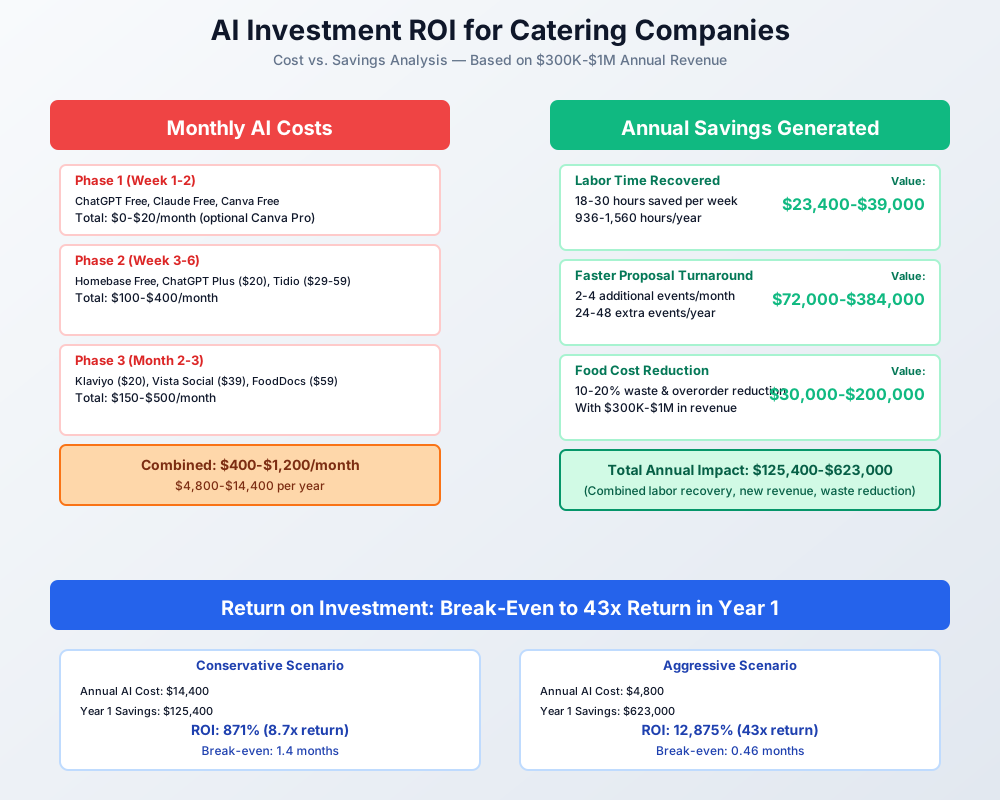
Total first-layer cost: $15–$55/month. Total setup time: 3–6 hours across two weeks.
If the first layer delivers even one additional booking in the first 30 days — and most operators see that by week three — that single event funds your entire second-layer implementation.
Here's a breakdown of the costs and expected returns:
Frequently Asked Questions
Can AI write proposals that actually sound like my business?
Yes — but the quality depends entirely on your context document. Paste in your cuisine philosophy, signature dishes, service style, and 2–3 excerpts from your best past proposals, and ChatGPT or Claude will produce drafts that read remarkably close to your voice. What it can't do is invent specific details about a client's event. You add those in a 5-minute edit pass. Most caterers report the output needs less editing than copy from a junior marketing hire.
How does AI purchase ordering work when my menu changes for every single event?
Restaurant inventory tools predict based on historical daily sales — same menu, different day. Catering tools like MarketMan work differently: the AI reads your upcoming event calendar, pulls the recipes assigned to each event, multiplies by guest count, aggregates across all events in the purchasing window, and generates a consolidated purchase order. This only works after you've entered accurate recipes. Without that recipe library, the AI has nothing to calculate from. The 4–6 hours of initial recipe entry isn't optional setup — it's the foundation the whole thing runs on.
My staff can barely handle the group text schedule. Will they actually adopt scheduling software?
7shifts works specifically because it's simpler than group text for the people using it. Servers see only their shifts, tap to confirm or swap, and get a push notification for openings. They don't scroll through 47 messages to find their Saturday assignment. The real change management challenge is on your end — you need to stop posting schedules via text and commit to the app. First week, half your staff will text you their availability instead of entering it. Hold the line. By the second event weekend, they're on it.
What if the chatbot quotes wrong pricing or promises availability I don't have?
Lyro only answers questions you've explicitly trained it on. If you tell it your per-head pricing ranges from $75–$150 for weddings, that's what it quotes. If a visitor asks about a specific date, Lyro doesn't check your real calendar — it captures the preferred date and routes the lead to you for availability confirmation. The actual risk isn't wrong answers; it's gaps in training. If Lyro encounters a question outside its training data, it says "Let me connect you with our team" and captures contact info. Review your first 30 days of chat transcripts to identify what you missed and add it.
How do I price ezCater packages without eroding my margins?
ezCater's commission (typically 10–20% on completed orders) means you need to price corporate packages 12–15% higher than your direct-booking rate to maintain equivalent margins. The trade-off is worth it: ezCater delivers corporate clients you'd otherwise spend $2,000–$5,000/year in marketing to reach. Start with 5–6 standardized packages built around your highest-margin menu items. Track per-order profitability in QuickBooks Project Tracking for 90 days before expanding. If a package doesn't hit 30% gross margin after the commission, restructure the components or remove it.
Do multi-jurisdiction caterers need separate HACCP plans for each county?
Often yes, or at minimum documented addenda. Off-premises caterers crossing county lines face varying health department requirements — some jurisdictions require event-day permits, others mandate different temperature logging frequencies. FoodDocs generates a solid baseline plan but doesn't auto-detect local variations. Contact each health department in your service area for their off-premises catering requirements and build a jurisdiction checklist your event manager reviews before each out-of-county event.
Is this stuff worth learning if I only do 20–30 events a year?
For the free and low-cost tools — yes, without question. The proposal time savings alone pay off at 20 events annually. Where it gets nuanced: Birdeye at $299/month is harder to justify below 30–40 events per year, and MarketMan's per-event purchase ordering becomes more valuable as volume scales. A smaller operation should start with ChatGPT for proposals, 7shifts for scheduling, and QuickBooks AI features you're already paying for. That stack costs $0 in new spend and recovers real time immediately.
Running a practice with a hospitality or food-service component? Our guides for bakery businesses and food truck operations cover inventory and mobile-service AI in more detail. If weddings and corporate galas are a big share of your bookings, our event planning AI guide covers the proposal and vendor-coordination side of the same events from the planner's chair.
More AI Implementation Guides
AI Tools for Breweries: The 2026 Owner's Playbook
The best AI tools for breweries in 2026: cut TTB compliance time, tighten COGS, streamline taproom scheduling, and target release marketing — starting free.
AI Tools for Wineries: DTC, Cellar & Compliance
The best AI tools for wineries in 2026 — cut wine club churn, automate DTC marketing, digitize cellar records, and stay TTB-compliant. A phased plan.
Best AI Tools for Bakeries: Production & Orders
Best AI tools for bakeries: cut waste 50%, automate custom cake orders, forecast demand spikes, and reclaim 15-25 hrs/week. See picks, pricing & setup.
AI Tips for Baristas: Coffee Shop Tools & ChatGPT
AI tips for baristas and coffee shop owners: use ChatGPT for marketing, automate social posts, cut inventory waste 50%, and save 15+ hrs/week. Top picks.
Best AI Tools for Food Trucks: POS, Social & Catering
Cut food waste 30%, automate Instagram, book more catering gigs & reclaim 15+ hours weekly. Best AI tools for food trucks — free picks, real pricing & setup.
AI Tools for Restaurants: Your 2026 Guide
The best AI tools for restaurants in 2026. Cut food waste, fill no-show tables, automate scheduling, and reclaim delivery margins—step by step.
Keep exploring
See every AI implementation guide we've published for Food & Hospitality, or browse the full library by industry or category. Looking for a specific platform? The AI tools directory indexes every product mentioned across our guides, and the comparisons hub puts the most-asked head-to-heads side by side.