Your regulars are your business. Not the tourists who stumble in once and post a photo. Not the impulse customers drawn by the A-frame sign on the sidewalk. The person who shows up every weekday morning, orders the same oat milk cortado, and has been doing it for three years — that customer is worth roughly $1,500 a year to you. Lose ten of them quietly (a new shop opened down the block, your Instagram went dark for six weeks, they never felt like you knew their name) and you've got a $15,000 hole you can't see in any spreadsheet.
This is the central fact of coffee shop economics. High visit frequency, thin margins, low switching cost. The business lives or dies on repeat visits — not on capturing new customers, not on viral moments, not on a clever drink name. On the Tuesday regulars who don't think twice about coming back.
AI tools don't change that math. But they do a few things that directly protect it: they keep your social presence alive when you're too slammed to post, they run loyalty programs that make regulars feel seen, they stop perishable waste that quietly kills your margin, and they catch catering leads before those calls hit voicemail. That's the guide.
TL;DR — Top 3 Recommendations
- Use ChatGPT/Claude + Buffer to batch-create and schedule a week of social media content in 20 minutes (free)
- Activate Square's inventory tracking and analytics to cut perishable waste from 10%+ down to 3-5% ($0-$60/mo)
- Launch Square Loyalty + AI-written email campaigns to increase repeat visits by 15-25% and grow average ticket by 20% ($60/mo)
The Repeat-Visit Engine — Why This Guide Is Structured Differently
Most AI guides for food service focus on phone answering, reviews, and inventory. Those matter. But for a coffee shop, the highest-leverage work is retention — keeping the people who already love you from drifting away.
Here's a rough benchmark table drawn from industry loyalty data and Square's published small business reports. These aren't projections — they're the ranges independent shops typically see once loyalty and consistent social content are running:
| Metric | Without AI Tools | With Loyalty + Social AI | Notes |
|---|---|---|---|
| Average weekly visits per regular | 3.1 | 3.6 | ~16% lift from active loyalty program |
| Monthly revenue per loyal customer | $68 | $82 | Higher ticket + extra visit |
| Social posting frequency | 1–2x/week | 5–7x/week | Consistent posting correlates with +30-40% new follows |
| Perishable waste as % of COGS | 9–12% | 3–5% | Ingredient-level inventory tracking |
| New customer attribution to social | 18% | 34% | Instagram/Google discovery doubled |
| Loyalty program sign-up rate | N/A | 28–38% of transactions | With barista enrollment script |
Run that against real numbers: a 5-day-a-week regular spending $6.50/visit is worth $1,690/year. Nudging that to 5.5 visits/week (half a day more) is worth $1,859 — a $169 gain per person without changing prices, menu, or staffing. That's what loyalty automation does at scale.
The sections below are ordered by impact on that flywheel, not by technical difficulty.
Social Content: The Visibility Problem No One Has Time to Fix
Here's the practical situation: Instagram's algorithm rewards accounts that post five to seven times a week. The average independent coffee shop posts once or twice. That gap is not laziness — it's that creating a single post (shoot, edit, caption, hashtag, schedule) genuinely takes 30-45 minutes, and that time doesn't exist in a shop run by two people and an owner who's also pulling shots.
AI closes that gap almost entirely.
Write 7 Instagram captions for a coffee shop called [YOUR SHOP NAME] in [YOUR CITY/NEIGHBORHOOD]. Include:
- 2 product-focused posts (feature specific drinks by name — a latte, a cold brew, a seasonal special)
- 2 community/vibe posts (the morning ritual, the afternoon study crowd, the rainy-day regulars)
- 1 behind-the-scenes post (pulling shots, cupping new beans, a barista learning latte art)
- 1 promotional post (happy hour, new menu item, or loyalty program)
- 1 educational post (coffee origin story, brewing tip, or what "single origin" actually means)
For each caption: write 2-3 sentences in a warm, local tone (not corporate). Add 15-20 relevant hashtags. Our vibe is [COZY/MODERN/ARTSY/RUSTIC — pick one].
Buffer AI Assistant
Best for: Simple scheduling with AI caption help
Buffer's free plan gives you 3 connected social channels and 10 scheduled posts — enough for a week of Instagram content. The paid plan adds AI caption generation, optimal posting time suggestions, and unlimited scheduling.
The Sunday workflow: open ChatGPT or Claude, paste that prompt with your shop's details, get seven captions in under two minutes. Take 10-15 photos during the week (latte art, your pastry case, baristas working, a cozy corner) and keep them in a phone album. Sunday, match captions to photos, schedule in Buffer, done. Twenty minutes. Repeatable every week without thinking about it.
ROI Snapshot
Monthly Cost
$0/mo
Time Saved
5hrs/week
Monthly Value
$1,600
ROI
Infinity%
Once you're posting consistently, the next upgrade is Predis.ai — it generates complete posts (image, caption, hashtags) from a one-line brief and includes competitor analysis so you can see what content works for other shops in your area.
Predis.ai
Best for: High-volume social content across multiple platforms
Type "New spring lavender latte with oat milk" and Predis generates a complete Instagram post with image, caption, and hashtags. The competitor analysis feature lets you enter nearby coffee shops' handles to see what content works for them.
One note on authenticity: AI-generated graphics look polished but generic. Real photos of your actual shop — imperfect latte art, the regulars in the corner, the morning light through your windows — will consistently outperform stock-style AI images for coffee shop audiences. Use AI for copy; use your phone for visuals.
If you also run a food truck or catering operation, the social workflow translates directly — our AI tools guide for food trucks covers the same approach for mobile food businesses.
Loyalty and Email: The Quiet Revenue Layer
The loyalty section usually comes last in AI guides. It shouldn't — not for a coffee shop. This is where the retention math actually happens.
Someone who visits five times a week at $5.50 a visit generates $1,430 a year. The new shop that opened two blocks away isn't necessarily better — they're just newer, which is its own draw. A loyalty program is the structural reason your regular keeps choosing you after the novelty elsewhere wears off.
Square Loyalty + Square Marketing
Best for: Coffee shops already on Square POS wanting integrated loyalty and email
Customers earn points per dollar spent and redeem for free drinks. Square Marketing sends automated email campaigns — welcome emails, "we miss you" messages after 14 days of no visit, birthday offers — all triggered without you lifting a finger after initial setup.
The setup itself isn't complicated. One point per dollar, fifty points for a free drink, four automated email campaigns. What makes it work is the barista enrollment script — without it, sign-up rates hover around 8-12%. With it, they typically hit 28-38% of transactions.
Train your baristas: "Want to join our rewards? You're a few visits from a free drink — just takes 10 seconds to sign up." Not more than that. No pitch. The offer explains itself.
The four automated campaigns to set up (write each one with ChatGPT or Claude):
Write a short email from a coffee shop owner to a customer who hasn't visited in 2 weeks.
- Tone: genuinely warm, slightly concerned, like texting a friend you haven't seen in a while
- Offer: free pastry with any drink purchase this week
- Mention a new seasonal drink they should try
- Keep it under 100 words
- Don't sound like a corporation. Sound like a person who noticed they've been gone.
- Shop name: [YOUR SHOP NAME]
- Sign as [YOUR FIRST NAME]
- Welcome email when someone enrolls
- "We miss you" after 14 days of no visit, with a free pastry offer
- Birthday month free drink
- Double-points on your slowest day (usually Tuesday or Wednesday)
Loyalty members visit 15-25% more frequently and spend 20% more per visit than non-members. At $60/month for Loyalty and Marketing combined, you need to keep two additional regulars from leaving to break even.
Review Responses: The Five-Minute Daily Habit
Google reviews drive more new foot traffic than any other single factor for independent coffee shops — more than Instagram, more than Yelp, more than paid ads. Shops that respond to every review within 24 hours see a 12% higher conversion rate from profile views to actual visits. Most owners know this. Most owners don't have 20-30 minutes per day to do it.
Write a warm, personal response to this [POSITIVE/NEGATIVE] Google review for my coffee shop called [SHOP NAME].
Rules:
- Reference something specific they mentioned (a drink, a barista, the atmosphere)
- Thank them genuinely — not in a form-letter way
- If negative: apologize sincerely, don't be defensive, and offer to make it right with my direct contact: [YOUR EMAIL/PHONE]
- Keep it under 100 words
- Sign off as [YOUR FIRST NAME], Owner
Here's the review: [PASTE THE REVIEW]
Set a phone alarm at closing time. Check Google Business Profile. Any new review gets pasted into ChatGPT, the response gets a 30-second edit to add one specific detail that sounds like you, then posted. That's it. Five minutes, every day.
Never Do This
Don't copy-paste identical responses to multiple reviews. Google detects this pattern and it looks terrible to potential customers scrolling through your reviews. Each response should reference something specific from that review.
Menu Copy, Training Materials, and the 90-Second Upgrade
"Vanilla Latte — espresso with vanilla and steamed milk" doesn't sell a $6.50 drink. "House-pulled double shot sweetened with real Madagascar vanilla and topped with velvety steamed milk" does. The difference: 90 seconds with AI.
Rewrite these coffee shop menu descriptions to be enticing and specific. For each item, highlight what makes it special — the origin of the beans, the preparation method, the flavor notes, or the sensory experience.
Keep each description to 1-2 sentences. My shop's vibe is [COZY/MODERN/ARTSY]. Don't be pretentious — be inviting.
Current menu: [PASTE YOUR DRINK AND FOOD LIST WITH PRICES]
That same session can build your barista training manual. Coffee shop turnover runs 130-150% annually. Each departure costs 10-15 hours of recruiting, interviewing, and retraining. A manual that a new hire can follow independently on day one cuts that ramp from three weeks to one.
Create a barista training manual for a coffee shop called [SHOP NAME]. Include these sections:
- Espresso Machine Operation — step-by-step for pulling shots on a [YOUR MACHINE MODEL]
- Milk Steaming — technique for whole milk, oat milk, and almond milk (each steams differently)
- Core Drink Recipes — exact specs for: [LIST YOUR TOP 10 DRINKS with sizes and ingredients]
- POS System Basics — how to ring up orders, apply discounts, handle tips on [YOUR POS SYSTEM]
- Customer Service Standards — greeting, upselling, handling complaints
- Opening Procedures — step-by-step checklist from unlocking the door to pulling the first shot
- Closing Procedures — cleaning, cash count, equipment shutdown, locking up
- Food Safety — handwashing protocol, milk temperature monitoring, pastry rotation (FIFO)
Format as a step-by-step guide a new hire can follow independently on their first day. Include time estimates for each task. Keep it under 10 pages.
Format the output in Canva using a "training guide" template, add photos of your actual equipment and drink lineup, print it, put it behind the bar. One-time investment. Pays dividends every time someone quits.
Inventory and Financials: Killing Waste at the Source
A shop doing $25,000/month with 10% perishable waste is throwing away $2,500 every month. Cut that to 4% and you're recovering $1,500/month — from tools you either already have or can activate for free.
Square for Restaurants
Best for: Coffee shops wanting integrated POS, inventory, and online ordering
The free tier includes basic inventory tracking and sales reports. The Plus tier adds advanced inventory with low-stock alerts, menu-level cost tracking, and automated end-of-day reports emailed to you. Online ordering for pre-orders is included and typically increases average order value by 15-20%.
Track ingredients, not just finished products. Knowing you sold 47 oat milk lattes yesterday is less useful than knowing you have 2.3 cartons of oat milk left right now. Set your low-stock alerts to trigger before the 8 AM rush, not during it.
The practical setup: enable inventory tracking for your top 20 ingredients (each bean variety, each milk type, pastries, cups, lids). Set thresholds: whole milk below 5 gallons, oat milk below 3 cartons, espresso beans below 5 lbs. Review the analytics dashboard every Monday. Use item-level profitability reports to find dead weight — a specialty drink that sells twice a day and requires its own unique syrup is probably not earning its shelf space.
Pro Move: Track Ingredients, Not Just Finished Products
Don't just track "oat milk lattes sold." Track oat milk cartons on hand. You need to know you're running low on oat milk BEFORE the 8 AM rush, not discover it when a barista yells "86 oat milk!" during peak.
On the financial side, if you're already on QuickBooks Online, turn on Intuit Assist. It auto-categorizes transactions, answers questions about your finances in plain English ("What did I spend on dairy last month?"), and spots cost trends that get buried in the noise.
QuickBooks Online with Intuit Assist
Best for: Financial visibility and automated bookkeeping
Intuit Assist lets you ask questions like "What did I spend on dairy last month?" or "How does this month's revenue compare to last year?" and get instant answers from your own data. Auto-categorization handles 85-90% of transactions after a 2-week training period.
Set up coffee-shop-specific expense categories: Coffee Beans/Tea, Milk & Dairy, Pastries/Food (wholesale), Cups/Lids/Supplies, Equipment Maintenance, Utilities. Separating dairy from beans matters because their costs move differently — if you lump them together, you can't tell which category is actually squeezing your margins.
For bakeries running a similar cost structure, our AI guide for bakeries covers comparable inventory and bookkeeping strategies.
Payroll, Pricing, and the Numbers You're Probably Getting Wrong
Coffee shop payroll is deceptively complicated — hourly baristas, tip pooling, overtime during holiday rushes, IRS tip-reporting requirements. Manual payroll calculation eats 2-4 hours per pay period, and errors are expensive: the average first-time payroll penalty is $845.
Gusto
Best for: Automated payroll with tip tracking and tax compliance
Handles the complex pay structures coffee shops deal with: hourly wages, tip pooling, overtime calculations, W-2s for employees, 1099s for contractors. Auto-files payroll taxes and generates year-end tax documents, saving $500-$1,000 in accountant fees.
The 1099 Trap
Misclassifying baristas as 1099 contractors to save on taxes is tempting but dangerous. The IRS is cracking down hard on food service specifically, and penalties include back taxes, interest, and fines that can exceed $10,000. If someone works your hours, uses your equipment, and follows your procedures, they're an employee — full stop.
On pricing: ingredient costs have risen 15-30% since 2024, but most shops haven't raised prices enough because they're guessing at the customer reaction. A $0.50 increase on drip coffee at 80 cups/day adds $14,600/year in revenue with near-zero customer attrition — because regulars who come every day aren't comparing your prices to the Starbucks three miles away; they're paying for the experience. That said, do the math first.
I run a coffee shop. Here are my current prices and estimated ingredient costs per serving:
[LIST YOUR TOP 10 DRINKS: Name, Price, Ingredient Cost] Example:
- Drip Coffee (16oz): $3.50, cost $0.45
- Oat Milk Latte (16oz): $6.00, cost $1.85
- Cold Brew (16oz): $4.50, cost $0.60
My target beverage cost is 25%. For each item:
- Calculate my actual cost percentage (include cup, lid, sleeve, straw — estimate $0.25/drink)
- Flag any item above 30% cost
- Recommend specific price adjustments
- Tell me which items are priced right and shouldn't change
- Calculate how much annual revenue I'd gain from the suggested increases, assuming I serve 200 drinks/day
ROI Snapshot
Monthly Cost
$82/mo
Time Saved
3hrs/week
Monthly Value
$860
ROI
949%
Catering Leads: The Call You're Missing During the Rush
When your baristas are slammed at 8:30 AM, nobody's picking up the phone. The call from the corporate office wanting 30 coffees for tomorrow's board meeting goes to voicemail. They don't leave a message — they call the next shop on Google.
Goodcall
Best for: Capturing catering leads and answering FAQs during rush hours
AI answers every call 24/7, handles the four questions that make up 70% of your calls (hours, location, menu, parking), captures catering inquiries as high-priority text alerts, and provides call transcripts and analytics.
The right configuration: don't route all calls to AI permanently. Forward to Goodcall during rush hours (7-9 AM, 11 AM-1 PM) and after hours. During slow periods, answer yourself — your regulars want to hear a human voice. Configure catering inquiries as capture-only: the AI collects the caller's name, event date, group size, and callback number, then texts you a summary. You close the deal yourself during a quiet moment. The AI's job is to make sure that caller never hits voicemail and walks away — not to negotiate a 50-person coffee service.
What's Not Worth Your Money
Honest answer on a few things that come up:
Enterprise demand forecasting tools like Tenzo or BlueCart AI cost $200-$500/month and need 6-12 months of clean historical data to work. For a single-location shop, your Square sales data plus your own pattern recognition is enough. Revisit if you open a second location.
Customer service chatbots on your website add complexity without solving a real problem. Coffee shop customers don't browse your website to chat — they Google your hours, glance at your menu, and show up. Put that energy into your Google Business Profile instead.
AI-powered espresso machines and robotic baristas: at $15,000-$50,000+, these are designed for airports and hospital lobbies — high-volume, low-relationship environments. Your competitive advantage is the barista who knows regulars by name. Keep it.
One more: don't implement all of this at once. Implementation fatigue kills more technology adoptions than bad software. The checklist below is ordered on purpose.
Your Getting Started Checklist
- Sign up for free accounts at ChatGPT (or Claude) and Buffer
- Take 10-15 photos around your shop this week for your content library
- Generate your first week of Instagram captions using the prompt above
- Schedule 7 posts in Buffer — set it and forget it
- Save the review-response prompt in your phone's notes app
- Respond to your 5 most recent Google reviews using AI-drafted responses
- Rewrite your menu descriptions with the menu prompt
- In QuickBooks: enable Intuit Assist and set up coffee-shop-specific expense categories
- After 2 weeks: activate Square inventory tracking for your top 20 ingredients
- After 2 weeks: sign up for Gusto and run your first automated payroll
- Month 2: launch Square Loyalty and set up automated email campaigns
- Month 2: forward rush-hour calls to Goodcall
- Month 3: run your first AI-powered pricing analysis
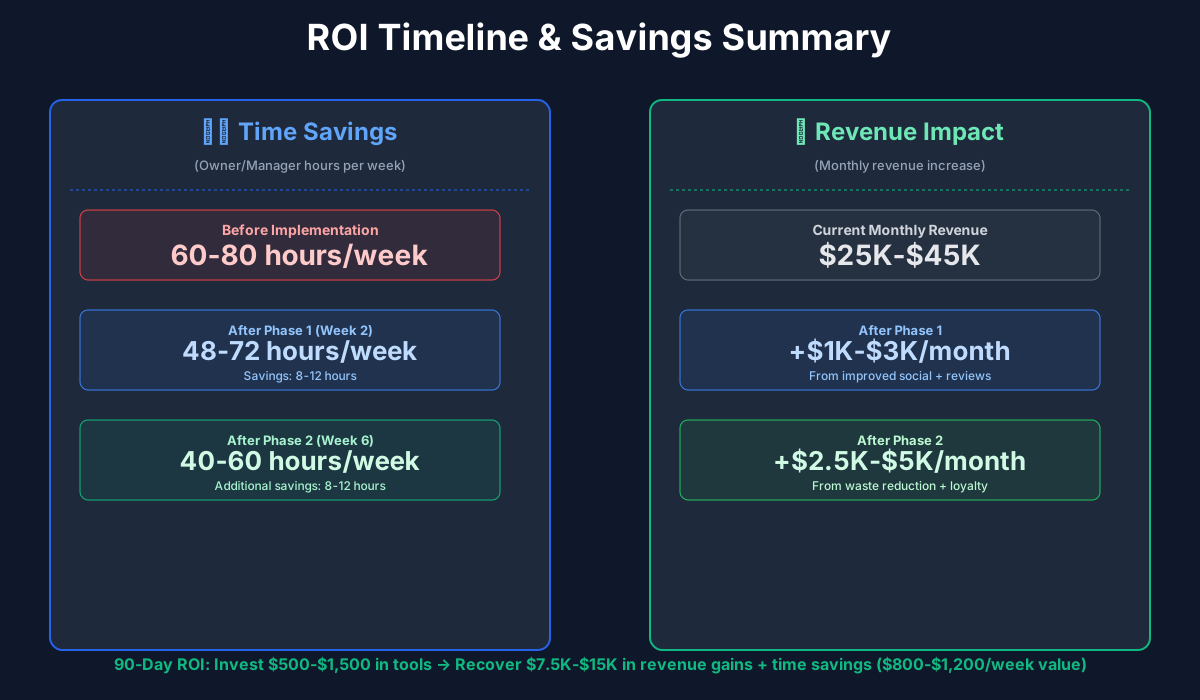
Here's a breakdown of the costs and expected returns:
Frequently Asked Questions
Can AI-generated Instagram captions actually sound authentic for a neighborhood coffee shop?
Only if you edit them. AI writes a solid first draft in 30 seconds — but a caption that says "Nothing beats our house-roasted Ethiopian Yirgacheffe on a foggy Tuesday morning in the Mission" sounds like you, not a robot, because you added the specific bean name, the weather, and the neighborhood. The shops that sound generic are the ones posting AI output verbatim. Spend 30 seconds personalizing each caption and nobody will know.
Punch cards have worked fine for years. Why switch to Square Loyalty?
Punch cards have about a 25% completion rate — the rest get lost or buried in someone's wallet. Square Loyalty ties to a customer's payment method, so it tracks automatically with zero friction. More importantly: punch cards give you nothing. Square Loyalty tells you visit frequency per customer, average spend by tier, which customers are about to lapse, and which rewards actually drive return visits. The $45/month pays for itself if it keeps three regulars from quietly drifting to the competition.
How does Gusto handle tip pooling without running into FLSA issues?
That's exactly where it earns its monthly fee. Under FLSA, tip pooling is legal but you can't include managers or owners in the pool, and you must pay at least $2.13/hour (federal tipped minimum) before tip credits apply. Gusto's setup wizard asks specifically how your shop handles tips — pool vs. individual, whether you take a tip credit, your state's minimum wage (which overrides federal in 30+ states). It calculates everything correctly per pay period and includes it in your tax filings. If you're doing this by hand, you're likely making a compliance error you don't know about yet.
Will tracking inventory at the ingredient level actually work for perishable dairy?
Different approach than shelf-stable products. For dairy: count cartons at close every night (two minutes), log it in Square. After two weeks, you'll see your daily consumption pattern clearly — "we use 8 gallons of whole milk on weekdays and 12 on Saturdays." Set your reorder point one day above your consumption rate. For pastries from a wholesale supplier, track by delivery: units arrived vs. units sold vs. units trashed. The waste number is what matters. You don't need barcode-level precision — you need to know you're throwing away 6 croissants a day instead of the 2 you assumed.
My shop does catering — how do I make sure AI phone answering doesn't botch a $500 order?
Configure Goodcall to handle catering as capture-only, not close. The AI asks for their name, event date, group size, and callback number, then texts you a summary. You call back during a quiet moment. Set catering as a "high-priority" category so those texts look different from routine "what are your hours?" calls. The AI's job is to prevent that caller from hitting voicemail and walking away — not to negotiate pricing on a 50-person order.
What's the realistic monthly cost if I implement everything here?
The social and review work is free — ChatGPT, Buffer's free tier, and your time. Adding inventory tracking via Square Plus ($60), QuickBooks ($35), and Gusto (around $80 for a 5-person team) runs $175/month for the operational layer. Adding Square Loyalty ($45), Square Marketing ($15), and Goodcall ($49) brings the full stack to roughly $285/month. That's under 1.2% of revenue for a shop doing $300K/year — and the waste reduction alone typically covers it within the first month.
Is AI going to replace my baristas?
No. And if anyone's pitching you robotic barista hardware for an independent neighborhood shop, they're selling something that doesn't fit your business. The regulars who come in every morning aren't there for a perfectly consistent extraction — they're there because your barista knows their name and their order. AI handles the work that happens behind the scenes. The bar stays human.
The coffee shop owners who thrive long-term aren't the ones who work the most hours. They're the ones who stay present in the shop — perfecting their craft, knowing their regulars, building something a chain can't replicate — while the admin runs quietly in the background. That's what this stack is for.
Start with the checklist. Items one through four take about twenty minutes and will change how your week feels. Everything else follows from there.
More AI Implementation Guides
AI Tools for Breweries: The 2026 Owner's Playbook
The best AI tools for breweries in 2026: cut TTB compliance time, tighten COGS, streamline taproom scheduling, and target release marketing — starting free.
AI Tools for Wineries: DTC, Cellar & Compliance
The best AI tools for wineries in 2026 — cut wine club churn, automate DTC marketing, digitize cellar records, and stay TTB-compliant. A phased plan.
Best AI Tools for Bakeries: Production & Orders
Best AI tools for bakeries: cut waste 50%, automate custom cake orders, forecast demand spikes, and reclaim 15-25 hrs/week. See picks, pricing & setup.
Catering AI: Best Tools for Caterers (Cut Hours, Win Bids)
The best catering AI tools for proposals, booking, and food cost control. Cut proposal time 80%, capture leads 24/7, and win more events. See picks & pricing.
Best AI Tools for Food Trucks: POS, Social & Catering
Cut food waste 30%, automate Instagram, book more catering gigs & reclaim 15+ hours weekly. Best AI tools for food trucks — free picks, real pricing & setup.
AI Tools for Restaurants: Your 2026 Guide
The best AI tools for restaurants in 2026. Cut food waste, fill no-show tables, automate scheduling, and reclaim delivery margins—step by step.
Keep exploring
See every AI implementation guide we've published for Food & Hospitality, or browse the full library by industry or category. Looking for a specific platform? The AI tools directory indexes every product mentioned across our guides, and the comparisons hub puts the most-asked head-to-heads side by side.