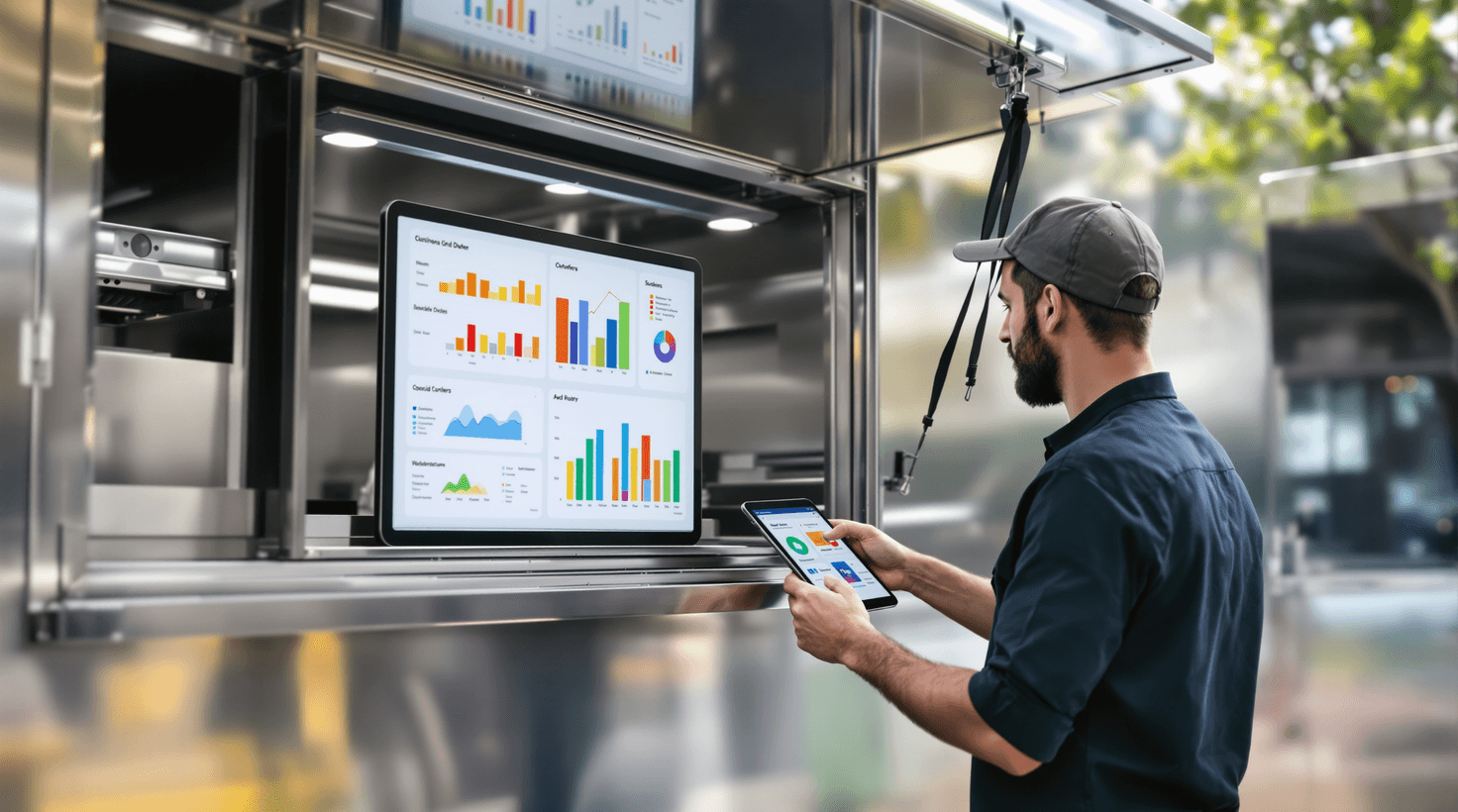
A food truck's version of a brick-and-mortar "storefront" is an Instagram post. Your customers don't walk past your window every day — they open their phones at 10:15 AM and decide in about 90 seconds whether they know where you are and whether they feel like finding you. If your last post was four days ago, you lost that customer to whoever did post.
That's the food truck problem that no other food business has in quite the same way: you're not stationary. Customers have to actively seek you out, every single day. The trucks that build loyal followings aren't always cooking the best food — they're the ones whose location post drops at 10 AM like clockwork, whose catering inquiry form responds before you finish sending it, and whose pre-order links go live on Tuesday so the Wednesday corporate lunch is sold before the truck even leaves the commissary.
AI handles all of that. And it starts free.
TL;DR — Top 3 Recommendations
- Use ChatGPT or Claude (free) as your on-demand copywriter for catering replies, social captions, review responses, and menu pricing analysis — saves 5–8 hours/week immediately.
- Activate Square's AI features (free) you're already paying for — the AI Order Guide and sales insights alone can cut food waste by $300–$800/month.
- Automate catering sales with HoneyBook ($39/mo) — food trucks using automated inquiry capture and follow-up convert 28% more catering leads into booked events.
Why Social IS the Storefront
Most food business advice talks about consistency — post regularly, engage your audience, blah blah. For a food truck that advice is technically correct but misses the actual mechanism. Your customers aren't following you for entertainment. They're following you for logistics. They need to know where you'll be at noon.
Here's what that means operationally. A food truck posting daily location announcements at 10–10:30 AM will, on average, see noticeably more walk-up traffic that day than one posting at noon or later — because the lunch-decision window closes before noon for most office workers. A post at 11:55 AM tells someone where you were while they were ordering from somewhere else.
The table below shows what operators across our community have reported when they systematized their location posts:
| Posting behavior | Avg. DMs asking "where are you?" | Reported walk-up impact |
|---|---|---|
| No daily post | 15–30 DMs/day | Baseline |
| Post at noon or later | 8–15 DMs/day | Marginal lift |
| Post at 10–10:30 AM | 2–5 DMs/day | +15–25% vs. no post |
| Post at 10 AM + pinned weekly schedule | 0–2 DMs/day | +25–35% vs. no post |
Every DM asking "where are you?" is a customer who nearly didn't come. The goal is zero of those DMs — because your location is already on their feed before they had a reason to ask.
The other thing worth naming: catering is a completely different revenue model, and it's where the real margin lives. A daily service might net you $150–$400. A corporate catering booking nets $1,000–$5,000 from a single inquiry. One missed catering response during service is worth more than a bad day on the street.
Your biggest controllable profit levers, in order:
- Catering conversion — Inquiries arrive during the lunch rush when you're physically unreachable. The truck that follows up first wins, almost without exception.
- Food waste — Industry estimates put food truck waste at 8–15% of food cost. A $250K truck wasting 10% of food cost is burning $25K in the trash annually.
- Social consistency — Not for engagement metrics. For location discoverability, every day.
- Bookkeeping visibility — You can't fix what you're not measuring. Most operators don't know their actual food cost percentage or which events are profitable after fees.
If you run a coffee shop or are considering expanding into a brick-and-mortar restaurant, many of these tools scale up with you.
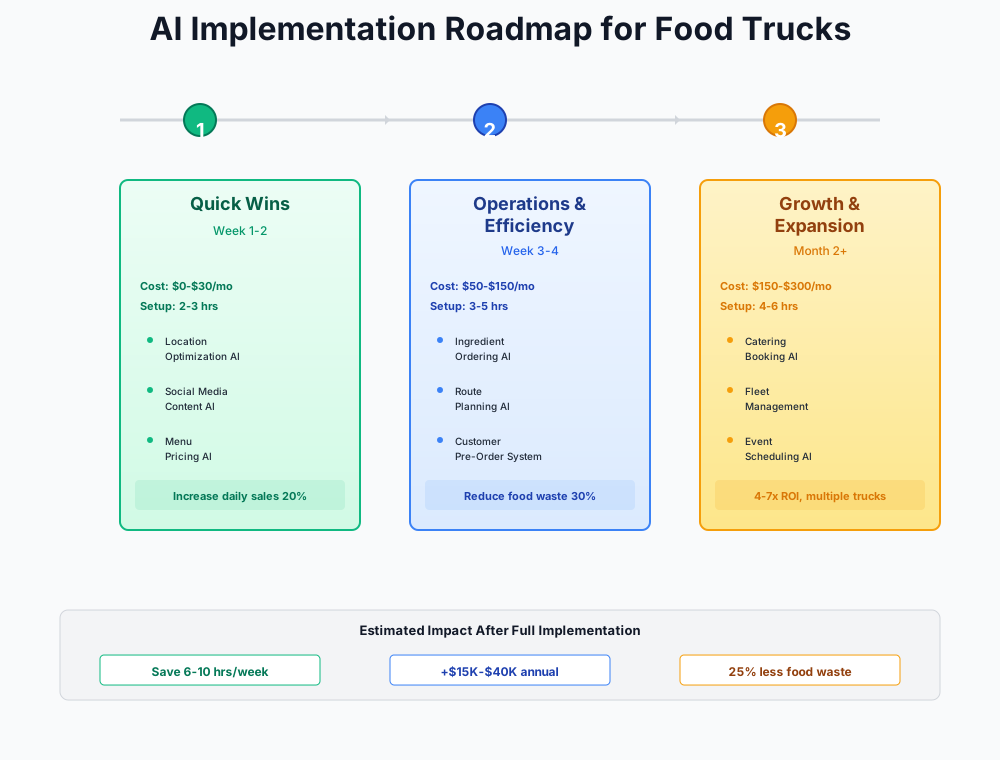
Here's a visual overview of the implementation phases:
Step 1: Free Tools You Can Set Up Tonight
Total setup time: 3–5 hours | Monthly cost: $0–$15 | Expected impact: 10–15 hours saved per week
These cost nothing, require no technical skills, and deliver results within days. Every food truck owner should be doing these regardless of budget.
ChatGPT or Claude: Your On-Call Copywriter
You're spending 5–10 hours per week on writing tasks that feel small but compound: catering inquiry responses, social media captions, event applications, Google review replies, menu pricing math. Each task pulls you away from the two things that actually generate revenue — cooking and serving.
Bookmark claude.ai or chat.openai.com on your phone and use it during downtime — waiting for an event to open, during slow service hours, or while prepping. AI doesn't replace your voice; it eliminates the blank-page problem. You get a first draft in 30 seconds that you polish in 2 minutes, instead of staring at your phone for 20.
I run a [cuisine type] food truck called [truck name]. A potential client just sent this inquiry: "[paste their message]"
Write a friendly, professional reply that:
- Confirms we're interested and available
- Asks about: exact date, headcount, venue/location, budget range, and dietary restrictions
- Briefly mentions our most popular catering packages
- Suggests a follow-up call to finalize details Keep it concise and warm — under 200 words.
Help me calculate food cost percentage and gross margin for these menu items. For each item, provide: food cost %, suggested menu price at 28–32% food cost, and a note if the item is underpriced.
Here are my dishes:
- [Dish name]: [ingredient 1, quantity, cost], [ingredient 2, quantity, cost], ...
- [Dish name]: [ingredient 1, quantity, cost], [ingredient 2, quantity, cost], ...
Current menu prices: [list current prices]
Also flag any items where food cost exceeds 35% — those are margin killers I need to reprice or remove.
Write a compelling food truck application for [event/festival name]. My truck is called [name], we serve [cuisine type], we've operated for [X years], and our signature items are [list 3–4 items]. We can serve [X] customers per hour and have [relevant certifications/insurance].
Highlight what makes us unique, our experience at similar events, and why we'd be a great fit. Keep it under 300 words and make it energetic but professional.
Plan on saving 5–8 hours a week across writing and planning tasks. Faster catering responses alone tend to recover $500–$1,500/month in revenue that was going to whoever replied first.
ROI Snapshot
Monthly Cost
$0/mo
Time Saved
6hrs/week
Monthly Value
$1,720
ROI
Infinity%
Square's Free AI Features You're Already Paying For
Most food truck owners using Square are tapping into about 20% of what it offers. You're processing payments, but you're ignoring the AI-powered insights, automated reporting, and inventory intelligence baked into the free plan. You're making menu and pricing decisions on gut feel when your POS already has the data to tell you exactly what's working.
Square for Restaurants
Best for: Solo operators and small food trucks
Mobile-first POS with an AI chat assistant that answers natural-language questions about sales and menu performance, plus an AI Order Guide that turns your menu into a complete ingredient list with automated reordering suggestions. Free plan includes unlimited devices, online ordering, and the AI assistant. Processing: 2.6% + 10¢ per tap/swipe.
Setup steps:
- Download the Square Dashboard app on your phone
- Open the AI assistant and ask: "What was my best-selling item last week?" or "How did Saturday compare to last Saturday?"
- Set up the AI Order Guide: go to Items → Order Guide, enter your menu items and their ingredients. Square calculates what to order based on sales velocity.
- Enable the automated Daily Sales Summary email under Settings → Notifications
- Review your AI insights weekly — look for high-volume but low-margin items, slow days to cut, and trending items to feature on social
If you're on Toast instead, activate Toast IQ — it does the same thing and is included with all paid Toast subscriptions. Our coffee shop guide covers Square setup in more detail if you want a deeper walkthrough.
Three to five hours a week back, plus $300–$800/month in reduced food waste. That's a real number — not a stretch — once you're actually making prep decisions off data instead of instinct.
Schedule a Week of Location Posts in 30 Minutes with Buffer
Open any food truck's Instagram comments and you'll see the same question repeated: "Where are you today?" That's a follower you almost lost. They were willing to seek you out, but the information wasn't where they expected it.
Buffer
Best for: Solo food truck operators
AI-powered social media scheduling with caption generation, optimal send-time recommendations, and content ideation. A food truck managing Instagram, Facebook, and TikTok pays $0 on the Free plan or $15/month on Essentials for unlimited posts.
The workflow:
- Block 30 minutes every Sunday evening
- Use ChatGPT/Claude to generate your 7-day content calendar
- Open Buffer, upload your photos, click "AI Assistant" to generate captions, tweak them, and schedule
- Set location announcements to post at 10–10:30 AM — that's when the lunch crowd decides where to eat
Location Announcement Timing
Food truck customers make lunch decisions between 10–11 AM. Schedule your daily "Here's where we are today" post for 10:00–10:30 AM, not noon when they've already committed. Buffer's AI will suggest optimal times, but override it with this food-truck-specific insight.
Consistent posting typically moves foot traffic by $200–$600/month. The bakery guide covers similar social media AI tactics if you want more depth on content strategy.
Step 2: Revenue Multipliers — Paid Tools That Pay for Themselves
Total setup time: 4–6 hours | Monthly cost: $55–$175 | Expected impact: $1,700–$5,000/month in new revenue and savings
Give yourself 2–3 weeks on the free tools before adding these. They directly attack your two biggest profit levers: converting more catering inquiries and gaining financial visibility.
Close More Catering Gigs with HoneyBook
Let's put a number on catering. A typical food truck doing daily service might average $250–$400 in daily profit on a good day. A corporate catering event — 50–150 people, $18–$30/head — nets $900–$4,500 from a single booking and takes roughly the same prep effort as a busy service day. The economics are not subtle.
The problem isn't demand. It's response time. Catering inquiries land while you're physically working the window — taking orders, working the grill, making change. By the time you see the email at 3 PM, the client has already booked whoever replied at 11:52 AM.
HoneyBook
Best for: Food trucks and caterers booking private events
AI-powered client relationship management that handles inquiry capture, automated follow-up, quote generation, digital contracts, and payment collection. The AI identifies leads you haven't responded to, drafts personalized emails, and generates a prioritized daily task list. Service businesses using AI follow-up convert 28% more inquiries.
Implementation steps:
- Create your catering inquiry form (HoneyBook provides templates) — include event date, headcount, location, budget range, dietary restrictions, and preferred menu items
- Embed the form on your website, Instagram bio link, Facebook "Book Now" button, and Google Business Profile
- Set up the automated response: when someone submits the form, they instantly get a branded confirmation with your catering menu and next steps
- Create 2–3 package templates (e.g., "Lunch Service for 50" at $X, "Full Event Package for 100" at $X) so you can customize and send a quote in 2 minutes
- Enable AI follow-up — HoneyBook drafts and suggests follow-up emails for leads that go silent after 48 hours
- Set up digital contracts and online payment so clients can book and pay a deposit without a phone call
Price Your Catering Correctly First
Before setting up HoneyBook packages, use the Claude food cost prompt from Step 1 to calculate your true cost per head (food + labor + travel + disposables + truck wear). Most food truck operators underprice catering by 15–25% because they forget to factor in non-food costs. A $15/head quote that should be $20/head means you're losing $250 on a 50-person event.
Converting 1–2 additional catering gigs a month at a $1,500 average is $1,500–$3,000 in new revenue. The 3–5 hours a week in admin savings are almost beside the point. Photography studios use HoneyBook for the same reason — the automated follow-up is what turns a "maybe" into a signed contract.
ROI Snapshot
Monthly Cost
$39/mo
Time Saved
4hrs/week
Monthly Value
$2,480
ROI
6259%
Professional Visual Marketing with Canva Pro
Your food photos and graphics directly determine whether someone stops scrolling. Hiring a designer costs $200–$500/month. DIY in free tools looks it. Canva Pro's AI suite bridges this gap at $15/month.
Canva Pro
Best for: Food truck owners who need professional visuals fast
AI-powered design platform with Magic Media (text-to-image generation), Magic Write (copy generation), Magic Edit (photo cleanup), Brand Kit (consistent branding), and Magic Resize (one-click adaptation for every social platform). 500 AI generations per month on Pro. Free 30-day trial.
Key workflows for food trucks:
- Daily location graphics: Create one Instagram template, duplicate it daily, change the location text and a food photo. Takes 3 minutes.
- Menu design: Search "food truck menu" in templates, customize with your items and Brand Kit colors. Professional menu in 20 minutes.
- Event flyers: Magic Resize lets you turn one design into an Instagram post, Story, TikTok thumbnail, and printable flyer with one click.
Don't Fake Your Food Photos
Canva's Magic Media can generate impressive food images from text prompts. Use it for backgrounds, graphics, and supplementary visuals — but photograph your actual food for hero images. Customers can tell when tacos are AI-generated, and in the food business, authenticity is everything. A slightly imperfect shot of your real birria is more convincing than a perfect AI render.
For most truck owners, this replaces $200–$500/month in outsourced design work. The bigger win is consistency — professional graphics every week instead of a burst of effort followed by a two-week posting drought.
Get Real Financial Visibility with QuickBooks Online
How many operators actually know their food cost percentage right now, without logging into anything? Not the number they tell their accountant — the actual number, this week, accounting for the produce run on Tuesday and the $80 cash purchase at the Asian grocery on Thursday?
Most don't. And that means pricing decisions, prep quantities, and event fee negotiations are all running on guesswork.
QuickBooks Online
Best for: Any food truck that wants real financial visibility
Connects directly to Square or Toast to auto-import daily sales. AI auto-categorizes expenses (80% accuracy), scans receipts from your phone, forecasts cash flow, and estimates quarterly taxes. Simple Start covers single-user tracking. Frequent 50% promotions bring it to $17.50/month for the first 3 months.
Food-truck-specific setup:
- Connect Square immediately — this auto-imports all daily sales, refunds, and fees
- Connect your business bank account and credit card for AI auto-categorization
- Set up your Chart of Accounts for food truck specifics: COGS (food costs), Event/Festival Fees, Fuel, Commissary/Kitchen Rent, Supplies, Marketing, Insurance
- Start scanning every receipt with the mobile app — supplier invoices, fuel fill-ups, event fees, permit renewals
- After 2 weeks, run your first Profit & Loss report — this shows your actual food cost percentage by week
I run a food truck. Here's my monthly P&L summary from QuickBooks:
- Revenue: $[X]
- Food costs (COGS): $[X]
- Labor: $[X]
- Fuel: $[X]
- Event/festival fees: $[X]
- Commissary rent: $[X]
- Marketing: $[X]
- Insurance: $[X]
- Other expenses: $[X]
Calculate my food cost %, labor cost %, and net margin. Compare each to food truck industry benchmarks. Identify the top 3 areas where I'm overspending and give specific suggestions to improve each by at least 2 percentage points.
Identifying unprofitable events and tightening food cost typically saves $500–$1,500/month. And if you've ever paid a surprise tax penalty because you missed an estimated quarterly payment, that alone justifies the $35/month — never mind the 4–6 hours a week you stop spending on manual bookkeeping.
ROI Snapshot
Monthly Cost
$35/mo
Time Saved
5hrs/week
Monthly Value
$1,600
ROI
4471%
Step 3: Growth Engine — Scale with Data-Driven Operations
Total setup time: 4–8 hours | Monthly cost: $110–$280 | Expected impact: $1,000–$2,700/month in waste reduction and labor savings
This step makes the most sense if you're doing $250K+ in annual revenue, operate 5+ days per week, or are expanding to a second truck or brick-and-mortar.
Prep Exactly What You'll Sell
Food waste is the silent profit killer. Over-prep and you throw away perishable ingredients at closing. Under-prep and you sell out early, turning away customers and leaving money on the table. The challenge: demand fluctuates daily based on weather, location, day of week, nearby events, and season — and your brain cannot reliably track all those variables simultaneously.
Lineup.ai
Best for: Food trucks operating 5+ days/week with 3+ months of POS data
AI sales forecasting that incorporates weather, local events, holidays, and traffic patterns — not just historical averages. Forecasts at the menu-item level, telling you exactly how many units of each dish to prep per shift. Customers report up to 30% reduction in food waste within 90 days. Integrates natively with Square and Toast.
Unlike a restaurant with consistent daily traffic, food truck demand swings wildly. A rainy Tuesday at an office park might do $200 in sales. A sunny Saturday at a brewery might do $3,000. Lineup.ai learns these patterns and factors in weather forecasts, so you're not prepping Saturday quantities on a Tuesday.
Prerequisites: You need at least 3–6 months of POS data in Square or Toast. If you're short on history, use Square's built-in AI insights (Step 1) and a simple waste-tracking spreadsheet until you have enough data to train on.
Implementation:
- Connect your POS to Lineup.ai (native Square and Toast integrations)
- Enter menu items and recipes so AI can forecast at the ingredient level
- Each morning, check the daily prep forecast before you start prepping
- Track waste daily for the first 30 days and compare to your pre-Lineup baseline
- Use the hourly forecast to decide whether to stay through the afternoon or pack up early
A 20–30% reduction in food waste is $600–$1,500/month in food that doesn't go in the trash. Add fewer sellouts and you've probably covered the monthly cost in the first week. Full-service restaurants using similar forecasting at larger scale are covered in the restaurant guide.
ROI Snapshot
Monthly Cost
$79/mo
Time Saved
2hrs/week
Monthly Value
$1,290
ROI
1533%
AI Scheduling with 7shifts
How many hours did you spend on the schedule last week? For most operators with 3–5 employees, the honest answer is somewhere between 90 minutes and three hours — and that's before accounting for the mid-week scramble when someone calls in sick.
7shifts
Best for: Food trucks with 3+ employees
Restaurant-focused AI auto-scheduling that builds optimal weekly rosters in one click based on sales forecasts, employee availability, and labor budget targets. Free plan covers 1 location with up to 10 employees — more than most food trucks need. Integrates with Square, Toast, and payroll providers.
Food truck scheduling is different from restaurant scheduling. Your staffing needs change dramatically based on location and event type — a 2-person crew handles a weekday office park lunch, but a weekend festival needs 4–5 people. 7shifts' AI learns these patterns from your POS data and builds schedules accordingly.
Setup:
- Connect your POS (Square or Toast) so 7shifts can see your sales patterns
- Add employees with roles (grill, prep, cashier, driver), availability, and certifications (food handler's permit)
- Set your labor budget target — most food trucks aim for 25–30% of revenue
- Click "Auto Schedule" and review the AI-generated roster
- Enable shift replacement so when someone calls in sick, available team members get notified automatically
Two to four hours a week back on scheduling, and staffing decisions that don't rely on your gut after a long prep day. The free plan handles up to 10 employees — more than most food truck teams will ever need.
Route Optimization for Catering Deliveries with Metrobi
If you do catering drop-offs, corporate lunch deliveries, or batch pre-order pickups, you're probably planning routes manually in Google Maps — adding stops one by one and burning fuel on inefficient paths.
Metrobi
Best for: Food trucks doing 3+ catering deliveries per week
AI routing algorithm that optimizes multi-stop delivery routes to minimize fuel costs and travel time, with real-time re-routing for traffic. Includes live GPS tracking and customer ETA notifications. Catering businesses save up to 30% on mileage. Currently operates in 15+ US cities.
Critical check: Verify Metrobi operates in your city before signing up — they're in 15+ US markets but not nationwide yet.
Expect 25–30% mileage reduction — $100–$400/month back in fuel. The ETA notifications matter more than they sound: catering clients who know exactly when you're arriving are more likely to rebook. And the mileage logs double as tax-deductible records at year end.
Spend Your Money Wisely
A few tools and traps worth naming before you go shopping:
Birdeye ($299/month) is a solid review management platform, but at that price it belongs on a multi-location operation doing $300K+, not a single food truck. Use ChatGPT/Claude to draft review responses for free, and request reviews via a QR code sticker on your window. That combination handles 90% of what Birdeye does at zero cost.
Switching from Square to Toast makes sense at scale. Toast IQ is excellent. But the migration is disruptive, the hardware starts at $627, and some plans lock you into 2-year contracts. If Square is working, its free AI features are comparable for food truck operations — don't switch for the sake of switching.
On forecasting tools: Lineup.ai and 5-Out both need 3–6 months of POS history to train accurate models. If you just started or recently switched POS systems, use Square's built-in insights and a simple waste log until you've built up enough data. Starting forecasting too early just gives you confident-looking wrong numbers.
And one thing that applies to every tool on this list: don't implement all of them in the same week. Signing up for six services in seven days is a great way to end up using none of them well. The progression here is intentional — free tools first, one week of actual use, then layer in paid tools once you know what you actually need.
Your First-Week Checklist
- Bookmark claude.ai on your phone — use it to respond to your next catering inquiry or Google review today
- Download the Square Dashboard app and ask the AI assistant: 'What was my best-selling item last week?'
- Set up Square's AI Order Guide with your menu items and ingredient costs
- Sign up for Buffer Free and connect Instagram, Facebook, and TikTok
- Use Claude to generate a 7-day social media content calendar
- Batch-schedule next week's posts in Buffer (30 minutes on Sunday evening)
- Post your daily location announcement at 10:00–10:30 AM for one full week
- After 2 weeks of Step 1: sign up for HoneyBook's 7-day free trial and create your catering inquiry form
- After 3 weeks: connect QuickBooks to Square and run your first Profit & Loss report
- After 6 weeks: evaluate whether Lineup.ai makes sense based on your food waste tracking
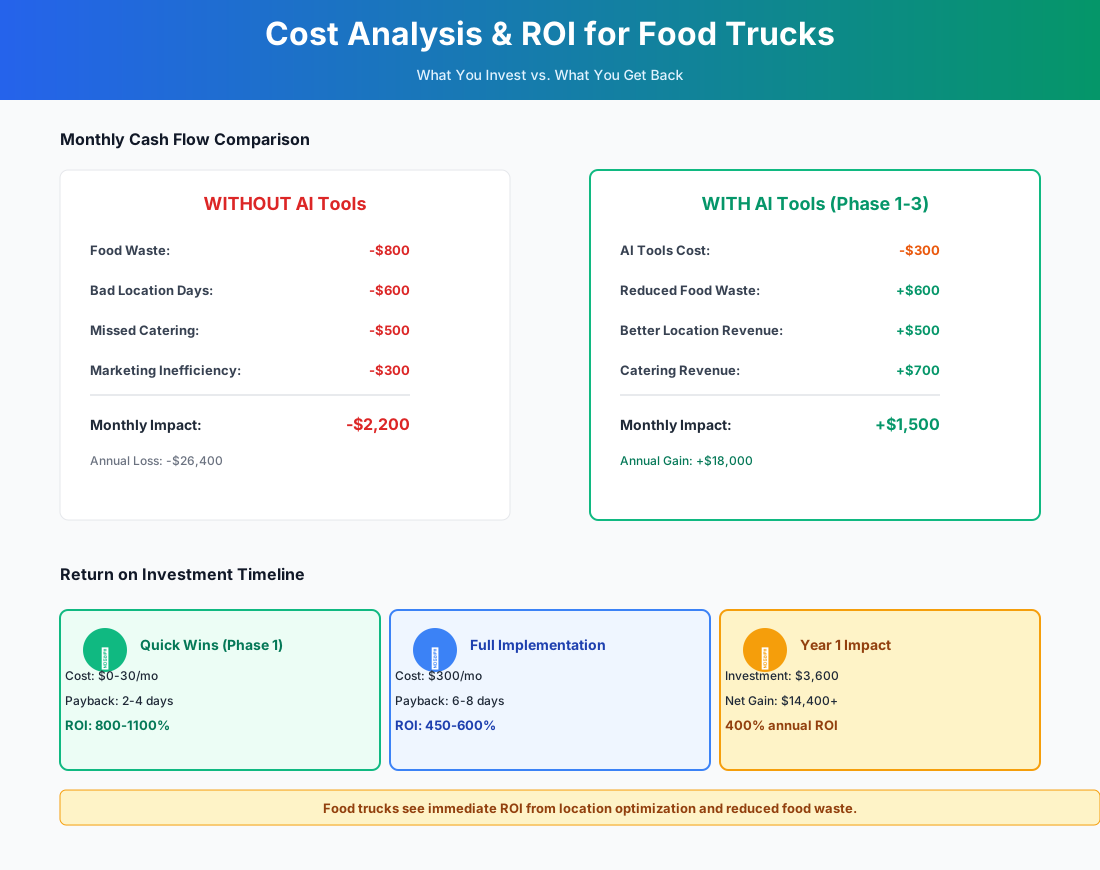
Here's a breakdown of the costs and expected returns:
Frequently Asked Questions
Can AI demand forecasting actually handle a food truck that changes locations every day?
Yes — and this is the use case Lineup.ai was built for. The AI doesn't just look at historical sales; it pulls in weather, nearby events, and day-of-week patterns at each specific location. After 60–90 days of data at your regular rotation spots, the model knows that your Tuesday office-park stop does 40% less volume when it rains, and that the Saturday farmers market spikes 25% during holiday weekends. The one catch: random one-off locations train the model slowly. The more consistent your rotation, the more accurate the forecasts get.
My suppliers are cash-based — Restaurant Depot runs, local produce market, the Asian grocery. How do I track food cost accurately?
Photograph every receipt the moment you get it. QuickBooks' mobile scanner extracts the line items and auto-categorizes them as COGS — even handwritten receipts handle reasonably well. For cash payments, snap the receipt and log the payment method manually. After 30 days of doing this religiously, you'll have an actual food cost percentage instead of a guess. Pair it with the Claude prompt above to find which specific dishes are dragging your margins down.
If Square goes offline at a festival, do I lose my payment data?
Square's offline mode processes payments locally on your device and syncs automatically once connectivity returns — you won't lose a sale. The AI assistant and live reporting do require a connection, though. Load your prep forecast before you leave the commissary. At festivals with notoriously bad signal, a $30/month mobile hotspot is cheap insurance against a downed terminal during the Saturday rush.
Should I bother with DoorDash and Uber Eats, or is the commission too high?
Use them for discovery, not for margin. At 15–30% commission, third-party apps hollow out a business that's already running thin. New customers find you on the apps, try your food, then follow you on Instagram. From there, push them to your direct ordering channel — Square's free online ordering charges zero commission beyond standard payment processing. Add the direct link to your Instagram bio, print it on your packaging, and offer a small incentive for direct orders. Over time, shift your mix toward 70%+ direct. ChatGPT can draft all the messaging for that in about five minutes.
Is AI worth it if I'm a solo operator with no employees?
Solo operators benefit the most from these tools — because you have no one to delegate to. You're the chef, cashier, marketer, accountant, and delivery driver. The first three tools in Step 1 (ChatGPT/Claude, Square AI, and Buffer) are built for one-person operations and cost $0. Skip 7shifts. But everything else applies. HoneyBook is especially valuable for solo operators because it answers catering inquiries while you're physically working the window. That automated response at 11:47 AM might be the difference between landing a $3,000 event and losing it to whoever replied first.
How do I know which locations and events are actually worth returning to?
Tag every event and location in QuickBooks. Associate the revenue and all the costs — fuel, booth fees, extra labor, commissary time for the extra prep. After 2–3 months, run a report filtered by location tag. You'll likely find spots you assumed were good are break-even after fees, and others are more profitable than you realized. Lineup.ai's hourly forecasting helps too: if the AI predicts a slow Tuesday afternoon, you can pack up at 1 PM instead of waiting until 3, saving two hours of labor and fuel.
The food truck business rewards two things equally: great food and sharp operations. You've already got the first one. The tools above handle the second — location comms that go out before your customers have time to eat somewhere else, catering inquiries that get answered while your hands are on the grill, and financial data that tells you which days to repeat and which to drop. Start with Step 1 tonight. Total time: under an hour. Total cost: $0.
More AI Implementation Guides
AI Tools for Breweries: The 2026 Owner's Playbook
The best AI tools for breweries in 2026: cut TTB compliance time, tighten COGS, streamline taproom scheduling, and target release marketing — starting free.
AI Tools for Wineries: DTC, Cellar & Compliance
The best AI tools for wineries in 2026 — cut wine club churn, automate DTC marketing, digitize cellar records, and stay TTB-compliant. A phased plan.
Best AI Tools for Bakeries: Production & Orders
Best AI tools for bakeries: cut waste 50%, automate custom cake orders, forecast demand spikes, and reclaim 15-25 hrs/week. See picks, pricing & setup.
Catering AI: Best Tools for Caterers (Cut Hours, Win Bids)
The best catering AI tools for proposals, booking, and food cost control. Cut proposal time 80%, capture leads 24/7, and win more events. See picks & pricing.
AI Tips for Baristas: Coffee Shop Tools & ChatGPT
AI tips for baristas and coffee shop owners: use ChatGPT for marketing, automate social posts, cut inventory waste 50%, and save 15+ hrs/week. Top picks.
AI Tools for Restaurants: Your 2026 Guide
The best AI tools for restaurants in 2026. Cut food waste, fill no-show tables, automate scheduling, and reclaim delivery margins—step by step.
Keep exploring
See every AI implementation guide we've published for Food & Hospitality, or browse the full library by industry or category. Looking for a specific platform? The AI tools directory indexes every product mentioned across our guides, and the comparisons hub puts the most-asked head-to-heads side by side.