
It's 6:47 AM and you're already behind. The infant room's lead teacher just texted — she's sick. You need a substitute before the first family arrives at 7:00 or you'll violate your state's 1:4 ratio and have to turn away four infants whose parents are driving to work right now. You flip through your phone contacts, calling down the substitute list while simultaneously unlocking the front door, booting up the check-in system, and mentally recalculating whether your toddler room can absorb two extra kids until help arrives. By 7:30 you'll be elbow-deep in diapers yourself, covering the classroom you're supposed to be managing from behind a desk. The enrollment inquiry that came in at 9 PM last night? You'll get to that tomorrow. Maybe.
This is what directors describe to us, week after week. Not a single dramatic crisis, but a daily compounding of 50 small fires — ratio scrambles, late tuition payments, licensing paperwork, parent messages, lesson plans that teachers write on their own time for $13 an hour — that consume 20-30 hours of administrative work every week on top of the actual job of caring for children.
Three constraints define the daycare business in a way that nothing else in small business quite matches. First, staffing ratios aren't a suggestion — violate them and your license is at risk. Second, parent communication volume is relentless; families expect real-time updates on meals, naps, and scraped knees, and trust erodes fast when they don't get them. Third, enrollment runs on a long funnel: a prospective family who visits your website at 9 PM on a Tuesday either gets an instant answer or calls the center down the street in the morning.
AI tools built around those three realities — ratio enforcement, parent communication, and enrollment capture — pay for themselves within weeks. Here's exactly how, with specific tools, real costs, and step-by-step instructions.
TL;DR — Top 3 Recommendations
- Start today (free): Use ChatGPT or Claude to generate lesson plans, incident reports, and CACFP-compliant menus — saves 8-15 hours/week center-wide
- Month 1 ($80-$350/mo): Deploy AI-powered scheduling (XShift AI, ~$40/mo) and automated billing (Famly, $49-$119/mo) to stop cash flow bleeding and ratio scrambles
- Month 3 ($140-$500/mo): Add an AI chatbot (Tidio, $29/mo) to capture after-hours enrollment leads and book tours automatically
The Ratio Reality: What It Actually Costs Per Classroom
Before picking any software, it helps to understand what a ratio violation — or a last-minute gap — actually costs you. Directors often feel the pain but haven't put a dollar number on it.
Here's a rough breakdown across common classroom configurations. Figures assume a 10-hour operating day, tuition of $50-$75/child/day, and a $25/hour substitute rate:
| Classroom | State Ratio | Licensed Capacity | Revenue at Full | Cost of One Empty Slot/Day | Substitute Cost if Lead Calls Out |
|---|---|---|---|---|---|
| Infant | 1:4 | 8 | $400-$600/day | $50-$75 | $200 + scramble time |
| Toddler | 1:6 | 12 | $600-$900/day | $50-$75 | $150 + scramble time |
| Preschool | 1:10 | 20 | $1,000-$1,500/day | $50-$75 | $125 + scramble time |
The infant room is the most vulnerable. Four children means one absent lead teacher without a substitute closes the room entirely — or forces you to pull a teacher from a room that then can't maintain its own ratio. The cascade happens fast. Ratio-aware scheduling software breaks that cascade before 6 AM. That's the whole value proposition.
Most centers already use some form of childcare management platform — Brightwheel leads with 150,000+ programs, followed by Procare, HiMama/Lillio, and newer entrants like Illumine and Famly. About 65-75% use a digital parent communication app. But fewer than 20% use email marketing systematically, fewer than 30% use a real enrollment CRM, and the majority still schedule staff with spreadsheets or paper. The gap between what technology exists and what centers actually use is where AI delivers the fastest returns.
If you're still comparing platforms, see our full breakdown of what childcare management software actually costs — per-child, per-classroom, and flat pricing across Brightwheel, Procare, Illumine, and Famly.
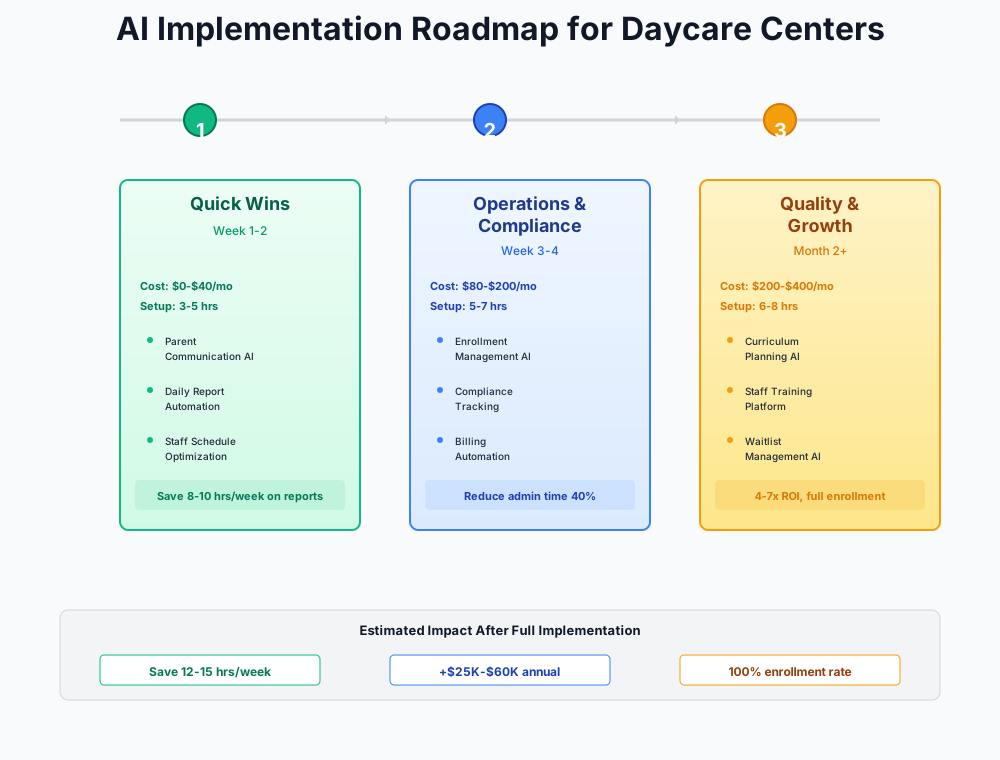
Here's a visual overview of the implementation approach:
Quick Wins: Free AI for Everyday Center Tasks
Total cost: $0-$20/month | Setup time: 3-5 hours | Time saved: 10-15 hours/week
These tools cost nothing and deliver immediate relief. Every director and teacher in your building should know about them by end of week.
Lesson Plans and Curriculum Documentation
Teachers spend 3-5 hours per week writing lesson plans and aligning activities to early learning standards like NAEYC and HighScope — often unpaid, after hours, on their own time. At $13/hour, this unpaid labor is a direct driver of the burnout that causes 30-65% annual turnover.
ChatGPT and Claude generate complete, standards-aligned weekly lesson plans from a single sentence in under two minutes.
You are an early childhood educator at a licensed daycare center. Create a complete weekly lesson plan for a preschool classroom (ages 3-5) with the theme "Farm Animals."
Include for each day:
- Circle time activity
- 2 art projects across the week
- 1 sensory play activity
- 1 outdoor activity
- 1 music/movement activity
Align each activity to a specific NAEYC developmental domain (language, cognitive, physical, social-emotional). Keep activities simple enough for 2 teachers to manage with 12 children. List materials needed for each activity.
Here's how to roll this out:
- Create a free ChatGPT account at chat.openai.com (2 minutes)
- Print the prompt template above and post it in the break room — or pin it in your staff group chat
- Have each teacher generate their first plan and compare it to what they'd write manually. Most find it 80-90% usable as-is
- Teachers paste the output into Teaching Strategies GOLD or their lesson plan document, then customize for their specific kids and available materials
For a center with 3-4 classrooms, that's 8-15 hours of teacher time reclaimed per week — time that goes back into actual child care instead of Sunday-night paperwork.
Bonus: Parent-Teacher Conference Notes
Use the same approach before conference season. Paste brief observations about a child ("likes building with blocks, counts to 12, sometimes has trouble sharing") and ask AI to write professional developmental progress notes organized by NAEYC domains. Saves 15-20 minutes per child — for a class of 15, that's 4-5 hours before conferences.
Incident Reports and Parent Communications
Incident reports must be completed and signed by parents within 24 hours at most licensed centers. Writing them while supervising children — or rushing through them at pickup when the parent is standing right there — leads to incomplete documentation and compliance risk.
Write a professional, factual incident report for a licensed daycare center.
Facts: [child's first name] was playing on the outdoor climbing structure at approximately 2:15 PM when he slipped and scraped his right knee. Staff member [teacher name] immediately assessed the area, cleaned the scrape with soap and water, applied a bandage, and comforted the child. [Child] resumed activities within 5 minutes. Ice was not required. No signs of swelling or continued pain were observed. Parents to be notified at pickup.
Write in neutral, factual language suitable for official licensing records and parent review. Do not include any medical diagnoses or assessments beyond observable facts.
Privacy note: Never enter children's full names or identifying details into ChatGPT or Claude. Use first names only or initials.
The same approach works for newsletters, policy updates, and difficult parent communications. Jot down bullet points, let AI draft the professional version, review and personalize. Between incident reports, newsletters, and parent emails, that's 3-5 hours a week back in your pocket — and complete documentation that holds up when a licensing inspector comes calling.
Marketing and Enrollment Content
How many enrollment inquiries came in after 6 PM last month? At most centers, the answer is "I don't know — we don't track it." Most directors create social media posts when they remember, with no training and no time. Meanwhile, every empty slot costs $700-$1,500 per month.
Canva (Magic Studio)
Best for: Social media posts, enrollment flyers, newsletters
Canva's Magic Write AI generates social media captions and enrollment ad copy in seconds. Magic Design creates complete branded flyers from a text prompt. The free tier gives ~50 AI uses per month — enough for 2-3 social posts per week plus enrollment flyers.
Quick start: Search "daycare" or "childcare" in Canva templates, customize with your center's photos (with signed parent consent forms), and use Magic Write to generate captions. Set up your free Google Business Profile if you haven't — it's the single most important marketing asset for local search.
Write a professional, warm response to this Google review of my daycare center "[Center Name]."
The review says: "[paste review text]"
The response should: thank the parent by first name, address any specific praise or concerns they mentioned, and reinforce our commitment to quality early childhood education. If the review is negative, express empathy, invite them to discuss further offline at [phone number], and avoid being defensive. Keep it under 100 words.
Filling just one more slot from consistent marketing presence and faster review responses covers years of Canva Pro subscriptions. At $700-$3,000/month per slot, even sporadic improvement pays off.
CACFP Menu Planning
If your center participates in the USDA Child and Adult Care Food Program — roughly 60% of licensed centers do — you know the complexity of planning menus that meet creditable food component requirements. Non-compliant menus mean rejected reimbursement claims worth $500-$2,000 per month.
Create a 5-day lunch menu for a USDA CACFP-compliant daycare serving children ages 3-5.
Each lunch MUST include all required CACFP components:
- Meat or meat alternate
- Grain or bread
- Two different vegetables, OR one vegetable and one fruit
- Fluid milk
Requirements:
- No repeated main proteins across the 5 days
- Include CACFP-required portion sizes for ages 3-5
- Flag common allergens (nuts, dairy, gluten, soy, eggs) next to each item
- Keep ingredients budget-friendly for a childcare center kitchen
- Note which items require verification against the current CACFP creditable foods list
Critical step: Always cross-reference AI-generated menus against the current USDA CACFP creditable foods list before entering into KidKare for official tracking. AI may suggest items that sound compliant but aren't technically creditable — especially grain products and meat alternates, which are the most common audit findings.
KidKare
Best for: CACFP meal tracking and claim submission
The industry-standard CACFP software with 250+ automated edit checks that catch compliance errors before claim submission. Before paying for it directly, call your CACFP sponsor organization — many provide KidKare at no cost to participating centers.
That's 1-2 hours a week back from menu planning, and it keeps your CACFP claims clean — protecting the $500-$2,000/month in reimbursements that make the food program worth running.
Core Operations: Paid Tools That Pay for Themselves
Total cost: $80-$350/month | Setup time: 6-10 hours | Time saved: 14-24 hours/week
This is where the ratio problem gets solved and the cash flow bleeding stops. Three areas consume most director time and leak the most revenue: staff scheduling, tuition billing, and parent communication. Each tool below pays for itself within the first month.
Ratio-Compliant Staff Scheduling
This is the single highest-ROI operational tool for most daycare centers. Directors spend 5-10 hours per week building schedules in spreadsheets, and a single callout in the infant room can force closing that classroom — losing $200-$500 per child per day in revenue while you scramble for coverage.
XShift AI
Best for: AI scheduling with ratio compliance dashboard
Purpose-built for shift-based teams with a childcare-specific ratio compliance dashboard. The AI Copilot generates a full weekly schedule in 60 seconds from a plain-language description. Callout management automatically removes absent staff and texts available substitutes.
Implementation steps:
- Sign up for XShift AI's 21-day free trial — no credit card required
- Input your classroom structure: room names, licensed capacity, and state-mandated ratio for each age group (e.g., Infant Room: 1:4, Toddler Room: 1:6, Preschool Room: 1:10)
- Add all staff with roles, certifications (lead teacher vs. aide), availability, and preferred hours
- Use the AI Copilot: "I need 2 teachers in the infant room from 7am-6pm with a float teacher covering lunch breaks from 11am-1pm"
- Review the generated schedule — the dashboard highlights any ratio gaps — then publish to staff via the app
- Configure callout management so the system auto-texts available staff when someone calls in sick
Don't Skip This
Spend 30 minutes collecting accurate availability from every staff member before setup. The AI schedule is only as good as the data you give it. Have each teacher confirm their available days and hours in writing (or via the app) before generating the first schedule.
Alternative: If budget is extremely tight, Homebase offers a free Basic plan (1 location, up to 10 employees) with scheduling and time tracking — no AI, but a massive upgrade from paper. Their Plus plan ($70/month) adds AI scheduling and AI hiring features. If your center also uses Homebase for hiring (see below), the Plus plan bundles both. Many service businesses like bakeries and cleaning services use Homebase for the same scheduling challenges.
ROI Snapshot
Monthly Cost
$45/mo
Time Saved
7hrs/week
Monthly Value
$2,700
ROI
5900%
Most directors reclaim 5-8 hours a week on scheduling alone. The bigger number: $1,000-$3,000/month in classroom revenue that stops disappearing because of a 6 AM callout.
Automated Billing and Late Payment Collection
Late tuition payments create $2,000-$10,000 monthly cash flow gaps for the average center, and the uncomfortable follow-up conversations strain the relationships your teachers have built with families. Automated billing makes the software the enforcer, not the person who cares for their child.
Famly
Best for: Transparent pricing, 139-language translation, all features included
Per-child pricing with no hidden fees or feature gating: $49/month for up to 30 children, $79 for 30-50, $99 for 50-70, $119 for 70-100, $139 for 100-150. Every plan includes billing, attendance, parent communication, AI writing assistant, 139-language translation, and ratio tracking. No sales call required. Free dedicated account manager from day one.
Implementation steps:
- Sign up for Famly's free trial — transparent pricing means no surprises after the trial
- Import your family roster and tuition rates by classroom/age group
- Set up recurring invoices: billing date (1st of month or weekly), tuition per child, sibling discounts, and subsidy splits
- Enable auto-pay enrollment and send parents a communication (use ChatGPT to draft it): "Starting [date], tuition will be automatically collected via ACH on the [1st]. This eliminates late fees and ensures your child's spot is always secured."
- Configure automatic reminders: Day 1 (friendly), Day 3 (second notice), Day 7 (late fee applied)
- For subsidy families, set up split billing: government CCAP portion tracked separately from parent co-pay
Give Families Notice
Launch auto-pay with 2-3 weeks' advance notice. Offer to help parents set up their payment method at drop-off during the transition week. Surprising families with automatic charges is the fastest way to lose trust.
Alternative: If you're already on Brightwheel, their built-in billing module handles the same automated invoicing and payment reminders. The key is automation, not the specific platform.
Most centers recover 5-8 hours a week from billing admin. More importantly: late payments stop being a weekly negotiation and start being the software's problem. That's worth the $49-$139/month by itself.
AI-Enhanced Parent Communication and Daily Reports
Parents expect real-time updates on meals, naps, activities, and milestones — but documenting everything while supervising toddlers is nearly impossible. Teachers spend 1-2 hours daily on documentation, and the quality of reports varies wildly between staff.
Illumine
Best for: AI daily reports, 20+ language translation, curriculum planning
Standard plan ($99/mo): parent communication, attendance, check-in/out, AI daily reports, 20+ language translation. Business plan ($249/mo): adds billing, AI lesson planning, ratio alerts. Enterprise ($499/mo): adds multi-center CRM, subsidy management, AI newsletters. Ranked #1 on Capterra and GetApp for childcare software.
The workflow that saves hours: Teachers tap quick entries on a classroom tablet throughout the day — meal (what they ate), nap (start/end), activity (brief note + optional photo). Each entry takes 10-15 seconds. At 4:30 PM, the AI compiles all entries into a polished, professional daily report and sends it to parents automatically.
For centers serving multilingual families, this is where both Illumine and Famly genuinely earn their cost. Illumine translates into 20+ languages; Famly into 139. A parent who speaks Somali or Vietnamese receives the same detailed daily report as every other family — automatically, with no extra staff effort.
The net effect center-wide: 4-8 hours of documentation time back per week. And families who feel informed stay longer — replacing a child means 1-2 months of a vacant slot, so retention has a real dollar value.
Growth: Filling Every Slot and Keeping Your Staffing Pipeline Full
Total cost: $140-$500/month | Setup time: 6-10 hours | Annual revenue potential: $20,000-$55,000
With daily operations running more smoothly, this stage focuses on filling every slot in your building and keeping your staffing pipeline full. These tools assume your team has already freed up hours from the sections above.
AI Chatbot for 24/7 Lead Capture and Tour Scheduling
Prospective parents research daycare centers in the evening — after their current childcare closes, after bedtime, on weekends. When they visit your website at 9 PM and can't get answers about pricing, availability, or your curriculum philosophy, they click to the next center on Google. That inquiry is gone.
The enrollment funnel at most centers looks something like this: 40-60 website visitors per month produce 8-12 inquiry contacts, which convert to 4-6 tours, which close 2-4 enrollments. The biggest drop-off happens between visitor and inquiry — specifically because the visitor hit your site after hours and nobody answered.
Tidio AI
Best for: 24/7 website chatbot with lead capture and tour booking
Lyro AI agent answers parent questions about enrollment, hours, pricing, and availability automatically with a 67% resolution rate. Captures lead info via pre-chat forms and books tour appointments via calendar integration. Free plan available with limited conversations. Used by many small businesses — auto parts stores and flower shops use the same tool for after-hours lead capture.
Implementation steps:
- Install Tidio's chat widget on your website (1-click for WordPress, Wix, or Squarespace)
- Train the Lyro AI agent on your center's 15-20 most common questions: hours, tuition by age group, current availability, curriculum approach, staff qualifications, meal program, outdoor play policy, security procedures
- Connect to Google Calendar so the chatbot books tour appointments directly
- Set up the pre-chat form: parent name, email, phone, child's age, desired start date
- Configure handoff: if AI can't answer, it collects parent info and alerts you for follow-up
- Test it yourself in an incognito browser — ask questions as a prospective parent and refine any weak answers
Most centers reclaim 3-5 hours of weekly phone time once the chatbot handles first-contact inquiries. The enrollment math is direct: 2-3 additional enrollments from after-hours captures is $1,400-$4,500/month. The chatbot pays for itself many times over.
AI-Powered Hiring Pipeline
With 30-65% annual turnover, a 15-person center replaces 5-10 staff per year. Each hire costs $3,000-$5,000 in recruiting, onboarding, and lost productivity while classrooms run short-staffed. Most directors post to Indeed manually, screen applications one by one, and play phone tag to schedule interviews.
Homebase AI Hiring
Best for: AI job posting, candidate screening, and multi-board distribution
The Plus plan ($70/month per location) bundles AI Hiring Assistant with AI Scheduling Assistant. AI generates optimized childcare job postings, posts to Indeed, ZipRecruiter, and Google Jobs simultaneously, auto-screens candidates, and enables self-scheduling for interviews.
Write a compelling job posting for a Full-Time Lead Teacher at a licensed daycare center in [City, State].
Requirements: CDA credential or Early Childhood Education degree preferred, experience with ages 2-5, must pass state background check, CPR/First Aid certification (or willingness to obtain within 30 days).
Pay: $16-19/hour depending on experience.
Benefits to highlight: paid holidays, staff appreciation events, classroom supply budget, professional development support, consistent Monday-Friday schedule (no evenings/weekends).
Write in an engaging, warm tone that attracts passionate educators. Lead with culture and mission, not requirements — in a $13/hour industry, candidates choose centers that feel welcoming.
That's 3-5 hours saved per open position, and a time-to-hire that compresses a 2-3 week cycle into 5-7 days. Every day a classroom runs short-staffed costs real money in overtime or director coverage — faster hiring is direct cash recovery.
Licensing Compliance: Becoming "Always Inspection-Ready"
A failed licensing inspection can suspend your operations — immediately halting all revenue and potentially losing families permanently. Most directors spend 5-8 hours per week on compliance paperwork, spiking to 15-20 hours before the annual inspection as they tear through binders searching for a teacher's expired CPR card.
The goal is shifting from "scramble before inspections" to "always ready."
Start free: Use ChatGPT to generate a comprehensive pre-inspection checklist customized for your state — staff files, child files, health and safety logs, fire drill records, CACFP documentation, posting requirements. Then build a Google Sheet compliance tracker with conditional formatting: yellow for items expiring within 60 days, red for expired.
Platform approach: If you've adopted Illumine, Famly, or Brightwheel in the core operations stage, enter all staff certifications (CPR, First Aid, background checks, annual training hours) and child records (immunizations, medical authorizations) into the compliance module. Set automated reminders at 90, 60, and 30 days before expiration.
The one habit that prevents the annual scramble: Block 30 minutes on the first Monday of each month for a compliance audit walk-through. Review every item, update what's changed, follow up on approaching expirations. This single habit replaces the panicked multi-day sprint directors dread before every inspection.
Directors who build this habit report getting back 3-5 hours a week — and 10-15 hours before each annual inspection. More than that: you stop dreading the inspector's visit.
A Few Things Worth Knowing Before You Buy
Workforce.com, LineLeader CRM, and Legion Workforce AI all target multi-site operators with 20-500 staff. If you're a single-location center, those tools will charge you for infrastructure you don't need and take 6+ months to configure fully. Start with Homebase (free), Famly ($49/month), or XShift AI (~$40/month).
Automated parent communication needs a review step. AI daily reports must be approved by a lead teacher before sending — a wrong allergy mention or mischaracterized incident damages trust in seconds, and it's impossible to unsend a report to 50 families.
Don't switch platforms and add a CRM simultaneously. Migrating from Brightwheel to Illumine while also adding IntelliKid Systems creates too much change for teachers to absorb while they're still, you know, watching children. One system per stage.
AI documents observations and writes progress notes, but should never assess developmental delays or medical conditions. Those require trained evaluators and carry legal implications.
Call your CACFP sponsor's free tools before paying for food program software. Many sponsor organizations provide KidKare at no cost to participating centers.
Your Week-by-Week Checklist
- Week 1: Create free ChatGPT account and generate your first AI lesson plan — share results with your teaching staff
- Week 1: Save the incident report and CACFP menu prompts where all staff can access them (break room poster or group chat pin)
- Week 1: Set up Google Business Profile if you don't have one — respond to your last 5 Google reviews using AI-drafted responses
- Week 2: Have every teacher generate at least one AI lesson plan and one set of conference notes — collect feedback on what works
- Week 2: Create a Canva account and design one enrollment flyer and 4 social media posts for the month
- Week 3: Sign up for XShift AI free trial and build your first AI-generated weekly schedule with ratio compliance checking
- Week 3: Sign up for Famly or activate Brightwheel billing — import family roster and configure automated invoicing
- Week 4: Send parents advance notice about auto-pay enrollment (2-3 weeks before activation)
- Month 2: Deploy Illumine or Famly for AI-powered daily reports — train teachers on quick-entry workflow with classroom tablets
- Month 2: Enable multilingual translation for non-English-speaking families
- Month 3: Install Tidio AI chatbot on your website and train it on your center's top 20 FAQ answers
- Month 3: Set up Homebase Plus for AI-powered hiring if you have open positions
- Month 4: Build your compliance tracking system (Google Sheet or platform module) and schedule monthly 30-minute audits
- Month 6: Measure results — compare director admin hours, late payment rate, teacher documentation time, and occupancy rate to your pre-AI baselines
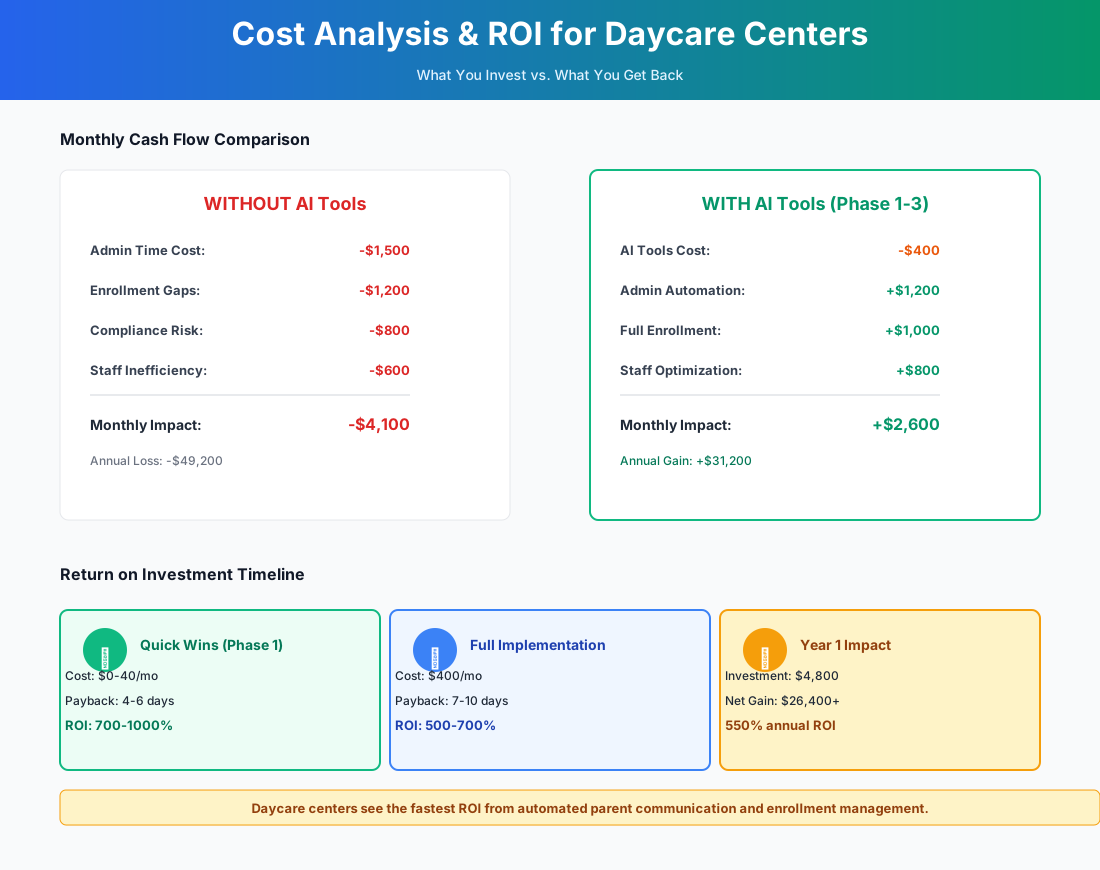
Here's a breakdown of the costs and expected returns:
Frequently Asked Questions
Can AI-generated lesson plans satisfy state early learning standards and QRIS documentation requirements?
Yes — with human review. ChatGPT can generate lesson plans explicitly aligned to NAEYC developmental domains, HighScope key experiences, or your state's specific early learning standards. The output is a solid first draft that teachers customize for their classroom's children, available materials, and developmental levels. For QRIS documentation, the plan is compliant as long as it demonstrates intentional alignment to standards — which AI does well. The teacher's implementation notes and child observation records still need to be authentic, but the planning framework alone saves 3-5 hours per classroom per week.
How does split billing work for CCAP subsidy families — does the software handle the government portion automatically?
Platforms like Famly and Brightwheel let you configure split billing per child: the government subsidy portion is tracked separately from the parent co-pay. The parent's co-pay goes on auto-collection via ACH. What they can't do yet is submit claims to your state's CCAP portal automatically — in most states, you still log into the state system to submit attendance and claim reimbursement. The platform handles the internal accounting so your month-end reconciliation takes 20 minutes instead of 3 hours.
If XShift AI can't find a substitute for an infant room callout, am I still the backstop?
Honestly, sometimes yes. But the system dramatically reduces how often you end up there. The moment a callout comes in, XShift texts your entire available substitute pool instead of you making 8 phone calls from the parking lot at 6:45 AM. The more useful feature is predictive: the ratio compliance dashboard flags when you're one callout away from a violation before it happens, so you can schedule an extra float on high-risk days — Mondays, Fridays, the week after a long weekend, flu season — proactively. Prevention is the real value.
Will licensing inspectors accept records from digital platforms, or do they still want paper?
Every state licensing agency we've researched accepts digital records — attendance logs, billing records, staff files, and daily reports from platforms like Brightwheel, Procare, Illumine, and Famly. Records must be accessible during the inspection, which means having a tablet or laptop ready to pull up anything the inspector requests. Keep a printed summary binder as backup for your first digital inspection. The platforms' audit trails — timestamped entries, who logged what, and when — are actually stronger documentation than paper sign-in sheets that could be completed after the fact.
Our center has 20 families who primarily speak Spanish or Somali. Will AI translation tools hold up for things like medication authorization forms?
For daily activity reports, newsletters, and general announcements, Famly's 139-language translation and Illumine's 20+ language support handle conversational childcare terminology accurately. Where you need to be careful: medication authorizations, allergy alerts, and pickup authorization changes. For those, have a bilingual staff member or a professional translator review before sending. The stakes are too high to risk an ambiguous translation. Spell out acronyms in your original message (write "Child and Adult Care Food Program" not just "CACFP") so the translation engine has full context to work with.
Our occupancy is 85% but we're still barely breaking even — is this actually going to move the needle?
At 85% occupancy with 5-10% margins, you're losing more to operational leakage than to empty slots. Three places AI plugs the leak: late tuition — if 15% of your 50-child roster pays late and you're absorbing even $200/month in uncollected fees, automated billing recovers $2,400/year without a single uncomfortable conversation. Director time — if you're covering classrooms 5 hours a week because of scheduling gaps, that's 5 hours not spent on enrollment marketing or compliance work. Staff retention — every teacher you keep instead of replacing saves $3,000-$5,000 in hiring costs, and teachers who aren't spending Sunday nights on lesson plans are less burned out. Filling 2 more slots at $1,000/month average tuition adds $24,000/year against $2,000-$6,000/year in tool costs. The math holds even at high occupancy.
Daycare centers that run well in 2026 aren't necessarily the ones with the nicest facilities. They're the ones where ratio compliance is handled before the director's coffee is cold, where parents get detailed daily reports without teachers spending their lunch breaks typing, and where a prospective family who visits the website at 10 PM on Sunday gets a response before they find a competitor.
Start with the lesson plan prompt. Generate one. Show your teaching staff. The two minutes it takes to produce something that would have cost three hours on a Sunday night is the clearest possible demonstration that this is real — and worth your center's time to implement.
If your center also runs after-school or tutoring programs, our tutoring center guide covers the curriculum and parent communication side in more detail. And if you're managing staffing across a martial arts or recreational program alongside your daycare, the martial arts school guide covers scheduling and enrollment tools that overlap with what's here.
More AI Implementation Guides
AI Tools for Driving Schools: 2026 Owner's Guide
The best AI tools for driving schools in 2026: capture enrollment calls, cut no-shows, kill dead drive-time. A phased plan with real pricing and ROI.
How Much Does Childcare Software Cost? (2026)
Real 2026 childcare management software pricing — from $29/mo flat to per-child and per-classroom plans. Compare Brightwheel, Famly, Illumine, XShift & more.
AI Tools for Tutoring Centers: 2026 Guide
Best AI tools for tutoring centers in 2026. Reduce no-shows, automate reports, capture leads, boost retention — complete guide.
AI Tools for Bookkeeping Services: 2026 Guide
Best AI tools for bookkeeping services in 2026: Automate categorization, reconciliation, and document chasing without hiring extra staff.
AI Tools for Marketing Agencies: 2026 Playbook
The best AI tools for marketing agencies in 2026. A phased plan to kill Hell Week reporting, scale content, and fix billable utilization without new hires.
AI Tools for Home Health Care Agencies: 2026 Guide
A practical 2026 guide to AI tools for home health care agencies — HIPAA-safe automation for shift-filling, OASIS-E documentation, EVV, and claim denials.
Keep exploring
Browse the full library by industry or category, see every product we cover in the AI tools directory, or read the head-to-head comparisons.