
It's a Tuesday in October. You shot a 10-hour wedding on Saturday — two shooters, a first look that moved indoors when the rain came, a grandmother's dress altered for the flower girl, a golden retriever ring bearer who stole the ceremony. The couple is already texting for a sneak peek. Your card reader has been dumping 3,800 raw frames onto a backup drive since Sunday night. And sitting in front of Lightroom, you do the math you've done after every wedding for years: three hours to cull this down to selects, then another fifteen to twenty to edit. For every hour you spent behind the camera, you'll spend three or four at the desk.
That ratio — roughly 8–12 hours shooting against 30–40 hours of post-production per wedding — is the central fact of this business. It's what caps how many weddings you can take, what creates the delivery backlog your clients complain about, and what drives the burnout that pushes photographers out of the industry. AI isn't going to shoot the wedding for you, and it shouldn't. But it can collapse that post-production number, answer the inquiry that lands at 11pm while you're asleep, and finally let you write the venue blog posts you've been meaning to publish for three years.
This guide is a phased plan: free quick wins first, paid core automation once those prove out, advanced revenue tools last. Every tool here is real, and every number is matched to what a solo or small-studio wedding photographer can actually expect.
TL;DR — Start Here
- Add AI culling (Aftershoot Select, from $10/mo). Cuts culling from 3–6 hours to under 1 hour per wedding. Start the free trial this week.
- AI-draft inquiry replies (HoneyBook's built-in AI, or a saved ChatGPT/Claude prompt — free). The first photographer to reply usually books the gig; this gets you under an hour, 7 days a week.
- Batch off-season blog posts (ChatGPT or Claude, $20/mo or free tier). Turn each venue you've shot into local-SEO content during the November–March slow season.
Understanding the Wedding Photographer's Year
Nobody books a wedding photographer the way they book a plumber. The relationship starts 12–18 months before the wedding and continues for months afterward: inquiry, consultation call, booking and contract, engagement session, timeline planning, the wedding day itself, then weeks of culling, editing, album design, and delivery. You are a salesperson, a project manager, a contractor-wrangler, a colorist, and an artist — usually all of them, usually alone.
The calendar is brutally uneven. Roughly 70% of weddings fall between May and October, with September alone accounting for around 15% of the annual total. Inquiries for the following year peak September through March. Then November through March goes quiet, and the cash-flow swing is severe enough that wedding-vendor seasonality surveys (fielded mostly among videographers, but the dynamic holds across the vendor side of the industry) find a meaningful share of pros accepting below-minimum rates in the off-season just to keep money moving. A full-time solo shooter does 25–40 weddings a year at an average fee of $2,500–$4,500; studios with associate teams and strong album sales push total revenue per client toward $8,000–$10,000.
The tech stack is already deep. You almost certainly run Lightroom Classic (a large majority of the niche does — commonly cited estimates run 70–85%), a client-gallery platform like Pixieset or Pic-Time, and a CRM — HoneyBook, Dubsado, or Studio Ninja dominate here. You cull in Photo Mechanic or Lightroom, design albums in Fundy or SmartAlbums, and chase leads across The Knot, WeddingWire, Instagram, and referrals. The point of AI here is not to bolt on a pile of new apps. It's to drop AI into the stack you already own — a Lightroom plugin, an AI feature inside your existing CRM, a chatbot in a tool you'll copy-paste into. Nothing in Phase 1 requires code, an API, or IT help. If you've ever installed a Lightroom update, you can do this.
If you run a broader studio that also shoots portraits, newborns, and commercial work, our AI tools for photography studios guide covers the general-studio workflow; this post stays focused on the wedding-specific grind.
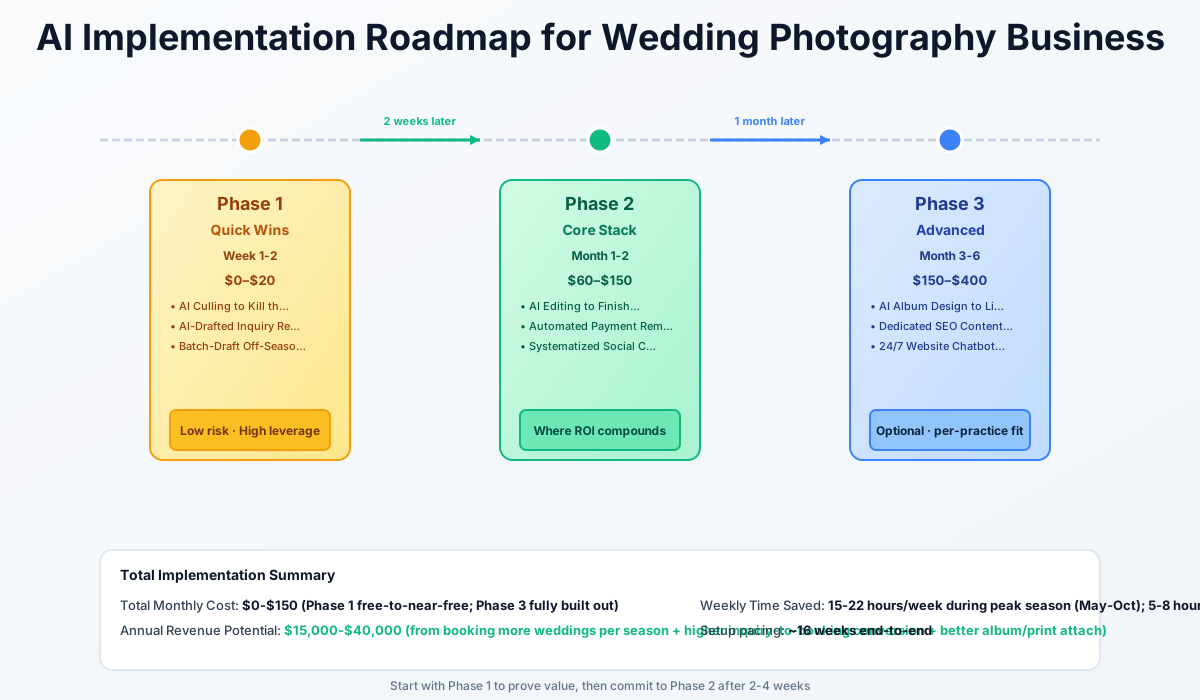
Here's a visual overview of the implementation phases:
Phase 1: Quick Wins (Week 1–2)
Free or near-free, layered on software you already own. No new monthly commitment required to feel the first results. Total setup: 3–5 hours. Monthly cost: $0–$20.
Quick Win #1: AI Culling to Kill the Post-Production Backlog
A single wedding yields 2,000–4,000 raw frames across you and your second shooter. Culling that down to 400–800 deliverables — removing the blinks, the blurs, the burst duplicates, the misfire where someone's elbow blocked the kiss — eats 3–6 hours and is the single biggest source of decision fatigue in the business. This is the fix: AI culling software plugs into Lightroom Classic, analyzes focus, exposure, closed eyes, and duplicate bursts, and flags the keepers for you. Your job shrinks from reviewing 4,000 frames one at a time to a fast final pass over its suggestions.
Aftershoot Select
Best for: Solo and associate wedding studios wanting the fastest automated culling pass
The most widely adopted AI culler in the wedding niche. Groups duplicate bursts, detects blinks, and — critically — uses key-face detection to protect photos of the couple and VIP guests from accidental rejection. Runs as a Lightroom Classic plugin and learns your culling preferences over time. The 2026 repricing split culling, editing, and retouching into separate add-ons; the full Complete bundle (Select + Edit + Retouch + Galleries) runs $45/mo billed annually.
If you're uncomfortable handing selection fully to a machine, Narrative Select ($10/mo Lite, up to $60/mo Ultra) takes an AI-assisted approach — it scores focus and face quality and speeds your manual review without auto-rejecting anything. It's measurably slower on a full 6,000-frame wedding than Aftershoot, but it keeps you in the decision seat. And FilterPixel's DeepCull (Standard $14.99/mo with 20 Deep Cull shoots/year, up to $34.99/mo on Pro for 70 shoots/year) is a 2026 arrival worth watching: it's a wedding-genre-aware mode trained to recognize the narrative of a wedding day — ceremony structure, emotional peaks — not just technical quality. More on that in Phase 3.
Setup steps:
- Start Aftershoot's free trial this week (no card required) and install the Lightroom Classic plugin
- Run it on your next wedding's raw catalog — don't delete anything yet
- Compare its selects against a wedding you culled manually, to build trust in its judgment
- Turn on key-face detection so photos of the couple and VIPs are protected from rejection
- Once confident, commit to the $10/mo Select plan — or bundle into Complete when you add AI editing in Phase 2
Do the math on a full season: culling drops from 3–6 hours to under an hour per wedding, so 3–5 hours saved each time. Over 30 weddings that's 100–150 hours back — enough capacity for 3–6 additional bookings worth $7,500–$27,000 at average fees. Land even one extra wedding a year and the subscription has paid for itself 30–50 times over.
Watch Out
Do not let the tool auto-delete rejected frames for the first few weddings. Soft-flag them and keep them for a week until you trust the AI's judgment. A wedding is an unrepeatable, one-day event — a missed in-law or VIP shot is unfixable. AI should compress your review time, never replace your final pass.
Quick Win #2: AI-Drafted Inquiry Replies to Win the First-Reply Race
An inquiry lands at 11pm on a Saturday while you're mid-reception, phone face-down in your bag. By the time you see it Monday morning, the couple has already heard back from two other photographers. Response-time studies across service businesses consistently show conversion dropping sharply once you move from "within the hour" to "the next day" — and inquiries don't respect your schedule. Every slow reply risks a $3,000+ booking leaking to whichever competitor got there first.
If you're on HoneyBook, turn on its built-in AI. If not, build one saved prompt that drafts a warm, personalized reply in under a minute from your phone, anywhere, any time.
HoneyBook AI
Best for: Photographers already using or considering HoneyBook as their core CRM
The dominant wedding-niche CRM drafts personalized inquiry responses in your tone, flags priority leads versus tire-kickers, takes automatic meeting notes on consultation calls, and generates a daily AI action plan of what needs a reply today. Core AI inquiry drafting is now available starting on the Starter plan, with deeper automation and proposal features added on Essentials and above. A 7-day free trial, no card required.
On Dubsado or Studio Ninja, which don't yet have HoneyBook's native AI inquiry drafting, close the gap with a saved ChatGPT or Claude prompt. Keep it as a note on your phone, paste the lead's message in, and get a draft in seconds:
Write a warm, personal-sounding email reply to a bride who inquired about wedding photography for a June 2027 wedding at [VENUE NAME]. She mentioned she loves "candid, documentary-style" photos. Include our starting package price ($3,200), mention that our calendar books 12–18 months out, and end with an invitation to a 15-minute call. Keep it under 150 words and avoid sounding like a form letter.
Setup steps:
- Write one master prompt today with your real pricing, booking lead time, and brand voice baked in
- Save it to your phone notes so you can draft a reply from a venue parking lot in under a minute
- For your next 10 inquiries, use the AI draft but personalize one sentence before sending — never send unedited
- If you're on HoneyBook Essentials or above, turn on native AI inquiry drafting and priority-lead flagging instead
- Track response time for two weeks to confirm you're consistently under an hour
Convert just 2 extra bookings a season from faster response and you've added $5,000–$9,000/year. On the free ChatGPT/Claude option there's no cost to weigh against that — the real win here isn't the 10–15 minutes saved per reply, it's speed.
Watch Out
Never send an AI draft completely unedited. A tone mismatch in the first email a couple ever receives from you is the fastest way to lose their trust. A 30-second human read before hitting send is non-negotiable.
Quick Win #3: Batch-Draft Off-Season Blog Content
Local SEO blogging — ranking for "wedding photographer at [venue]" and "wedding photographer in [city]" — is one of the highest-ROI ways to cut your dependence on costly directories like The Knot and WeddingWire. It also almost never gets done, because nobody writes blog posts during peak season. So don't try to. Use the slow November–March months to batch-draft 8–10 venue-specific posts with ChatGPT or Claude ($20/mo, or the free tier for occasional use). Each wedding you already shot becomes a piece of owned-channel content you control forever.
Write a 1,200-word SEO blog post titled "Getting Married at [VENUE NAME] in [CITY]: A Complete Guide for Couples" for a wedding photography business website. Include sections on the venue's best photo locations, ideal timing for golden-hour portraits given the venue's layout, parking and logistics tips for guests, and a natural mention of our photography services without being salesy. Write in a warm, first-person voice as if the photographer is sharing real experience shooting there.
Setup steps:
- Pick one venue you shot at this year and draft a 1,200-word post this week
- Edit it to sound like you — add one real detail from that actual wedding day
- Publish on your existing WordPress, Squarespace, or Showit site
- Repeat weekly; aim for 8–10 posts total by the end of the slow season
- Add an AI-drafted FAQ section to each post to support rich-result eligibility in search
You'll save 2–3 hours per post versus writing from scratch, which is what makes a weekly cadence realistic for the first time. But don't expect quick results — the payoff is 60–90+ days out, a season-ahead investment rather than an immediate lead fix. Over a year or two, organic traffic chips away at your directory spend ($1,000–$10,000/year) and diversifies where bookings come from. Just don't quit after two posts. SEO content needs the full batch to start moving.
Phase 2: Core Automation (Month 1–3)
With culling and faster replies proven out, finish the post-production overhaul, automate the money side, and systematize social. Setup: 4–6 hours. Monthly cost: $60–$150. Only move here once Phase 1's free trials have earned your trust.
Core Automation #1: AI Editing to Finish the Post-Production Overhaul
Culling was never the biggest number on your timesheet. Editing and color-grading a full gallery to your signature look — across hundreds of images shot in wildly varied light, a bright garden ceremony, a dim candlelit reception, harsh midday portraits — still takes 10–25 hours per wedding even after AI has cleared the duplicates. It's the largest remaining time sink in the business, and the hardest to outsource without losing your style.
The fix is to train an AI editing profile on your own previously edited galleries so it replicates your exact color grade across an entire wedding in minutes, then do a lighter human polish pass instead of editing every frame from scratch.
Imagen AI
Best for: Studios with a consistent signature edit who want AI to replicate their exact style
Trains a personal AI editing profile on your past-edited photos — not a generic preset — so output matches your studio's look, not someone else's. Adds AI culling, sky replacement, and batch adjustments. Pay-as-you-go suits low volume; the Limitless flat plan wins past a certain point. One of the two most-cited AI editing tools in 2026 wedding comparisons, credited with cutting editing from 10–25 hours to 2–6 per wedding.
If you went with Aftershoot for culling, Aftershoot Edits (part of the $45/mo Complete bundle) keeps everything under one subscription. For portrait and bridal detail retouching specifically — skin, teeth, background cleanup — Evoto (from $89/year for 800 credits, credit-based) is a budget-friendly layer, though it's not a full-gallery color-grading replacement for Imagen or Aftershoot.
Note too that your base tool already does more than it used to: Lightroom Classic now ships AI Denoise (a lifesaver for high-ISO reception shots), AI subject/sky masking, and AI Lens Blur, all inside the $9.99/mo Photography plan you likely already pay for. Those are per-photo tools that complement the full-gallery automation above rather than replace it.
ROI Snapshot
Monthly Cost
$129/mo
Time Saved
14hrs/week
Monthly Value
$5,860
ROI
4443%
Setup steps:
- Upload 2–3 of your best, most consistent previously edited galleries to train your personal AI profile
- Run the profile on your next wedding and compare its output to how you'd normally edit
- Adjust the training set if skin tones or colors drift — the profile improves fast with iteration
- Commit to Imagen's unlimited plan (~$129/mo) or Aftershoot Complete ($45/mo) depending on volume
- Budget 2–6 hours per wedding for a final human polish pass — never deliver AI output untouched
Editing drops from 10–25 hours to 2–6 per wedding — 8–20 hours saved each time. Stack that with Phase 1's culling gains and your total post-production moves from 30–40 hours toward 8–15. Post-production time is only part of what a wedding costs you in hours — shooting, travel, consults, and admin add more — but freeing 20+ hours per wedding is realistically enough recovered capacity for a few additional bookings a year (worth $5,000–$25,000+ depending on your fee and how many you actually add), or the same number of weddings with your evenings and family back, which is its own kind of return.
Watch Out
Training the profile on inconsistent past galleries produces inconsistent AI output — garbage in, garbage out. And if you shoot high volume, model Imagen's pay-per-photo cost carefully: at 100k+ images a season it can exceed $8,000–$10,000/year, well past the flat unlimited plan or Aftershoot Complete.
Core Automation #2: Automated Payment Reminders and Cash-Flow Visibility
How many times have you drafted and redrafted a message chasing a late balance, trying to sound firm without sounding like you're hounding someone who's about to get married? Chasing unpaid invoices is an admin drain and an emotionally awkward one — these are clients, not debtors. Layer on the severe seasonal cash-flow swing, and reconciling payments across your CRM, Stripe, and your bank turns into a monthly headache.
AI-assisted bookkeeping handles the reconciliation side — auto-categorizing transactions and tracking per-wedding profitability — while a saved AI-drafted reminder template handles the awkward conversation, staying warm but firm every time.
QuickBooks Online (Intuit Intelligence)
Best for: Studios over $100K wanting per-wedding profitability and AI bookkeeping
AI-powered bank-feed categorization (Intuit claims ~12 hours/month saved), plain-language AI chat over your financials, automated reconciliation, and job-level profitability tracking so you can see which packages actually earn margin. Integrates directly with HoneyBook Essentials+. Essentials jumped from $65/mo to $85/mo on 2026 renewals, so it's a meaningfully bigger line item than it used to be — confirm current pricing before budgeting.
For solo photographers in their first few years, Wave Accounting covers invoicing and basic bookkeeping on a genuinely free Starter tier (as of mid-2026, bank-feed automation and receipt scanning moved behind the Pro tier at $19/mo, where they used to be partially free) — no reason to pay for QuickBooks until you're scaling. Whichever you use, generate your reminder templates once with AI and reuse them:
Write a friendly but firm payment reminder email for a wedding client whose final balance of $1,400 was due 5 days ago. This is the second reminder (the first was a soft nudge). Reference the contract terms requiring payment before the wedding date, offer a quick way to pay via [STRIPE/SQUARE LINK], and keep the tone warm — these are people about to get married, not debtors.
You'll get back 3–5 hours a month on bookkeeping and follow-up, collect balances faster to smooth the lean off-season, and finally see job-level data to plan pricing ahead of the November dip. One caution: don't jump to QuickBooks Advanced ($275/mo) when Wave's free tier covers what a solo operation actually needs.
Core Automation #3: Systematized Social Content from Every Wedding
Marketing content eats 5–10 hours a week, year-round, most of it spent re-deriving captions and post ideas from scratch for every single gallery. Stop starting from a blank cursor. Turn each wedding into 3+ ready-to-schedule pieces with one AI prompt, then push them into a scheduler with an AI caption writer built in.
Here are 5 bullet points describing a wedding I shot this weekend: [rustic barn venue, rainy-day first look moved indoors, bride's grandmother's dress altered for the flower girl, surprise fireworks send-off, golden retriever ring bearer]. Write: (1) a 3-sentence Instagram caption in a warm storytelling voice, (2) a Pinterest-style pin description with SEO keywords for "rustic barn wedding," and (3) a 2-sentence teaser for a blog post about the wedding.
Flick
Best for: Photographers whose primary lead channel is Instagram
AI caption writer (branded "Iris") built directly into the post scheduler — no copy-pasting between tools — plus hashtag research across 20+ languages and best-time-to-post recommendations. The Pro tier (£24/mo, billed annually) adds unlimited scheduling and full hashtag tracking. UK-based pricing in GBP adds a little currency friction for US photographers, and monthly (non-annual) billing runs higher than these annual rates.
If your Instagram grid aesthetic matters as much as the captions, Later (from $18.75/mo) has a visual grid planner that shows exactly how a new post looks against your existing feed before you publish — the differentiator versus Flick, whose hashtag research is stronger.
Expect 4–6 hours a week back. Batch a month of posts in one sitting rather than posting reactively, and reuse each blog teaser as the opening paragraph of a future SEO post from Phase 1's pipeline, so the two systems compound. If you also run styled shoots and vendor events, the workflow in our event planning company AI guide pairs well with this content engine.
Phase 3: Advanced Growth (Month 4–6+)
Post-production, admin, and content are now largely automated. Shift AI spend toward raising revenue per client and scaling SEO — only after Phases 1–2 are embedded and paying off. Setup: 4–8 hours. Monthly cost: $150–$400.
Advanced #1: AI Album Design to Lift Attach Rates
Weak album and print attach is where the money hides. When couples default to "just the digitals," you leave $1,000–$3,000 per client on the table — and album design itself is slow, iterative labor that rarely gets recouped. The blank-page problem is real: couples who never see a started album rarely start one.
Pic-Time 2.0 (relaunched April 2026) added an AI Album Designer that lets couples pick VIPs and must-have photos to generate a structured first draft. Album Starter, a related feature that auto-builds a complete album the moment a gallery is delivered so a sellable album is already there waiting, followed as a separate rollout in October 2026. Together they tackle the blank-page problem from two angles. For studios running formal in-person sales sessions, Fundy Designer's AutoFlow AI generates full spreads from a folder of selects and pairs them with IPS slideshow tools built to raise attach rates live. SmartAlbums by Pixellu is the fastest gallery-to-proof path for solo shooters who design themselves. Confirm current 2026 pricing directly on each vendor's site — published rates were unverified at research time, and Pic-Time's post-relaunch tiers in particular weren't public.
What to evaluate. Pilot the AI designer on your next 2–3 galleries before rolling it out. Track how many couples who see an auto-generated draft move forward versus your historical attach rate. Even a modest 10–15 percentage-point lift adds $1,000–$3,000 per booked client. Treat the AI draft as a faster starting point for a brief human refinement pass — not as final.
Advanced #2: A Dedicated SEO Content Engine
Phase 1's ChatGPT/Claude blogging proves the concept. Scaling local SEO further — to meaningfully dent your directory dependence — needs real keyword research and competitive content scoring. Jasper AI (from ~$59/mo, seat-based) drafts in your brand voice; Surfer SEO (from ~$49/mo for its entry tier) scores your draft against the pages currently ranking for your target keyword in real time. Together they let you systematically target "wedding photographer in [city]" and venue searches with data behind them. Pricing on both shifts with plan changes most years, so confirm current tiers before budgeting.
The honest caveat: this ~$100+/month combined spend is the slowest, least-certain payback in the whole plan. Don't front-load it. Reserve it for after you can point to specific Phase 1 posts that are getting impressions in Google Search Console but aren't quite ranking — those are your optimization targets, and that's when Surfer earns its keep. Expect payoff 60–90+ days out; this is a slow-season bet on compounding organic search, not a lead-flow switch you flip.
Advanced #3: A 24/7 Website Chatbot for Full Inquiry Coverage
Even with AI-drafted replies, inquiries that land while you're shooting or fully offline still wait for you to personally open the message. A website chatbot closes that last gap. ChatOnBo (free tier: 1 agent, 250 conversations/month; Pro $19/mo) sits on your portfolio site, answers pricing/availability/style questions trained on your own uploaded packages and FAQ, captures the lead's name, email, wedding date, and budget, and only offers consultation slots you're actually free for. It pushes qualified leads into HoneyBook, Dubsado, Studio Ninja, or Tave via webhook. It supports 50+ languages, which matters for destination and multicultural weddings. Worth noting: it's a small, newer vendor with limited track record outside its own site — pilot it on the free tier before trusting it with your only inquiry channel, and keep your existing CRM/email inbox as a backup until you've confirmed leads are reliably coming through.
What to evaluate. Upload real pricing and FAQ content before going live, or the bot gives vague answers that frustrate couples. Test the webhook handoff by messaging your own site as a fake lead — a silent webhook failure means captured leads never reach your CRM. For most solo photographers the free tier's 250 conversations/month is plenty; upgrade only if you exceed it.
What to Avoid
The wedding-photography market is crowded with AI pitches, and a few will cost you if you take them at face value:
- Don't let any tool auto-delete or auto-finalize a gallery without your review. A wedding happens once. A missed VIP shot or an off-tone edit in a one-day event is catastrophic and unfixable. AI compresses your review time; it never replaces your judgment.
- Don't run Imagen's pay-as-you-go pricing at high volume without modeling the cost. Per-photo billing can exceed $8,000–$10,000/year for associate studios processing 100k+ images a season. Past a certain volume, a flat plan or Aftershoot Complete is far cheaper.
- Don't buy the Jasper + Surfer SEO stack before Phase 1's free blogging is actually running. It's the highest-cost, slowest-payback item here. It only makes sense once you have published posts and real Search Console impressions to optimize.
- Don't use AI-generated imagery (Midjourney, Firefly) as portfolio content. Couples book based on real past work. AI mood boards are fine for internal style conversations in a consultation; never as a stand-in for actual photography in your portfolio or ads.
Getting Started Checklist
- Week 1: Start the Aftershoot free trial and run AI culling on your next wedding alongside your manual process
- Week 1: Write one master inquiry-reply prompt in ChatGPT/Claude (or turn on HoneyBook AI) and save it to your phone
- Week 2: Confirm your inquiry response time is consistently under an hour for two weeks straight
- Month 1: Once culling earns your trust, add AI editing (Imagen or Aftershoot Complete) and train a profile on your own galleries
- Month 1: Set up Wave (free) or QuickBooks and draft three escalating payment-reminder templates with AI
- Month 2: Build a social pipeline — one multi-angle prompt per wedding into Flick or Later, batched monthly
- Off-season (Nov–Mar): Batch-draft 8–10 venue-specific SEO blog posts and publish them on your own site
- Month 4+: Pilot an AI album designer on 2–3 galleries and measure the attach-rate lift before rolling it out
Start with Week 1. Run AI culling on your very next wedding's catalog — the one already sitting on your drive — and compare it against how you'd have done it by hand. That single afternoon is where the 40-hour post-production week starts to shrink, and it costs you nothing but a free trial and an hour of your time.
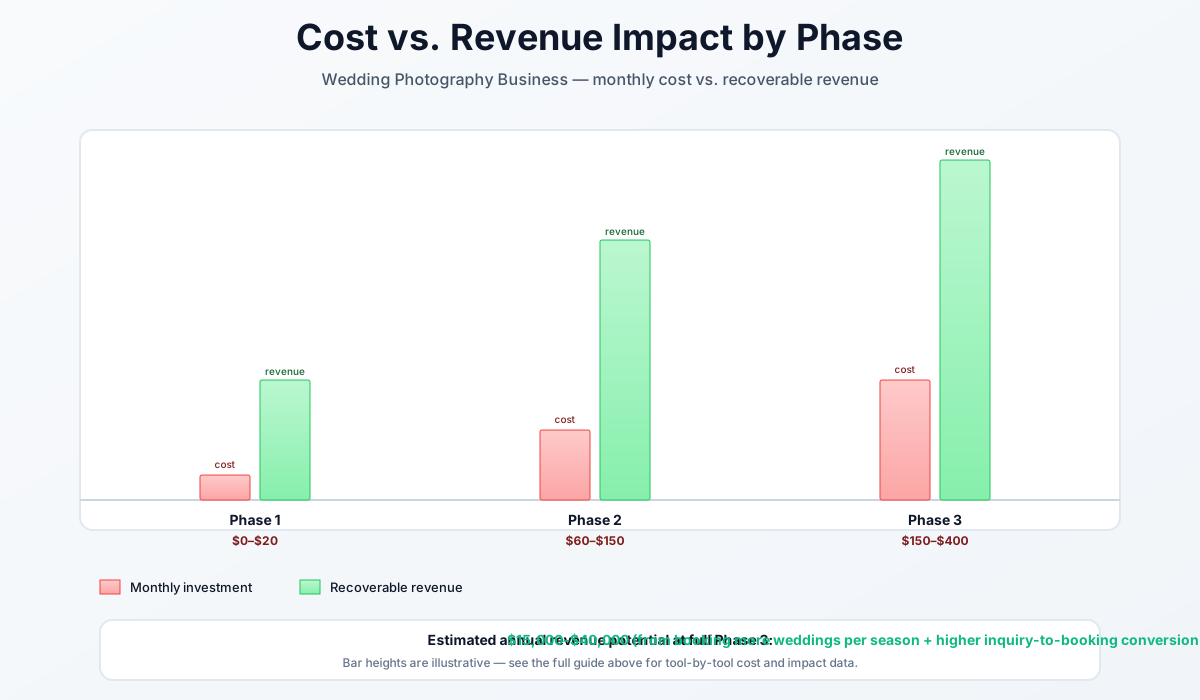
Here's a breakdown of the costs and expected returns:
Frequently Asked Questions
Will AI culling accidentally throw out the one perfect shot of the couple's first kiss?
This is the right thing to worry about, and it's why the first rule is: never auto-delete. Tools like Aftershoot include key-face detection specifically to protect frames of the couple and VIP guests from being dropped, and nothing is deleted automatically — you always get a final human review pass over the AI's suggestions. For your first few weddings, soft-flag rejected frames rather than deleting them, and spot-check the ceremony and key-moment sequences by hand. The AI is compressing a 4,000-frame slog into a fast review, not making the final call for you.
If I train an AI editing profile on my past galleries, will my photos start looking like everyone else's?
The opposite is the design goal. Imagen AI and Aftershoot Edits train on your own previously edited galleries, not a generic marketplace preset — the entire point is to replicate your specific color grade and style across a wedding, not impose a house look. The risk isn't that you'll look like everyone else; it's that if your past galleries are stylistically inconsistent, the profile learns inconsistency. Feed it your most consistent work, and budget a short human polish pass on every gallery so subtle style drift gets caught before delivery.
Should I tell couples I use AI in my post-production, and will it hurt my bookings?
No, and you don't need to volunteer it any more than you'd announce which Lightroom preset you built your look on. Every tool in this guide touches your operations — culling, editing assistance, scheduling — not your creative eye or your presence on the wedding day, which is what couples are actually paying for. Faster delivery and sub-hour replies make you look more professional, not less personal. If a couple asks directly, "AI speeds up my sorting and editing so I can spend more time shooting and less time at a desk" is both the honest answer and the reassuring one.
How do I model whether Imagen's per-photo pricing or a flat plan is cheaper for my volume?
Count your typical deliverable-plus-edited image volume per season. At $0.05/photo pay-as-you-go, a studio editing, say, 600 images per wedding across 30 weddings processes ~18,000 images — around $900/year, so pay-as-you-go still wins. But associate studios running second shooters and editing 100,000+ frames a season blow past the ~$129/month ($1,548/year) unlimited plan quickly and can hit $8,000–$10,000 on per-photo pricing. The break-even is roughly where your annual image count times $0.05 exceeds the flat plan — run that one multiplication before committing, and re-run it each season as your volume grows.
What's the fastest AI win if I only have an hour this week and one wedding to deliver?
AI culling, without question. It attacks the single biggest time sink, requires only a free trial and a Lightroom plugin install, and delivers a visible result on the exact catalog already sitting on your drive. Run Aftershoot's free trial on that wedding's raws, let it flag duplicates, blinks, and misfires, and do your final pass over its selects instead of all 3,800 frames. You'll feel the 3–5 hours saved on the first wedding — no subscription decision required until you trust it.
Does AI-drafted blog content actually rank, or does Google penalize it?
AI-drafted venue guides rank fine if you do the one thing most people skip: add real, specific detail from a wedding you actually shot there. Google's guidance targets low-effort, mass-produced content with no original value — not content where a real photographer uses AI to draft a post they then edit with genuine firsthand knowledge of the venue's best golden-hour spots and logistics. The generic AI draft published verbatim won't rank or convert. The same draft, edited to include "the stone staircase on the east terrace catches the 6pm light perfectly," becomes a post only you could have written. That's the difference between content that ranks and content that gets ignored.
More AI Implementation Guides
Best AI Tools for Event Planning Companies: 2026 Playbook
Boutique planners lose leads to slow replies and burn out on 3-hour proposals. Here's the 2026 AI playbook for event planning companies that actually scales.
AI Tools for Photography Studios: 2026 Workflow Playbook
Best AI tools for photography studios in 2026. Cut editing time by 70%, automate bookings and inquiries, grow print sales, and reclaim 15-25 hours weekly.
AI Tools for Bicycle Shops: The 2026 Owner's Playbook
The best AI tools for bicycle shops in 2026 — cut 'is my bike ready?' calls, automate tune-up reminders, and fix inventory risk without replacing your POS.
AI Tools for Sporting Goods Stores: 2026 Guide
The best AI tools for sporting goods stores in 2026: beat Amazon and Dick's with smarter forecasting, faster team orders, and fit tech that wins.
AI Tools for Window & Door Installers: 2026 Guide
The best AI tools for window and door installation companies in 2026. A phased plan to win the speed-to-lead race, cut no-shows, and stop reorder losses.
AI Tools for Audiology Clinics: 2026 Compliance Guide
A compliance-first guide to AI tools for audiology clinics: cut no-shows, automate billing and recall, and protect your margins without a HIPAA headache.
Keep exploring
Browse the full library by industry or category, see every product we cover in the AI tools directory, or read the head-to-head comparisons.